

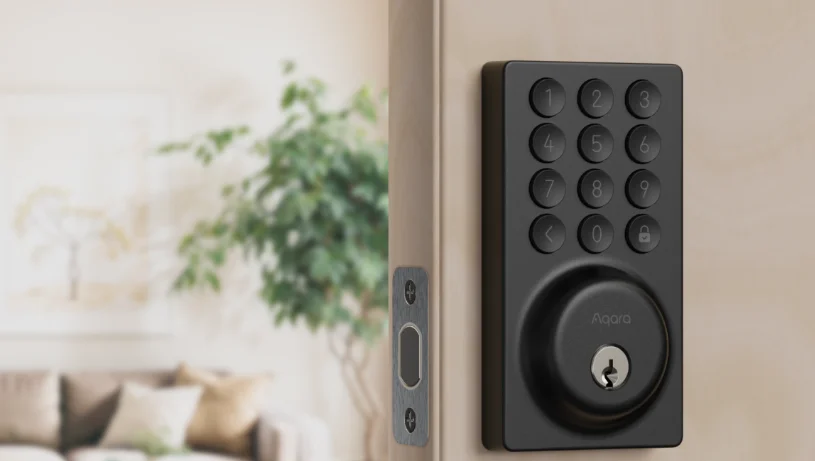

Aqara Smart Lock B50
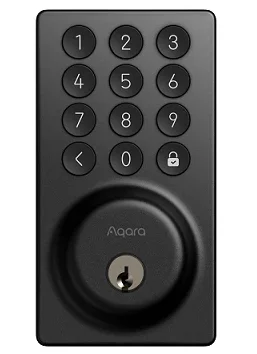
Product Introduction
The Aqara Smart Lock B50, Wi-Fi Smart Lock, provides a practical and convenient unlocking experience for users. This device only supports 2.4G Wi-Fi networks.
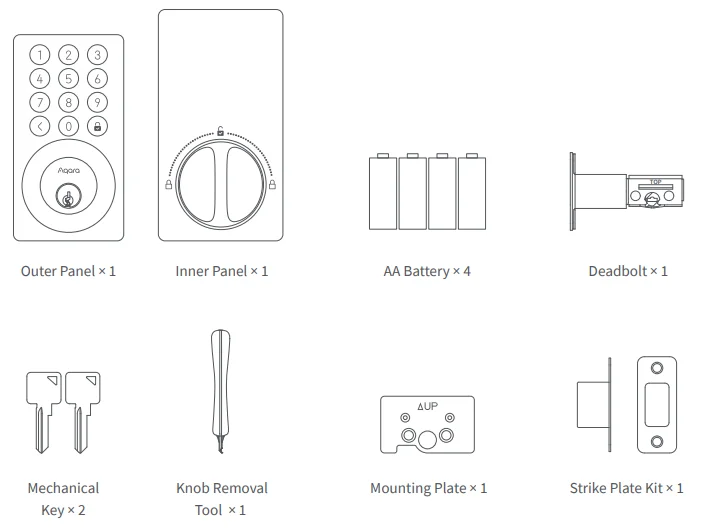
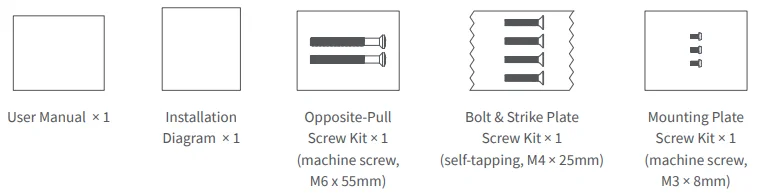
What’s in the Box
Instructions before Installation
Before using this product, you need to download the Aqara Home app and register for an account.
For FAQs, visit: https://www.aqara.com/en/product/smart-lock-B50-faq.
A PH1 standard Phillips head screwdriver is required for installation.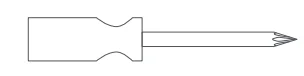
Tools necessary only for new doors or adjusting existing door holes: Drill, Hole Saws, Wood Mortise Chisel, Pencil, Tape Measure, Level.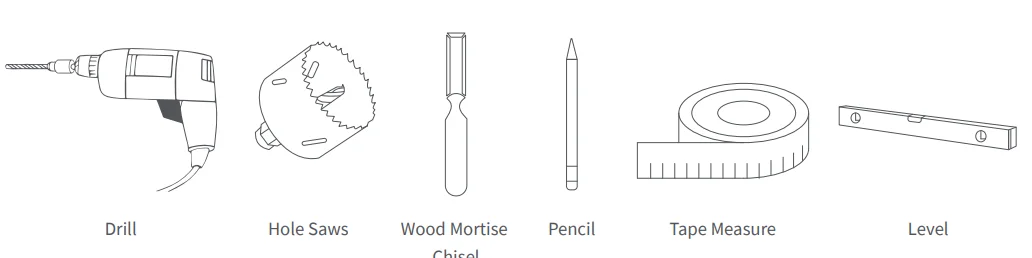
Device Installation & App Connection
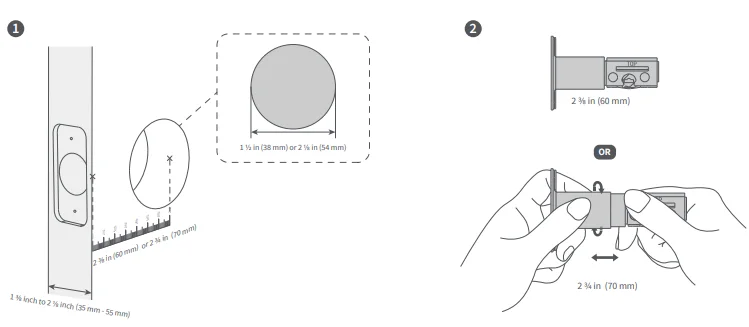
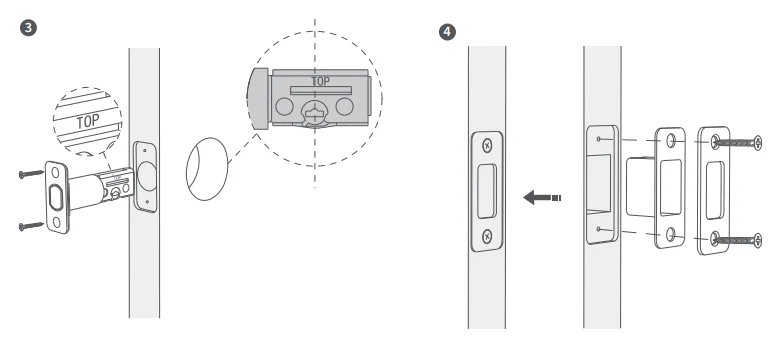
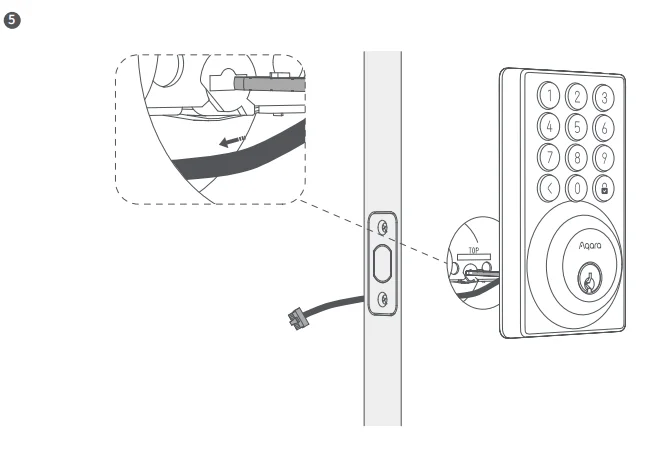
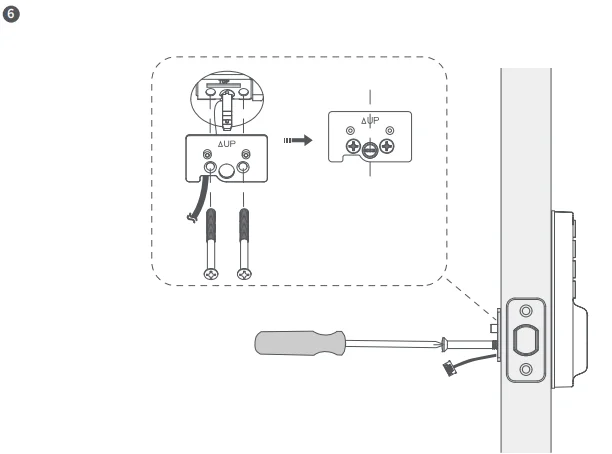
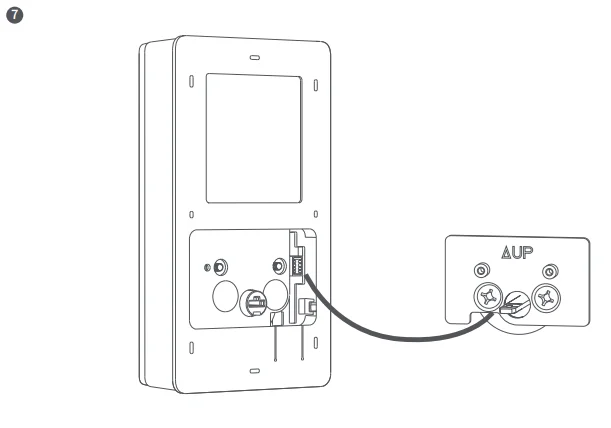
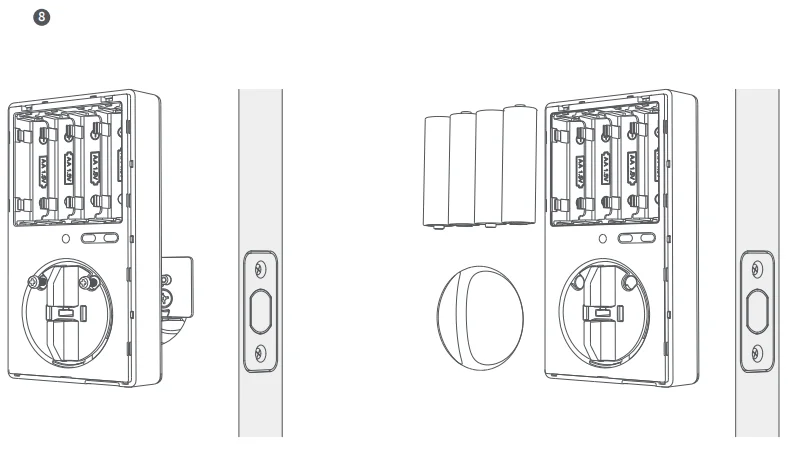
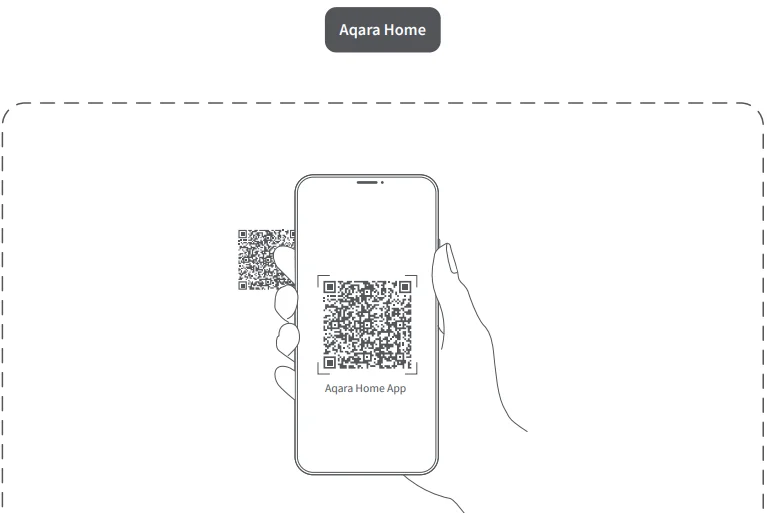
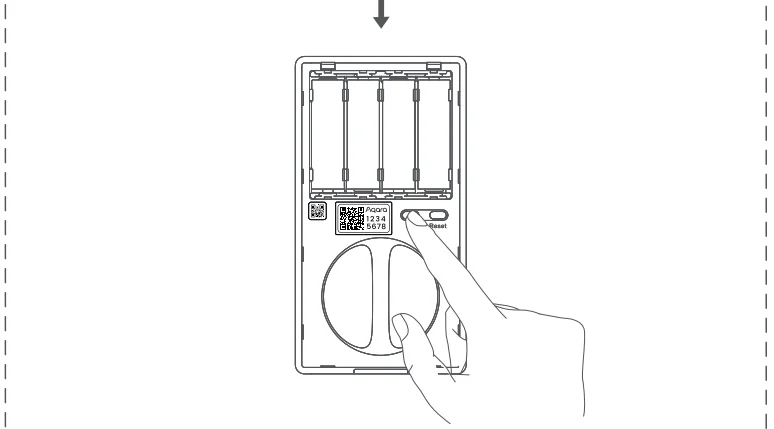

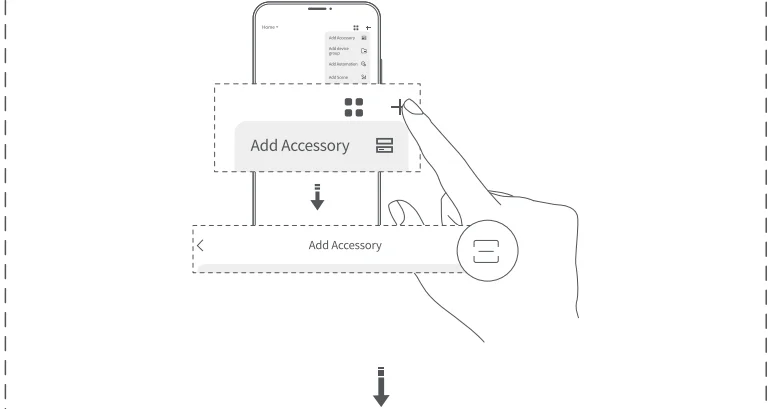
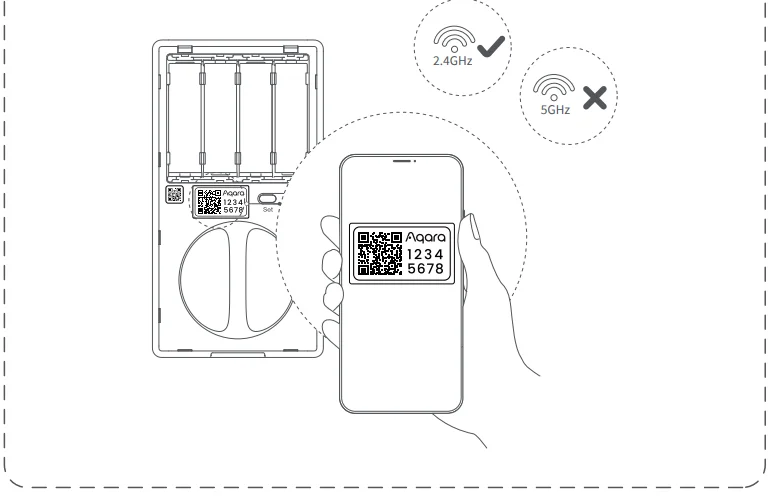
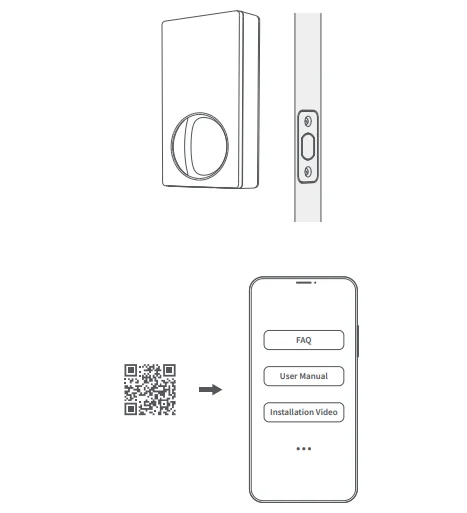
Door Lock Local Settings
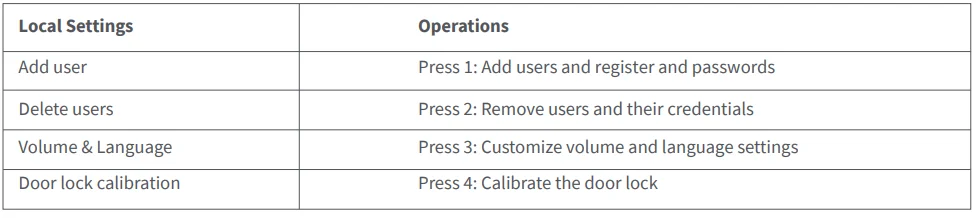
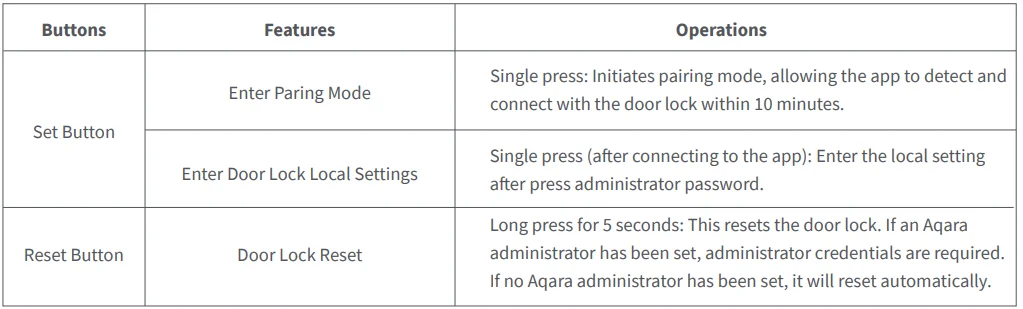
When the door lock is connected to the phone, you can set the password and configure it via the phone. When not connected, local settings are available. Press Set, enter the admin password, and follow the voice prompts to select functions.
The Local Settings Contain:
Resetting the Lock
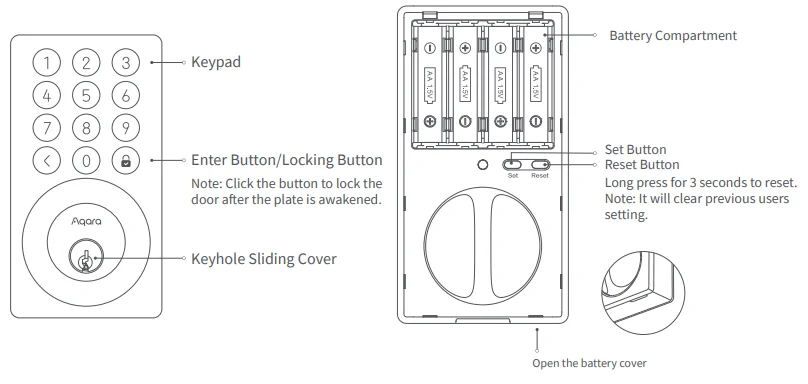
You can reset the lock using either of these methods: Press and hold the Reset button for 3 seconds to enter reset mode. Verify the admin password on the keypad. If correct, the lock will reset to factory settings and erase all data.
Auto-Lock
Users can turn on and off the auto-lock feature on the mobile and set the auto-lock time.
Door Lock Buttons Introduction
FCC ID: 2AKIT-DLD12
Federal Communications Commission (FCC) compliance statement:
- This device complies with part 15 of the FCC Rules. Operation is subject to the following two conditions:
- This device may not cause harmful interference, and
- This device must accept any interference received, including interference that may cause undesired operation.
- Changes or modifications not expressly approved by the party responsible for compliance could void the user’s authority to operate the equipment.
Note: This equipment has been tested and found to comply with the limits for a Class B digital device, pursuant to part 15 of the FCC Rules. These limits are designed to provide reasonable protection against harmful interference in a residential installation. This equipment generates, uses, and can radiate radio frequency energy and, if not installed and used in accordance with the instructions, may cause harmful interference to radio communications.
However, there is no guarantee that interference will not occur in a particular installation. If this equipment does cause harmful interference to radio or television reception, which can be determined by turning the equipment off and on, the user is encouraged to try to correct the interference by one or more of the following measures:
- Reorient or relocate the receiving antenna.
- Increase the separation between the equipment and receiver.
- Connect the equipment into an outlet on a circuit different from that to which the receiver is connected.
- Consult the dealer or an experienced radio/TV technician for help.
RF Exposure statement:
This equipment complies with FCC radiation exposure limits set forth for an uncontrolled environment. This equipment should be installed and operated with a minimum distance of 20 cm between the radiator and your body. This transmitter must not be co-located or operating in conjunction with any other antenna or transmitter.
IC: 22635-DLD12
IC NOTICE TO CANADIAN USERS
This device contains licence-exempt transmitter(s)/receiver(s) that comply with Innovation, Science and Economic Development Canada’s licence-exempt RSS(s). Operation is subject to the following two conditions:
- This device may not cause interference.
- This device must accept any interference, including interference that may cause undesired operation of the device.
This Class B digital apparatus complies with Canadian ICES-003. This device complies with RSS-247 of Industry Canada. Operation is subject to the condition that this device does not cause harmful interference. This equipment complies with IC radiation exposure limits set forth for an uncontrolled environment. This equipment should be installed and operated with a minimum distance of 20 cm between the radiator and your body. This transmitter must not be co-located or operating in conjunction with any other antenna or transmitter.
CAUTION
- Risk of explosion if the battery is replaced with an incorrect type.
- Dispose of used batteries according to the instructions.
- Do not ingest the battery. Chemical Burn Hazard.
- This product contains a battery. If the battery is swallowed, it can cause severe internal burns in just 2 hours and can lead to death.
- Keep new and used batteries away from children.
- If the battery compartment does not close securely, stop using the product and keep it away from children.
- If you think batteries might have been swallowed or placed inside any part of the body, seek immediate medical attention.
Product Specification
- Model: DL-D12E
- Wireless Protocols: Bluetooth 5.3, Wi-Fi IEEE 802.11b/g/n/ax 2.4GHz
- Powering Modes: 4 AA Batteries (6V); USB-C Emergency Port (5V)
- Dimensions:
- Inner Panel: 5.5 × 2.9 × 1.8 in. (139 × 75 × 47 mm);
- Outer Panel: 4.9 × 2.7 × 1.3 in. (125 × 68 × 32 mm)
- Operating Temperature:
- Inner Panel: -18°C ~ 55°C (-0.4°F ~ 131°F);
- Outer Panel: -35°C ~ 66°C (-31°F ~ 150.8°F)
- Operating Humidity: 0 ~ 93% RH, no condensation
- What is in the Box: Smart Lock B50 × 1, User Manual × 1, Installation Diagram × 1, Key × 2, AA Battery × 4, Knob Removal Tool × 1, Opposite-Pull Screw Kit × 1, Bolt & Strike Plate Screw Kit × 1, Mounting Plate Screw Kit × 1
- Online Customer Service: www.aqara.com/en/support.html
- Manufacturer: Lumi United Technology Co., Ltd.
- Address: Room 801-804, Building 1, Chongwen Park, Nanshan iPark, No. 3370, Liuxian Avenue, Fuguang Community, Taoyuan Residential District, Nanshan District, Shenzhen, China
- Email: [email protected]
For More Manuals By Aqara, Visit ManualsLibraryy.
Aqara Smart Lock B50-FAQs
What is the Aqara Smart Lock B50, and who is it for?
The Aqara Smart Lock B50 is a budget-friendly Wi-Fi smart deadbolt designed for homeowners seeking simple, keyless entry. It allows remote control, app access, and multiple unlocking methods, making it ideal for apartments, houses, and rental properties needing convenient and secure access management.
Does the Aqara Smart Lock B50 require a hub to work?
No, the B50 works without a hub thanks to built-in Wi-Fi connectivity. You can control it remotely using the Aqara Home app, Alexa, or Google Home. However, adding an Aqara hub enables Matter support and deeper smart home integrations.
What unlocking methods does the Aqara Smart Lock B50 support?
The lock offers multiple unlocking options, including PIN codes, mobile app control, voice commands, physical keys, and offline passwords. This flexibility ensures access even without internet connectivity, making it suitable for different user preferences and emergencies.
How long does the Aqara Smart Lock B50 battery last?
The B50 runs on four AA batteries that typically last up to six months under normal usage. If the battery runs out, a USB-C emergency power port allows temporary charging, ensuring you can still unlock the door when needed.
Is the Aqara Smart Lock B50 secure for everyday use?
Yes, it includes security features like anti-peep password protection, failed attempt lockout, and AES-128 encryption. These features help prevent unauthorized access and protect user data, making it a reliable option for everyday home security.
Can the Aqara Smart Lock B50 be controlled remotely?
Yes, you can lock or unlock the door, check status, and manage access remotely using the Aqara Home app. Since it has built-in Wi-Fi, no additional bridge is required for remote functionality, making it convenient for monitoring your home from anywhere.
Does the Aqara Smart Lock B50 support smart home integration?
The lock works with Amazon Alexa and Google Home directly. With a compatible Aqara hub, it can also support Matter, allowing integration with platforms like Apple Home, SmartThings, and Home Assistant for broader smart home automation.
Is the Aqara Smart Lock B50 easy to install?
Yes, it is designed for simple DIY installation and fits standard deadbolt doors. Most users can install it using just a screwdriver without drilling, making it accessible for homeowners and renters who want a quick smart lock upgrade.
What additional smart features does the Aqara Smart Lock B50 offer?
The B50 includes features like auto-lock, night latch mode, do-not-disturb mode, and activity logs. These functions improve convenience and security by automating locking behavior and giving users better control over how and when the lock operates.
Is the Aqara Smart Lock B50 suitable for outdoor use?
Yes, the lock is designed to handle outdoor conditions with an IPX3 rating and a wide operating temperature range. It can withstand splashes and varying weather conditions, making it reliable for front doors and external entry points.