
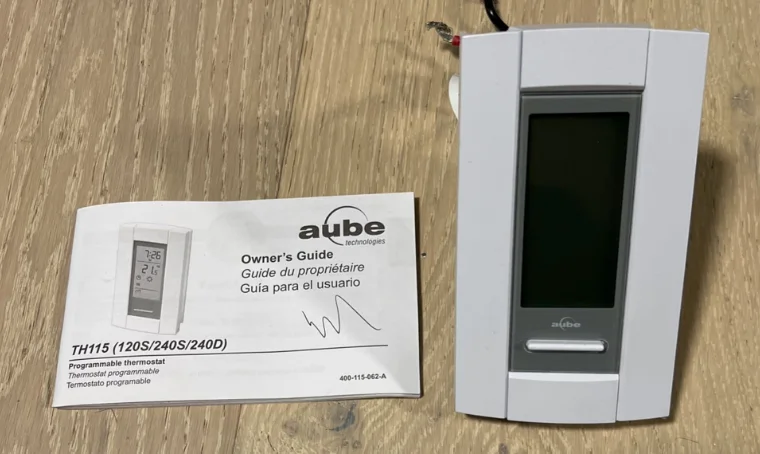

Aube Technologies TH115-AF-GA Programmable Thermostat
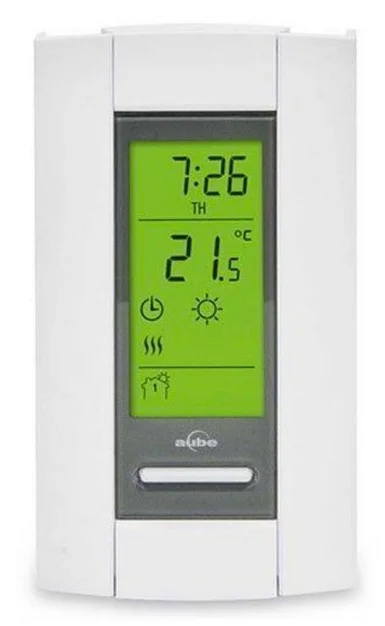
Description
Aube’s TH115 programmable thermostat has three temperature control modes:
- A mode:
- controls the ambient air temperature
- F mode:
- controls the floor temperature using an external temperature sensor
- AF mode:
- controls the ambient air temperature
- maintains the floor temperature within desired limits using an external temperature sensor

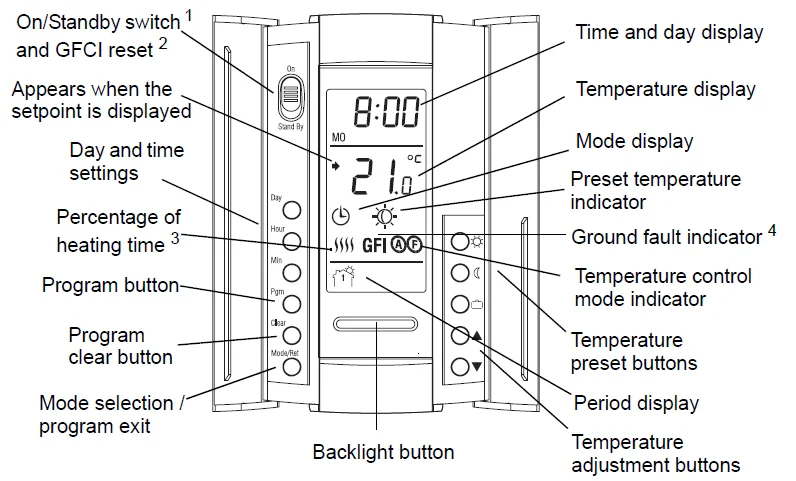
- Place the switch in Standby to cut power to the heater when not in use (e.g., in the summer). This will not affect the time and temperature settings.
- If your thermostat is installed on a power base equipped with a ground fault protection, to reset the ground fault protection, switch the thermostat to Standby and back to On.
- The thermostat displays the percentage of heating time required to maintain the desired temperature. For example,
 is displayed when heating is activated 40 percent of the time.
- GFI appears when the ground fault protection has tripped.
 is displayed when heating is activated 40 percent of the time.
Configuration
Some thermostat configurations can be modified via switches on the back of the faceplate (control module). Default (factory) settings are inside the gray cells.
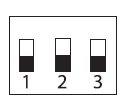

- Early Start can be used in Automatic mode only. When this function is enabled, the thermostat calculates the optimal time to start heating in order to obtain the desired temperature by the set time. The thermostat re-assesses the start time daily based on the previous day’s results.
NOTE: If you wish to use only 2 periods, set periods “1 and 4” or periods “2 and 3”. Early Start will not work if you set periods “1 and 2” or periods “3 and 4” - To select the F mode, place the switch in the F position. To select the AF mode, place the switch in the AF position and ensure that the remote temperature sensoris connected to the thermostat. To select the A mode, place the switch in the AF position and ensure that the remote temperature sensor is NOT connected to the thermostat.
Installation
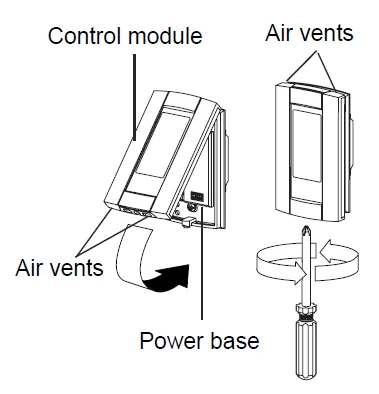
- Refer to the installation instructions of the power base.
- Insert the tabs at the top of the control module in the slots at the top of the power base.
- Secure the control module using the captive screw underneath the base.
NOTE: Keep the thermostat’s air vents clean and unobstructed at all times.
Clock and Day Setting
- Press the Hour button to set the hour.
- Set the Min button to set the minutes.
- Set the Day button to set the day.
- Press Mode/Ret to exit.
Daylight Saving Time
The thermostat can automatically re-adjust its clock at the Daylight Saving Time changeover. When this function is enabled (On), the thermostat switches to Daylight Saving Time on the second Sunday of
March and to normal time on the first Sunday of November.
NOTE: The function is disabled (default setting) when the clock loses its setting.
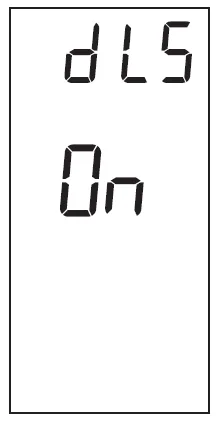
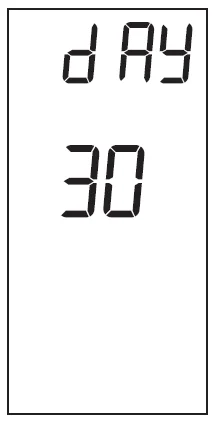
- Press the Day button (3 seconds) until DLS appears on the screen.
- Press the to
 toggle between On (enabled) and Off (disabled).
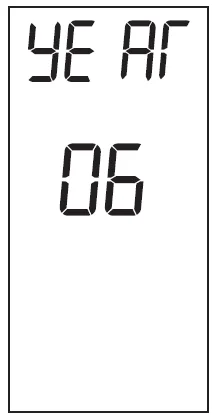
- Press the Day button briefly. The year setting is displayed.
- Press theto set the current year.

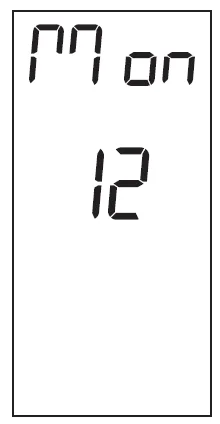
- Press the Day button briefly. The month setting is displayed.
- Press theto set the current month.

- Press the Day button briefly. The date setting is displayed.
- Press theto set the current date.
- Press Mode/Ret to exit.
Backlight
The display illuminates for 12 seconds when the backlight button is pressed. When either of the buttons is pressed, the display also illuminates for 12 seconds. The setpoint temperature appears for 5 seconds,
then the actual (measured) temperature is displayed.
Temperature Adjustment
Setpoint Temperature
The thermostat normally displays the actual (measured) temperature. To view the setpoint, press one of thebuttons once. The setpoint will appear for the next 5 seconds. To change the setpoint, press one of thebuttons until the desired temperature is displayed. To scroll faster, press and hold the button.
Preset Temperatures
The thermostat has 3 preset temperatures:
- Comfort temperature

- Economy temperature

- Vacation temperature


To use a preset temperature, briefly press the corresponding button. The corresponding icon will be displayed. The following table shows the intended use and the default setting of each of the preset temperatures.
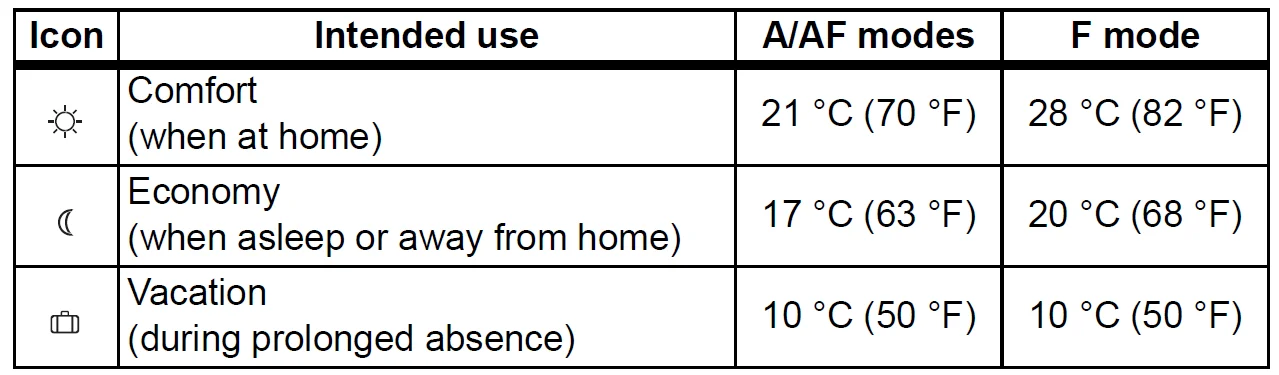
To store a preset temperature:
- Set the desired temperature using the buttons.
- Press and hold the corresponding button until the correspondingicon is displayed.
Floor Temperature Limits (AF mode only)
NOTE: To avoid damaging your floor, follow your floor supplier’s recommendations regarding floor temperature limits.
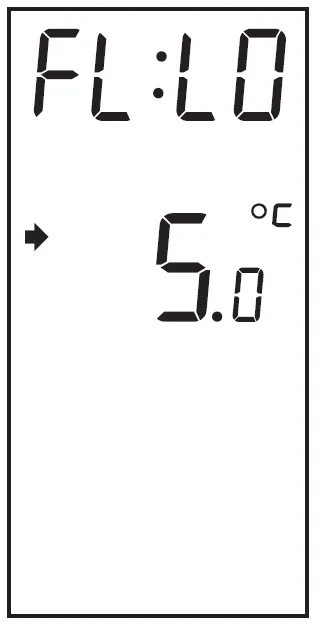
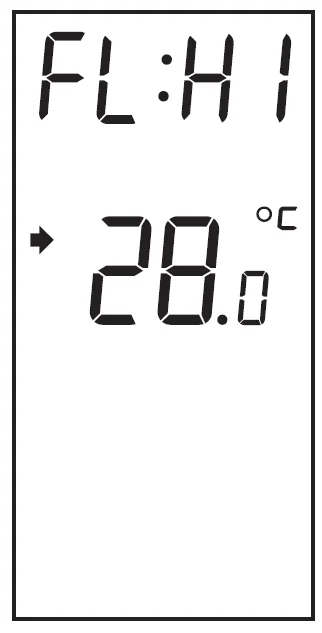
The minimum and maximum floor temperature limits are 5 °C (41 °F) and 28 °C (82 °F) by default. To modify these limits, proceed as follows:
- Switch the thermostat to Standby.
- Press and hold thebutton.
- Switch the thermostat back to On.

- Release thebutton when the minimum temperature limit (FL:LO) appears.
- Set the minimum temperature limit using thebuttons.

- Press thebutton to display the maximum temperature limit (FL:HI).
- Set the maximum temperature limit usingthe buttons.
- Press Mode/Ret to exit.
Modes of Operation
The thermostat has 3 modes of operation.
 Automatic Mode
The thermostat follows the programmed schedule. To place the thermostat in this mode, press Mode/Ret until is displayed. The data of the current schedule period are also displayed.
Temporary Bypass
If you modify the setpoint temperature when the thermostat is in automatic mode, the new temperature will be used until the beginning of the next period.flashes during the bypass. You can cancel the bypass by pressing Mode/Ret.
Programmed Schedule
The schedule consists of 4 periods per day, which represents a typical weekday. You can program the thermostat to skip the periods that do not apply to your situation. For example, you can skip periods 2 and 3 for the weekend.
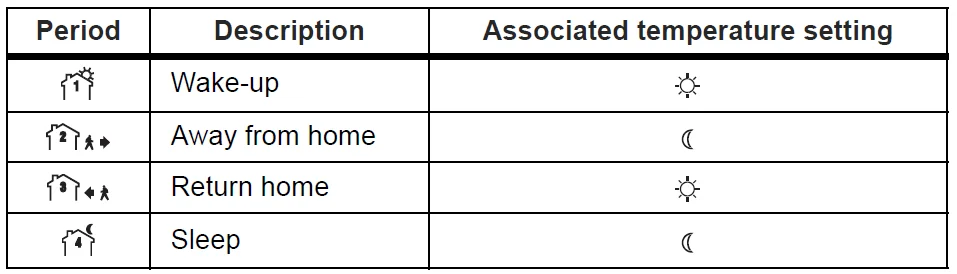
The Comfort ( ) temperature is used in periods 1 and 3 and the Economy (
 ) temperature is used in periods 2 and 4. For example, when the period changes from 1 to 2, the setpoint automatically changes from Comfort () temperature to Economy () temperature. You can have a different program for each day of the week; i.e., each period can start at different time for each day of the week. The thermostat has been programmed with the following schedule.
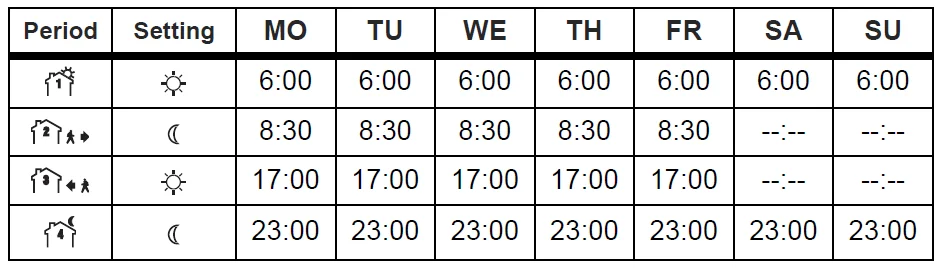
To modify the schedule:
- Press Pgm to access the programming mode. Period 1 is selected.
- Press Day to select the day to program (hold for 3 seconds to select the entire week).
- Press Hour and Min to set the start time of the selected period, or press Clear if you want to skip the period (–:– is displayed).
NOTE: If you wish to use only 2 periods, set periods “1 and 4” or periods “2 and 3”. Early Start will not work if you set periods “1 and 2” or periods “3 and 4” . - Press Pgm to select another period, or press Day to select another day. Then repeat step 3.
- Press Mode/Ret to exit the programming mode.
NOTE: If no button is pressed for 60 seconds, the thermostat will automatically exit the programming mode.
 Manual Mode
 Manual Mode
The programmed schedule is not used. The temperature must be set manually. To place the thermostat in this mode:
- Press Mode/Ret untilis displayed.
- Set the temperature using the,orbutton.
 Vacation Mode
In this mode, the thermostat is set to Vacation temperature. There are two ways to place the thermostat in Vacation mode:
- By pressing thebutton on the thermostat. When the Vacation mode is activated using thebutton, theicon appears on the screen without flashing.
- From an Aube telephone controller (CT240/CT241) or any other remote control device equipped with a dry contact if your power base is equipped with the ECONO input. When the contact closes, the Vacation mode is activated andthe icon flashes on the screen. All buttons on the thermostat are locked. When the contact opens, the thermostat returns to the preceding mode.
NOTE: When the Vacation mode is activated using a remote control device, it can only be deactivated using the device.
Error Messages
 The measured temperature is below the thermostat’s display range. Heating is activated.
 The measured temperature is above the thermostat’s display range. Heating is deactivated.
 Verify the thermostat and sensor connections.
 The measured temperature is below the thermostat’s display range. Heating is activated.
 The measured temperature is above the thermostat’s display range. Heating is deactivated.
 Verify the thermostat and sensor connections.
Technical Specifications
- Power supply: Refer to the power base’s installation guide.
- Display range: 0 °C to 70 °C (32 °F to 158 °F)
- Ambient setpoint range (A/AF modes): 5 °C to 30 °C (40 °F – 86 °F)
- Floor setpoint range (F mode): 5 °C to 40 °C (40 °F – 104 °F)
- Floor limit range (AF mode): 5 °C to 40 °C (40 °F – 104 °F)
- Display resolution: 0.5 °C (1 °F)
- Operating temperature: 0 °C to 50 °C (32 °F to 120 °F)
- Storage temperature: -20 °C to 50 °C (-4 °F to 120 °F)
- Heating cycle length: Refer to the power base’s installation guide
- Data backup: In the event of a power failure, most settings are saved. Only the time must be re-adjusted if the power failure lasts more than 6 hours. The thermostat will return to the mode that was active prior to the power failure.
Warranty
Aube warrants this product, excluding battery, to be free from defects in the workmanship or materials, under normal use and service, for a period of three (3) years from the date of purchase by the consumer. If at any time during the warranty period the product is determined to be defective or malfunctions, Aube shall repair or replace it (at Aube’s option). If the product is defective,
- return it, with a bill of sale or other dated proof of purchase, to the place from which you purchased it, or
- contact Aube. Aube will make the determination whether the product should be returned, or whether a replacement product can be sent to you.
This warranty does not cover removal or reinstallation costs. This warranty shall not apply if it is shown by Aube that the defect or malfunction was caused by damage which occurred while the product was in the possession of a consumer. Aube’s sole responsibility shall be to repair or replace the product within the terms stated above. AUBE SHALL NOT BE LIABLE FOR ANY LOSS OR DAMAGE OF ANY KIND, INCLUDING ANY INCIDENTAL OR CONSEQUENTIAL DAMAGES RESULTING, DIRECTLY OR INDIRECTLY, FROM ANY BREACH OF ANY WARRANTY, EXPRESS OR IMPLIED, OR ANY OTHER FAILURE OF THIS PRODUCT. Some provinces, states or regions do not allow the exclusion or limitation of incidental or consequential damages, so this limitation may not apply to you. THIS WARRANTY IS THE ONLY EXPRESS WARRANTY AUBE MAKES ON THIS PRODUCT. THE DURATION OF ANY IMPLIED WARRANTIES, INCLUDING THE WARRANTIES OF MERCHANTABILITY AND FITNESS FOR A PARTICULAR PURPOSE, IS HEREBY LIMITED TO THE THREE-YEAR DURATION OF THIS WARRANTY. Some provinces, states or regions do not allow limitations on how long an implied warranty lasts, so the above limitation may not apply to you. This warranty gives you specific legal rights, and you may have other rights which vary from province, state or region to another.
Installation Instructions
Applications
This power base has been designed for floor heating applications. It has ground fault protection (GFCI1 or EGFPD2) and an input for connecting a floor sensor. If your thermostat has the Vacation Mode, the mode can be activated by connecting an Aube telephone controller (CT240 or CT241) or any other remote control device equipped with a normally open (NO) dry contact. For more information on this mode, see the thermostat’s user guide.
NOTE: This power base must be used with a thermostat operating on 15-minute cycles.
- Ground Fault Circuit Interrupter
- Equipment Ground Fault Protection Device
Supplied Parts
- One (1) power base
- Two (2) screws
- Four (4) solderless connectors for copper wires
NOTE: Special CO/ALR solderless connectors must be used for connecting aluminum conductors. - One (1) floor sensor
- One (1) flat-tip screwdriver
Installation Guidelines
- Install the thermostat onto an electrical box.
- Do NOT install the thermostat in an area where it can be exposed to water or rain.
Installation Procedure
Installation should be carried out by an electrician and must comply with local electrical codes.
- Turn off power to the heating system at the main power panel in order to avoid any risk of electrical shock.
- Connect the power base wires to the power supply and to the load using solderless connectors for copper wires.

- Insert the floor sensor cable through one of the two openings on the base and connect the sensor wires to terminals 1 and 2 (no polarity). Position the sensor cable such that it does not come in contact with the floor heating wires. The sensor probe must be centered between two floor heating wires for best temperature control.

- If you wish to connect a remote control device, insert the wires (use 18- to 22-gauge flexible wires) through one of the two openings on the base and connect them to terminals 2 and 3 (no polarity).
- Push the excess length of the high-voltage wires back inside the electrical box.
- Secure the power base to the electrical box using the provided screws.
- Verify the settings of the configuration switches (if any) on the back of the control module (see user guide).
- Install the control module on the base (see user guide).
- Apply power to the heating system. Verify the installation by making sure that the heating system can be turned on and turned off by increasing and decreasing the setpoint.
- Test the ground fault protection.
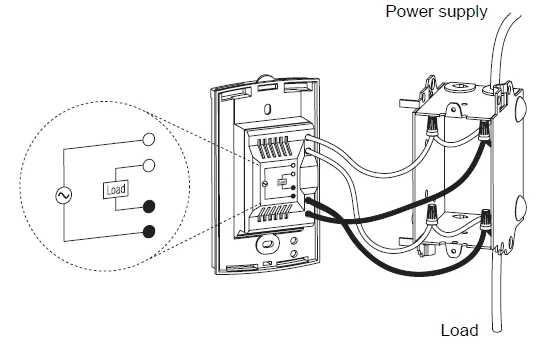
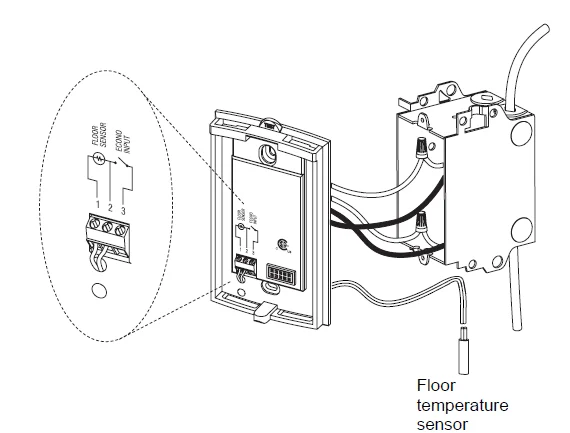
Ground Fault Protection
Description
The power base protects against risks of electrocution caused by leakage current. If the leakage current exceeds 5 mA or 15 mA (depending on the model), the ground fault protection will automatically trigger, cutting power to the floor heating system. To indicate the fault, the TEST light on the top of the base will illuminate (red).
Ground Fault Protection Reset
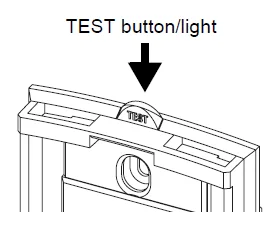
When the ground fault protection has triggered, reset it by switching the thermostat to Standby and back to On. The TEST light will go off.
Ground Fault Protection Test
To ensure the ground fault protection is always in working order, test it once the thermostat is installed and on a monthly basis thereafter.
- Increase the setpoint temperature above the measured floor temperature in order to activate the floor heating system.
- Press the TEST button.
- The test is successful if the TEST light is On (red). Reset the thermostat and place it back to the desired temperature.
- The test has failed if the TEST light remains off. Cut power to the heating system at the main electrical panel and replace the thermostat.
Technical Specifications
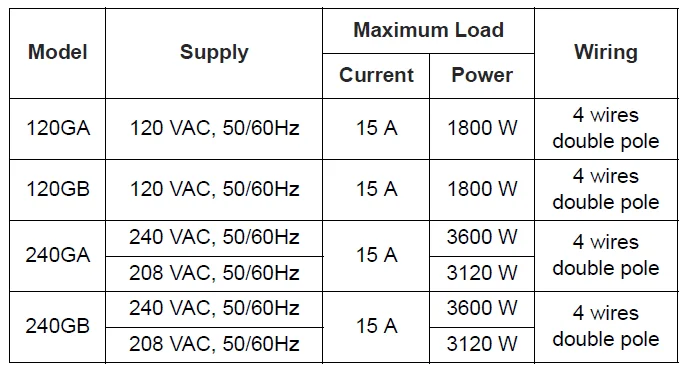
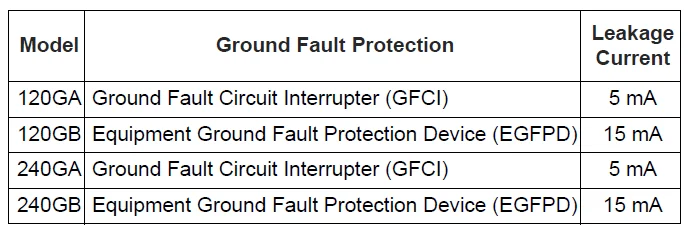
- Heating cycle length: 15 minutes
- Storage: -20 °C to 50 °C (-4 °F to 120 °F)
- Size (H • W • D): 124 x 70 x 23 mm (4.89 x 2.76 x 0.91 in.)
For more manuals by Aube Technologies, visit ManualsLibraryy
Aube Technologies TH115-AF-GA Programmable Thermostat-FAQs
How do I set or change the temperature?
Press the up or down arrow buttons to raise or lower the desired temperature. The new set temperature will appear on the screen. After a few seconds, the display returns to showing the current temperature. If you hear a clicking sound, it means the heating system has turned on to reach your selected setting.
How do I reset the Aube TH115-AF-GA thermostat?
To reset the thermostat, press the Mode button until “Standby” appears. Then press and hold the button for about 6 seconds. The screen will display “rSt” (reset) briefly before returning to normal operation. This restores factory settings and can fix minor glitches or programming issues.
Why does my Aube thermostat keep turning off or resetting?
Frequent resets may be caused by electrical interference or power fluctuations. In some systems, contactors or wiring issues can create voltage spikes. Check connections and ensure the unit is installed properly. If the issue continues, professional inspection is recommended.
What heating systems is this thermostat compatible with?
The TH115-AF-GA is designed for electric heating systems such as electric floor heating, baseboard heaters, radiant ceilings, convectors, and fan-forced heaters. It is not designed to control central air conditioning systems.
What is the ideal temperature setting for comfort and savings?
For most homes, a temperature between 18°C and 20°C (64–68°F) provides comfort and energy efficiency. Lowering or raising the temperature by even one degree can reduce energy usage by around 1–3% over extended periods.
Why is the thermostat not maintaining the set temperature?
If the room temperature differs from the set point, check for calibration issues, sensor placement, or airflow problems. Poor insulation or drafts can also affect readings. If needed, reset the thermostat or verify installation wiring to ensure accurate temperature control.
How do I turn off the thermostat?
Simply press the ON/OFF or Mode button until the display shows Standby. This disables heating while keeping the thermostat powered on. The time and temperature will still be displayed, but the heating system will not operate until you turn it back on.
Does the TH115-AF-GA require batteries?
No, this model is battery-free. It is powered directly by a 120V electrical connection. Since it does not rely on batteries, you won’t need to worry about battery replacement or sudden power loss affecting your programmed settings.