

Beldray BEL01843 Vacuum Cleaner
Description of parts
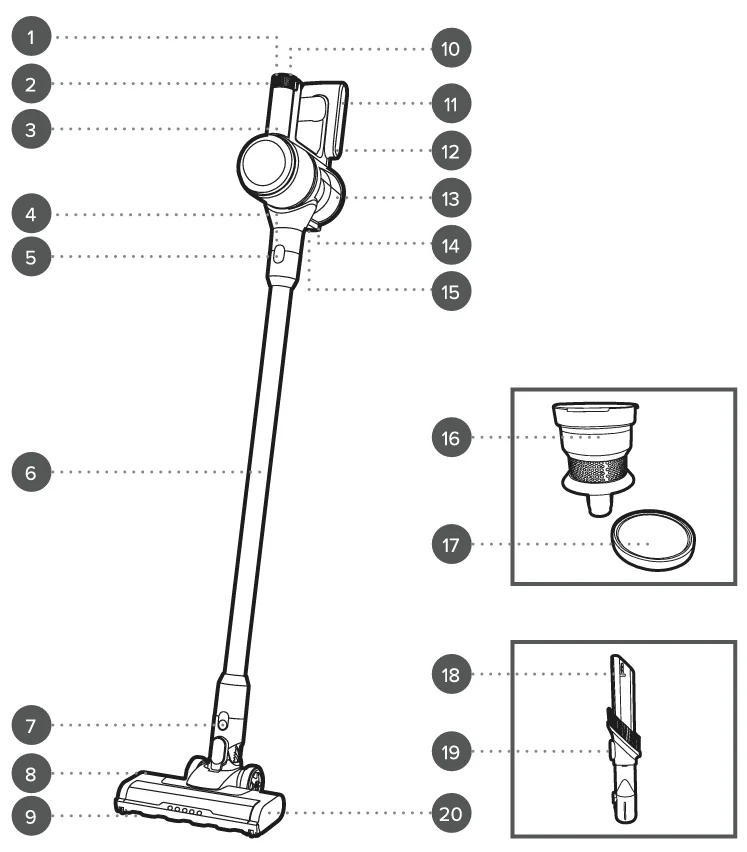
- LED indicator lights
- Power button
- Vacuum cleaner main unit
- Air inlet
- Extension tube release button
- Extension tube
- Floor brush release button
- Floor brush
- Brush bar
- Boost button
- Storage hook
- Charging port
- Dust container
- Dust container base release latch
- Dust container release button
- Filter cone
- Washable filter
- 2-in-1 crevice and brush tool
- Crevice tool button
- Brush bar release tab

SAFETY INSTRUCTIONS
- When using electrical appliances, basic safety precautions should always be followed.
- Check that the voltage indicated on the rating plate corresponds with that of the local network before connecting the appliance to the mains power supply.
- Children aged from 8 years and people with reduced physical, sensory, or mental capabilities or lack of experience and knowledge can use this appliance, only if they have been given supervision or instruction concerning the use of the appliance in a safe way and understand the hazards involved.
- Children should be supervised to ensure that they do not play with the appliance.
- Unless they are older than 8 and supervised, children should not perform cleaning or user maintenance.
- If the power supply cord, plug, or any part of the appliance is malfunctioning or if it has been dropped or damaged, cease using the product immediately to avoid potential injury.
- This appliance contains no user serviceable parts; only a qualified electrician should carry out repairs. Improper repairs may place the user at risk of harm.
- Do not remove the adaptor from the mains power supply by pulling the cord; switch off and remove the plug by hand.
- Do not use the adaptor to recharge non-rechargeable batteries or any other appliance.
- Do not use the appliance for anything other than its intended use.
- Take care when equipping accessories with rotating parts, as this could cause entrapment.
- Switch off the appliance, disconnect it from the mains power supply, and allow it to cool fully before changing or fitting accessories and before cleaning or user maintenance.
- Use of an extension cord with the appliance is not recommended.
- Only use the appliance with the power supply unit provided.
- This appliance should not be operated by means of an external timer or separate remote control system.
- This appliance is intended for domestic use only. It should not be used for commercial purposes.
Battery safety
- The supply terminals are not to be short-circuited.
- In the event of a battery pack leaking, do not allow the liquid to come in contact with the skin or eyes.
- If contact has been made, wash the affected area with copious amounts of water and seek medical advice.
- Secondary cells and batteries need to be charged before use.
- After extended storage, it may be necessary to charge and discharge the battery pack several times to restore maximum performance.
- Do not leave a battery pack on prolonged charge when not in use.
- Do not use any charger other than that specifically provided for use with the product.
- Do not use any cell or battery that is not designed for use with the product.
- Keep batteries out of the reach of children.
- Do not crush, puncture, dismantle, or otherwise damage batteries.
- Do not store above 60 °C. Avoid storage in direct sunlight.
- Do not expose batteries to heat or fire, as they may explode.
- Do not subject batteries to mechanical shock.
- Do not dispose of exhausted battery packs in household waste.
- To dispose of the exhausted battery pack, take it to a local recycling station.
- Contact the local government offices for further details.
- This appliance is fitted with a 22.2 V 2200 mAh Li-ion rechargeable battery (non-removable).
Care and maintenance
- Always unplug the vacuum cleaner from the mains power supply before attempting any cleaning or maintenance.
- Wipe the external surface of the vacuum cleaner with a soft, damp cloth and allow it to dry thoroughly.
- Do not use any harsh or abrasive detergents or cleaning agents to clean any part of the vacuum cleaner.
- Keep the filter clean and replace it when it becomes worn.
Dos and don’ts
- DO: Check that the filter is kept clear of obstruction. Make sure that the dust container and filter are cleaned regularly to preserve suction and prolong the life of the vacuum cleaner.
- DON’T: Use the vacuum cleaner without the filter or filter cone in position. Use the vacuum cleaner to pick up flammable liquids, matches, cigarette ends, hot ashes, or any hot, burning, or smoking objects. Use the vacuum cleaner to pick up water or any other liquid, as this poses a risk of electric shock.
Before first use
Before using the vacuum cleaner for the first time, clean the exterior surface with a soft, damp cloth and dry thoroughly. Do not immerse the vacuum cleaner in water or any other liquid.
Charging the vacuum cleaner
Before first use, the vacuum cleaner must be charged for approx 4-5 hours. Subsequent charging times will vary depending on use. If the vacuum cleaner battery becomes drained completely during use, it may take up to 4-5 hours to fully recharge.
- Check that the vacuum cleaner is switched off.
- Connect the mains power adaptor to the charging port on the handheld unit.
- Plug the mains power adaptor into the mains power supply; the LED indicator lights will flash during charging. Once the battery is fully charged, the LED indicator lights will remain illuminated.
WARNING: Do not use any mains power adaptor other than that supplied. Using an alternative will increase the risk of damage to the appliance or injury to the user.
If the LED indicator lights do not illuminate when the charger is first plugged in:
- Unplug the charger from the vacuum cleaner.
- Turn on the vacuum cleaner for approx 5 seconds.
- Turn off the vacuum cleaner.
- Reattach the charger to the vacuum cleaner; make sure it is fully inserted into the charging port. The LED lights should now illuminate to indicate that the vacuum cleaner is charging.
Using the vacuum cleaner
- Check that the vacuum cleaner is disconnected from the mains power adaptor after unplugging it from the mains power supply.
- Turn on the vacuum cleaner by pressing the power button. The vacuum cleaner will be on the minimum power setting; press the boost button to use the maximum power setting.
WARNING: Do not use the vacuum cleaner without the filter or filter cone in position.
Using the extension tube and floor brush
The extension tube can be fitted onto the air inlet to extend reach, ideal for floor-to-ceiling cleaning.
- Fit the extension tube onto the air inlet by aligning the pins and carefully pushing the extension tube towards the vacuum cleaner main unit until it clicks into position. To release the extension tube, press the extension tube release button and pull it away from the vacuum cleaner main unit.
- Attach the floor brush by aligning the pins on the floor brush with the bottom of the extension tube. Carefully push together to secure into place. To release the floor brush, press the floor brush release button and pull it away from the extension tube.
- Turn on the vacuum cleaner by pressing the power button.
NOTE: The floor brush can also be attached directly onto the handheld unit by aligning the pins on the floor brush with the air inlet on the handheld unit. Carefully push together to secure the floor brush in place.
Using the 2-in-1 crevice and brush tool
- If required, fit the extension tube onto the air inlet following the instructions in the section entitled ‘Using the extension tube and floor brush’.
- Push the 2-in-1 crevice and brush tool onto the end of the extension tube until it clicks into place. If no extension is required, push the 2-in-1 crevice and brush tool directly onto the air inlet until it clicks into place.
- Press the button on the accessory and slide the brush bar back to use as a crevice tool, ideal for removing dust and dirt from corners and recesses. Press the button on the accessory and slide the brush bar forward to use as a brush tool, perfect for cleaning upholstery and fabrics.
- To remove the 2-in-1 crevice and brush tool, press the release button on the vacuum cleaner main unit or extension tube and pull away.
Emptying the dust container
To maintain optimum performance, the dust container must be emptied regularly. If there is a reduction in suction power, empty the dust container. Before emptying the dust container, check that the vacuum cleaner is switched off and any attachments have been removed from the air inlet.
- Whilst securely holding the vacuum cleaner main unit, press the dust container base release latch. Empty the dust container slowly and carefully to reduce the amount of dust released back into the atmosphere.
- Close the dust container by pushing the base closed until the dust container base release latch locks back into position.
NOTE: It is recommended to empty the dust container outdoors. Always close the dust container base before using the vacuum cleaner.
Cleaning the filter and filter cone
The filter can only be accessed when the dust container is open.
- Empty the dust container following the instructions in the section entitled ‘Emptying the dust container.’
- Remove the filter and filter cone by rotating them in an anticlockwise direction and lifting them out of the vacuum cleaner main unit.
- Carefully lift the filter out of the filter cone. Shake the filter until the majority of the dust has been removed, then rinse under clean, warm water and allow to dry naturally.
- Once the filter is fully dry, place it back into the filter cone. Replace the filter cone by aligning the indents on the filter cone with those on the top of the vacuum cleaner main unit. Secure in place by rotating the filter cone in a clockwise direction.
- Close the dust container by pushing it firmly shut until it clicks into position.
NOTE: The filter and filter cone should be thoroughly cleaned at least once every two weeks. Do not clean the filter using detergents or use external heat sources such as radiators to dry it.
WARNING: Do not reassemble or use the vacuum cleaner until the filter is fully dry, as this could cause damage.
Cleaning the exhaust filter
The exhaust filter is located beneath the nameplate on the vacuum cleaner main unit.
- To remove the exhaust filter for cleaning, rotate the removable hub cap in an anticlockwise direction and pull it away from the vacuum cleaner main unit.
- Remove the exhaust filter from the top of the motor.
- Shake off the exhaust filter until the majority of the dust has been removed, then wash it under clean, warm water and allow it to dry thoroughly.
- Once the exhaust filter has dried fully, slot it back into the exhaust filter housing and replace the removable hub cap, locking it back into place by rotating it in a clockwise direction.
Cleaning the floor brush
The floor brush has a removable brush bar for easy cleaning.
- Switch off the vacuum cleaner and remove the floor brush by pressing the floor brush release button and pulling it away from the extension tube.
- Push the brush bar release tab to the unlocked position and remove the brush bar by pulling it away from the floor brush.
- Remove any built-up dust, debris, and hair from the brush bar and floor brush.
- Replace the brush bar in the floor brush by aligning it on both sides and pushing it into the floor brush until it clicks.
Installing the wall mount storage base
The wall-mount storage base can be fixed to a wall for convenient storage. If the vacuum cleaner is to be stored whilst it is charging, check that the wall mount storage base is close enough to the mains power supply to avoid overstretching the charging wire.
- Using a pencil, mark the positions of 2 screw holes on the desired surface. The markings should be horizontally aligned using a spirit level.
- Using a suitable drill bit, drill pilot holes into the markings. Consult a qualified professional if required.
- Firmly place the wall plugs into the pilot holes so that they sit flush with the surface of the wall.
- Position the wall mount storage base onto the surface, aligning the holes on the surface with those on the wall mount storage base.
- Insert the screws provided through the wall mount storage base and into the wall, and tighten so that the wall mount storage base sits flush with the surface. Check that the wall mount storage base has the hook facing upwards.
- Slide the vacuum cleaner into position on the wall mount storage base, making sure that it engages with the hook.
Storage
Check that the vacuum cleaner is cool, clean, and dry before storing it in a cool, dry place. Store the mains power adaptor separately, checking that it is not bent at the connections, as this could cause damage to the wires.
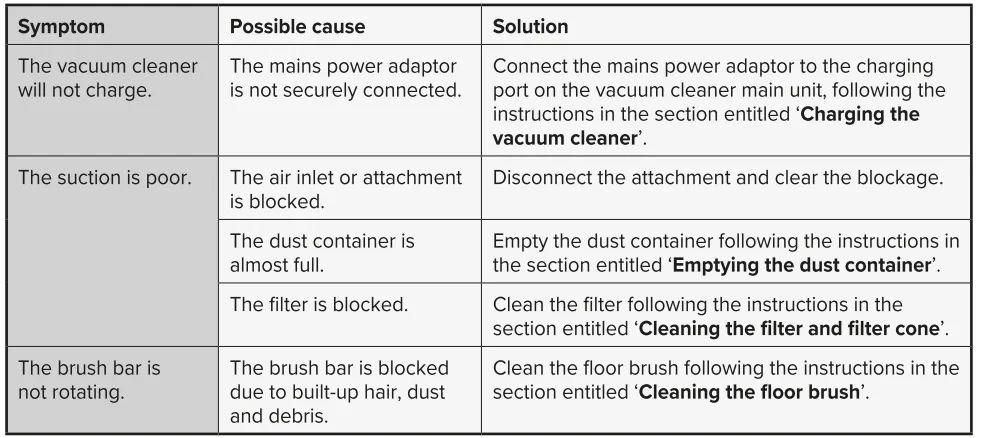
Troubleshooting
Specifications
- Product code: BEL01843
- Battery: 22.2 V 2200 mAh Li-ion
- Adaptor input: 100-240 V ~ 50/60 Hz, 0.4 A
- Adaptor output: 27.0 V === 0.5 A, 13.5 W
- Average active efficiency: 84.0%
- Efficiency at low load (10%): 77.0%
- No load power consumption: 0.09 W
- Dust tank capacity: 700 ml
For More Manuals By Beldray, Visit ManualsLibraryy.
Beldray BEL01843 Vacuum Cleaner-FAQs
What is the Beldray BEL01843 Vacuum Cleaner?
The Beldray BEL01843 is a cordless stick vacuum cleaner designed for everyday household cleaning. It features a lightweight 2-in-1 design that converts into a handheld vacuum, making it suitable for floors, stairs, upholstery, furniture, and hard-to-reach cleaning areas.
Is the Beldray BEL01843 a cordless vacuum cleaner?
Yes, the Beldray BEL01843 is a cordless vacuum powered by a rechargeable 22.2V lithium-ion battery. Its cordless design allows users to clean freely without power cables, making it convenient for moving between rooms and cleaning tighter spaces around the home.
How long does the Beldray BEL01843 battery last?
The vacuum offers up to approximately 35 minutes of runtime on a full charge, depending on suction mode and cleaning conditions. This operating time is generally suitable for small to medium homes, quick daily cleaning, and spot cleaning tasks.
Does the Beldray BEL01843 work as a handheld vacuum?
Yes, the BEL01843 converts into a handheld vacuum for cleaning furniture, stairs, car interiors, curtains, and smaller areas. Its 2-in-1 functionality makes it versatile for users who want both floor cleaning and portable handheld convenience in one appliance.
Is the Beldray BEL01843 good for pet hair?
The vacuum’s strong suction, motorized floor head, and HEPA filtration help collect dust, debris, and pet hair from hard floors and carpets. Many users find it useful for routine pet hair maintenance, although performance can vary on thick carpets.
Does the Beldray BEL01843 have a HEPA filter?
Yes, the Beldray BEL01843 includes a washable HEPA filter designed to capture fine dust particles and allergens. This filtration system can help improve air cleanliness, making the vacuum appealing for allergy sufferers and households needing better dust control.
What attachments come with the Beldray BEL01843 Vacuum Cleaner?
The vacuum typically includes accessories such as a crevice tool, brush attachment, and motorized LED floor head. These tools help users clean corners, upholstery, furniture, and difficult spaces more effectively while adapting to different cleaning surfaces around the home.
What are the common problems with the Beldray BEL01843?
Some users report reduced suction when filters require cleaning or when internal parts become blocked. Others mention battery limitations during heavy cleaning sessions, while occasional feedback notes that performance may decrease when vacuuming damp debris or thick carpeting.
Is the Beldray BEL01843 easy to clean and maintain?
Yes, most users find the vacuum easy to maintain because it features a bagless dust container and a washable filter system. Regular emptying and filter cleaning help maintain suction performance and support more reliable long-term operation.
Is the Beldray BEL01843 Vacuum Cleaner worth buying?
The Beldray BEL01843 is considered a practical, budget-friendly cordless vacuum for everyday home cleaning. Many buyers appreciate its lightweight design, handheld conversion, cordless flexibility, and useful accessories, especially for small homes, apartments, and quick daily cleaning routines.