
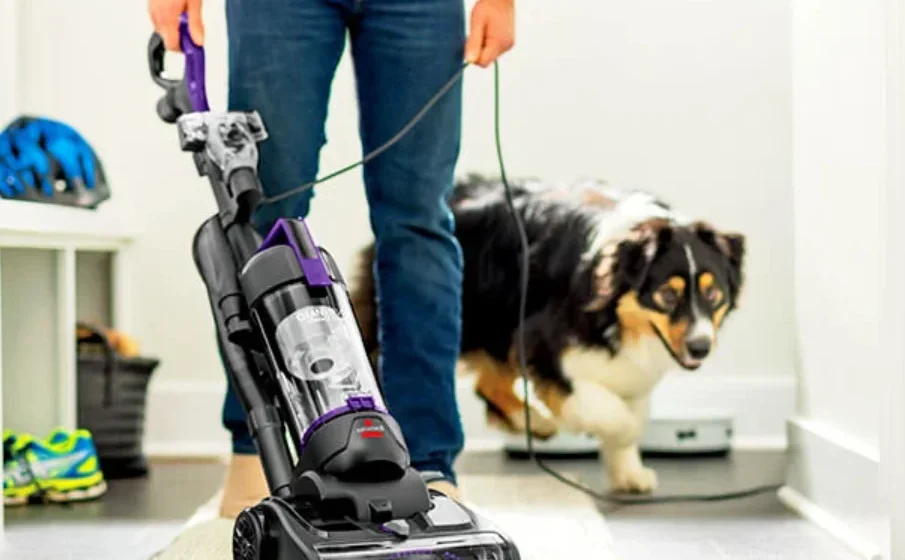

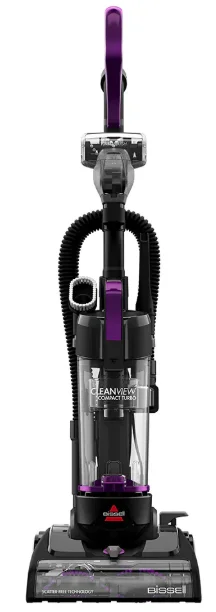
Bissell CleanView Compact Turbo Upright Vacuum
IMPORTANT SAFETY INSTRUCTIONS
TO REDUCE THE RISK OF FIRE, ELECTRIC SHOCK, OR INJURY:
- Do not leave the vacuum cleaner when it is plugged in. Unplug from the outlet when not in use and before servicing.
- Do not use outdoors or on wet surfaces.
- Do not allow it to be used as a toy. Close attention is necessary when used by or near children.
- Do not use for any purpose other than described in this user guide. Use only the manufacturer’s recommended attachments.
- Do not use with a damaged cord or plug. If the appliance is not working as it should, has been dropped, damaged, left outdoors, or dropped into water, have it repaired at an authorized service center.
- Do not unplug by pulling on the cord. To unplug, grasp the plug, not the cord.
- Do not handle the plug or the vacuum cleaner with wet hands.
- Do not put any object into openings. Do not use with any opening blocked; keep openings free of dust, lint, hair, and anything that may reduce air flow.
- Keep hair, loose clothing, fingers, and all parts of the body away from openings and moving parts.
- Turn OFF all controls before plugging or unplugging the vacuum cleaner.
- Use extra care when cleaning on stairs.
- Do not use to pick up flammable or combustible materials (lighter fluid, gasoline, kerosene, etc.) or use in areas where they may be present.
- Do not use a vacuum cleaner in an enclosed space filled with vapors given off by oil-based paint, paint thinner, some moth-proofing substances, flammable dust, or other explosive or toxic vapors.
- Do not use it to pick up toxic material (chlorine bleach, ammonia, drain cleaner, etc.).
- Do not pick up anything that is burning or smoking, such as cigarettes, matches, or hot ashes.
- Do not use without filters in place.
- Do not pick up hard or sharp objects such as glass, nails, screws, coins, etc.
- Use only on dry, indoor surfaces.
- Keep the appliance on a level surface.
- Do not carry the vacuum cleaner while it is running.
- Unplug before connecting or disconnecting the TurboBrush® Tool or TurboEraser® Pet Tool (on select models).
- Plastic film can be dangerous. To avoid the danger of suffocation, keep away from children.
- Do not plug in your vacuum cleaner UNTIL you are familiar with all instructions and operating procedures.
- To reduce the risk of electrical shock, turn the power switch OFF and disconnect the polarized plug from the electrical outlet BEFORE performing maintenance or troubleshooting checks.
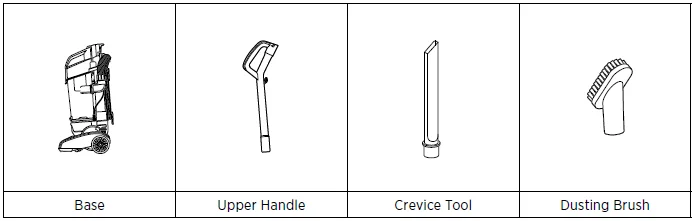
What’s in the Box?
Product View
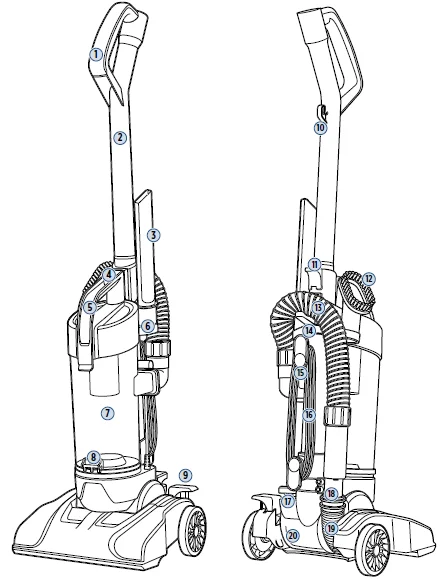
- Handle
- Handle/ High Reach Extension Wand
- Crevice Tool
- Tank Release Button
- Carrying Handle
- Accessory Holder
- Dirt Tank
- Dirt Tank Empty Button
- Handle Recline Pedal
- Cord Hook
- Extension Wand Release
- Dusting Brush
- Stretch Hose
- Hose Clip
- Upper Quick Release™ Cord Wrap
- Power Cord
- Power Switch Pedal
- Hose Holder
- Foot Hose
- Product Rating Label & Serial Number
Assembly
WARNING: Do not plug in your vacuum until you are familiar with all instructions and operating procedures.
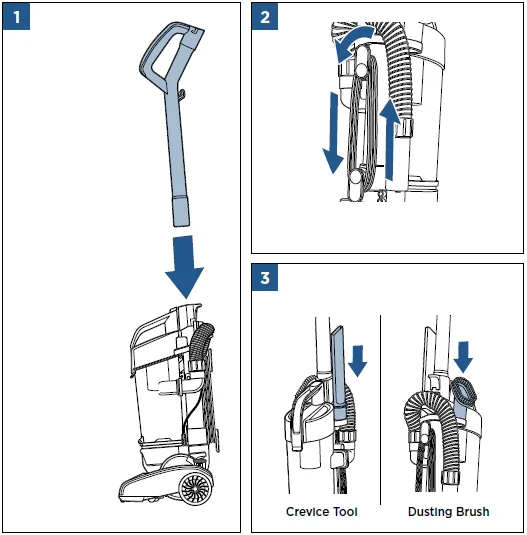
- Position the handle so the lower tab is facing the back of the vacuum. Insert the handle into the base and push until it locks into place.
- Wrap the power cord around the upper and lower cord wraps.
- Attach tools by inserting them into the tool holders.

Using Your Vacuum
WARNING: Before using your vacuum, make sure that the dirt tank is in the locked position and that all filters, both pre- and post-filters, are in place. DO NOT operate your vacuum without these filters.
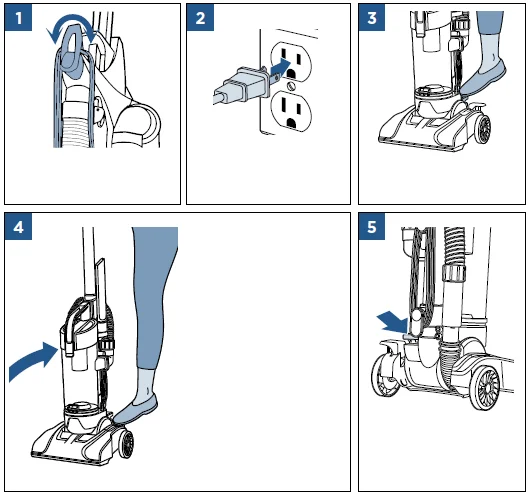
- Twist the Upper Quick Release™ Cord Wrap down to quickly remove the cord.
- Connect the power cord plug to a polarized outlet.
- Step on the red power switch to turn the vacuum ON.
- Press the handle recline pedal with your foot to place your vacuum in one of three positions: Upright – For storage and
transporting. Normal Cleaning – Press the handle and release the pedal once for most household floor cleaning tasks. Low Cleaning – With the vacuum in normal cleaning position, press the handle release pedal again to reach under low furniture, such as tables, chairs, or beds. - Step on the red power switch again to turn the vacuum OFF.

NOTE: Some Berber carpets have a tendency to fuzz with wear. Repeated strokes in the same area may enhance this condition.
Above Floor Cleaning
- Raise the handle to the upright position.
- Grasp the hose and pull up to remove it from the hose holder.
- For extended reach, remove the extension wand by pressing the extension wand release lever and pulling the handle out of the body.
- Connect the hose to the extension wand by inserting it into the open end of the extension wand and twisting to lock.
- Attach the desired tool by firmly pushing onto the end of the vacuum hose or extension wand.
- Crevice Tool: Use in tight and narrow spaces. Dusting Brush: Use to dust upholstery, blinds, shelves, and more.
ATTENTION: The floor brush will continue to rotate while using your vacuum for above-floor cleaning. To prevent carpet damage, do not lean on the vacuum or let the Powerfoot tilt forward.
Storing the Power Cord
WARNING: To reduce the risk of electric shock, turn the power switch OFF and disconnect the plug from the electrical outlet before performing maintenance or troubleshooting checks.
When you have finished using your vacuum, store the power cord in the cord wraps. Loop the power cord around the cord wraps on the back of the cleaner, making certain the Upper Quick Release™ Cord Wrap is pointed up towards the handle and the Lower Quick Release Cord Wrap is pointed down towards the floor. Clip the molded plug to the power cord to secure.
Emptying the Dirt Tank
- Remove the dirt tank by pushing the dirt tank release button on top of the tank handle.
- Holding the dirt tank over the garbage bin, press the release button on the back. Snap the bottom back into place and return to the machine, pushing to lock into place.
NOTE: The dirt tank may be washed in warm water with a mild detergent. Rinse and dry thoroughly before reattaching it. This is not dishwasher safe.
Cleaning the Dirt Tank
WARNING
To reduce the risk of electric shock, turn the power switch OFF and disconnect the plug from the electrical outlet before performing maintenance or troubleshooting checks.
- Remove the dirt tank by pushing the dirt tank release button on top of the tank handle.
- Open the dirt tank lid by lifting the release latch.
- Remove the primary separator by lifting it out of the dirt tank. The container and separator can be washed with hand-warm water. Mild detergent may be used. Rinse well, then air dry completely.
- Remove the hose by twisting to unlock and pulling it up. Check the inlet for any clogging before reassembling.
Cleaning the Filter
WARNING
- To reduce the risk of electric shock, turn the power switch OFF and disconnect the plug from the electrical outlet before performing maintenance or troubleshooting checks.
- Do not operate the vacuum with damp or wet filters, as well as without filters or the dirt tank in place. Allow components to dry before reassembling the dirt tank.
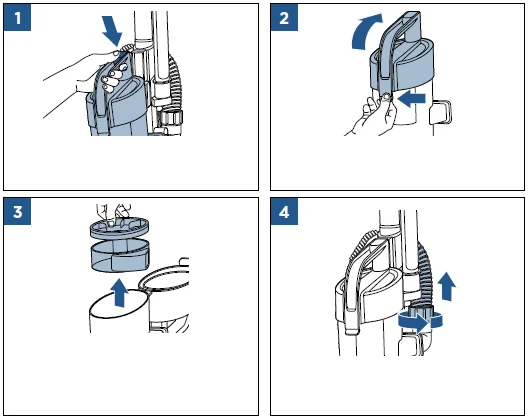
- Remove the dirt tank by pushing the dirt tank release button on top of the tank handle.
- The filter is located inside the dirt tank lid. Open the dirt tank lid by lifting the release latch.
- Grasp the filter and pull to remove. The filter can be washed with warm water. Mild detergent may be used. Rinse well, then air dry completely before returning to the dirt tank lid.
- Place the filter back in the dirt tank lid. The white mesh side should be put in first, with the black foam side still visible. Align the locating details on the filter with the locating features in the tank lid.

NOTE: If the filter is still excessively dirty, damaged, or torn, it will need to be replaced.
Cleaning the Brush Roll
WARNING
To reduce the risk of electric shock, turn the power switch OFF and disconnect the plug from the electrical outlet before performing maintenance or troubleshooting checks.
- Place the vacuum upside down with the brush roll facing upwards. Remove 5 screws with a Phillips-head screwdriver.
- Lift off the brush cover and grasp the floor brush at both ends to lift out. Clean debris from the brush roll, motor pulley, and drive belt. If the brush roll is worn, replace it as needed.
- Check the air passageway for obstructions.
- Separate the hose from the hose wand base to look through the hose for clogs. Remove debris from this area.
- When finished cleaning, align the brush roll with the belt, turning by hand several times in the direction of the motor to align the belt on the floor brush.
- Replace the brush cover and 5 screws.
NOTE: If an object becomes lodged in the foot and the brush shuts off, turn the vacuum OFF and unplug from the electrical outlet.
Replacing the Drive Belt
WARNING
To reduce the risk of electric shock, turn the power switch OFF and disconnect the plug from the electrical outlet before performing maintenance or troubleshooting checks.
- Place the vacuum upside down with the brush roll facing upwards. Remove 5 screws with a Phillips-head screwdriver.
- Lift off the brush cover and grasp the floor brush at both ends to lift out. Check the drive belt carefully for wear, cuts, and stressed areas. If the drive belt appears worn, replace it as needed.
- Test the brush by holding it on end and spinning. It should spin several revolutions freely from one flick. If not, the brush will need to be replaced.
- Grasp the old drive belt and remove it from the motor shaft to discard it. Loop the new drive belt over the motor shaft and stretch the other end over the floor brush in the space provided between the bristles.
- When finished, align the brush roll with the belt, turning by hand several times in the direction of the motor to align the belt on the floor brush.
- Replace the brush cover and 5 screws.
Cleaning the Hose and Foot
WARNING
To reduce the risk of electric shock, turn the power switch OFF and disconnect the plug from the electrical outlet before performing maintenance or troubleshooting checks.
- Locate the stretch hose where it connects to the hose elbow on the back of the vacuum. Look to see if there is any debris in the hose and the hose elbow. Clean as necessary.
- Locate the clear foot hose under the hose holder. Remove the two screws and clear clogs and debris in the hose. Use a long, narrow object, such as a broomstick, to clean the hose. Replace two screws and reattach the stretch hose by sliding over the inlet and rotating upwards towards the lock position.
NOTE: If the debris cannot be reached through the hose, then follow the instructions for cleaning the air passageway in the “Cleaning the Brush Roll” section.
Troubleshooting
WARNING
To reduce the risk of electric shock, turn the power switch OFF and disconnect the plug from the electrical outlet before performing maintenance or troubleshooting checks.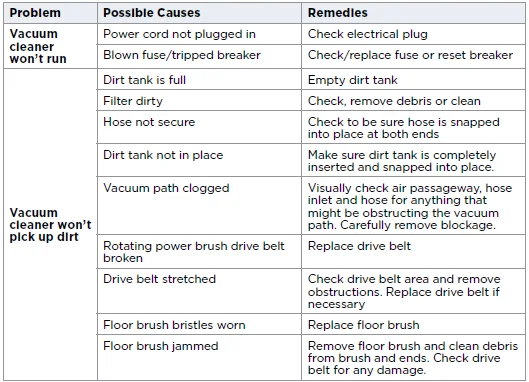
Service
Please do not return this product to the store. Other maintenance or service not included in the manual should be performed by an authorized service representative.
If your BISSELL product should require service: Visit support.BISSELL.com or call 1-800-237-7691 for warranty information, BISSELL Authorized Service Centers, and replacement parts.
Parts & Supplies
For Parts and Supplies, go to BISSELL.com and enter your model number in the search field.
For more Manuals by Bissell, visit ManualsLibraryy
Bissell CleanView Compact Turbo Upright Vacuum-FAQs
Is the Bissell CleanView a good vacuum?
Yes, the CleanView line is known for strong suction and reliable performance. Many users praise its ability to clean both hard floors and carpets efficiently.
Does the Bissell CleanView Compact work on carpet?
Yes, it works very well on carpets. The included Pet TurboBrush helps remove embedded dirt and pet hair from carpets, stairs, and upholstery.
Is the Bissell CleanView Compact Turbo good for stairs?
Yes, the TurboBrush tool makes it easy to clean stairs, upholstery, and small areas.
Is Bissell better than Shark?
Both brands are popular, but Shark models generally offer stronger build quality and more features. Bissell, however, provides great performance at a more budget-friendly price.
Is Bissell better or Dyson?
Dyson vacuums target the high-end market with more advanced features, while Bissell offers reliable performance at a lower price. For budget shoppers, Bissell is often the better value.
Can I use the Bissell CleanView on hardwood floors?
Yes, the CleanView Compact Turbo can be used on hard floors as long as you use the correct height setting.
How can I improve suction on my Bissell vacuum?
Empty the dust bin, clean the filters, check the hose for blockages, and remove tangled hair from the brush roll to restore suction power.
Can I use other cleaning solutions in my Bissell?
No. Only use Bissell-approved cleaning products to avoid damage or voiding the warranty.