
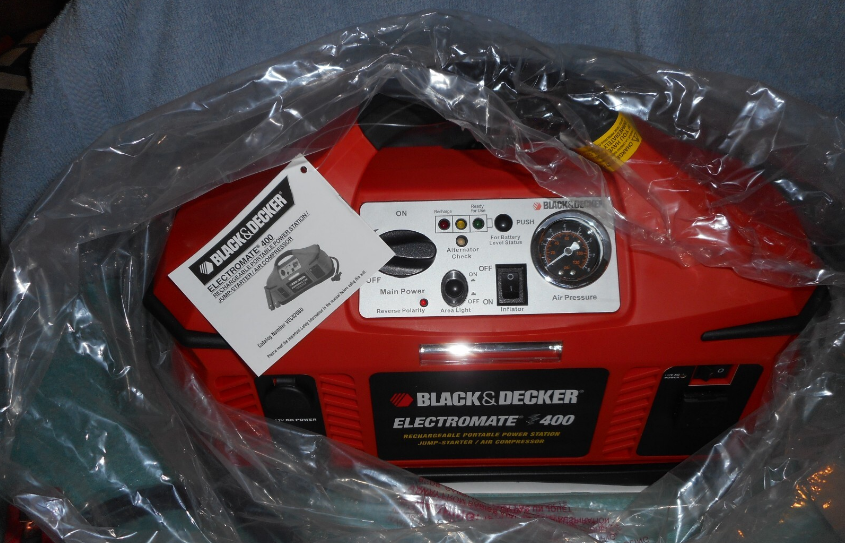

Black & Decker ElectroMate 400 Battery Jump Starter

IMPORTANT SAFETY INSTRUCTIONS
- RISK OF EXPLOSIVE GAS MIXTURES — WORKING IN THE VICINITY OF A LEAD-ACID BATTERY IS DANGEROUS. BATTERIES GENERATE EXPLOSIVE GASES DURING NORMAL BATTERY OPERATION. FOR THIS REASON, IT IS OF UTMOST IMPORTANCE THAT EACH TIME BEFORE USING YOUR CHARGER, YOU READ THIS MANUAL AND FOLLOW THE INSTRUCTIONS EXACTLY.
- To reduce the risk of battery explosion, follow these instructions and those published by the battery manufacturer and the manufacturer of any equipment you intend to use in the vicinity of the battery. Review cautionary markings on these products and on the engine.
- This equipment employs parts (switches, relays, etc.) that produce arcs or sparks. Therefore, if used in a garage or enclosed area, the unit MUST be placed not less than 18 inches above the floor.
Battery Safety
- When working with lead-acid batteries, always make sure immediate assistance is available in case of accident or emergency.
- Always use protective eyewear when using this product: contact with battery acid may cause blindness and/or severe burns. Be aware of first aid procedures in case of accidental contact with battery acid.
- There is a risk of releasing explosive gases when lead acid batteries are charged or discharged. Failure to follow instructions may cause property damage and/or personal injury.
- When connecting the battery clamps to a discharged battery and an alarm sounds — the clamp connections are incorrect and need to be reversed.
- Jump-start procedures should only be performed in a safe, dry, well-ventilated area.
- Always store battery clamps detached from unit when not in use. Never touch battery clamps together. This can cause dangerous sparks, power arcing and/or explosion.
- When using this unit close to the vehicle’s battery and engine, stand the unit on a flat, stable surface, and be sure to keep all clamps, cords, clothing and body parts away from moving vehicle parts.
- Do not wear vinyl clothing when jump-starting a vehicle, friction can cause dangerous staticelectrical sparks. Remove all jewelry or metal objects that could cause short circuits or react with battery acid.
- Never allow RED and BLACK clamps to touch each other or another common metal conductor — this could cause damage to the unit and/or create a sparking/explosion hazard.
- a. For negative-grounded systems, connect the POSITIVE (RED) clamp to the POSITIVE ungrounded battery post and the NEGATIVE (BLACK) clamp to the vehicle chassis or engine block away from the battery. Do not connect the clamp to the carburetor, fuel lines or sheet-metal body parts. Connect to a heavy gauge metal part of the frame or engine block.
- b. For positive-grounded systems, connect the NEGATIVE (BLACK) clamp to the NEGATIVE ungrounded battery post and the POSITIVE (RED) clamp to the vehicle chassis or engine block away from the battery. Do not connect the clamp to the carburetor, fuel lines or sheet-metal body parts. Connect to a heavy gauge metal part of the frame or engine block.
INTRODUCTION
Thank you for purchasing the Black & Decker VEC026BD Electromate 400. Please read this guide carefully before use to ensure optimum performance and avoid damage to the unit.
FEATURES
- Powers 110/120 volt AC appliances
- Powers 12 volt DC appliances
- Jump-starts vehicle engines
- Built-in inflator
- Built-in 400 watt inverter
- Includes non-spillable, maintenance-free, heavy-duty, sealed battery
- Safe to use, transport and store
- Alternator check
- Reverse polarity connection warning
- Detachable jumper cables
- Requires no maintenance (other than recharging) for optimum operation
- Rechargeable with built-in AC charger
- Unique compact design provides completely portable 12 volt DC power
- The molded high-impact case is tough and durable
- Built-in area light for night time roadside repairs and use in remote locations without utility power
- Battery charge level indicators
Protective Features
- Automatic Overload — Built-in protection against overload — if the
- AC outlet draws more than 400 watts, the power to the unit’s outlet will automatically shut off.
- Ground Fault Circuit Interrupter (GFCI) — The GFCI protects the unit and the user by sensing imbalances in a circuit caused by current leakage to the ground and shuts down the unit’s AC outlet to prevent electrical shock.
- Overheating — The Unit automatically shuts down if it exceeds a safe temperature.
- Safety Power Switch and Reverse Polarity Alarm — In the event the cables/clamps are reversed during jump-starting, an indicator lights and an alarm sounds BEFORE the Power Switch is turned ON.
- Low Battery — If the battery power level is too low, the AC Power Supply shuts down automatically.
AC AND DC CHARGING/RECHARGING
Use a common household AC extension cord for charging (cord not supplied). For maximum battery life, we recommend the unit be kept fully charged at all times. If the battery is allowed to remain discharged, battery life will be shortened
- MAKE SURE ALL SWITCHES ARE TURNED OFF DURING RECHARGING.
- Charge the unit for a full 24 hours using the AC method before first use.
- Recharge the unit fully after each use.
- Recharge the unit every two months when it has not been used regularly
Viewing Battery Charge Status
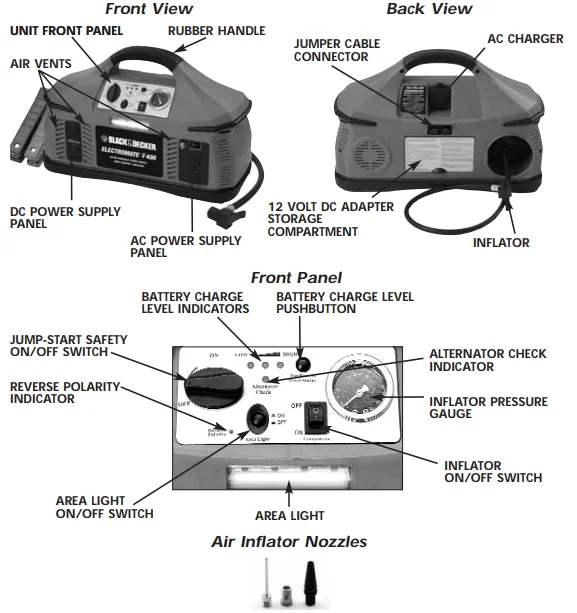
Press the Battery Charge Level pushbutton to display battery status. The Battery Charge Level Indicator LEDS will light.
LEDS (from left to right):
- Red LED indicates a low battery charge
- Two Red LEDs indicate a medium level or partially charged battery
- Two Red and one Green LED indicate a full or high-level battery charge
120 Volt AC Charging
- Lift the AC adapter cover located on the back of the Electromate and connect an extension cord to the unit. Plug the other end of the cord into a standard 120-volt AC wall outlet.
- Charge until two Red and one Green LEDs light.
- Once fully charged, disconnect the extension cord.
12 Volt DC Charging
The DC recharging method will NOT recharge the unit as effectively as recharging from 120 volt AC. The 12 volt DC recharging procedure is recommended only when it is necessary, since frequent use of the 12 volt DC recharging procedure may shorten the battery system’s
- Insert the gold-tipped DC/DC charging adapter plug into the vehicle’s 12 volt DC accessory outlet.
- Insert the silver-tipped end plug into the 12 volt DC accessory outlet on the front panel of the unit.
- To check the charge status of the battery during DC charging, disconnect the DC adapter from the accessory outlet and push the Battery Charge Level pushbutton. Observe the battery charge indicator.
- When charging is complete, remove the power cord and return it to the storage compartment
Jump-Starting Instructions
This jump-starter is equipped with a manual safety switch that only allows jump-start energy to flow when proper connections are made to battery and frame. Connect — RED clamp first, then BLACK clamp. Disconnect — BLACK clamp first, then RED clamp.
- Turn OFF vehicle ignition and all accessories (radio, A/C, lights, cell phone, etc.). Place vehicle in “park” and set the emergency brake.
- Make sure jump-start system’s ON/OFF power switch is turned to OFF.
- Connect jumper cables to unit.
- To jump-start a NEGATIVE GROUNDED SYSTEM (NEGATIVE battery terminal is connected to the chassis — the most common configuration), follow steps 4a and 4b, then proceed to step 6.
- 4a. Connect the POSITIVE (+) RED clamp to vehicle battery’s POSITIVE ungrounded post.
- 4b. Connect the NEGATIVE (–) BLACK clamp to the vehicle chassis or engine block away from the battery. Do not connect the clip to carburetor, fuel lines or sheet-metal body parts. Connect to a heavy gauge metal part of the frame or engine block.
- To jump-start a POSITIVE GROUNDED SYSTEM — In the rare event that the vehicle to be started has a POSITIVE Grounded System, POSITIVE battery terminal is connected to chassis, replace steps 4a and 4b above with steps 5a and 5b, then proceed to step 6.
- 5a. Connect NEGATIVE (–) BLACK clamp to vehicle battery’s NEGATIVE ungrounded post.
- 5b. Connect POSITIVE (+) RED clamp to the vehicle chassis or engine block away from the battery. Do not connect the clip to carburetor, fuel lines or sheet-metal body parts. Connect to a heavy gauge metal part of the frame or engine block.
- After making proper connections, turn safety power switch to ON.
- Start vehicle (do not turn key for longer than 5-6 seconds).
- After vehicle starts, turn the safety power switch to off, remove clamps (disconnect the frame or engine clamp first, followed by the battery cable). Disconnect the cables from unit.
USING THE ALTERNATOR CHECK FEATURE
- Turn the safety switch to the OFF position.
- Connect jumper cables to unit.
- Connect to vehicle.
- Start engine.
- Turn vehicle accessories off.
- A solid LED indicates a good alternator. A flashing LED indicates a bad alternator.
USING THE 12 VOLT DC PORTABLE POWER SUPPLY
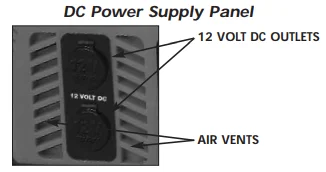
- Flip open one of the 12 volt DC outlet covers on the DC Power Supply Panel.
- Insert the 12 volt DC plug from the appliance into the outlet.
- Turn on the appliance and operate normally
USING THE 120 VOLT AC POWER SUPPLY
The 120 Volt AC Power Supply is designed for maintaining today’s modern lifestyle while traveling in vans, RVs, automobiles, trucks, or vehicles that have a 12 volt DC battery power supply and a means to recharge those batteries. The Electromate 400 comes with:
- AC ON/OFF Switch — Slide switch to turn the AC Power Supply ON and OFF.
- 120 Volt AC Power Outlets
- AC Power Supply “ON” Status Indicator — green LED lights when AC outlet is turned on; green LED flashes on and off when faulted.
- AC Power Ground Fault Circuit Interrupt (GFCI) — a 3-prong outlet for 120 volt AC appliances which shuts down inverter if leakage or ground fault current is detected
- Internal protective circuits including:
- Overload and over-temperature shutdown (activated if AC output exceeds 400 watts)
- AC short-circuit shutdown
- Low-voltage shutdown
- A new cooling technology that more efficiently cools the power transistors and, combined with soft start, dramatically increases reliability and product life
AC Power Supply Controls and Indicators
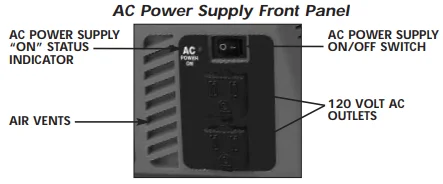
The illustration below details the AC Power Supply front panel. Air vents keep the unit from overheating. An ON/OFF switch turns the AC power circuitry on and off. The ON/OFF switch can also be used to reset the AC power after shutdown due to
overvoltage, overload or over-temperature condition. The “ON” status indicator lights when the AC power supply is on. The AC outlets (covered when not in use) supply power to AC appliance
AC Power Supply Operation
- Turn the power switch to ON (the power indicator lights).
- Plug in the appliance and turn the appliance on.
USING THE EMERGENCY AREA LIGHT
The Area Light is controlled by an ON/OFF pushbutton. Make sure the light is turned OFF when the unit is being recharged or stored.
USING THE TIRE INFLATOR
The built-in 12 volt DC inflator is the ultimate inflator for all vehicle tires, trailer tires and recreational inflatables. Three different-sized nozzles are supplied. Each nozzle clips on the end of the standard tire valve connector attached to the free end of the inflator hose. The inflator hose with tire fitting is stored in a retaining channel between the jumper cable channels on the rear of the unit. The ON/OFF switch is located on the front of the unit. The inflator can operate long enough to fill up to 3 average-sized tires before the battery must be recharged. The inflator may be used by removing the air hose from the storage hatch and, if required, fitting the appropriate nozzle to the air hose. Return the hose to the storage compartment
Inflating Products With a Valve Stem
- Place standard connector (chuck) on valve stem.
- Push connector toward valve stem and close thumb latch
- Slide inflator switch to ON.
- Check pressure with the pressure gauge.
- When desired pressure is reached, slide the inflator switch to OFF; open thumb latch and remove connector from valve stem.
- Store inflator hose and tire fitting in storage compartment.
Inflating Products Without a Valve Stem
Inflation of other items requires use of one of the adapters (nozzles
- Insert appropriate adapter (e.g. needle) into connector (chuck) and close thumb latch.
- Insert adapter (e.g. needle) into item to inflate.
- Slide inflator switch to ON.
- Refer to the following table for approximate filling pressure and time. Small items such as volleyballs, footballs, etc. inflate very rapidly.
- Slide inflator switch to OFF.
- Remove adapter from item and store properly.
CARE AND MAINTENANCE
Battery Replacement/Disposal
It is recommended that the unit be returned to Customer Service for battery replacement. This unit contains a maintenance-free, non-spillable, sealed leadacid battery. This battery is fully recyclable and should be accepted at any location that accepts common automotive starter batteries. Examples of places that accept these batteries are: county or municipal recycling drop-off centers, scrap metal dealers and retailers who sell automotive replacement lead acid starter batteries
Fuse Replacement (DC Accessory Adapter)
- Remove plug from accessory outlet. Remove the gold cap by turning counterclockwise and lifting off.
- Remove center pin and spring. Remove fuse.
- Replace fuse with same type and size fuse (8 amp).
- Replace center pin and spring inside plug.
- Replace gold cap by turning clockwise.
SPECIFICATIONS
12 Volt DC Specifications
- Battery: 12 volt DC rechargeable, maintenance-free
- Internal Battery Type: Sealed, AGM lead-acid Internal Battery
- Capacity: 12 volt 19Ah/20 hour rate
- Area Light: Light Emitting Diode (LED)
- Jumper Cables: Heavy duty welding cable with 450 amp clamp
- Accessory Outlet
- Protection: Self-resetting overload protection
- DC Charging Adapter: 12 volt DC
AC Power Specifications
- Output Power: Continuous — 400 watts
- Output Voltage: 120 VAC RMS
- Output Frequency: 60 Hz ±4 Hz
- Output Waveform: Modified sine wave
- Overheat Protection: Yes
- Overload Protection: Yes
- Output Short Circuit
- Protection: Yes
FOR MORE MANUALS BY BLACK AND DECKER, VISIT MANUALSLIBRARYY
Black & Decker ElectroMate 400 Battery Jump Starter-FAQs
How do I use the Black & Decker ElectroMate 400 Jump Starter?
To use the jump starter, connect the red clamp to the positive (+) terminal of your car battery and the black clamp to the negative (–) terminal. Turn on the unit, then start your vehicle. Once the engine starts, disconnect the clamps in reverse order.
How do I charge the Black & Decker ElectroMate 400?
The unit has a built-in 120V AC charging adapter on the back. Lift the protective cover and plug in an extension cord. Connect the cord to a standard household wall outlet to begin charging.
How long does it take to fully charge the ElectroMate 400?
It takes about 24 to 48 hours for an initial full charge. After each use, recharge the unit completely. If storing it long-term, recharge it at least once every two months to maintain battery health.
How can I tell if my ElectroMate 400 is fully charged?
A solid green indicator light means the unit is fully charged. A flashing green light means it’s still charging. If your model doesn’t have indicator lights, you can check the voltage using a multimeter.
Can I overcharge the Black & Decker ElectroMate 400?
No, you should avoid overcharging. Unplug the charger once the battery is fully charged to prevent battery wear and reduce heat buildup.
What does a flashing red light on the charger mean?
A flashing red light usually signals an issue with the battery or the charger connection. Check that the clamps and cable connections are secure and the unit isn’t overheating.
Does a jump starter need to be fully charged to work properly?
Yes, for the best results, ensure the ElectroMate 400 is fully charged before use. A low charge may not deliver enough power to start a vehicle.
Can a jump starter charge a completely dead battery?
If your car battery is extremely discharged but can still hold a charge, the ElectroMate 400 can jump-start it. However, if the battery is completely dead and cannot hold power, it may need replacement.
How can I extend the life of my ElectroMate 400 battery?
Recharge the unit after every use and avoid deep discharges. Store it in a cool, dry place and recharge it every couple of months if not used regularly.