
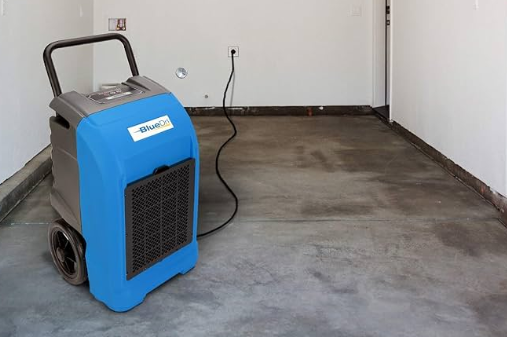

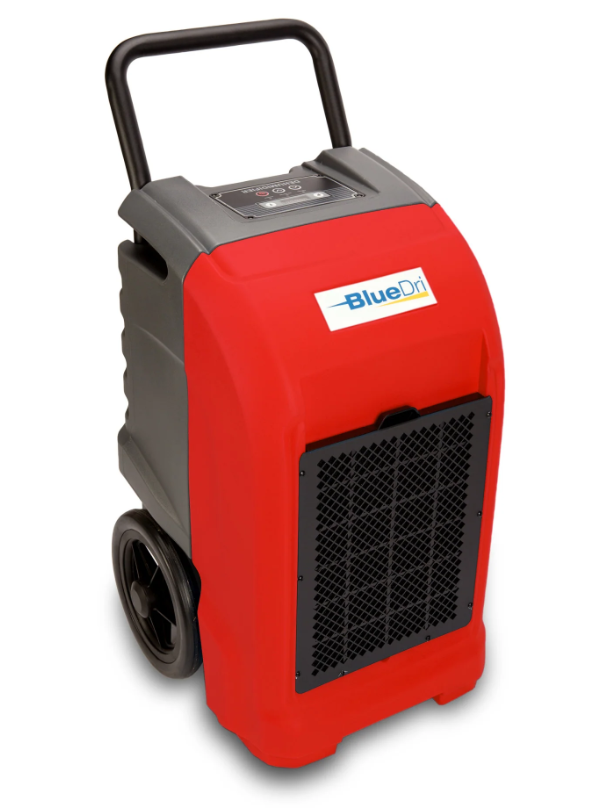
BlueDri BD-76P Industrial Dehumidifier
GENERAL INFORMATION
Packaging
Please DO NOT dispose of any packaging until you have checked that the appliance is operational. After removing the packaging, ensure the contents are intact and complete. In the unlikely event of missing parts, contact your retailer. DO NOT leave children unattended with any of the packaging since it is a potential source of danger.
Disposal of all packaging must be carried out responsibly and safely, and in accordance with your local authority regulations. ALWAYS recycle the packaging material where possible. When using any electrically powered product, basic safety precautions should always be followed. PLEASE READ THE INSTRUCTIONS CAREFULLY AND IN FULL BEFORE USING THE PRODUCT.
IMPORTANT INSTRUCTIONS
WARNING – to reduce the risk of fire, electrical shock, or injury to persons or property:
- Always operate the product from a power source of the same voltage, frequency, and rating as indicated on the product identification plate.
- Close supervision is necessary when any product is used by or near children, the elderly, or the infirm. Do not allow children to use the appliance as a toy.
- Do not operate this product with a damaged power cord plug. If the supply cord is damaged, it must be replaced by qualified personnel or other similar qualified persons in order to avoid a hazard.
- To reduce the risk of electric shock, do not expose the unit or flexible cord to moisture of any kind.
- Switch off and unplug from the power socket when not in use, before assembling or before cleaning.
- Do not place objects on the product or allow objects to obstruct the inlet or outlet openings, or operate in proximity to walls or curtains, etc.
- The use of attachments or accessories not recommended or sold by the product distributor may cause injury to persons or property damage.
- This product is intended for normal light commercial use only.
- Do not attempt to dismantle the appliance.
- Do not operate the appliance on a metal surface.
- Do not use the appliance in artificially hot or humid conditions or allow it to be used in a hazardous environment.
- Do not clean the appliance with an organic solvent.
- This appliance is not intended for use by persons (including children) with reduced physical, sensory, or mental capabilities, or a lack of experience and knowledge, unless they have been given supervision or instruction concerning use of the appliance by a person responsible for their safety.
- Children should not be left unsupervised with the appliance.
- This instruction manual is an integral part of the appliance and should be stored for safekeeping and must always accompany the appliance in the event of ownership transfer or for reference by a service engineer.
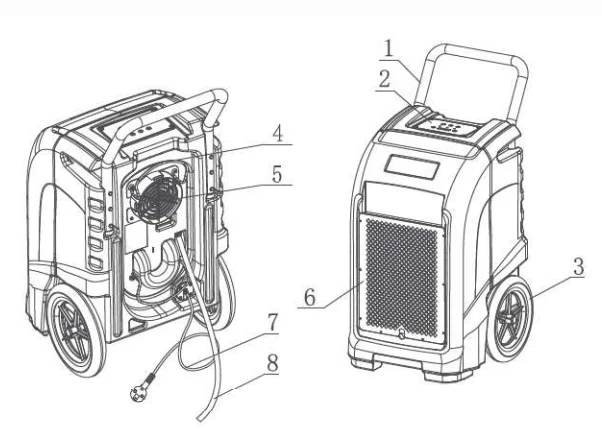
PRODUCT IDENTIFICATION
- Metal Handle
- Control Panel
- Wheels
- Water pipe bracket
- Air Outlet Grille
- Air Inlet Grille
- Power Cord
- Water Pipe

SETTING UP INSTRUCTIONS
IMPORTANT
Place the dehumidifier in the upright position. When transporting a dehumidifier to the site, allow the dehumidifier to stand for 30 minutes before switching ON. This is necessary to allow the refrigerant system to stabilise and avoid system damage.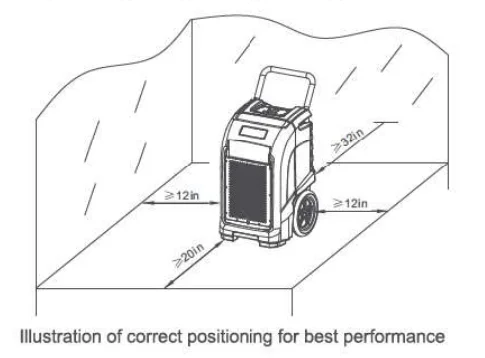
SETTING UP THE DEHUMIDIFIER:
Operate the dehumidifier in an enclosed area, as this creates a drying chamber. Close all doors, windows, or areas that open to external areas to maximize the dehumidifier’s water removal efficiency. Keep traffic through the drying chamber to a minimum. Place the dehumidifier in the centre of the room, away from walls and furnishings. DO NOT allow the airflows to be obstructed.
DRAINAGE:
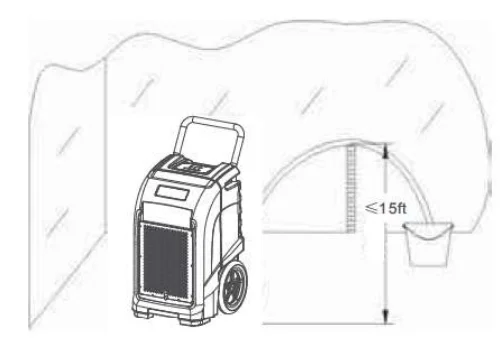
The dehumidifier pump connects to a plastic drainage hose. The hose is stored on the back of the appliance. Uncoil the entire hose, ensuring there are no kinks or restrictions, and place the unattached end into a water vessel or run it outdoors.
- Ensure that water that runs outdoors does NOT create a slip hazard.
- Water vessels MUST be checked regularly when used.
- The position of the drain water pipe would not be too high (<15 ft). Failure to do so may cause a water backup in the pump, resulting in leakage.

CONTROL PANEL
- ON/OFF Key
- UP AND DOWN Key
- Purging Indicator
- Defrosting Indicator
- PURGE Key
- HUMIDITY AND TIME Display
- TIME Key
- Operating Indicator

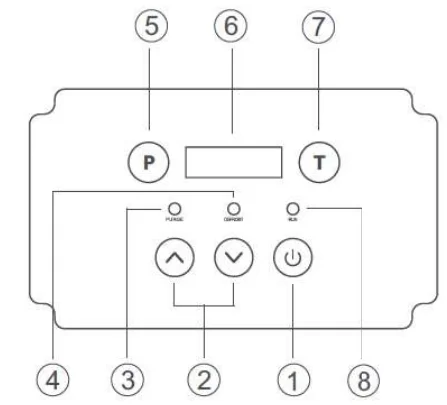
A.  ON/OFF: Press the ON/OFF key to turn the unit ON or OFF.
B. P PURGE: Press the PURGE key to empty water from the pump reservoir. During normal operation, the pump purges automatically when the reservoir is full. Use “PURGE” before moving the machine to avoid water spillage. The pump will close automatically after forty seconds of continuous operation.
C.  : Press the UP and DOWN keys to set or adjust humidity in the range between 26% and 90%. When the environmental humidity is below 26%, “CO” will be displayed.
D.  : Display working hours and total working time. After turning on the operation, it can display the setting humidity (left) and the current humidity (right), and the humidity can be changed by pressing “Up and Down”. For the current time, the time unit is based on minutes. For example, if it displays “0000:50”, it means that it has worked for 50 minutes this time. If you want to view the total working time, please press “T” once more, and it will show for 10 s and return automatically to the original working hours. If you press “T” before it has lasted for 10 s, it can turn to the original working hours.
If the unit is in power but not in operation, the LED will display nothing, and in this condition, the working hours at the last time will be shown for 10 s if “T” is pressed one time. But within 10 s, if “T” is pressed again, the total working time will also be shown for 10 s, and within 10 s, if there is no action, the LED will automatically turn off.
In addition, if “T” is pressed again when the LED displays the total working time, the LED will turn off immediately. What’s more, the current working time will be deleted by pressing “T” for 5 s continuously, and the time will be recounted, but the deleted time will be added to the total working time.
E. Defrost Indicator: The unit begins to defrost when the defrost indicator lights; the unit stops defrosting when the defrost indicator is off. When defrosting finishes, the unit begins to dehumidify automatically again.
Note: The total working time cannot be deleted. If the time is beyond the range of the LED showing time, it will be deleted and recounted from the start.
OPERATING INSTRUCTIONS
A. Operation for general use:
- Press the ON/OFF key to turn the unit on; it will get into working mode automatically.
- After using, press the ON/OFF key to turn the unit off, while the water pump will turn on automatically for 40 seconds to drain the remaining water, and turn off automatically.
Attention: DO NOT switch the power OFF by disconnecting at the mains socket outlet. To avoid water spillage, DO NOT move the dehumidifier for at least three minutes after turning the power OFF.
B. Key lock function:
If the keys of “T” and “PURGE” are pressed for 2 s at the same time, the defrost light will keep shining, and all the keys on the control panel will be locked, but they can be unlocked by the same action again.
C. Pipe function:
As to a much wetter space, use a plastic pipe with a diameter larger than 6.7 in, and tie the pipe to the hood; it will be much faster and more effective to make it dry.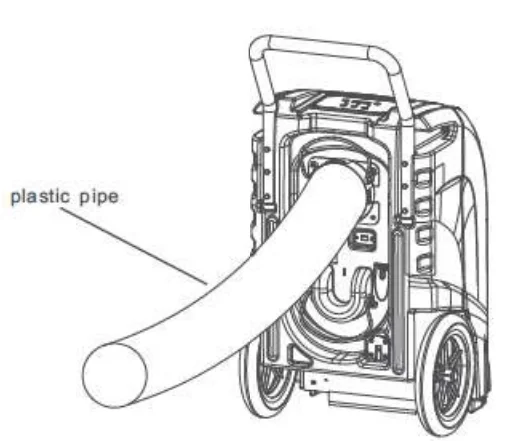
Maintenance: CLEANING THE AIR FILTER
Ensure the dehumidifier is turned OFF and the plug is removed from the power socket before maintenance is carried out. The working performance of the dehumidifier will be greatly reduced if the filters become blocked.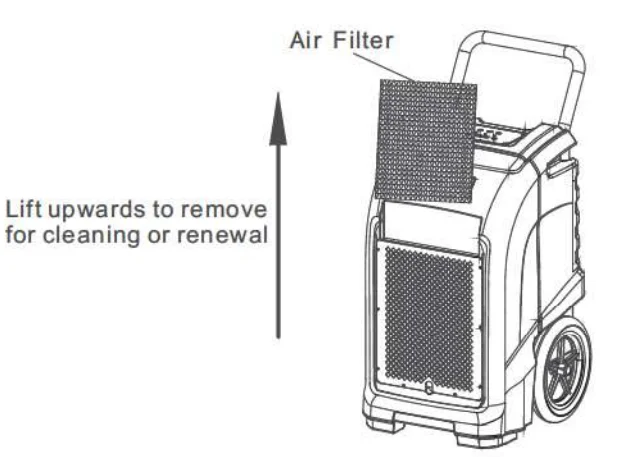
- Remove the filter as shown in the diagram above.
- Vacuum any debris from the filter using the vacuum hose and nozzle attachment.
- Using lukewarm water and a mild detergent, wash the filter and allow it to dry.
- Once dry, reinstall the filter into the dehumidifier.
REPLACING THE BATTERY
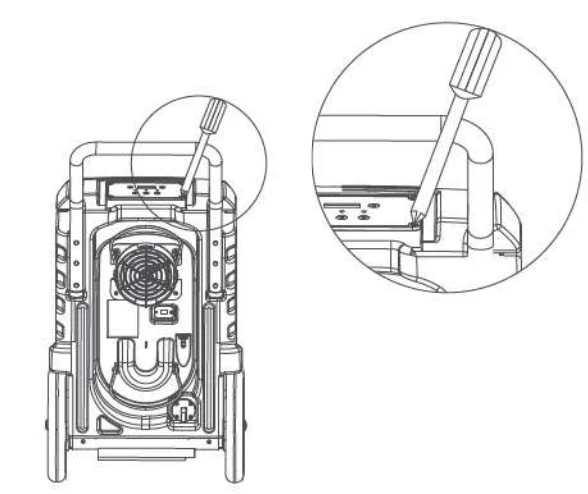
- Remove the screws in the four corners of the control panel.
- Once the screws are removed, carefully lift the control panel to access the PCB.
On the PCB is a 6F22 9V battery. Remove the battery and replace it with a new one. - Refit the control panel onto the PCB.
- Refit the four screws.

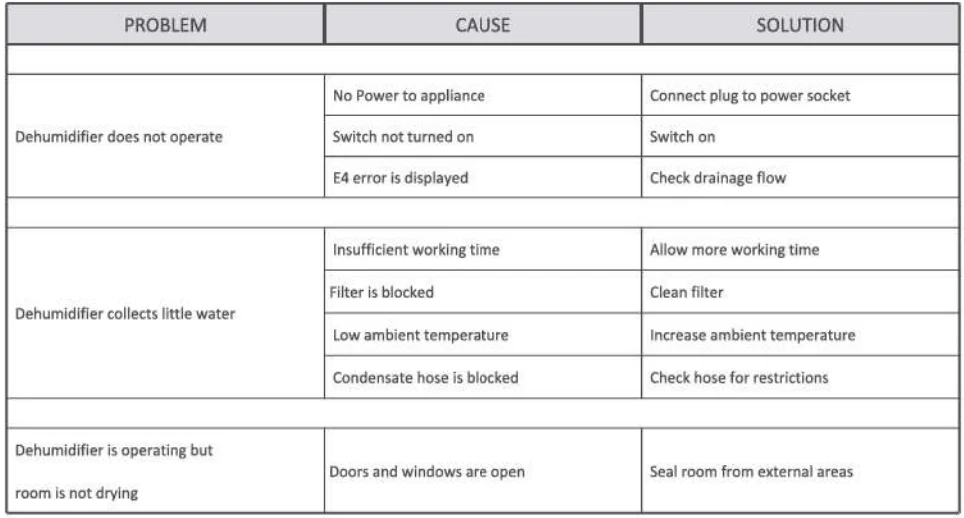
TROUBLE SHOOTING
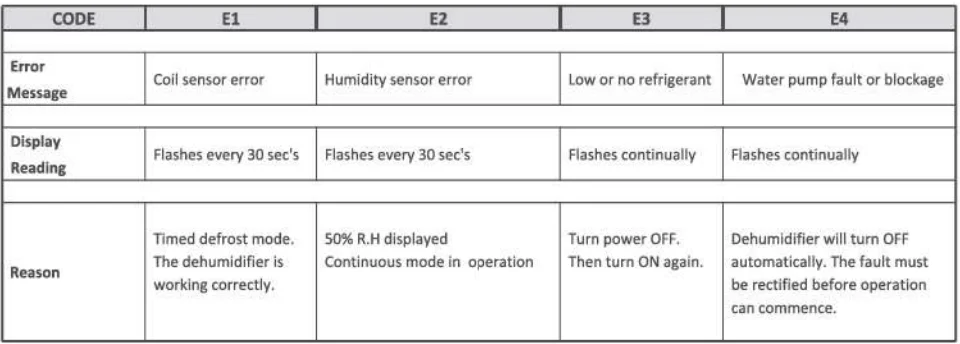
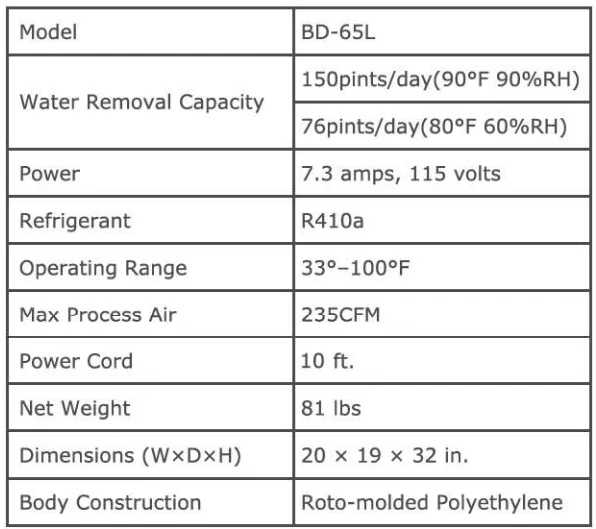
SPECIFICATION
BLUEDRI’S WARRANTY POLICY
1-Year Coverage
Subject to the conditions stated below, BLUEDRI offers a limited warranty on parts and labor on the following equipment, parts, and accessories to be free from defects in material and workmanship for a period of one year to the original purchaser.
10-Year Coverage
Subject to the conditions stated below, BLUEDRI warrants parts and labor on rotationally molded polyethylene tanks/housings and injection molded vacuum head assemblies to be free from defects in materials and workmanship for a period of ten years to the original purchaser.
Wear items exempt from warranty consideration include, but may not be limited to: power cords, transport wheels, castors, handle grips, filters, screens, brushes, and carbon brushes. Subject to the conditions and exceptions stated in this warranty, BLUEDRI warrants the BLUEDRI products to be free from defects in material and workmanship, under normal use and service, for the periods listed under the warranty policy to the original purchaser. At any time during the warranty period, BLUEDRI will furnish replacement parts for the BLUEDRI products to the original purchaser.
Such parts will be furnished and charged, including transportation costs, to the original owner. If the original part is returned within the warranty policy period from the date of delivery for inspection by BLUEDRI and is found to be defective, the owner will be credited for the cost of replacement parts plus shipping and handling. Replacement parts that have become defective through wear or abuse are not included in this warranty.
This warranty does not apply to damage or defect caused by accident, misuse, negligence, fire, or to any BLUEDRI product which has been serviced or repaired by other than an authorized BLUEDRI Service Distributor or BLUEDRI factory personnel. This warranty is void if products are used for any purpose other than that for which was intended. There are no other warranties expressed or implied. In no event shall BLUEDRI be liable for incidental or consequential damages or any damage to person or property. (Please note that some states do not allow the exclusion or limitations for incidental and consequential damages.)
For More Manuals By BlueDri, Visit ManualsLibraryy.
BlueDri BD-MS25 Max Storm 25 Air Mover Blower Fan -FAQs
What is the difference between a standard dehumidifier and an industrial dehumidifier?
A standard (residential) dehumidifier is designed for small rooms and occasional use, while an industrial dehumidifier like the BlueDri BD-76P is built for continuous operation in large, moisture-heavy environments. Industrial units offer higher pint removal capacity, stronger airflow, rugged construction, and automated drainage. They are commonly used for water damage restoration, basements, warehouses, and construction sites where reliability and performance are critical.
How do I turn on the BlueDri BD-76P dehumidifier?
To turn on the BlueDri BD-76P, plug the unit into a grounded power outlet and press the ON/OFF button on the control panel. The dehumidifier will automatically enter working mode using its default settings. When turning it off, press the ON/OFF button again. The internal pump will continue running for about 40 seconds to drain remaining water before shutting down completely.
What does the E4 error code mean on a BlueDri BD-76P?
The E4 error code usually indicates a drainage-related issue or improper temperature detection. In most cases, it appears when the water tank is full, the drain hose is blocked, or the unit cannot sense a normal temperature change. To fix it, check and clear the drain line, ensure proper drainage, and restart the unit. If the error persists, professional servicing may be required.
How can I tell if my BlueDri dehumidifier is working properly?
You can check if the BlueDri BD-76P is working by monitoring water drainage, feeling strong airflow from the outlet, and observing a gradual drop in room humidity. The unit should collect or pump out water consistently in humid conditions. If humidity levels remain high or error codes appear, inspect the filter, drain hose, and operating environment for possible issues.
Is 70% indoor humidity too high?
Yes, indoor humidity levels above 60% are considered too high and can lead to mold growth, mildew, musty odors, and damage to walls or furniture. At 70% humidity, moisture problems become more severe and unhealthy over time. Using a high-capacity industrial dehumidifier like the BlueDri BD-76P helps reduce humidity to a safer range (around 40–50%) and protects indoor air quality.
How many hours a day should an industrial dehumidifier run?
Industrial dehumidifiers like the BD-76P are most effective when allowed to run continuously. Rather than setting fixed hours, it’s best to let the unit operate based on humidity demand. It will automatically stop and restart as needed to maintain optimal moisture levels. Continuous operation ensures consistent drying, faster moisture removal, and better long-term humidity control in large or severely damp spaces.
Can I leave the BlueDri BD-76P running 24/7?
Yes, the BlueDri BD-76P is designed for continuous 24/7 operation. It automatically cycles on and off based on humidity levels, making it ideal for long-term moisture control. Leaving it running nonstop is safe and effective, especially in restoration projects, damp basements, or high-humidity environments. Continuous use helps prevent mold growth, condensation, and structural moisture damage.
How do I reset the BlueDri BD-76P dehumidifier?
To reset the BlueDri BD-76P, turn the unit off using the power button and unplug it from the outlet. Wait about 5–10 minutes to allow the system to fully reset. Plug the unit back in and turn it on. This process clears minor control errors and temporary fault codes. If error codes return after resetting, troubleshooting or professional inspection may be necessary.