
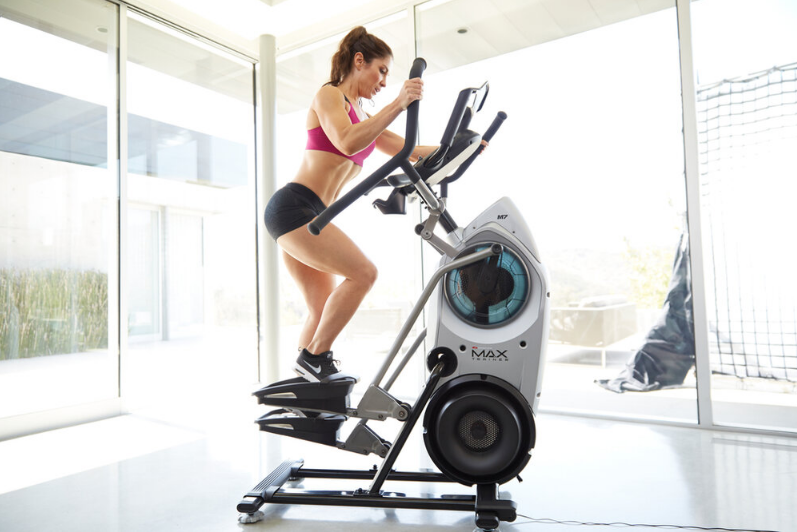

BowFlex Max Trainer M7 Full Body Workout

FCC Compliance
 Changes or modifications to this unit not expressly approved by the party responsible for compliance could void the user’s authority to operate the equipment.
Note: This machine and power supply have been tested and found to comply with the limits for a Class A digital device, pursuant to Part 15 of the FCC Rules. These limits are designed to provide reasonable protection against harmful interference in a residential installation. This equipment generates, uses, and can radiate radio frequency energy and, if not installed and used in accordance with the instructions, may cause harmful interference to radio communications.
However, there is no guarantee that interference will not occur in a particular installation. If this equipment does cause harmful interference to radio or television reception, which can be determined by turning the equipment off and on, the user is encouraged to try to correct the interference by one or more of the following measures:
- Reorient or relocate the receiving antenna.
- Increase the separation between the equipment and receiver.
- Connect the equipment into an outlet on a circuit different from that to which the receiver is connected.
- Consult the dealer or an experienced radio/TV technician for help.
Specifications

- Maximum User Weight: 300 Ibs. (136 kg)
- Maximum Pedal Height: 19.1 inches ( 48.5 cm)
- Power Requirements:
- Operational Voltage: 9VDC
- Operating Current: 1500 mA
- Heart Rate Chest Strap: 1 CR2032 battery
- Machine Weight: approximately 148 lbs. (67.1 kg)
- Regulatory Approvals:
- AC Power Adapter: UL listed, CSA certified (or equivalent), rated 120V 60Hz Input, 9VDC, 1500mA Output. Class 2 or LPS.
Before Assembly
Select the area where you are going to set up and operate your machine. For safe operation, the location must be on a hard, level surface. Allow a workout area of a minimum 78.5″ (199.4 cm) x 97″ (246.4 cm). Be sure that the workout space you are utilizing has adequate height clearance, taking into consideration the height of the user and the maximum pedal height of the fitness machine.
Basic Assembly Tips
Follow these basic points when you assemble your machine:
- Read and understand the “Important Safety Instructions” before assembly.
- Collect all the pieces necessary for each assembly step.
- Using the recommended wrenches, turn the bolts and nuts to the right (clockwise) to tighten, and the left (counterclockwise) to loosen, unless instructed otherwise.
- When attaching 2 pieces, lightly lift and look through the bolt holes to help insert the bolt through the holes.
- The assembly requires 2 people.
Machine Mat
The Bowflex Max Trainer™ Machine Mat is an optional accessory that helps keep your workout area clear and adds a layer of protection to your floor. The rubber machine mat provides a non-slip, rubber surface that limits static discharge and reduces the possibility of display errors. If possible, put your Bowflex Max Trainer™ Machine Mat in your selected workout area before you begin assembly.
To order the optional machine mat, go to www.bowflex.com or call 1 (800) 605-3369.
Parts
( 2 Boxes )
Box 1

Box 2


Hardware / Tools


Note: Select pieces of Hardware have been provided as spares on the Hardware Card. Be aware that there may be remaining Hardware after the proper assembly of your machine.
Tools

Assembly
- Attach the Rail Assembly to the Frame, and then release the Frame from the Shipping Plate
 Some components of the machine can be heavy or awkward. Use a second person when doing the assembly steps involving these parts. Do not do steps that involve heavy lifting or awkward movements on your own.
NOTICE: Hand-tighten hardware.

- Attach Levelers to the Stabilizer Assembly

- Carefully lift the Frame Assembly from the Shipping Plate and attach it to the Stabilizer Assembly
Some components of the machine can be heavy or awkward. Use a second person when doing the assembly steps involving these parts. Do not do steps that involve heavy lifting or awkward movements on your own. Lift the Frame Assembly from the exterior of the pivot assembly as indicated below.
NOTICE: Once all hardware has been hand-tightened, fully tighten ALL hardware from previous steps.
- Attach the Stabilizer Shroud to the Frame Assembly

- Attach the Rear Shroud and Caps to the Frame Assembly
NOTICE: Place the inside hook of the Rear Shroud on the Frame Assembly and then pivot it up into place.
- Attach Legs to Frame Assembly
Be aware that the Legs are connected, and when either of these parts moves, the other does as well. 
- Attach Pedals to Frame Assembly
In order to avoid possible serious injury, when inserting the tube ends into the Leg Assembly, be careful to avoid fingers or hands being caught or pinched. 
- Cut the Shipping Zip-Ties from the Foot Pads and Attach to the Pedals

- Cut the Shipping Zip-Tie that Secures the Cables, Connect the Cables, and Attach the Console Assembly
NOTICE: Do not let the Cables drop into the Frame Assembly. Do not cut or crimp the Console Cables.

- Attach the Upper Handlebars to the Frame Assembly
Be aware that the Pedals and the Upper Handlebars are connected, and when either of these parts moves, the other does as well.
Some components of the machine can be heavy or awkward. Use a second person when doing the assembly steps involving these parts. Do not do steps that involve heavy lifting or awkward movements on your own.
NOTICE: Be sure to attach the Upper Handlebars so that they are in the range of operation for the User.
- Connect the AC Adapter to the Frame Assembly

- Final Inspection
Inspect your machine to ensure that all hardware is tight and components are properly assembled. Be sure to record the serial number in the field provided at the front of this manual
Do not use until the machine has been fully assembled and inspected for correct performance in accordance with the Owner’s Manual.


Adjustments
Moving the Machine
The machine may be moved by one or more persons, depending on their physical abilities and capacities. Make sure that you and others are all physically fit and able to move the machine safely
- Grasp the Aero Bars to carefully tilt the machine toward you onto the transport rollers. Be sure not to grab the Media Shelf.
Be aware of the Hand bars and the weight of the machine before tilting the machine. - Push the machine into position.
- Carefully lower the machine into position.
NOTICE: Be careful when you move the machine. All abrupt motions can affect the operation.

Leveling the Machine
The machine needs to be leveled if your workout area is uneven or if the Rail Assembly is slightly off the floor. To adjust:
- Place the machine in your workout area.
- Loosen the locking nuts and adjust the levelers until they are evenly balanced in contact with the floor.
Do not adjust the levelers to such a height that they detach or unscrew from the machine. Injury to you or damage to the machine can occur. - Tighten the locking nuts.
Make sure the machine is level and stable before you exercise.

Features


WARNING: Use the values calculated or measured by the machine’s computer for reference purposes only. The heart rate displayed is an approximation and should be used for reference only. Over-exercising may result in serious injury or death. If you feel faint, stop exercising immediately.
Console Features

Burn Rate display
The BMRe display shows the level of calories being burned per minute. This rate is a function of Intensity, which is the current level of RPM (pedal speed) and resistance level (1-20). As either of those values increases, the Burn Rate will increase.
Burn Rate Target LED range
The Burn Rate Target LED range is a workout coach based on the settings of the selected User Profile. A range of five LEDs is activated during a workout. The first of the LEDs in the range is a suggested beginner level, with the higher LEDs being for a more advanced fitness user. The Intensity of the range is based on the Workout Profile Display.
Note: Be sure the User Profile is current for a more exact calorie burn rate and suggested target range.
The Target LED Range is a suggested workout level, and should only be followed if your physical fitness level allows.
During an Interval workout, the SPRINT segment will be red LEDs, and the RECOVER segment will be green LEDs.
Maximum Burn Rate LED marker
The Maximum Burn Rate LED marker is an orange LED that shows the highest rate of calorie burn achieved during the current workout.
Benefit Zone display
A suggested Burn Rate Target Zone to gain the full benefits from the current workout: Fat Burn, Endurance, and Performance Zones.

Total Calories display
The Total Calories display shows the estimated calories that have been burned during the workout. The maximum display is 9999.
Active User display
The Active User display shows the selected user profile. A user profile is always selected.
Note: For more accurate calorie counts and Burn Rate Targets, be sure to edit your User Profile.
User button
Push to select the desired User Profile, push and hold for 3 seconds to edit the selected User Profile.
Volume button and indicator lights
The Volume button sets the sound level of the Console, and the indicator lights show the current setting: low (1 LED), medium (2 LEDs), high (3 LEDS), or off (no LEDs).
MAX 14 Minute Interval button
Push to start the MAX 14 Minute Interval workout.
PROGRAMS button
Push to select a workout program. With the Calorie Goal program selected, push and hold for 3 seconds to customize the workout goal.
ENTER/START button
Starts the selected Program workout, or resumes a paused workout. Push to accept the displayed value for an option.
PAUSE/STOP button
Pauses an active workout, ends a paused workout, or goes back to the previous screen.
Add Time button
Increases the length of a workout by 2.5 minutes for non-Interval Workouts, or adds another Interval for Interval Workouts.
Note: Button is disabled for Calorie Goal, Manual, and Fitness Test programs.
Burn Rate Target buttons
Adjust the burn rate target during a workout (if active), or increase a value (date, time, age, or weight)
Resistance Level buttons
Adjusts the resistance level of the workout.
LCD Display Data
The console display shows the workout measurements and current options.

SPRINT
The high-intensity segment of an Interval workout. During an Interval workout, the active segment shifts between the SPRINT and RECOVER segments with an audible confirmation, counting the time down for the currently active segment.
RECOVER
The reduced workout segment of an Interval workout, counting down until the next SPRINT segment.
WARM UP
WARM UP starts when the machine is used, but a workout has not been started. The WARM UP display will activate, and the Time display will show the time in Warm Up.
COOL DOWN
COOL DOWN starts when a workout ends, but the machine is still used. The COOL DOWN display will activate, and the Time display will show the time in Cool Down. The workout results are displayed during the cool-down.
Time display
The Time display shows the time count depending on the style of workout: Interval, Benefit, or Manual.
During an Interval workout, the Time display counts down the current Interval segment (SPRINT or RECOVER). For a Benefit Mode workout, the total time of the workout counts down. During a Manual workout, the Central Time display counts up until the workout is ended.
The maximum display for time is 99:99.
Interval Workout Count
During an Interval workout, the Interval Workout Count displays the count of the currently active Interval and the total number of Intervals for the workout.
Goal display
The Goal display shows the total workout time or the total calories for a non-interval workout. During an Interval workout, the Goal display counts down the time until the end of the workout. This display will be blank during a Manual workout. When the goal is time-based, the clock icon is displayed.
Note: During a Fitness Test, the displayed 3-minute goal begins when the heart rate reaches the heart zone. Be aware of the additional time before the 3-minute countdown begins.
Bluetooth® App Connected display
The display shows when a device is paired with the App.
Target Coaching Programs
Target Coaching Programs suggest a calorie burn rate as a target during the workout. The Bum Rate Target LED Range activates to show the bum rate target during the workout. The Workout Profile displays the Calorie Burn Rate during a Target Coaching Program.
Benefit Mode Programs
Benefit Mode Programs suggest a wide range of calorie burn rates for the workout. The Workout Profile display shows Resistance Level during a Benefit Mode Program.
Workout Profile display
The Workout Profile display area shows the course profile of the program. Each column in the profile shows one workout segment. The higher the column, the higher the intensity of the workout.
During a Target Coaching Program, the Workout Profile shows the target level of Burn Rate. During a Benefit Mode Program, the Workout Profile shows the level of resistance. The Console will adjust the Resistance Level during the workout.
The flashing column shows the currently active segment.
RPM
The RPM display field shows the mrevolutionsper minute (pedal speed).
Calorie Burn Rate
The Calorie Burn Rate display field shows the current rate at which calories are being burned per minute. The RPM and Resistance Level directly change this rate. The User Profile settings also affect the rate (User weight).
Heart Rate
The Heart Rate display shows the heart rate in beats per minute (BPM) from the heart rate sensors. This value will not be shown if a heart rate signal is not detected.
Consult a physician before you start an exercise program. Stop exercising if you feel pain or tightness in your chest, become short of breath, or feel faint. Contact your doctor before you use the machine again. The heart rate displayed on the console is an approximation and should be used for reference only.
Resistance Level
The Resistance Level display field shows the current Resistance Level (1-20). The higher the Resistance Level, the harder it will be to push the Pedals.
Note: During a Power Interval workout, the Console will automatically adjust the resistance level to encourage the User to reach the Bum Rate Target (based on the pedal speed).
Connectivity on your Bowflex Max Trainer® cardio machine
The Bowflex Max Trainer® M7 cardio machine is equipped with Bluetooth® connectivity and can wirelessly sync with the “Bowflex Max Trainer*” Fitness App on supported devices.
Note: For a complete list of supported devices, visit www.bowflexmaxtrainer.com.
Fitness App (“Bowflex Max Trainer® 2” )
The Bowflex Max Trainer® 2 App syncs with your Bowflex Max Trainer® M7 to track total calories burned, time, watts, and more. Records and stores every workout for quick reference. Plus, it automatically syncs your workout data with MyFitness Pal” to make hitting your daily goals easier than ever! Track your results and share with friends and family.
- Download the free software App, named “Bowflex Max Trainer® 2”. The software app is available on Google Play™ and the App Store.
Note: For a complete list of supported devices, visit www.bowflexmaxtrainer.com. - Follow the instructions on the App to sync your device to the Bowflex Max Trainer cardio machine.
Contact Heart Rate Sensors
Contact Heart Rate (CHR) sensors send your heart rate signals to the Console. The CHR sensors are the stainless steel parts of the Handlebars.
To use, put your hands comfortably around the sensors. Be sure that your hands touch both the top and the bottom of the sensors. Hold firm, but not too tight or loose. Both hands must make contact with the sensors for the Console to detect a pulse. After the Console detects four stable pulse signals, your initial pulse rate will be shown.
Once the Console has your initial heart rate, do not move or shift your hands for 10 to 15 seconds. The Console will now validate the heart rate.
Many factors influence the ability of the sensors to detect your heart rate signal:
- Movement of the upper body muscles (including arms) produces an electrical signal (muscle artifact) that can interfere with pulse detection. Slight hand movement while in contact with the sensors can also produce interference.
- Calluses and hand lotion may act as an insulating layer to reduce the signal strength.
- Some Electrocardiogram (EKG) signals generated by individuals are not strong enough to be detected by the sensors.
- The proximity of other electronic machines can generate interference.
Use the values calculated or measured by the machine’s computer for reference purposes only.
Remote Heart Rate Monitor
Monitoring your Heart Rate is one of the best procedures to control the intensity of your exercise. Contact Heart Rate (CHR) sensors are installed to send your heart rate signals to the Console. The Console can also read telemetry HR signals from a Heart Rate Chest Strap Transmitter that operates in the 44.44.5Hz.5HzKHzange.
Note: The heart rate chest strap must be an uncoded heart rate strap from Polar Electro or an uncoded POLAR® compatible model. (Coded POLAR® heart rate straps,s uch as POLAR® OwnCode” chest straps, will not work with this equipment.)
If you have a pacemaker or other implanted electronic device, consult your doctor before using a wireless chest strap or other telemetric heart rate monitor.r
The heart rate displayed on the console is an approximation and should be used for reference only.
Chest Strap
Using the heart rate transmitter chest strap lets you monitor your heart rate at any time during your workout.
Consult a physician before you start an exercise program. Stop exercising if you feel pain or tightness in your chest, become short of breath, or feel faint. Contact your doctor before you use the machine again. Use the values calculated or measured by the machine’s computer for reference purposes only.
The heart rate transmitter is attached to a chest strap to keep your hands free during your workout. To put on your chest strap:
- Adjust the strap length to fit snugly and comfortably against your skin. Secure the strap around your chest, just below the chest muscles, and buckle it.
- Lift the transmitter off your chest and moisten the two Grooved Electrode Areas on thebacka.ck
- Check that the wet electrode areas are firmly against your skin.
The transmitter will send your heart rate to the machine’s receiver and display your estimated Beats Per Minute (BPM).
Always remove the transmitter before releasing the chest strap. Clean the chest strap regularly with mild soap and water, and thoroughly dry it. Residual sweat and moisture may keep the transmitter active and drain the battery in the transmitter. Dry and wipe dean the transmitter after each use.
Note: Do not use abrasives or chemicals such as stwool wod or alcohol when dean the chest strap, as they can damage the electrodes permanently.
If the Console does not display a heart rate value, the transmitter may be at fault. Check that the textured contact areas on the chest strap are making contact with your skin. You may need to lightly wet the contact areas. If no signal appears or you need further assistance, call your Nautilus Representative.
Before discarding a chest strap, remove the battery. Dispose of in accordance with local regulations and/or at approved recycling centers.
Heart Rate Calculations
Your maximum heart rate usually decreases from 220 Beats Per Minute (BPM) in childhood to approximately 160 BPM by age 60. This fall in heart rate is usually linear, decreasing by approximately one BPM for each year. There is no indication that training influences the decrease in maximum heart rate. Individuals of the same age could have different maximum heart rates. It is more accurate to find this value by completing a stress test than by usage-related formula.
Your at-rest heart rate is influenced by endurance training. The typical adult has an at-rest heart rate of approximately 72 BPM, whereas highly trained runners may have readings of 40 BPM or lower.
The Heart Rate table is an estimate of what Heart Rate Zone (HRZ) is effective to burn fat and improve your cardiovascular system. Physical conditions vary; therefore, your individual HRZ could be several beats higher or lower than what is shown.
The most efficient procedure to burn fat during exercise is to start at a slow pace and gradually increase your intensity until your heart rate reaches between 60 – 85% of your maximum heart rate. Continue at that pace, keeping your heart rate in that target zone for over 20 minutes. The longer you maintain your target heart rate, the more fat your body will burn.
The graph is a brief guideline, describing the generally suggested target heart rates based on age. As noted above, your optimal target rate may be
higher or lower. Consult your physician for your individual target heart rate zone.
Note: As with all exercises and fitness regimens, always use your best judgment when you increase your exercise time or intensity.

Troubleshooting


For more manuals by BowFlex, visit ManualsLibraryy
BowFlex Max Trainer M7 Full Body Workout- FAQs
Is the BowFlex Max Trainer M7 worth it?
Yes. Users report excellent results with consistent use. Many have seen significant weight loss and improved stamina, calling it a powerful investment for full-body fitness.
Is the BowFlex Max Trainer an elliptical or a stair stepper?
It’s a hybrid of both — about 70% stair stepper and 25% elliptical. This combination delivers a high-intensity yet low-impact workout that targets multiple muscle groups.
Can the BowFlex Max Trainer help with weight loss?
Absolutely. Studies show you can burn up to twice as many calories on the Max Trainer compared to a treadmill or traditional elliptical, making it great for fat burning and endurance.
How does the Max Trainer compare to a treadmill?
Unlike a treadmill, the BowFlex Max Trainer works both your upper and lower body at once. It’s more intense and efficient but can be a bit tougher for beginners to start with.
How long should I exercise on the BowFlex Max Trainer?
Start small and build up to the 14-minute Max Trainer workout. Over time, you can increase duration as your strength and endurance improve.
Can I build muscle using the BowFlex Max Trainer M7?
Yes. It engages your legs, glutes, arms, and core, especially when you increase resistance. It helps tone and strengthen muscles while boosting cardiovascular fitness.
Is 30 minutes on the elliptical enough to lose weight?
Yes. A 30-minute elliptical session can burn 270–400 calories depending on your weight and intensity level, supporting healthy and gradual weight loss.
Is the BowFlex Max Trainer good for belly fat?
While spot reduction isn’t possible, consistent full-body cardio sessions on the Max Trainer can help reduce overall fat, including belly fat.
Which is better for fat loss — treadmill or elliptical?
Both are effective. Treadmills burn more calories with higher impact, while ellipticals like the Max Trainer offer low-impact, total-body workouts that are easier on the joints.
Can you do ab exercises on the BowFlex Max Trainer?
Yes. The movement naturally engages your core muscles, helping strengthen your abs and improve posture during workouts.