
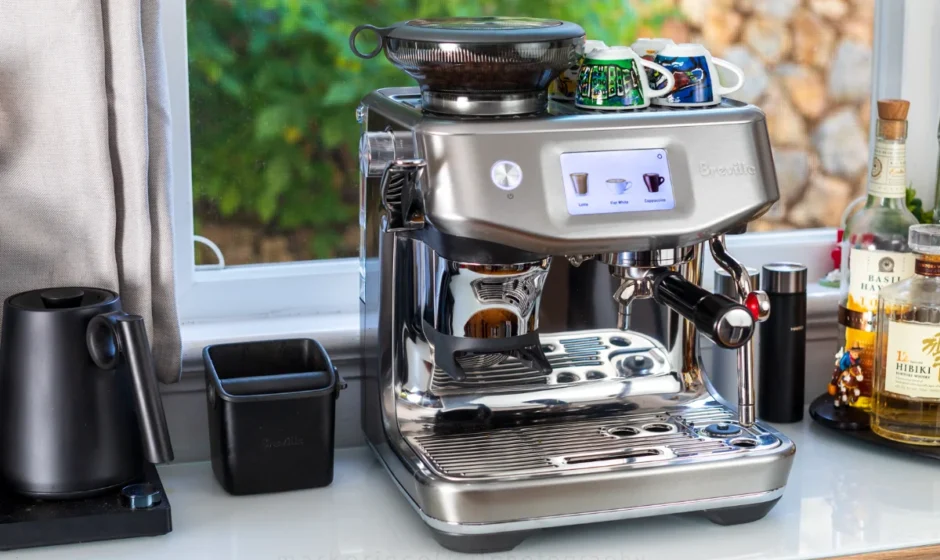

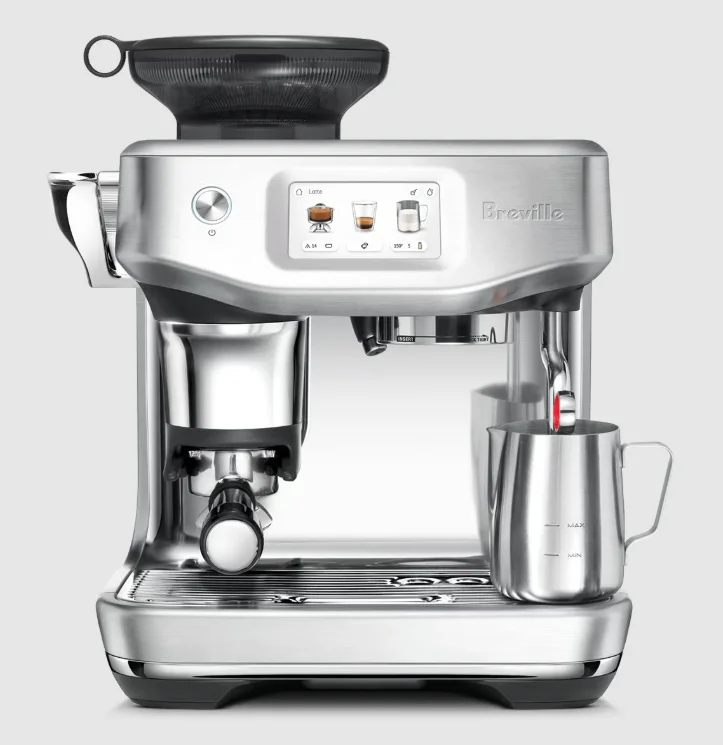
Breville Barista Touch Impress
IMPORTANT SAFEGUARDS
- Remove and discard any packaging materials safely before use.
- Ensure the product is properly assembled before first use and fully unwind the power cord before operating.
- Before using for the first time, please ensure that your electricity supply is the same as shown on the rating label on the underside of the appliance (220-240 V ~ 50-60 Hz 1430-1700 W). If you have any concerns, please contact your local electricity company.
- The installation of a residual current safety switch is recommended to provide additional safety when using all electrical appliances. Safety switches with a rated operating current not more than 30mA are recommended. Consult an electrician for professional advice.
- Regularly inspect the power cord, plug and actual appliance for any damage. If found to be damaged in any way, immediately cease use of the appliance, and return the entire appliance to the nearest authorised Breville Service Centre for examination, replacement, or repair.
- Do not let the power cord hang over the edge of a counter or table. Do not let the power cord touch hot surfaces or become
knotted. - Do not touch hot surfaces. Always ensure the appliance has been
allowed to cool; if the appliance is to be left unattended, cleaned, moved, assembled or stored, or when changing accessories, always switch off the espresso machine by pressing the POWER
button to OFF. Switch off and unplug from the power outlet. - Children must not play with the appliance. Do not leave the appliance unattended when in use. Do not move the appliance whilst in operation.
- This appliance can be used by children aged 8 years and above, and by persons with reduced physical, sensory, or mental capabilities or lack of experience and knowledge if they have been given supervision or instruction concerning the use of the appliance in a safe way and understand the hazards involved. Children shall not make cleaning and user maintenance unless they are older than 8 and supervised. Keep the appliance and its cord out of reach of children aged less than 8 years. To eliminate a choking hazard for young children, discard the protective cover fitted to the power plug safely.
- Position the appliance on a stable, heat-resistant, level, dry surface away from the counter edge, and do not operate on or near a heat source such as a hot plate, oven, or gas hob.
- Do not operate the appliance in an enclosed space or inside a cupboard.
- Do not use attachments other than those provided with the appliances. The use of attachments not sold or recommended by Breville® may cause fire, electric shock, or injury.
- This appliance is for household use only. Do not use the appliance for anything other than its intended purpose. Do not use in moving vehicles or boats. Do not use outdoors. Misuse may cause injury.
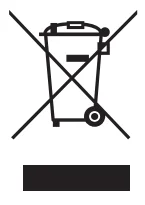
The symbol shown indicates that this appliance should not be disposed of in normal household waste. It should be taken to a local authority waste collection centre designated for this purpose or to a dealer providing this service. For more information, please contact your local council office.

To protect against fire or electric shock, do not immerse the power cord, power plug or appliance in water or any other liquid.
NOTICE TO CUSTOMERS REGARDING MEMORY STORAGE
Please note that in order to better serve our customers, internal memory storage has been embedded into your appliance. This memory storage consists of a small chip to collect certain information about your appliance, including the frequency of use of the appliance and the manner in which your appliance is being used. In the event your appliance is returned for service, the information collected from the chip enables us to quickly and efficiently service your appliance.
The information collected also serves as a valuable resource in developing future appliances to better serve the needs of our consumers. The chip does not collect any information regarding the individuals who use the product or the household where the product is used. If you have any questions regarding the memory storage chip, please contact us at [email protected]
FOR HOUSEHOLD USE ONLY
SAVE THESE INSTRUCTIONS
Features
- RAPID HEAT UP
Innovative heating system achieves ideal extraction temperature in 3 seconds. - PRECISION CONICAL BURR GRINDER
Precision conical burrs maximise ground coffee surface area for a full espresso flavour. - STEP-BY-STEP BARISTA GUIDANCE
Swipe & select from the drink’s menu. Receive guidance throughout the whole coffee-making process so you can enjoy a perfect cup of coffee. Adjust your shot volume, milk texture or milk temperature, then save it as your personal favourite. - ADJUSTABLE GRIND SIZE
Espresso grind settings from fine to coarse for optimal extraction. - ADJUSTABLE GRIND AMOUNT
Adjust the amount of fresh ground coffee dosed into the filter basket to suit the fineness or coarseness of the grind. - PID TEMPERATURE CONTROL
Electronic PID temperature control for increased temperature stability. - DEDICATED HOT WATER SPOUT
Dedicated hot water outlet for making long blacks, teas, and pre-heating cups. - LESS MESS
The portafilter remains secure in the same position as you grind, dose and tamp, reducing any potential grind mess on your drip tray and bench top. - THE BARISTA TOUCH™ IMPRESS PUCK SYSTEM
Simplifies the steps needed to grind, dose, and tamp to create an impressive puck. Less mess. Less fuss.- Precision Measurement
Auto Corrects the Next Dose Grind measurement displayed on screen indicates when the correct level is achieved, and the system automatically remembers the adjustment for the next dose. The correct dose level is calculated based on the measured grind amount. - Assisted Tamping with a 7° Barista Twist Finish
Precise 10kg impression with a professional 7-degree barista twist for a polished puck.
- Precision Measurement
AUTOMATIC HANDS-FREE MILK TEXTURING
Automatically textures milk to the selected temperature and style from silky smooth latté to creamy cappuccino. Choose your preferred milk type to optimize your milk results for dairy, almond, soy and oat milk. Automatic purge removes residual milk from the steam wand once texturing is complete.
Components
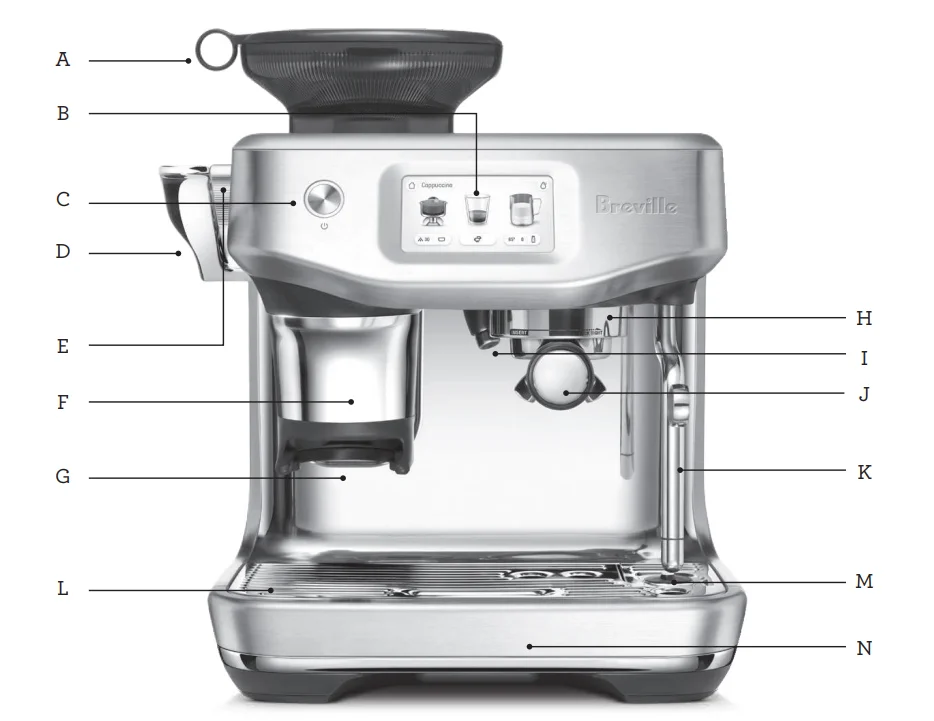
- A. 340g Bean Hopper
- B. Touch Screen
- C. Power Button
- D. Tamp Lever
- E. Grind Size Adjustment Dial
- F. Removable Tamp Cover
- G. Grinding Cradle
- H. Group Head
- I. Hot Water Spout
- J. 54mm Stainless Steel Portafilter
- K. Steam Wand
- L. Drip Tray Grill
- M. Milk TemperatureSensor
- N. Drip Tray
NOT SHOWN
- 2 L Removable Water Tank
- Tool Storage Tray
- Power Cord Storage
ACCESSORIES
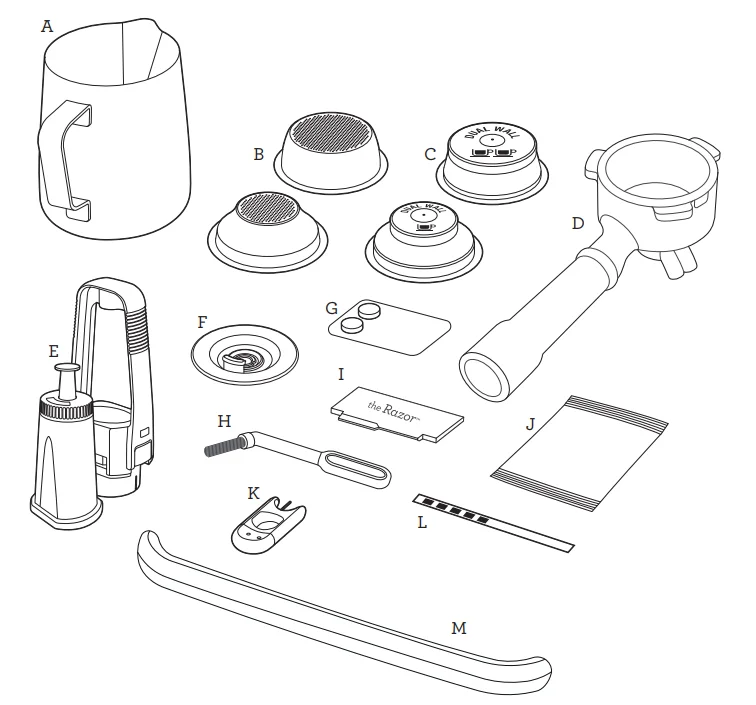
- A. Stainless Steel Milk Jug
- B. 1 cup & 2 cup Single Wall* Filter Baskets
- C. 1 cup & 2 cup Dual Wall Filter Baskets
- D. 54mm Stainless Steel Portafilter
- E. Water Filter Holder With Filter
- F. Cleaning Disc
- G. Cleaning Tablets
- H. Cleaning Brush
- I. Razor™ precision dose trimming tool
- J. Descale Powder
- K. Cleaning Tool For Steam Wand Tip
- L. Water Hardness Strip
- M. Drip Tray Guard (included with machines in colour only)
* 2 cup single wall filter basket comes installed in the portafilter
Assembly
BEFORE FIRST USE
Machine Preparation
Remove and discard all labels and packaging materials attached to your espresso machine. Ensure you have removed all parts and accessories from the box before discarding the packaging. Remove the water tank located at the back of the machine by pulling the water tank handle. Clean parts and accessories (water tank, portafilter, filter baskets, jug) using warm water and a gentle dish washing liquid. Rinse well then dry thoroughly.
NOTE
Machines with colour, drip tray protection guard is included. DO NOT DISCARD.
INSTALLING THE WATER FILTER
- Remove the water filter and water filter holder from the plastic bag.
- Soak the filter in cold water for 5 minutes.
- Rinse the filter holder with cold water.
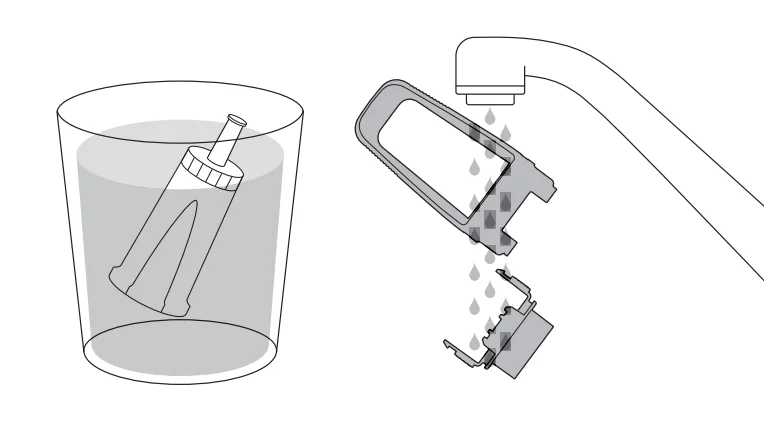
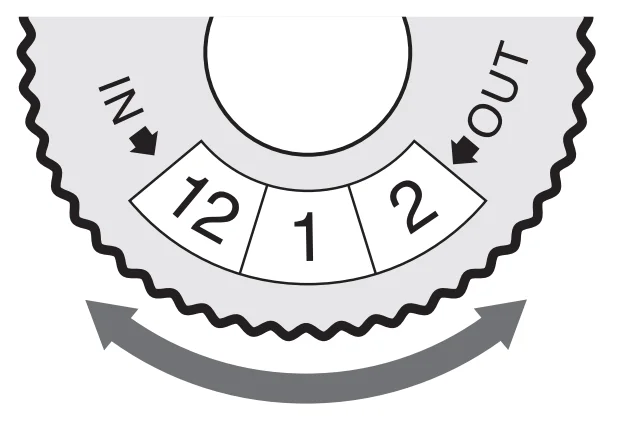
- Set the reminder for next month of replacement. We recommend to replace the filter after 3 months.
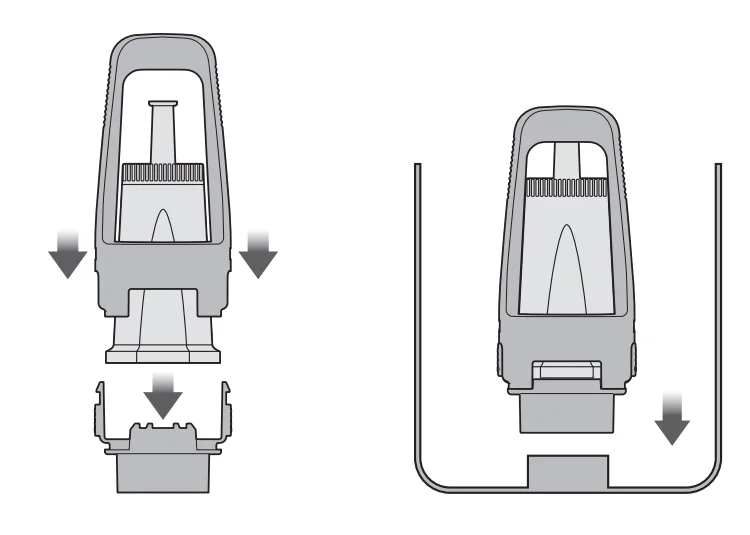
- Insert the filter into the two parts of the filter holder.
- To install the assembled filter holder into the water tank, align the base of the filter holder with the adapter inside the water tank. Push down to lock into place.
NOTE
Replacing the water filter every three months will reduce the need to descale the machine. Filters can be purchased at www.breville.com
NOTE
If your water hardness is either 4 or 5 when tested, we strongly recommend you to change to an alternate water source. Filtered water will extend both the life of your built-in filter and descale intervals as well as superior taste. Please ensure to test the water hardness of the alternative water source you’ve chosen and input into the machine accordingly. Avoid using overly filtered water, like RO water unless some mineral content is being added back to the final water. Never use distilled water, or water with no or low mineral content as this will affect the taste of coffee.
Functions
Filling the Water Tank
- Ensure the water filter is securely fitted inside the water tank.
- Use the handle at the top of the water tank to assist in lifting the water tank and away from the machine.
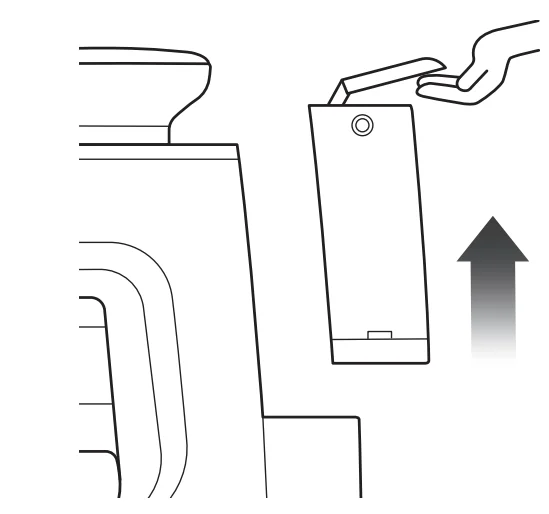
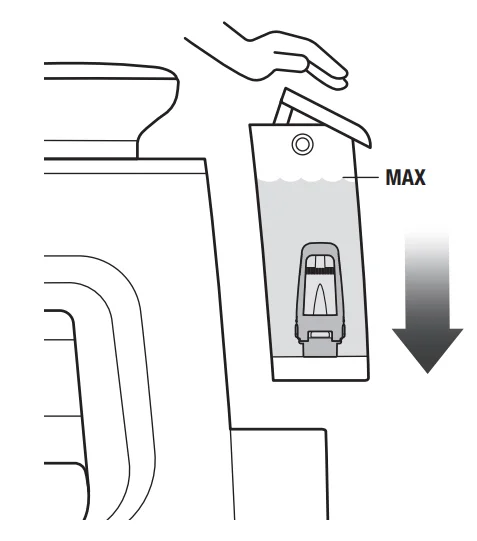
- Fill the water tank with cold potable tap water up to the MAX marking indicated on the side of the water tank.
- Replace the water tank back on the machine, pressing down to ensure that it is properly positioned and attached to the machine.
NOTE
If the water level in the water tank is below the minimum (MIN) marking, the espresso machine will not operate.
Attaching the Hopper
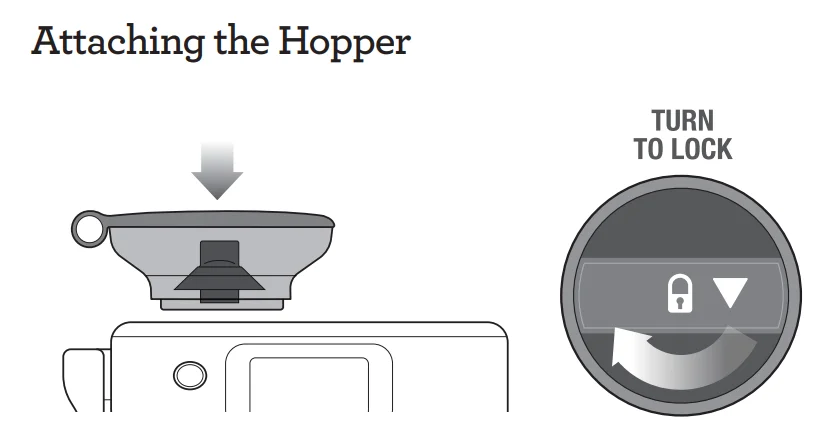
- Insert the bean hopper into position on top of the machine.
- Turn the dial to lock the hopper into place.
- Fill the hopper with fresh beans.
TIP
We recommend quality 100% Arabica beans with a ‘Roasted On’ date stamped on the bag, not a ‘Best Before’ or ‘Use By’ date. Coffee beans are best consumed between 5–20 days after the ‘Roasted On’ date. Stale coffee may pour too quickly from the portafilter spouts and taste bitter and watery.
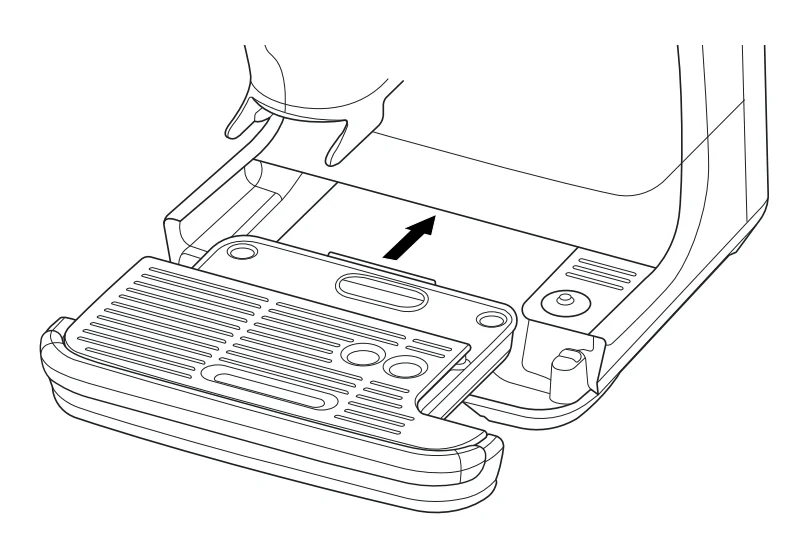
Attaching the Drip Tray
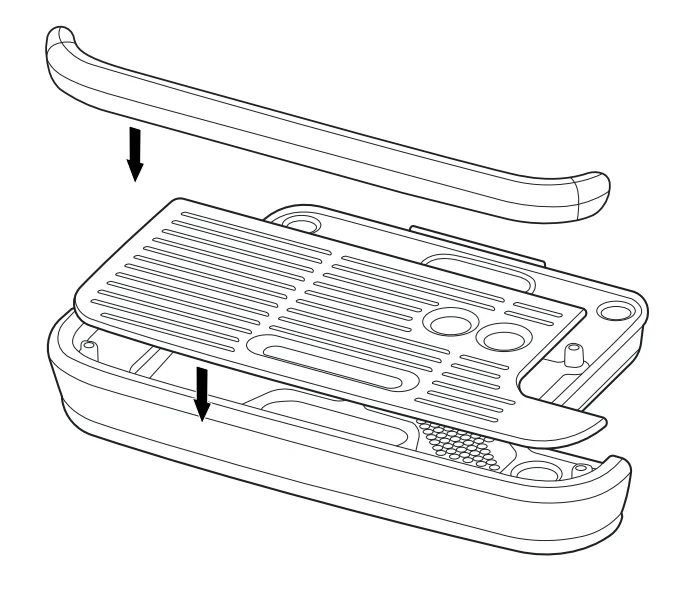
- Place the drip tray grill on top of the drip tray.
- Machines with colour, attach the drip tray protection guard cover on the drip tray.
- Slide the drip tray into the machine.
NOTE
Using the drip tray protection guard cover is optional.
GENERAL OPERATION
- Check the water tank is filled with cold tap water up to the maximum mark.
- Plug the power cord into the power outlet.
- Press the ‘Power’ button.
- Follow the instructions on screen to guide you through first use setup.
DRINK SELECTION
Swipe and select your choice of drink.
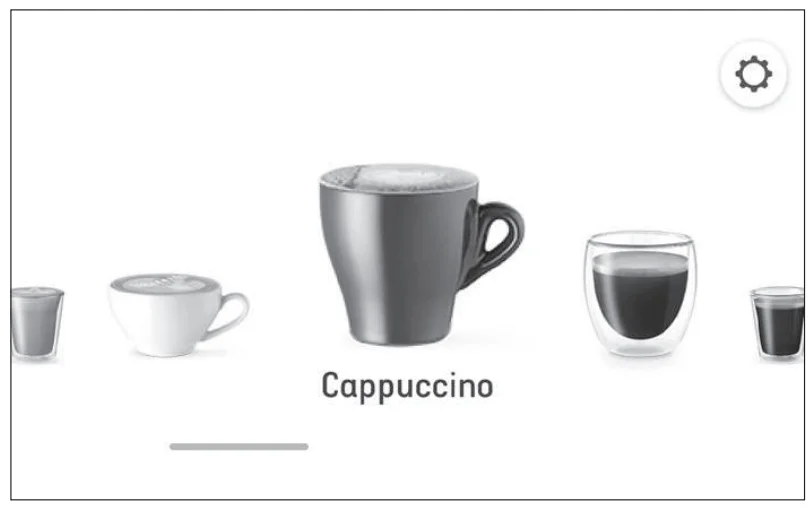
NOTE: Please keep the touch screen dry and clean to ensure that the machine functions properly
DRINK SCREEN
In this screen, you can customise your drink by touching the choice of drink on screen.
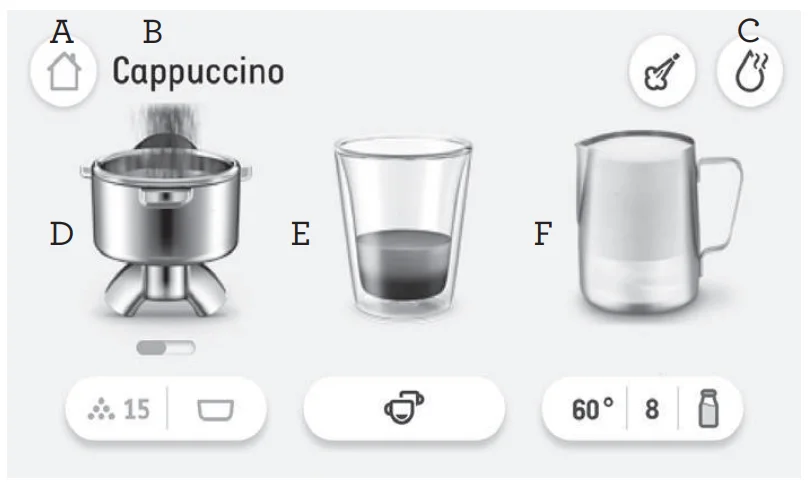
- A. Home icon
- B. Chosen drink
- C. Hot water
- D. Grind / Dose = tap the icon below the portafilter to adjust grinder settings.
- E. Brew = tap the icon below the coffee glass to adjust brewing settings.
- F. Milk texture = tap the icon below the milk jug to adjust milk settings.
SETTING THE GRIND SIZE ANDDOSING
- Adjust the grind size by using the dial on the side of the machine.
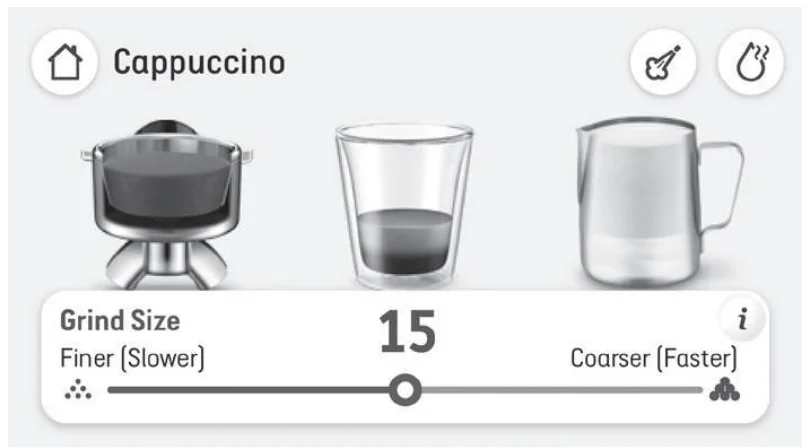
- Follow the screen prompts to select the preferred ‘Basket Size’.
- Tap on the portafilter image to start the grinding and allow fresh ground coffee to fill the portafilter.
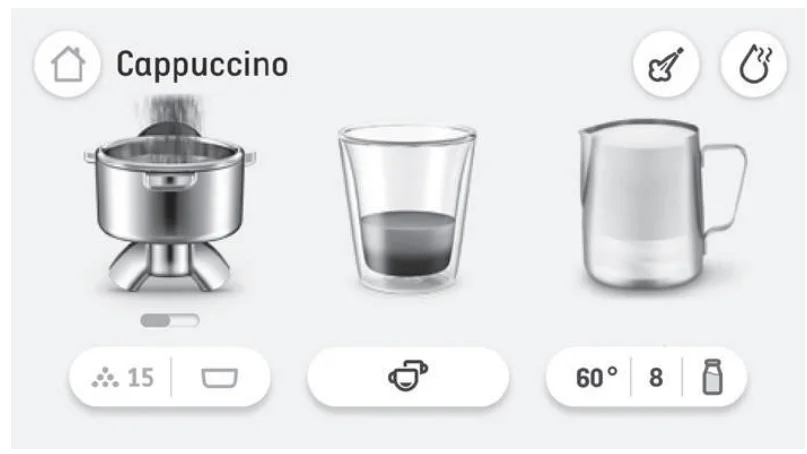
- Grinding will automatically stop.
ASSISTED TAMPING
- When grind cycle is completed, the machine is ready to tamp.
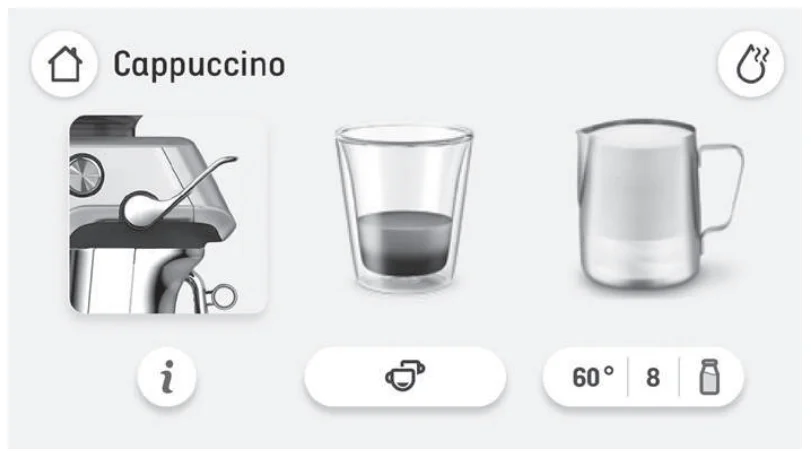
- Push the lever downwards to the end position. This will tamp the coffee grinds in the portafilter using a consistent amount of tamp force. Pushing the lever slowly and consistently will help to improve the puck appearance.
- Release the lever slowly upwards to the home position after tamping.
- Repeat the tamping action as above twice.
NOTE: Screen will indicate if tamp or dose is low, ideal or high.
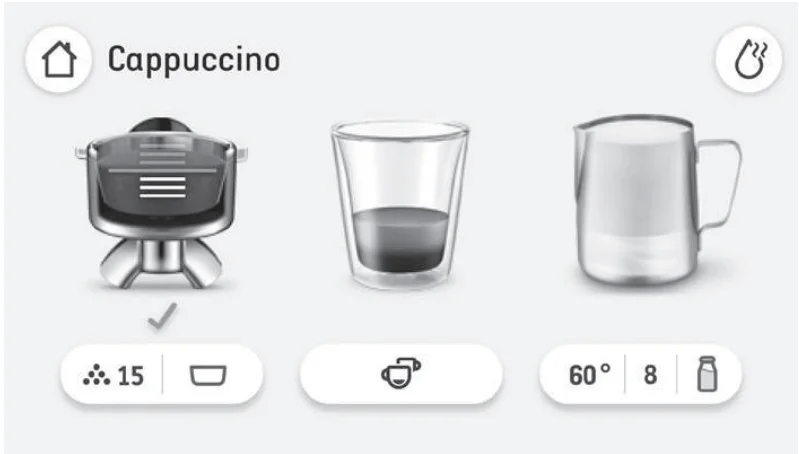
HOW TO CORRECT AN UNDER OR OVER DOSE?
An under or over dose can occur when fresh beans are added to the hopper; when coffee beans age; a different type of coffee bean is used or if a change is made to the grind size.
What to do when dose level is below the ideal middle bar?
- When dose is below the ideal middle bar, the machine will indicate and calculate ‘A Bit More’. Tap the portafilter image on screen to add a bit more and follow screen prompts and complete a tamp for an updated dose level reading.
- When ideal dose level is reached, the machine will automatically update the auto dose time for the next cycle.
What to do when dose level is above the ideal middle bar?
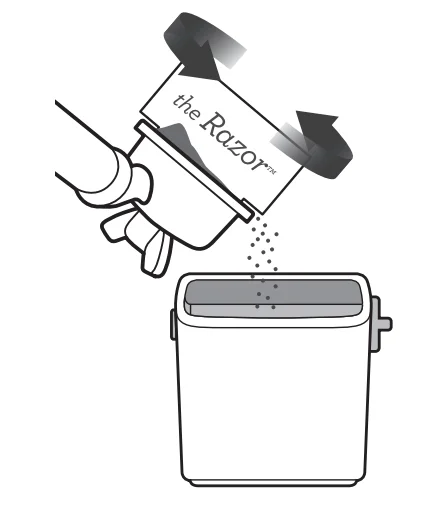
- When dose is above the ideal middle bar, remove the portafilter from the cradle.
- Use the Razor Trimming Tool. (refer to Trimming the Dose section).
- The machine will calculate how much to reduce the auto grind time and apply this for the next cycle.
OVER DOSE (TRIMMING THE DOSE)

The Razor™ precision dose trimming tool allows you to trim the puck to the right level for a consistent extraction. Insert the Razor™ into the coffee basket until the shoulders of the tool rest on the rim of the filter basket. The blade of the dosing tool should penetrate the surface of the tamped coffee. Rotate the Razor™ dosing tool back and forth while holding the portafilter on an angle over the knock box to trim off excess coffee.
Inserting the Portafilter
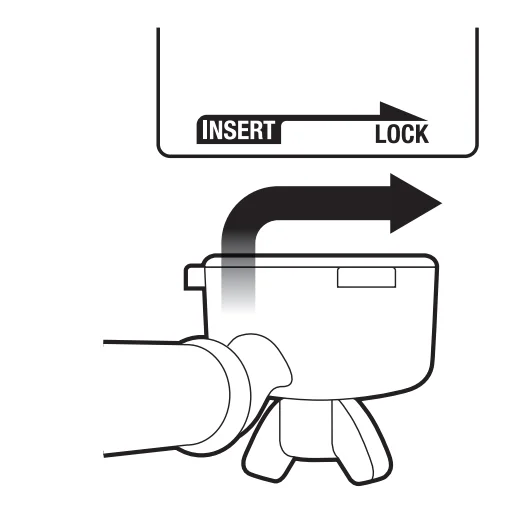
Place the portafilter underneath the group head so that the handle is aligned with the INSERT position. Insert the portafilter into the group head and rotate the handle towards the centre until resistance is felt.
ESPRESSO EXTRACTION
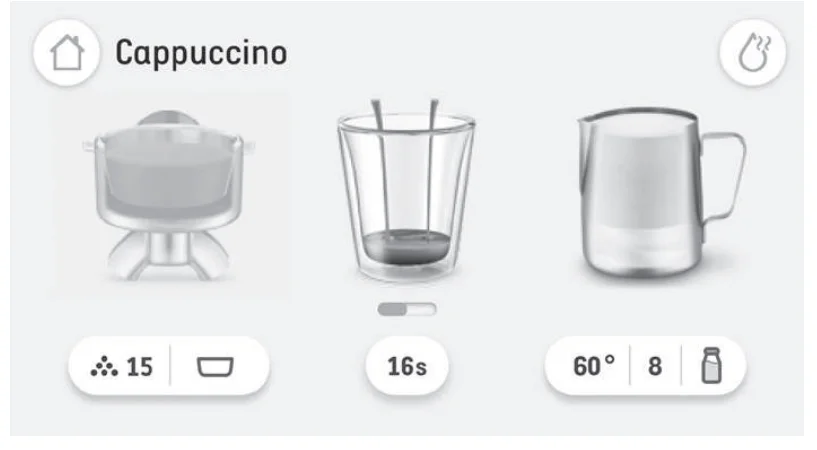
- Select a display of brew options on the screen.
- Select the café size options from: Single (approx.30ml), Double (approx.60ml) or Double+ (approx.90ml).
- Select Custom and slide and drag the dot to increase or decrease the coffee volume.
- Tap the coffee cup image on the screen to start extraction.
- The duration times are preset but can be customised.
MANUAL OVERRIDE
Press and hold the coffee image (approx 2 seconds) to enter manual extraction mode. Touch the coffee image to start the extraction, touch the coffee image again to stop the extraction.
NOTE
- The amount of espresso extracted in the cup will vary depending on your grind size and grind amount settings.
- Touching the coffee image during a preset shot volume will immediately stop the extraction.
- For optimal flavour when using a 1-CUP filter basket, you should extract approx. 30ml. When using a 2-CUP filter basket, you should extract approx 60ml.
TEXTURING MILK
Different brands and milk alternatives will texture differently. For best texturing results, it is recommended to use full cream milk when using dairy milk and use barista-type milks when using plant-based milks. You may need to adjust the froth level accordingly. Start with cold milk. Fill the milk jug to below the spout position. Lift the steam wand and insert it into the milk jug. Lower the steam wand, ensuring it is fully down. The milk jug should rest on the milk temperature sensor located on the drip tray, and the tip of the steam wand should be submerged to ensure that milk covers the ring around the steam wand tip.
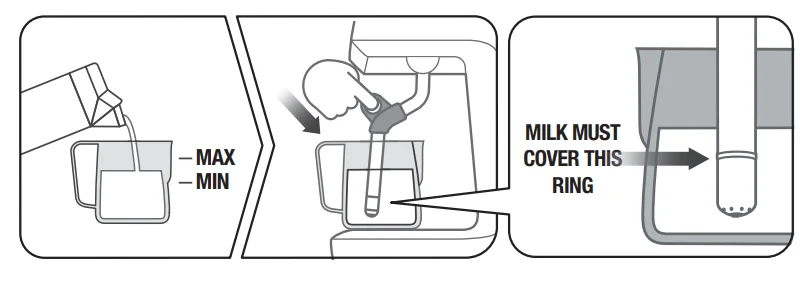
NOTE: Check the image on the screen for the correct milk jug position.
Under the milk jug image, tap the icon to adjust the milk temperature, the level of milk froth or change your milk option: Dairy, Almond, Oat
or Soy. To start, touch the ‘Milk jug’ image. The screen will display the temperature of the milk as it heats.
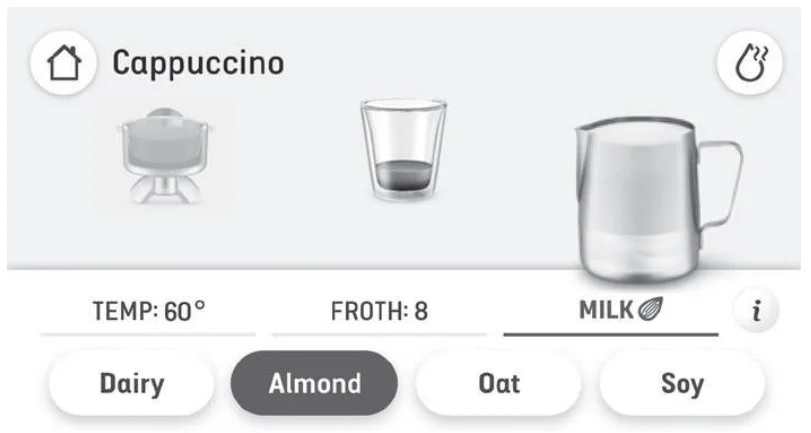
Milk texturing will stop automatically when the selected milk temperature is reached. Lift steam wand to remove milk jug. Wipe the wand and tip with a clean damp cloth. Lower steam wand to the down position and the wand will automatically purge.
MANUAL MILK TEXTURING
Auto milk texturing and auto shut-off are disabled during manual milk texturing mode. Start with a cold milk. Fill milk jug to below the spout position. Lift the steam wand and slide the milk jug under the steam wand. Hold the milk jug at an angle. Start frothing by tapping the milk jug image on screen. When frothing is done and the jug is hot to comfortably touch; tap the milk jug image on screen to stop. Wipe the wand & tip with a clean damp cloth. Lower steam wand to the down position and the wand will automatically purge.
CAUTION: BURN HAZARD
Pressurised steam can still be released, even after machine has been switched off. Children must always be supervised.
NOTE
- When the machine creates steam, a pumping noise can be heard. This is the normal operation of the pump.
- Use exclusively the stainless steel milk jug included in the pack to froth milk. The use of a container made of glass or plastic material to froth milk may lead to overheated milk or dangerous conditions.
Maintenance
- Clean Steam Wand – This will show how to clean the steam wand to remove any blockage for better steaming performance.
- Group Head Cleaning – This will need an espresso cleaning tablet or powder and will take 10 minutes to complete.
- Grinder Cleaning – Follow the step-by-step process to clean the grinder to help the grinder run in its optimal capacity and avoid possible blockages.
- Descale – Descaling prevents excess mineral and scale build-up. A pop-up message will let you know when it is time for descaling.
- Water Filter Change – To ensure the machine has clean water to use.
Drink Settings
- Intelligent Dose – To turn on or off ‘Intelligent Dosing’ that measures the dose and enables the intelligent brewing calibration feature.
- Default Milk – List of different kinds of milk and select the desired milk default.
- Coffee Tutorial – The machine will guide you on screen, step by step to make an actual coffee.
Other
- Notifications – List of the machine notification alerts.
- Guidance Tips – To turn on and off the guidance tip animations on the drink screen.
- Date & Time – To help set the date and time on the machine.
- Units – To switch between imperial and metric units.
- Help – Online help information screen with QR Code.
- Language – To set the machine’s language.
- Demo mode – For on-screen Barista Touch™ Impress demonstration sequence.
- About Appliance –To show model number and firmware version of the machine.
- Factory Reset – Use this function to reset all programmable values back to the factory settings and delete all custom drinks.
CLEANING THE FILTER BASKETS AND PORTAFILTER
- The filter baskets and portafilter should be rinsed under hot water immediately after use to remove all residual coffee oils.
- If any of the holes in the filter basket become blocked, use the pin on the end of the provided cleaning tool to unblock the hole(s).
- If the hole(s) remain blocked, dissolve a cleaning tablet in hot water and soa filter basket and portafilter in solution for approx. 20 minutes.
- Rinse thoroughly.
For more manuals by Breville, visit ManualsLibraryy
Breville Barista Touch Impress-FAQs
What is the Breville Barista Touch Impress?
The Breville Barista Touch Impress is a premium espresso machine with a touchscreen display, built-in grinder, automatic milk frothing, and assisted tamping system. It is designed to help users make café-style coffee at home with less effort and more consistency.
What is the difference between the Barista Touch and Touch Impress?
The Barista Touch Impress includes all the touchscreen and automatic milk features of the standard Barista Touch, but it also adds an intelligent grinding and tamping system. This helps improve espresso consistency and reduces mess during preparation.
Is the Breville Barista Touch Impress good for beginners?
Yes, this machine is beginner-friendly because it guides users through grinding, tamping, and milk frothing. The touchscreen interface and automatic settings make it easier for new users to prepare espresso drinks with professional-style results.
Can you customise drink settings on the Barista Touch Impress?
Yes, users can customise coffee strength, milk texture, temperature, and shot volume. The machine also allows you to save personalised drink recipes for quick access later.
Does the machine have a built-in grinder?
Yes, the Barista Touch Impress comes with an integrated conical burr grinder. It grinds fresh coffee beans directly into the portafilter for better flavor and aroma in every cup.
How does the Impress tamping system work?
The Impress system automatically assists with tamping pressure and dosage guidance. It helps create a balanced coffee puck, improving extraction quality and reducing guesswork for users.
Can the Breville Barista Touch Impress make regular coffee?
The machine is mainly designed for espresso-based drinks like lattes, cappuccinos, and Americanos. However, you can prepare an americano by adding hot water to espresso for a coffee-style drink.
What drinks can you make with this espresso machine?
You can prepare espresso, cappuccino, latte, flat white, americano, macchiato, and other milk-based coffee beverages. The touchscreen includes preset drink options for convenience.
How often should the machine be cleaned?
Regular cleaning is recommended after daily use. The drip tray, steam wand, and portafilter should be cleaned frequently, while descaling and deep cleaning should be done according to the maintenance alerts shown on the machine.