
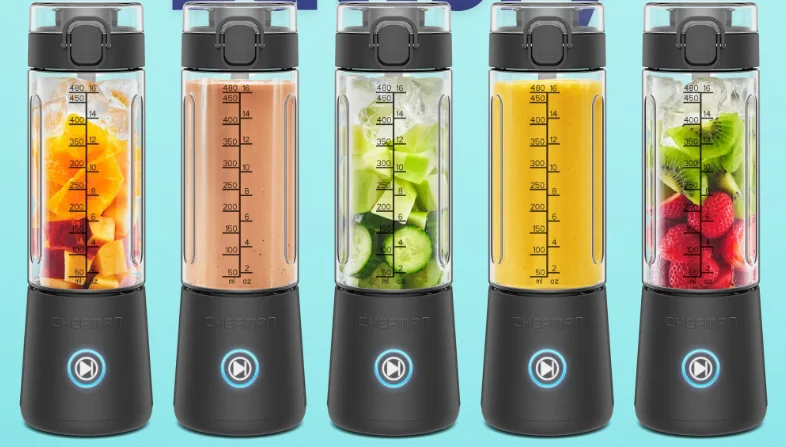

Chefman RJ28-R Cordless Portable Blender
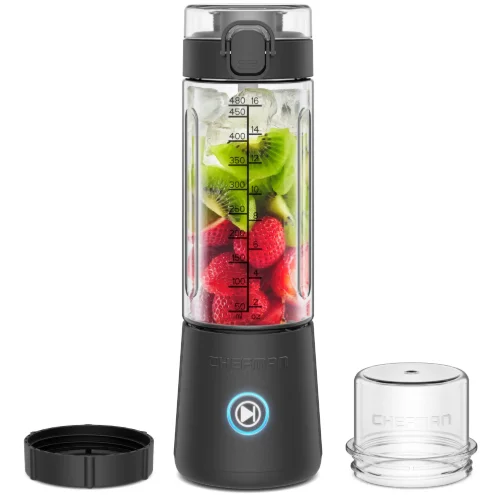
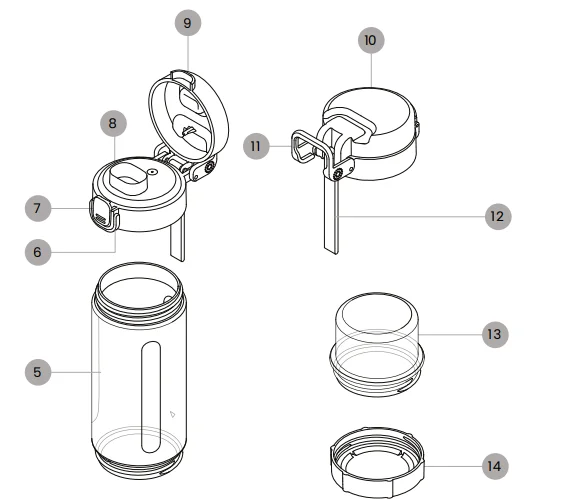
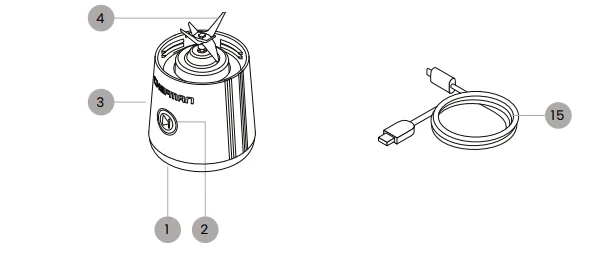
Get to Know Your Blender
- Motor base
- START button with 5-color LED
- Charging cable port (on back, not shown)
- Blade assembly
- Blender jar
- Lid button lock
- Lid open button
- Sipping spout
- Sipping lid (front view)
- Sipping lid (back view)
- Lid carrying ring
- Lid carrying strap
- Blade cover
- Blender jar bottom cover
- Charging cable


SAFETY INSTRUCTIONS & IMPORTANT SAFEGUARDS
When using electrical appliances, basic safety precautions should always be followed, including:
- Read all instructions.
- To protect against the risk of electrical shock, do not put the unit base in water or other liquids.
- This appliance is not intended for use by persons (including children) with reduced physical, sensory, or mental capabilities, or a lack of experience and knowledge, unless they are closely supervised and instructed concerning use of the appliance by a person responsible for their safety.
- Close supervision is necessary when any appliance is used by or near children. Children should be supervised to ensure that they do not play with the appliance.
- Turn the appliance OFF before assembling or disassembling parts and before cleaning.
- To unplug after charging, grasp the plug and pull from the blender.
- Avoid contacting moving parts. Do not attempt to defeat any safety interlock mechanisms.
- Do NOT operate any appliance after the product malfunctions or is dropped, or is damaged in any manner. Contact Chefman Customer Support for examination, repair, or adjustment.
- The use of attachments, including canning jars, is not recommended by the manufacturer and may cause injuries to persons.
- Do NOT use outdoors.
- Keep hands and utensils out of the container while blending to reduce the risk of severe injury to persons or damage to the blender. A scraper may be used, but it must be used only when the blender is not running.
- Blades are sharp. Handle carefully.
- Always operate the blender with the cover in place.
- Do NOT place on or near a hot gas or electric burner, or in a heated oven.
- Do NOT blend hot liquids.
- Do NOT incinerate this appliance even if it is severely damaged. The batteries can explode in a fire.
- The appliance should only be used with the battery charger packaged with the appliance or those battery chargers according to Listed/Certified Information Technology (Computer) Equipment, or Listed/Certified ITE Power Supply, or Listed Class 2 Power Unit.
Before First Use
- Remove all packaging materials and check to ensure that all parts and accessories are accounted for.
- Wipe down the motor base with a damp cloth to remove any packaging residue.
- Wash the blending jar, lid, blade cover, and blending jar bottom cover with warm, soapy water, and dry thoroughly. (These parts are also all top-rack dishwasher safe.)
- Charge the blender according to the directions below.
How to Charge the Blender
- Plug the small end of the included charging cable into the port on the back of the base. Insert the other end into a standard USB-C charging block (not included) and plug the block into a wall outlet.
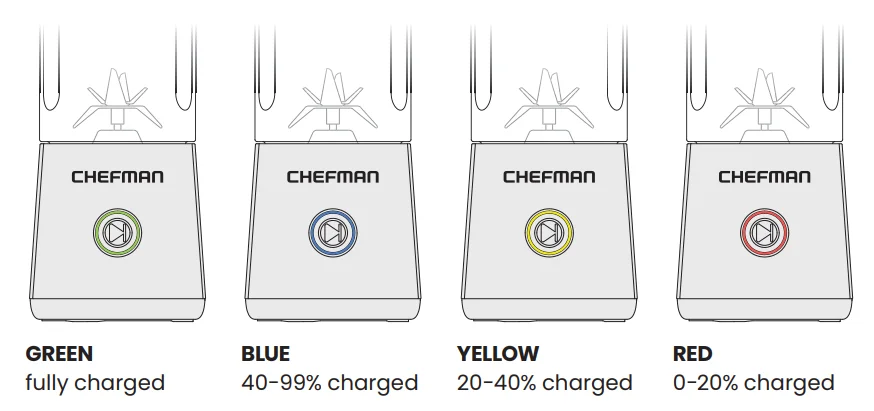
- The LED ring around the START button will slowly pulse red, then yellow, then blue as the unit charges. When it is fully charged, the LED ring will turn solid green. It will take approximately 4 hours for an empty battery to fully charge.
- When ready to use the blender, unplug it from the charging cable. The LED light will change from green to blue when you start to use it, and then display the same colors as the battery discharges, as it did when charging (but solid rather than pulsing).
Battery Charge Indicator Colors
How to Use the Blender
- Set the motor base on a clean, dry work surface.
- With the blending jar upright (numbers facing the correct way), screw the blender jar onto the motor base, turning clockwise until snug.
- Add the food to be processed to the blending jar, up to but not over the 16 oz/480 ml marking. See How to Layer Ingredients, p. 8, for the best way to fill your blender. CAUTION: Do not blend ice alone without any liquid.
- Place the lid on the jar and tighten by turning clockwise until snug. Make sure the lid is closed and locked before blending.
- To process, press the START button twice. The blender will operate for 30 seconds, then automatically turn off. Repeat blending as many times as necessary. NOTE: After the fourth or fifth blend, it’s a good idea to let the blender rest briefly to avoid overheating and extend the life of the motor.
- Alternatively, put the blender in pulse mode by pressing and holding the START button for 3 seconds—the LED ring will turn purple. You can then blend in short bursts by pressing and releasing the button. (The blender will return to its default blend mode after 1 minute of inactivity.)
- When finished blending, turn the unit over and unscrew the motor base. Replace the base with the blender jar bottom cover, twisting clockwise until snug. (For safety, screw the blade cover onto the motor base for storage or when not in use.) Alternatively, you can take the blender on the go with the base still attached—for instance, if you want to re-blend just before drinking. WARNING: Do NOT place the full blender with motor base attached in the refrigerator.
- The blender is now ready to take on the go. It can be carried by either the carrying ring or the strap on the lid. Be sure the lid button lock is over the button so it doesn’t accidentally open in transit.
- To open the lid for drinking, press the button and gently press the lid back until it locks open so it doesn’t flop down.
How to Layer Ingredients
For the best, most even blending, it’s important to add your ingredients to the blender in an order that will allow for free movement of the blades and prevent anything from getting stuck. Most ingredients should be cut into 1-inch chunks, though soft ingredients like bananas can be larger. Here’s how to layer them: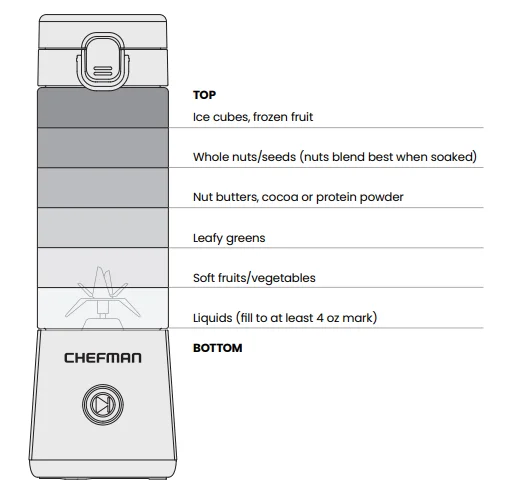
Keep It Clean
- For the easiest everyday cleaning, clean the blender as soon as you’re finished using it. Reassemble the blender and fill it with water and a few drops of mild soap. Blend to clean the jar and blade assembly. Discard and rinse with clean water.
- If there is food stuck to the blade, clean it with a wet brush and carefully wipe it clean with a kitchen cloth. CAUTION: The blades are SHARP! Take care when cleaning them by hand. CAUTION: Do not immerse the motor base in water or any liquid, or let water get into the START button or charging port.
- The removable parts (blending jar, lid, blade cover, and blender jar bottom cover) are also top-rack dishwasher safe.
- After washing, be sure the gasket in the lid cover is still securely in place (if not, push it back into place).
- User Maintenance: Any other servicing should be performed by an authorized service representative.
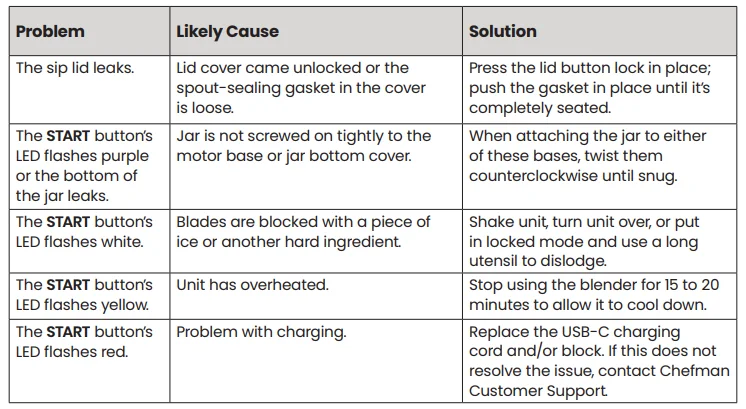
Having Trouble?
Terms & Conditions
Limited Warranty
RJ Brands, LLC d/b/a Chefman® offers a limited 1-year warranty (the “Warranty”) available on sales through authorized distributors and retailers only. Please note that this Warranty becomes valid from the date of initial retail purchase and that the Warranty is nontransferable and applies only to the original purchaser.
This Warranty is void without proof of purchase within the United States and Canada. Please be aware that this Warranty supersedes all other warranties and constitutes the entire agreement between the consumer and Chefman®. Any changes to the Terms and Conditions of this Warranty must be in writing, signed by a representative of Chefman®. No other party has the right or ability to alter or change the Terms and Conditions of this Warranty.
We may ask you to please submit, via email, photos and/or videos of the issue you are experiencing. This is to help us better assess the matter and possibly offer a quick fix. Photos and/or video may also be required to determine Warranty eligibility.
We encourage you to register your product. Registering can make the Warranty process easier and can keep you informed of any updates or recalls on your product. To register, follow the directions on the Chefman® Warranty Registration page in the Chefman® User Guide. Please retain your proof of purchase even after registering. If you do not have proof of your purchase date, we may declare your Warranty void, or we may, at our sole discretion, apply the date of manufacture as the purchase date for purposes of this Warranty.
What the Warranty Covers
Manufacturer Defects
Chefman® products are warranted against defects in material and workmanship, under normal household use, for a period of 1 year from the date of purchase when used in accordance with the directions listed in the Chefman® User Guide. If your product does not work as it should, please contact Customer Support at [email protected] so that we may assist you.
This Warranty Does Not Cover
Misuse
Damage that occurs from neglectful or improper use of products, including but not limited to damage that occurs as a result of usage with incompatible voltage, regardless of whether the product was used with a converter or adapter. See Safety Instructions in the Chefman® User Guide for information on proper use of the product.
Poor Maintenance
General lack of proper care. We encourage you to take care of your Chefman® products so that you may continue to enjoy them. Please see Keep It Clean directions in this Chefman® User Guide for information on proper maintenance.
Commercial Use
Damage that occurs from commercial use.
Normal Wear and Tear
Damage or degradation expected to occur due to normal use over time;
Altered Products
Damage that occurs from alterations or modifications by any entity other than Chefman®, such as the removal of the rating label affixed to the product;
Catastrophic Events
Damage that occurs from fire, floods, or natural disasters; or
Loss of Interest
Claims of loss of interest or enjoyment.
For product information, please visit us at Chefman.com. EXCEPT WHERE SUCH LIABILITY IS REQUIRED BY LAW, THIS WARRANTY DOES NOT COVER, AND CHEFMAN® SHALL NOT BE LIABLE FOR, INCIDENTAL, INDIRECT, SPECIAL, OR CONSEQUENTIAL DAMAGES, INCLUDING WITHOUT LIMITATION, DAMAGE TO OR LOSS OF USE OF THE PRODUCT, OR LOST SALES OR PROFITS, OR DELAY OR FAILURE TO PERFORM THIS WARRANTY OBLIGATION. THE REMEDIES PROVIDED HEREIN ARE THE EXCLUSIVE REMEDIES UNDER THIS WARRANTY, WHETHER BASED ON CONTRACT, TORT, OR OTHERWISE.
For More Manuals By Chefman, Visit ManualsLibraryy
Chefman RJ28-R Cordless Portable Blender-FAQS
How do I charge the Chefman RJ28-R cordless blender?
To charge the blender, connect the smaller end of the charging cable to the USB port on the blender. Plug the other end into a power adapter, then connect it to a standard wall outlet.
How long does it take to fully charge the portable blender?
A full charge usually takes around 2 hours, depending on the power source used.
How can I tell when the Chefman portable blender is fully charged?
When charging is complete, the indicator light will stop blinking or change to a steady light, showing that the battery is fully charged.
Can I use the blender while it is charging?
No. The blender should not be used while plugged in or charging, as this is a safety feature designed to protect the motor and battery.
What should I do if the blender suddenly stops working?
If the blender stops mid-use, it may have overloaded. Turn it off, remove some ingredients, let the motor cool, and then try again.
Does the blender stop charging once it is full?
Yes. The Chefman RJ28-R includes built-in protection that automatically stops charging when the battery reaches full capacity.
Is it safe to leave the blender plugged in after it’s fully charged?
Occasionally leaving it plugged in is fine, but to extend battery life, it’s best to unplug the blender once charging is complete.
How long does a cordless portable blender like this usually last?
Chefman RJ28-R Cordless Portable Blender User Manual provides setup instructions, safety guidance, operating steps and maintenance tips for reliable blending.
What ingredients should I avoid blending?
Avoid very hard items like solid ice blocks or extremely frozen ingredients, as they can strain the motor and reduce the blender’s lifespan.