
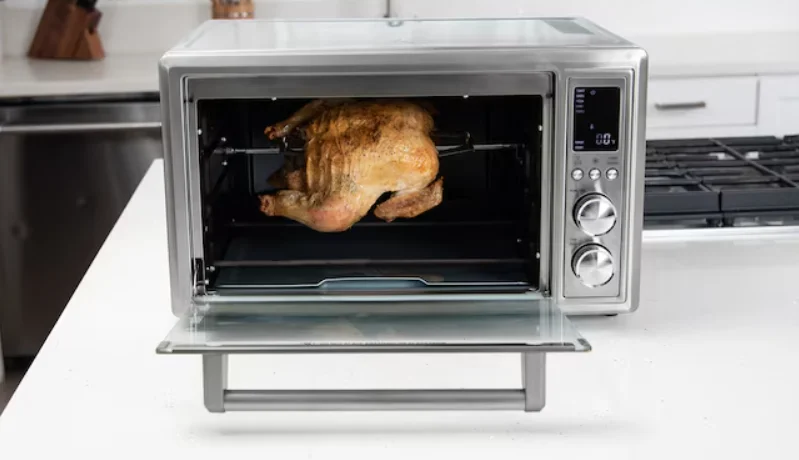

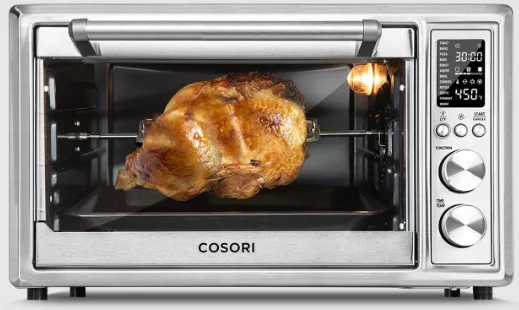
COSORI CO130-AO 30 Liter Air Fryer Oven
GETTING TO KNOW YOUR AIR FRYER TOASTER OVEN
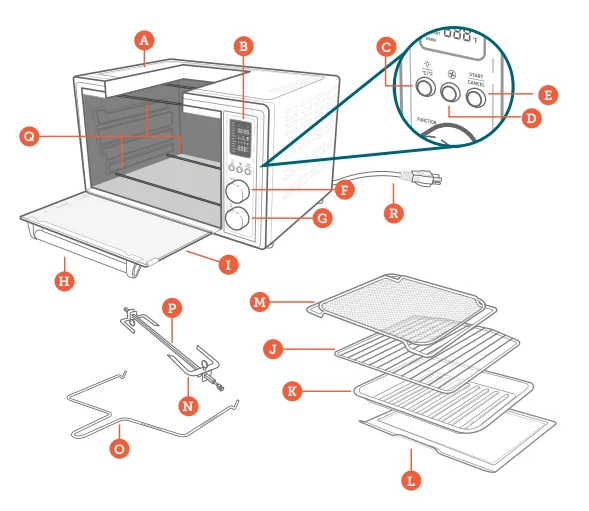
DISPLAY


CONTROLS
Light/Unit Button
- Turns the interior light on/off.
 will show on the display.
The interior light will turn on automatically when there is 1 minute left of cooking time. Press to turn the light back off. - Press and hold to switch temperature units between Fahrenheit and Celsius.
 will show on the display.
Fan Button
- Cycles through fan speeds: normal, high, and off.
- The fan can be used for all cooking functions except Toast and Bagel. The fan is automatically set during Air Fry and Dehydrate.
START/CANCEL Button
- Starts or cancels a cooking function.
- If preheating, it cancels preheating and starts the cooking function.
- Blinks when the oven is preheating or has finished preheating. Press the button again to start the cooking function.
- Lights up when the oven is heating.
FUNCTION Knob
- Turn the knob to choose a cooking function. The selected function will blink on the display.
TIME/TEMP Knob
- Turn the knob to change the time/temperature. Turn clockwise to increase, and counterclockwise to decrease.
- Press the knob to switch between controlling time and temperature. By default, the knob will control time.
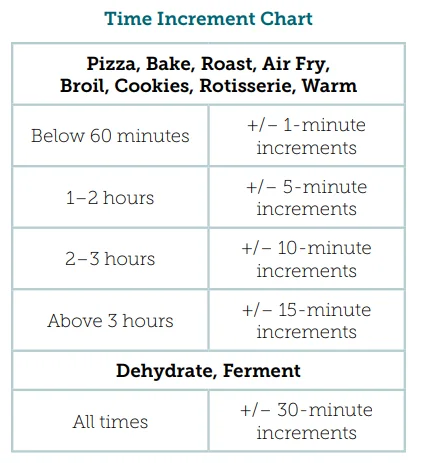
- Time will adjust in increments of +/– 1, 5, 10, or 15 minutes (see chart).
- Temperature will adjust in increments of +/– 5°F.
- After a time or temperature setting is selected, the number will flash 5 times on the display before the setting is confirmed.
- Display On/Off: Press and hold the knob until the display turns on/off.

BEFORE FIRST USE
Setting Up
- Remove all packaging around and inside the oven.
- Place on a stable, level, heat-resistant surface, away from anything that can be damaged by heat.
- Wash all accessories and clean the oven’s interior (see page 26). Dry and place accessories back in the oven.
- Plug in. Turn the FUNCTION knob to “TOAST”, and turn the TIME/TEMP knob to Level 7. Note: Running the Toast function (with no food in the oven) will eliminate any residue or traces of odor that may remain after shipping.
- Press START/CANCEL. The button will light up, and the display will show the timer counting down.
- The oven will stop heating and beep when finished.
Test Run
A test run will help you become familiar with your oven, make sure it’s working correctly, and clean it of possible residues in the process.
- Make sure there is no food or packaging in the oven and plug it in.
- Turn the FUNCTION knob to “TOAST” and turn the TIME/TEMP knob to Level 7.
- Press START/CANCEL to begin heating. The button will light up, and the display will show the timer counting down.
- The oven will stop heating and beep when finished.
COOKING WITH YOUR AIR FRYER TOASTER OVEN
CAUTION:
- The outer surface of the oven, including the oven door, is hot during and after use. Temperature may be over 212°F / 100°C. Do not touch hot surfaces. Use a handle.
- Always use heat-resistant gloves, pads, or oven mitts when handling hot materials and when placing items in or removing items from the oven.

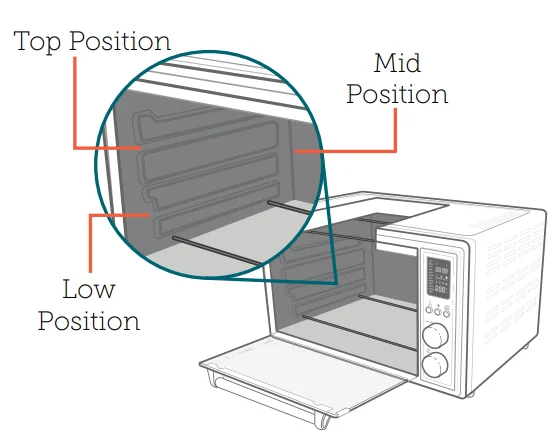
Note: Always leave the crumb tray at the bottom of the oven when cooking for easier cleaning.
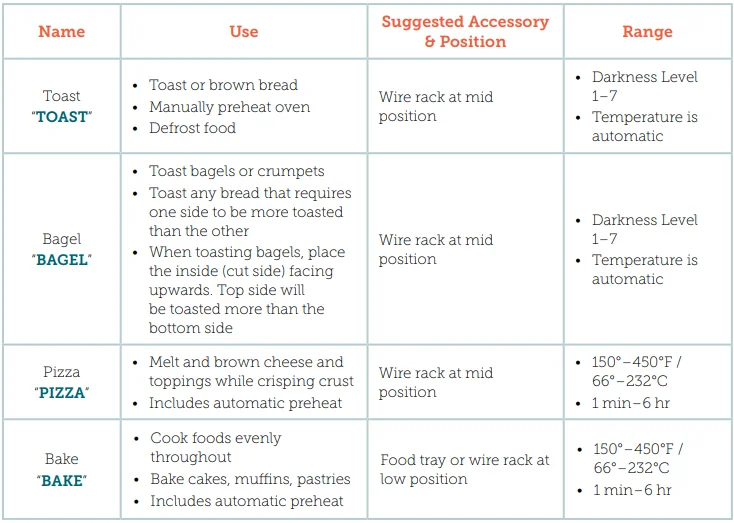
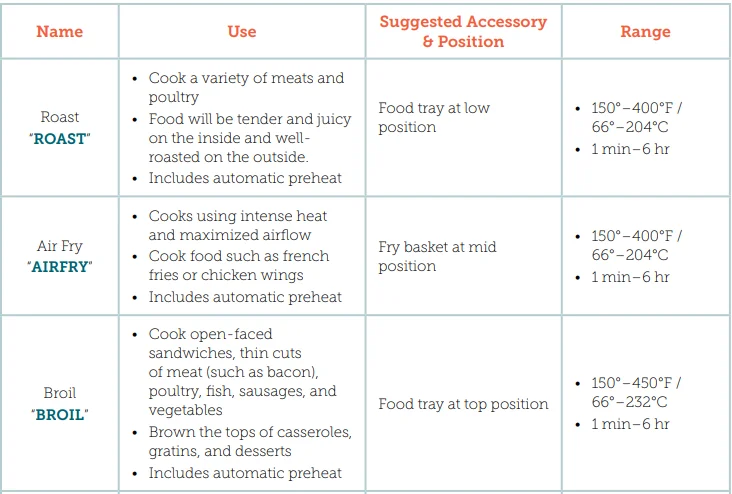
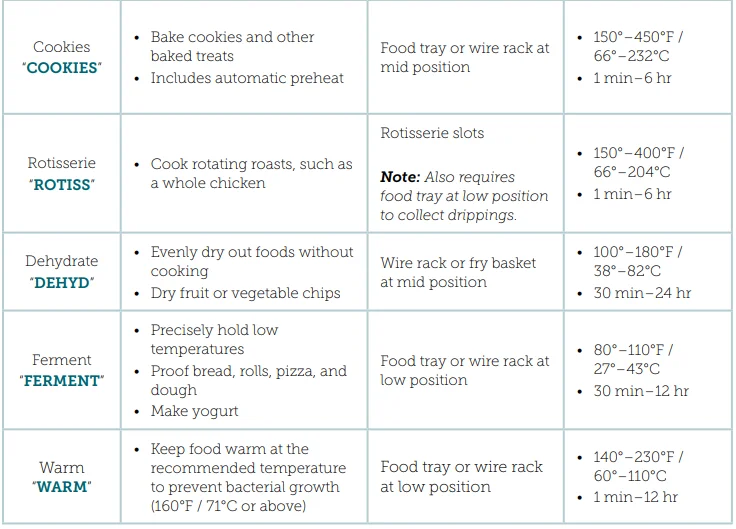
Cooking Functions Quick Reference Chart
Convection Fan
The fan circulates hot air in the oven for faster and more even cooking. Use the high fan speed (super convection) for crispier results and for air frying. You can turn the fan on and off at any time during cooking. Note: The fan cannot be used for the Toast or Bagel functions. Fan speed is set automatically for the Air Fry and Dehydrate functions.
Automatic Preheat
Pizza, Bake, Roast, Broil, Cookies, and Air Fry all use automatic preheat.
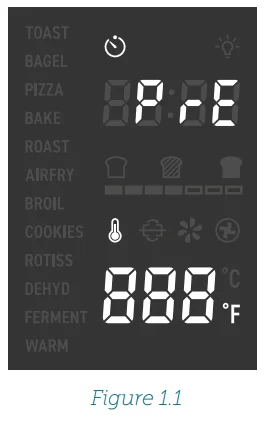
- When you start the cooking function by pressing START/CANCEL, preheating will start automatically. The START/CANCEL button will blink, and the display will show
 .
. - Pressing START/CANCEL again during preheating will cancel preheating and immediately start cooking.

- When preheating is finished, the oven will beep several times, and the display will flash. This will repeat every 2 minutes. The START/CANCEL button will keep blinking until pressed again.
- After 10 minutes of inactivity, the cooking function will cancel, the oven will stop heating, and the display will reset.
- Press START/CANCEL to begin cooking. The button will light up, and the display will show the timer counting down.
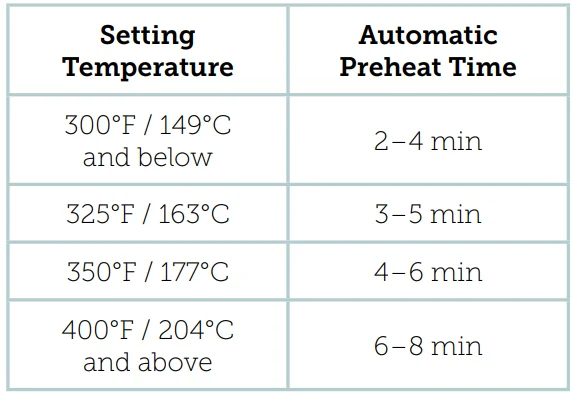
- Preheating times vary based on the temperature setting (see chart).

 .
.
Toast Function (“TOAST”)
This function browns the outside of your bread while keeping the inside soft. Also ideal for English muffins and frozen waffles. It can be used to manually preheat the oven or defrost food. Use Level 4 or higher.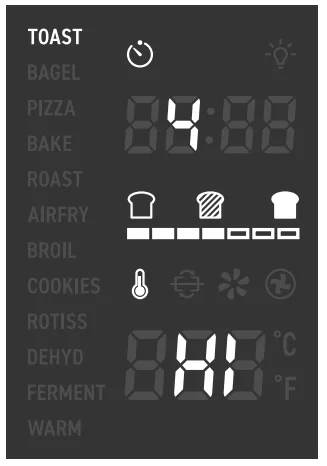
- Heating Elements: Top and bottom heating elements cycle on and off
- Rack Position: Mid
- Place up to 6 slices of bread on the wire rack. Insert the wire rack at the mid position and close the oven door.
- Turn the FUNCTION knob to “TOAST”, which will blink on the display.
- Optionally, customize the darkness level. You can only do this before cooking starts.
- Turn the TIME/TEMP knob to adjust the darkness level between 1–7. The bars underneath the toast icons indicate the darkness level.
- Use 1–2 for a light toast, 3–5 for a medium toast, and 6–7 for a dark toast.
- Note: When setting the darkness level, consider the type, thickness, and freshness of the bread.
- Try lighter settings for raisin toast, white bread, and thinly sliced bread.
- Try darker settings for rye, whole wheat, heavier-textured bread, and fresh bread.
- Time and temperature are set automatically. Time increases with the darkness level. Temperature is set to the highest level (450°F / 232°C). The display will show “HI”.
- Press START/CANCEL to begin. The button will light up, and the display will show the timer counting down.
- The oven will stop heating and beep when finished.
Bagel Function (“BAGEL”)
This function crisps the inside of a cut bagel while lightly toasting the outside. Also ideal for toasting crumpets or thick-sliced specialty breads, which require one side to be more toasted than the other.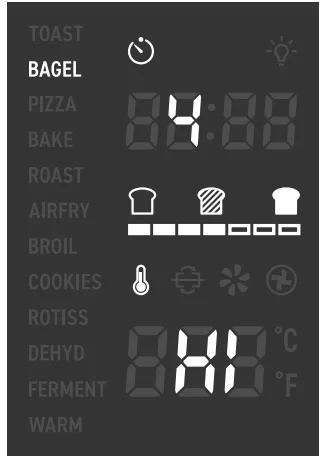
- Heating Elements: Top heating elements cycle on and off, and bottom heating elements are half on and half off.
- Rack Position: Mid
- Slice the bagel in half. Center the halves on the wire rack. Insert the wire rack at the mid position and close the oven door. Note: This function toasts more on the top than the bottom. The inside (cut side) of the bagel should face upwards for best results.
- Turn the FUNCTION knob to “BAGEL”, which will blink on the display.
- Optionally, customize the darkness level. You can only do this before cooking starts.
- Turn the TIME/TEMP knob to adjust the darkness level between 1–7. The bars underneath the toast icons indicate the darkness level.
- Use 1–2 for a light toast, 3–5 for a medium toast, and 6–7 for a dark toast.
- Note: When setting the darkness level, consider the type, thickness, and freshness of the bagel.
- Try lighter settings for bagels that are white, light-textured, thinner, or have raisins.
- Try darker settings for bagels that are fresh or have a heavier texture.
- Time and temperature are set automatically. Time increases with the darkness level.
- Press START/CANCEL to begin. The button will light up, and the display will show the timer counting down.
- The oven will stop heating and beep when finished.
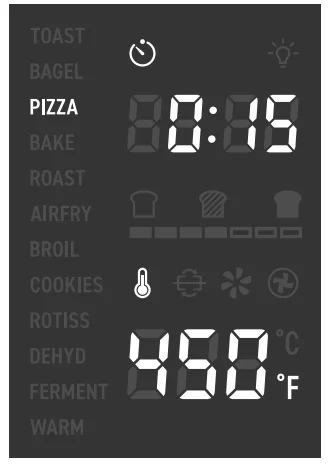
Pizza Function (“PIZZA”)
This function melts and browns cheese and toppings while crisping the crust.
- Heating Elements: Top and bottom heating elements cycle on and off
- Rack Position: Mid

- Insert the wire rack at the mid position and close the oven door.
- Turn the FUNCTION knob to “PIZZA”, which will blink on the display.
- Optionally, customize the temperature and time. You can do this anytime during cooking (except during preheating).
- Turn the TIME/TEMP knob to adjust the time between 1 min–6 hr.
- Press the TIME/TEMP knob once to control temperature. Turn the knob to adjust the temperature between 150°–450°F / 66°–232°C. Note: Try a slightly longer cooking time for pizzas with thicker crust, and an even longer cooking time for frozen pizzas.
- Press START/CANCEL to begin. Preheating will start automatically. The START/CANCEL button will blink, and the display will show
 .
. - When preheating is finished, the oven will beep several times, the display will flash, and the START/CANCEL button will blink continuously.
- Remove any cardboard, plastic, paper, or other flammable materials. Place the pizza on a pan, and place the pan on the wire rack. Close the oven door.
- Press START/CANCEL to begin cooking. The button will light up, and the display will show the timer counting down. Note: For large pizzas, open the oven door halfway through cooking and carefully turn the pizza 90 degrees for more even browning.
- The oven will stop heating and beep when finished.
Bake Function (“BAKE”)
This function cooks food evenly throughout. Ideal for baking cakes, muffins, brownies, and pastries. Also ideal for cooking pre-packaged frozen meals, including lasagna and pot pies.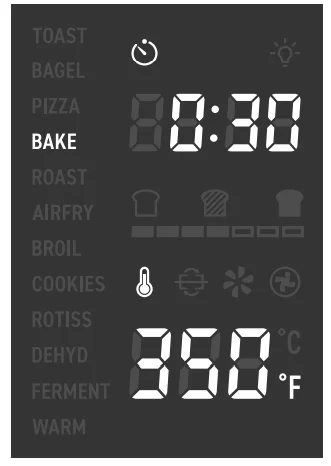
- Heating Elements: Top and bottom heating elements cycle on and off
- Rack Position: Low
- If using the wire rack, insert it at a low position and close the oven door.
- Turn the FUNCTION knob to “BAKE”, which will blink on the display.
- Optionally, customize the temperature and time. You can do this anytime during cooking (except during preheating).
- Turn the TIME/TEMP knob to adjust the time between 1 min–6 hr.
- Press the TIME/TEMP knob once to control temperature. Turn the knob to adjust the temperature between 150°–450°F / 66°–232°C.
- Press START/CANCEL to begin. Preheating will start automatically. The START/CANCEL button will blink, and the display will show . Note: Pressing START/CANCEL again during preheating will cancel preheating and immediately start cooking.
- When preheating is finished, the oven will beep several times, the display will flash, and the START/CANCEL button will blink continuously.
- Place food inside the oven. If using the food tray, insert it at a low position. Close the oven door.
- Note: Citric acid (from oranges, lemons, and other foods) may damage the porcelain enamel finish of the trays or racks. Line the trays with foil or baking paper.
- Use extreme caution when using foil, and always fit foil as securely as possible. To avoid overheating and the risk of fire, make sure the foil does not contact the heating elements.
- Press START/CANCEL to begin cooking. The button will light up, and the display will show the timer counting down.
- The oven will stop heating and beep when finished.
Roast Function (“ROAST”)
This function is ideal for cooking a variety of meats and poultry. Food will be tender and juicy on the inside and well-roasted on the outside.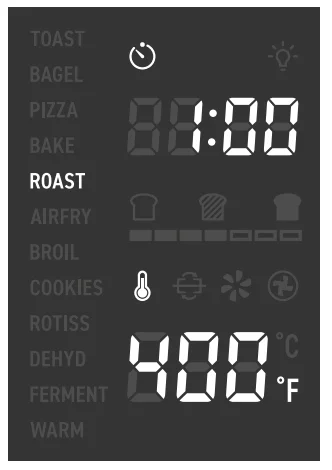
- Heating Elements: Top and bottom heating elements cycle on and off
- Rack Position: Low
- If using the wire rack, insert it at a low position and close the oven door.
- Turn the FUNCTION knob to “ROAST”, which will blink on the display.
- Optionally, customize the temperature and time. You can do this anytime during cooking (except during preheating).
- Turn the TIME/TEMP knob to adjust the time between 1 min–6 hr.
- Press the TIME/TEMP knob once to control temperature. Turn the knob to adjust the temperature between 150°–400°F / 66°–204°C.
- Press START/CANCEL to begin. Preheating will start automatically. The START/CANCEL button will blink, and the display will show
 . Note: Pressing START/CANCEL again during preheating will cancel preheating and immediately start cooking.
 - When preheating is complete, the oven will beep several times, the display will flash, and the START/CANCEL button will blink continuously.
- Place food inside the oven. If using the food tray, insert it at a low position. Close the oven door.
- Note: Citric acid (from oranges, lemons, and other foods) may damage the porcelain enamel finish of the trays or racks. Line the trays with foil or baking paper.
- Use extreme caution when using foil, and always fit foil as securely as possible. To avoid overheating and the risk of fire, make sure foil does not contact the heating elements.
- Press START/CANCEL to begin cooking. The button will light up, and the display will show the timer counting down.
- The oven will stop heating and beep when finished.
Air Fry Function (“AIRFRY”)
This function is ideal for cooking a variety of food, including French fries or chicken wings. Uses intense heat and maximized airflow.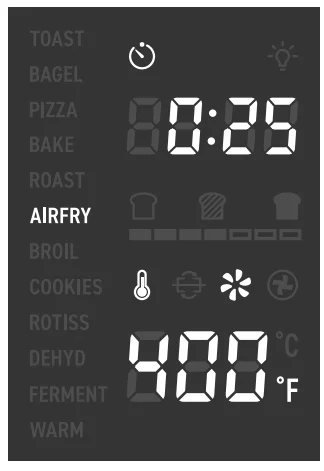
- Heating Elements: Top, bottom, and side heating elements cycle on and off. Note: Side heating elements are on the right side of the oven and are not visible.
- Rack Position: Mid
- Turn the FUNCTION knob to “AIRFRY”, which will blink on the display.
- Optionally, customize the temperature and time. You can do this anytime during cooking (except during preheating).
- Turn the TIME/TEMP knob to adjust the time between 1 min–6 hr.
- Press the TIME/TEMP knob once to control temperature. Turn the knob to adjust the temperature between 150°–400°F / 66°–204°C.
- Press START/CANCEL to begin. Preheating will start automatically. The START/CANCEL button will blink, and the display will show . Note: Pressing START/CANCEL again during preheating will cancel preheating and immediately start cooking.
- When preheating is complete, the oven will beep several times, the display will flash, and the START/CANCEL button will blink continuously.
- Place food in the fry basket.
- When air frying fatty foods (such as chicken wings), use the food tray instead to prevent oil dripping. Discard excess oil between batches.
- Insert at the mid position and close the oven door.
- Press START/CANCEL to begin cooking. The button will light up, and the display will show the timer counting down.
- The oven will stop heating and beep when finished.
Broil Function (“BROIL”)
This function is ideal for cooking open-faced sandwiches, thin cuts of meat (such as bacon), poultry, fish, sausages, and vegetables. It can also be used to brown the tops of casseroles, gratins, and desserts.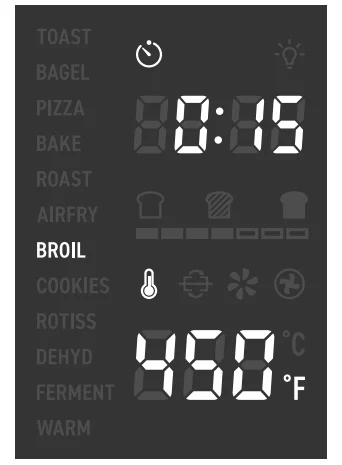
- Heating Elements: Top heating elements stay on for 5 minutes, then cycle on and off. Bottom heating elements are half on and half off.
- Rack Position: Top
- Turn the FUNCTION knob to “BROIL”, which will blink on the display.
- Optionally, customize the temperature and time. You can do this anytime during cooking (except during preheating).
- Turn the TIME/TEMP knob to adjust the time between 1 min–6 hr.
- Press the TIME/TEMP knob once to control temperature. Turn the knob to adjust the temperature between 150°–450°F / 66°–232°C.
- Press START/CANCEL to begin. Preheating will start automatically. The START/CANCEL button will blink, and the display will show
 . Note: Pressing START/CANCEL again during preheating will cancel preheating and immediately start cooking.
 - When preheating is complete, the oven will beep several times, the display will flash, and the START/CANCEL button will blink continuously.
- Place food on the food tray.
- Optionally, lightly grease the enamel food tray or line it with foil to prevent food from sticking.
- Use extreme caution when using foil, and always fit foil as securely as possible. To avoid overheating and the risk of fire, make sure foil does not contact the heating elements.
- Insert the food tray at the top position and close the oven door.
- Insert at mid position instead of:
- Bulky foods that may touch the upper heating elements
- Thicker foods, such as burger patties.
- Marinated foods such as chicken wings
- Foods requiring a gentler broil
- Press START/CANCEL to begin cooking. The button will light up, and the display will show the timer counting down.
- The oven will stop heating and beep when finished.
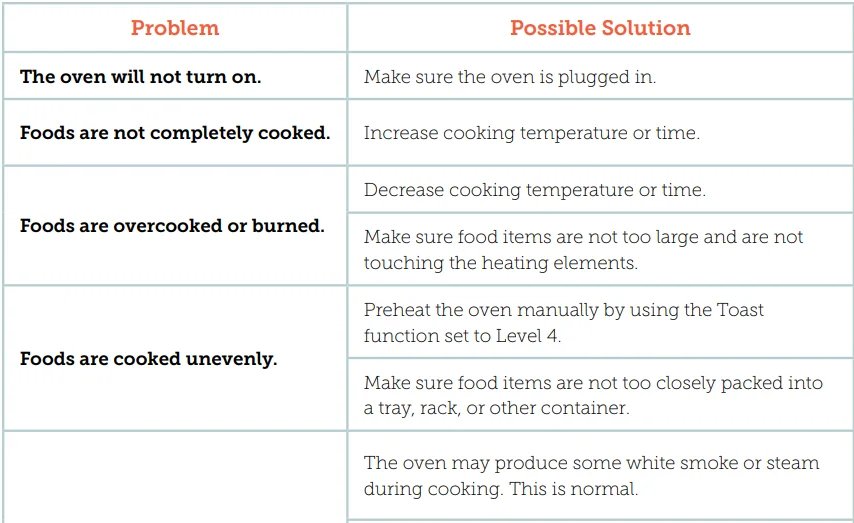
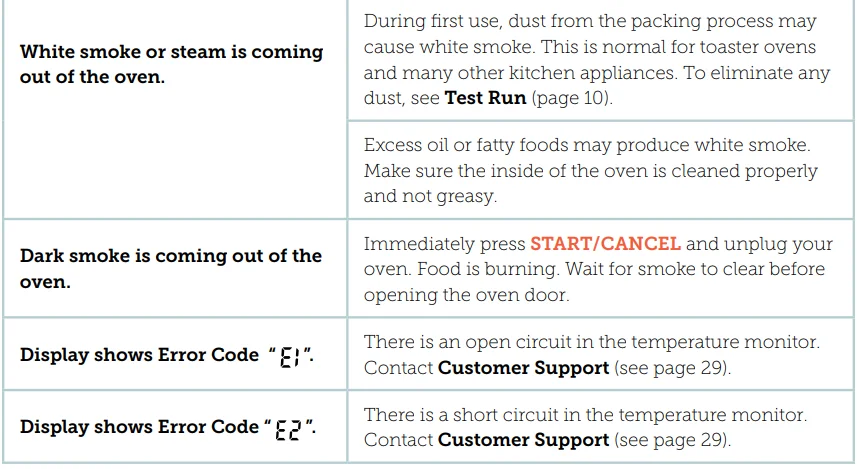
TROUBLESHOOTING
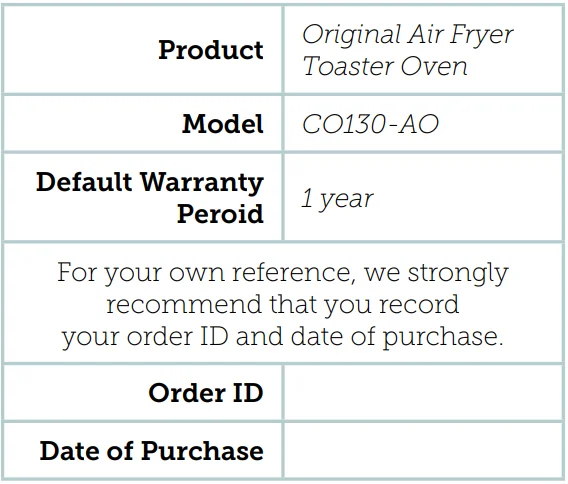
WARRANTY INFORMATION
TERMS & POLICY
Arovast Corporation warrants all products to be of the highest quality in material, craftsmanship, and service, effective from the date of purchase to the end of the warranty period. Arovast Corporation will replace any product found to be defective due to manufacturer flaws, based on eligibility. Refunds are available within the first 30 days of purchase. Refunds are only available to the original purchaser of the product. This warranty extends only to personal use and does not extend to any product that has been used for commercial, rental, or any other use for which the product is not intended.
There are no warranties other than the warranties expressly set forth with each product. This warranty is non-transferable. Arovast Corporation is not responsible in any way for any damages, losses, or inconveniences caused by equipment failure or by user negligence, abuse, or use noncompliant with the user manual or any additional safety or use warnings included in the product packaging and manual. This warranty does not apply to the following:
- Damage due to abuse, accident, alteration, misuse, tampering, or vandalism.
- Improper or inadequate maintenance.
- Damage in the return transit.
- Unsupervised use by children under 18 years of age.
Arovast Corporation and its subsidiaries assume no liability for damage caused by the use of the product other than for its intended use or as instructed in the user manual. Some states do not allow this exclusion or limitation of incidental or consequential losses, so the foregoing disclaimer may not apply to you. This warranty gives you specific legal rights, and you may also have other rights which may vary from state to state. ALL EXPRESSED AND IMPLIED WARRANTIES, INCLUDING THE WARRANTY OF MERCHANTABILITY, ARE LIMITED TO THE PERIOD OF THE LIMITED WARRANTY.
Extend Your Warranty by 1 Year
Register your product at www.cosori.com/warranty to extend your 1-year warranty by an additional year. Please fill out all required fields and include your order ID, place of purchase, and purchase date, if applicable.
Defective Products & Returns
If you discover your product is defective within the specified warranty period, please contact Customer Support via [email protected] with a copy of your invoice and order ID. DO NOT dispose of your product before contacting us. Once our Customer Support Team has approved your request, please return the product with a copy of the invoice and order ID.
For More Manuals By COSORI, Visit ManualsLibraryy
COSORI CO130-AO 30 Liter Air Fryer Oven-FAQS
Do I need to preheat the COSORI CO130-AO Air Fryer Oven?
Yes. Preheating helps the oven reach the right temperature so food cooks evenly and becomes crispier.
Does the COSORI air fryer oven turn off automatically?
Yes, it shuts off automatically after a period of inactivity for safety.
How long does preheating take?
Typically, the preheat function takes 2–5 minutes, depending on the selected temperature.
Is the COSORI air fryer oven safe to use?
Yes, COSORI appliances are safe when used correctly. Always follow the manual and check for manufacturer safety notices or recalls.
Do I need oil when cooking in the air fryer oven?
Oil is optional. A light brush of oil can improve crispiness, but many foods cook well without it.
What is the maximum temperature of the COSORI CO130-AO?
The air fryer oven can reach up to 450°F (232°C) for crispier cooking.
Can I use aluminum foil in the COSORI air fryer oven?
Yes, but only place foil in the basket or tray, not directly over the heating elements. Avoid covering airflow.
How do I clean the COSORI CO130-AO Air Fryer Oven?
Soak trays and accessories in warm soapy water, then scrub gently with a soft sponge. Wipe the interior with a damp cloth—never submerge the oven.
How do I use the air fryer oven for the first time?
Preheat the oven, avoid using too much oil, place food evenly on the racks, and adjust cooking time based on food thickness.