
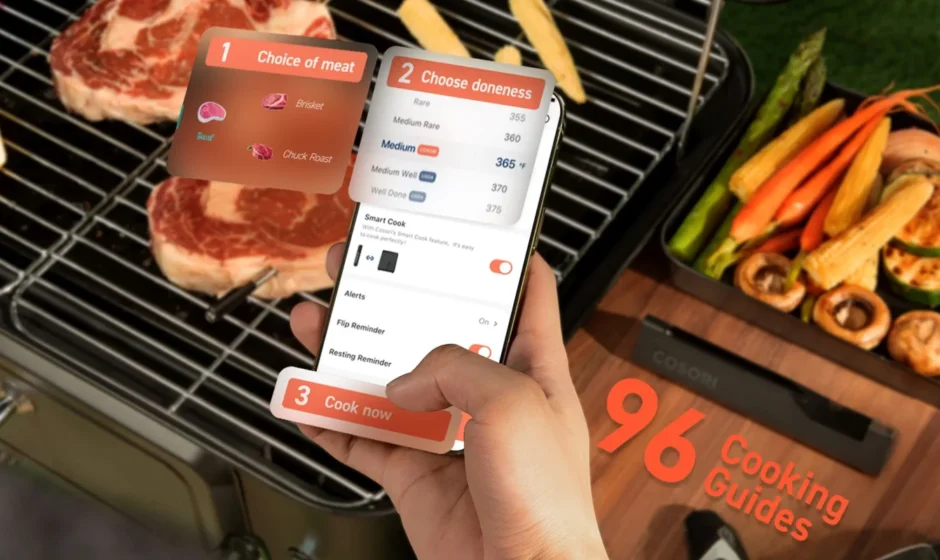

COSORI Smart Meat Thermometer
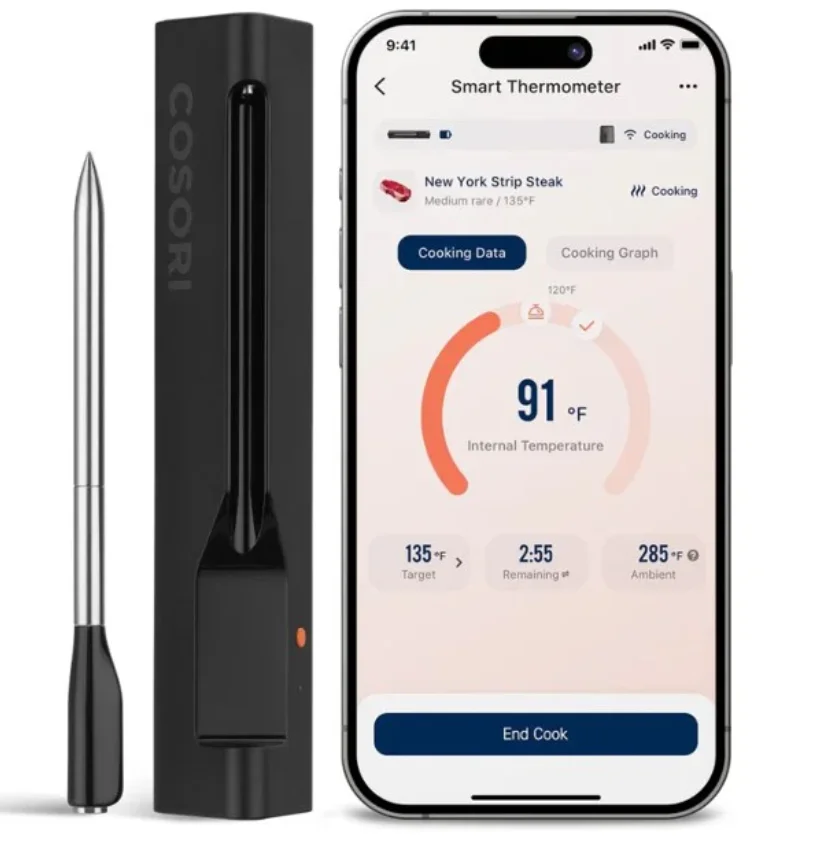
GETTING TO KNOW YOUR SMART MEAT THERMOMETER
Meat Thermometer Diagram
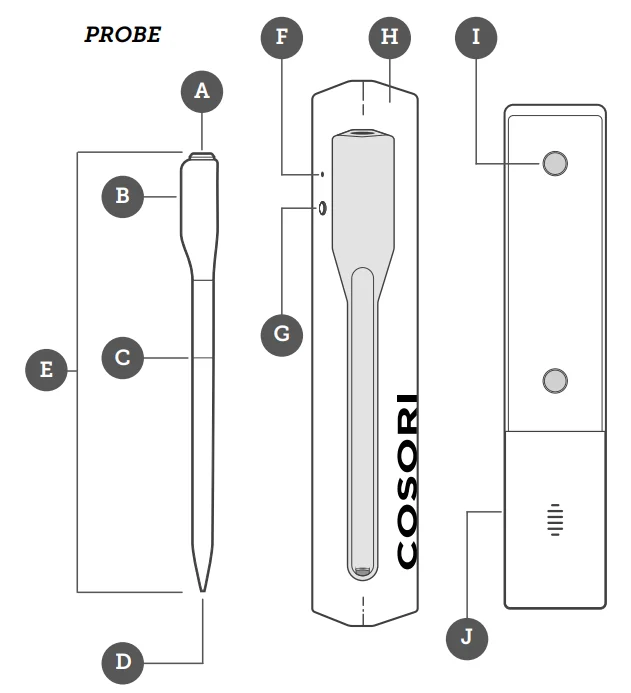
- A. Ambient Temperature Sensor
- B. Handle
- C. Insertion Line
- D. Internal Temperature Sensor
- E. Probe
- F. Battery Level Indicator / Bluetooth® Indicator
- G. Battery Level Button
- H. Charging Case
- I. Magnets
- J. Battery Compartment
- Model: CMT-R161S
- Probe Battery: 2.4V, 5mAh, rechargeable Li-ion battery
- Charging Case Battery: 1 x 1.5V AAA Battery
- Temperature Range :
- Internal Temperature Sensor: 0°–100°C / 32°–212°F
- Ambient Temperature Sensor: 0°–300°C / 32°–572°F, ≤ 90% RH
- Bluetooth® Frequency Range: 2402–2480MHz
- Maximum transmit power: < 4dBm (E.I.R.P.)
- Water-resistant level of Probe: IP67
Note:
- Do not use the thermometer outside of the recommended temperature ranges.
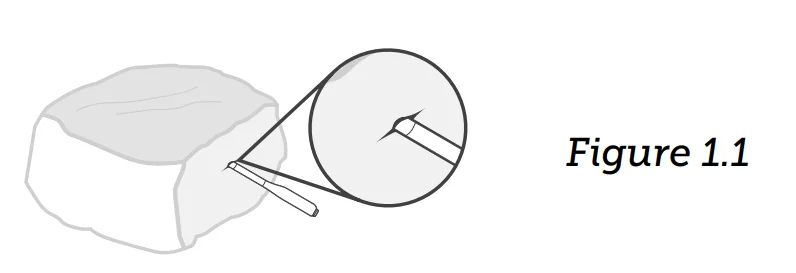
- Always insert the thermometer up to the insertion line to avoid damaging the product or causing injury.
Battery Level Button
Short press to check the battery level of the charging case by the LED indicator.
- Green on: Charging case’s battery is sufficient.
- Red on: Charging case needs to replace a new AAA battery.
Note:
- When the probe is put back in the charger, the LED lights up green for 3 seconds, indicating the charger recognizes the probe, and the probe should be able to charge.
Bluetooth® Indicator
- Flashing Red Indicator: Thermometer lost connection with the charging case.
- Flashing Green Indicator: The thermometer is connected to the charging case.
Disconnecting From Bluetooth®
- To disconnect Bluetooth®, place the thermometer back into the charging case.
- To reconnect, remove the thermometer from the charging case and follow the instructions in the VeSync app for adding a device.
IMPORTANT SAFEGUARDS & WARNINGS
Follow basic safety precautions when using your meat thermometer. Read all instructions.
Key Safety Points
- Use caution when removing the thermometer after cooking. Use heat-resistant gloves or oven mitts to remove the thermometer or allow food to cool before removing.

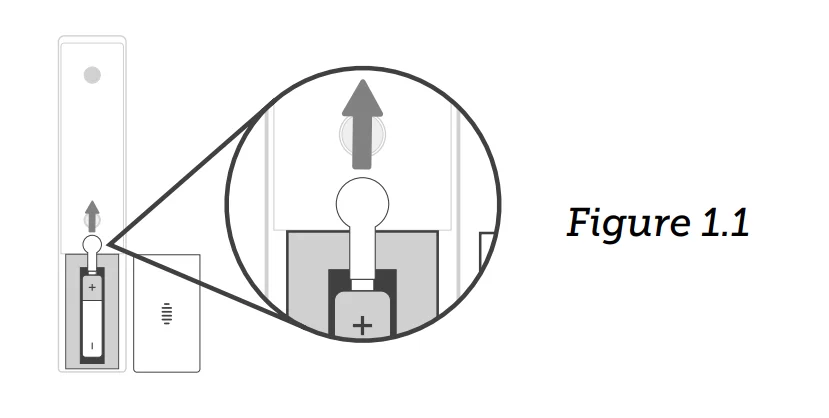
- Always insert the thermometer up to the insertion line to avoid damaging the product or causing injury. [Figure 1.1]
- Do not exceed an internal temperature of 100°C/ 212°F and an ambient temperature of 300°C/ 572°F. If temperatures exceed the allowed range or the thermometer directly touches open flame or hot coal, you must wear eye protection before removing the thermometer.
General Safety
- The thermometer is only intended to measure the temperature of meat during cooking.
- It is recommended to use USDArecommended safe minimum internal temperatures to cook different meats to avoid food poisoning caused by raw or undercooked meat and seafood.
- Do not hit the probe tip against hard surfaces to avoid causing damage.
- Do not use in hot oil, microwave ovens, deep fryers, or pressure cookers.
- Do not use in direct contact with charcoal or fire, and make sure the thermometer is removed before searing.
- Do not insert the thermometer directly under a heat source to avoid burns.
- The charging case must be kept away from heat sources, such a grill cover.
- If the thermometer accidentally falls into a cooking appliance, immediately turn off the cooking appliance and close the lid/ door. Allow the thermometer to fully cool off before removing.
- Do not bend the probe. The handle is able to withstand normal twisting and pulling when inserting into meat.
- Keep out of reach of children.
- Do not tamper with the thermometer’s internal components.
- Do not dispose of any part of the thermometer in a fire.
- Do not use your thermometer if it is damaged, not working, or if the charging case is damaged. Contact Customer Support (see page 11).
- Not for commercial use. Household use only.
- The thermometer can be used with air fryers, ovens, smokers, grills, BBQs, stoves, rotisserie cookers, clay cookers, and slow cookers.
- Never use the thermometer with microwave ovens, pressure cookers, freezers, or for boiling liquids, making candy, open flames, or measuring room and human body temperatures.
- Do not use cleaning products that contain alcohol, ammonia, benzene, or other abrasive chemicals to clean the thermometer.
- The thermometer is water-resistant but not waterproof. Store in a dry, cool place.
Do not soak in liquids, sinks, or moisture for extended periods of time. - The charging case is neither water-resistant nor waterproof.
- Do not soak the probe in cold water immediately after cooking.
- When installing or changing the charging case’s battery, make sure to place the battery in the correct polarity. Using a battery that is not alkaline may shorten the operating life of the thermometer.
- Do not replace the battery while your hands are wet or while the thermometer is in a wet environment.
- To remove the batteries from your equipment, reverse the procedure described in the owner’s manual for inserting batteries. For products with a built-in battery that lasts for the lifetime of the product, removal may not be possible for the user. In this case, recycling or recovery centers handle the dismantling of the product and the removal of the battery. If, for any reason, it becomes necessary to replace such a battery, this procedure must be performed by authorized service centers. In the European Union and other locations, it is illegal to dispose of any battery with household trash. All batteries must be disposed of in an environmentally sound manner. Contact your local waste management officials for information regarding the environmentally sound collection, recycling and disposal of used batteries.
- Do not use to take your own temperature.
- Do not poke the tip of the probe to your fingers or body parts to avoid the risk of injury.
- If the thermometer is used in a manner not specified in the user manual, the protection provided by the thermometer may be impaired.
- The thermometer will be hot during and after use. Always use heat-resistant gloves or oven mitts to handle the hot thermometer.
WARNING: Danger of explosion if battery is incorrectly replaced. To reduce the risk of fire, explosion, or leakage of flammable liquid/gas, do not disassemble, crush, puncture, short external contacts, expose to temperature above 60°C (140°F), sunshine, or the like, expose to extremely low air pressure, or dispose of in fire or water. Replace only with specified batteries.
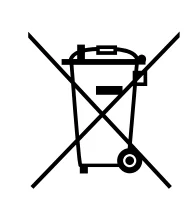
The symbol indicating ‘separate collection’ for all batteries and accumulators shall be the crossed-out wheeled bin shown below:
 This symbol means the product must not be discarded as household waste, and should be delivered to an appropriate collection facility for recycling. Proper disposal and recycling helps protect natural resources, human health and the environment.
GETTING STARTED
Note:
- Review the manual and VeSync app for basic safety precautions and complete operating instructions.
- Requires device to run app, Wi-Fi® or mobile data, and iOS version 12 or Android version 6 (or above). Standard data and messaging rates may apply. Registration is required.
- Remove the insulation strip and charge the thermometer for 2 hours. [Figure 1.1]

- Open the VeSync app. If you already have an account, tap Log In. To create a new account, tap Sign Up.

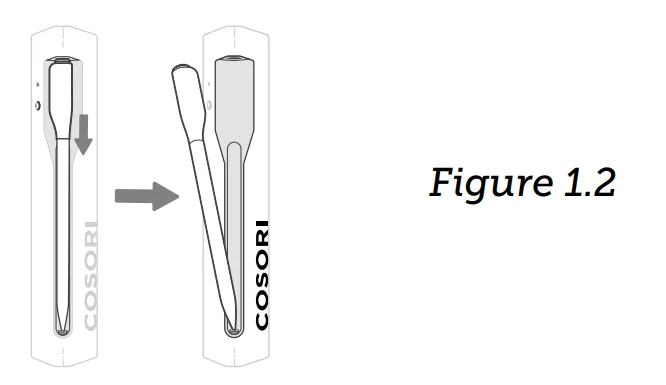
- Push down on the thermometer and pull to remove it from the charging case to turn on Bluetooth® pairing. [Figure 1.2]
 Note: Place the thermometer back in the charging case to turn off Bluetooth® pairing.
 - Tap + to add the device. Tap Kitchen, then select COSORI Smart Meat Thermometer and follow the in-app instructions to complete setup.

 Note: Place the thermometer back in the charging case to turn off Bluetooth® pairing.
LIMITED WARRANTY INFORMATION

COSORI Limited Product Warranty
Register your products at https://warrantycosori.com/warranty to stay up to date with important product information such as product updates, limited warranties, usage and maintenance recommendations, and notifications concerning safety warnings or product recalls. Registration is not required to claim your limited warranty. Two (2) Year Limited Consumer Product Warranty Etekcity GmbH (“Etekcity”) warrants that the product shall be free from defects in material and workmanship for a period of 2 years from the date of original purchase (“Limited Warranty Period”), provided the product was used in accordance with its use and care instructions (e.g., in the intended environment and under normal circumstances).
Your Limited Warranty Benefits
During the Limited Warranty Period and subject to this limited Warranty Policy, Etekcity will, in its sole and exclusive discretion, either (i) refund the purchase price, (ii) repair any defects in material or workmanship, (iii) replace the product with another product of equal or greater value.
Who Is Covered?
This limited warranty extends only to the original consumer purchaser of the product and is not transferable to any subsequent owner of the product, regardless of whether the product transferred ownership during the specified term of the limited warranty. The original consumer purchaser must provide verification of the defect or malfunction and proof of the date of purchase to claim the Limited Warranty Benefits.
Be Aware of Unauthorized Dealers or Sellers This limited warranty does not extend to products purchased from unauthorized dealers or sellers. Etekcity’s limited warranty only extends to products purchased from authorized dealers or sellers that are subject to Etekcity’s quality controls and have agreed to follow its quality controls. Please be aware that products purchased from an unauthorized website or dealer may be counterfeit, used, defective, or may not be designed for use in your country. You can protect yourself and your products by making sure you only purchase from Etekcity or its authorized dealers. If you have any questions about a specific seller, or if you think you may have purchased your product from an unauthorized seller, please contact our Customer Support via [email protected]
What’s Not Covered?
- Normal wear and tear, including parts that might wear out over time (e.g., batteries, filters, cleaning brush, essential oil pads, etc.).
- If the proof-of-purchase has been altered in any way or is made illegible.
- If the model number, serial number or production date code on the product has been altered, removed or made illegible.
- If the product has been modified from its original condition.
- If the product has not been used in accordance with directions and instructions in the user manual.
- Damages caused by connecting peripherals, additional equipment or accessories other than those recommended in the user manual.
- Damages or defects caused by accident, abuse, misuse, or improper or inadequate maintenance.
- Damages or defects caused by service or repair of the product performed by an unauthorized service provider or by anyone other than Etekcity.
- Damages or defects occurring during commercial use, rental use, or any use for which the product is not intended.
- If the unit has been damaged, including but not limited to damage by animals, lightning, abnormal voltage, fire, natural disaster, transportation, dishwasher, or water (unless the user manual expressly states that the product is dishwasher-safe).
- Incidental and consequential damages.
- Damages or defects exceeding the cost of the product.
Claiming Your Limited Warranty Service in 5 Simple Steps:
- Make sure your product is within the specified limited warranty period.
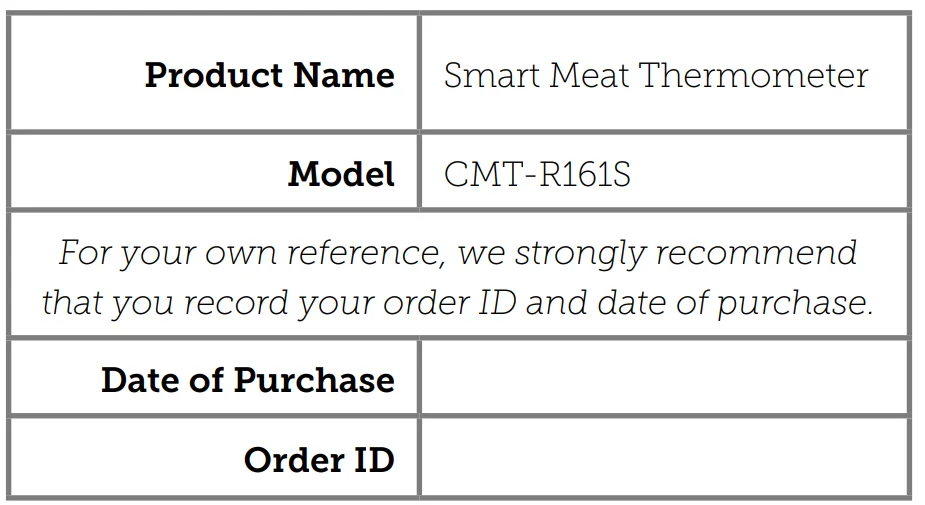
- Make sure you have a copy of the invoice and order ID or proofof- purchase.
- Make sure you have your product. DO NOT dispose of your product before contacting us.
- Contact our Customer Support team via [email protected]
- Once our Customer Support team has approved your request, please return the product with a copy of the invoice and order ID. Sole and Exclusive Remedy
THE FOREGOING LIMITED WARRANTY CONSTITUTES Etekcity GmbH’S EXCLUSIVE LIABILITY, AND YOUR SOLE AND EXCLUSIVE REMEDY, FOR ANY BREACH OF ANY WARRANTY OR OTHER NONCONFORMITY OF THE PRODUCT COVERED BY THIS LIMITED PRODUCT WARRANTY STATEMENT. THIS LIMITED WARRANTY IS EXCLUSIVE, AND IN LIEU OF ALL OTHER WARRANTIES. NO EMPLOYEE OF Etekcity GmbH OR ANY OTHER PARTY IS AUTHORIZED TO MAKE ANY WARRANTY IN ADDITION TO THE LIMITED WARRANTY IN THIS LIMITED PRODUCT WARRANTY STATEMENT.
Disclaimer of Limited Warranties
TO THE FULLEST EXTENT PROVIDED BY APPLICABLE LAW, EXCEPT AS WARRANTED IN THIS LIMITED PRODUCT WARRANTY POLICY, Etekcity GmbH PROVIDES THE PRODUCTS YOU PURCHASE FROM Etekcity GmbH “AS IS” AND Etekcity GmbH HEREBY DISCLAIMS ALL WARRANTIES OF ANY KIND, WHETHER EXPRESS OR IMPLIED, STATUTORY, OR OTHERWISE, INCLUDING BUT NOT LIMITED TO ANY WARRANTIES OF MERCHANTABILITY, NONINFRINGEMENT, AND FITNESS FOR PARTICULAR PURPOSE.
Limitations of Liability
TO THE FULLEST EXTENT PROVIDED BY APPLICABLE LAW, IN NO EVENT WILL Etekcity GmbH, ITS AFFILIATES, OR THEIR LICENSORS, SERVICE PROVIDERS, EMPLOYEES, AGENTS, OFFICERS, OR DIRECTORS BE LIABLE FOR:
- DAMAGES OF ANY KIND ARISING OUT OF OR IN CONNECTION WITH PRODUCTS PURCHASED FROM Etekcity GmbH IN EXCESS OF THE PURCHASE PRICE PAID BY THE PURCHASER FOR SUCH PRODUCTS, OR
- INDIRECT, SPECIAL, INCIDENTAL, CONSEQUENTIAL, OR PUNITIVE DAMAGES EVEN IF Etekcity GmbH OR ONE OF ITS SUPPLIERS HAS BEEN ADVISED OF THE POSSIBILITY OR
LIKELIHOOD OF SUCH DAMAGES. AND REGARDLESS OF WHETHER CAUSED BY TORT (INCLUDING NEGLIGENCE), BREACH OF CONTRACT, OR OTHERWISE. OUR LIABILITY SHALL UNDER NO CIRCUMSTANCES EXCEED THE ACTUAL AMOUNT PAID BY YOU FOR THE DEFECTIVE PRODUCT, NOR SHALL WE UNDER ANY CIRCUMSTANCES BE LIABLE FOR ANY CONSEQUENTIAL, INCIDENTAL, SPECIAL OR PUNITIVE DAMAGES OR LOSSES, WHETHER DIRECT OR INDIRECT. EXCEPT AS COVERED BY THIS LIMITED PRODUCT WARRANTY STATEMENT, Etekcity GmbH SHALL NOT BE LIABLE FOR COSTS ASSOCIATED WITH THE REPLACEMENT OR REPAIR OF PRODUCTS PURCHASED FROM IT, INCLUDING, BUT NOT LIMITED TO, LABOR, INSTALLATION, OR OTHER COSTS INCURRED BY THE USER AND, IN PARTICULAR, ANY COSTS RELATING TO THE REMOVAL OR REPLACEMENT OF ANY PRODUCT.
OTHER RIGHTS YOU MAY HAVE
SOME JURISDICTIONS DO NOT ALLOW FOR: (1) EXCLUSION OF IMPLIED WARRANTIES; (2) LIMITATION ON THE DURATION OF IMPLIED WARRANTIES; AND/OR (3) EXCLUSION OR LIMITATION OF INCIDENTAL OR CONSEQUENTIAL DAMAGES; SO THE DISCLAIMERS IN THIS POLICY MAY NOT APPLY TO YOU. IN THESE JURISDICTIONS YOU HAVE ONLY THE IMPLIED WARRANTIES THAT ARE EXPRESSLY REQUIRED TO BE PROVIDED IN ACCORDANCE WITH APPLICABLE LAW. THE LIMITATIONS OF WARRANTIES, LIABILITY, AND REMEDIES APPLY TO THE MAXIMUM EXTENT PERMITTED BY LAW. ALTHOUGH THIS LIMITED WARRANTY GIVES YOU SPECIFIC LEGAL RIGHTS, YOU MAY HAVE OTHER RIGHTS IN YOUR JURISDICTION. THIS STATEMENT OF LIMITED WARRANTY IS SUBJECT TO APPLICABLE LAWS THAT APPLY TO YOU AND THE PRODUCT. PLEASE REVIEW THE LAWS IN YOUR JURISDICTION TO UNDERSTAND YOUR RIGHTS FULLY.
CHANGES TO THIS POLICY
We may change the terms and availability of this limited warranty at our discretion, but any changes will not be retroactive. This warranty is made by: Etekcity GmbH Vossbarg 1 25524 Itzehoe, Germany
For more manuals by COSORI, visit ManualsLibraryy
COSORI Smart Meat Thermometer-FAQs
How do you use the COSORI smart meat thermometer?
Insert the probe into the thickest part of the meat, avoiding bone or fat. Connect it to the COSORI app or receiver, select the food type, and monitor the temperature in real time until cooking is complete.
Can I leave the COSORI meat thermometer in while cooking?
Yes. The COSORI smart meat thermometer is designed to stay in the meat during cooking, including oven, grill, or smoker use, as long as it is within the recommended temperature range.
How do I reset my COSORI meat thermometer?
To reset the thermometer, turn it off, remove the battery (if applicable), wait 10–30 seconds, then reinsert the battery and power it back on. Some models reset automatically when reconnected to the app.
How do I change the COSORI thermometer from Celsius to Fahrenheit?
Open the COSORI app, go to Settings, select Temperature Unit, and choose °F (Fahrenheit) or °C (Celsius). The thermometer will update instantly.
How do I switch the thermometer from Fahrenheit to Celsius?
Go to the app settings or device menu and toggle the temperature unit from °F to °C. Some models also have a small C/°F button inside the battery compartment.
What does the HOLD button do on a digital meat thermometer?
The HOLD button locks the current temperature reading on the screen, allowing you to safely remove the probe and read the temperature away from heat.
Why is my COSORI meat thermometer not working?
Common reasons include low batteries, Bluetooth connection issues, or probe damage. Replacing the battery, restarting the app, or re-pairing the device usually fixes the issue.
Do I need to calibrate a meat thermometer regularly?
Yes. It’s recommended to calibrate your meat thermometer every few months or if you notice inaccurate readings, especially after long-term use.
How do I know if my meat thermometer is working correctly?
Test it in ice water (32°F / 0°C) or boiling water (212°F / 100°C at sea level). If the reading is accurate, your thermometer is working properly.