
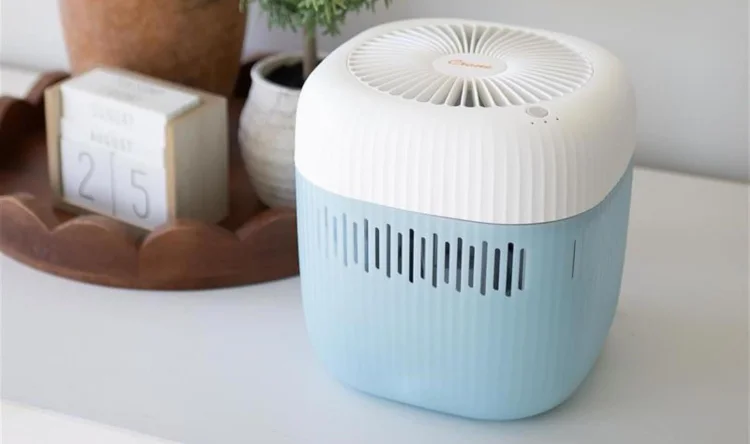

Crane EE-5403 Humidifier
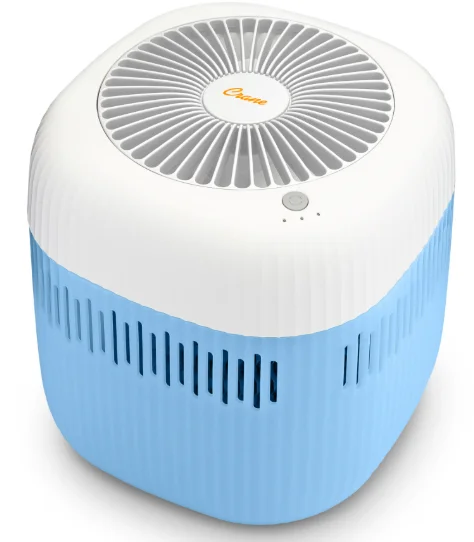
IMPORTANT SAFETY INSTRUCTIONS
WARNING! READ AND SAVE THESE INSTRUCTIONS. Failure to follow all of the instructions listed below may result in electric shock, fire, and/or serious personal injury.
- It is advisable to carry a filled Water Tank with two hands.
- DO NOT operate outdoors. This humidifier is intended for indoor use only.
- Always have water in the Water Tank when operating the unit.
- Use only clean, cool tap water to fill the Water Tank (filtered or distilled water is recommended to avoid white dust if tap water is too hard). DO NOT use hot water.
- Be sure that the Water Tank Cap is firmly tightened on the Water Tank. Always have the Mist Lid in place while the unit is operating. Place the humidifier so that the mist is directed away from children, walls, furniture, and electrical appliances.
- Use only a 110–240 VAC outlet. ALWAYS plug and unplug the unit with dry hands to avoid electric shock.
- Never operate the unit with a damaged cord or plug.
- Always place the unit on a smooth, flat, lint-free, non-metallic, waterproof, and level surface, and position the unit away from direct sunlight. Keep the cord away from heated surfaces and areas where it could be walked on or tripped over. Unplug the unit when not in use and whenever you clean or move the unit.
- Do not add medication of any type into the Water Basin or Water Tank. Do not cover any openings on the unit or insert objects into any openings.
- The unit should not be left unattended in a closed room, as the air could become saturated and leave condensation on walls or furniture. Leave the room door partly open when the humidifier is being operated.
- When cleaning the inside of the humidifier, keep water away from the Fan Vent. Turn off and unplug the humidifier to wipe the exterior (except the electrical controls) with a damp cloth. The humidifier requires regular cleaning. Please refer to the CLEANING INSTRUCTIONS in this manual.
- Do not tilt or tip the humidifier or attempt to empty or fill it while it is in operation.
- Do not use a detergent to clean any parts of the unit that contain water. Detergent film dissolved in the water supply can interfere with the unit’s output. Instead, always use white vinegar mixed with water to clean the humidifier.
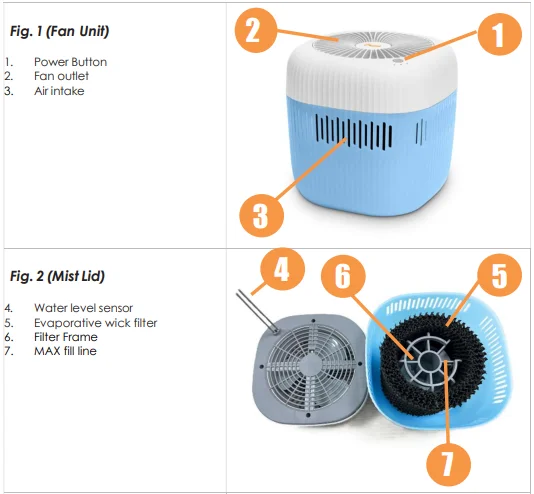
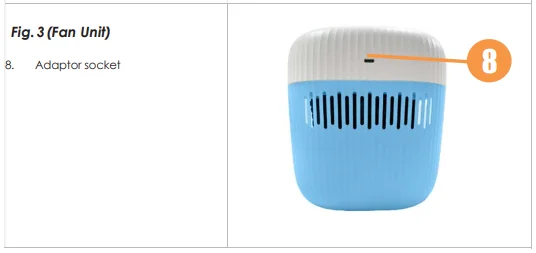
LIST OF MAIN PARTS
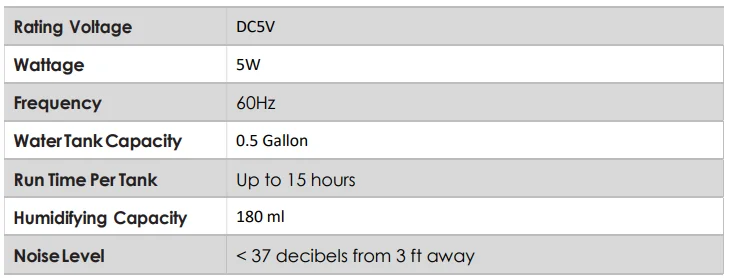
TECHNICAL SPECIFICATIONS
BEFORE EACH USE:
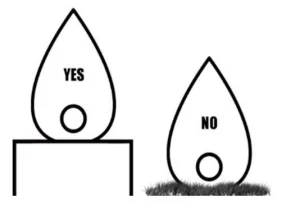
CHECK HUMIDIFIER PLACEMENT: Place the humidifier on an elevated, non-metallic, lint-free, waterproof, level surface at least 2 feet above the floor.
- DO NOT PLACE ON CARPET OR TOWEL. The fan vent is located on the bottom of the humidifier base. The fan vent MUST NOT be obstructed.
- DO NOT PLACE ON WOOD SURFACE or near furniture that can be damaged by too much moisture.

CHECK WATER LEVEL SENSOR:
Make sure the Water Level Sensor is secured properly and not obstructed (Page 4 – Fig. 1).
CAUTION
- DO NOT attempt to operate the humidifier without water in the Water Tank.
- DO NOT plug or unplug the Power Cord with wet hands, as electric shock could occur.
ASSEMBLY & USE
ALWAYS use fresh, cool water when operating the humidifier.
- Add the evaporative wick filter netting to the filter frame. Insert the filter and filter frame into the base of the water tank. Filters should be replaced every 3–4 months, depending on frequency of use and quality of water.
- Add water to the water tank, making sure not to exceed the MAX fill line. The MAX fill line can be located on the grey filter frame. This unit can hold 2.5 L (approximately 0.66 Gal) of water. Note: Do not attempt to move the humidifier while fully assembled and filled with water. Doing so may cause leakage of water and/or the Humidifier Base to overfill.
- Return the top portion of the unit to the filled water tank. Plug the unit directly into a wall outlet.
- Set the desired humidity output:
- 1 press for low
- 2 press for medium
- 3 press for high
- 4 press for off
- Note: This unit comes equipped with a UVC germicidal light that will always be on during operation. This light will switch off when the lid is removed from the water tank or if the unit is powered off.
- When the humidifier runs out of water, the unit will run for another 90 minutes and then stop. This is a safety feature to allow the filter to dry out and prevent bacteria growth, as well as prevent the humidifier from possibly overheating. Turn the humidifier off and unplug the unit before removing and refilling the water tank.
A NOTE ABOUT HUMIDITY
- To reduce excessive humidity or condensation, especially in small rooms, leave the room door open and adjust mist intensity to the low output setting.
- Too much humidity in the room may allow moisture to accumulate on surfaces where bacteria and fungi can grow. Moisture that gathers may also damage furniture and walls, especially wallpaper.
MAINTENANCE
Cleaning and disinfecting on a regular basis is important for maintaining the performance of your humidifier.
IMPORTANT: Water left in the tank or base when not in use may result in a buildup of mineral deposits and bacteria, which may inhibit the output efficiency as well as void the warranty. If water remains in the Water Tank for more than a day or two, bacterial growth is possible.
DAILY MAINTENANCE
- Turn off, unplug from the outlet, and empty water from the tank & base daily.
- Allow the tank & base to air dry.
- Leave the cap off the tank until ready for the next use.
WEEKLY MAINTENANCE
- Turn off, unplug from the outlet, and empty water from the tank & base.
- Fill the water tank halfway with warm water and add 2 tablespoons of white vinegar. Let it sit for 30–60 minutes. Empty the tank and rinse with plain water. Alternatively, the water tank can be cleaned in a dishwasher.
- Remove the wick filter from the filter frame and soak it in cool tap water for 30 minutes to an hour. After soaking, rinse the filter under a faucet, making sure not to rub the filter together.
- Allow the tank to air dry, or dry with a clean cloth before the next use. NEVER IMMERSE A HUMIDIFIER FAN IN WATER.
END-OF-SEASON MAINTENANCE & STORING YOUR HUMIDIFIER
- Turn off, unplug from the outlet, and empty water from the tank.
- Follow instructions for weekly maintenance above.
- Let all parts dry completely.
- Store the humidifier in a cool, dry place.
CRANE CUSTOMER CARE
- CALL US: 1-888-599-0992 (Mon–Fri 9:00 am – 4:00 pm CST)
- EMAIL US: [email protected]
- LIVE CHAT: available at www.crane-usa.com.
TROUBLESHOOTING
DO NOT attempt to repair the motor yourself. If the humidifier continues to not operate, please contact Crane Customer Care.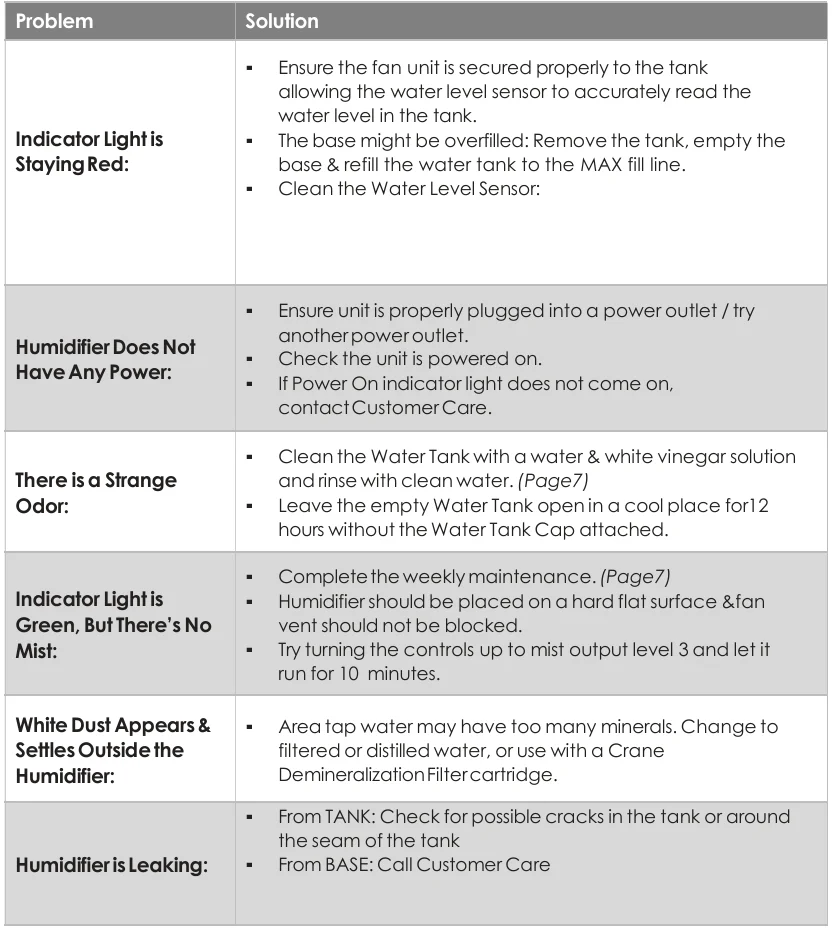
CRANE WARRANTY
For more information regarding the warranty policy, please visit our website: www.crane-usa.com/customer-service.
LIMITED WARRANTY
Thank you for purchasing a Crane product, which has been tested to meet our stringent quality standards. This product is warranted to be free from manufacturing defects under normal use and conditions for 1 year. PLEASE CONTACT US BEFORE RETURNING THIS PRODUCT TO THE STORE. CALL CRANE CUSTOMER CARE FOR PROBLEMS AND QUESTIONS. WE CAN HELP. WARRANTY REQUIRES A DATED PROOF OF PURCHASE.
This warranty is void if the defect is due to accidental damage, misuse, abuse, neglect, improper repair or alteration by unauthorized persons, or a failure to follow operating instructions provided with the product, including the use of essential oils directly into the tank and base. This warranty does not apply to normal wear and tear or commercial use. In no event shall liability exceed the purchase price paid by the purchaser of the product. Under no circumstances shall there be liability for any loss—direct, indirect, or incidental—or consequential damage arising out of, or in connection with, the use of this product.
This warranty is valid only in the 48 contiguous states plus the District of Columbia and excludes Puerto Rico and the Virgin Islands. This warranty is effective only if the product is purchased and operated in the United States of America. Any instructions or warranty included in this manual may be subject to change without notice. For the most up-to-date instructions and warranty information, please contact us or visit our website.
For More Manuals By Crane, Visit ManualsLibraryy.
Crane EE-5403 Humidifier-FAQs
What size room is the Crane EE-5403 humidifier best for?
The Crane EE-5403 is generally designed for small to medium rooms up to about 250 square feet, making it suitable for bedrooms, nurseries, and home offices. Its evaporative design helps maintain comfortable humidity without over-humidifying compact spaces.
How does the Crane EE-5403 humidifier work?
This humidifier uses evaporative cool mist technology, where a wick filter absorbs water while a fan pushes moisture into the air. Unlike ultrasonic models, it produces invisible mist, helps reduce white dust, and naturally regulates humidity levels indoors.
Does the Crane EE-5403 require a filter replacement?
Yes, the Crane EE-5403 uses a wick filter and demineralization filter that require periodic replacement for optimal performance. Depending on water quality and usage, replacement may be needed every one to two months to maintain airflow, moisture output, and cleaner operation.
How long can the Crane EE-5403 run on one tank?
With its 0.5-gallon top-fill tank, the Crane EE-5403 can run up to around 15 hours, depending on speed setting and room conditions. Lower fan settings may extend runtime, while higher settings can provide faster humidity output but use water more quickly.
Is the Crane EE-5403 easy to clean and maintain?
Yes, many users choose this model for its top-fill design and dishwasher-safe tank components, which simplify maintenance. Regular cleaning, wick changes, and occasional sensor checks help prevent odors, mineral buildup, and performance issues while extending the humidifier’s lifespan.
Is the Crane EE-5403 quiet enough for bedrooms?
The Crane EE-5403 is designed for relatively quiet operation and is commonly used in bedrooms and nurseries. Its fan-based evaporative system creates some ambient sound, but many users find it gentle enough for sleeping, especially on lower speed settings.
Does the Crane EE-5403 help with dry air symptoms?
Yes, this humidifier can help relieve discomfort linked to dry indoor air, including dry skin, congestion, irritated sinuses, and scratchy throats. Maintaining balanced humidity may also improve sleep comfort, particularly during winter heating seasons or in dry climates.
Does the Crane EE-5403 produce white dust?
Because it uses evaporative technology instead of ultrasonic misting, the Crane EE-5403 is designed to reduce or avoid white dust issues common in some humidifiers. Using the recommended filter and clean water can further support cleaner operation and better indoor air quality.
What features make the Crane EE-5403 stand out?
Popular features include the top-fill tank, three speed settings, evaporative wick filtration, UV-assisted sanitation features, and compact tower design. Many shoppers also appreciate the dishwasher-safe parts and invisible cool mist output, which make it practical for everyday household use.
Is the Crane EE-5403 worth buying for everyday use?
For small-room humidification, the Crane EE-5403 is often considered a practical option because of its simple maintenance, quiet performance, and evaporative design. It may especially appeal to users wanting a low-fuss cool mist humidifier with filter-based moisture control.