
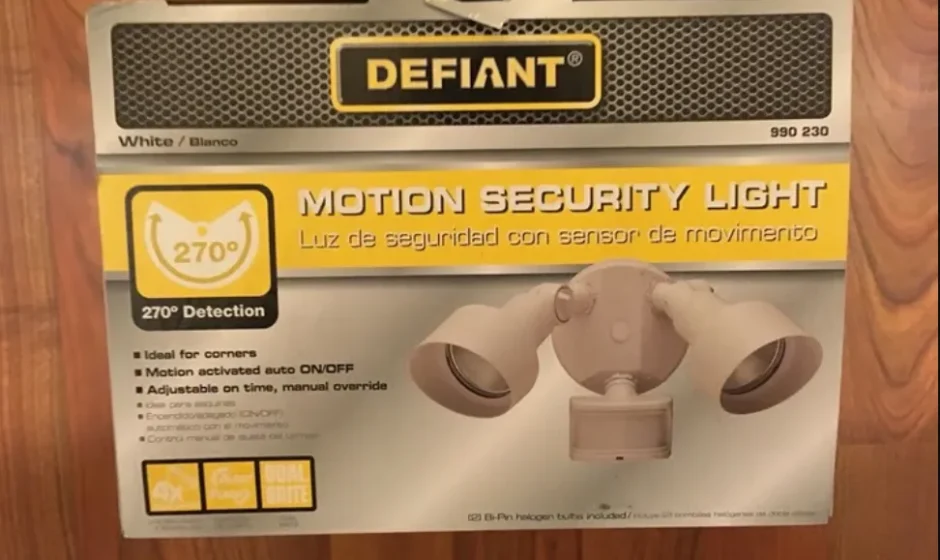

Defiant DF-5597 270-Degree Motion Security Light
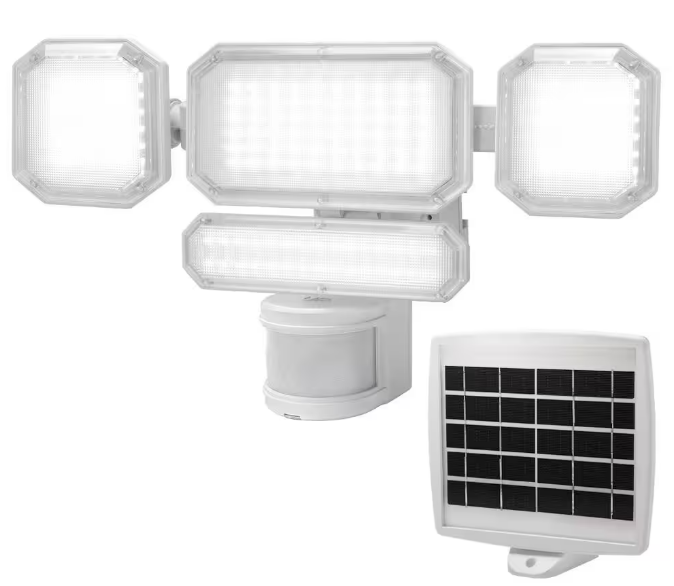
Safety Information
PRECAUTIONS
Please read and understand this entire manual before attempting to assemble, install, or operate this light fixture.
This light fixture requires 120-volts AC.
Some codes require installation by a qualified electrician. This light fixture must be properly grounded. This light fixture is intended for use with the enclosed gasket and with a junction box marked for use in wet locations.
For proper operation, this light fixture should be:
- Installed outdoors on a wall or eaves
- Installed 8 ft. (2.4 m) above the ground (If the light fixture is mounted higher than recommended, aiming the sensor down will reduce the coverage area.)
- Do not leave the “ON-TIME” switch in the “TEST” position. The frequent ON/OFF cycling of the light fixture will reduce the life of the bulb
- Use only T4 100W (maximum), G8 tungsten halogen bi-pin bulbs (120 VAC)
 WARNING: Turn the power off at the circuit breaker or fuse. Place tape over the circuit breaker switch and verify that power is off at the light fixture.
WARNING: Risk of fire. Do not aim the bulbs at a combustible surface within 3 ft. (1 m).
WARNING: Risk of fire. Keep the bulbs at least 2 in. (51 mm) from combustible materials.
 CAUTION: Keep the motion sensor at least 2 in. (51 mm) away from the bulbs.
CAUTION: Keep the bulb holders 30° below horizontal to avoid water damage and electrical shock.
CAUTION: To avoid water damage and the risk of electrical shock, the motion sensor controls must be facing the ground when the installation is complete.
CAUTION: Burn hazard. Allow the light fixture and the bulb to cool before touching.
CAUTION: Do not cut any wires with factory-installed wire connectors or remove the wire connectors.
NOTICE: Do not connect this light fixture to a dimmer switch or timer.
Warranty
2-YEAR WARRANTY
Contact the Customer Service Team at 1-866-308-3976 or visit www.homedepot.com.
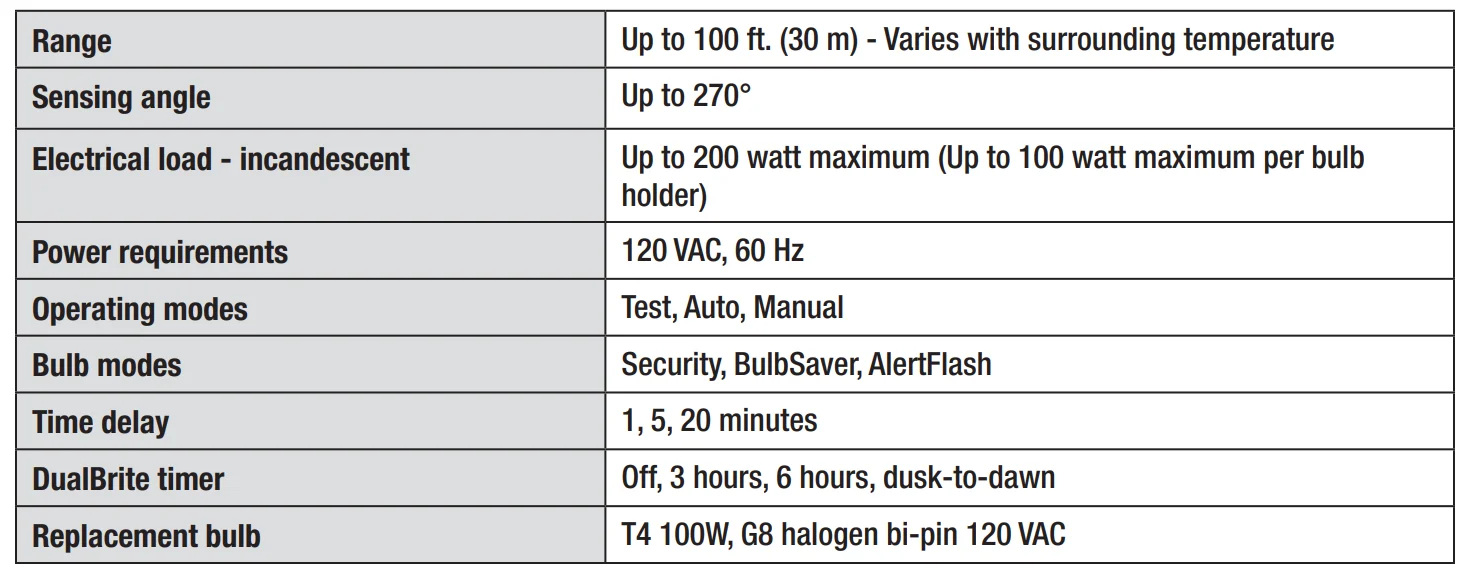
Specifications
Pre-Installation
PLANNING INSTALLATION
Before installing the light fixture, ensure that all parts are present (see Hardware Included on page 4). If any part is missing or damaged, do not attempt to assemble, install, or operate this light fixture.
Estimated installation time: 30 minutes
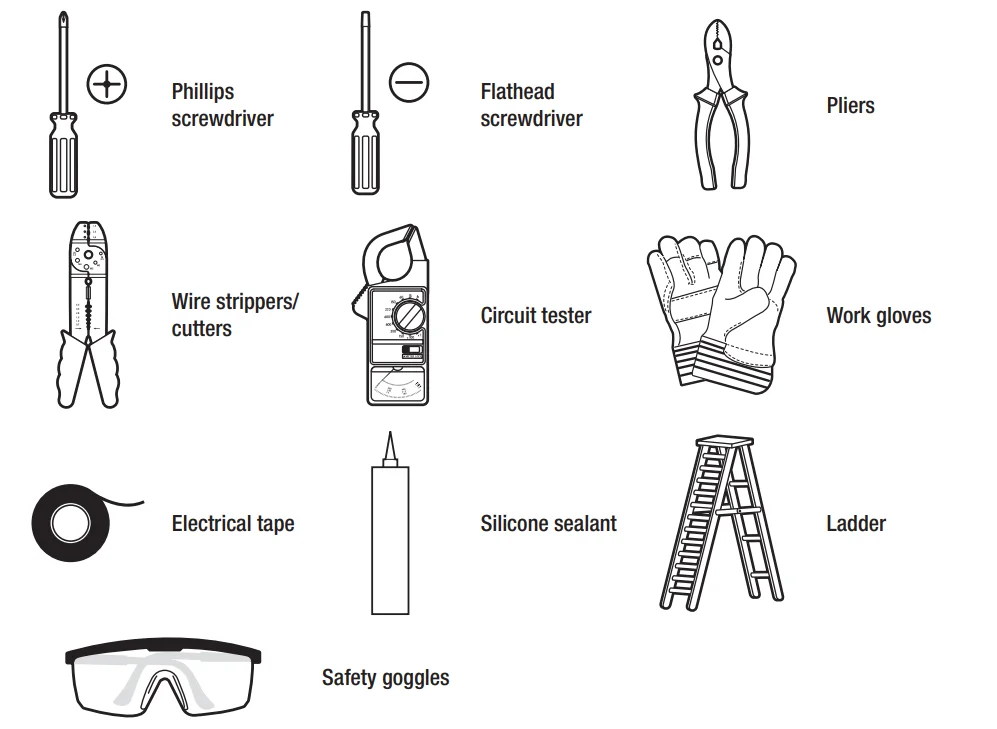
TOOLS REQUIRED
HARDWARE INCLUDED
NOTE: Hardware shown to actual size.
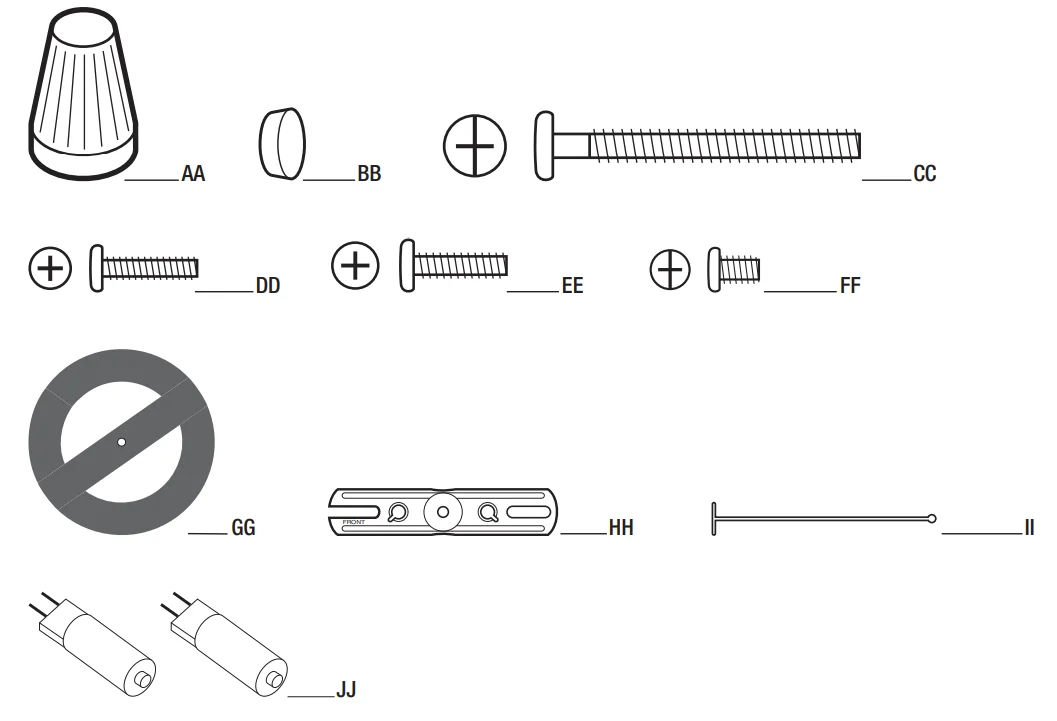
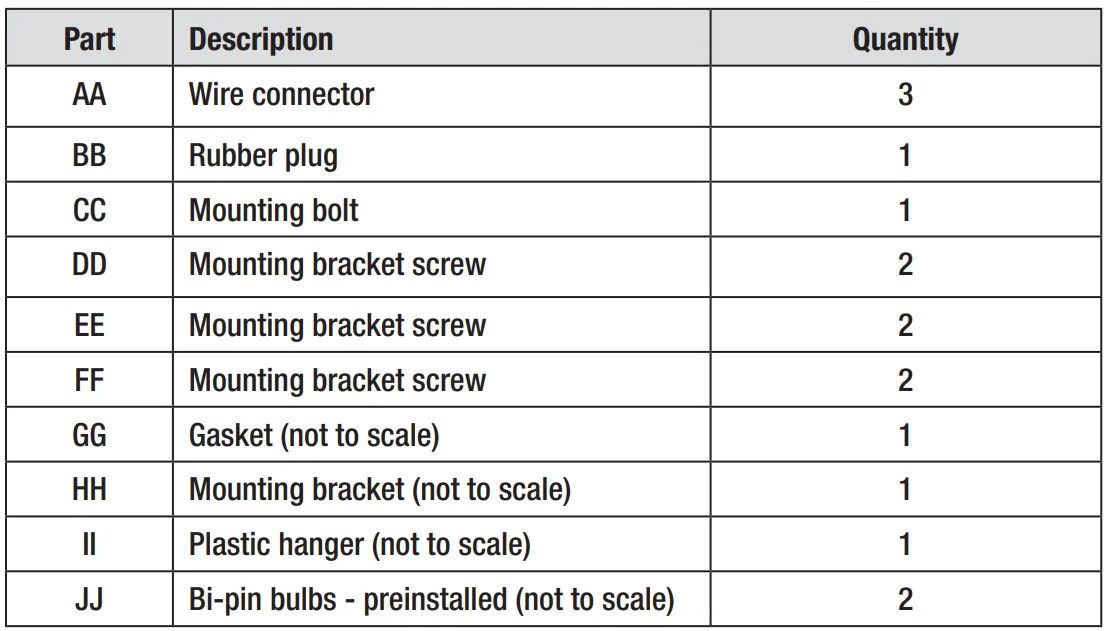
PACKAGE CONTENTS
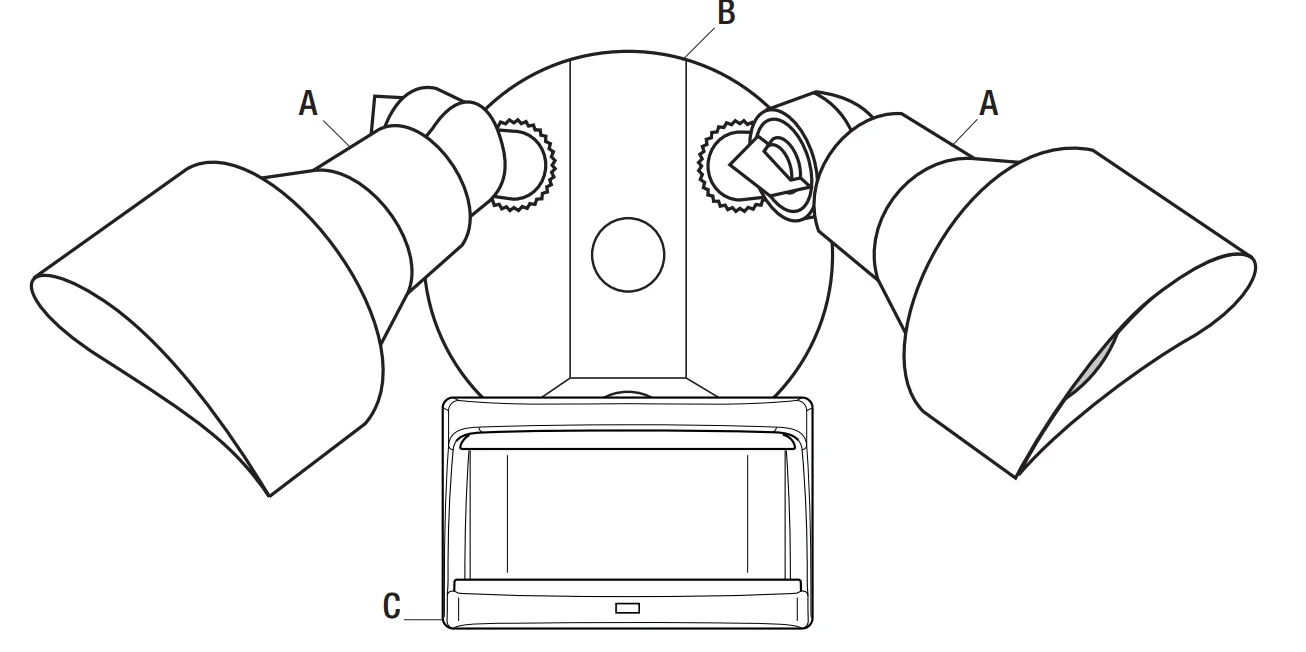
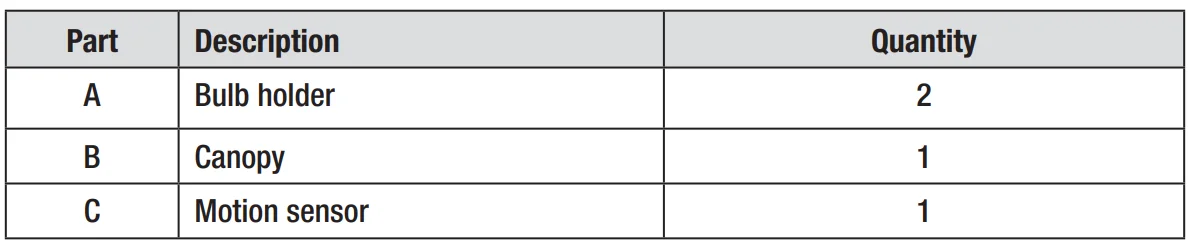
MOUNTING LOCATIONS
- Determine the mounting location – a wall or under an eave.
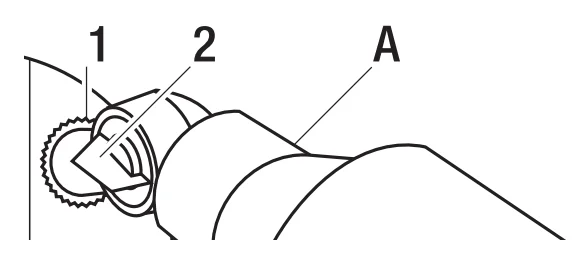
- Position bulb holders (A) in the general direction of the desired light coverage and tighten the lock nuts (1) and the thumb screws (2).
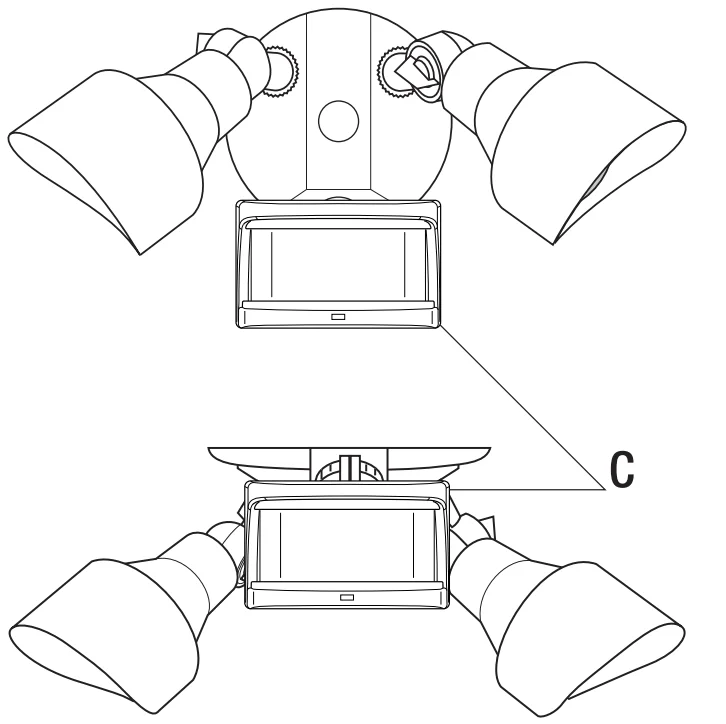
- If needed, lift the motion sensor (C) and rotate it so the controls face the ground after installation. Tighten the clamp screw (3) when done. Do not overtighten.
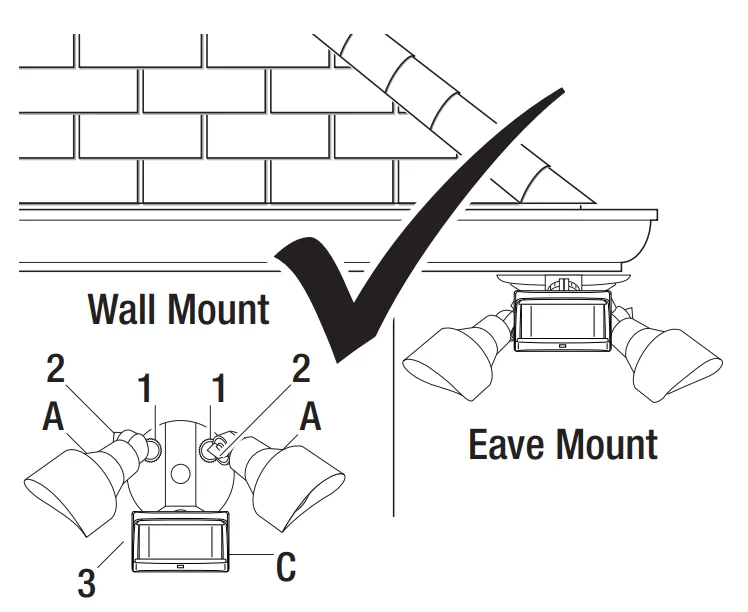
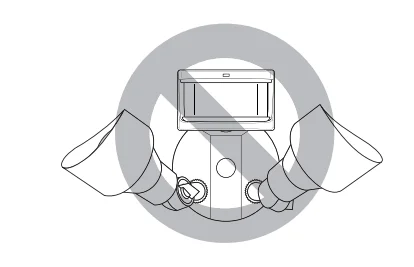
NOTE: If the motion sensor (C) pops out of the ball joint, loosen the clamp screw (3), push the motion sensor (C) back into the ball joint, and tighten the clamp screw (3). Do not overtighten.
Installation
Installing the Mounting Bracket
WARNING: Turn the power off at the circuit breaker or fuse. Place tape over the circuit breaker switch and verify that power is off at the light fixture.
- Remove the existing light fixture.
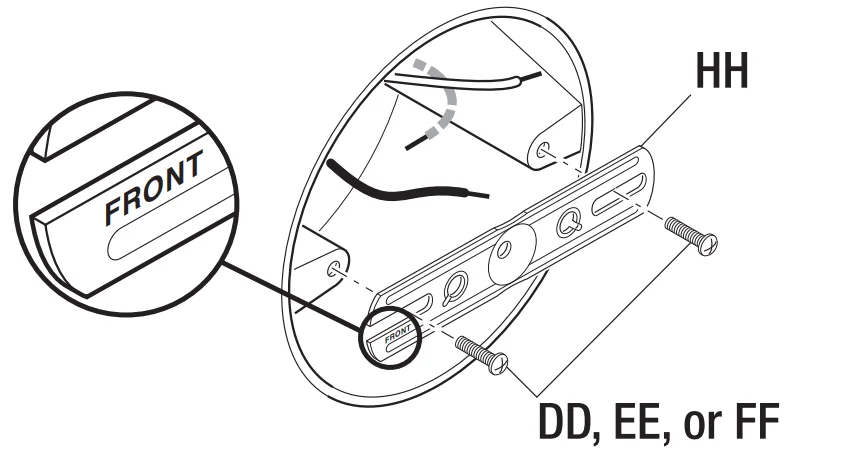
- Install the mounting bracket (HH) with the stamped word “FRONT” facing away from the junction box. Use the mounting bracket screws (DD, EE, or FF) that best fit the junction box.
NOTE: Firmly pull on the mounting bracket to verify it is securely mounted to the junction box. If necessary, use the screws that were removed from the existing light fixture.
Hanging the Light Fixture Temporarily
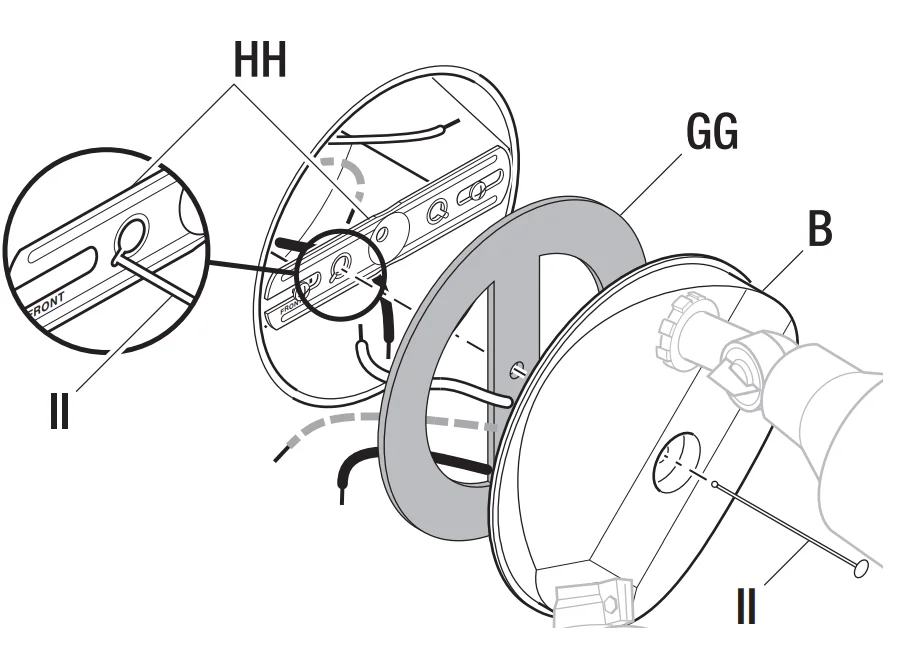
- Insert the small end of the plastic hanger (II) through the center hole of the canopy (B) and the gasket (GG).
- Insert the small end of the plastic hanger (II) into one of the two small, slotted holes on the mounting bracket (HH).
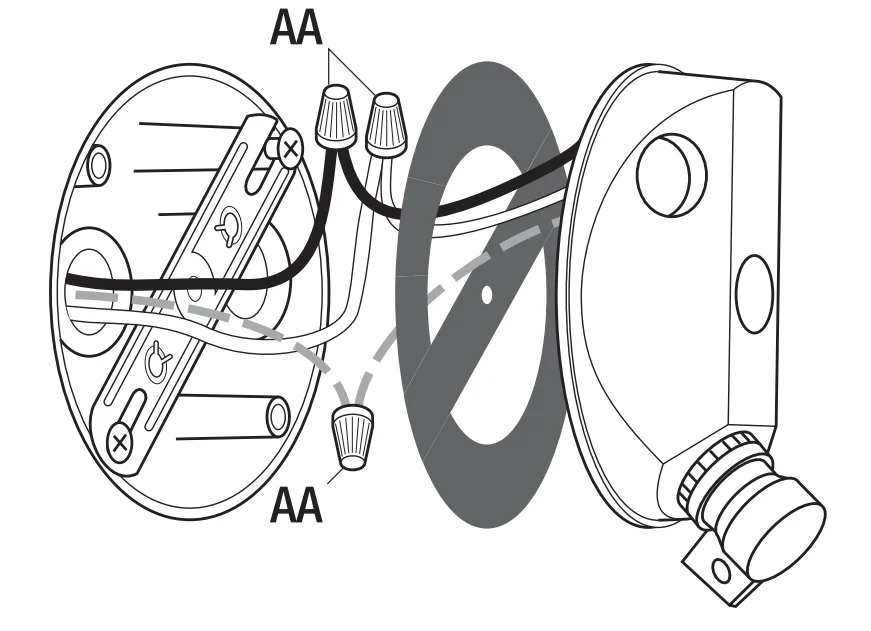
- Route the light fixture wires through the large holes in the gasket (GG).
Wiring the Light Fixture
CAUTION: Do not cut any wires with factory-installed wire connectors or remove the wire connectors.
- Connect the light fixture wires to the junction box wires with wire connectors (AA):
- White to white
- Black to black
- Bare or green ground wire to house ground
Mounting the Light Fixture
- Remove the plastic hanger (II).
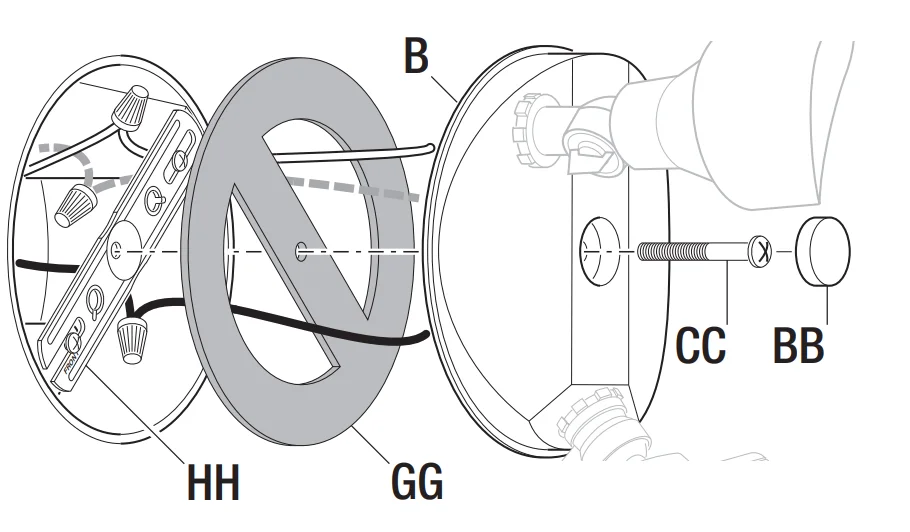
- Insert the small end of the mounting bolt (CC) through the center hole of the canopy (B) and the gasket (GG).
- Align the mounting bolt (CC) with the center hole in the mounting bracket (HH) and tighten securely. Do not overtighten.
- Push the rubber plug (BB) firmly into the mounting bolt hole on the canopy (B).
NOTE: Make sure all the wires are inside the junction box before attaching the canopy (B) to the junction box.
Caulking Around the Light Fixture
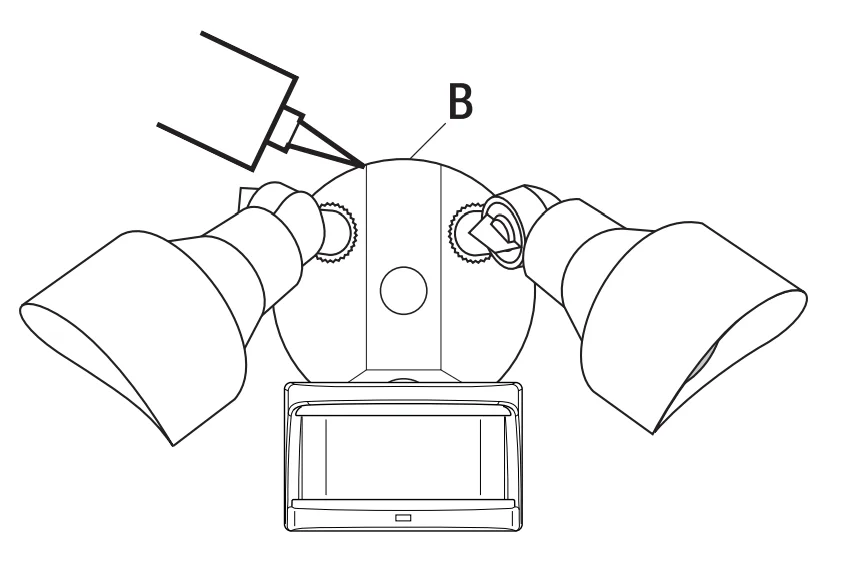
- Caulk around the canopy (B) and mounting surface with silicone sealant (not included).
Replacing a Bulb
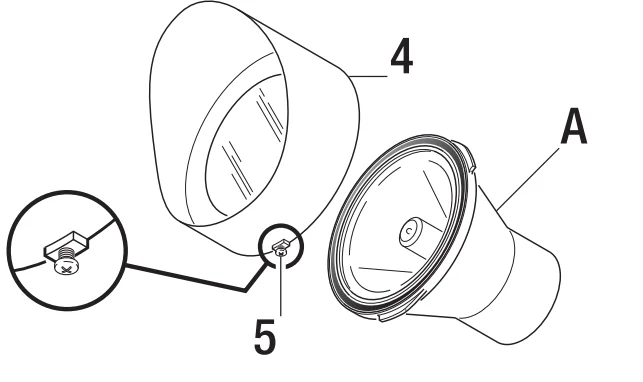
- Remove the shade (4) by loosening the set screw (5) several turns.
- Turn the shade (4) counterclockwise and remove.
- Pull the bulb out of the bulb holder (A) and replace it with a new bulb.
- Reinstall the shade (4) to the desired position and tighten the set screw (5).
Operation
Adjusting the Bulb Holders
Warning: Risk of fire. Do not aim the bulbs at a combustible surface within 3 ft. (1 m).
Warning: Risk of fire. Keep the bulbs at least 2 in. (51 mm) from combustible materials.
CAUTION: Keep the sensor at least 1 in. (25 mm) away from the bulbs.
CAUTION: Keep bulb holders 30° below horizontal to avoid water damage and electrical shock.
- Turn the power on at the circuit breaker or fuse and turn on the wall switch.
- Loosen the lock nut (1) and thumb screw (2) to adjust the bulb holders (A) for the desired light coverage.
- Tighten the lock nut (1) and thumb screw (2).
NOTE: Do not rotate the bulb holders more than 180° from the factory setting.
Rotating Sensor Controls Downward
CAUTION: To avoid water damage and risk of electrical shock, the motion sensor controls must be facing the ground when installation is complete.
- Rotate the motion sensor (C) so the controls face toward the ground.
NOTICE: All clearances must be maintained. See Safety Information on page 2.
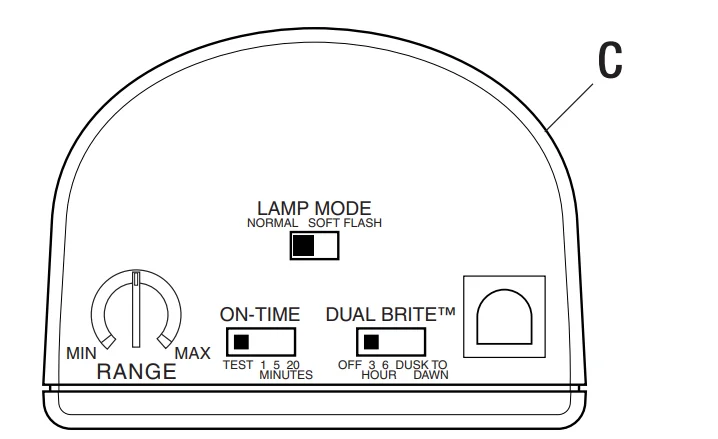
Setting the Sensor for Testing
When the “ON-TIME” switch is set to the “TEST” position, the light fixture will operate during the day or night. The light will stay on for 5 seconds after all motion is stopped.
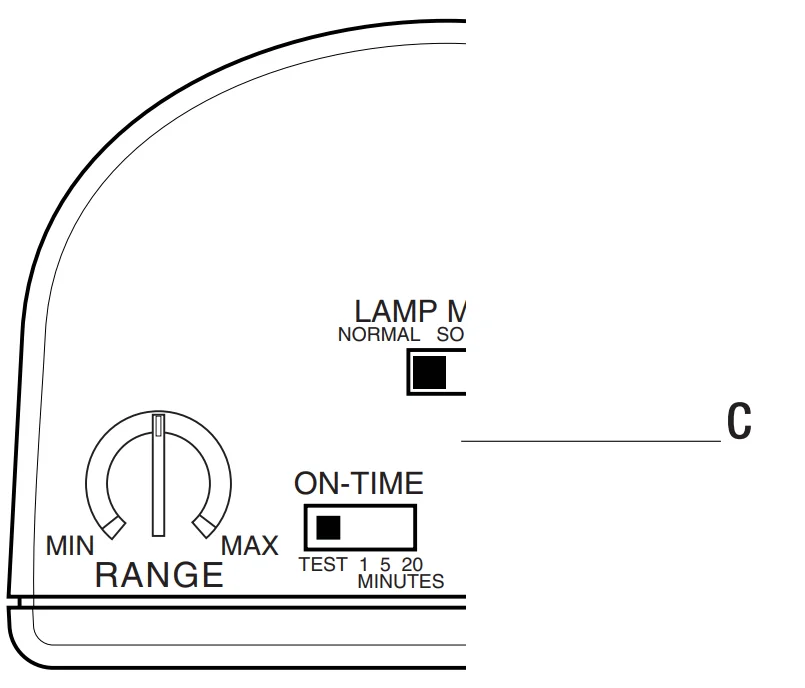
- Set the “ON-TIME” switch to the “TEST” position.
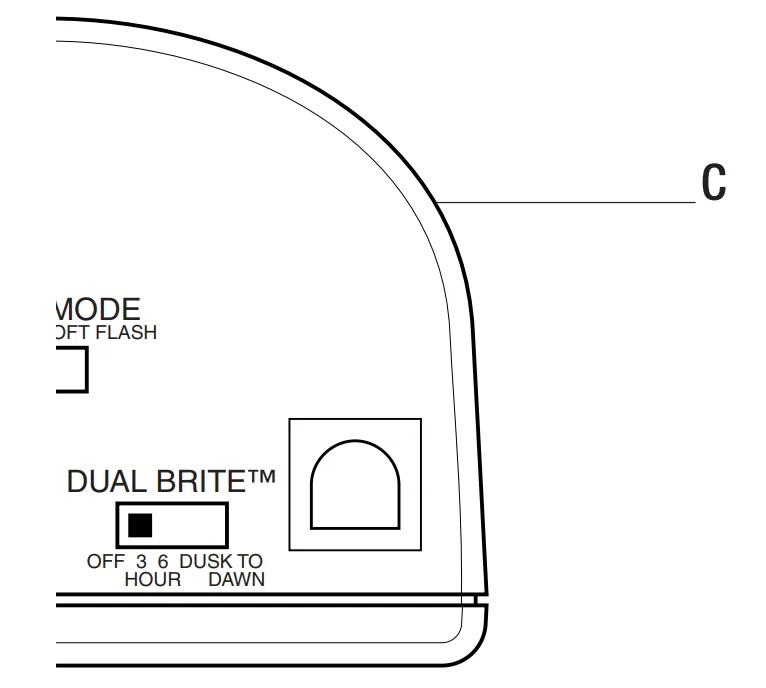
- Set the “DUALBRITE” switch to the “OFF” position.
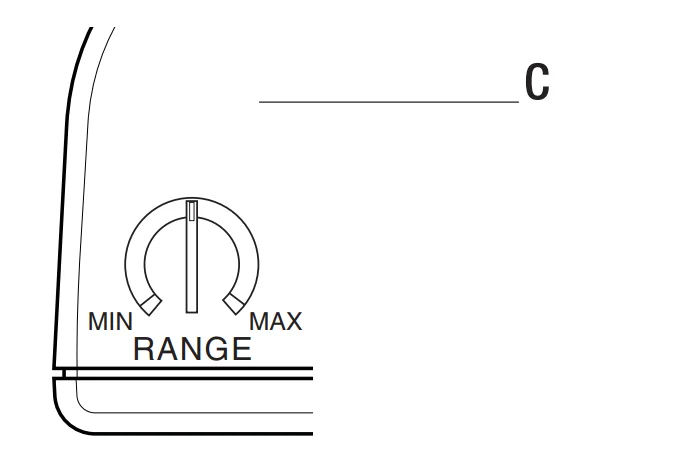
- Turn the “RANGE” dial to the “MIN” position.
- Aim the motion sensor (C) in the general direction of the area to be covered.
NOTE: The motion sensor will need to completely warm up (90 seconds) before beginning the setup process.
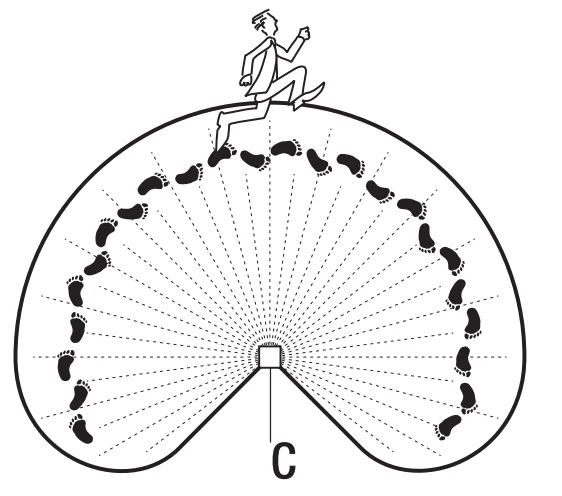
Adjusting the Motion Sensor Detection Zone
- Turn on the circuit breaker or fuse and the light switch.
- Perform a “walk test”. Walk in an arc across the front of the motion sensor (C).
- Watch the light. The light will come on and the red LED will flash,, indicating motion has been detected.
- Stop, wait for the light to turn off, and then begin walking again.
- Continue this process until the detection zone has been established.
- Adjust the sensor up, down, or side to side to change the motion sensor (C) detection zone.
Adjusting the RANGE Dial
- To increase the detection zone, turn the “RANGE” dial toward the “MAX” position.
- To decrease the detection zone, turn the “RANGE” dial toward the “MIN” position.
NOTE: The motion sensor (C) is more sensitive to motion moving across the front of the sensor. The motion sensor (C) is less sensitive to motion moving directly toward the front of the sensor.
NOTE: The higher the “RANGE” setting (sensitivity), the greater the possibility of false triggering. To reduce false triggering, rotate the “RANGE” control toward the “MIN” setting.
Adjusting the ON-TIME Switch
The “ON-TIME” switch determines the amount of time the light will stay on full bright after all motion has stopped.
- Set the “ON-TIME” switch to the 1, 5, o20-minutete position.
Adjusting the DUALBRITE Switch
The “DUALBRITE” switch determines the amount of time the lights stay on at a reduced light level after sundown. Switching this setting to “OFF” will not affect the “ON-TIME” setting.
- Set the “DUALBRITE” switch to OFF, 3 hours, 6 hours, or dusk-to-dawn (sunset to sunrise).
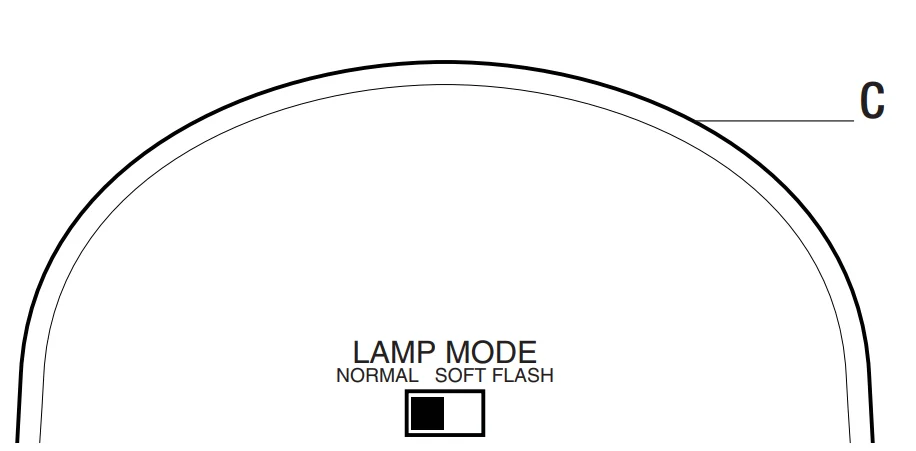
Adjusting the LAMP MODE Switch
The “LAMP MODE” switch determines the way the lights will turn on when motion is detected.
- Security (“NORMAL”) – Light comes on instantly.
- BulbSaver (“SOFT”) – Light comes on dim and gradually increases to full brightness. When the light turns off,, it will gradually dim to half-bright, pause, and thel continue dimming until the light turns off.
- AlertFlash (“FLASH”) – Light flashes on then off twice before turning on full brightness.
- Set the “LAMP MODE” to “NORMAL”, “SOFT”, or “FLASH” position.
Using Manual Mode
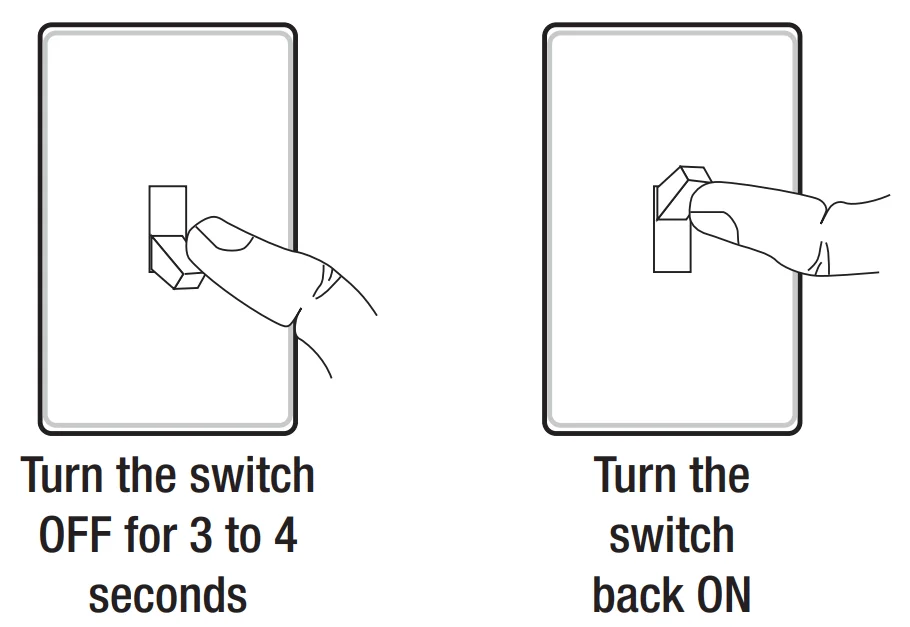
Manual mode overrides the motion sensor (C) and “ON-TIME” control so the light will operate full bright. This feature only works at night and only for one night at a time. The motion sensor (C) will reset to motion-sensing mode at sunrise. Manual mode can be toggled on and off using a wall switch.
- To turn manual mode on, switch the light off at the wall switch for 3 to 4 seconds and then back on.
- To turn manual mode off, switch the light off at the wall switch for 3 to 4 seconds and then back on.
NOTE: If the power to the light fixture is off for more than 5 seconds, allow the motion sensor to warm up prior to switching to manual mode.
Care and Cleaning
- To prolong the original appearance, clean with clear water and a soft, damp cloth only.
- Do not use paints, solvents, or other chemicals on this light fixture. They could cause a premature deterioration of the finish. This is not a defect in the finish and will not be covered by the warranty.
- Do not spray with a hose or power washer.
Troubleshooting
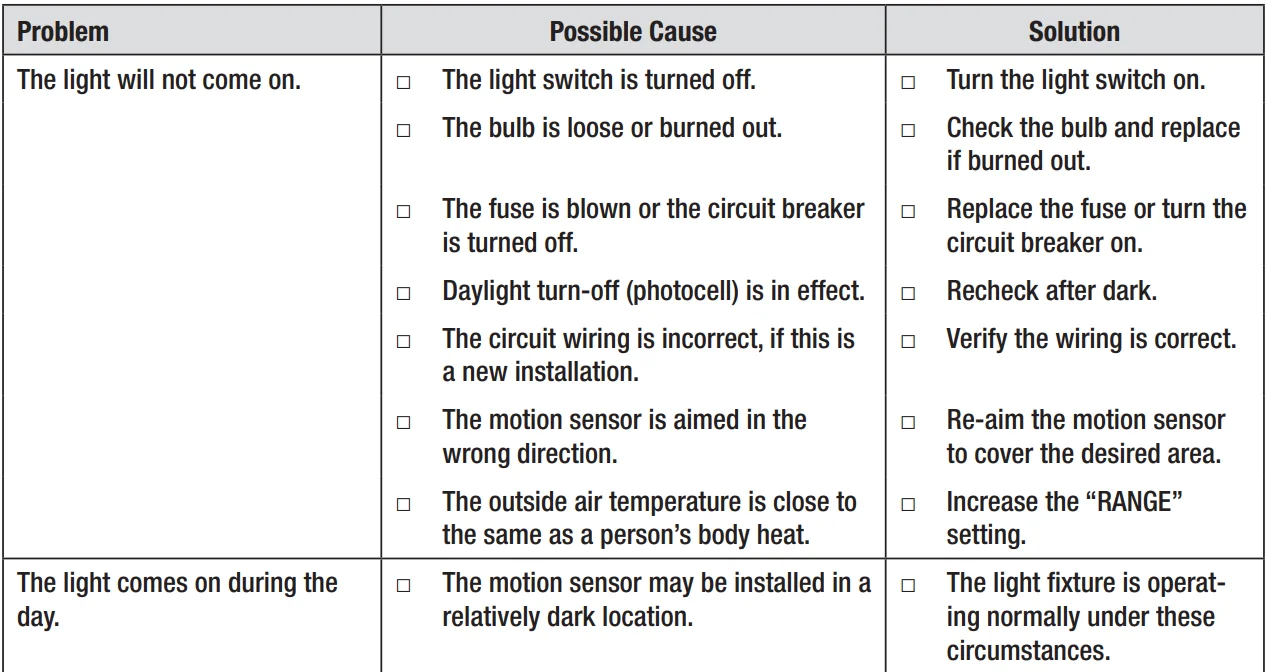
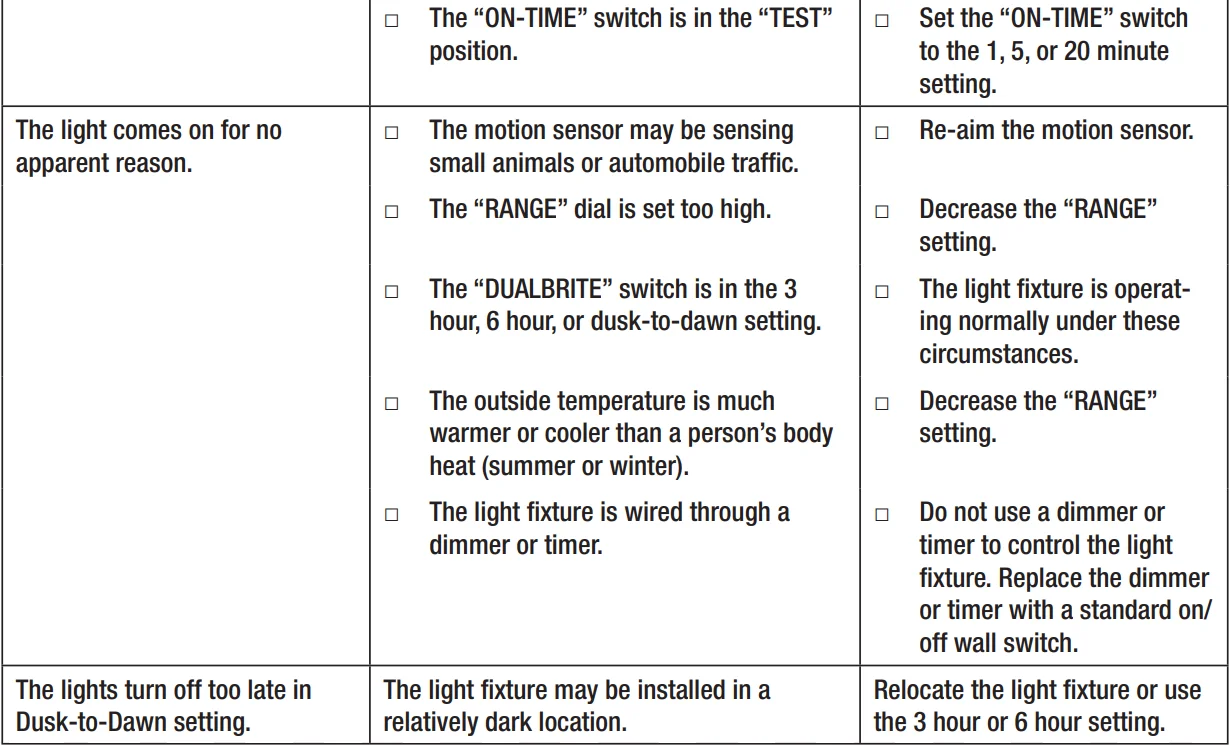
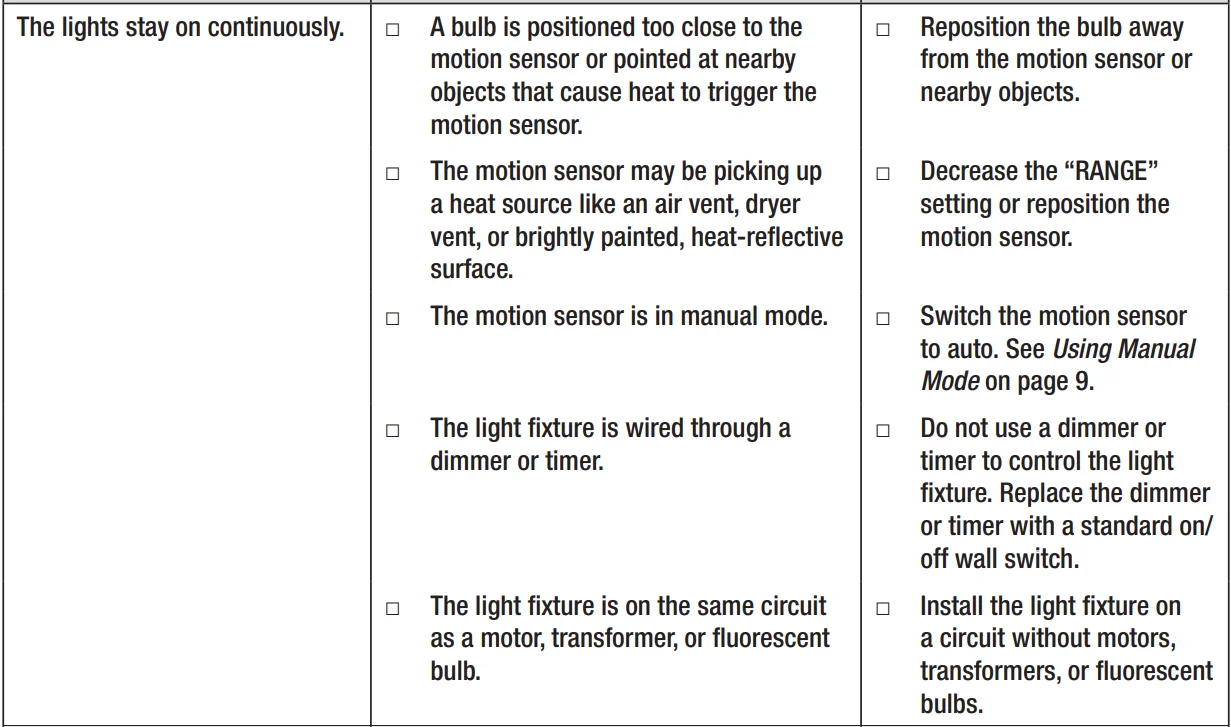
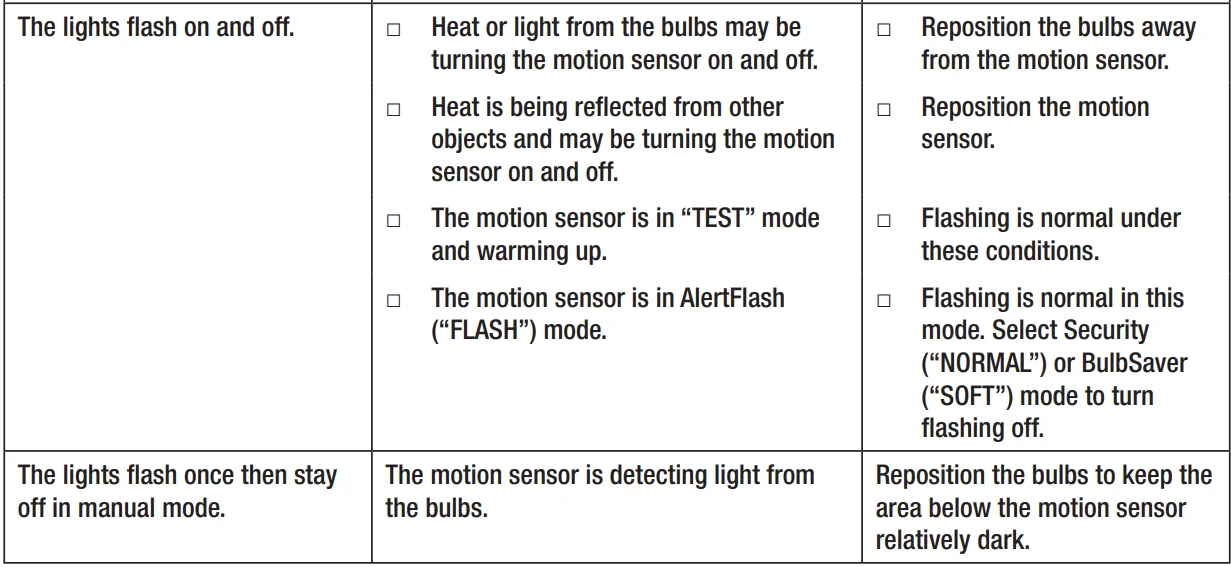
For more manuals by Defiant, visit ManualsLibraryy
Defiant DF-5597 270-Degree Motion Security Light- FAQs
Are Defiant motion lights good?
Yes. Defiant motion lights provide bright illumination and are easy to install, making them a reliable choice for enhancing outdoor security. Some users note limited sensitivity and duration adjustments.
Why is my Defiant motion security light not working?
Common causes include low battery, loose wiring, or incorrect LUX settings. Make sure the battery is charged, cables are secure, and the light’s settings are properly adjusted.
Why does my motion security light stay on all night?
This may happen due to improper settings, age, power surges, storm damage, or incorrect installation. Adjusting the sensitivity, time, and LUX settings usually resolves the issue.
How much electricity do motion sensor lights use?
Motion sensor lights are energy-efficient since they only activate when motion is detected. Their electricity usage is minimal compared to leaving lights on continuously.
Do I need an electrician to install a Defiant motion light?
While you can install it yourself if familiar with electrical work, hiring a licensed electrician ensures safe and correct installation, especially for wired models.
Why do LED security lights fail?
Overheating is the most common cause. LEDs need proper heat dissipation; extreme heat or poor installation can shorten their lifespan.
Where should I not place a motion sensor light?
Avoid placing it near moving trees, pets, busy streets, or reflective surfaces to reduce false triggers and improve reliability.
Can motion sensor lights be repaired?
Yes. Common fixes include adjusting sensitivity, cleaning the sensor, checking wiring, repositioning the light, or replacing a faulty sensor.