
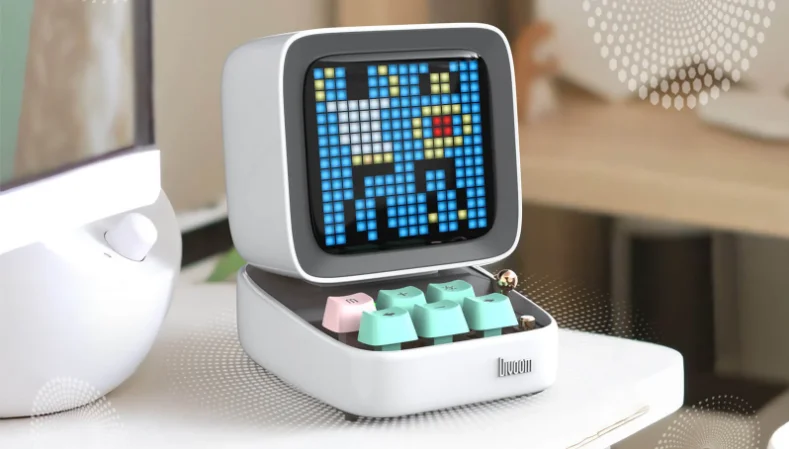

Divoom Ditoo Pro Bluetooth Mini Speaker
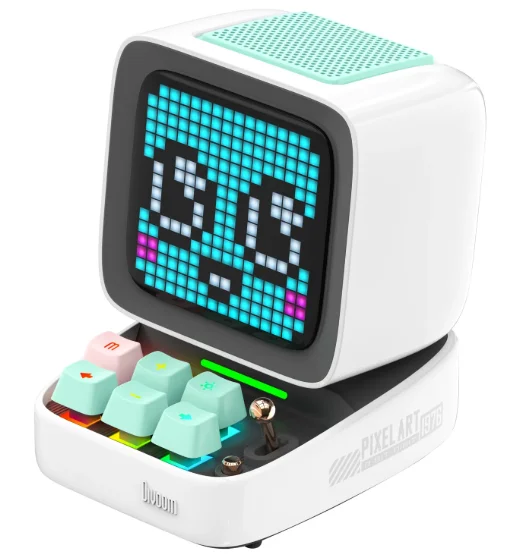
NICE TO MEET YOU!
Thank you for purchasing the DitooPro, the best desktop gadget from Divoom. With DitooPro & its companion APP, you can create pixel art designs and interact with the largest pixel art community, as well as enjoy its great audio. DitooPro is capable of many daily functions, and it can learn more via software updates.
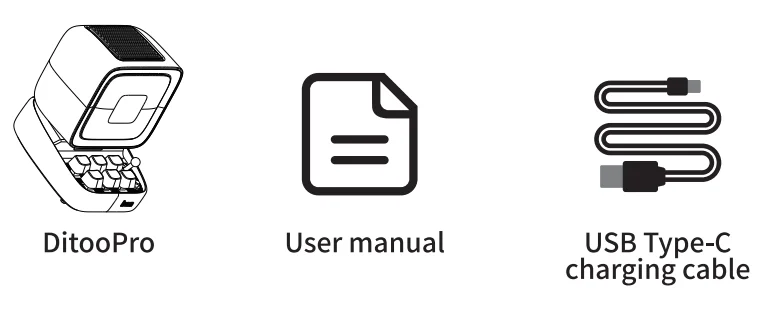
WHAT’S INCLUDED?
- DitooPro
- User manual
- USB Type-C charging cable

Thank you for purchasing a Divoom product! Please read this manual carefully. You can also visit www.divoom.com to learn more about our other products. Due to the nature of the technology product, the information in this manual is subject to change without prior notice. If you have any questions, please contact the Divoom customer support.
PRODUCT DETAILS
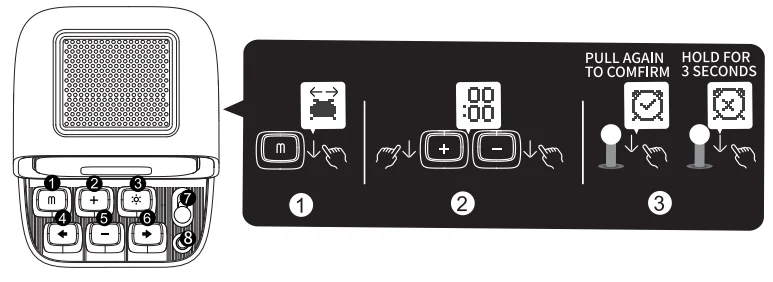
- ‘m’ button
- Press: Enter/Exit menu system
- Hold: Turn On/Off the keyboard backlight
- ‘+’ button
- Press: Increase volume
- Hold: Increase brightness
 Lighting button
- Press: Change light function
- Hold: Change light effects
- ‘←’ button
- Press: Previous song
- Hold: Last light effect
- ‘-‘ button
- Press: Decrease volume
- Hold: Lower brightness
- ‘→’ button
- Press: Next song
- Hold: Next light effect
- Lever
- Short pull: Play/Pause
- Long pull: Start voice memo recording
- Audio source button
- Short pull: Switch between the different audio sources
- Double-press: Disconnect Bluetooth connection

- Battery indicator
- Press any button to check the battery status
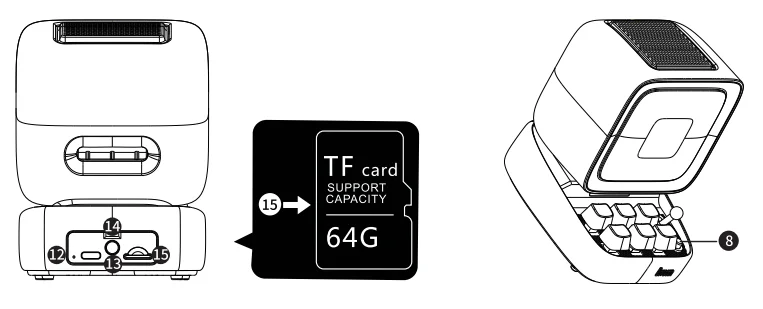
- Bass port
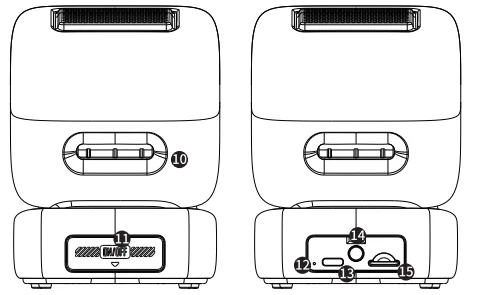
- Rear port flap
- Reset the pin hole
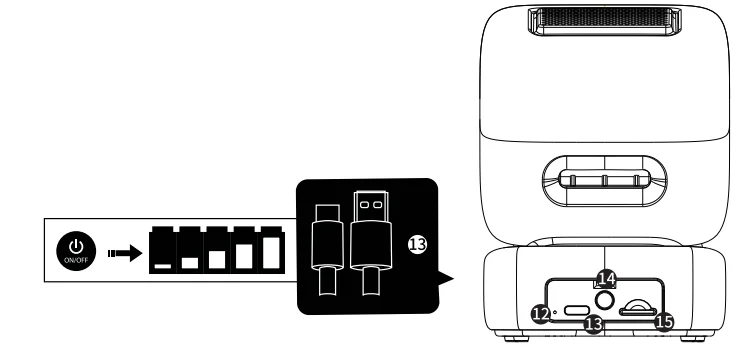
- USB-C charging port
- ON/OFF button
- Hold: Power ON/OFF speaker
- TF card slot
- Playback music from a TF card

- Playback music from a TF card
 Lighting button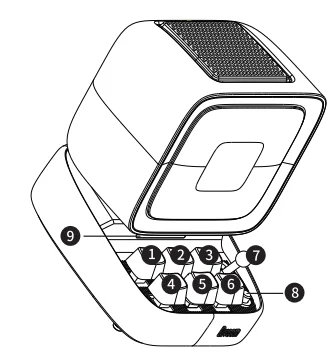
HOW TO USE DITOOPRO’S MENU FUNCTION?
- Short-press the (m) menu key to enter the menu system.
- Use the (+ -) (➔) keys to switch between music/pixel coloring/tools/alarm clock/game.
- Pull down the joystick to confirm the option, and short-press the (m) menu key to exit the current menu function.
[Music]
Pull down the joystick to enter the music function. Press (+ -) (➔) keys to switch to Bluetooth or TF card mode, and pull down the joystick to confirm.
[Pixel coloring]
Pull down the joystick to start coloring. Press the (+) (-) (➔) key to move the icon, pull down the joystick to fill in the selected area until the color of the pattern is filled, then enter the next pixel image coloring. Press the (sun icon) key to view the complete pattern prompt.
[Tools]
Pull down the joystick to enter the tool, and press the (+ -) (➔) keys to select tools: scorer, timer, countdown, noise detection.
[Alarm clock]
Pull down the joystick to enter the alarm clock settings. Press the (+) (-) keys to set the clock and minute time, respectively, pull down the joystick to confirm and start the alarm clock. How to cancel alarm: Enter the alarm clock setting interface and long-press the joystick to delete the set alarm clock.
[Game]
After selecting the game menu function, press the (+ -) (➔) keys to switch between slot machine/dice/magic black ball/pinball/flying bird/snake/pixel racing, etc., and pull down the joystick to confirm and start the game. During the game, short-press the (+) (-) (➔) keys to move up and down, and pull down the joystick to confirm.
HOW TO CONNECT THE SPEAKER?
Download the mobile application
Search “Divoom” application for both iOS and Android systems.
- Please grant all privilege requests prompted by the APP.
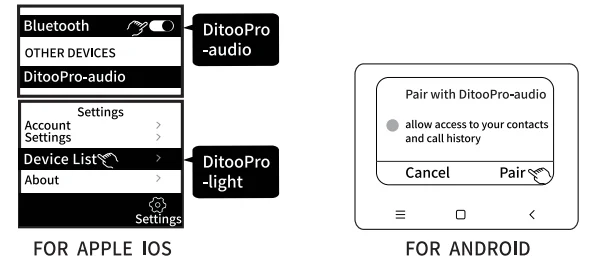
For the Apple iOS system, connect 2 Bluetooth devices.
Search and connect the “DitooPro-audio” in Bluetooth settings for music, then search and connect the “DitooPro-light” in the Divoom APP for controlling the screen.
For the Android system, connect 1 Bluetooth.
Search and connect the “DitooPro-light” or “DitooPro-audio” in the APP to control the music and screen.
60 SECONDS VOICE MESSAGE FUNCTION
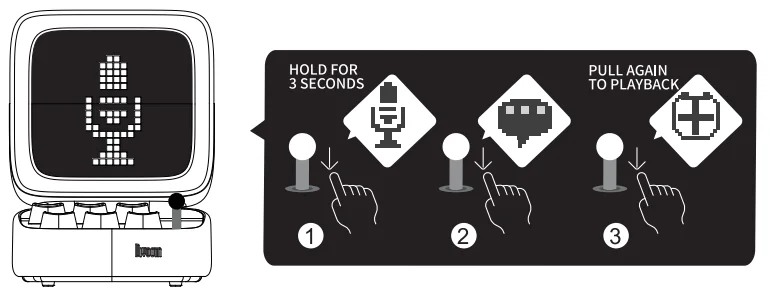
- Pull down the joystick and hold it for 3 seconds. After the message pattern appears on the screen, release the joystick to start recording messages.
- Pull down the joystick to end recording, and pull down the joystick again to play the message.
- The voice message will be automatically deleted after playing.

HOW TO SET ALARM CLOCK MANUALLY?
- After pressing the (m) button, use the (+ -) (➔) keys to switch to the alarm clock, and pull down the joystick to enter the settings.
- First, press the (+) (-) keys to set the clock time, pull down the joystick to confirm; then press the (+) (-) keys to set the minute time, pull down the joystick, and a ticked alarm clock icon appears to indicate that the alarm clock is set successfully.
- How to cancel alarm: Enter the alarm clock setting interface and long-press the joystick to delete the set alarm clock. A crossed alarm clock icon appears to indicate successful deletion.
- DitooPro only supports 1 set of manual alarm clocks. If you need more alarm clocks, please use the Divoom App to set them.

HOW TO PLAY THE TF CARD AUDIO?
- Insert the TF card into the TF card slot, and the speaker will automatically enter the TF card mode.
- Short-press the mode button to quickly switch the playback mode.
- Switch the mode: short-press the (m) menu button, pull down the joystick to enter the “music” menu. Use the (+ -) (➔) keys to switch to TF card mode, and pull down the lever to enter.
- In music mode, please use the keyboard buttons and joystick controls to play music.
- MP3/WAV/FLAC are the only supported file formats. The maximum supported capacity is 64GB.

HOW TO CHARGE?
- Insert the USB Type-C cable into the speaker.
- Press the power button if you want to check the battery percentage.
- When charging, the indicator light will be lit. Upon 100% charge, the indicator will turn off.
- Please use a 5V–2A charger, and do not use a higher voltage charger.

- Please use a 5V–2A charger, and do not use a higher voltage charger.
PRODUCT SPECIFICATION
- Dimension: 114.2 x 90 x 121.2 mm
- Weight: 533 g
- Speaker size: 48 mm
- Output power: 15 W
- Frequency response: 30 Hz–20 KHz
- Signal-to-noise ratio: 80 dB
- Playback time: 8 hrs (tested under moderate volume with controlled environment)
- Battery capacity: 5000 mAh
- Battery voltage: 3.6 V
- Battery charge time: 4 hrs
- Charge: 5V–2A
- Wireless range: 10 M / 33 ft
- Bluetooth compliant: 5.0
SAFETY GUIDE
Please read the following instructions carefully:
- Please follow our product installation and operation instructions.
- Always place the speaker on a smooth and stable surface.
- Please place the speaker in an open area for the best sound quality. Do not block the surroundings of the speaker.
- Do not push any objects into speaker vents or slots. Do not apply any great force on the speaker.
- Please keep the speaker in a room-temperature environment. Do not place the speaker near any heat sources (such as radiators, heat registers, stoves, fireplaces, or direct sunlight). Do not place the speaker near any open flame source.
- Do not attempt to service the speaker by yourself. Always refer to the instructions by qualified service personnel.
- To avoid the risk of electrical hazard, do not expose this speaker to a wet surface.
WARRANTY INFORMATION:
- If you believe your product is defective within the warranty period, please bring the product back to where it was initially purchased. Alternatively, for any other questions or concerns, please call customer support at +0755 86290767, or contact us via email at [email protected].
- If, within 12 (24 if required by local law) months of purchase, this device or any part thereof is proven to be defective by reason of faulty workmanship or defects in materials, we will, at our option repair or replace the same free of charge for labor or materials on condition that it is similar to the product’s current condition.
- The sales invoice or receipt with the date and source of purchase must be presented together with the defective unit. We cannot validate the product warranty information without an invoice.
- The warranty does not cover product failures that have been caused by the use of accessories or other peripheral devices that are not Divoom-branded original accessories intended for use with the product.
- The warranty does not cover product failures caused by modification, repair, or disassembly by any person who is not authorized by the manufacturer.
- The warranty is non-transferable. Any defective unit or part shall become the property of the manufacturer.
- Warranty does not cover any damage caused by misuse, drop, hit, or negligence.
- Customer is responsible for the return shipping charges.
PRODUCT WARRANTY CARD

Divoom official website: www.divoom.com/ www.divoom-gz.com
Divoom warranty information: https://divoom.com/policies/refund-policy
Divoom product FAQ: https://divoom.com/apps/help-center
Divoom support email: [email protected]
Divoom support contact number: 0755-86290791
Divoom repair & return address: Shenzhen Divoom Technology Limited Corporation, 1st Floor, 5th Building, XinlianHe Industrial Complex, Shajing Town, Baoan District, Shenzhen City, Guangdong Province 518000, The People’s Republic of China.
For More Manuals By Divoom, Visit ManualsLibraryy.
Divoom Ditoo Pro Bluetooth Mini Speaker-FAQs
Is the Divoom Ditoo Pro a good speaker?
Yes, the Divoom Ditoo Pro is generally considered a good mini Bluetooth speaker, especially for users who value design and extra features alongside sound quality. It delivers surprisingly clear audio for its compact size and uses DSP tuning to improve bass and clarity. What makes it stand out is the pixel-art display, customizable animations, and smart features like an alarm clock and notifications, making it both a speaker and a decorative desk gadget.
What is the Divoom Ditoo Pro Bluetooth mini speaker?
The Divoom Ditoo Pro is a compact Bluetooth speaker that combines audio playback with a programmable pixel art LED screen. It features a retro computer-style design and allows users to create and display pixel art, animations, and notifications using the companion mobile app. Besides music playback, it also functions as a smart alarm clock, gaming desk accessory, and decorative display, making it popular among gamers, creators, and fans of unique tech gadgets.
Can the Divoom Ditoo Pro connect to Bluetooth devices easily?
Yes, the Divoom Ditoo Pro connects easily to smartphones, tablets, and computers using standard Bluetooth connectivity. Pairing usually takes just a few seconds once the speaker is placed in pairing mode. After the first connection, most devices reconnect automatically when the speaker is turned on. The Bluetooth connection allows you to stream music, podcasts, or videos wirelessly while also controlling the pixel display and other features through the Divoom mobile app.
What features make the Divoom Ditoo Pro different from other mini speakers?
The Divoom Ditoo Pro stands out because it is more than just a Bluetooth speaker. It includes a programmable pixel art LED display that lets users create animations, icons, or text messages. The speaker also includes features like a customizable equalizer, alarm clock, white noise generator, social pixel art community, and smart notifications. These creative and interactive elements make it a fun desk accessory in addition to being a portable audio device.
Is the sound quality of the Divoom Ditoo Pro good for its size?
For a compact desktop speaker, the Divoom Ditoo Pro delivers impressive sound quality. It uses DSP audio processing and a 15-watt output to provide balanced audio with clear vocals and decent bass for its size. While it cannot match large portable speakers in volume or bass depth, it performs very well for casual music listening, gaming setups, and desk environments where a small but capable speaker is sufficient.
How long does the Divoom Ditoo Pro battery last?
Battery life on the Divoom Ditoo Pro depends on how it is used, particularly the brightness of the pixel display and audio volume. On average, users can expect several hours of playback on a single charge when listening to music with the display active. If the LED screen brightness is reduced or used occasionally, the battery can last longer, making it suitable for desk use, casual listening, or decorative display throughout the day.
Can you create your own pixel art on the Divoom Ditoo Pro?
Yes, one of the most popular features of the Divoom Ditoo Pro is the ability to create custom pixel art. Through the Divoom mobile app, users can design their own pixel images, animations, and scrolling messages directly from their phone. The app also includes access to a large community library with thousands of shared pixel designs that you can download and display, allowing you to personalize the speaker’s LED screen easily.
Is the Divoom Ditoo Pro good for gaming or desk setups?
The Divoom Ditoo Pro is particularly popular for gaming and desk setups because of its retro aesthetic and customizable LED pixel screen. The display can show animated graphics, music visualizers, clocks, or gaming-themed artwork, which adds personality to a workspace or gaming station. Combined with its compact design and decent sound output, it works well as both a small speaker and a visual decoration for modern or creative desktop environments.
Is Divoom a Chinese company?
Yes, Divoom is a technology company based in Shenzhen, China. The company specializes in audio devices that combine speakers with pixel art LED displays and smart features. Over the years, Divoom has gained international popularity for its creative product designs, including speakers like the Ditoo, Tivoo, and Pixoo series. Their focus on combining sound technology with digital art has helped them build a strong niche in the tech gadget market.
Is the Divoom Ditoo Pro waterproof?
No, the Divoom Ditoo Pro is not designed to be waterproof or water-resistant. It is primarily intended for indoor use on desks, shelves, or bedside tables. Because it includes an LED display and electronic components that are not sealed against water, it should be kept away from moisture, rain, or spills. If you need a waterproof speaker for outdoor use, other portable Bluetooth speakers specifically designed with IP ratings would be a better option.