
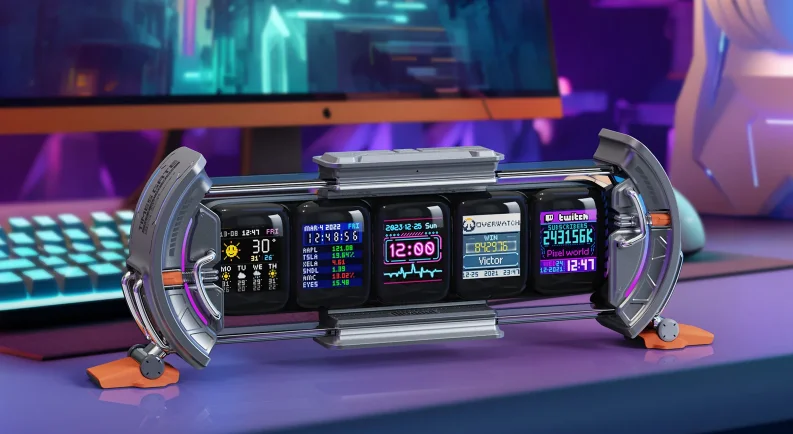

Divoom Times Gate Cyberpunk Digital Clock
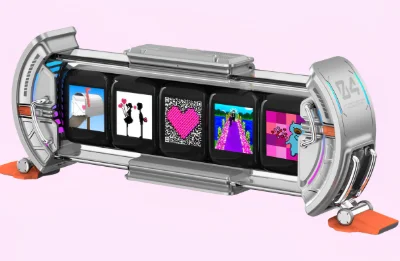
The Divoom Times Gate Cyberpunk Digital Clock is a futuristic desk gadget designed to bring a bold cyberpunk aesthetic to your workspace or gaming setup. Featuring multiple vibrant LED displays arranged in a sleek gate-style frame, it shows the time, animated pixel art, and customizable visuals that create an eye-catching digital ambiance.
With support from the Divoom App, users can personalize the clock with thousands of pixel animations, GIF-style artwork, and useful widgets like weather, social stats, and notifications. The high-quality RGB lighting and retro-futuristic design make it perfect for gamers, tech enthusiasts, or anyone looking to add a unique, sci-fi touch to their desk. Compact yet striking, the Divoom Times Gate blends smart functionality with artistic display, turning an ordinary clock into a dynamic piece of digital décor.
IN THE BOX
Thank you for purchasing a Divoom product. Please read through this manual carefully. Visit divoom.com to learn more about your products. Due to the nature of a technology product, the information in this manual is subject to change without prior notice. For any questions, please contact [email protected] or visit www.divoom.com.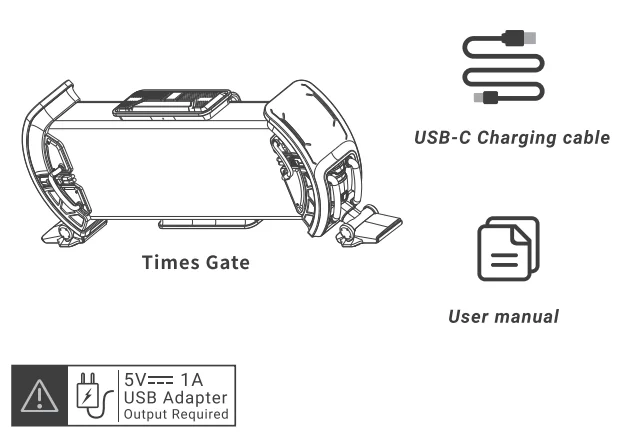
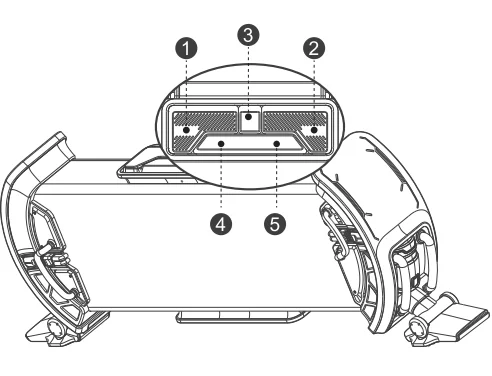
CONTROLS
- LIGHT
- Press: Switch between ambient light “sets.”
- MODE
- Press: Switch between the LCD’s “display set.”
- POWER
- Press: Turn OFF both LCDs & ambient light
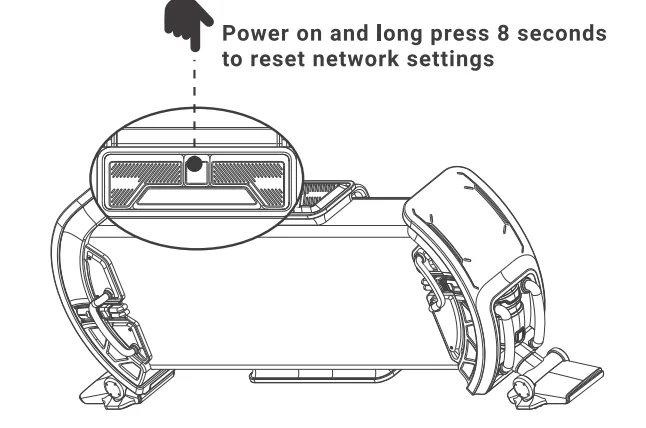
- Hold: Reset Times Gate to Network Settings

- LEFT Arrow
- Press: Lower “display set” brightness by 10%
- Hold: Lower “display set” brightness at a rapid rate
- RIGHT Arrow
- Press: Increase “display set” brightness by 10%
- Hold: Increase “display set” brightness at a rapid rate
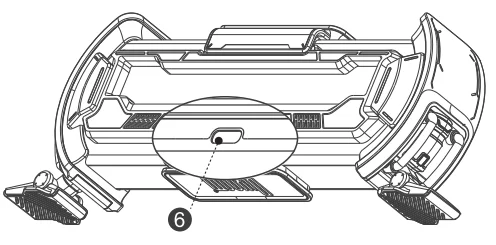
- USB-C Power Port

SETUP
RESET NETWORK
TROUBLESHOOT
- Device is powered, but it is unresponsive/restarting in a loop/not starting properly.
- A) Make sure it’s connected to a 5V = 1A USB charger.
- B) Try a different USB adapter/cable.
- C) Make sure none of the buttons are held or stuck while inserting the power cable.
- Network pairing failed.
- A) Make sure to place both the device and phone near the WiFi router.
- B) Use a 2.4G WiFi connection. 5G WiFi/Public WiFi is not supported.
- C) Try the WiFi setup on a different phone or with a different WiFi network.
- D) Download the latest Divoom APP from the APP Store or Google Play.
TECH SPEC
- Dimension (mm): 283*47*97
- Weight: 406.4 g
- LED: 4.0 x 2.0 x 1.6 mm (45 RGB light beads)
- Screen: 5 x 1.44″ LCD modules
- Output: 5W
- Microphone: MEMS
- Charge: via USB cable, 5V = 1A
For More Manuals By Divoom, Visit ManualsLibraryy.
Divoom Times Gate Cyberpunk Digital Clock-FAQs
What can the Divoom Times Gate display?
The Divoom Times Gate can display a variety of digital information across its cyberpunk-style LED screens. It can show the current time, weather forecasts, stock market data, exchange rates, and social media statistics. In addition, users can display pixel art animations, custom graphics, and music visualizers through the companion app. These features make it more than a simple clock, turning it into an interactive desk gadget for gamers, creators, and home office setups.
What is the Divoom Times Gate cyberpunk digital clock?
The Divoom Times Gate is a futuristic digital desk clock designed with a cyberpunk aesthetic and multiple pixel LED screens. It connects to a mobile app that allows users to customize what appears on the displays, including clocks, pixel art, and live information widgets. The device is designed mainly for gaming setups, streaming desks, and creative workspaces, offering both practical functions and visually dynamic displays that enhance the look of a modern desk environment.
Is the Divoom Times Gate an alarm clock?
Yes, the Divoom Times Gate includes a built-in alarm clock feature that can be managed through the companion app. Users can set multiple alarms for daily routines, such as waking up, reminders, or work schedules. The alarm feature can also be combined with visual effects on the LED display. This makes the device useful not only as a decorative gadget but also as a practical bedside or desk clock for everyday time management.
How do you set up the Divoom Times Gate?
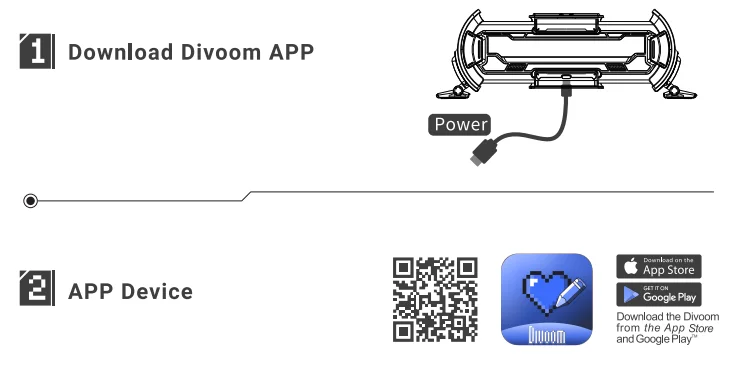
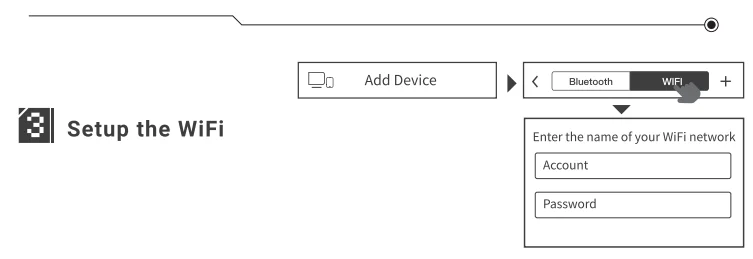
Setting up the Divoom Times Gate typically involves connecting the device to a power source and then pairing it with the Divoom mobile app. During setup, the clock connects to a 2.4 GHz Wi-Fi network so it can synchronize time and access real-time information like weather updates and stock data. Once connected, users can customize screen layouts, change pixel art displays, and configure widgets directly through the app interface.
Does the Divoom Times Gate require Wi-Fi to work?
Yes, the Divoom Times Gate relies on a Wi-Fi connection to unlock most of its smart features. Wi-Fi allows the device to sync time automatically and display real-time information such as weather forecasts, financial data, and online pixel art content. The connection also enables app control and content updates. Without Wi-Fi, the device may still function as a basic clock, but many of its dynamic and interactive features would be limited.
Can you customize the display on the Divoom Times Gate?
Yes, customization is one of the main attractions of the Divoom Times Gate. Through the Divoom app, users can change display styles, upload pixel art, and choose from a large library of community-created animations. You can also arrange widgets to show information such as time, weather, or social media updates. This flexibility allows users to personalize the clock’s appearance and match it with gaming setups, office desks, or creative workspaces.
What is the purpose of the Divoom Times Gate digital clock?
The main purpose of the Divoom Times Gate is to combine timekeeping with customizable digital displays and smart desk features. While it functions as a standard digital clock, it also acts as a decorative tech gadget that shows animated pixel art, useful widgets, and real-time data. Many users place it in gaming setups, streaming environments, or creative workspaces where both functionality and aesthetic design are important.
Is Divoom a Chinese company?
Yes, Divoom is a technology company headquartered in Shenzhen, China. The brand is known for producing creative tech products that combine audio devices and LED pixel displays. Many of its popular products, such as the Pixoo and Ditoo series, focus on merging digital art with everyday gadgets. This design approach has helped the company build a global following among gamers, tech enthusiasts, and people who enjoy customizable digital decor.
Can the Divoom Times Gate show pixel art animations?
Yes, the Divoom Times Gate supports pixel art animations that can be displayed across its LED panels. Users can create their own pixel artwork directly in the Divoom app or download designs from the brand’s online community. These animations can include characters, icons, or moving visual effects. Many people use this feature to personalize their desk setup with animated art that reflects gaming themes, pop culture, or creative designs.
Is the Divoom Times Gate good for gaming setups or desk décor?
The Divoom Times Gate is widely appreciated as a decorative accessory for gaming setups and modern desks. Its cyberpunk-inspired design and animated LED displays make it visually appealing in environments that feature RGB lighting and digital decor. Beyond aesthetics, it also provides useful information like time, weather, and notifications. This combination of style and functionality makes it a popular gadget among gamers, streamers, and tech enthusiasts.