
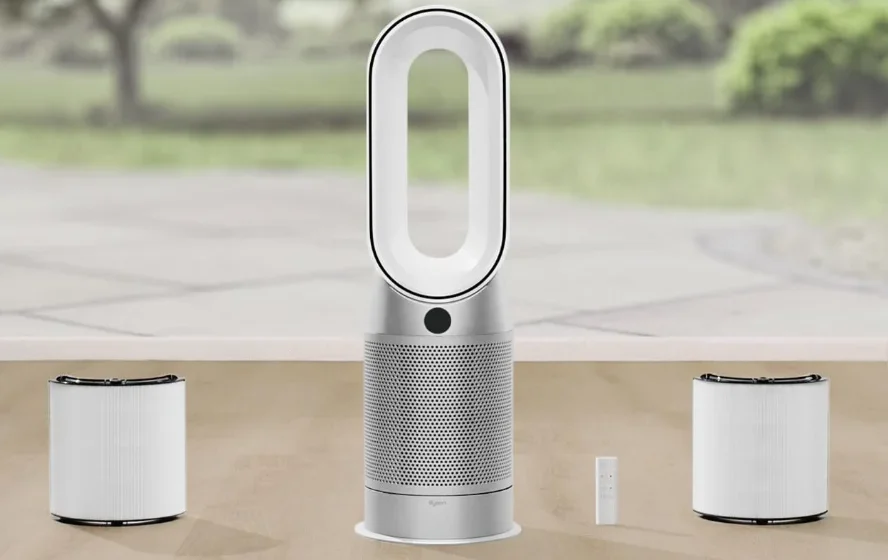

Dyson Purifier Hot+Cool Gen1
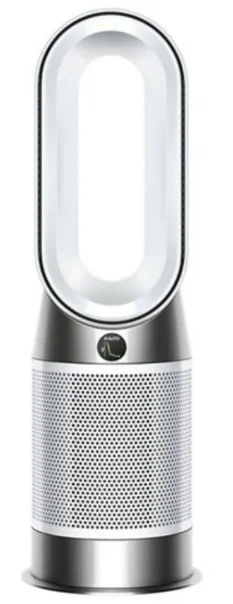
Assembling your machine
Use both hands to lift your machine out of the box by its base.
Do not lift out by the loop amplifier.
Dyson Purifier Hot+Cool Gen1
Supplied with a combined glass HEPA+Carbon filter.
Getting started
Place the remote control on top of the machine with the buttons facing down.
Plug in and switch on.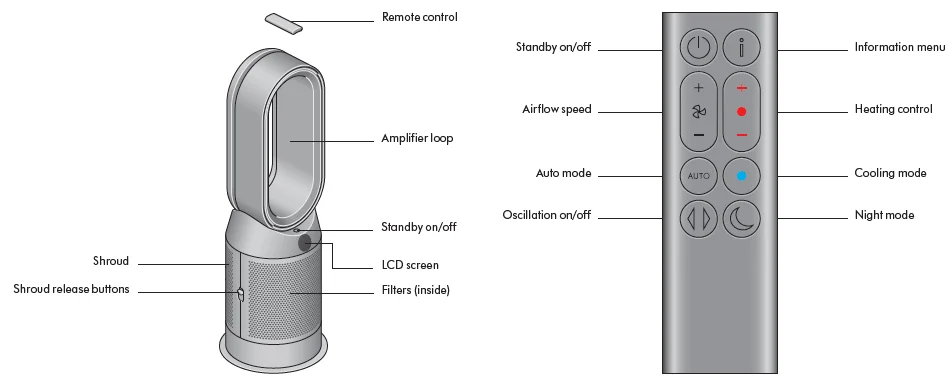
An image of the air purifier fan heater with the remote placed on the top of the loop amplifier and the location of the standby on/off button on the top of the base of the machine.
The layout of the remote control with the standby button on the top left, the airflow speed toggle button in the middle left, the Auto mode button below, and at the bottom is the Oscillation button. On the top right-hand side is the Information menu button, then going downwards is the Heating control button, Cooling mode button, and then Night mode button at the bottom.
Power and continuous monitoring
Stand-by on/off
Press the Standby on/off button on your Dyson purifying fan heater or remote control to stop your machine. It will continue to monitor the air quality.
Continuous monitoring
Continuous monitoring is turned off by default. Once turned on, it will always be active until you turn it off again.
With continuous monitoring turned on, your Dyson purifying fan heater will gather air quality and temperature information, which is displayed on the LCD screen.
Press and hold the Auto mode button on the remote control for 5 seconds to turn it on. The LCD screen will indicate when continuous monitoring is on or off.
Information menu
Press this button to scroll through the information being monitored by your Dyson purifying fan heater.
Information about air quality, temperature, and filter levels is shown on the LCD screen.
When a particular type of pollutant causes air quality to decrease, a symbol for the pollutant will show on the LCD screen.
The remote control with the information button on the top right.
Indoor particulate matter – 12 seconds
Monitors the current particulate matter with a graph showing the last 12 seconds of data.
Particulate matter (PM10)
Larger microscopic particles up to 10 microns in size, suspended in the air we breathe. These include dust, mould, and pollen.
Particulate matter (PM2.5)
Microscopic particles up to 2.5 microns in size, suspended in the air we breathe. These include smoke, bacteria, and allergens.
Indoor temperature
Monitor the ambient temperature to help maintain a comfortable environment.
Filters
The remaining filter life is shown on the LCD screen and will indicate when your filters need replacing.
Auto mode
Set your Dyson purifying fan heater to Auto mode, and the on-board sensors will intelligently adjust the settings of the machine according to the air quality.
- Air quality: your machine will pause when the target air quality has been reached, switching on again when the air quality levels drop.
- Airflow speed: The airflow speed will increase until the target air quality and temperature have been reached.
The remote control with the Auto mode button below the Airflow speed button on the left.
Airflow speed
Press the Airflow speed button to increase and decrease the airflow speed.
The remote control with the Airflow speed toggle button on the left-hand side, below the standby button.
Oscillation
Press the Oscillation button to circulate the air around the room and scroll through the oscillation settings from 0° to 350°.
The remote control with the oscillation button on the left at the bottom below the Auto button.
Night mode and Sleep timer
In Night mode, your Dyson purifying fan heater will continue to monitor and respond to changes, but only using its quietest settings – and with its LCD screen dimmed.
Press the Night mode and Sleep timer buttons to scroll through the timer options.
The remote control with the Night mode and Sleep timer button on the right at the bottom.
Heating and Cooling modes
Press the button to set the required room temperature. Your machine will pause when the temperature set has been reached.
Press the Cooling mode button to switch your machine from Heating mode to Cooling mode.
The remote control with the Heating mode button on the right, below the Information button. The Cooling mode button is immediately below the Heating mode button.
Changing your HEPA+Carbon filter
Before changing your filter, switch off and unplug your Dyson purifier fan heater.
The remaining filter life is displayed on the screen and will indicate when your non-washable filters need replacing. Press the Information button on your remote.
You’ll need to reset the filter life on your machine.
Dyson Purifier Hot+Cool Gen1
Supplied with a HEPA+Carbon filter.
To change your HEPA+Carbon filter, push down on the buttons on either side of your machine to release the outer cover. Push down on the tabs to remove the filter.
Push the replacement filter into the outer cover and make sure the tabs click into place.
Put the outer covers into position on your machine and push firmly until they both click securely into position.
Plug in and switch your machine, and reset your filter life.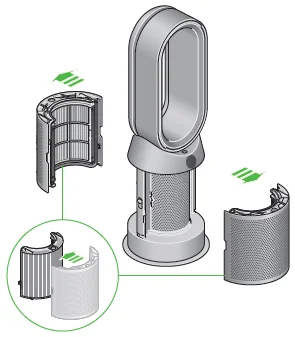
The air purifier fan heater with the filter covers open, showing a HEPA plus carbon filter located in the filter covers. Arrows demonstrate that the filter covers will need to be assembled onto the base of the machine.
Resetting your HEPA+Carbon filter life
It’s important to reset your filter life after you have replaced your filter.
Resetting your HEPA+Carbon filter life
Press and hold the Night mode button on your remote control.
The display on your machine will count down from five, the filter life will be reset, and your machine is ready to use.
Pressing the Night mode and Sleep timer button on the bottom right of the remote control for 5 seconds.
Looking after your machine
To always get the best performance from your Dyson purifying fan heater, it’s important to regularly clean it and check for blockages.
Cleaning your machine
If your machine is dusty, wipe with a damp, lint-free cloth.
Look for blockages in the air inlet holes on the filter and the small aperture inside the loop amplifier.
Use a soft brush to remove dust and debris. Don’t use detergents or polishes to clean your machine.
Error codes
If your machine shows an error code, try turning it off and then on again. If this doesn’t clear the error code, contact Dyson Customer Care.
For more information and support for your machine, go online: www.dyson.com/support
For more Manuals by Dyson, visit ManualsLibraryy
Dyson Purifier Hot+Cool Gen1-FAQs
How do I use the Dyson Purifier Hot+Cool Gen1?
Plug in the unit and press the power button on the remote or machine. Choose Heating, Cooling, or Auto mode, then adjust temperature, airflow speed, or oscillation as needed.
Can the Dyson Hot+Cool be used for both heating and cooling?
Yes. It provides warm air in winter and airflow cooling in summer, while also purifying the air year-round.
How do I switch between heating and cooling modes?
Use the remote to press the Heating or Cooling button. The indicator light turns red for heat and blue for cooling.
Does the Dyson Hot+Cool actually cool the air like an AC?
No. It does not lower room temperature like an air conditioner. Cooling mode circulates purified room-temperature air for comfort.
Can I leave my Dyson Cool fan on all night?
Yes. The purifier has a Night mode that runs quietly with a dimmed display, making it suitable for overnight use.
Is it safe to sleep with a Dyson air purifier on?
Yes. It’s designed for continuous operation and can help improve air quality while you sleep.
Can I run the Dyson Hot+Cool 24 hours a day?
Dyson recommends keeping it on Auto mode so it can constantly monitor air quality and respond to pollutants.
What is Auto mode on the Dyson Hot+Cool Gen1?
Auto mode adjusts airflow speed automatically based on real-time air quality detected by built-in sensors.