
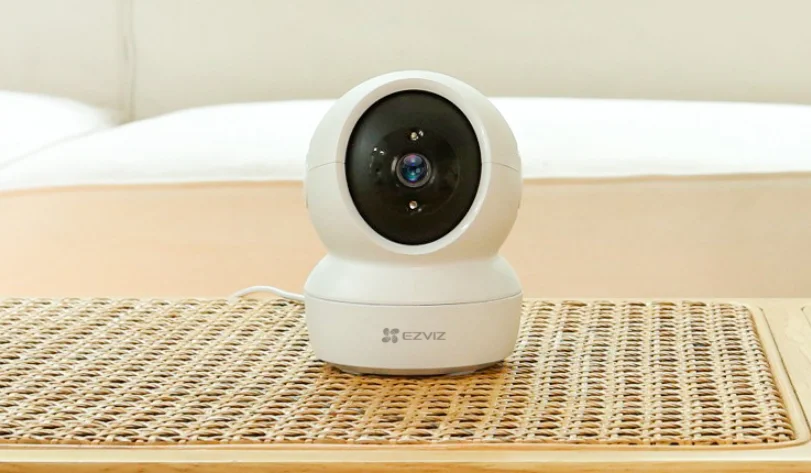

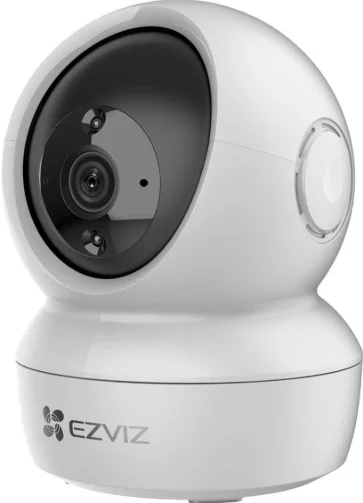
EZVIZ H6c Indoor Pan & Tilt Camera
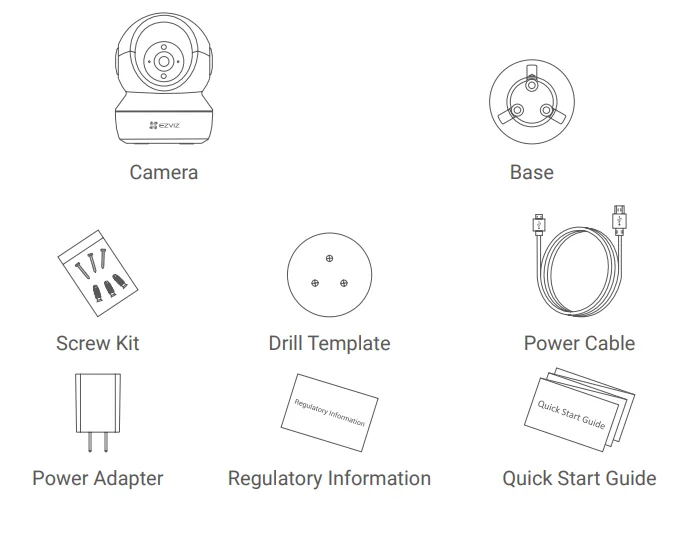
Package Contents
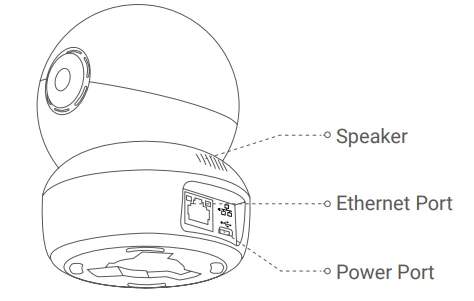
Basics
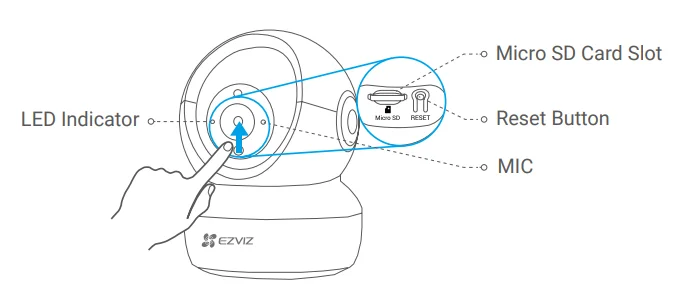
Name Description
- LED Indicator
- Solid Red: Camera starting up.
- Slow-flashing Red: Wi-Fi connection failed.
- Fast-flashing Red: Camera exception (e.g., Micro SD card error).
- Fast-flashing Blue: Camera ready for Wi-Fi connection.
- Slow-flashing Blue: Camera running properly.
- Micro SD Card (sold separately): Initialize the card in the EZVIZ app before using it.
- Reset Button: Hold for 5 seconds to restart and set all parameters to default.
- MIC: For audio in.
- Speaker: For audio out.

Setup
1. Power-on
Plug the power cable into the camera, and then plug the power adapter into an outlet as shown in the figure below.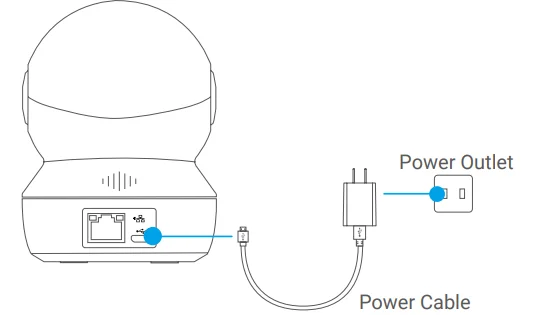
Note: The LED turning fast-flashing blue indicates that the camera is powered on and ready for Wi-Fi configuration.
2. Camera Setup
- Create a user account
- Connect your mobile phone to Wi-Fi using your 2.4GHz network.
- Search for “EZVIZ” in the App Store or Google Play Store(TM).
- Download and install the EZVIZ app.
- Launch the app.
- Create and register an EZVIZ user account by following the start-up wizard.
- Add a camera to EZVIZ
- Log in to your account using the EZVIZ app.
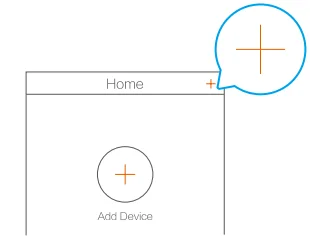
- On the Home screen, tap “+” on the upper-right corner to go to the Scan QR Code interface.

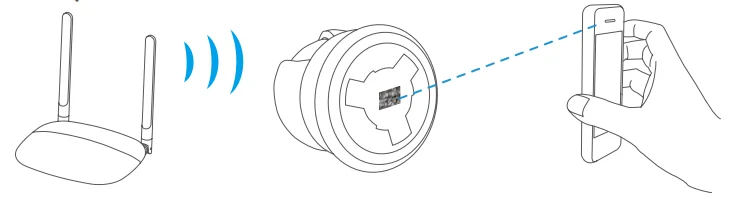
- Scan the QR code on the bottom of the camera.

- Follow the EZVIZ app wizard to finish Wi-Fi configuration.
Note
- Hold the Reset button for 5s in any of the following cases:
- The camera fails to connect to your Wi-Fi network.
- You want to select another Wi-Fi network.
Installation (Optional)
1. Install the Micro SD Card (Optional)
- Rotate the sphere upwards until you see the card slot.
- Insert the Micro SD card (sold separately) into the card slot as shown in the figure below. Note: After installing the Micro SD card, you should initialize the card in the EZVIZ app before using it.

- In the EZVIZ app, tap the Storage Status in the Device Settings interface to check the SD card status.
- If the memory card status displays as Uninitialized, tap to initialize it.
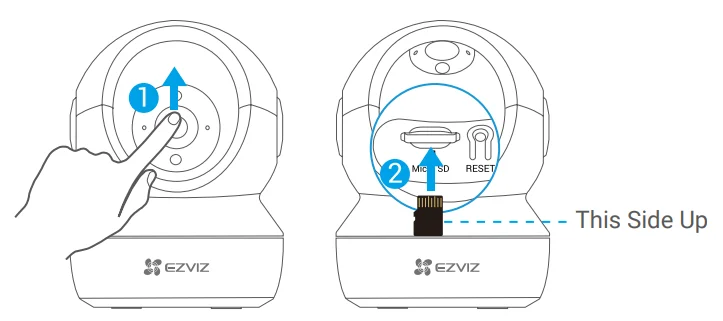
Note: The status will then change to Normal, and it can store videos and/or pictures.
2. Install the Base
The camera can be placed horizontally or mounted on the ceiling. Here, we take ceiling mounting as an example.
Note:
- Make sure the ceiling is strong enough to withstand three times the weight of the camera.
- Avoid positioning the camera in an area that gets a lot of light shining directly into the camera lens.
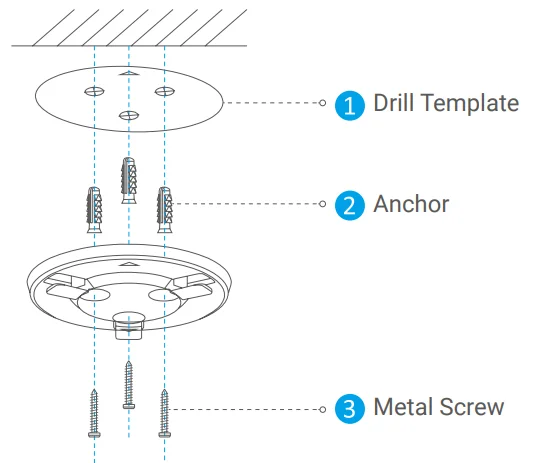
- Place the drill template onto the surface you have chosen to mount the camera.
- (For cement wall/ceiling only) Drill screw holes according to the template, and insert three anchors.
- Use three metal screws to fix the camera base according to the template.

3. Install the Camera
Mount the camera to the base, and turn it clockwise until it is fixed.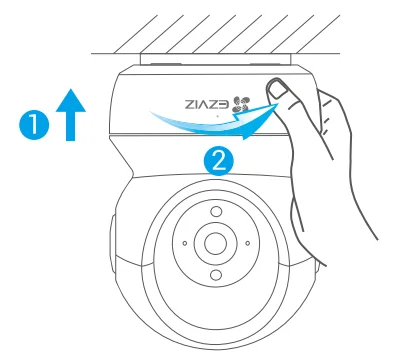
Note: After installing the camera, please go to the EZVIZ app to flip the camera image. For detailed information, please visit www.ezviz.com/eu.
INFORMATION FOR PRIVATE HOUSEHOLDS
- Separate collection of waste equipment: Electrical and electronic equipment that has become waste is referred to as waste equipment. Owners of waste equipment must dispose of it separately from unsorted municipal waste. In particular, waste equipment does not belong in household waste, but in special collection and return systems.
- Batteries and rechargeable batteries, as well as lamps: Owners of waste equipment shall, as a rule, separate waste batteries and rechargeable batteries that are not enclosed in the waste equipment, which can be removed from the waste equipment without being destroyed, from the waste equipment before handing them in at a collection point. This does not apply if waste equipment is prepared for reuse with the participation of a public waste management authority.
- Options for returning waste equipment: Owners of waste equipment from private households can return it free of charge to the collection points of the public waste management authorities or to the take-back points set up by manufacturers or distributors within the meaning of the Electrical and Electronics Equipment Law. Stores with a sales area of at least 400 m² for electrical and electronic equipment, and those grocery stores with a total sales area of at least 800 m² that offer electrical and electronic equipment several times a year or permanently and make it available in the market, are required to take it back. This also applies in the case of distribution using means of distance communication, if the storage and shipping areas for electrical and electronic equipment are at least 400 m² or the total storage and shipping areas are at least 800 m². Distributors shall, in principle, ensure take-back by providing suitable return facilities at a reasonable distance from the respective end user. The possibility of returning waste equipment free of charge exists for distributors who are obliged to take it back, among other things, if a new similar device that essentially fulfills the same functions is delivered to an end user.
- Privacy Notice: Waste equipment often contains sensitive personal data. This applies in particular to devices of information and telecommunications technology, such as computers and smartphones. In your own interest, please note that each end user is responsible for deleting the data on the waste equipment to be disposed of.
- Meaning of the symbol “crossed-out wheelie bin”: The symbol of a crossed-out wheelie bin regularly depicted on electrical and electronic equipment indicates that the respective device is to be collected separately from unsorted municipal waste at the end of its service life.
For More Manuals By EZVIZ, Visit ManualsLibraryy.
EZVIZ H6c Indoor Pan & Tilt Camera-FAQs
What features make the EZVIZ H6c a good indoor security camera?
The EZVIZ H6c combines pan-and-tilt coverage, motion detection, auto-tracking, two-way audio, and night vision, making it a versatile indoor camera. Its wide room coverage and app-based remote monitoring appeal to users wanting security, pet monitoring, or baby surveillance in one affordable device.
Does the EZVIZ H6c support full-room monitoring?
Yes, the EZVIZ H6c is designed for near-complete room coverage through wide pan-and-tilt movement that minimizes blind spots. It can rotate to track movement and monitor larger spaces effectively, which makes it useful for living rooms, nurseries, offices, and other indoor environments.
How good is the video quality on the EZVIZ H6c?
The EZVIZ H6c comes in multiple resolution options, including 1080p and higher-resolution variants, offering clear video for daily indoor monitoring. It performs well for recognizing people, pets, and activity details, while night vision helps maintain visibility even in low-light conditions.
Can the EZVIZ H6c track motion automatically?
Yes, auto-tracking is one of the standout features of the EZVIZ H6c. When motion is detected, the camera can follow movement automatically, helping users keep their eyes on pets, children, or unexpected activity. This feature adds convenience and stronger indoor security monitoring.
Is the EZVIZ H6c suitable for pet or baby monitoring?
The camera works well for pet and baby monitoring because it offers remote viewing, two-way talk, motion alerts, and room-wide visibility. Parents and pet owners often value the pan-and-tilt control, allowing them to check different areas without needing multiple indoor cameras.
Does the EZVIZ H6c require a subscription to store footage?
No, the EZVIZ H6c supports local storage through microSD cards, reducing reliance on subscriptions. Cloud storage is optional for users wanting additional backup features. This flexibility appeals to buyers who want continuous recording options without mandatory monthly fees.
How does night vision perform on the EZVIZ H6c?
Night vision on the EZVIZ H6c is designed for dependable indoor monitoring in darkness, with infrared visibility reaching around 10 meters on standard models. It helps users monitor sleeping children, pets, or nighttime movement while maintaining clear footage in low-light conditions.
Is the EZVIZ H6c easy to install and use?
The EZVIZ H6c is generally considered beginner-friendly, with app-guided setup and Wi-Fi connectivity making installation straightforward. Its controls for pan, tilt, alerts, and live viewing are designed for simple everyday use, which is why it attracts first-time security camera buyers.
Does the EZVIZ H6c have privacy features?
Yes, privacy is supported through features such as sleep mode or privacy shutter functions, depending on the model. These let users temporarily disable monitoring when desired, which is useful in bedrooms, nurseries, or shared living spaces where privacy matters.
Is the EZVIZ H6c worth buying for home security?
For users wanting affordable indoor surveillance with smart tracking, pan-and-tilt coverage, and local storage support, the EZVIZ H6c offers strong value. It may not replace advanced professional systems, but it suits everyday home monitoring needs well for most households.