
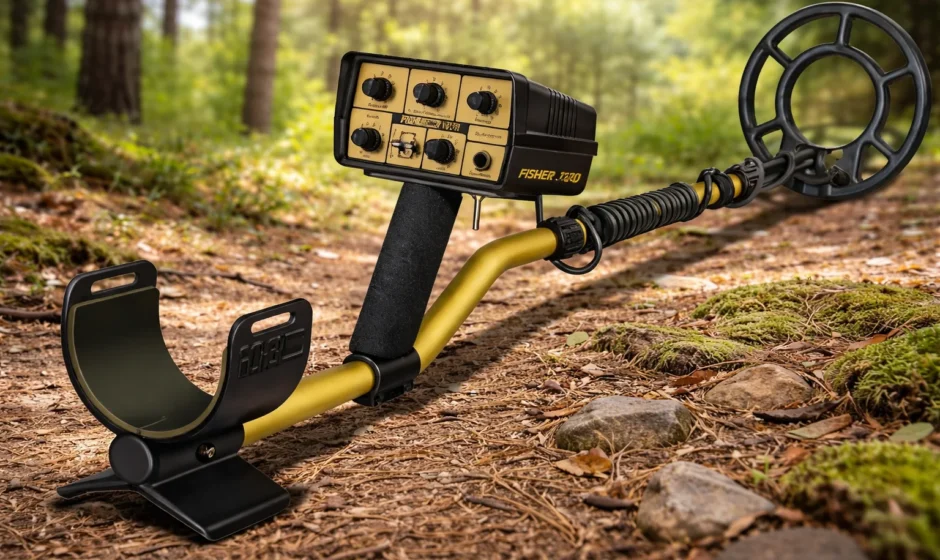

Fisher 1270 Relic Hunting Metal Detector
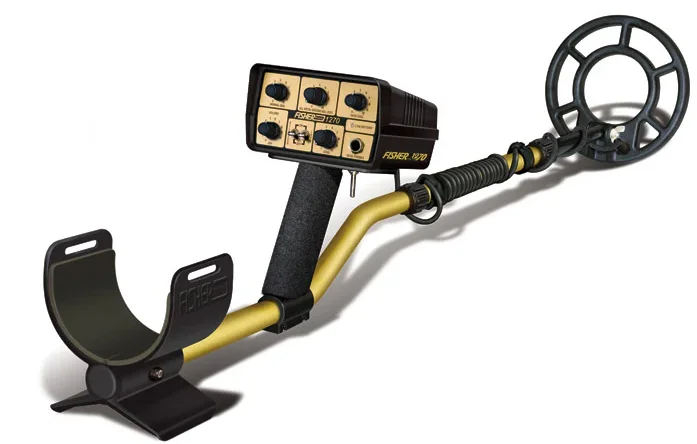
ABOUT YOUR FISHER 1270
The 1270 is a “motion” detector and was designed to offer you more versatility in a wide range of conditions: highly mineralized soil, extremely trashy areas, and deep targets. By utilizing the various controls on the 1270, you will find more items that were unreachable until today. We at Fisher Research Laboratory always strive to give you maximum performance and quality, and have been doing so since 1931.
FEATURES:
- 3 Search Modes – normal discrimination, enhanced iron discrimination, and all-metal ground-balanced search.
- Patented Double Derivative, Crystal Locked Circuitry (U.S. Patent # 4,514,692)
- Enhanced Relic Sensitivity
- Excellent “see-through” in iron trash.
- “Cutting Edge” performance in moist soils
- Sensitivity Control to enable silent search or audio threshold
- Silencer for silent (3rd Derivative) discrimination
- Trigger Switch mode change
- Trigger Switch Zero-Motion Pinpointing
- Near Perfect Balance for comfortable use
- Lightweight Cushioned Arm Rest & Grip
- Low Battery Alert – LED blinks automatically
- Drop-in Batteries
- Double Locking lower stem
- 3-piece breakdown handle
CONDENSED OPERATING INSTRUCTIONS
We recommend that you first read this entire operating manual before taking your new 1270 out for a test drive. You’ll be more successful and have a better chance of finding more treasure. But we also understand the excitement of the “hunt,” so here are some simple instructions for setting up the 1270.
Set the controls as follows:
- NORMAL DISC = 5 (iron & foil discrimination)
- SILENCER switch = ON
- IRON DISC switch = OFF
- ALL METAL GROUND ADJ. = 0, OFF (completely counterclockwise)
- SENSITIVITY = 8 Turn the 1270 ON with the ON/OFF Volume control (adjust volume to a comfortable level).
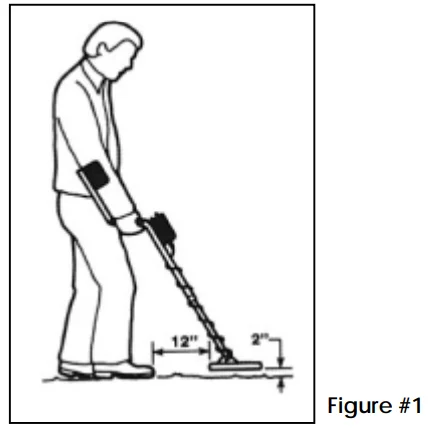
Take your 1270 outside. There’s normally too much metal inside to perform a proper test. Hold the 1270 as shown in Figure 1 and slowly sweep the search coil left and right while moving forward slightly with each sweep. A slight motion is required for the 1270 to detect a target. It is often helpful to bury a few known targets in the soil to get a “feel” for how the 1270 responds to different targets at various sweep rates. Remember, at a DISC setting of 5, certain targets such as iron or aluminum should be ignored.
When the 1270 “beeps,” you’ve passed over a metal target with the search coil. Swing the 1270 left and right, then forward and back, making an “X” over the “beep” area. The target will be directly below the center of the search coil. Because the 1270 is a “motion” detector, with practice, this may be the only mode of pinpointing you will need.
To use the no-motion pinpoint mode, place the coil on the ground away from the target, pull and hold the MODE TOGGLE SWITCH (on the bottom of the housing). This switches the 1270 into ALL METAL no motion PINPOINT mode. Keeping the search coil level with the ground and moving the coil near the target, you will hear an audio increase.
Next, move the 1270 in an “X” pattern over the target and stop where the loudest tone is heard. This will be the center of your target, directly under the center of the search coil. Read this instruction manual thoroughly, practice often, and you are in for some exciting treasure hunting. Drop us a line if you have any questions, comments, or good finds to tell us about. In the meantime…
SETTING UP
Your new 1270 comes ready to assemble and use, but first, review the steps below before proceeding.
- Unpack your 1270 carefully and save the carton. It may come in handy on the rare occasion that you need service.
- The coil is attached to the lower stem. Depress the spring lock button on the lower stem and slip it into the center handle section until it snaps into a hole.
- Depress the spring lock button on the upper handle and insert it into the opposite end of the center handle section, and hand-tighten the lock nut.
- The search coil angle and stem length may now be adjusted. The stem length can be adjusted by loosening the lower lock nut and allowing the spring lock to snap into the desired hole in the middle handle section.
- Adjust the length and the coil angles so that the search coil rests flat on the ground about 12 inches in front of your foot. Your arm should be straight and relaxed. Proper length will greatly reduce arm fatigue.
- When the stem length is properly adjusted, tighten the lower lock nut and the coil wing nut. CAUTION: Never use pliers or anything other than your hand to tighten either lock nut or wing nut.
- Disconnect the search-coil cable from the control housing and wrap it around the stem. A loose cable near the search coil may cause false signals, but don’t wrap it so tightly that it pulls against the housing or search coil. Reconnect the search coil cable to the control housing. Again, finger tighten only.
- With the coil angle and the shaft length properly adjusted, you should be able to move into your “search” position (see Figure 1).

- Standing with the 1270, the search coil should be parallel to the ground and no more than 2 inches off the ground while your arm is straight. Remember, the closer your coil is to the target, the better chance you have of detecting it in normal soil conditions (although there may be occasions when lifting the coil off the ground an inch or two will be helpful, such as hunting in heavily mineralized soil).
CONTROLS & FUNCTIONS
- ON/OFF VOLUME: Allows you to turn on the 1270 and adjust the volume to a comfortable level. No need to have special headphones with volume controls. Turning this control clockwise adjusts the volume.
- NORMAL DISC: When operating in NORMAL DISC mode, this control gives you the ability to adjust the rejection point of the 1270 to a wide range of metal objects. At lower settings, the 1270 will reject most ferrous and low-conductivity metal objects. At higher settings, more high-conductivity metal objects will be rejected. At maximum (10), all targets except silver and copper should be rejected. This is the “primary” mode when both the ALL-METAL GROUND ADJ. The control and the IRON switch are OFF.
- ALL METAL GROUND ADJUST: Turning this control clockwise out of its OFF position (0) allows you to operate in the All-Metal mode and adjust the 1270 to compensate for various ground mineral conditions. In this All-Metal mode, all DISC mode control settings will be ignored but can be momentarily re-engaged without changing the GROUND setting by pushing the MODE TRIGGER switch forward (the DISC mode engaged will be the one that is presently set on the panel controls). Turning the GROUND ADJ. Fully counterclockwise control into its OFF position will return the unit to the DISC mode set on the panel controls.
- IRON DISC ADJUST: When operating in the IRON DISC mode, this control provides an expanded discrimination range to fine-tune the rejection point of most small iron objects (used in conjunction with the IRON switch). This is the “primary” mode when the IRON switch is ON and the ALL-METAL GROUND ADJ. Control is OFF.
- HEADPHONE JACK: Accepts most stereo headphones with 1/4″ diameter plugs. When headphones are used, the speaker is disconnected. Headphones are beneficial when hunting in noisy areas. Faint and deeper signals will be heard better.
- SENSITIVITY: This control adjusts the sensitivity level and scan width of the 1270. Turning the control clockwise increases the sensitivity to weak target signals (from deeply buried or small metal objects). A low audio threshold is provided at higher settings to allow monitoring of weak threshold variations resulting from deeply buried objects. Reducing the sensitivity is necessary at times to reduce false signals when working in areas of high trash, highly mineralized ground, electrical interference, or near large metal objects such as buildings, fences, or bleachers.
- IRON DISC TOGGLE: When this toggle switch is flipped ON, the 1270 will operate in IRON DISC mode. When operating in this mode, the IRON DISC control becomes active, and the NORMAL DISC control will be ignored. The NORMAL DISC control can be momentarily re-engaged without changing the IRON DISC setting by pushing the MODE TRIGGER switch forward.
- SILENCER: Used in conjunction with the NORMAL DISC control, this feature reduces the normal clicks and pops heard while going over trash. With the toggle “off,” you will hear clicks and pops and partial signals for maximum audio target information. With the toggle “on,” the 1270 operates in a newly developed 3rd derivative SILENCER mode, eliminating the clicks, pops, and partial target responses for a quieter mode of operation. This mode is especially designed for those who wish to eliminate excessive partial audio responses in high-trash areas.
- LOW BATTERY LED: This LED will start to blink to alert you when the batteries are nearing the end of their life. When the LED starts to blink, you have approximately 1 hour* of usage left before performance degradation begins to occur (*actual time will vary depending on usage). The first stage of performance degradation is loss of the audio threshold when the SENSITIVITY control is at maximum.
- HEADPHONE JACK: This jack accepts most stereo headphones with 1/4 inch diameter plugs. When headphones are used, the speaker is disabled. Headphones are beneficial when hunting in noisy areas. Faint and deeper signals will be heard better.
- MODE TOGGLE SWITCH: The 1270 MODE TOGGLE switch allows you to conveniently switch between modes of operation without losing your panel control settings. The switch has three positions: normal (center position), pinpoint (pulled position), and swap (pushed position).
- PINPOINT – Pulling the MODE TRIGGER toward yourself will cause the 1270 to operate in No-Motion, All-Metal Pinpoint mode. This mode allows you to “pinpoint” the exact location of a buried target for faster and easier retrieval.
NORMAL – In the MODE TRIGGER’s center position, the 1270 operates in “primary” operating mode set by the front panel controls. - SWAP – Pushing (and holding) the MODE TRIGGER forward causes the 1270 to switch to the “secondary” operating mode set by the front panel controls.
PRIMARY AND SECONDARY OPERATING MODES
A “primary” operating mode is active when the MODE TRIGGER switch is in the Normal (center) position, and the “secondary” operating mode is active when the MODE TRIGGER is in the Swap position (pushed and held). The following front panel settings will show you how to achieve your favorite primary and secondary operating modes. This will allow you to quickly change modes without losing any settings to gain more information about your targets.
- Primary = NORMAL DISC
- Secondary = IRON DISC:
- ALL-METAL GROUND ADJ. is OFF (0).
- The IRON switch is OFF.
- Primary = IRON DISC
- Secondary = NORMAL DISC:
- ALL-METAL GROUND ADJ. is OFF (0).
- IRON switch is ON.
- Primary = ALL-METAL GROUND ADJ.
- Secondary = NORMAL DISC:
- ALL-METAL GROUND ADJUST is OK (set to proper ground compensation).
- The IRON switch is OFF.
- Primary = ALL-METAL GROUND ADJ.
- Secondary = IRON DISC:
- ALL-METAL GROUND ADJ. is ON (set to proper ground compensation).
- IRON switch is ON.
ALL METAL MODE
Your 1270 gives you two ways to search in all-metal operation: (1) by setting your NORMAL DISC to 0, or (2) by turning on the ALL METAL GROUND ADJUST (rotate knob clockwise). When using the ALL-METAL GROUND ADJUST mode, only the VOLUME and the SENSITIVITY controls are still active; you have temporarily disabled the other controls on the 1270 (it becomes the “primary” operating mode, as explained above). In this mode, you must manually adjust the 1270 for the type of ground you are searching.
Turn the GROUND ADJUST knob switch on (to about “1”) and the sensitivity to about “8.” Make sure the search coil is not near any metal. This may be tested quickly by pulling the trigger switch and sweeping over an area of about one square foot. If no signal is detected, release the trigger switch and raise the search coil off the ground and lower it back down two or three times (also known as “bobbing”). If an audible sound is heard, turn the GROUND ADJUST knob slightly clockwise. Repeat this procedure until no sound is heard when raising and lowering the coil to the ground.
Once you have the 1270 balanced to the type of ground you are searching, you may begin sweeping the coil at a comfortable pace. Approximately four feet per second will give you optimal performance. Remember, the ALL METAL GROUND ADJUST mode is a MOTION mode. Slight movement of the coil is required to detect an object. While in this mode, if the IRON DISC toggle is OFF, pushing the MODE TRIGGER forward switches the 1270 into the NORMAL DISC mode. If the IRON DISC toggle is ON, pushing the MODE TRIGGER forward switches the 1270 into the IRON DISC mode. SEE PRIMARY & SECONDARY OPERATING MODES PG. 7.
IRON DISC MODE
Searching in IRON DISC may be preferred when small iron objects are to be rejected. In fact, this mode greatly improves the detector’s ability to “see through” iron trash to the good non-ferrous targets often sought after. Make sure the ALL METAL GROUND ADJUST is OFF; that is, fully counterclockwise until it “clicks” into the “0” position. Flip the IRON toggle switch up into the ON position. Adjust your sensitivity clockwise to the desired level (preferably until a slight threshold tone is heard, at about “8” or greater). Reduce the sensitivity slightly if you prefer a silent search.
In the IRON DISC mode, you have two features that enhance the performance of the 1270: the SILENCER and the IRON DISC adjust knob. The IRON DISC knob gives you the ability to “fine-tune” the amount of iron you wish to reject. Turning the IRON DISC knob clockwise causes larger pieces of iron to be rejected. You may hear some normal “clicks and pops” when the coil passes over these targets. In high trash areas, turning the SILENCER toggle ON will reduce and, in most cases, eliminate the “clicks and pops.”
Remember that the IRON DISC mode is a MOTION mode. Slight movement of the coil is required to detect an object. When IRON DISC is the primary operating mode, pushing the MODE TRIGGER forward switches the 1270 into the NORMAL DISC mode. SEE PRIMARY & SECONDARY OPERATING MODES PG. 7.
NORMAL DISC MODE
When rejection of a full range of other non-ferrous trash is desired, the NORMAL DISC mode will be necessary. Make sure the ALL METAL GROUND ADJUST is OFF; that is, fully counterclockwise until it “clicks” into the “0” position. The IRON toggle switch must also be OFF. Adjust the NORMAL DISC knob to reject the unwanted “trash” targets (see Figure 2).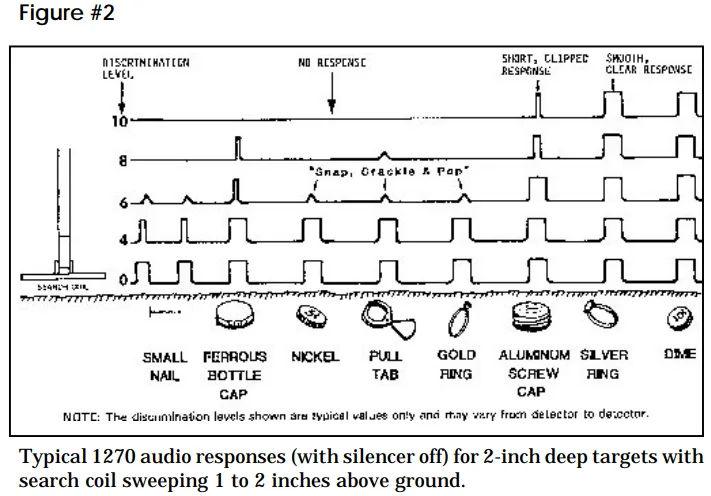
When the NORMAL DISC is set at “0,” all metals will be detected. As you turn the NORMAL DISC knob clockwise, certain metals will be rejected. At the full setting of “10,” most iron, foil, and aluminum will be rejected, while copper and silver will still yield a good signal. Adjust your sensitivity clockwise to the desired level (preferably until a slight threshold tone is heard, at about “8” or greater). Reduce the sensitivity slightly if you prefer a silent search.
In high trash areas, turning the SILENCER toggle ON will reduce and, in most cases, eliminate the “clicks and pops” that result from some rejected targets. Remember that the NORMAL DISC mode is a MOTION mode. Slight movement of the coil is required to detect an object. When NORMAL DISC is the primary operating mode, pushing the MODE TRIGGER forward switches the 1270 into the IRON DISC mode. SEE PRIMARY & SECONDARY OPERATING MODES PG. 7.
SEARCH TECHNIQUES
Good searching techniques are every bit as important as having a good detector.
- Adjust your SENSITIVITY control. Only experience will tell you how to set it in every situation. As a general rule, turn up the sensitivity to achieve maximum depth and detection of small items. You will also get a wider search scan. Conditions may arise where you’ll need to reduce sensitivity: (a) when near larger metal objects, (b) when ground mineralization causes “false signals,” (c) when near sources of interference, such as power lines or radio towers, (d) when a silent search is desired. Minimum sensitivity is when the knob is turned to “1,” or fully counterclockwise. Maximum sensitivity is when the knob is turned to “10,” or fully clockwise.
- Decide how much discrimination (trash rejection) you want. In certain areas, you may wish to detect all metals, but in others, you want to discriminate unwanted targets. Only you will be able to determine your particular situation. Remember that a lot of “good” targets are not necessarily silver and copper. For example, many gold targets can be missed when discriminating against aluminum.
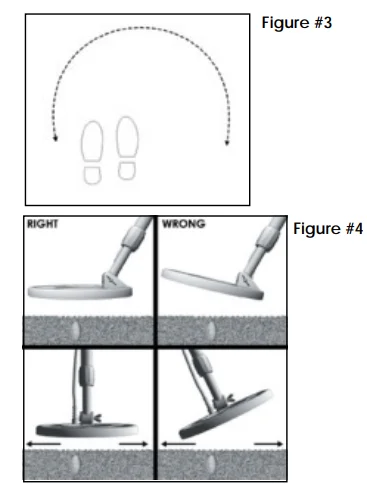
- Search slowly and systematically in a tight semi-circle as shown in Figure 3.
- Keep the search coil as close to the ground and as parallel as possible (see Figure 4). The closer you are to the target, the easier it is to detect.

- Take your time and overlap your sweeps by at least 50%.
- Search an area thoroughly, taking note of where you have already been.
- Keep the search coil moving at a comfortable rate. Remember, the 1270 is a motion detector. A sweep rate of about 4 feet per second will suffice, but make sure your arm is comfortable. “Whipping” the 1270 search coil is not necessary.
PINPOINTING
The 1270 is a slow-motion detector, and after some practice, you may find that you won’t even use the TRIGGER SWITCH pinpoint mode.
SLOW MOTION PINPOINT
When the 1270 “beeps,” you have passed over a metal target with the search coil. Swing the 1270 search coil left and right, then forward and back, making an “X” over the “beep” area. The target will be directly below the center of the search coil. Because the 1270 is a “motion” detector, with practice, this may be the only mode of pinpointing you will need.
NO-MOTION PINPOINT
- When the target “beep” is heard, make an “X” over the target, as described above, to determine the target area.
- Move the coil away from the target area and lower the coil to the ground.
- Pull and hold the MODE TRIGGER switch.
- Raise the coil about 1/2 inch and move back across the target area.
- Stop the coil at the center of the loudest response.
- Repeat this one more time, moving your coil from side to side. Your target should be directly below the center of the coil.
- For larger targets, place the coil on the ground closer to the center of the target. The closer you are to the target center when you pull the MODE TRIGGER switch, the more of the target will be “tuned out.” The target signal response will appear smaller and even easier to pinpoint.
- IMPORTANT: Be careful not to pull the Pinpoint MODE TRIGGER switch while directly over the target. This may “tune out” the entire target, and you will get no target response.
SERVICE
Fisher is committed to providing you, our valued customer, with superior service. Each and every instrument is rigidly tested and carefully inspected during assembly and before shipment. Should you have any questions or problems, contact:
FISHER RESEARCH LABORATORY
200 West Willmott Road,
Los Banos, California 93635
Tel 209.826.3292
Fax 209.826.0416
www.fisherlab.com
Email: [email protected]
for a dealer near you
1.800.M-SCOPE.1
1.800.672.6731
For More Manuals By Fisher Labs, Visit ManualsLibraryy.
Fisher 1270 Relic Hunting Metal Detector-FAQs
What frequency does the Fisher 1270 operate at?
The Fisher 1270 metal detector operates at approximately 8.2 kHz (Very Low Frequency), which provides a good balance between depth and sensitivity for general relic and coin hunting. This frequency helps the detector penetrate mineralized soil while still detecting mid-sized relics with reliable audio responses.
Is the Fisher 1270 good for relic hunting?
Yes — the Fisher 1270 was designed specifically with relic hunters in mind. It includes enhanced relic sensitivity, improved detection in trashy areas, and multiple search modes that allow you to discriminate trash while still locating deeper or older metallic artifacts in parks, fields, and historic sites.
What search modes does the Fisher 1270 offer?
The Fisher 1270 provides three primary search modes: Normal Discrimination, Enhanced Iron Discrimination (for better “see-through” trash performance), and an All-Metal Ground-Balanced mode for maximum depth and relic sensitivity. There’s also a zero-motion pinpoint mode for accurately locating targets.
How deep can the Fisher 1270 detect relics?
Depth can vary based on soil conditions and target size, but many users report the 1270 can reach 8–10+ inches for mid-sized relics, with deeper detection possible under favorable ground conditions. Its ground balance and discrimination systems help you dig deeper without excessive false signals.
Does the Fisher 1270 work well in trashy or mineralized soil?
Yes — one of the 1270’s strengths is its enhanced iron discrimination and ground-balanced search modes, which improve performance in trashy areas and highly mineralized soil. These features reduce chatter and help the detector focus on more valuable targets without burying you in false signals.
What kind of search coil does the Fisher 1270 use?
By default, the Fisher 1270 uses an 8-inch concentric, co-planar search coil, which provides a good mix of sensitivity and coverage. Optional coils (like 5″ or 10.5″ sizes) are available for specialized detecting, from pinpoint accuracy to wider sweep coverage.
How easy is the Fisher 1270 to use for beginners?
While the Fisher 1270 is a capable relic detector, it’s considered more intermediate-level due to its motion search requirement and multiple control settings. Beginners can certainly learn it, and its straightforward knobs and trigger control make adaptation easier with practice.
What power source does the Fisher 1270 use, and how long does it run?
The Fisher 1270 runs on two 9-volt batteries (carbon zinc or alkaline). Battery life varies — approx 15–25 hours on carbon-zinc and up to about 30–40 hours on alkaline batteries — giving plenty of runtime for field hunts without frequent changes.
Is the Fisher 1270 suitable for beach or wet conditions?
While the 1270’s search coil is submersible, the control housing itself is not designed to be fully waterproof. You can use it near shorelines and slightly damp ground, but avoid fully immersing the control box to protect electronics.
What makes the Fisher 1270 different from other relic detectors?
The Fisher 1270 stands out due to its patented Double Derivative, Crystal-Locked circuitry, which enhances signal stability and depth performance. Its combination of sensitivity control, discrimination modes, and pinpointing makes it effective in both trashy parks and historic relic sites, offering an edge over simpler hobby detectors.