
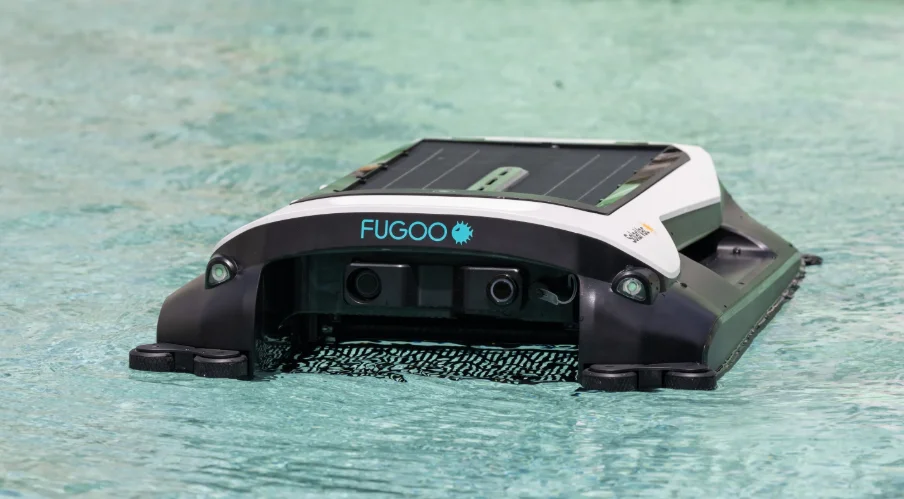

Fugoo SolarVac FSV100 Pool Cleaning Robot
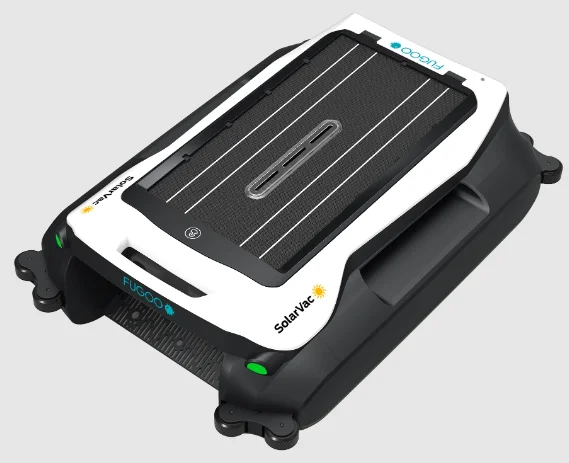
FCC Statement:
This device complies with Part 15 of the FCC Rules. Operation is subject to the following two conditions:
- This device may not cause harmful interference, and
- This device must accept any interference received, including interference that may cause undesired operation.
Warning: Changes or modifications not expressly approved by the party responsible for compliance could void the user’s authority to operate the equipment.
NOTE: This equipment has been tested and found to comply with the limits for a Class B digital device, pursuant to Part 15 of the FCC Rules. These limits are designed to provide reasonable protection against harmful interference in a residential installation. This equipment generates, uses, and can radiate radio frequency energy and, if not installed and used in accordance with the instructions, may cause harmful interference to radio communications.
However, there is no guarantee that interference will not occur in a particular installation. If this equipment does cause harmful interference to radio or television reception, which can be determined by turning the equipment off and on, the user is encouraged to try to correct the interference by one or more of the following measures:
- Reorient or relocate the receiving antenna.
- Increase the separation between the equipment and the receiver.
- Connect the equipment into an outlet on a circuit different from that to which the receiver is connected.
- Consult the dealer or an experienced radio/TV technician for help.
FCC Radiation Exposure Statement
This equipment complies with FCC radiation exposure limits set forth for an uncontrolled environment. This equipment should be installed and operated with a minimum distance of approximately 8 inches between the radiator and your body.
Product Description
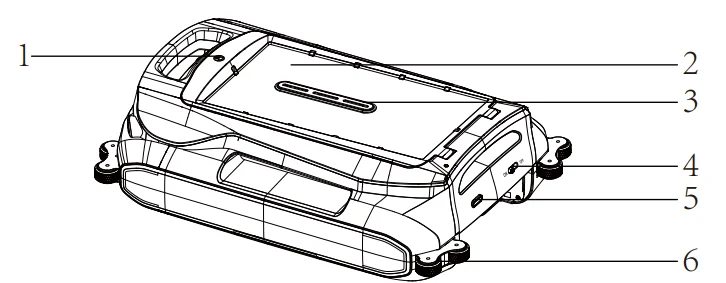
2.1 Parts name
- Flip open button
- Solar panels
- Collection basket detection port
- Power switch
- Rear LED light
- Guide wheel
- Garbage collection board
- TYPE-C charging port seal cover
- Ultrasonic obstacle avoidance sensor
- Kickstands x4
- Propeller motor
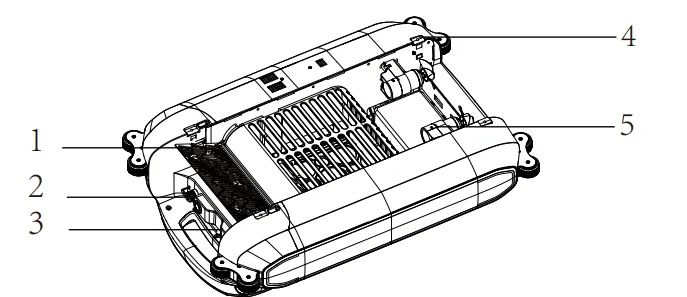
- Flip top
- Collection basket
- Guide wheel
- Impeller
- Front LED light
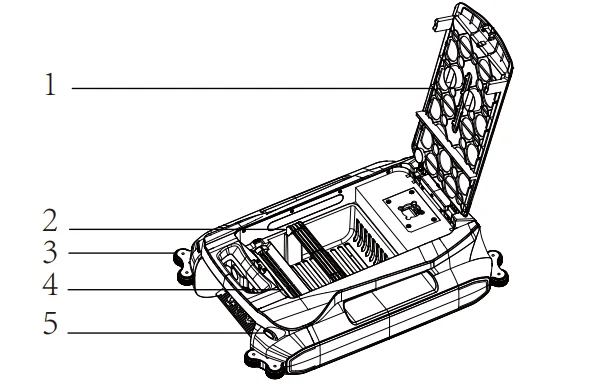
Product Features
2.2 Product Specs
Structure
- Dimensions of the main unit: 26.1″ x 17.8″ x 7.6″ / [663 x 453 x 193 mm]
- Net weight of the main unit: 13.23 lbs. / [6 kg]
Electronic
- Charging port input: 5V-2A
- Rated power: 3W
- Rated voltage: 7.2V
- Battery rated capacity: 6400mAh
- Type-C charging time: 6–7 hrs. approx.
Collection Basket Specifications
- Collection basket capacity: 1.19 gl / [4.5 L]
- Basket size: 2.0″ x 9.6″ x 5.3″ / [305 x 245 x 135 mm]
Operating Instructions
3.1 Operational Guidelines
Press the flip-open button before use to check that the collection basket is in place.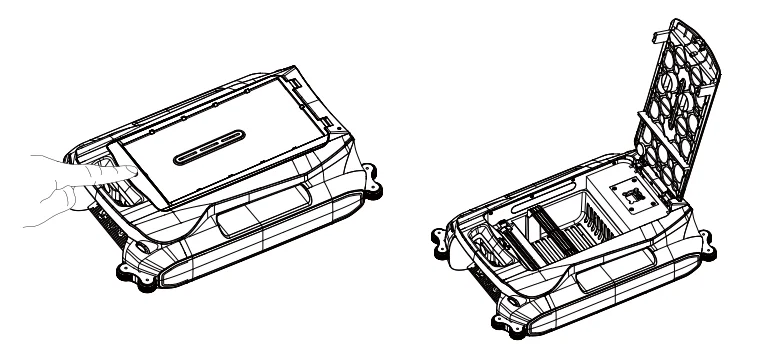
The machine has four kickstands, one at each corner underneath. For infinity-type swimming pools, press the lock and lower the kickstands as needed. This will help keep the SolarVac inside the pool. Always place the machine gently on the water; do not throw or drop it.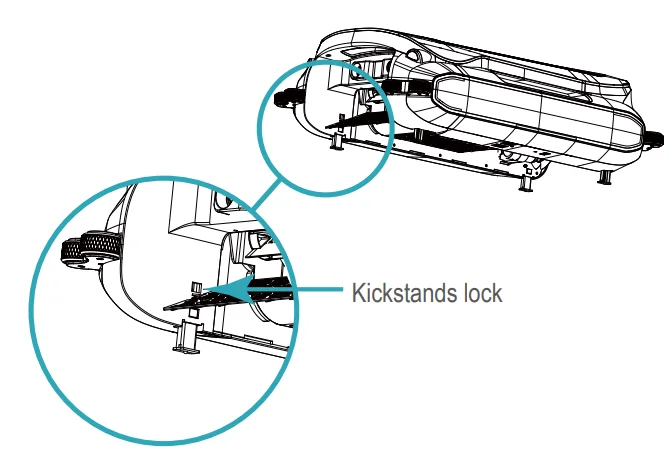
Switch on the machine’s power, and the green indicator light will illuminate. Within 3 to 5 seconds, the machine will automatically begin moving forward while avoiding obstacles in its path. When used outdoors, if the power level drops below 20%, the machine will automatically locate an area with strong sunlight for charging. It will pause its current task and resume operation once the battery is charged to 30%.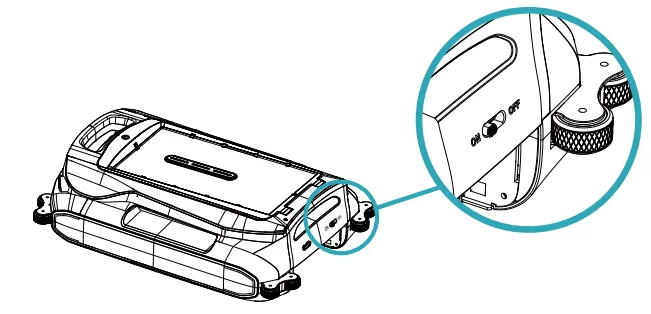
The machine operates outdoors using 100% solar energy. During summer, it can fully support daytime operations by efficiently converting solar energy into electricity. However, in winter, the machine requires more time to charge, leading to reduced operating hours. For indoor use, the machine must be charged using a 5V 2A adapter. Before charging, ensure the Type-C charging port is clean and free from water stains.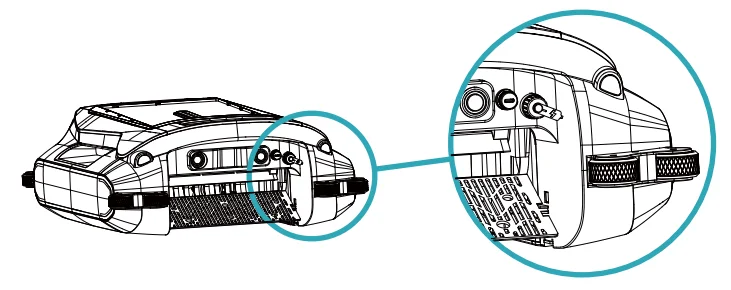
To access the charging port, turn the charging cover counterclockwise, then connect the Type-C charging cable. Note that the machine will cease operation while charging. Make sure to keep the power switch on during the charging process. Once charging is complete, securely close the charging cover by turning it clockwise.
LED Indicator
LED indicator description of operations.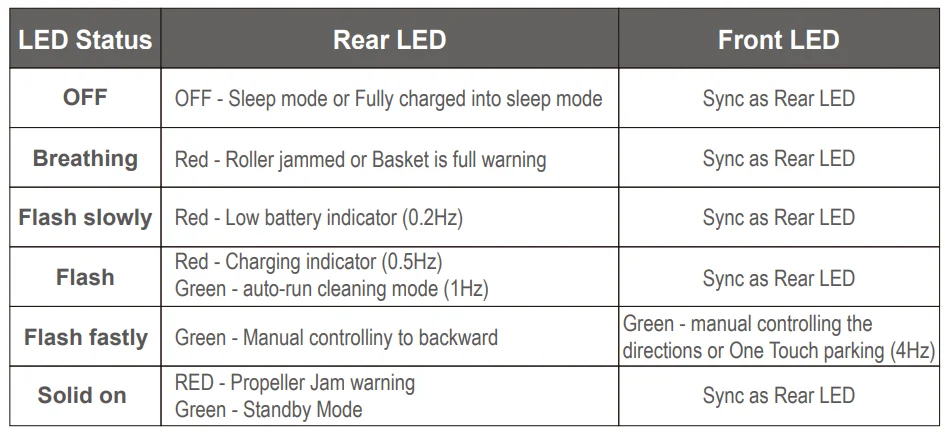
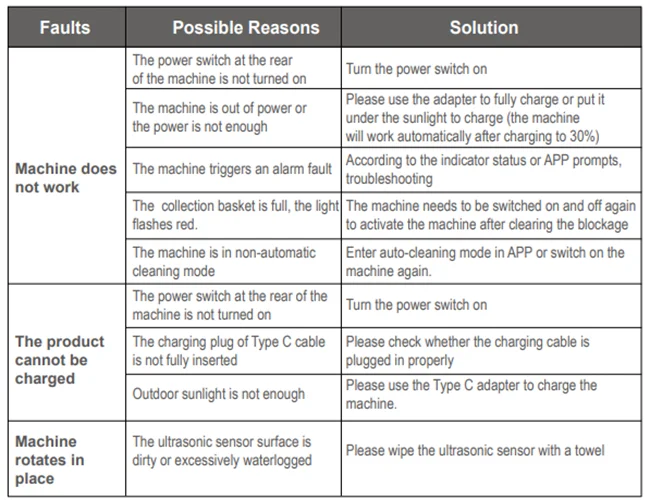
If the ultrasonic sensor becomes dirty or water-stained, it may affect its functionality and cause the machine to continuously rotate in working mode. Clean the ultrasonic sensor with a towel to restore proper operation.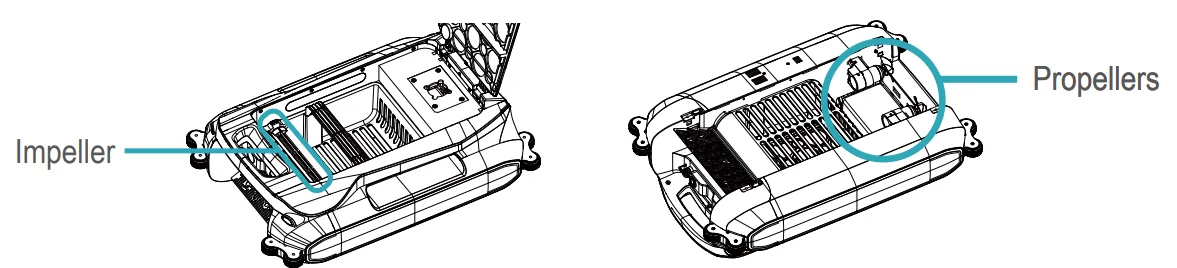
Troubleshooting
If a foreign object clogs the impeller or propeller, causing the motor speed to slow down, the LED light on the machine will turn solid red. This indicates that the machine is in a stopped state. Remove the blockage, then restart the machine to resume normal operation.
When the battery is low, the LED light on the machine will slowly flash red. To recharge, place the machine in a well-lit area for solar charging or connect it to a Type-C charger. Make sure the socket is dry and the power switch is switched on before charging. The waterproof cover of the charging port must be closed before going underwater.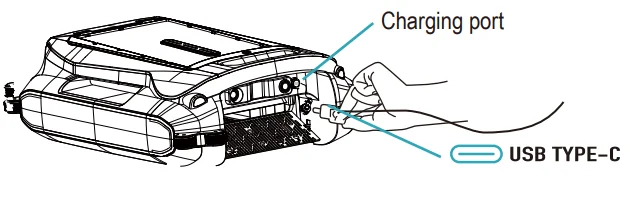
More Troubleshooting
Using the App
APP settings
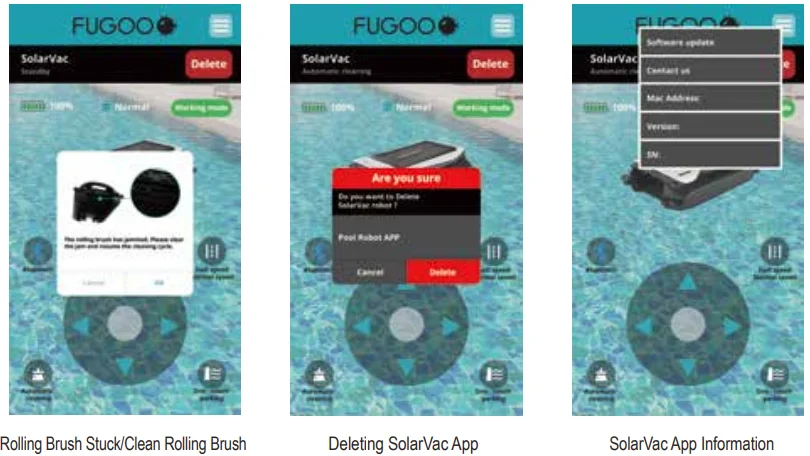
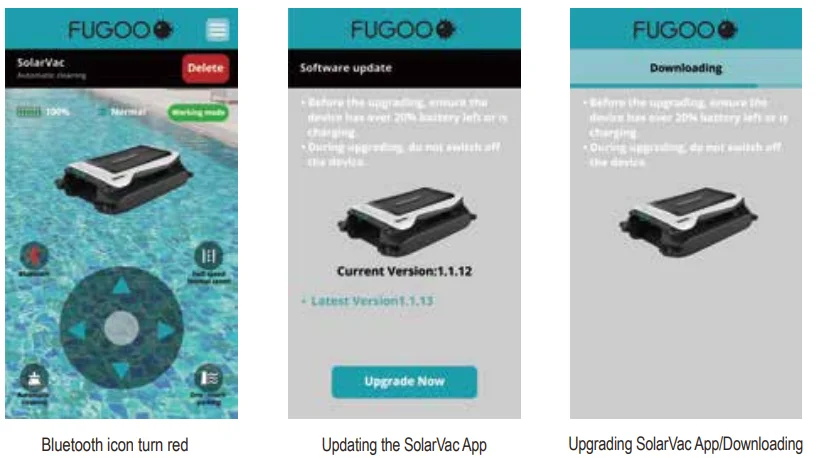
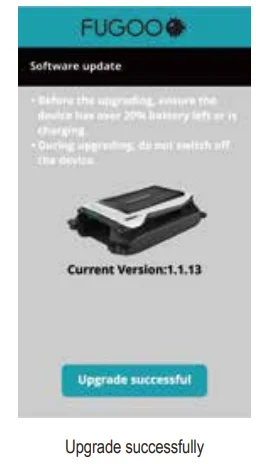
Download and install the “Fugoo Link” app by searching for it on the App Store or Google Play. Once installed, follow the on-screen instructions on your smart device.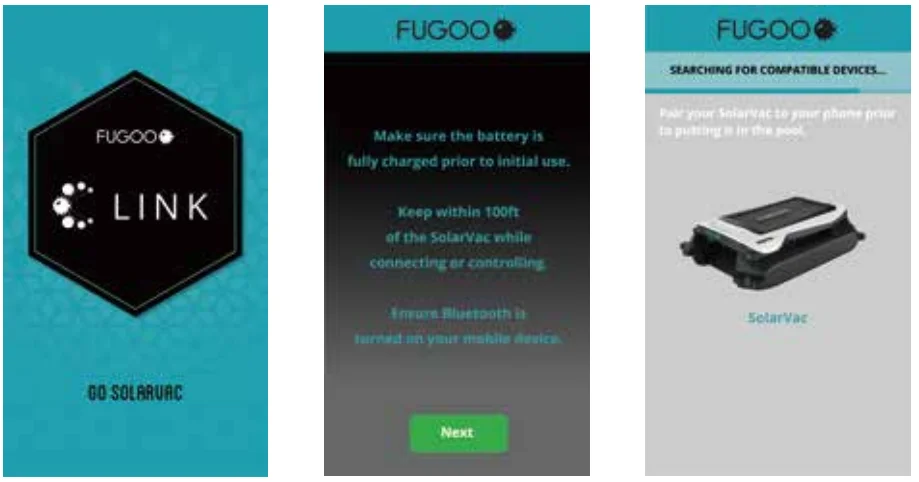
Follow the on-screen prompts to power on your device, ensure it remains within range, and activate Bluetooth on your phone. Once the steps are completed and the device status is confirmed, click “Next” and wait for the device to pair.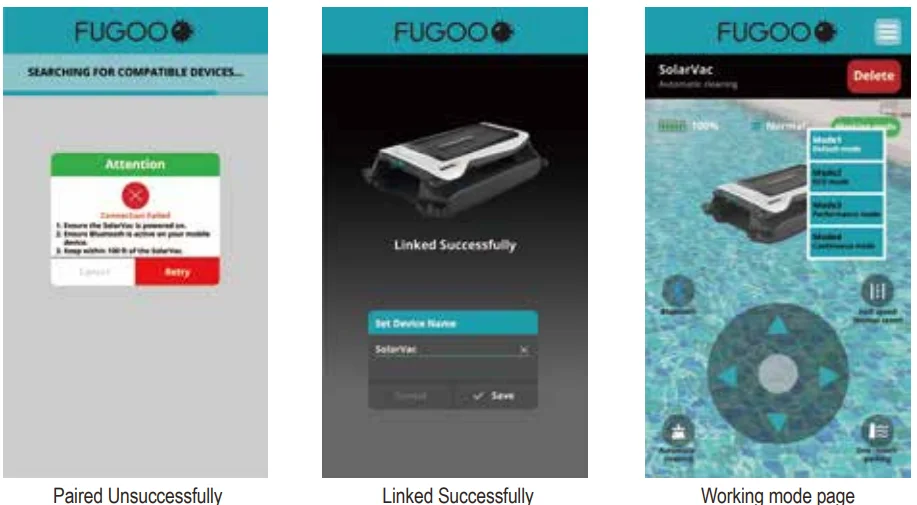
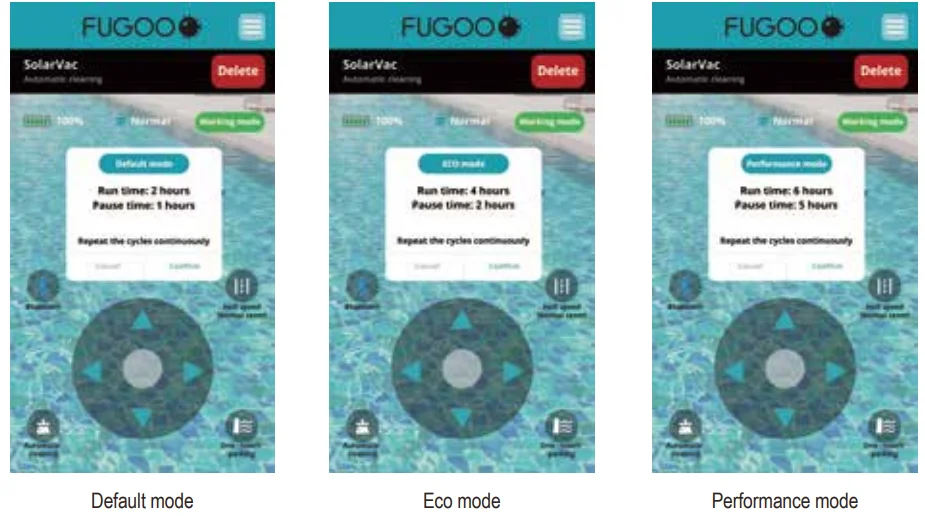
SolarVac is now ready to use with its intuitive app. For optimal performance, carefully follow the usage instructions, paying special attention to the LED lighting modes and unit maintenance guidelines.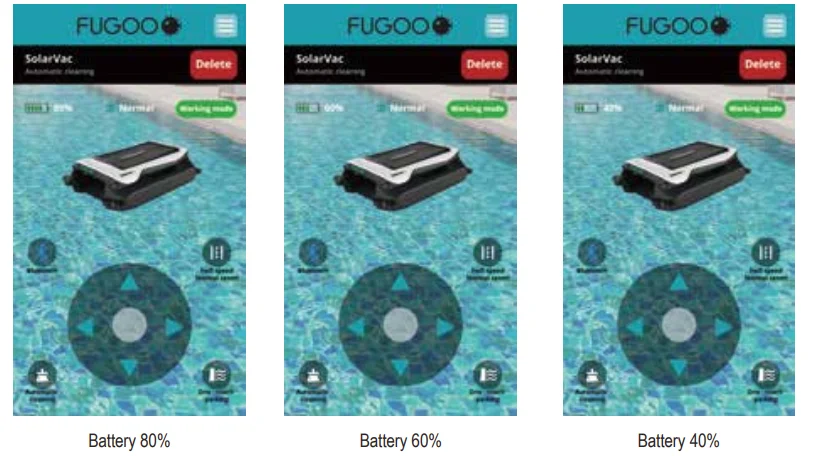
Bluetooth connectivity generally operates within a typical range of approximately 30 to 33 feet under optimal conditions. However, this range can be influenced by various environmental factors such as physical obstructions and electromagnetic interference. To ensure uninterrupted communication, your SolarVac and the paired smart device must remain within this operational range.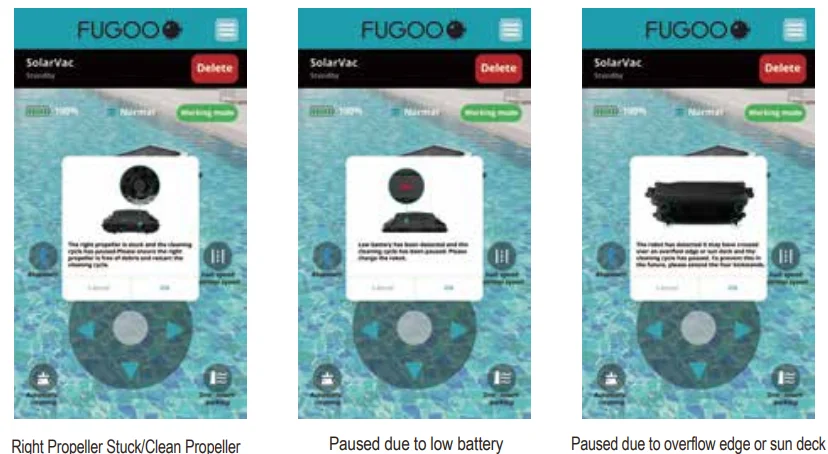
Additional Information
Description Working Mode
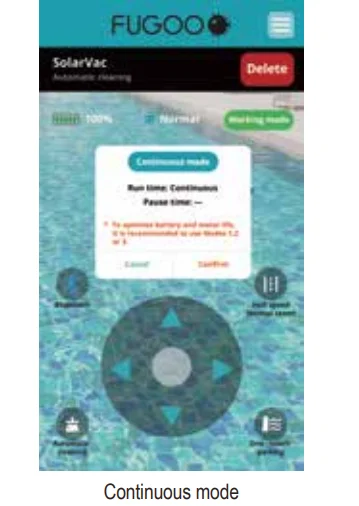
The swimming pool robot has four built-in working modes, which users can switch on using the mobile app. The default mode is 1.
- Mode 1: The machine will sleep for 1 hour every 2 hours of operation, continuously cycling.
- Mode 2: The machine will sleep for 2 hours every 4 hours of operation, continuously cycling.
- Mode 3: The machine will sleep for 5 hours every 6 hours of operation, continuously cycling.
- Mode 4: The machine operates 24 hours a day without interruption.
Note: When the machine is in Modes 1, 2, and 3, before entering sleep mode, the robot will enter parking mode first and will automatically park at the edge of the swimming pool. Pop-up menu to remind users while they select Mode #4. To optimize battery and motor life, it is recommended to use Modes 1, 2, or 3.
Battery Reminder
When the battery level drops below 20%, the machine will enter sleep mode, and the LED will automatically turn off. During this time, the app may not function properly. Please ensure the machine is fully charged before use. To protect the battery and motor, remove the machine from the pool and store it indoors if the outdoor temperature is 32°F (0°C) or lower.
Product Maintenance
Cleaning the Collecting Basket
Press the flip-open button to remove the collection basket.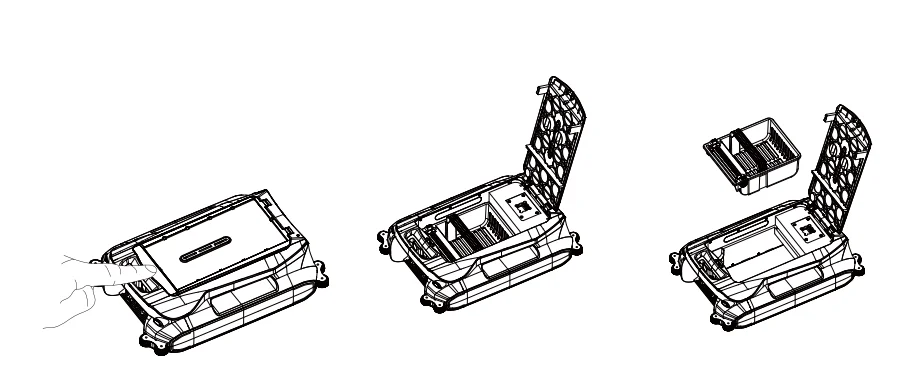
Remove the trash from the collection basket, wash it with water, and put it back into the machine.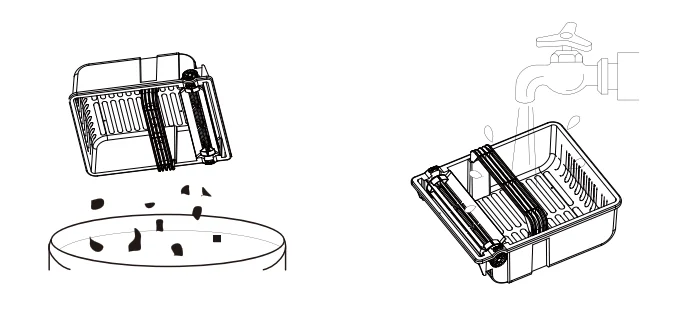
Cleaning the SolarVac
To maintain the efficiency of solar charging, regularly remove dust, fallen leaves, and other debris from the solar panel. The SolarVac can be rinsed with water and wiped clean for optimal performance.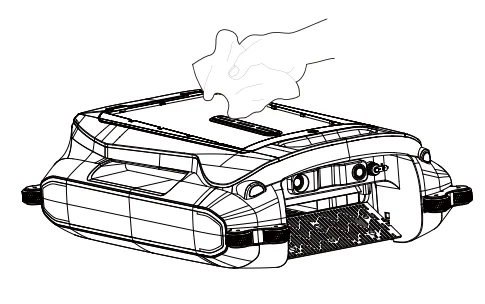
Ultrasonic sensors should be cleaned regularly to ensure proper functioning. Dirt or water stains can interfere with the machine’s distance measurement, potentially causing continuous rotation. Use a clean towel to wipe the sensors and restore normal operation.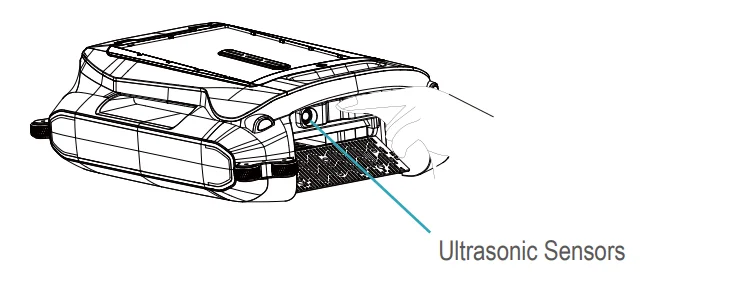
Components
Name of Parts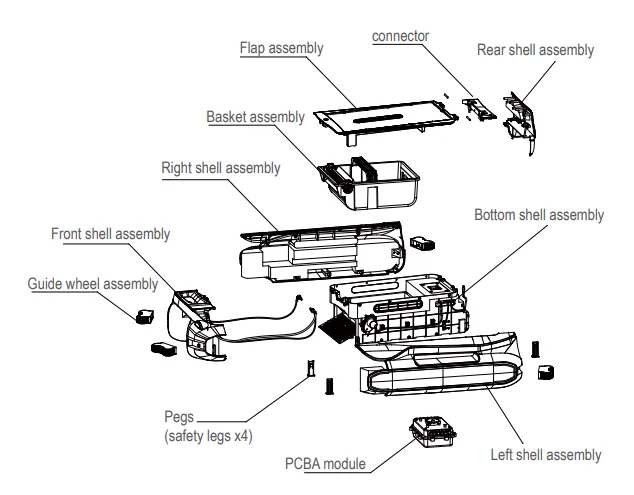
One-Year Consumer Limited Warranty
This Fugoo-branded product, marketed as new in the original carton to the original purchaser (“Product”), is warranted against manufacturing defects in materials and workmanship for a limited warranty period of one (1) year for labor and one (1) year for parts. This “Limited Warranty” is conditioned upon proper use of the Product by you, the Purchaser.
This Limited Warranty does not apply to store display products and products sold as “marked down” specials, in as-is condition, “closeouts,” “liquidation and clearance sales,” “open box,” “products missing accessories,” or “no fault found.” Proof of purchase in the form of a bill of sale, receipt, or receipted invoice is evidence that the Product is within the Limited Warranty period. The bill of sale, receipt, or receipted invoice must be presented as a precondition to obtaining limited warranty service.
This Limited Warranty begins on the original date of purchase and is valid only on Products purchased through authorized dealers and used in the United States, Puerto Rico, and Canada by the original Purchaser. To receive warranty service, the Purchaser must first contact us for problem determination and service procedures. The original dated bill of sale, receipt, or receipted invoice must be presented upon request as proof of purchase.
We will repair your product, or if repairs cannot be made, we will replace it at no charge with the same or a similar product. If the Product is defective as specified in this Limited Warranty during the limited warranty period, we may use new or remanufactured parts to repair the Product. All replaced parts and products become our property and must be returned to us. Replacement parts and Products assume the remaining original Limited Warranty or ninety (90) days, whichever is longer.
Product freight must be prepaid by you, the original Purchaser, and shipped in either its original packaging or packaging affording an equal degree of protection. We will not be responsible for or obligated to replace damaged Products. If the Product is received damaged, it is your responsibility as the consumer to file a claim against the carrier. We will only store the damaged Product for 30 days and reserve the right, in our sole discretion, to dispose of the damaged Product or ship it back to you at your expense after 30 days.
This Limited Warranty covers manufacturing defects in materials and workmanship encountered in normal, and except to the extent otherwise expressly provided for in this statement, noncommercial use of this Product, and shall not apply to the following including, but not limited to: damage which occurs in the shipment; delivery, and installation; applications and uses for which this Product was not intended; altered Product or serial numbers; cosmetic damage or exterior finish; accidents, abuse, neglect, fire, water, lightning or other acts of nature;
use of products, equipment, systems, utilities, services, hardware, supplies, accessories, applications, installations, repairs, external wiring or connectors not supplied or authorized by us or the manufacturer, which damage this Product or result in service problems; incorrect electrical line voltage, fluctuations and surges; customer adjustments and failure to follow operating instructions, cleaning, maintenance and environmental instructions that are covered and prescribed in the instruction book; reception problems and distortion related to noise, echo, interference or other signal transmission and delivery problems; burned-in images. Uninterrupted or error-free operation of the Product is not warranted.
THERE ARE NO EXPRESS OR IMPLIED WARRANTIES OTHER THAN THOSE LISTED AND DESCRIBED ABOVE, AND NO WARRANTIES WHETHER EXPRESS OR IMPLIED, INCLUDING, BUT NOT LIMITED TO, ANY IMPLIED WARRANTIES OF MERCHANTABILITY OR FITNESS FOR A PARTICULAR PURPOSE, SHALL APPLY AFTER THE EXPRESS WARRANTY PERIODS STATED ABOVE, AND NO OTHER EXPRESS WARRANTY OR GUARANTY GIVEN BY ANY PERSON, FIRM OR CORPORATION WITH RESPECT TO THIS PRODUCT SHALL BE BINDING ON US.
REPAIR OR REPLACEMENT AS PROVIDED UNDER THIS LIMITED WARRANTY IS YOUR EXCLUSIVE REMEDY AS THE CONSUMER. WE SHALL NOT BE LIABLE FOR ANY INCIDENTAL OR CONSEQUENTIAL DAMAGES FOR BREACH OF ANY EXPRESS OR IMPLIED WARRANTY ON THIS PRODUCT; EXCEPT TO THE EXTENT PROHIBITED BY APPLICABLE LAW, ANY IMPLIED WARRANTY OF MERCHANTABILITY OR FITNESS FOR A PARTICULAR PURPOSE ON THIS PRODUCT IS LIMITED FOR THE DURATION OF THIS LIMITED WARRANTY. THIS LIMITED WARRANTY SHALL NOT EXTEND TO ANYONE OTHER THAN THE ORIGINAL PURCHASER OF THIS PRODUCT, IS NONTRANSFERABLE, AND STATES YOUR EXCLUSIVE REMEDY.
Some states or provinces do not allow limitations on how long an implied warranty lasts, or the exclusion or limitation of incidental or consequential damages, so the above limitations or exclusions may not apply to you. This Limited Warranty gives you specific legal rights, and you may also have other rights, which vary from state to state or province to province. Any provision contained herein that is found contrary to state, provincial, or local laws shall be deemed null and void, and the remaining provisions shall continue in full force and effect.
PLEASE CONTACT US AT OUR CUSTOMER SUPPORT FOR ASSISTANCE BEFORE RETURNING TO THE STORE:
Phone: (877) 435-7596
Email: [email protected]
Website: https://fugoo.com
Hours of Operation:
Monday – Friday: 6 am to 6:30 pm (PST)
Saturday – Sunday: 8:00 am to 4:30 pm (PST)
For More Manuals By Fugoo, Visit ManualsLibraryy.
Fugoo SolarVac FSV100 Pool Cleaning Robot-FAQs
How do I use the Fugoo SolarVac pool robot?
Submerge the robot in your pool until all bubbles disappear. Place it on the pool floor, select your preferred cleaning cycle on the control panel, and let it clean automatically.
How do I know when the robot is fully charged?
A flashing blue light indicates charging. When the blue light stays solid, the battery is fully charged.
How long does it take to fully charge the pool robot?
It typically takes 3–4 hours for a full charge.
How long does the battery last on a full charge?
The Fugoo SolarVac can run for up to 150 minutes on a single charge.
How do I reset the pool robot?
Unplug the robot from its power source, wait 30 seconds, then plug it back in. Check the user manual for model-specific reset instructions.
Can I leave the pool robot in the water all the time?
It’s recommended to remove the robot after each cleaning cycle, clean the filters, and store it in a dry, shaded area when not in use.
Why is my pool robot not moving?
Check the power connections, inspect the motor and drive system, and ensure no debris is blocking the tracks or wheels.
Do I still need to brush my pool manually?
Yes. While the robot cleans efficiently, occasional manual brushing ensures thorough cleaning of corners and walls.
How often should I run the pool robot?
For regular maintenance, run it 2–3 times per week. Daily cleaning is optional for pools with heavy debris or frequent use.
What is the expected lifespan of the pool robot?
With proper care, most robotic pool cleaners last 3–7 years. Regular maintenance helps extend its life.