
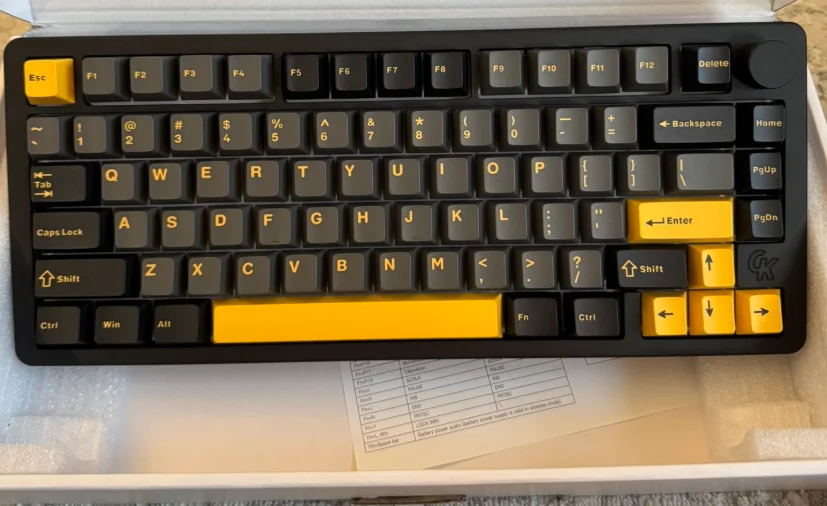

GamaKay TK75PRO Wireless Aluminum Mechanical Keyboard
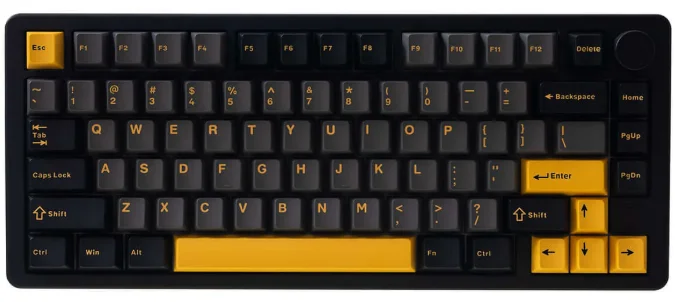
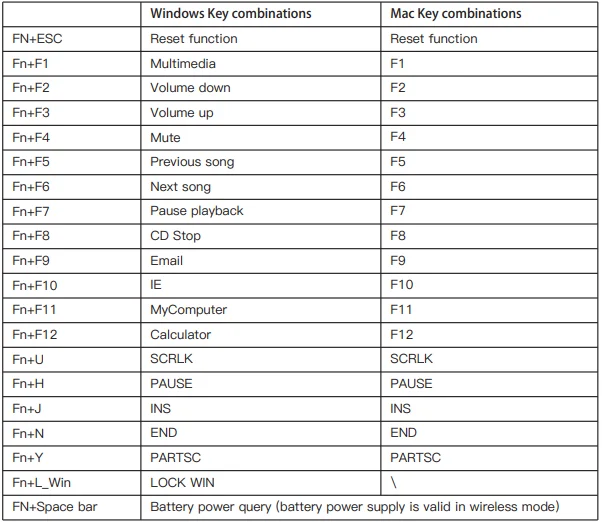
Key combination function

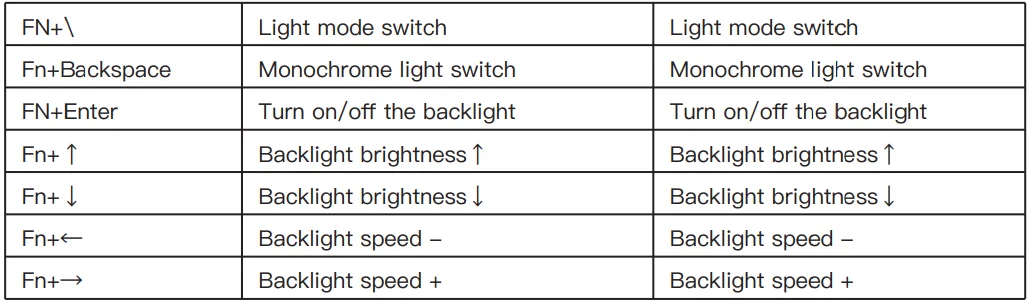
Keyboard lighting setting
Notes: Gamakay keyboards support full key customization of lights and key values. This can be done in two ways
- Download the driver from the official website www.gamakay.com/pages/downloads.
- Use the driver directly at www.qmk.top.
Connection Mode Combination key and connection method
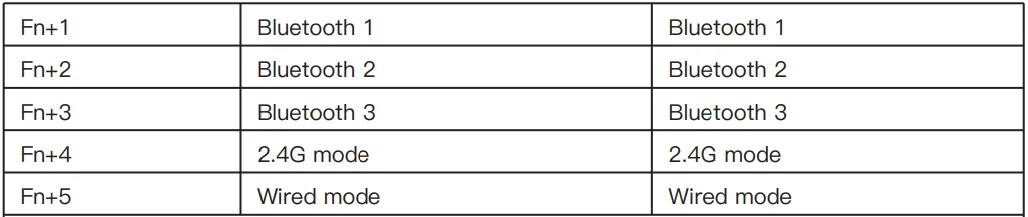
- Bluetooth Mode: Toggle switch to the right, press and hold the FN + (1/2) / 3 key combination for 3S to make the keyboard enter pairing mode, the 1/2/3 indicator flashes quickly, and the 1/2/3 indicator stays on for 3S after connecting to the device. If not connected to a device, the lights go off, keyboard goes to sleep.
- 2.4G Mode: Toggle switch to the left, press and hold the FN+4 key combination for 3S to make the keyboard enter 2.4G mode, the indicator light flashes quickly, insert the 2.4G dongle, exit the pairing after successful pairing, and exit the pairing mode after 30s if the paired device is not found, the indicator light is off, the keyboard go to sleep.
- Wired Mode: Move the switch to the center, press and hold the FN + 5 key combination for 3S to make the keyboard enter wired mode.
Notes: If you plug in the cable while in wired mode and try to switch to wireless mode by pressing FN + 123/4, the system will detect that the keyboard battery is only at 1%.
For More Manuals By GamaKay, Visit ManualsLibraryy.
GamaKay TK75PRO Wireless Aluminum Mechanical Keyboard -FAQs
What is the GamaKay TK75PRO Wireless Aluminum Mechanical Keyboard?
It’s a 75% compact mechanical keyboard with a full aluminum body, hot-swappable switches, RGB, and tri-mode connectivity (Bluetooth, 2.4 GHz wireless, Wired).
What connectivity options does the TK75PRO support?
The keyboard supports Bluetooth, 2.4 GHz wireless (dongle), and USB-C wired connection, giving flexibility for laptops, PCs, and mobile devices.
What switches does it come with?
It includes KTT Hyacinth linear pre-lubed switches that are smooth and satisfying, plus all keys are hot-swappable with 3- to 5-pin mechanical switches.
Does the TK75PRO have RGB lighting?
Yes — it features customizable RGB backlighting that can be adjusted via shortcut keys or Gamakay software.
Is the TK75PRO good for gaming?
Yes — its responsive linear switches, gasket mount, and wireless options make it suitable for casual gaming and everyday use.
What layout and key count does it have?
This keyboard uses a 75% layout with 81 keys, retaining essential keys while saving desk space.
How long does the battery last?
The TK75PRO includes a 4000 mAh battery that lasts through long wireless sessions before needing recharge.
Is it compatible with Windows and macOS?
Yes — the keyboard works with both Windows and Mac systems, with full key functionality across devices.
Does the TK75PRO have a volume or media control?
Yes — it includes a metal knob that can control volume and media playback directly from the keyboard.
Can I replace the switches myself?
Yes — all switches are hot-swappable, so you can easily change them without soldering to customize feel and sound.