
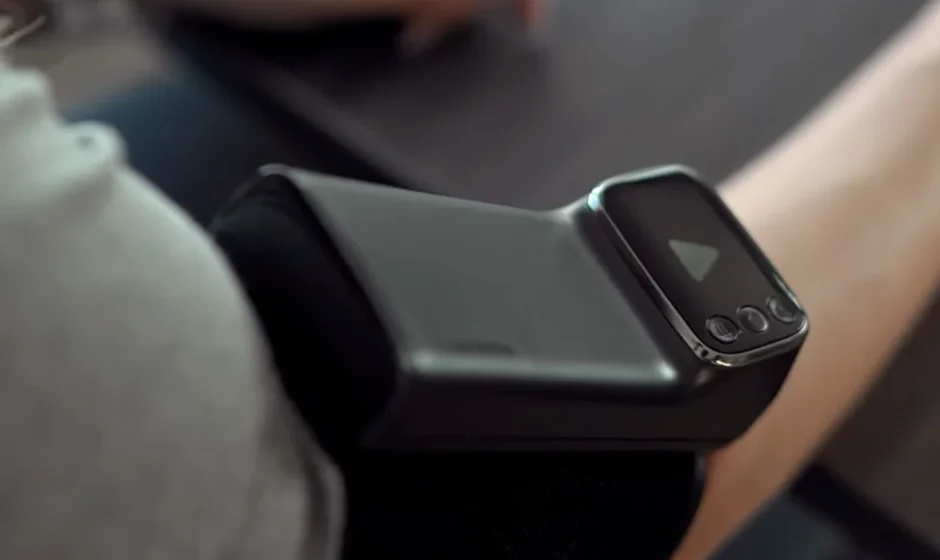

Garmin Index BPM Smart Blood Pressure Monitor
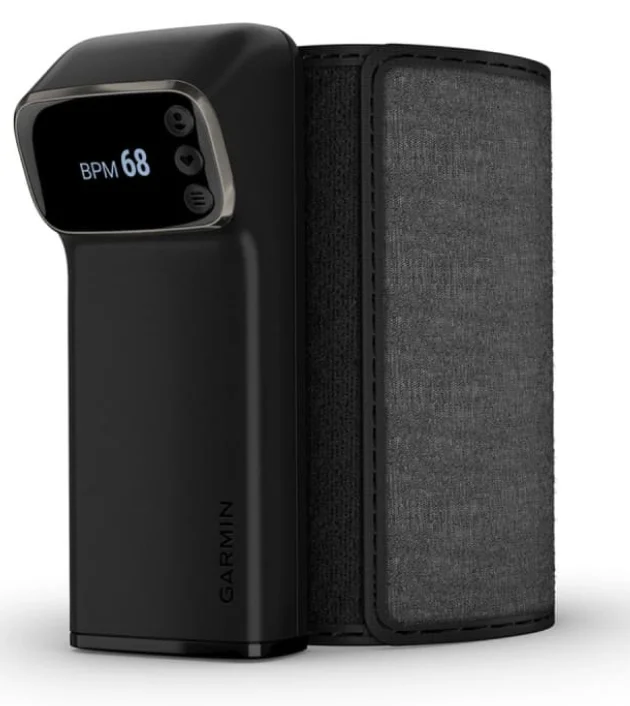
Important Safety and Product Information
WARNING: Read all instructions carefully before installing and using the Index BPM device.
WARNING: Failure to heed the following warnings could result in death, serious injury, or property damage.
Health Warnings
- Do not use this product if you have a pacemaker or other internal electronic device.
- Do not use this product if you are pregnant, if you think you may be pregnant, or if you are pregnant and experiencing pre-eclampsia or toxemia.
- Always consult your physician before beginning or modifying any exercise program.
- Measurements provided by this device are for reference only. Garmin® is not responsible for the consequences of erroneous information. This device is not intended to diagnose, treat, cure, or prevent any disease.
- Do not adjust your medication based on measurements provided by this device. Take medication as prescribed by your physician. Only a physician is qualified to diagnose and treat high blood pressure.
- This device is not for use in an oxygen-rich environment.
- This product is not intended to undergo medical device sterilization.
- Do not use this device on the same limb as another health monitoring device.
- If you have had a mastectomy, do not use this device on the arm on the same side as your mastectomy.
Battery Warnings
Replaceable alkaline batteries should be used with this device. If these guidelines are not followed, batteries may experience a shortened life span or may present a risk of damage to the device, fire, chemical burn, electrolyte leak, and/or injury.
- Do not expose the device or batteries to fire, explosion, or other hazards.
- BATTERIES ARE HAZARDOUS AND MUST BE KEPT AWAY FROM CHILDREN. NEVER PUT NEW OR USED BATTERIES IN THE MOUTH OR IN ANY PART OF THE BODY. Severe or fatal injuries can occur within 2 hours if swallowed or placed inside the body. If this occurs or is suspected, seek medical attention immediately.
- Do not disassemble, modify, remanufacture, puncture or damage the device or batteries.
- Only replace batteries with the correct replacement batteries. Using other batteries presents a risk of fire or explosion.
- Do not mix battery types.
- Do not mix old and new batteries.
NOTICE: Failure to heed the following notices could result in personal or property damage, or negatively impact the device functionality.
User Restrictions: This product is not intended for use by children under the age of 18.
Battery Notice: Contact your local waste disposal department to dispose of the device/batteries in accordance with applicable local laws and regulations.
Intended Use
The Index BPM device is a tubeless blood pressure monitor. This is a medical device intended to measure systolic and diastolic blood pressure and pulse rate. The device is designed for measurement and operation by adults aged 18 to 75. The device is designed to measure adults (age 18 to 75) with an upper arm circumference of 22 to 42 cm (8.6 to 16.5 in.). This is not a diagnostic device. You should contact your physician if the device displays hypertensive or high blood pressure values. There are no known side effects for using this device. The Index BPM device is a standalone device that measures and displays blood pressure and pulse rate. You are not required to connect the device to a smartphone app. The optional smartphone app can only be used to store data for personal record-keeping.
Device Overview
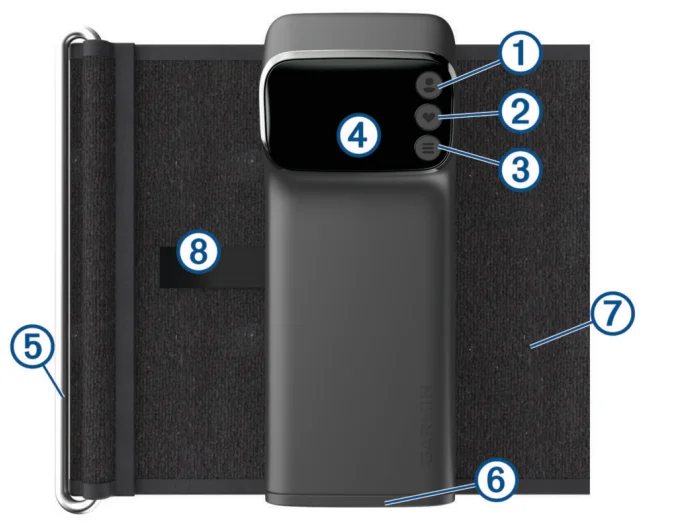
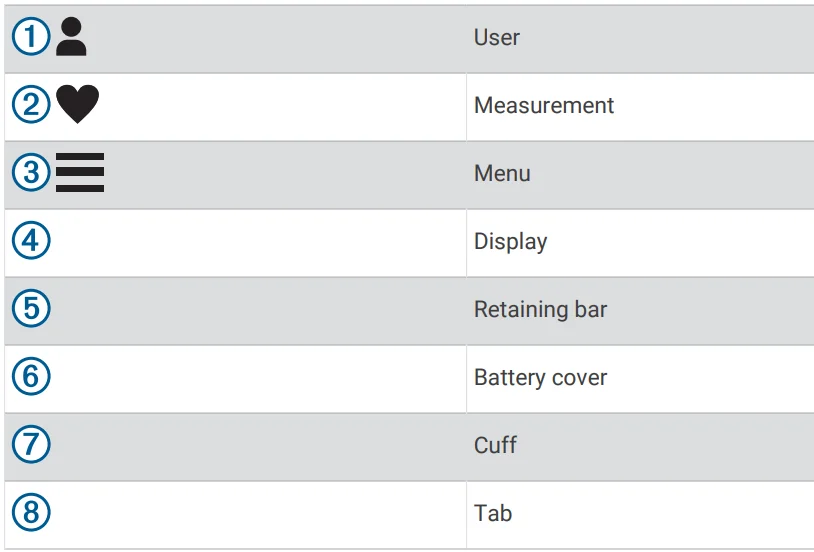
Activating the Device
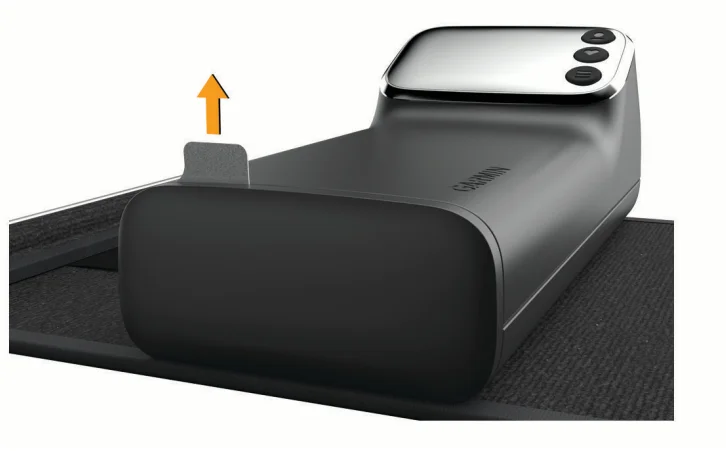
- Remove the pull tab from the battery cover.

- Press any button.
Tips for Getting a Good Measurement
The Index BPM device displays your results for a few seconds and automatically powers off.
- Read all of the instructions before measuring.
- Avoid eating, smoking, or exercising before measuring.
- After sliding the cuff strap onto your arm, relax for at least 5 minutes before measuring.
- Use the same arm each time you measure.
- Measure at a consistent time of day.
- Avoid tight or bulky clothing that could constrict blood flow.
- Avoid talking during measurements.
- Avoid distractions during measurements.
Tips for Adjusting the Cuff
The Index BPM cuff should be snug but comfortable.
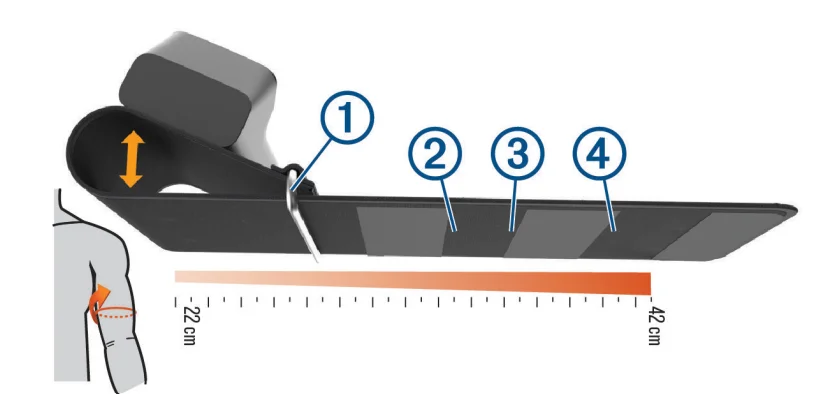
- For smaller arms, slide the retaining bar 1 to the right of the first section of hook material 2.
- For medium arms, slide the retaining bar between the first and second sections of hook material 3.
- For large arms, slide the retaining bar to the right of the second section of hook material 4.
Measuring Your Blood Pressure and Pulse Rate
For tips on how to get an accurate measurement of your blood pressure and pulse rate, see Tips for Getting a Good Measurement, page 3. You can take a single measurement (1X), or you can take three consecutive measurements and calculate the average (3X).
- Unfold the cuff strap.
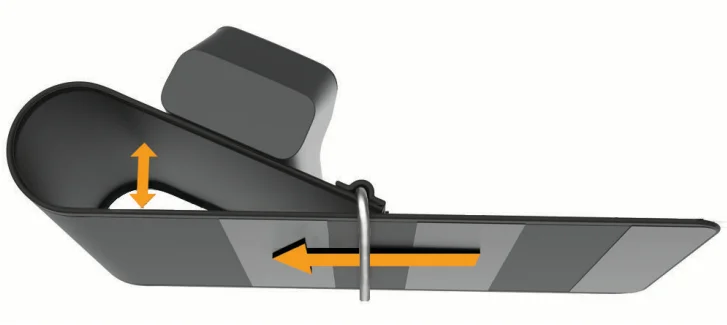
- Grip the retaining bar, and loosen the cuff strap by pulling the cuff strap through the retaining bar until it forms a loop.
TIP: If necessary, pull the retaining bar away from the device to begin forming the loop.
- Fold the cuff strap over the retaining bar, and fasten the hook and loop strap.
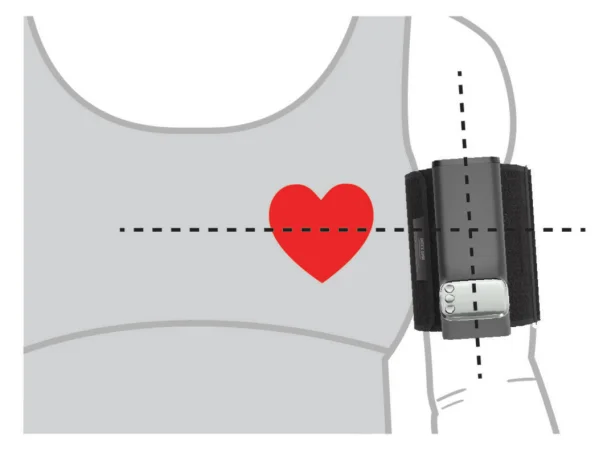
- Place your arm into the cuff loop, and slide the device to your upper arm.

The device should be above your elbow and level with your heart. The display should face you.
TIP: After you have adjusted the cuff to fit properly on your arm, you should be able to slide the fastened cuff on and off without adjusting it for every use. - If necessary, remove the cuff from your arm, and readjust the cuff so it is snug but comfortable (Tips for Adjusting the Cuff, page 4).
NOTE: If the device is not snug, the measurements may not be accurate. - Sit down with your feet flat on the floor.
- Place your arm on a table or flat surface.
- Press any button to wake up the device.
- Select an option:
- For a 1X measurement, press
 .appears.
 - For a 3X measurement, hold.appears.
NOTE: There is a one-minute rest period between each measurement. Do not move or talk until the third measurement is complete.
- For a 1X measurement, press
 .
.The arm cuff automatically inflates and deflates for each measurement. The results appear on the display. If you have set up your device with an optional Wi‑Fi® connection, the measurements are uploaded automatically to your Garmin Connect™ account.
Stopping a Measurement
You can stop a measurement at any time.
- Press.
- Slide the fastened cuff off of your upper arm.
Viewing Your Last Measurement
- Press
 >.
>.
 appears on the screen.
 - Press.
 appears on the screen.
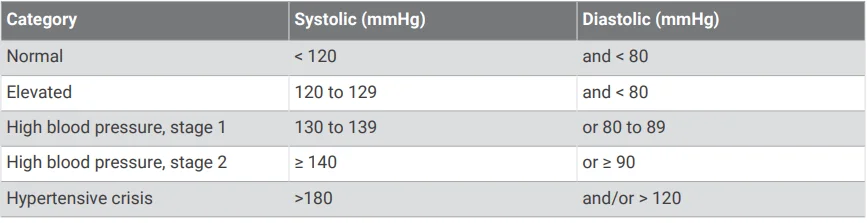
Blood Pressure Categories
CAUTION: This chart is not intended to provide a medical diagnosis. You must consult your physician to interpret the measurements.
The data in this chart is provided by the American Heart Association®.
Smart Features
Connecting to a Wi‑Fi Network
NOTICE
- Do not attempt to pair the device with a smartphone that is not your personal device.
- Do not attempt to connect the device to an unsecured Wi‑Fi network or to a Wi‑Fi network without a password.
- Do not share your account credentials or password.
You must connect your device to the Garmin Connect app on your smartphone before you can connect to a Wi‑Fi network. It is optional and not required to use a Wi‑Fi network with your Index BPM device. Your Index BPM device can sync measurements with the Garmin Connect app while connected to a Wi‑Fi network. The Index BPM device uses security measures to prevent data breaches. For example, the Garmin Connect app uses an authentication key to ensure that you can only pair the device to one smartphone at a time, and you must enter a 6-digit pairing code displayed on your device to complete the secure and bonded pairing.
- Move within range of a Wi‑Fi network.
- Press any button to wake up the device.
- Press.
 appears.
 - Press.
- From the Garmin Connect app, select the options menu, and select Add Device.
- Enter the security code displayed on your device.
- Enter a name for your device.
- Select an available Wi‑Fi network, and enter the login details.
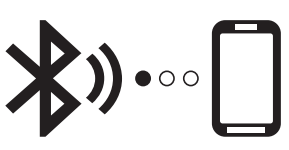 appears.
Changing the Wi‑Fi Network
You can add or change connected Wi‑Fi networks from the Garmin Connect app on your phone. Secondary users cannot manage Wi‑Fi networks.
- Move within range of a Wi‑Fi network.
- Press any button to wake up the device.
- Press.
appears. - Press.
- From the Garmin Connect app, selector ••• .
- Select Garmin Devices, and select your device.
- Select Connectivity > Wi-Fi > My Networks.
- Follow the on-screen instructions.
Garmin Connect App
WARNING: See the important safety and product information in the quick start manual for product warnings and other important information. It is optional and not required to use the Garmin Connect app with your Index BPM device. The Garmin Connect app allows you to view blood pressure measurements, create notes for your measurements, invite people to use your device, and manage blood pressure reading reminders. The Index BPM device runs in standalone mode until you download and pair the device with the Garmin Connect app.
Downloading the App
It is optional and not required to use the Garmin Connect app with your Index BPM device.
- On your compatible smartphone, open the application store, and search for the Garmin Connect app.
- Install the app.
See the owner’s manual for your smartphone for more information.
Pairing Your Device with the Garmin Connect App
You can add the Index BPM device to your Garmin Connect account.
- From the app store on your smartphone, install and open the
 Garmin Connect app.
 - Select an option to add your device to your Garmin Connect account:
- If this is the first device you have paired with the Garmin Connect app, follow the on-screen instructions.
- If you have already paired another device with the Garmin Connect app, from the settings menu, select Garmin Devices > Add Device, and follow the on-screen instructions.
- To enter pairing mode on your device, press any button to wake up the device, and press.
appears. - Press.
- Follow the on-screen instructions on the Garmin Connect app. New measurements automatically upload to the Garmin Connect app.
 Garmin Connect app.
Inviting Secondary Users
Before you can invite secondary users, the secondary users must install the Garmin Connect app on their smartphone and create an account. You can invite up to 15 secondary users to create a profile and take measurements on your device using the Garmin Connect app.
- From the Garmin Connect app on your smartphone, follow the on-screen instructions to invite secondary users.
The secondary user receives an email inviting them to use your device. - From the secondary user’s smartphone, accept the email invitation, and follow the on-screen instructions.
- Measure your Index BPM device.
The Index BPM device syncs, and the new user’s profile becomes available.
Changing the User Profile
Before you can change the user profile, you must complete the invitation process for secondary users and sync the device with your Garmin Connect account.
- Press any button to wake up the device.
- Press
 until the user’s name appears.
 - Take a measurement.
If you have set up your device with an optional Wi‑Fi connection, the measurements upload to the secondary user’s Garmin Connect account automatically.
Device Information
Resetting the Device
Resetting the device erases all data and connections. While the device is off, hold and
and for 10 seconds.
 appears, and the device resets.
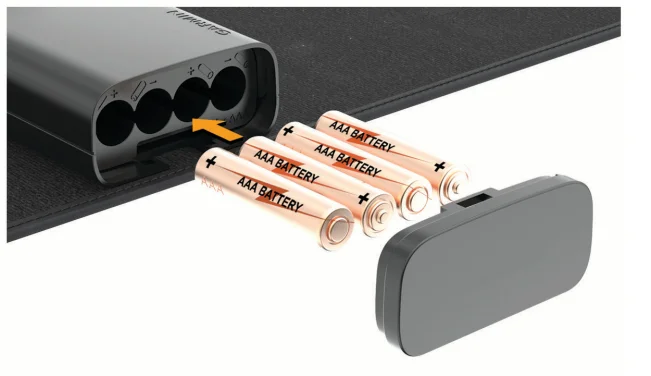
Replacing the Batteries
The device operates on four AAA batteries.
- Press the battery cover button located behind the cuff.
- Remove the battery cover.
- Remove the batteries from the device.
- Insert the new batteries, observing polarity.

- Replace the battery cover.
Troubleshooting
My device will not sync my measurements with the app
- Verify that you have completed the setup process and the device is connected using Wi‑Fi technology.
After you take a measurement, the device automatically attempts to sync through programmed Wi‑Fi networks. Measurements are stored in the user’s account until the device syncs successfully with the app.
Device Care
NOTICE
- Avoid extreme shock and harsh treatment, because it can degrade the life of the product.
- Do not store the device where prolonged exposure to extreme temperatures can occur, because it can cause permanent damage.
- When you do not plan to use the device for several months, remove the batteries.
- Do not use a sharp or abrasive object to clean the device.
- Avoid chemical cleaners, abrasive cleaners, solvents, and insect repellents that can damage plastic components and finishes.
- Avoid leaving the device in direct sunlight.
Cleaning the Device
If necessary, you can clean the surface of the device to remove unwanted residue, lint, and dust.
NOTE: You should clean the device at least once a year.
- Clean the surface of the device using a cloth dampened with a mild detergent solution or clean water.
- Wipe the device dry.
Storing the Device
- Roll the cuff strap until it is against the device, and secure the cuff with the hook and loop tab.
- Store the device in a cool, dry place, away from direct sunlight.
- Remove the batteries if you do not plan to use the device for more than 3 months to prevent battery leakage.
Specifications
- Display: 3.3 cm (1.3 in.) OLED
- Cuff pressure range: From 0 to 280 mmHg
- Measurement range:
- Systolic blood pressure: from 60 to 250 mmHg
- Diastolic blood pressure: from 40 to 180 mmHg
- Measurement method: Oscillometric
- Accuracy: Blood pressure value: ± 3 mmHg or ± 2%
- Pulse: ± 5%
- Power rating: DC 6 V, 4 1.5 V LR03 AAA batteries
- Arm circumference: From 22 to 42 cm (from 8.6 to 16.5 in.)
- Weight: 280 grams (0.62 lb.) without batteries
- Dimensions: 150 x 60 x 80 mm
- Battery life: Up to 9 mo.
- Operating temperature range:
- From 10° to 40°C (from 50° to 104°F)
- From 15% to 90% relative maximum humidity
- Maximum altitude: 2,000 m (6561.68 ft.)
- Storage temperature range:
- From -25° to 50°C (from -13° to 122°F)
- From 10% to 95% relative maximum humidity
- Maximum altitude: 2,000 m (6561.68 ft.)
- From 800 to 1,060 hPa
- Transmission method: Bluetooth® low energy 5.0
- Wireless network capability: IEEE 802.11 b/g/n
- Warranty: One yr.
- Applied part: Type BF (upper arm cuff)
- Contents
- BP707
- 4 AAA batteries
- Cuff (attached)
- Quick start manual
- Expected service life: 3 yr.
- Power on or wake-up time: 5 sec.
- Measurement cycle time: From 50 to 60 sec., according to the pressure value
- Wireless frequency
- Wi-Fi: 2412 to 2462 MHz @18.04 dBm
- Bluetooth Low Energy: 2402 to 2480 MHz @ -2.33 dBm
- Bluetooth Low Energy: 5.0
- Bluetooth Low Energy range: <30 ft. (typical)
- Maximum number of connections: 1 smartphone
- Wireless networks: b/g/n 2.4 GHz only
- Wireless network security: WPA2
- Wireless network range: <100 ft. (typical)
- Maximum number of wireless networks: 7 stored
Error Codes
Error codes may appear on the device screen to indicate a problem with the device (Tips for Getting a Good Measurement, page 3). If your Index BPM device displays an error code, you should remove the device from your arm and turn the device off and on before attempting another measurement.
- E1
The device did not detect a measurement. - E2
The cuff did not inflate properly or has a leak. - E3
The measurement is incorrect. - E4
The device timed out while the cuff was inflating or deflating. - E5
The cuff is partially inflated. - E6
The measurement exceeded the maximum blood pressure value. - E7
The device timed out while attempting to connect to the Garmin Connect app or a Wi‑Fi network. - E8
The device experienced an internal communications error. - E9
The software update did not install properly. - E10
The device timed out. - X
The device timed out while attempting to upload a measurement or complete setup.
Manufacturer Information
- Ya Horng Electronic Co., Ltd.
- www.yahorng.com
- +886-6593-2201
- [email protected]
- No. 35, Shalun, Anding Dist., Tainan City, TAIWAN
Radio Frequency Radiation Exposure
This device is a portable transmitter and receiver that uses an internal antenna to send and receive low levels of radio frequency (RF) energy for data communications. The device emits RF energy below the published limits for portable use when operating in its maximum output power mode and when used with Garmin-authorized accessories. To comply with RF exposure compliance requirements, the device should be used as described in the manual. The device should not be used in other configurations.
RF Exposure Information (SAR)
This device meets the government’s requirements for exposure to radio waves. This device is designed and manufactured not to exceed theN emission limits for exposure to radio frequency (RF) energy set by the Federal Communications Commission of the U.S. Government. The exposure standard employs a unit of measurement known as the Specific Absorption Rate, or SAR. The SAR limit set by the FCC is 1.6 W/kg. Tests for SAR are conducted using standard operating positions accepted by the FCC with the EUT transmitting at the specified power level in different channels. The FCC has granted an Equipment Authorization for this device with all reported SAR levels evaluated as in compliance with the FCC RF exposure guidelines. SAR information on this device is on file with the FCC and can be found under the Display Grant section of www.fcc.gov after searching on FCC ID: Z5O BP707.
FCC Compliance
This device complies with part 15 of the FCC Rules. Operation is subject to the following two conditions: (1) this device may not cause harmful interference, and (2) this device must accept any interference received, including interference that may cause undesired operation. This equipment has been tested and found to comply with the limits for a Class B digital device, pursuant to part 15 of the FCC rules. These limits are designed to provide reasonable protection against harmful interference in a residential installation. This equipment generates, uses, and can radiate radio frequency energy and may cause harmful interference to radio communications if not installed and used in accordance with the instructions. However, there is no guarantee that interference will not occur in a particular installation. If this equipment does cause harmful interference to radio or television reception, which can be determined by turning the equipment off and on, the user is encouraged to try to correct the interference by one of the following measures:
- Reorient or relocate the receiving antenna.
- Increase the separation between the equipment and the receiver.
- Connect the equipment into an outlet on a circuit different from that to which the receiver is connected.
- Consult the dealer or an experienced radio/TV technician for help.
This product does not contain any user-serviceable parts. Repairs should only be made by an authorized Garmin service center. Unauthorized repairs or modifications could result in permanent damage to the equipment, void your warranty, and your authority to operate this device under Part 15 regulations.
FCC RF Radiation Exposure Statement
This equipment complies with FCC radiation exposure limits set forth for an uncontrolled environment. End users must follow the specific operating instructions to satisfy the RF exposure compliance. This transmitter must not be co-located or operated in conjunction with any other antenna or transmitter.
RF Statement
Medical Electrical Equipment requires special precautions regarding ElectroMagnetic Compatibility (EMC) and needs to be installed and put into service according to the following EMC information.
- Interference may occur in the vicinity of equipment marked with portable and mobile RF communication equipment (e.g. cell phones) and can affect Medical Electrical Equipment.
- The device uses RF energy only for its internal function. Therefore, its RF emissions are very low and are not likely to cause any interference in nearby electronic equipment.
- The device is suitable for use in all establishments, including domestic establishments and those directly connected to the public low-voltage power supply network that supplies buildings used for domestic purposes.
- Portable and mobile RF communications equipment should be used no closer to any part of the device than the recommended separation distance, calculated from the equation applicable to the frequency of the transmitter. The device is intended for use in an electromagnetic environment in which radiated RF disturbances are controlled.
- Use of this equipment adjacent to or stacked with other equipment should be avoided because it could result in improper operation. If such use is necessary, this equipment and the other equipment should be observed to verify that they are operating normally.
For more manuals by Garmin, visit ManualsLibraryy
Garmin Index BPM Smart Blood Pressure Monitor-FAQs
How accurate is the Garmin Index BPM Smart Blood Pressure Monitor?
The Garmin Index BPM Smart Blood Pressure Monitor is clinically reliable, offering accuracy within ±3 mmHg or 2% for blood pressure readings and ±5% for pulse rate. It is an FDA-cleared Class II medical device, making it suitable for consistent home monitoring when used correctly.
Can a Garmin smartwatch measure blood pressure?
No, Garmin smartwatches do not directly measure blood pressure. However, when paired with the Garmin Index BPM device, you can sync readings to the Garmin Connect app and track your health data in one place for better monitoring.
What should I consider when buying a blood pressure monitor?
When choosing a digital BP monitor, look for clinical validation, proper cuff size, and ease of use. Power options like batteries or USB charging and connectivity features (such as app syncing) can also improve convenience and long-term usability.
Which blood pressure monitor brands are reliable?
Well-known and trusted brands include Omron, Beurer, Certeza, and Laica. These brands are widely recognized for their accuracy and durability, especially for home use. Always select a model that is clinically validated for dependable results.
How can I ensure accurate blood pressure readings at home?
To get accurate results, sit upright with your back supported, keep your feet flat on the floor, and rest your arm at heart level. Avoid talking or moving during the measurement and take readings at the same time each day for consistency.
What does BPM mean in blood pressure monitoring?
BPM stands for “beats per minute,” which measures your heart rate. It is different from blood pressure but is often displayed alongside readings to give a more complete picture of your cardiovascular health.
Can digital blood pressure monitors give incorrect readings?
Yes, inaccurate readings can occur due to improper cuff placement, body movement, or device wear over time. Regular calibration and correct usage help maintain accuracy and ensure reliable measurements.
Are upper-arm blood pressure monitors better than wrist devices?
Yes, upper-arm monitors like the Garmin Index BPM are generally more accurate than wrist or fingertip devices. Medical experts recommend cuff-style monitors for reliable and consistent readings at home.
Is 140/90 mmHg a normal blood pressure reading?
A reading of 140/90 mmHg is considered high blood pressure (hypertension). If you consistently get readings in this range, it’s important to monitor regularly and consult a healthcare professional for proper guidance.
What is the best time to measure blood pressure?
Blood pressure is usually highest during midday and lower in the evening. For accurate tracking, it’s best to measure it in the morning after waking up and again in the evening while relaxed and seated comfortably.