
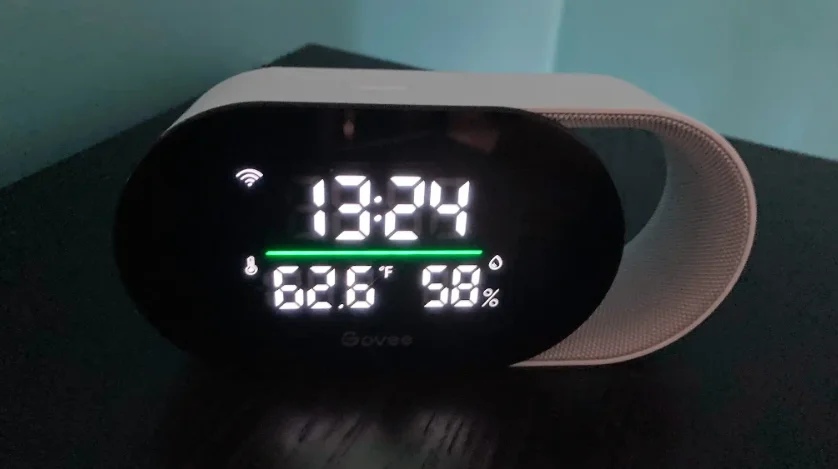

Govee H5106 Smart Air Quality Monitor
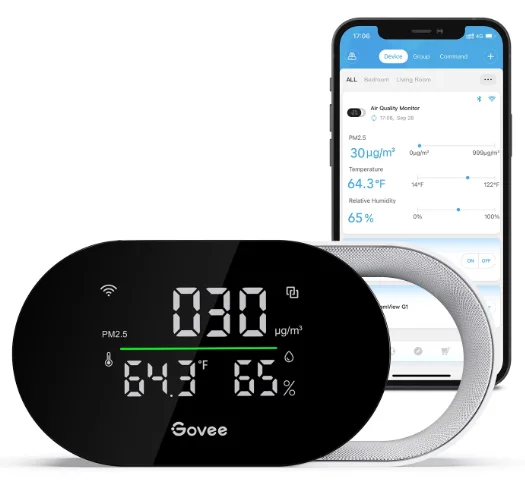
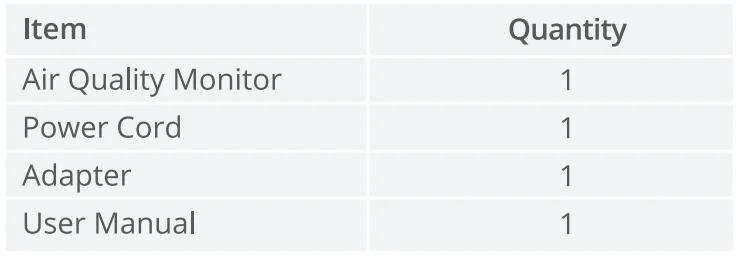
Included in the Box
Introduction
The Govee Air Quality Monitor can monitor indoor PM2.5, temperature, and humidity. It can sync the data to the screen of the device or the Govee Home App (pair with the app in advance) in real time, bringing you more possibilities in controlling the home environment.
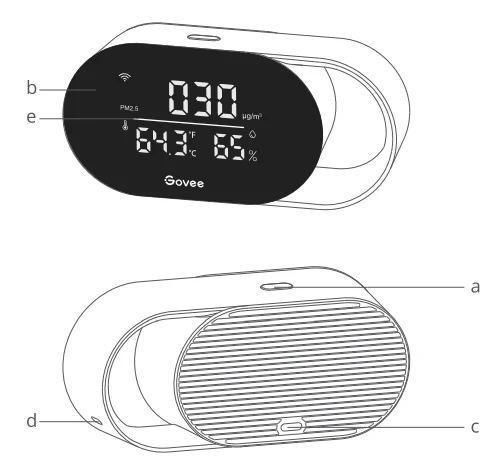
Part Names
- a. Function Button
- b. Screen
- c. Input Port
- d. Sensor Hole
- e. Air Quality Indicator

Controls
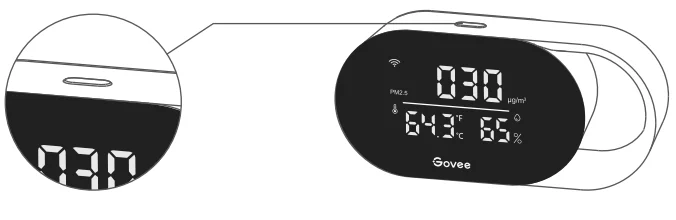
Function Button
- Long-press the function button for 3 seconds to cycle through PM2.5 readings and time.
- Single-click the function button to cycle through Fahrenheit and Celsius temperatures.
Note: The Display Time function is only accessible when the product is connected to Wi-Fi or is within Bluetooth communication distance.
Indicator Status
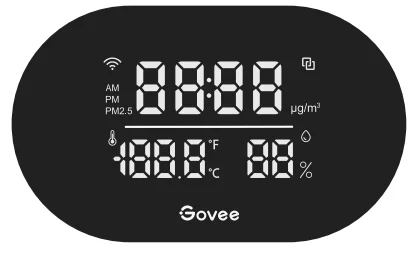
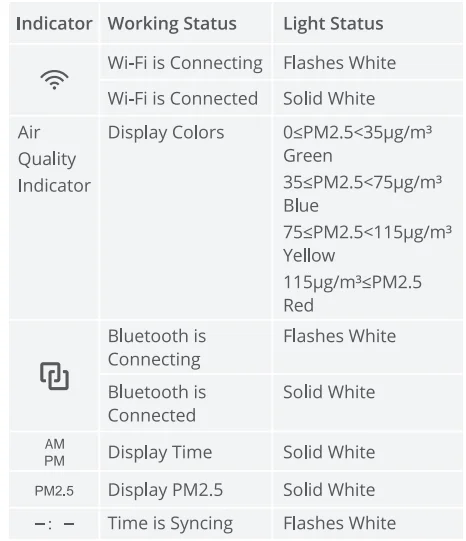
Note: The time display function is only accessible when the product is connected to Wi-Fi or is within Bluetooth communication distance.
Getting Started
- Remove all packaging and plug into power.

- Place the product on a flat and stable surface.

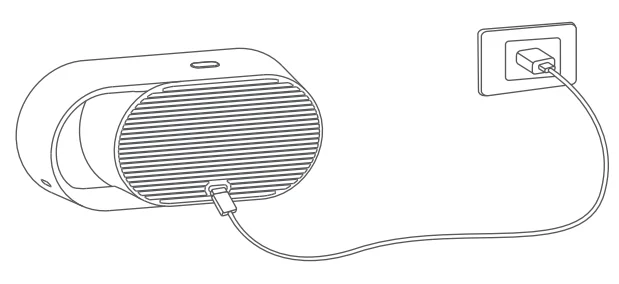
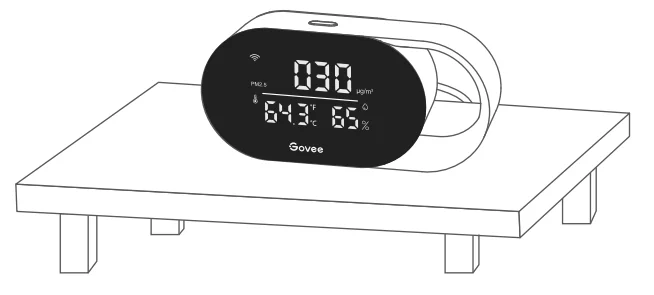
Note: To ensure the accuracy of the temperature and humidity readings, please do not touch the sensor hole while moving the product.
Govee Home App
You can access more features using the Govee Home App.
Downloading Govee Home App
To download the Govee Home App, scan the QR code or search for “Govee” in the Apple App Store® (iOS) or Google Play Store (Android).
Note: Choose “Allow” for the permissions requested when opening the Govee Home App for the first time. These permissions allow the app’s features to function normally and are not used to record personal, private information.
Due to ongoing updates, the Govee Home App may be slightly different from what is shown in this manual. In case of any differences, always follow the in-app instructions.
Pairing with Govee Home App
- Turn on your smartphone’s Bluetooth.
- Open the Govee Home App, tap the “+” icon in the top right corner, and search for “H5106.”
- Tap the device icon and follow the on-screen instructions to complete pairing.
Note: You can use the Govee Home App to connect your air purifier to Amazon Alexa or Google Assistant. Follow the in-app instructions to connect to each voice assistant. The Govee Home App is being continually updated, and its features expand.
Troubleshooting
The troubleshooting section below is for solving frequently asked questions. If your problem persists, please contact customer support.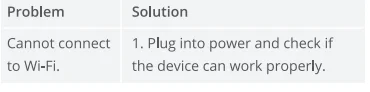
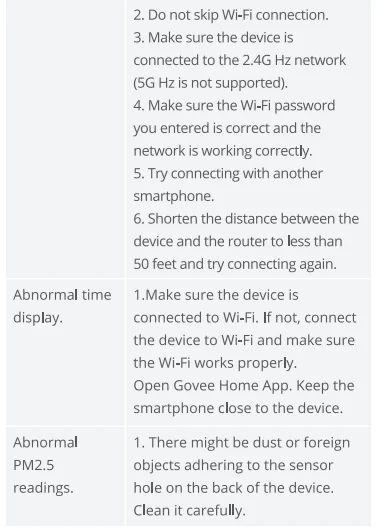
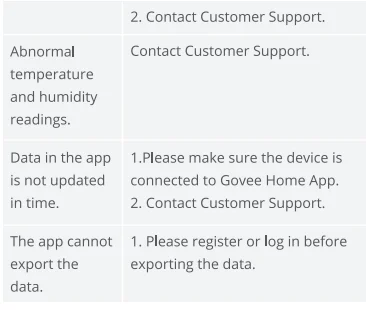
For App & Connectivity
- Cannot connect to Govee Home App.
- Make sure your smartphone is powered on and is not connected to other Bluetooth devices.
- Enable the smartphone’s Location Services.
- Try connecting with another smartphone.
- Make sure your app is updated to the latest version.
- Make sure you connect to your Wi-Fi router’s 2.4GHz network and that the network is working correctly.
- Make sure the Wi-Fi password you entered is correct.
- Shorten the distance between the air monitor, Wi-Fi router, and the smartphone.
- Make sure your air monitor and the Wi-Fi router are located away from appliances that produce
- electromagnetic radiation (e.g., microwave ovens, refrigerators, etc.).
- If you are using a VPN, try turning it off and then connecting the air monitor.
- Disable portal authentication for your Wi-Fi network. If portal authentication is enabled, this air monitor will not be able to access your Wi-Fi network, and setup will fail. Portal authentication means that you need to sign in to your Wi-Fi network through a web page before you can use the Internet.
- Cannot find the device on the Bluetooth Device Nearby page of the app.
- The air monitor may be connected to another smartphone. Disconnect it from the other smartphone first.
- The air monitor is offline.
- Make sure the air monitor is plugged in and powered on, then refresh “My Devices” in the Govee Home
- App by swiping down on the screen.
- Make sure your router is connected to the Internet, and your phone’s network connection is working.
- If the Wi-Fi password has been changed, the air monitor will automatically go offline. Try connecting it to the network again.
- Delete the offline air monitor from the Govee Home App, then add and reconfigure the air monitor again in the app.
Specifications
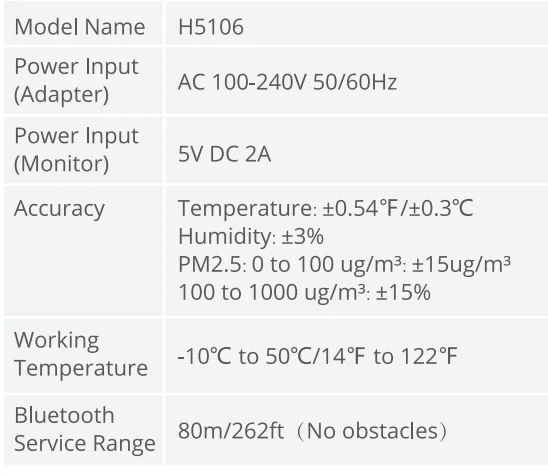
Compliance Information
FCC Statement
This device complies with Part 15 of the FCC Rules. Operation is subject to the following two conditions:
- This device may not cause harmful interference, and
- This device must accept any interference received, including interference that may cause undesired operation.
Warning: Changes or modifications not expressly approved by the party responsible for compliance could void the user’s authority to operate the equipment.
Note: This equipment has been tested and found to comply with the limits for a Class B digital device, pursuant to Part 15 of the FCC Rules. These limits are designed to provide reasonable protection against harmful interference in a residential installation. This equipment generates uses and can radiate radio frequency energy and, if not installed and used in accordance with the instructions, may cause harmful interference to radio communications.
However, there is no guarantee that interference will not occur in a particular installation. If this equipment does cause harmful interference to radio or television reception, which can be determined by turning the equipment off and on, the user is encouraged to try to correct the interference by one or more of the following measures:
- Reorient or relocate the receiving antenna.
- Increase the separation between the equipment and receiver.
- Connect the equipment into an outlet on a circuit different from that to which the receiver is connected.
- Consult the dealer or an experienced radio/TV technician for help.
FCC Radio Frequency Exposure Statement
This equipment complies with FCC radiation exposure limits set forth for an uncontrolled environment. This equipment should be installed and operated with a minimum distance of 20cm between the radiator & your body.
Sovee
Responsible party:
- Name: GOVEE MOMENTS(US) TRADING LIMITED
- Address: 13013 WESTERN AVE STE 5 BLUE ISLAND IL 60406-2448
- Email: [email protected]
- Contact information: https://www.govee.com/support.
For More Manuals By GoveeLife, Visit ManualsLibraryy.
Govee H5106 Smart Air Quality Monitor-FAQs
What is the Govee H5106 Smart Air Quality Monitor, and what does it measure?
The Govee H5106 Smart Air Quality Monitor is a device designed to track key indoor air metrics, including particulate matter (PM2.5), temperature, and humidity in real time. It displays these readings on a built-in LED screen and can send data to the Govee Home app for monitoring over time. The color-coded indicator changes based on PM2.5 levels to show air quality status at a glance.
How does the air quality display work on the H5106?
The air quality monitor has an LED indicator that changes color depending on PM2.5 levels, making it easy to see indoor air quality at a glance. For example, green typically indicates good air quality, while blue, yellow, and red represent progressively higher particulate concentration. This color coding helps you quickly judge when air quality is acceptable or when ventilation might be needed.
Can the Govee H5106 connect to Wi-Fi and mobile apps?
Yes, the H5106 supports both Bluetooth and 2.4 GHz Wi-Fi connectivity, allowing you to pair it with the Govee Home app. Once connected, you can view real-time and historical data, configure notifications, and even sync settings with voice assistants like Amazon Alexa or Google Assistant if supported. The app also lets you view readings over weeks and export historical data.
Does the H5106 require batteries or a power cable?
The monitor does not have an internal battery and must be powered continuously via a USB-C cable and adapter. This means it needs to stay plugged into a power source to function and log air quality data. Because it’s always powered, it can continuously monitor and update readings in real time without interruption.
What accuracy can I expect from this air quality monitor?
The H5106 offers reasonable accuracy for a consumer-grade indoor monitor. PM2.5 accuracy is around ±15 µg/m³, while temperature and humidity measurements typically fall within ±0.54 °F and ±3 %, respectively. While it’s not a lab-grade instrument, it’s suitable for everyday home environments and general awareness of air quality changes.
How do I set up the Govee H5106?
To set up the air quality monitor, remove it from packaging, plug it into power, and place it on a stable surface. Then, install the Govee Home app on your smartphone, enable Bluetooth, and follow the in-app instructions to pair. After pairing, you can connect it to your 2.4 GHz Wi-Fi network for full functionality, including time display and remote monitoring.
Can the H5106 work with other Govee smart devices?
Yes, this monitor can integrate with certain Govee smart home products. When paired through the Govee Home app, it can trigger actions in compatible air purifiers, humidifiers, and fans based on air quality thresholds you set. This can help automate air quality improvements without manual intervention.
Is the monitor suitable for health-related uses?
The H5106 is a good tool for general health awareness, especially if you want to monitor particulate pollution, humidity fluctuations, or temperature changes at home. It’s helpful for people with asthma, allergies, or respiratory concerns because it provides real-time air quality information so you can take steps like ventilating or using an air purifier when levels worsen.
Are there any limitations or common issues with the H5106?
Some users report occasional connectivity or reading stability issues, including unexpected 0 values or difficulties linking to other smart devices. Because it uses Bluetooth and Wi-Fi, performance can vary with network conditions. The monitor is mainly for general awareness rather than precise scientific measurements, so readings should be interpreted as indicative trends.
Where should I place the air quality monitor for the best results?
For accurate and meaningful results, place the monitor in a central area of the room away from direct heat sources, windows, and vents. Avoid placing it too close to walls or objects that might block airflow around the sensor. Since it continuously reports PM2.5, temperature, and humidity, good placement helps ensure the readings reflect overall room conditions rather than localized effects. (General best practices for sensor placement.)