
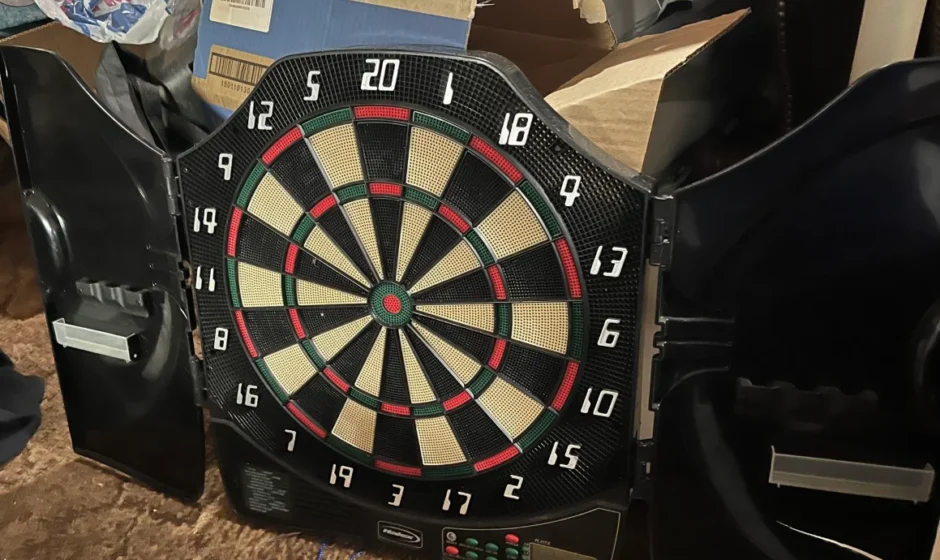

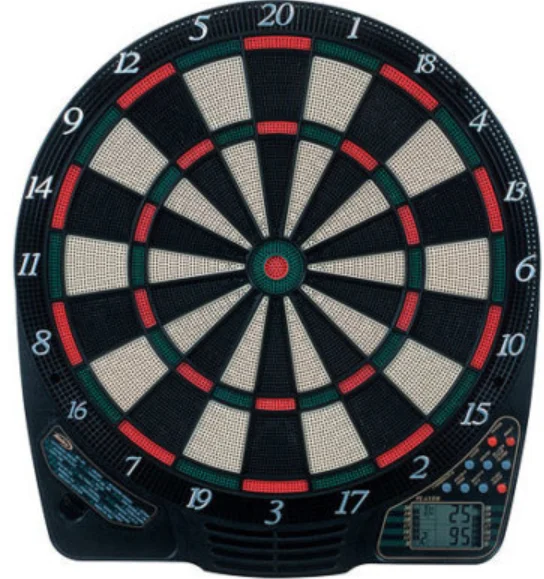
Halex Impact 4 Electronic Dartboard
Setup / Mounting Instructions
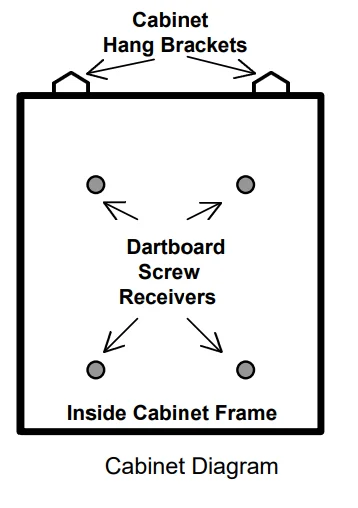
Choose a location to hang the dartboard where there is about 10 feet of open space in front of the board. The “toe-line” should be 7’ 9 1/4” from the face of the dartboard. Since this dartboard can be powered with the included AC adapter, you may want to mount it close to an electric outlet for convenience. Locate a wall stud and place a mark 79 3/4” from the floor. Place another mark at the same height 16” from the first mark. Due to the weight of the dartboard and cabinet, it is recommended that you mount it onto the wall studs. If this is not possible, we have included 2 drywall anchors. Bullseye height should be 5’ 8” from the floor. Toe line should be 7’ 9 ¼” from the face of the board. Screw 2 cabinet mounting screws (long) in the center of the stud using the marks you made as guides. Be sure the screws are level with one another (use a level for accuracy) to ensure the dartboard will be level. Mount the dartboard to the cabinet before mounting it to the wall. Lay the cabinet on the floor with doors open. Note the 4 screw receivers embedded in the backboard of the cabinet. Place the dartboard into the cabinet and line up the holes with the screw receivers. The holes on the dartboard are located in the catch ring area outside the scoring segment area. Using a small Philips- head screwdriver, screw the dartboard mounting screws into the receivers. The dartboard is now attached securely to the cabinet. To mount the cabinet to the wall, simply line up the screws on the wall with the hang brackets located on the back of the cabinet (top edge). It may be necessary to adjust the screws until the board fits snugly against the wall. Plug the A/C adapter into the wall outlet and into the jack at the bottom right of the dartboard through the hole in the right side of the cabinet.
Dartboard Functions (see diagram on page 18)
- RESET button – Cancels the current score and returns to the start of the game.
- POWER button – Press to turn the game on or off. The dartboard has an automatic suspend mode to conserve power and battery life (if using batteries). The dartboard will make a sound effect and display “SLEEP” on the display after approximately 3 minutes of non-use. However, the scores are stored in memory and can be restored by pressing any button.
- SOUND button – Press to change volume to high, low, or off.
- PLAYER/PAGE/SCORE button – This button is used at the start of each game to select the number of players you want to play the game. In addition, this button allows players to see other players’ scores that are not on active display. This dartboard keeps track of up to 4 players’ scoring or 4 two-person teams. When playing with more than 2 players, some scores will not be visible when not active. This button allows you to page through all players’ scores as needed.
- DOUBLE/MISS button – This button is used to activate the Double In/Double Out option for the “01” games. This function is only active when selecting 301, 401, etc. games. Press the MISS button if you wish to register a dart that misses the target area.
- BOUNCE OUT button – Decide before play if you want to count darts that do not remain in the board (“bounce-outs”) or not. If not, simply press the BOUNCE OUT button immediately after a bounce out occurs to deduct the score that registers.
- START button – This multi-function button is used to:
- START the game when all options have been selected.
- CHANGE to the next player when one player is finished with his round. This will put the dartboard in HOLD status between rounds to allow the player to remove darts from the target area.
- GAME buttons – Press to page through the on-screen game menu.
Display Protective Film
This electronic dartboard may have a clear film over the entire display area to prevent scratching during shipping. It is recommended that this film be removed before play to enhance the display area visibility. To remove, simply lift the edge, peel off, and discard.
Electronic Dartboard Operation
- Press the POWER button to activate the dartboard. A short musical introduction is played as the display goes through a power-up test.
- Press the GAME buttons until the desired game is displayed (see game chart on page 16).
- Press the DOUBLE button (optional) to select starting and/or ending on doubles (used only in 301 – 901 games). This is explained in the game rules section.
- Press the PLAYER button to select the number of players (1, 2, 3, 4, t 1-1, t 2-2, t 3-3, t 4-4). The default setting is 2 players.
- Press the START button (red) to activate the game and begin play.
- Throw darts
- The dart indicator display is located to the right of the score display. The number of darts displayed indicates the remaining throws for the active player.
- When all 3 darts have been thrown, a voice command will indicate “next player,” and the score will flash. The darts can now be removed without affecting the electronic scoring. When all darts are removed from the playing surface, press the START button to go to the next player. Voice command will indicate which player is up.
Sound Effects Demo
To hear your dartboard play through all the voice commands and sound effects, follow this procedure:
- With power on, press the RESET and GAME buttons simultaneously;
- Release the RESET button first, then release the GAME button; 3) Press the BOUNCE OUT button, and you will hear sound effects demo.
Team Play
In addition to scoring for up to 8 individual players, this dartboard is capable of keeping score for team play up to a maximum of 4 two-person teams (8 individuals). To enter team play mode, press PLAYER button continually until a “t” appears on the display. Each team option is illustrated below:
- t 2-2 2 teams, 4 individual players (1st team-players 1&3, 2nd team-players 2&4)
- t 3-3 3 teams,6 individual players (1st team-players 1&4, 2nd team-players 2&5, 3rd team-players 3&6
- t 4-4 4 teams,8 individual players (1st team-players 1&5, 2nd team-players 2&6, 3rd team-players 3&7, 4th team-players 4&8)
During team play, team members combine their scores to arrive at a team score.
Caring for your Electronic Dartboard
- Never use metal-tipped darts on this dartboard. Metal-tipped darts will seriously damage the circuitry and electronic operation of this dartboard.
- Do not use excessive force when throwing darts. Throwing darts too hard will cause frequent tip breakage and cause excess wear on the board.
- Turn darts clockwise as you pull them from the board. This makes it easier to remove darts and extends the life of the tips.
- Use only the optional A/C adapter (available directly from Regent Sports) for this dartboard. Using the wrong adapter may cause electrical shock and damage to the electronic circuits.
- Remove the batteries when not in use or if using the optional A/C adapter. This will prolong the life of your batteries.
- Do not spill liquids on the dartboard. Do not use spray cleaners or cleaners that contain ammonia or other harsh chemicals as they may cause damage.
Batteries
If using battery power, insert three “C” batteries into the battery compartment located on the back side of the dartboard toward the base. To remove the cover, press the two latches inward while lifting gently. The batteries must be positioned as indicated inside the battery compartment to power the dartboard.
Automatic Suspend Mode Feature
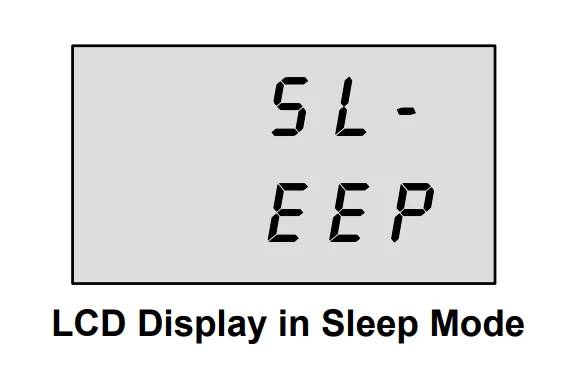
The dartboard will automatically suspend if no action occurs within approximately three minutes. This is designed to save power or battery life. A sound effect will play, and the LCD will indicate “SLEEP” (see below). All scores will be stored in memory, and play will resume when any button is pressed.
Game Rules
The Halex Impact 4.0 electronic dartboard is loaded with games and options. The rules for each game are detailed below in the order they appear on the LCD when paging through the games. The game number is indicated next to each game for your reference.
301 (G01)
This popular tournament and pub game is played by subtracting each dart from the starting number (301) until the player reaches exactly 0 (zero). If a player goes past zero, it is considered a “Bust,” and the score returns to where it was at the start of that round. For example, if a player needs a 32 to finish the game and he/she hits a 20, 8, and 10 (totals 38), the score goes back to 32 for the next round. In playing the game, the double-in / double-out option can be chosen (double out is the most widely used option).
- Double In – A double must be hit before points are subtracted from the total. In other words, a player’s scoring does not begin until a double is hit.
- Double Out – A double must be hit to end the game. This means that an even number is necessary to finish the game.
- Double In and Double Out – A double is required to start and end scoring of the game by each player.
- 401 (G02) Starting number 401
- 701 (G05) Starting number 701
- 501 (G03) Starting number 501
- 801 (G06) Starting number 801
- 601 (G04) Starting number 601
- 901 (G07) Starting number 901
CRICKET (G08)
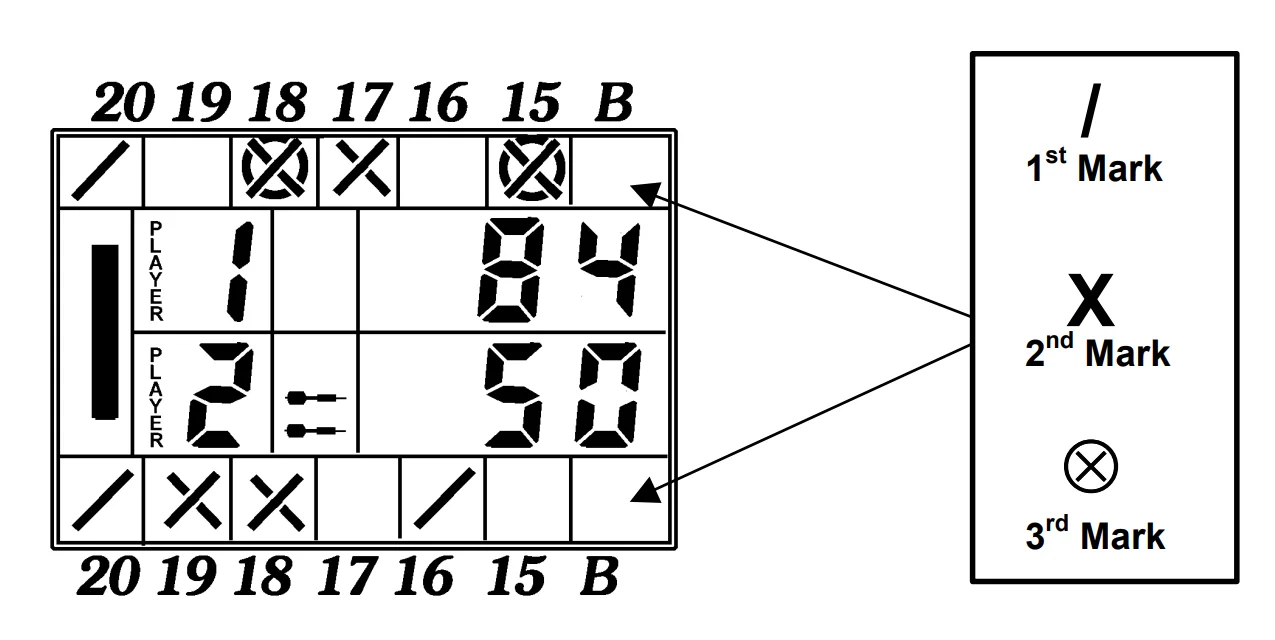
Cricket is a strategic game for accomplished players and beginners alike. Players throw for numbers best suited for them and can force opponents to throw for numbers not as suitable for them. The object of Cricket is to “close” all of the appropriate numbers before one’s opponent while racking up the highest number of points. Only the numbers 15 through 20 and the inner/outer bullseye are used. Each player must hit a number 3 times to “open” that segment for scoring (Refer to Tournament Cricket Scoring section for explanation on how players’ marks are registered). A player is then awarded the number of points of the “open” segment each time he/she throws a dart that lands in that segment, provided their opponent has not closed that segment. Hitting the double ring counts as two hits, and the triple ring counts as 3 hits. Numbers can be opened or closed in any order. A number is “closed” when the other player(s) hit the open segment 3 times. Once a number has been “closed”, any player for the remainder of the game can no longer score on it.
Winning – The side closing all the numbers first and accumulating the highest point total is the winner. If a player “closes” all numbers first but is behind in points, he/she must continue to score on the “open” numbers. If the player does not make up the point deficit before the opposing player(s) “closes” all the numbers, the opposing side wins. Play continues until all segments are closed – the winner is the player with the highest score.
Cricket Scoring Display
This dartboard utilizes a dedicated scoreboard within the LCD that keeps track of each player’s segment status when playing Cricket. When Cricket is selected, all lights on the Cricket scoreboard will light up – there are 3 separate lights within each number (15 through 20 and bullseye). During play, one of the status lights will turn off (black will disappear) as a segment is hit. If a double or triple of an active number is hit, 2 or 3 lights will turn off, respectively.
NO-SCORE CRICKET (G09) (Press SELECT button when Cricket is displayed)
Same rules as standard Cricket except there is no point scoring. The object of this version is to be the first to simply “close” all the appropriate numbers (15 through 20 and the bullseye).
SCRAM (G10) (For 2 players only)
This game is a variation of Cricket. The game consists of two rounds. The players have a different objective in each round. In round 1, player 1 tries to “close” (score 3 hits in each segment – 15 to 20 and bullseye). During this time, player 2 attempts to rack up as many points in the segments that the other player has not yet closed. Once player 1 has closed all segments, round 1 is complete. In round 2, each player’s roles are reversed. Now, player 2 tries to close all the segments while player 1 goes for points. The game is over when round 2 is complete (player 2 closes all segments). The player with the highest point total is the winner.
CUT-THROAT CRICKET (G11)
Same basic rules as standard Cricket except once scoring begins, points are added to your opponent(s) total. The object of this game is to end up with the fewest points. This variation of Cricket offers a different psychology to the players. Rather than adding to your own score and helping your own cause as in standard Cricket, Cut-Throat offers the benefit of racking up points for your opponent(s), digging them in a deeper hole. Competitive players will love this variation!
COUNT-UP 300 (G12)
The object of this game is to be the first player to reach the specified point total (300). The point total is specified when the game is selected. Each player attempts to score as many points as possible per round. Doubles and triples count 2 or 3 times the numerical value of each segment. For example, a dart that lands in the triple 20 segment is scored as 60 points. The cumulative scores for each player will be displayed in the LCD as the game progresses. Additional variations of this game are detailed below. The rules are the same, except the point total varies as indicated in the number.
- COUNT-UP 400 (G13)
- COUNT-UP 800 (G17)
- COUNT-UP 500 (G14)
- COUNT-UP 900 (G18)
- COUNT-UP 600 (G15)
- COUNT-UP 999 (G19)
- COUNT-UP 700 (G16)
High Score – 3 Rounds (G20)
The rules for this competitive game are simple – Rack up the most points in three rounds (nine darts) to win. Doubles and triples count as 2x and 3x that segment’s score, respectively. Additional variations of this game are detailed below. The rules are the same, except the number of rounds varies as indicated in the number.
- High Score – 4 Rounds (G21)
- High Score – 10 Rounds (G27)
- High Score – 5 Rounds (G22)
- High Score – 11 Rounds (G28)
- High Score – 6 Rounds (G23)
- High Score – 12 Rounds (G29)
- High Score – 7 Rounds (G24)
- High Score – 13 Rounds (G30)
- High Score – 8 Rounds (G25)
- High Score – 14 Rounds (G31)
- High Score – 9 Rounds (G26)
ROUND-THE-CLOCK – r1 singles (G32)
Each player attempts to score in each number from 1 through 20 and the bullseye in order. Each player throws 3 darts per turn. If a correct number is hit, he/she tries for the next number in sequence. The first player to reach 20 is the winner. The display will indicate which segment you are shooting for. A player must continue shooting for a segment until it is hit. The display will then indicate the next segment you should shoot for. There are many difficulty settings available for this game. Each game has the same rules; the differences are detailed as follows:
- ROUND-THE-CLOCK 5 (G33) – Game starts at segment number 5
- ROUND-THE-CLOCK 10 (G34) – Game starts at segment number 10
- ROUND-THE-CLOCK 15 (G35)- Game starts at segment number 15
Since this game does not utilize point scoring, the double and triple rings count as single numbers. We have added some new levels of difficulty to this game for those looking for a real challenge!:
- ROUND-THE-CLOCK Double (G36)- Player must score a Double in each segment from 1 through 20 in order.
- ROUND-THE-CLOCK Double 5 (G37) – Game starts at double segment 5
- ROUND-THE-CLOCK Double 10 (G38) – Game starts at double segment 10
- ROUND-THE-CLOCK Double 15 (G39) – Game starts at double segment 15
- ROUND-THE-CLOCK Triple (G40)- Player must score a Triple in each segment from 1 through 20 in order.
- ROUND-THE-CLOCK Triple 5 (G41) – Game starts at triple segment 5
- ROUND-THE-CLOCK Triple 10 (G42) – Game starts at triple segment 10
- ROUND-THE-CLOCK Triple 15 (G43) – Game starts at triple segment 15
KILLER (G44)
This game will really show who your friends are. The game can be played with as few as two players, but the excitement and challenge build with even more players. To start, each player must select their number by throwing a dart at the target area. The LCD will indicate “SEL” at this point. The number each player gets is their assigned number throughout the game. No two players can have the same number. Once each player has a number, the action starts. Your first objective is to establish yourself as a “Killer” by hitting the double segment of your number. Once your double is hit, you are a “Killer” for the rest of the game. Now, your objective is to “kill” your opponents by hitting their segment number until all their “lives” are lost. The last player to remain with lives is declared the winner. It is not uncommon for players to “team up” and go after the better player to knock him out of the game.
DOUBLE DOWN (G45)
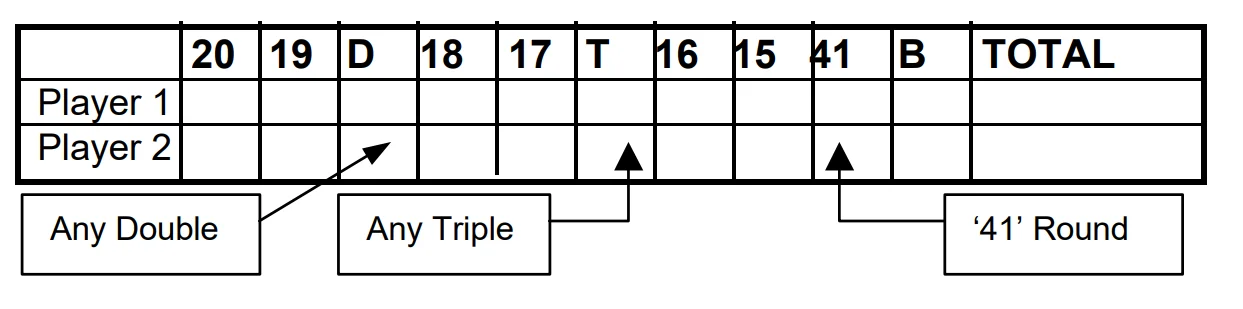
Each player starts the game with 40 points. The object is to score as many hits in the active segment of the current round. In the first round, the player must throw for the 15 segments. If no 15’s are hit, his score is cut in half. If some 15’s are hit, each 15 (doubles and triples count) is added to the starting total. In the next round, players throw for the 16 segments and hits are added to the new cumulative point total. Again, if no hits are registered, the point total is cut in half. Each player throws for the numbers as indicated in the chart below in order (the LCD screen will indicate the active segment in which to throw). The player who completes the game with the most points is the winner.
Cleaning your Electronic Dartboard
Your Halex electronic dartboard will provide many hours of competition if cared for properly. Regular dusting of the dartboard is recommended using a damp cloth. A mild detergent can be used if necessary. The use of abrasive cleaners or cleaners that contain ammonia may cause damage and should not be used. Avoid spilling liquid onto the target area since it can result in permanent damage and is not covered by the warranty. The wood cabinet can be cleaned with a damp cloth and can be polished with furniture polish.
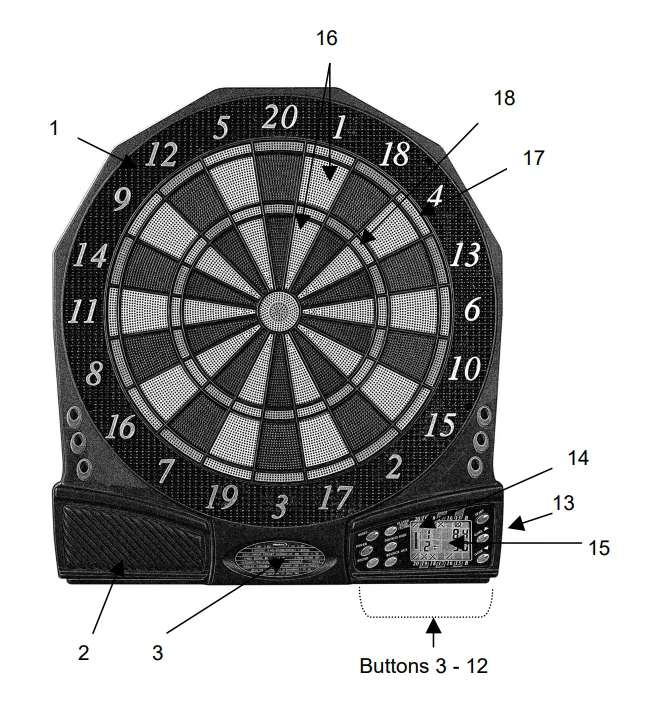
- Catch Ring
- Speaker
- Game Menu
- Power Button
- Sound Button (controls volume level)
- Reset Button Button
- Bounce Out Button
- Double/Miss Button
- Game Select (scroll up)
- Game Select (scroll down)
- Score/Player/Page Button
- Start Button
- Built-in Jack (for optional a/c adapter)
- Double In/Double Out Indicators
- LCD Display
- Singles Ring
- Doubles Ring
- Triples Ring
For more manuals by Halex, visit ManualsLibraryy
Halex Impact 4 Electronic Dartboard-FAQs
Is the Halex Impact 4 electronic dartboard good for beginners?
Yes, the Halex Impact 4 is a solid choice for beginners and casual players. It features automatic scoring, built-in games, and soft-tip darts, which make gameplay easier and safer. The clear display and simple controls help new players learn rules quickly without manual scorekeeping.
How does an electronic dartboard work?
An electronic dartboard uses soft-tip darts and built-in sensors to detect where the dart lands. The board automatically calculates scores and displays them on the screen. This eliminates scoring errors and allows players to focus more on gameplay and improvement.
How do I start a game on the Halex Impact 4 dartboard?
To start a game, press the GAME button to select your desired game mode, then choose any optional settings like double-in or double-out if available. Press the START button to begin play. The dartboard will guide you through turns automatically.
Where is the best place to install an electronic dartboard?
Mount the dartboard on a flat wall at the recommended height, with enough clear space around it. Adding a backboard or foam surround helps reduce noise and protects walls from missed throws, making it ideal for home use.
Why is my Halex dartboard not scoring properly?
Scoring issues can occur due to worn dart tips, low power supply, or sensor blockage. Try replacing dart tips, checking batteries or power connection, and resetting the board according to the user manual to restore normal operation.
What are the disadvantages of electronic dartboards?
Electronic dartboards require power (batteries or adapter) and may need occasional maintenance. They can also be noisier than traditional boards and may not appeal to professional players who prefer bristle boards for tournament practice.
Are electronic dartboards safe for kids?
Yes, electronic dartboards are safer than traditional bristle boards because they use soft-tip darts instead of sharp metal ones. This significantly reduces the risk of injuries, making them suitable for supervised children and family game rooms.