
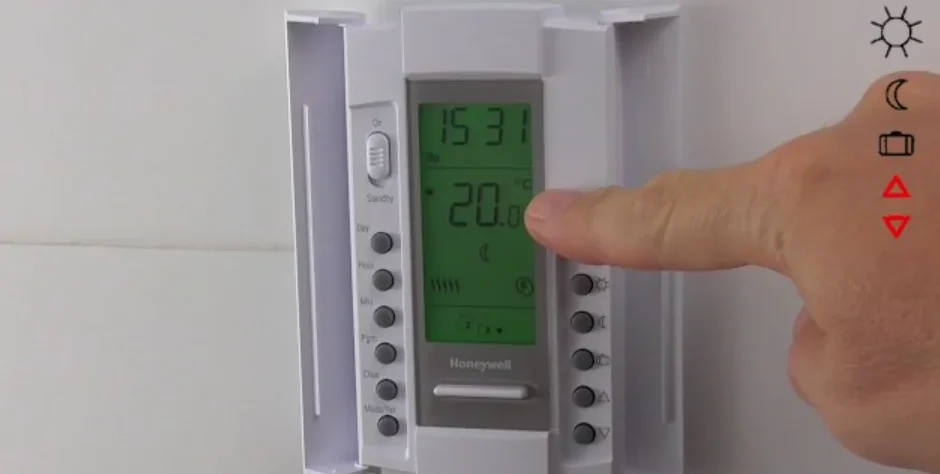

Honeywell 08161 Programmable Thermostat

Description
This programmable thermostat can be connected to an electric heating system such as an electric baseboard, a radiant ceiling, a floor heating system, an electric convector, etc. It is not compatible with a central heating system.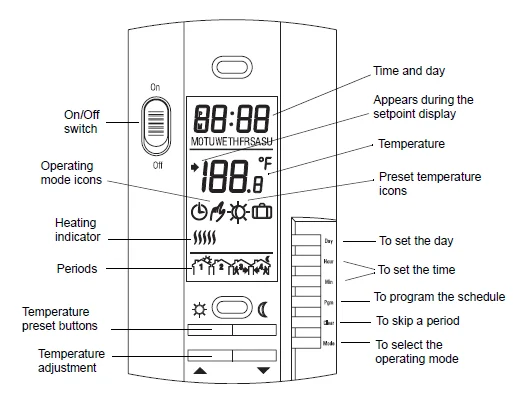
Set the switch to Off to cut power to the heater. This will not affect the time and temperature settings.
Connection
TURN OFF POWER TO THE HEATING SYSTEM AT THE MAIN POWER PANEL TO AVOID ELECTRICAL SHOCK.
- The installation must be carried out by an electrician.
- All cables and connections must conform to the local electrical code.
- Special CO/ALR solderless connectors must be used when connecting with aluminum conductors.
- Install the thermostat onto an electrical box.
- Install the thermostat about 5 feet high, on an inside wall facing the heater.
- Avoid locations where there are air drafts (such as the top of a staircase or an air outlet), dead air spots (such as behind a door), or direct sunlight.
- Do not install the thermostat on a wall that conceals chimney or stove pipes.
- Connect the thermostat wires to the power and to the load using solderless connectors for copper wires.
- Push the excess wire back into the electrical box to prevent interference with the thermostat.
- Secure the thermostat using two 6-32 screws.
- Return power to the heating system.
NOTE: Always keep the thermostat’s vents clean and unobstructed.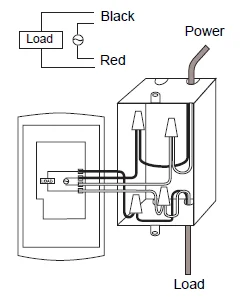
Configuration
The configuration switches are on the back of the thermostat. Default (factory) settings are inside the gray cells.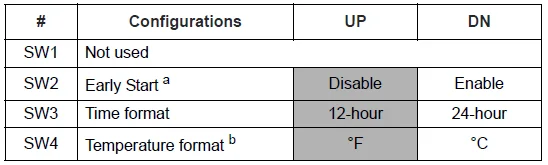
- Early Start can be used in Automatic mode only. When this function is enabled, the thermostat calculates the optimal time to start heating in order to obtain the desired temperature by the set time. The thermostat re-assesses the start time daily based on the previous day’s performance.
- If you change the temperature display format, the preset temperatures will return to their default settings.
Power-up
Upon power-up, the thermostat is in manual mode and displays the room temperature.
- Press the Hour and Min buttons to set the thermostat’s clock.
- Press the Day button to set the day.
Temperature Setting
Setpoint
The thermostat normally displays the room temperature. To view the set temperature, press the ∧ or ∨ button briefly. The set temperature will appear for 5 seconds.
To change the setpoint, press the ∧ or ∨ button until the desired temperature is displayed. To scroll faster, hold the button.
Using a preset temperature
The thermostat has 3 preset temperatures:
- Comfort temperature
- Economy temperature
- Vacation temperature

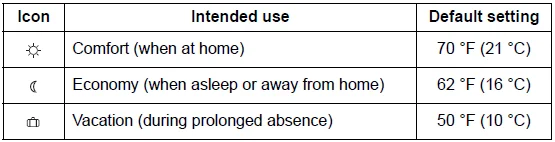
To use the Comfort or Economy temperature, press the Comfort or Economy button, respectively. The corresponding icon will be displayed.
To use the Vacation temperature, press both Comfort and Economy buttons simultaneously. The Vacation icon will be displayed.
Storing a preset temperature
To store the Comfort or Economy temperature:
Set the desired temperature using the ∧ or ∨ button. Press and hold the appropriate button (Comfort or Economy) for approximately 3 seconds until the corresponding icon is displayed.
To store the Vacation temperature:
Set the desired temperature using the ∧ or ∨ button. Press and hold both Comfort and Economy buttons simultaneously for approximately 3 seconds until the Vacation icon is displayed.
Operating Modes
Automatic
The temperature is set according to the energy-saving schedule. To place the thermostat in this mode, press Mode until the automatic icon is displayed. The icons of the current period and preset temperature are also displayed.
Temporary Bypass:
If you modify the setpoint (by pressing the ∧, ∨, Economy or Comfort button) when the thermostat is in automatic mode, the new setpoint will be used until the end of the current period. When the next period starts, the temperature set for that period becomes the new setpoint.
Manual
The energy-saving schedule is not used. The temperature must be set manually. To place the thermostat in this mode:
- Press Mode until the manual icon is displayed.
- Set the temperature using the ∧, ∨, Economy or Comfort button.
Vacation
The thermostat is set to the Vacation temperature. Press both Economy and Comfort buttons simultaneously to place the thermostat in Vacation mode.
Energy-saving Schedule
The schedule consists of 4 periods per day, which represents a typical weekday. You can program the thermostat to skip the periods that do not apply to your situation. For example, you can skip periods 2 and 3 for the weekend.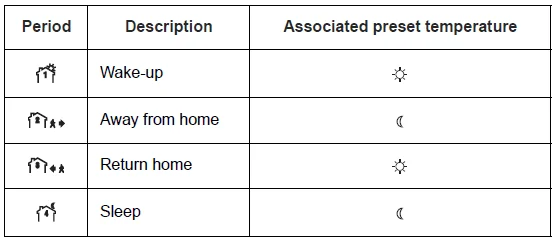
The Comfort temperature is used in periods 1 and 3, and the Economy temperature is used in periods 2 and 4. For example, when the period changes from 1 to 2, the setpoint automatically changes from the Comfort setting to the Economy setting.
You can have a different program for each day of the week; i.e., each period can start at a different time for each day of the week. The thermostat has been programmed with the following schedule.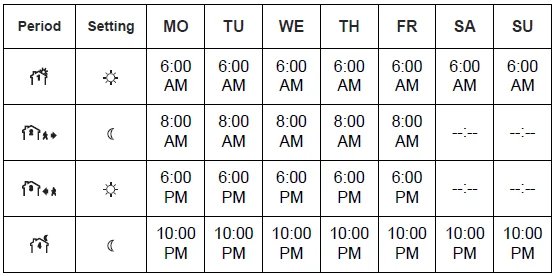
To modify the schedule:
- Press PGM to access the programming mode. Period 1 is selected.
- Press Day to select the day to program (hold for 3 seconds to select the entire week).
- Press Hour and Min to set the start time of the selected period, or press Clear if you want to skip the period (–:– is displayed).
- Press Pgm to select another period, or press Day to select another day. Then repeat step 3.
- Press Mode to exit the programming mode.
NOTE: If no button is pressed for 60 seconds, the thermostat will automatically exit the programming mode.
Troubleshooting
The thermostat’s screen is blank.
The thermostat’s switch is set to Off.
LO is displayed.
The measured temperature is below the display range. Heating is activated.
HI is displayed.
The measured temperature is above the display range.
The wrong time is displayed.
The thermostat was without power for more than 2 hours.
The measured temperature is wrong.
The thermostat is located in a spot exposed to an air draft.
The heater is always on.
Check the thermostat wiring.
The thermostat indicates that heating is on, but the heater is not on.
Check the thermostat wiring.
The temperature does not change according to the energy-saving schedule
Check that the thermostat is in Automatic mode. Check also the schedule and clock settings.
Customer Assistance
If you have any questions about the operation of your thermostat, please go to http://yourhome.honeywell.com or call Honeywell Customer Care toll-free at 1-800-468-1502.
For more Manuals by Honeywell, visit ManualsLibraryy
Honeywell 08161 Programmable Thermostat-FAQs
How do I set my Honeywell programmable thermostat?
Press the Menu button, then use the arrow keys to select Schedule. Set your desired time and temperature for each period (Wake, Leave, Return, Sleep), then confirm to save. The thermostat will automatically follow your set schedule each day.
How can I manually control my Honeywell thermostat?
To manually adjust the temperature, press the Up or Down arrows until your desired temperature appears. Press Hold to keep that setting until you change it again, or Run to return to your programmed schedule.
How do I reprogram my Honeywell digital thermostat?
Go to the Menu and select Program Schedule. Adjust each time period and temperature according to your needs. Save changes before exiting to apply your new program.
How do I change the mode on my Honeywell thermostat?
Press the Mode button to switch between Heat, Cool, Auto, or Off. The selected mode will display on the screen.
How do I reset my Honeywell programmable thermostat?
Press and hold the Menu button. Use the arrow buttons to navigate to Reset and select it. Then choose Factory Reset. The thermostat will restart and return to its original default settings. You can reconfigure it through the thermostat or the Resideo App.
Why is my Honeywell thermostat not heating or cooling properly?
Make sure your thermostat is set to the correct mode (Heat or Cool) and the temperature is above or below the room reading. Check the circuit breaker and ensure the furnace or AC door is securely closed. If the issue continues, try performing a reset.
How do I set my Honeywell thermostat to Hold or Run mode?
To keep a specific temperature, adjust it using the arrows and press Hold. The screen will display “Hold.” To cancel this and return to your programmed schedule, press Run.
How do I set my Honeywell thermostat to Auto?
Press Mode until Auto appears. This allows the thermostat to automatically switch between heating and cooling to maintain your preferred temperature range.
What is the best temperature setting for home comfort?
For most homes, a comfortable range is 68–72°F (20–22°C). During summer, 78°F (26°C) saves energy, while 68°F (20°C) is ideal for winter heating.
When should I reset my Honeywell thermostat?
You should reset your thermostat if it’s not responding properly, showing incorrect readings, or after major setting changes. Resetting restores default settings and often resolves minor glitches.