
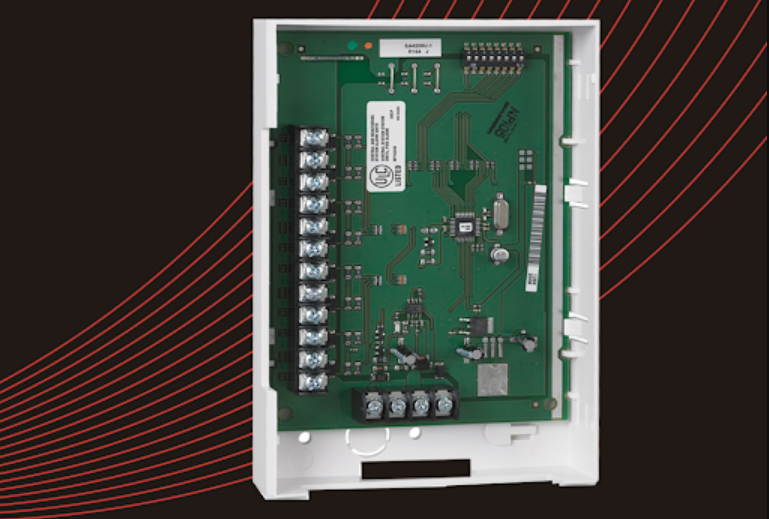

Honeywell 4208EX 8 Zone Remote Point Module
FEATURES
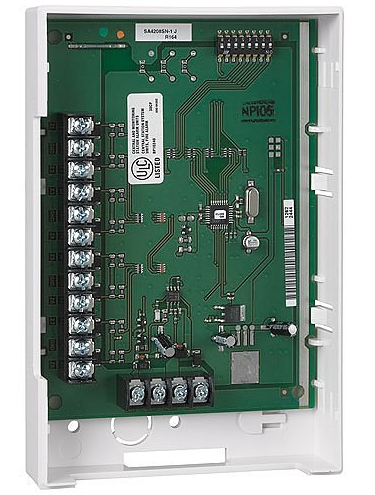
The Honeywell 4208EX Remote Point Module is an 8-zone expander that allows the use of available expansion zones provided by Honeywell controls that support VPlex polling loop devices. Features of this device include:
- Can be optionally powered from an external DC power supply to reduce the current draw from the polling loop. For ULC installations, you must use a ULC-listed UPS with Class 2 output.
- Uniquely identifies 8 EOLR supervised zones. All zones use either 2k resistors (supplied) or, for high security applications employing Form C contacts, 3.9k resistors must be used (also provided).
- Can be used in Zone Number or Serial Number mode, depending upon DIP Switch settings. In Serial Number mode, each serial number in the selected group can be assigned to any zone number.
- Double-balanced zone supervision option, depending upon DIP switch settings.
- Fast (10 msec) response selectable for Loops A & B.
- Tamper protection.
MOUNTING
Mount the module either horizontally or vertically by installing two #6 screws directly into the wall and sliding the keyholes in the back of the unit onto the screws. Use an additional #6 screw to secure the case back to the wall through the hole near the back wire knockout. Wires can exit from the side or the back knockout of the housing. Tamper protection is required when the unit is mounted remotely (required for ULC S304 applications).
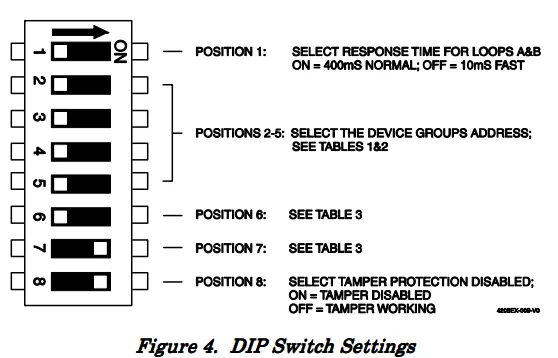
To enable, set DIP Switch 8 to OFF and attach the tamper magnet (provided) to the module’s inside cover (see Figure 1). Enable the expansion zone tamper option at the control (program field ✼24 = 0). If the module’s cover is removed, the magnet attached to the cover (positioned near the reed switch) will cause a tamper signal to be sent to the control for every active zone on the module.
 For ULC S559 applications, the unit must be mounted in a ULC Listed Fire Alarm cabinet. When mounted inside the cabinet with the control, the 4208EX should be mounted horizontally and does not need tamper protection, provided the cabinet is supervised. Insert two screws into the raised metal tabs, leaving the heads approximately 1/8” exposed, then hang the 4208EX using the two keyhole slots in the back.
WIRING
Polling loop and protection loop wires can be brought in either through the back or front of the unit by removing the knockouts. Use 22-gauge twisted pair wire for polling loop connections. All protection loops use 2k EOL resistors (3.9k if using Form C contacts in ULC high-security applications). A maximum resistance of 300 ohms is allowed on protection loops (excluding EOLR). See Figure 2 for standard connections. Keep in mind that connections to the polling loop are always required, while power supply connections are optional.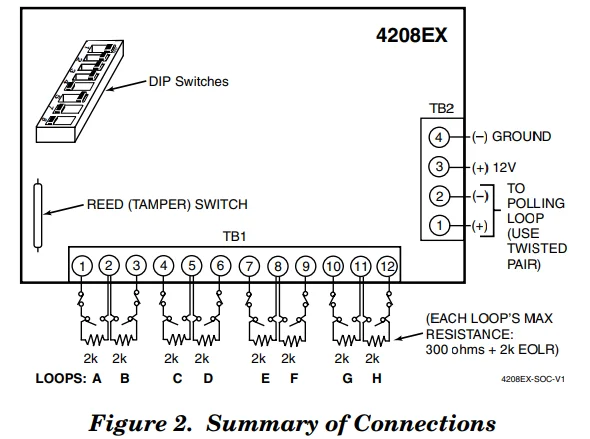
DOUBLE-BALANCED ZONES
Up to eight normally-closed contacts and shunt resistors can be connected to each zone input on the 4208EX (see Figure 3). This does not increase the number of zones reporting to the control panel. The zones will operate as described below.
- Any contact opening will be reported to the panel as a fault in the host zone.
- A break in the loop wiring will be reported as trouble/tamper on the host zone.
- A short in the loop wiring will be reported as trouble/tamper on the host zone.
Double-balanced zones must NOT be used for Fire or any other zone type that uses a “short” as an indication of an alarm.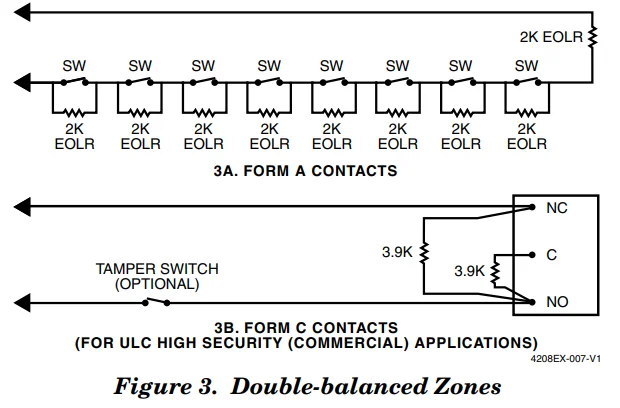
When the installation is complete, install the cover and affix the Serial Number and Zone Assignment Tables to the inside cover of the control.
- Do not select 1-8 for VISTA controls.
- If 9-16 is selected for controls that have 9 hardwire zones. Loop A (Zone 9) will be inactive.
- Accommodates option “ONE 4208 IN USE” if referred to in control programming.
NOTE: Consult the Control Panel Instructions to determine the valid zone numbers for that control panel.

Compatibility with Honeywell FBII Control Panels
When using this module with a Honeywell FBII control panel, it is necessary to cut the wire jumper as shown below in Figure 5 and set DIP switch positions 6 and 7 according to Table 3.
FBII PROGRAMMING
Set the DIP switches on the 4208EX as instructed below (see Figure 5):
- Select fast/slow response for Loops A and B using DIP Switch 1: Fast = OFF (10 msec), Slow = ON (400 msec).
- Select the mode of operation, Serial Number or Zone Assignment mode, in Table 3. For FBII Control Panels, the program jumper must also be cut. See Figure 5.
- Select the group setting using DIP Switches 2 through 5. See Table 1 for Zone Assignments or Table 2 for Serial Number Assignments. If using more than one 4208EX, be certain to set each one to a different group setting.
- For double-balanced zones, see Table 3.
- Select the 4208EX Tamper Protection setting using DIP Switch position 8: Tamper Disabled = ON, Tamper Enabled = OFF.
ADEMCO PROGRAMMING
When setting the 4208EX to a group of zone numbers, each zone must be programmed as follows:
- On ADEMCO 4140XMP and earlier controls, these zones must be programmed as Left Loop Polling Loop Zones.
- On ADEMCO VISTA-40 and later controls, these zones must be programmed in the #93 Menu Mode Zone Programming as INPUT TYPE “7” — DIP Switch type polling device (DP).
When setting the 4208EX to a group of serial numbers, each zone must be programmed as INPUT TYPE “6” — SL (Serial Number Polling Loop Device). Loops can be learned in any order and assigned to any legitimate zone number. When prompted to learn the serial number for a particular zone, you may either enter it manually through the keypad, through COMPASS Downloader, or “learn” it by momentarily faulting (shorting) the terminals of that zone as required by the control.
If entering a serial number manually through the keypad, enter it and press “✼” to advance to the next prompt, which will ask you for the loop number. Enter a “1” for each serial number entered. If learning or entering a serial number and “Duplicate of Zone XX” is displayed, another device with that same serial number is already in the system. In that case, use a different serial number group setting on the 4208EX.
DIP SWITCH SETTINGS
Zone Assignment Mode:
In the zone assignment mode, the DIP Switches on the 4208EX are used to assign the unit to a group of 8 consecutive zones. These zone numbers, once designated for the 4208EX, cannot be used for anything else, even if you don’t use all 8. Use Table 1 for DIP Switch settings.
Serial Number Mode:
In the serial number mode, the DIP Switches on the 4208EX are used to assign the unit to a group of 8 serial numbers. You can assign any serial number to any zone number (except hardwire zone numbers of the control), and you do not lose zone numbers if you don’t use all eight loops on the 4208EX. Use Table 2 for DIP Switch settings.
VERIFICATION OF PROGRAMMING
To verify proper programming, the following test should be performed:
- Be sure to enable expansion zone tamper protection at the control (program field ✼24 = 0).
- Set DIP Switch 8 to OFF (tamper enabled).
- Replace the 4208EX cover and clear the keypad of any faulted zones.
- Remove the 4208EX’s cover and verify (on the keypad) that only the zones you designated for this 4208EX are indicating a check (or trouble) condition.
SPECIFICATIONS
Physical: 6-7/16” W x 4-1/4” H x 1-1/4” D (163 mm x 108 mm x 32 mm)
Electrical:
Polling loop input: 8–12 VDC (SLC)
Polling Loop Current: 34 mA max. See Table 4.
Polling Loop Max. Impedance: 25 ohms
External Power Input:
Voltage: 12 VDC
Current: 34 mA max. See Table 4.
Sensor Loop Response:
Normal: 400 ms (all protection loops)
Fast: 10 ms (option on A and B only)
Sensor Loop Current:
Normal: 1.25 mA
Shorted: 1.6 mA
Sensor Loop Max. Resistance:
2k ohms (EOLR) ± 300 ohms tolerance.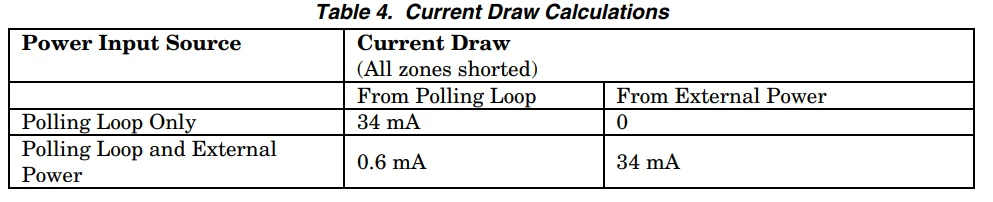
FEDERAL COMMUNICATIONS COMMISSION (FCC) Part 15 STATEMENT
The Class B digital apparatus complies with Canadian ICES-003. This equipment has been tested to FCC requirements and has been found acceptable for use. The FCC requires the following statement for your information: This equipment generates and uses radio frequency energy, and if not installed and used properly, that is, in strict accordance with the manufacturer’s instructions, may cause interference to radio and television reception.
It has been type tested and found to comply with the limits for a Class B computing device in accordance with the specifications in Part 15 of the FCC Rules, which are designed to provide reasonable protection against such interference in a residential installation. However, there is no guarantee that interference will not occur in a particular installation. If this equipment does cause interference to radio or television reception, which can be determined by turning the equipment off and on, the user is encouraged to try to correct the interference by one or more of the following measures:
- If using an indoor antenna, have a quality outdoor antenna installed.
- Reorient the receiving antenna until interference is reduced or eliminated.
- Move the radio or television receiver away from the receiver/control.
- Move the antenna leads away from any wire runs to the receiver/control.
- Plug the receiver/control into a different outlet so that it and the radio or television receiver are on different branch circuits.
If necessary, the user should consult the dealer or an experienced radio/television technician for additional suggestions. The user may find the following booklet prepared by the Federal Communications Commission helpful: “Interference Handbook.” This booklet is available from the U.S. Government Printing Office, Washington, DC 20402. The user shall not make any changes or modifications to the equipment unless authorized by the Installation Instructions or the User’s Manual.
Unauthorized changes or modifications could void the user’s authority to operate the equipment. This Class B digital apparatus complies with Canadian ICES-003. FOR INFORMATION REGARDING THE LIMITATIONS OF THE ENTIRE SECURITY SYSTEM, SEE THE CONTROL PANEL’S INSTALLATION INSTRUCTIONS. FOR LATEST WARRANTY INFORMATION, GO TO: http://www.security.honeywell.com/hsc/resources/wa.
For More Manuals By Honeywell, Visit ManualsLibraryy.
Honeywell 4208EX 8 Zone Remote Point Module-FAQs
What is the Honeywell 4208EX?
The 4208EX is an 8-zone remote point module that expands the number of zones available on Honeywell alarm systems, allowing more hardwired devices to connect.
What does a zone expander do?
A zone expander increases the number of hardwired zones your alarm system can use, which is useful for larger homes or commercial installations.
How many zones can the 4208EX add?
It adds 8 additional hardwired zones to compatible Honeywell systems.
What is the current draw of the 4208EX?
The module draws a maximum of 28.6 mA during operation.
Which systems are compatible with the 4208EX?
It works with Honeywell systems that support V-Plex polling loop devices or compatible wired control panels.
How do I install the 4208EX?
Connect the module to the main control panel using the polling loop wiring, assign zones in the system, and follow the Honeywell installation instructions.
What is the difference between 4208EX and 4208SN?
The 4208SN is designed for commercial polling loop panels and requires serial number programming, while the 4208EX is typically used for V-Plex compatible systems.
Is a battery required for the 4208EX?
No, it draws power from the control panel via the polling loop and does not require a separate battery.
How do I stop alarm beeping related to the module?
Press any key on the keypad to silence the beep, correct the issue, and then clear the CHECK or FAULT display by entering your security code + OFF sequence twice.
Can I reset the 4208EX module?
Yes, you can reset the module by power cycling the panel (disconnecting power and backup battery) or following the system’s reset instructions.
What are common issues with Honeywell zone expanders?
Typical problems include improper wiring, power issues, or communication errors with the main panel.