
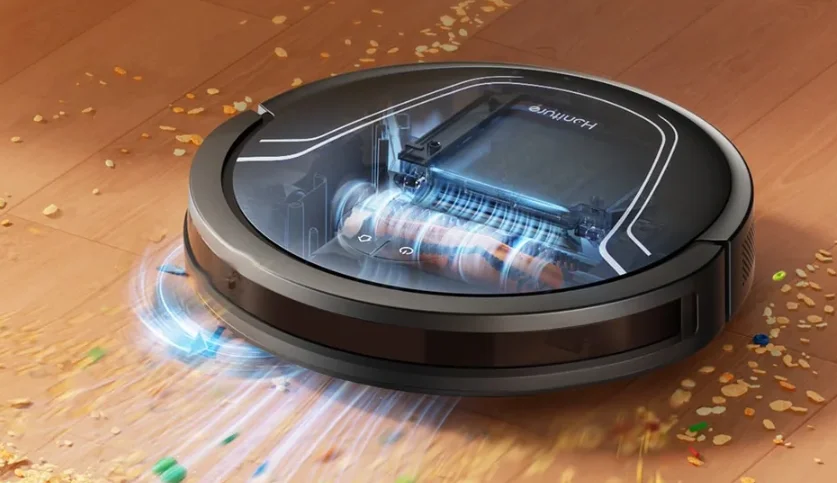

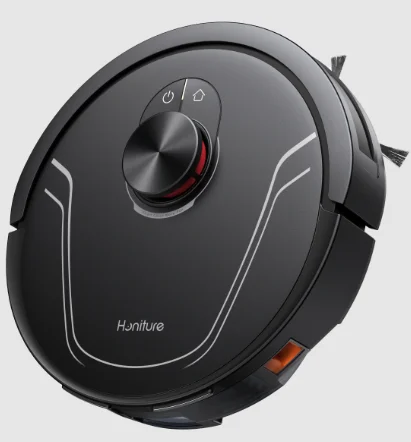
Honiture V8 Pro Robot Vacuum
Safety Instructions
Use Restrictions
Please read the manual before use.
Warning: To avoid injury to yourself and others, and to avoid unnecessary property damage, read carefully before using the product and observe the following “Safety instructions”. The safety instructions are divided into two sections, “Warning” and “Caution”. The “Warning” and “Caution” sections contain important information for safe use of the product and must be followed.
Warning: Important safety instructions to prevent death or serious injury from incorrect operations.
Caution: Important safety instructions to prevent minor injury or device damage from incorrect operation.
Warning
- Do not use this product in wet places such as bathrooms or near water sources.
- Do not use it to clean up liquids, matches, and wet garbage.
- Do not pull out/insert the power cord plug or touch the socket with wet hands.
- Do not use damaged power plugs or loose sockets.
- Do not use the main unit to clean flammable liquids such as kerosene, gasoline, objects with sparks, toner cartridges, toner, or other combustible dust. Do not use the device near the above items or in environments with flammable and explosive gases to avoid fires.
- Do not disassemble, repair, or modify the product on your own, to avoid fire, injury, or damage, except for the replacement of consumables in accordance with the manual.
- Do not charge non-rechargeable batteries. Please use an AC power supply with a rated voltage rather than a generator or a DC power supply to avoid fire hazards and electric shocks.
- Please use a dry cloth to clean the dust on the plug regularly to avoid a fire hazard caused by poor insulation and other reasons.
- Please make sure to insert the plug firmly to avoid electric shock, short circuits, and fire.
- Please immediately cut off the power and stop using the device in case of any malfunction to avoid smoke, fire, or electric shock.
- If the device deforms, overheats abnormally, emits a burning smell, or makes an unusual noise during charging or use, immediately disconnect the power supply and unplug the device. Place it in an open and non-flammable area to ensure safety. Faulty products shall be replaced and repaired by the manufacturer or its maintenance specialist to avoid danger.
- Please make sure to pull the plug from the power socket before conducting any cleaning and maintenance to avoid electric shock and injury.
- If the rolling brush malfunctions during use, please first turn off the power button and immediately check whether the rolling brush is entangled with hair or other long fibres, and clean it promptly.
- Do not spray water on the product body and plug, or immerse them in water.
- When pulling out the plug, please make sure to hold the insulated part of the power cord and do not pull the power cord directly.
- The battery is a sealed unit, and there is no safety hazard under normal circumstances. If liquid leaks out of the battery in extreme cases, it may cause irritation or burns. If you accidentally come into contact with the liquid, take the following instructions: G) skin contact – wash with soapy water, @ eye contact – immediately rinse with water for at least 15 minutes and seek medical help.
- This device is not suitable for children or individuals with poor physical, sensory, and mental abilities or those who lack relevant experience and knowledge. Please provide supervision during use.
- Please keep the robot vacuum and mop cleaner away from electromagnetic equipment in hospitals. Instruct children not to play with the device as a toy. The device should only be used with the original accessories provided.
- This power cord is only applicable for use with the robot vacuum and mop cleaner, as specified by the merchant.
- Before charging the device, check whether the power cord specifications match the required power voltage.
- The appliance is only to be used with the power supply unit provided with the appliance.
- This appliance contains batteries that are only replaceable by skilled persons.
- Warning: The Charging Station is against recharging non-rechargeable batteries.
- If the supply cord is damaged, it must be replaced by the manufacturer, its service agent, or similarly qualified persons to avoid a hazard.
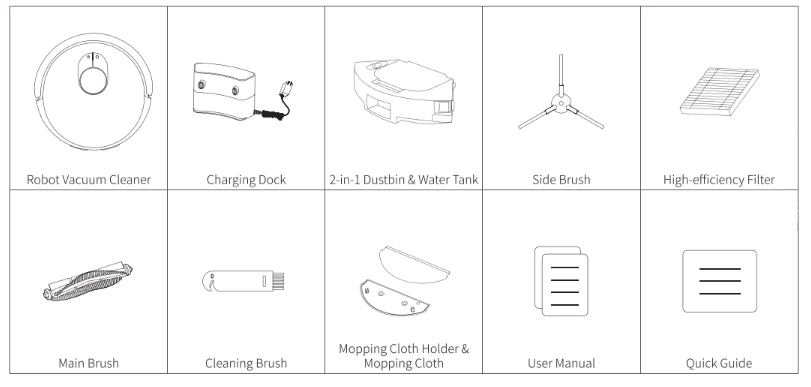
Packing List
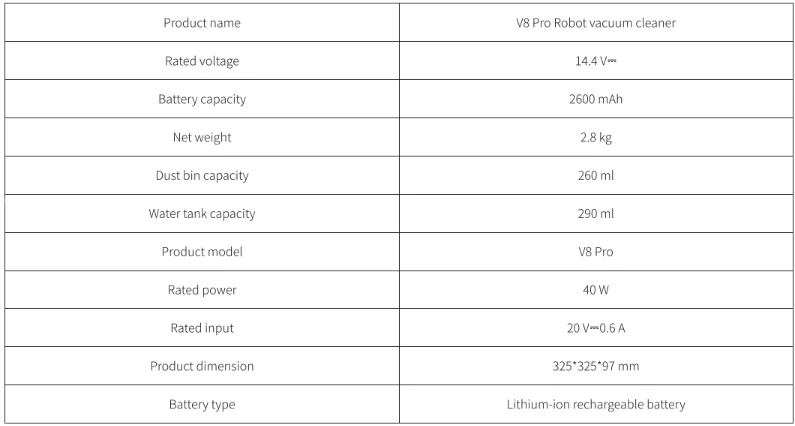
Basic Parameters
Product Introduction
Main unit
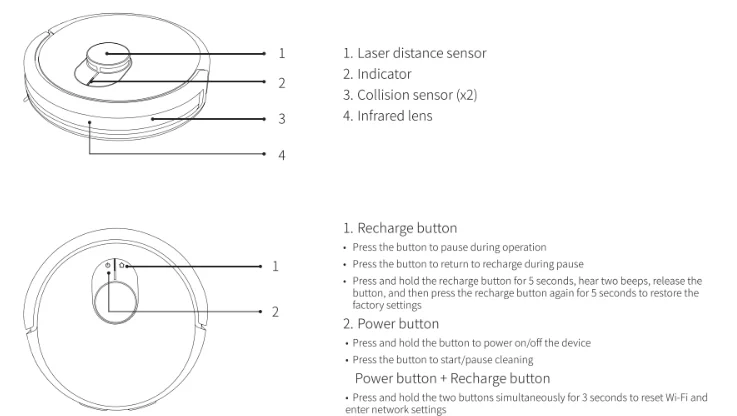
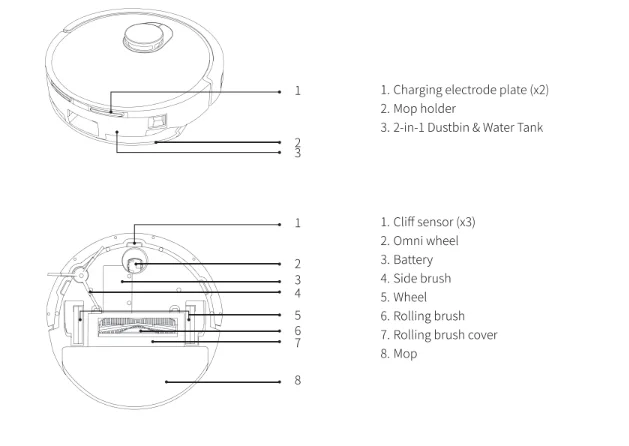
Preparation
Precautions
- Before starting the robot vacuum cleaner, please clean up wires and sundries scattered on the ground, and remove easy-to-fall, fragile, valuable, and potentially dangerous items. Avoid the robot being entangled, stuck, dragged, or knocked down; otherwise, personal injury or property damage may be caused.

- Do not use the robot to vacuum liquid; otherwise, it will damage the fan and affect the performance of the robot.
- When used in a suspended circumstance, it shall be protected by rails to avoid accidental falling or pushing other articles from falling.

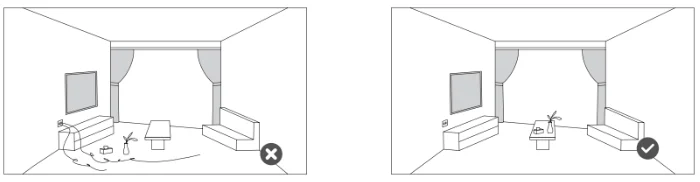
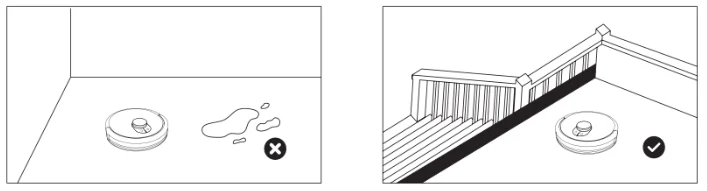
Use Instructions
Installation of Charging Station
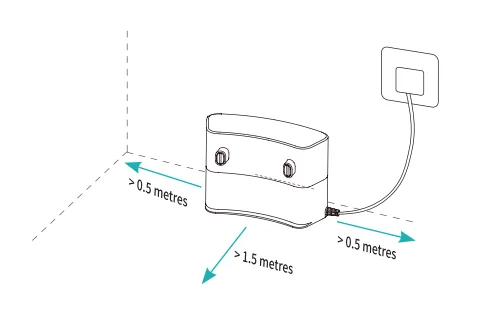
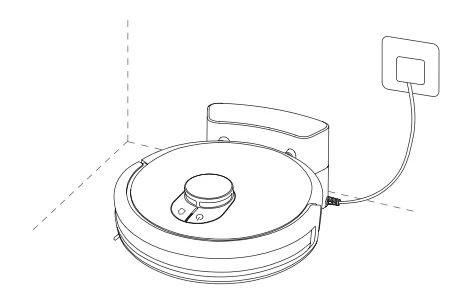
- Find a suitable location against the wall to place the charging station and connect it to the power supply.

- When using the device for the first time, press and hold the button C9 to power it on, then manually place the main unit against the charging station for charging.

Caution
- The charging station is not allowed to be placed on the carpet to avoid affecting the mainframe’s ability to charge.
- Before use, please remove the anti-collision protection strips on both sides of the main unit, the protective film on the front collision lens, and the infrared lens protective film.
- During charging, do not install the mopping module to prevent damp mops from leaking and damaging the floor.
- Please put away the power cord; otherwise, it may be dragged by the robot, causing the charging station to shift or power off.
- Do not use this device in a room with infants and young children, and keep it away from them.
- When the main unit is charging on the charging station, children or pets shall not be allowed to approach or collide with the main unit, to avoid danger.
- To facilitate the smooth return of the main unit to the charging station after cleaning, it is recommended to start the appliance from the charging station, and that you do not move the charging station during the cleaning process.
- Do not place the charging station in a location with direct sunlight to avoid charging failure due to environmental factors.
Installation of the mopping module
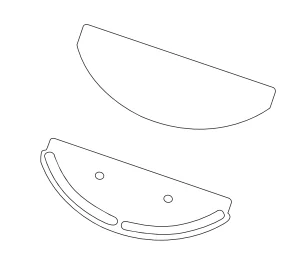
- Install the mop: Insert the wrung damp mop into the mop holder and press it on the Velcro.

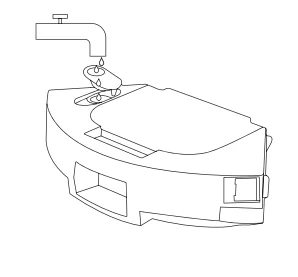
- Fill the 2-in-1 water tank with water: Open the rubber cap of the 2-in-1 water tank inlet, pour clean water into the tank, then fasten the rubber cap.

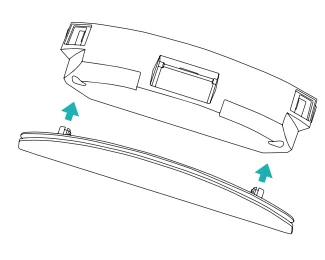
- Install the mopping module: Install the mopping mop holder into the bottom of the 2-in-1 water tank according to the direction shown in the diagram.

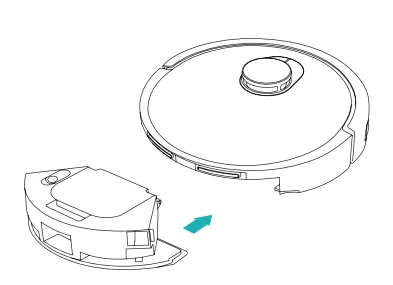
- Install the 2-in-1 water tank: Install the 2-in-1 water tank into the main unit according to the direction shown in the diagram until you hear a “click” sound.

Caution
- Do not use detergents, disinfectants, solid detergents, and other cleaning products to prevent corrosion and blocking of the two-in-one water tank.
- Do not pour hot water into the two-in-one water tank to avoid deformation of the water tank; do not flush or soak the two-in-one water tank.
- Due to production testing reasons, there may be a small amount of water residue in the two-in-one water tank, which is a normal phenomenon.
- When mopping the floor, set up virtual walls or a no-go area in carpeted areas; do not use the mopping function on the carpet.
- When the device is charging or not in use, remove the mopping module, pour out the excess water in the water tank, and clean the mop to avoid mildew or odours.
- It is recommended to clean the mop after each use to ensure the water output speed and cleaning effect. If necessary, the mop can be replaced with a new one.
- When the main unit is charging on a wooden floor, timely remove the mopping module to prevent the mop from leaking and damaging the floor.
Turning on/off and Cleaning modes
1. Power on/off
Press and hold the power button for 3 seconds. The power button indicator turns on, and the main unit enters standby mode. When the main unit is stationary, press and hold the power button to turn it off, and the indicator will turn off. When the main unit is in operation, pressing any button will pause the main unit. After a pause, press the power button again to continue cleaning.
2. Return to recharge
In standby mode, press the recharge button, and the main unit will return to the charging station to recharge. When the main unit has finished cleaning, it will automatically return to the charging station to recharge, and the indicator will flash white. If the battery is low during cleaning, it will automatically return to the charging station to recharge.
3. Quick map building
When the main unit is powered on for the first time, there is no map in the app. Place the main unit into the charging station, select quick map building in the app, and the main unit will build a map with one full house cleaning. After the main unit automatically returns to the charging station, the map will be completed and saved automatically.
4. Memory map
After the main unit completes a quick map building or cleaning and returns to the charging station to recharge, the app will automatically save and update the map. After the map is successfully built, you can divide or merge areas or customise room names in the app.
5. Full house cleaning
Start full house cleaning through the app or by pressing the power button. The main unit will first carry out full house cleaning along a set path, then carry out edge cleaning, and automatically return to the charging station to recharge after the cleaning is finished.
6. Area cleaning
After setting the area cleaning in the app, the main unit will clean according to the planned area and automatically return to the charging station to recharge after the cleaning is finished.
7. Fixed-point cleaning
Select fixed-point cleaning in the app, then set the target point on the map. The main unit will automatically plan the route to the target point and clean in a 2 × 2 m square area with the target point as the centre. The main unit will automatically return to the charging station to recharge after the cleaning is finished.
8. Scheduled cleaning
Use the app to set the time of scheduled cleaning, and the main unit will automatically start cleaning at the specified time and automatically return to the charging station after the cleaning is finished. If the Do-Not-Disturb Mode is enabled, the scheduled cleaning will not be executed during the Do-Not-Disturb period.
9. Add water or clean the mop during operation
During the cleaning process, if you need to add water or clean the mop, pause the device by pressing the power button, remove the two-in-one water tank and mopping module, add water or clean the mop, and then install the two-in-one water tank and mopping module. Finally, press the power button to continue working.
10. Sleep mode
If the main unit is not charging and there is no operation for more than 5 minutes, it will automatically enter sleep mode. If it stays in sleep mode for more than 6 hours, it will automatically turn off. To wake up the main unit, press any button or use the app.
11. Resume cleaning
During the cleaning process, if the battery is low, the main unit will automatically return to the charging station to recharge. After recharging, the main unit will automatically return to where it left off and continue the cleaning process. If you manually stop cleaning, then move or operate the main unit during the charging process, the resume cleaning will be cancelled.
12. Virtual wall/No-Go
In the app, you can set up virtual walls or No-Go areas to prevent the main unit from entering areas that do not need to be cleaned. Before using the virtual wall/No-Go area function, you need to save the map in the app. Moving the main unit or major changes in the environment can cause the original map to become invalid and result in the loss of virtual walls/No-Go areas.
13. Do-Not-Disturb Mode
During the Do-Not-Disturb period, the main unit will not execute resume cleaning and scheduled cleaning or actively broadcast voice prompts. The Do-Not-Disturb Mode is enabled by default from 23:00 to 9:00. You can enable/disable the Do-Not-Disturb Mode or set the time period of the mode. During the Do-Not-Disturb time period, the indicator will go off after the main unit has been charged for one minute.
14. Reset Wi-Fi
When the mobile phone cannot connect to the main unit after resetting the password or for other reasons, reset the Wi-Fi connection by following the actions in the app download of this manual.
15. Factory reset
Press and hold the recharge button for 5 seconds until you hear a prompt, then press and hold for another 5 seconds for a factory reset. The main unit needs to reconnect to the app, and all related settings in the app will be cleared.
16. Firmware upgrade
The device’s firmware can be upgraded through the app. During the upgrade process, the main unit must be in the charging station or have battery power of more than 30%. It is not allowed to start cleaning during the upgrade process.
Common Parameters
1. Failed to power on the machine
The battery power is insufficient. Please place the machine on the docking station and align it with the charging electrode. The machine will be automatically powered on. The ambient temperature is below 0 °C or above 35 °C. Please use the machine when the ambient temperature is 0 °C to 35 °C.
2. Failed to charge the machine
Move the machine away from the docking station and check whether the indicator of the docking station is on. Make sure that both ends of the power adapter are properly connected. The docking station is not in proper contact with the machine. Please clean the docking station shrapnel and the charging contact on the machine.
3. Failed to return to the docking station
The machine is too far away from the docking station. Try to place the machine near the docking station.
4. Abnormal behavior
Power off the machine and then turn it on again.
5. There is abnormal noise during cleaning
The roller brush, side brushes, or wheels may be entangled with foreign objects. Please clean them after stopping the machine.
6. The Wi-Fi network cannot be connected
The Wi-Fi signal is not good. Ensure that the machine is located in a place with good Wi-Fi signals. The Wi-Fi connection is abnormal. Reset the Wi-Fi settings, download the latest version of the app, and try to connect to the Wi-Fi network again. The password is incorrect. This machine supports only the 2.4 GHz band.
7. Scheduled cleaning cannot be carried out
The power is insufficient. Scheduled cleaning will start only when the remaining power is 15% or above.
8. Is any power consumed if the machine always stays at the docking station?
The power consumption is extremely low when the machine is always at the docking station. This helps to keep the battery in its best performance.
9. Is it necessary to charge the battery for 16 hours when the machine is used for the first three times?
The lithium battery does not have a memory effect. It can be used instantly after it is fully charged. There is no need to wait.
Troubleshooting
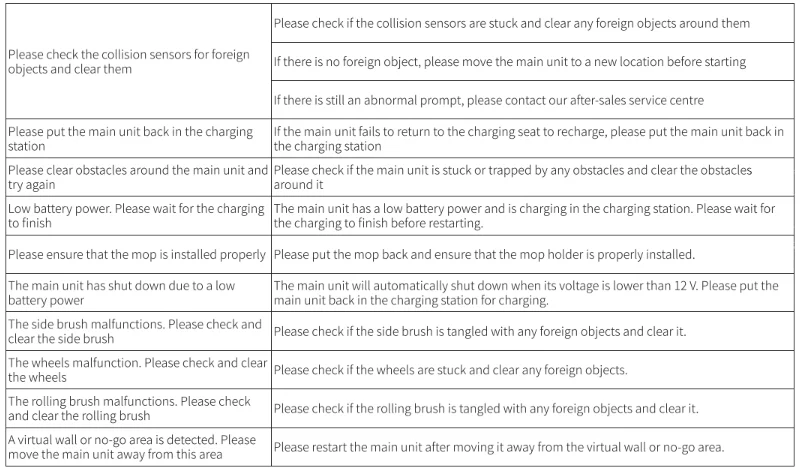
Visit www.honiture.com for more details.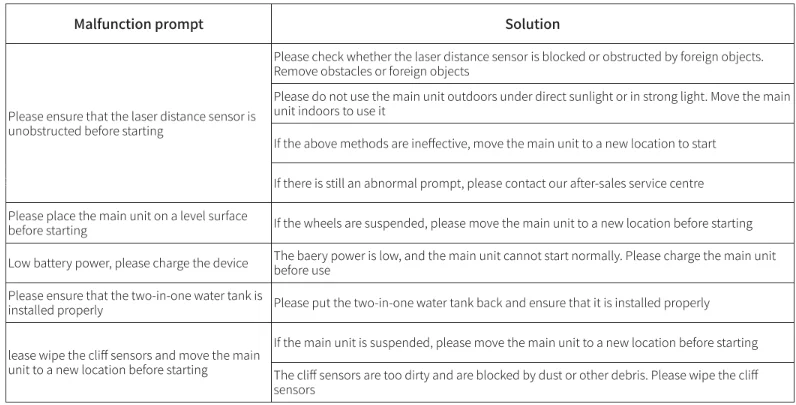
Warranty Instructions
The Warranty Period
- Within 30 days from the day after delivery of the product, if the product has a performance failure, you can enjoy free replacement or maintenance service after testing.
- Within 31 to 90 days from the day after delivery of the product, if the product has a performance failure, you can enjoy free replacement or maintenance service after testing.
- Within 2 years from the day after delivery of the product, if the product has a performance failure, you can enjoy free maintenance service.
Non-warranty Regulation
- Unauthorized maintenance, misuse, collision, negligence, abuse, case, fall, liquid injection, accident, alteration, incorrect use of non-product accessories, or tear or altered labels and anti-counterfeiting marks.
- Exceeded the validity period of three packages.
- Damage caused by excessive force.
- Not conforming to performance failure.
- The performance failure of the product is caused by personal reasons.
The Content of the Warranty

For More Manuals By Honiture, Visit ManualsLibraryy.
Honiture V8 Pro Robot Vacuum-FAQs
What is the Honiture V8 Pro robot vacuum?
The Honiture V8 Pro is a smart 3-in-1 cleaning robot that automatically vacuums, sweeps, and mops floors. It uses advanced LiDAR navigation and mapping technology to scan your home and clean efficiently without missing areas. With strong suction and smart app control, it can handle dust, debris, and pet hair on both hard floors and carpets. The robot is designed for hands-free cleaning and can automatically return to its charging station when the battery runs low.
How powerful is the suction on the Honiture V8 Pro robot vacuum?
The Honiture V8 Pro delivers up to 5000Pa suction power, which is considered strong for a robot vacuum. This level of suction helps it pick up dust, crumbs, pet hair, and debris from both carpets and hard floors. The vacuum also includes multiple suction levels, allowing users to adjust performance depending on the type of flooring or cleaning task. Strong suction combined with smart navigation helps ensure thorough and efficient cleaning throughout the home.
Does the Honiture V8 Pro vacuum and mop at the same time?
Yes, the Honiture V8 Pro supports simultaneous vacuuming, sweeping, and mopping. It comes with a combined dustbin and water tank that allows it to vacuum dirt while lightly mopping hard floors during the same cleaning session. This feature helps reduce cleaning time and makes routine floor maintenance easier. While the mopping function is designed for light cleaning and dust removal, it is especially useful for maintaining hard surfaces between deeper manual cleaning sessions.
What navigation technology does the Honiture V8 Pro use?
The Honiture V8 Pro uses LiDAR navigation and SLAM mapping to scan and map your home accurately. This system allows the robot to create a detailed layout of rooms and plan efficient cleaning routes instead of moving randomly. The advanced navigation also helps the robot detect obstacles and avoid furniture while cleaning. This results in more complete coverage and fewer missed spots compared to basic robot vacuums.
Can the Honiture V8 Pro map multiple floors in a home?
Yes, the Honiture V8 Pro supports multi-floor mapping and can store maps for up to five different levels of a house. This feature is useful for homes with multiple floors or complex layouts. Once a floor is mapped, the robot can recognize the layout and clean more efficiently without creating a new map each time. Users can also customize cleaning zones and adjust settings for each floor through the mobile app.
How long does the Honiture V8 Pro battery last on a single charge?
The Honiture V8 Pro robot vacuum can run for up to about 180 minutes on a full charge, depending on the cleaning mode and floor conditions. This runtime allows it to clean large areas before needing to recharge. When the battery becomes low during cleaning, the robot automatically returns to its charging station. After recharging, it can resume cleaning from where it left off, ensuring the entire space gets cleaned.
Does the Honiture V8 Pro automatically adjust suction on carpets?
Yes, the Honiture V8 Pro includes an automatic carpet boost feature. When the robot detects carpeted surfaces, it automatically increases suction power to ensure deeper cleaning of embedded dirt and pet hair. This feature allows the vacuum to adapt to different floor types without requiring manual adjustments. As a result, it can effectively clean both carpets and hard floors during the same cleaning session.
Can you control the Honiture V8 Pro using a smartphone app?
Yes, the Honiture V8 Pro can be controlled through a mobile app that allows users to manage cleaning schedules, monitor maps, and customize cleaning zones. Through the app, you can start or stop cleaning, set no-go areas, and adjust suction or mopping settings. Some models also support voice control through compatible smart assistants, making it easier to operate the robot vacuum with simple voice commands.
What cleaning modes are available on the Honiture V8 Pro?
The Honiture V8 Pro offers several cleaning modes designed for different situations. These include automatic cleaning for general use, spot cleaning for small dirty areas, edge cleaning for corners and walls, and scheduled cleaning that runs automatically at set times. These modes allow users to customize how the robot cleans different parts of the home. Combined with mapping technology, the vacuum can target specific areas more effectively.
Is the Honiture V8 Pro suitable for homes with pets?
The Honiture V8 Pro is suitable for pet owners because its strong suction and HEPA filtration system help capture pet hair, dust, and allergens. The powerful suction can lift hair from carpets and hard floors, while the filter helps trap fine particles that might otherwise circulate in the air. Regular automated cleaning also helps keep pet hair under control, making it easier to maintain a cleaner living environment.