
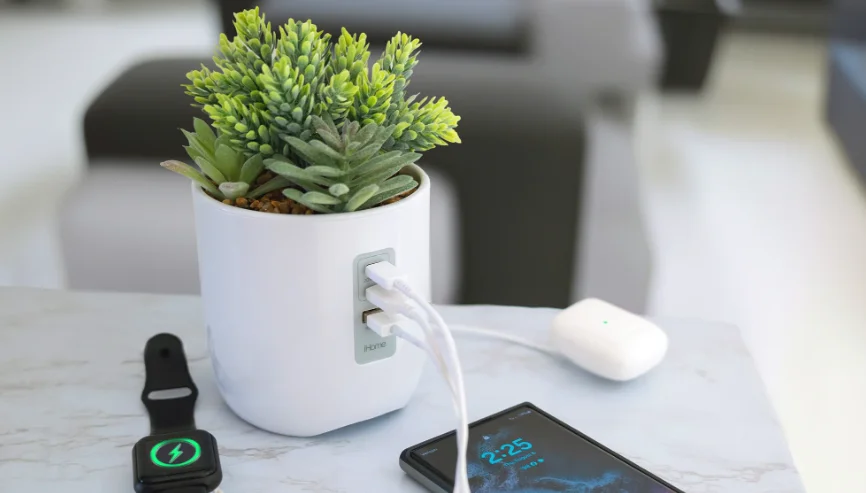

iHome iPP45 Powerplant Charging Station
CONNECTING TO AC POWER
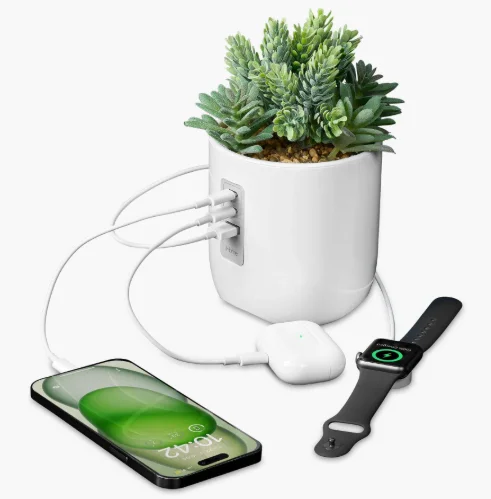
This unit operates on AC power using the included 100V-240V universal AC adaptor. Place the unit on a stable surface. Plug the power adaptor into the DC jack on the bottom of the unit and the other end into a working wall socket (If the AC socket is controlled by a switch, please be sure the switch is on). The iPP45 is now ready to charge your devices.
USING THE USB CHARGING PORT
The USB-C and USB-A charge ports are located on the front of the unit. Connect one end of a compatible USB cable (not included) into the USB port on the unit and the other end into the device you wish to charge. Monitor the charging status of your device. The iPP45 works with Apple devices such as iPhones and AirPods and most Android devices.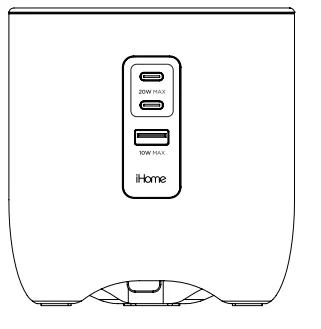
TIPS FOR CHARGING
If a device does not charge, please check to make sure the iPP45 is connected to an active wall socket, and please verify the charging cable is compatible and not defective. If you still encounter trouble charging, you may need to use the charger that came with the device.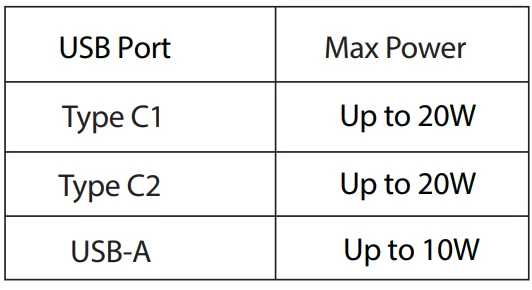
FCC Information
This equipment complies with FCC RF radiation exposure limits set forth for an uncontrolled environment. This device complies with Part 15 of the FCC Rules; operation is subject to the following two conditions: (1) This device may not cause harmful interference, and (2) this device must accept any interference received, including interference that may cause undesired operation.
Warning: Changes or modifications to this unit not expressly approved by the party responsible for compliance could void the user’s authority to operate the equipment.
NOTE: This equipment has been tested and found to comply with the limits for a Class B digital device, pursuant to Part 15 of the FCC Rules. These limits are designed to provide reasonable protection against harmful interference in a residential installation. This equipment generates, uses, and can radiate radio frequency energy and, if not installed and used in accordance with the instructions, may cause harmful interference to radio communications.
However, there is no guarantee that interference will not occur in a particular installation. If this equipment does cause harmful interference to radio or television reception, which can be determined by turning the equipment off and on, the user is encouraged to try to correct the interference by one or more of the following measures:
- Reorient or relocate the receiving antenna.
- Increase the separation between the equipment and receiver.
- Connect the equipment into an outlet on a circuit different from that to which the receiver is connected.
- Consult the dealer or an experienced radio/TV technician for help.
ISED Statement
This equipment complies with IC RSS-102 radiation exposure limits set forth for an uncontrolled environment. This device contains licence-exempt transmitter(s)/receiver(s) that comply with Innovation, Science and Economic Development Canada’s licence-exempt RSS(s). Operation is subject to the following two conditions:
- This device may not cause interference.
- This device must accept any interference, including interference that may cause undesired operation of the device. The device complies with ISED RF exposure requirements; users can obtain Canadian information on RF exposure and compliance.
Any changes or modifications not expressly approved by the party responsible for compliance could void the user’s authority to operate the equipment.
CAN ICES-3 (B) / NMB-3(B)
WARNING/DISPOSAL OF UNIT
To dispose of the unit, follow the instructions below:
- Never dispose of electronics with ordinary solid wastes, since they may contain toxic substances.
- Always dispose of electronics in accordance with the prevailing community regulations.
- Many electronics retailers now recycle electronic components at no charge. To find a drop-off location near you, visit www.call2recycle.com.
IMPORTANT SAFETY INSTRUCTIONS
Please heed all warnings, read and follow all instructions, and keep these instructions handy for future reference.
- Do not use this product near water. To clean, first unplug the unit from the adapter power source and disconnect any charging devices. Use only a damp cloth (not wet) to clean the surface. Stronger cleaning agents, such as benzene, thinner, or similar materials, can damage the surface of the unit.
- Do not block any ventilation openings.
- Heat – This product should be situated away from heat sources such as radiators, heat registers, stoves, or other appliances (including amplifiers) that produce heat.
- Only use attachments/accessories specified by the manufacturer.
- Unplug this product during lightning storms or when unused for long periods of time.
- Damage Requiring Service – This product should be serviced by qualified service personnel when:
- The plug has been damaged.
- Objects have fallen into or liquid has been spilled into the enclosure.
- The unit has been exposed to rain.
- The unit has been dropped or the enclosure damaged.
- The unit exhibits a marked change in performance or does not operate normally.
- No naked flame sources, such as lighted candles, should be placed on this product.
- This product is suitable for use in tropical and/or moderate climates.
- WARNING: To reduce the risk of fire or electric shock, do not expose this product to rain or moisture.
- Always use a UL/ETL certified AC adapter (included).
For More Manuals By iHome, Visit ManualsLibraryy.
iHome iPP45 Powerplant Charging Station-FAQs
What is the iHome iPP45 PowerPlant Charging Station?
The iHome iPP45 PowerPlant Charging Station is a decorative charging hub designed to resemble a small potted plant. It combines multiple USB charging ports with a Bluetooth speaker, offering a stylish way to charge devices and play music from a desk, bedside table, or kitchen counter.
How many devices can the iHome iPP45 charge at once?
The iPP45 can charge up to three devices simultaneously using its built-in USB ports. This allows you to power smartphones, tablets, wireless earbuds, and other USB-powered accessories from one compact station, reducing clutter and keeping your charging setup organized.
Does the iHome iPP45 include a Bluetooth speaker?
Yes, the iPP45 features a wireless Bluetooth speaker that lets you stream music, podcasts, and calls from compatible devices. It adds entertainment functionality while serving as a practical charging station, making it useful for both workspaces and relaxation areas.
Is the iHome iPP45 compatible with iPhone and Android devices?
Yes, the iPP45 works with virtually any USB-chargeable device, including iPhones, Android phones, tablets, smartwatches, and wireless earbuds. You simply connect your own charging cables to the available USB ports to start charging.
Does the iHome iPP45 have a built-in battery?
Yes, the Bluetooth speaker includes a rechargeable internal battery for portable playback. However, the charging ports require the unit to remain plugged into a wall outlet, as device charging is not supported when operating solely on battery power.
What comes in the box with the iHome iPP45?
The package typically includes the iPP45 PowerPlant Charging Station, a power adapter, and a user manual. Charging cables are generally not included, so you will need to use the cables that came with your devices.
Is the iHome iPP45 a good gift idea?
Yes, the unique faux plant design makes the iPP45 an excellent gift for students, office workers, and tech enthusiasts. It blends décor, charging functionality, and wireless audio into one attractive and practical product.
How portable is the iHome iPP45?
The iPP45 is lightweight and compact enough to move easily between rooms. While it is not intended primarily for travel, its rechargeable speaker and small footprint make it convenient to use in different areas of your home or office.
Does the iHome iPP45 help reduce cable clutter?
Yes, the charging station consolidates multiple USB ports into one device, allowing you to charge several gadgets in one location. This helps keep your desk or nightstand neater and reduces the need for multiple wall adapters.
Is the iHome iPP45 PowerPlant Charging Station worth buying?
The iPP45 is a worthwhile choice if you want a charging station that doubles as decorative décor and a Bluetooth speaker. Its combination of style, convenience, and multi-device charging makes it both functional and visually appealing.