
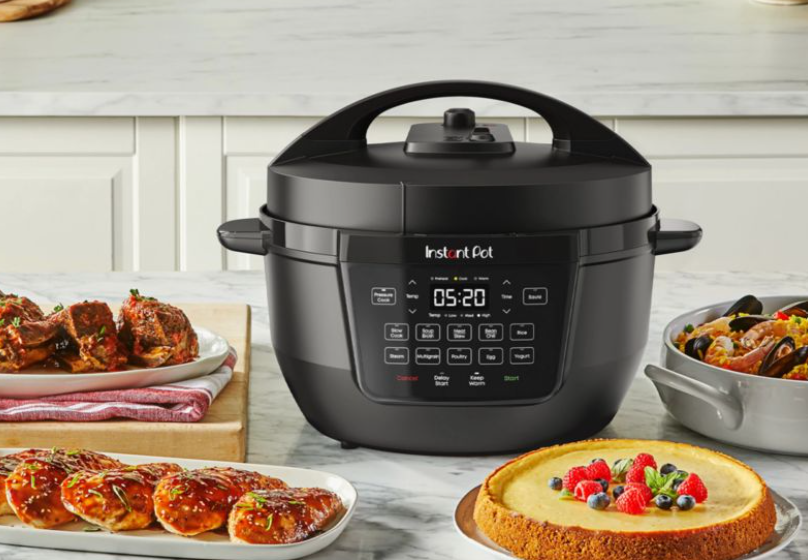

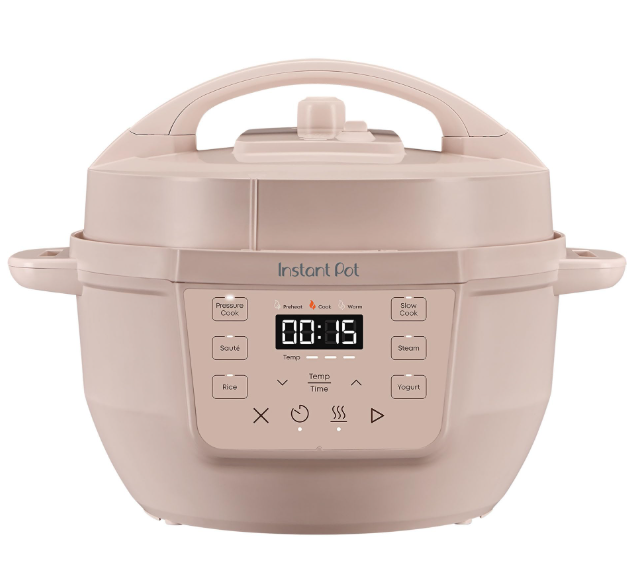
Instant Pot 4QT RIO Mini 7-in-1 Multi-Cooker
 n
n
IMPORTANT SAFEGUARDS
WARNING:
Failure to follow safety instructions may result in personal injury and/or property damage and may void your warranty.
READ ALL INSTRUCTIONS
Before using your new appliance, please read all instructions, including the Safety Information below. Keep this manual for reference. Placement
- DO place the appliance on a countertop only. Always operate the appliance on a stable, non-combustible level surface.
- DO make sure all parts are dry and free of food debris before placing the inner cooking pot on the cooker base.
- DO NOT place the appliance or power cord on or close to a gas or electric stovetop or oven. NEVER use the appliance on your stove.
- DO NOT use the appliance near water, an external heat source or flame.
- DO NOT use outdoors. Keep out of direct sunlight.
- DO NOT place on anything that may block the vents on the bottom of the appliance.
General Use
The removable inner cooking pot is extremely hot during use and can be extremely heavy when full of ingredients.
- DO use oven mitts when handling the inner cooking pot and removing accessories.
- DO place hot accessories on a heat-resistant surface or cooking plate.
- DO use care when lifting the cooking pot from the cooker base to avoid burn injury.
- DO use extreme caution when the cooking pot contains hot food, hot oil or other hot liquids.
- DO use only the Instant Pot lid that came with this cooker base. Using any other pressure cooker lids may cause personal injury and/ or property damage.
- DO NOT use the appliance without the removable inner cooking pot installed.
- DO NOT touch the appliance’s hot surfaces or any accessories during or immediately after cooking because they will be hot. Only use the appliance’s side handles for carrying or moving.
- DO NOT use this appliance for deep frying or pressure frying with oil.
- DO NOT move the appliance while it is in use and use extreme caution when disposing of hot grease.
- DO NOT allow children or persons with reduced physical, sensory or mental capabilities to operate this appliance. Close supervision is necessary when any appliance is used by or near children and persons with reduced physical, sensory or mental capabilities. Children should not play with this appliance.
- DO NOT use the appliance for anything other than household use. It is not intended for commercial use.
- DO NOT leave the appliance unattended while in use.
Pressure Cooking
This appliance cooks under pressure. Allow the appliance to depressurize naturally or release all excess pressure before opening. Failure to follow these instructions may result in burns, personal injury and/or property damage.
- DO make sure the appliance is properly closed before operating.
- DO check that the steam release valve is installed properly.
- DO use the pressure cooking lid when pressure cooking.
- DO turn the appliance off if steam escapes from the steam release valve and/or float valve in a steady stream for longer than 3 minutes. If steam escapes from the sides of the lid, turn the appliance off. Once the steam stops, pressure is released, and the cooker has cooled, carefully make sure the sealing ring is properly installed.
- DO ensure the sealing ring is in good condition and installed properly.
- DO check the steam release valve, steam release pipe, anti-block shield and float valve for clogging before use.
- DO NOT remove the pressure cooking lid with unprotected hands.
WHAT’S IN THE BOX
Lid (top)
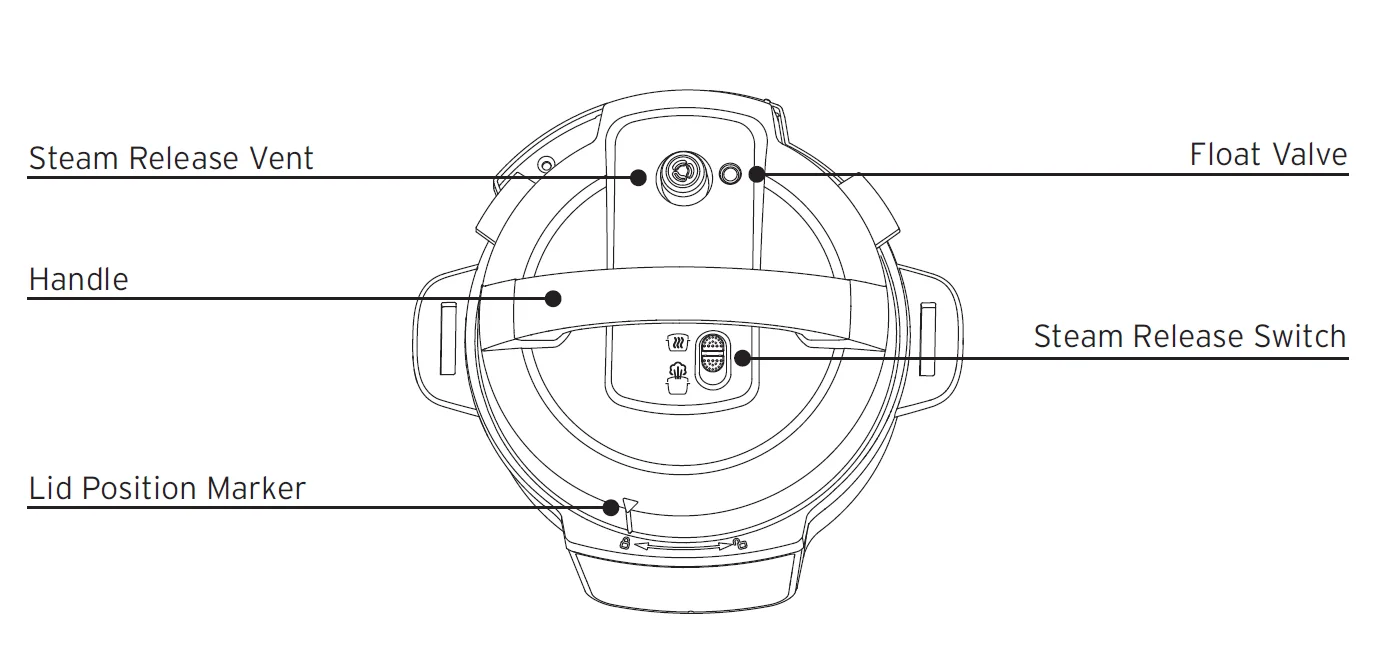
Lid (bottom)
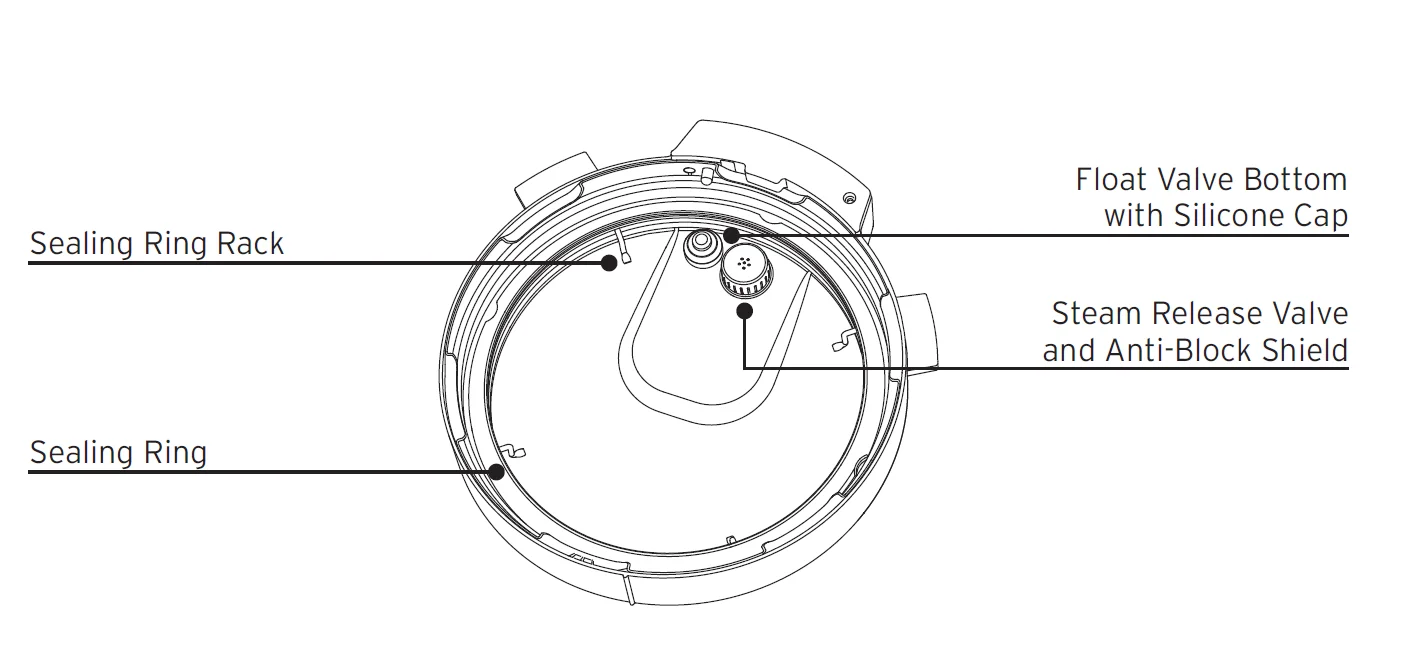
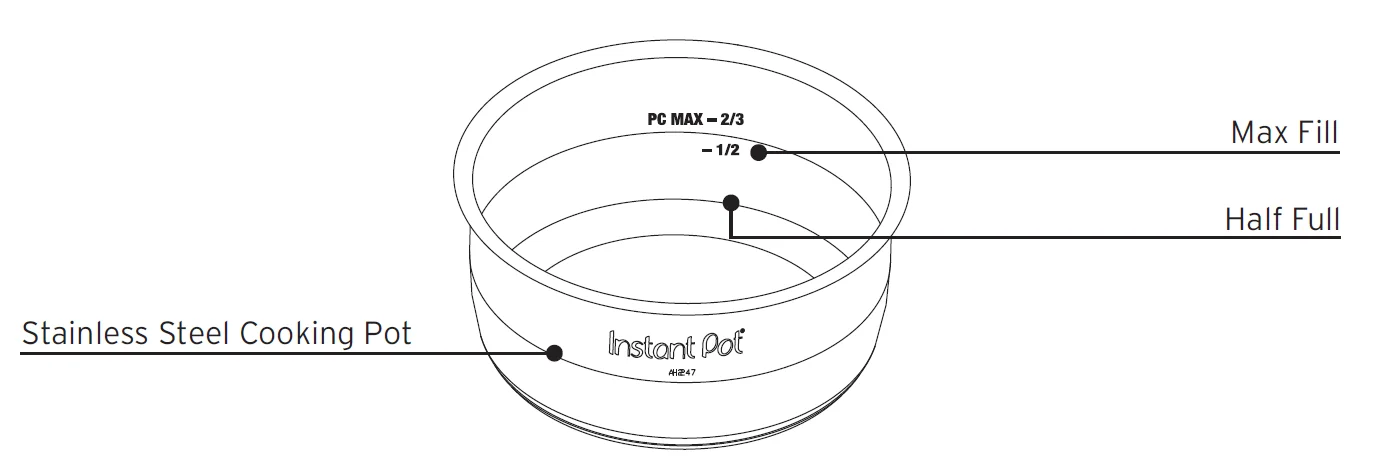
Cooking Pot
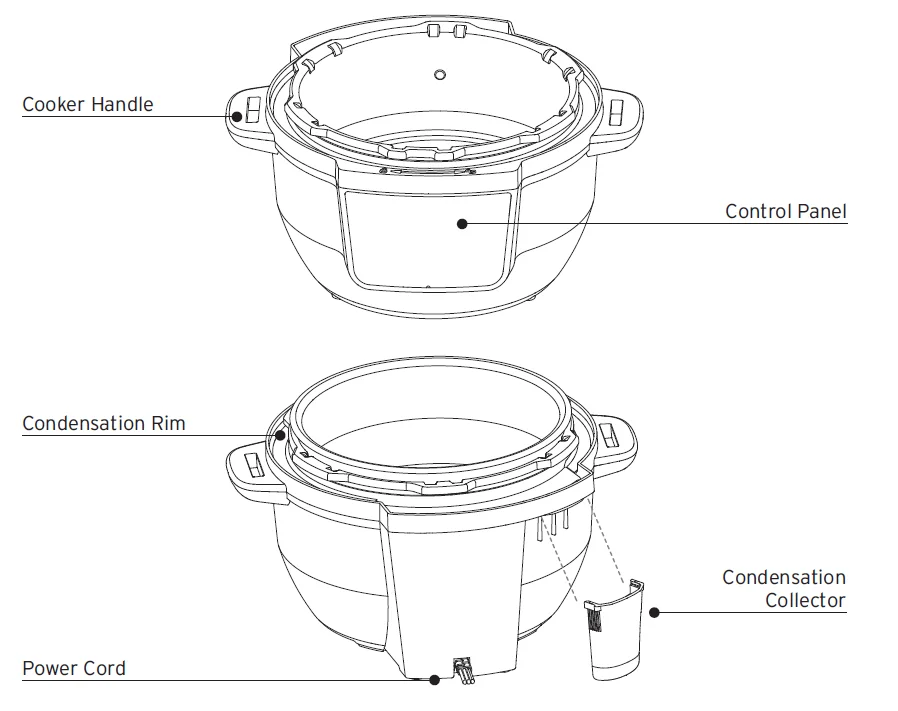
Cooker Base
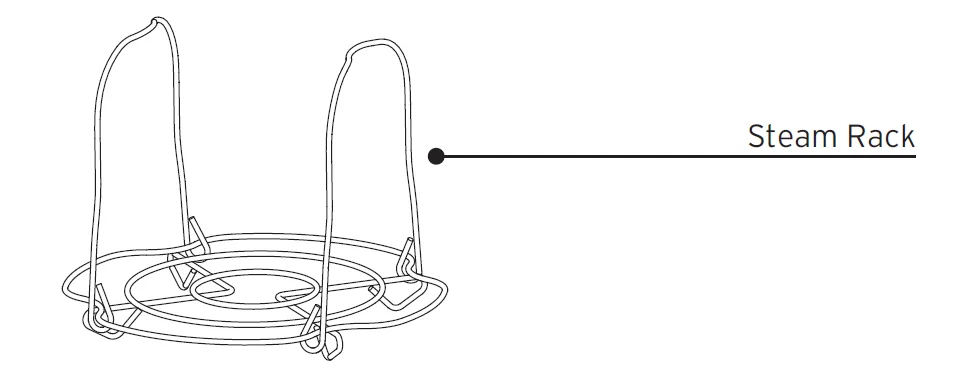
Accessories
Illustrations are for reference only and may differ from the actual product.
Remember to recycle!
We designed this packaging with sustainability in mind. Please recycle everything that can be recycled where you live.
USING YOUR INSTANT POT RIO MINI
Control panel
We’ve designed the control panel to be simple to use and easy to read.
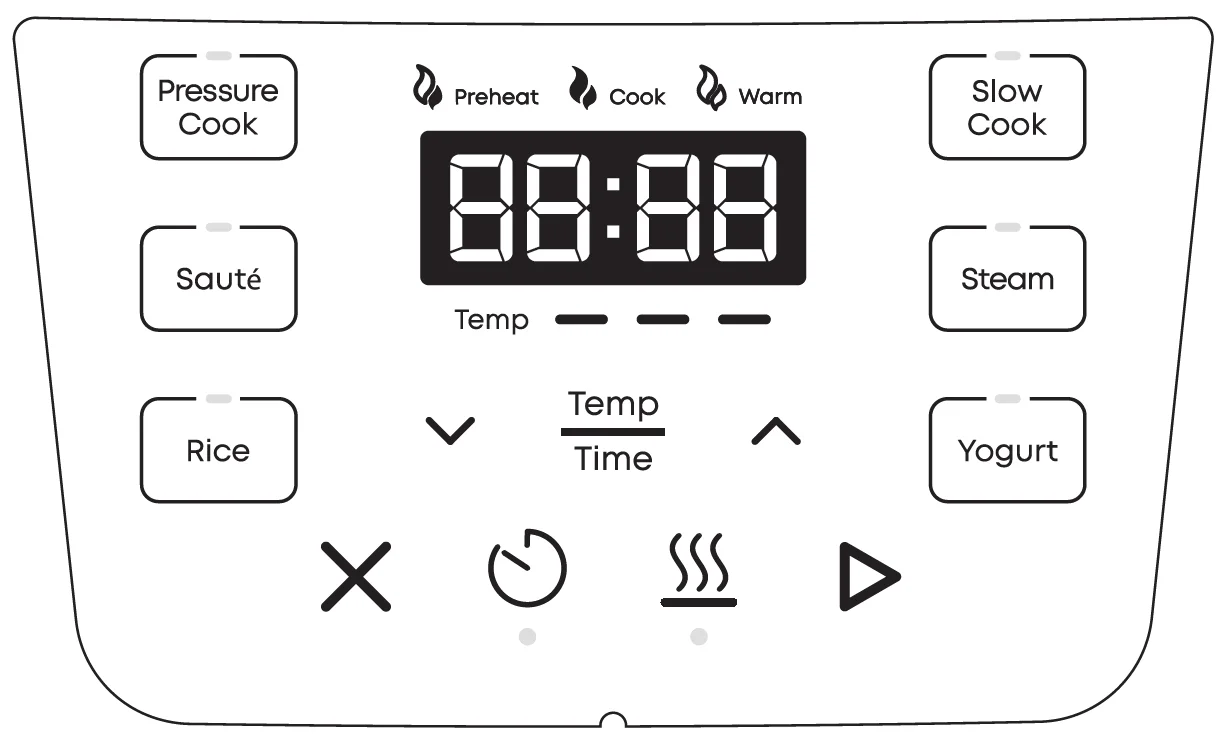
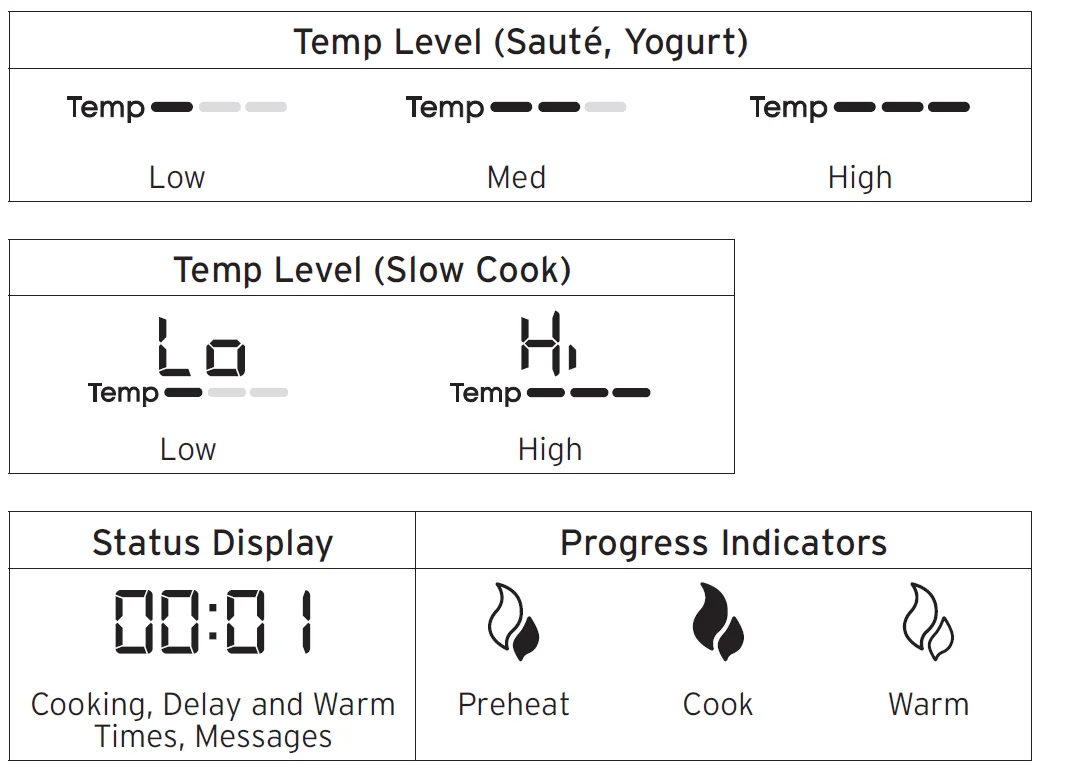
Control Panel buttons and indicators
Smart Programs
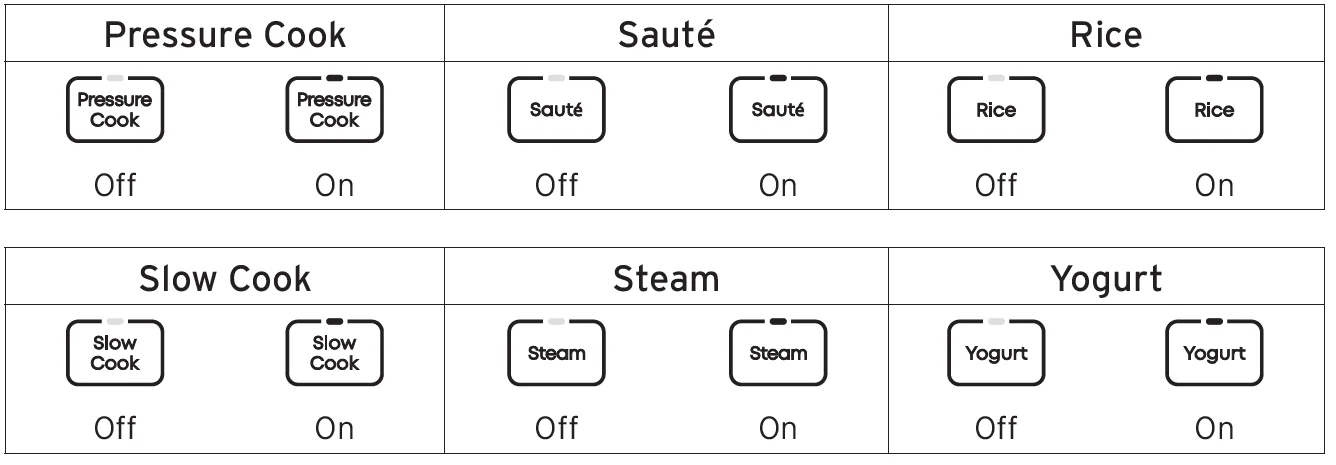
Controls
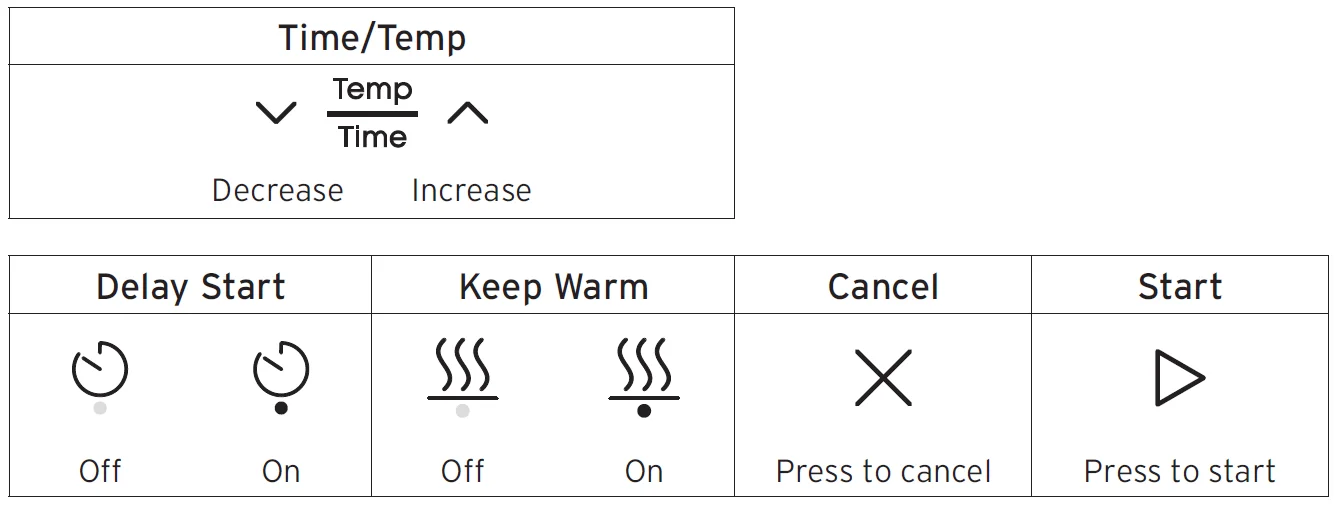
Indicators
INITIAL SET UP
Clean and assemble before use
- Wash the cooking pot with hot water and soap. Rinse and use a soft cloth to dry the outside. Or you can wash the cooking pot in the dishwasher.
- Wipe the heating element inside the multi-cooker base with a soft cloth to ensure there are no stray packaging particles.
- Install the condensation collector. See the instructions on page 37.
Connect to power
When you’re ready to use your Instant Pot, plug the power cord into an electrical outlet. When you’re done cooking and whenever you’re cleaning the multi-cooker, unplug the cord from the outlet.
Test run
Performing a test run is a great way to familiarize yourself with how the multi-cooker works before you actually cook a meal.
To perform a test run:
- Add 3 cups of water to the cooking pot.
- Place the cooking pot into the multi-cooker base.
- Place the lid on top of the multi-cooker base and turn to lock. See ‘How to close the lid’ below.
- Press Pressure Cook.
- Press the
 arrows to select 5 minutes time.
 - Press
 Keep Warm to turn off Keep Warm.
 - Press
 Start. The Progress Indicator shows
 Preheat.
 - When the pressure is ready, the Progress Indicator shows
 Cook.
Cook. - When the timer reaches 00:00, cooking stops, and the Status Display shows End.
- Set the steam release switch on the lid to Vent
 . When all the steam is released, the Float Valve drops into the lid. See ‘How the Float Valve works’ on page 17.
 - Open the lid.
See ‘How to open the lid’ below.
Use care: the cooking pot will be hot. Let the pot cool before carefully lifting it out. - Discard any remaining water, and then wash and dry the cooking pot.
Now you’re ready to cook a meal in your Instant Pot!
 arrows to select 5 minutes time.
 Keep Warm to turn off Keep Warm.
 Start. The Progress Indicator shows
 Preheat.
 Cook.
Cook. . When all the steam is released, the Float Valve drops into the lid. See ‘How the Float Valve works’ on page 17.
CHANGING SETTINGS
Turn the sound On/Off
You can set the alert sounds to either ON or OFF.
- When the Status Display shows OFF, press and hold
 Delay Start andKeep Warm for 5 seconds.
 - The Status Display shows S On or SOFF. The new sound setting is active.
 Delay Start and
Audible safety alerts cannot be turned off.
Cancel cooking
When in Preheating, Cooking or Keep Warm modes, press Cancel. The Status Display shows OFF.
Memorized settings
Each time you use a smart program, the multi-cooker memorizes the settings you select and they become the default the next time you use that program. Each time you use a smart program, you can use the default settings or change them. This applies to:
- Temperature settings
- Cooking time settings
You can erase the memorized settings and reset them to the original factory settings.
Reset individual smart programs
- When the Status Display shows OFF, press and hold one smart program button for over 3 seconds until the smart program flashes twice and the multi-cooker returns to Ready mode. The individual smart program settings are restored to the factory defaults.
Reset all smart programs
- When the Status Display shows OFF, press and hold
 Cancel for over 3 seconds until all smart program buttons flash 3 times. All smart program settings are restored to the factory defaults.
USING THE LID
You’ll use the lid for most smart programs, and always for pressure cooking. Always use the lid that came with this Instant Pot RIO Mini multi-cooker base.
How to close the lid
- Line up the
 on the lid with the
 on the multi-cooker base.
- Turn the lid until theon the lid aligns with the
 on the multi-cooker base.
 on the lid with the
 on the multi-cooker base.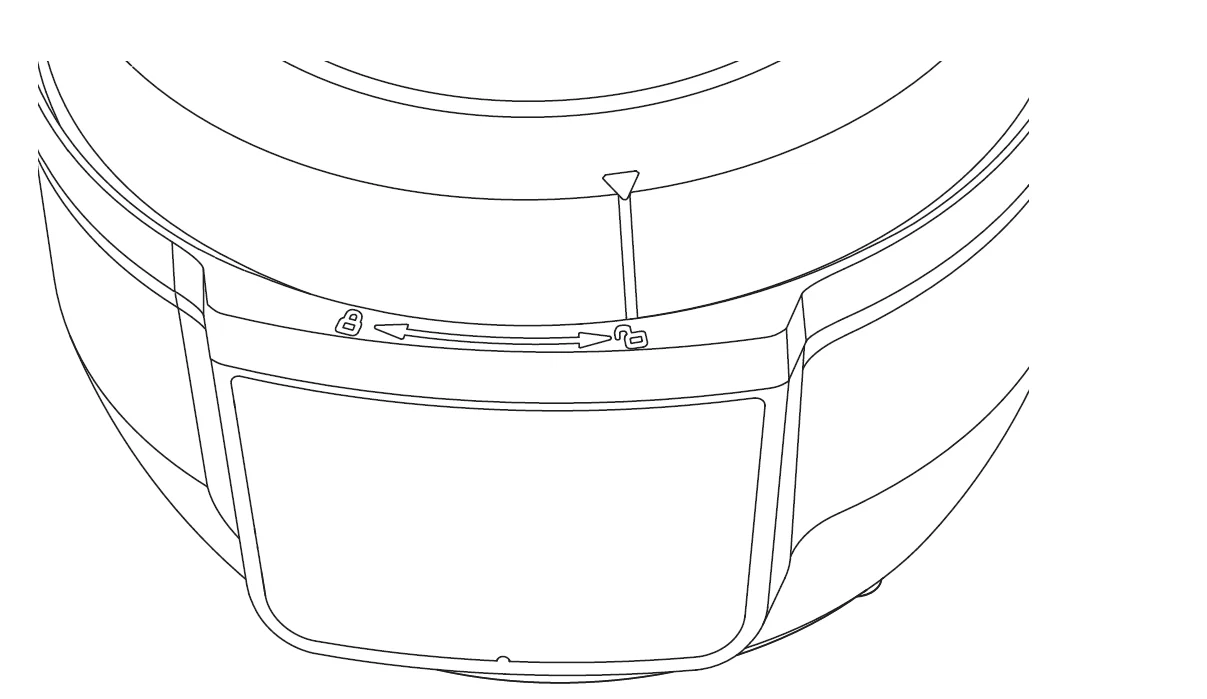
 on the multi-cooker base.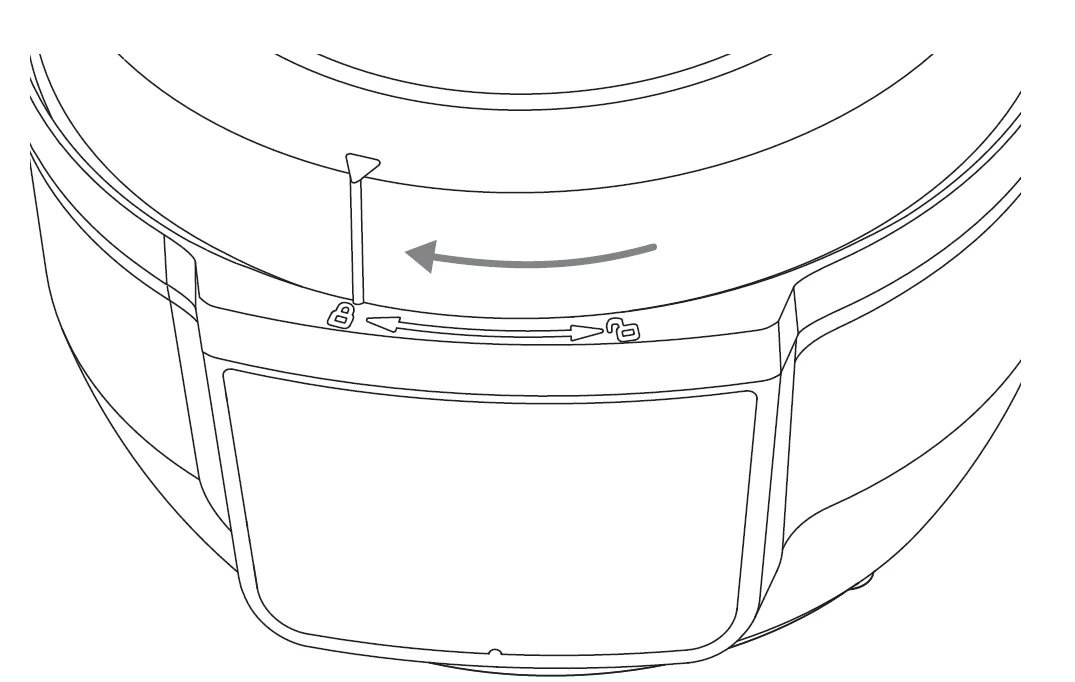
For pressure cooking, the lid will automatically lock when the multi-cooker starts building pressure.
How to open the lid
- If you’re using a pressure cooking smart program, make sure to vent the steam first until the Float Valve drops into the lid. See ‘How the Float Valve works’ below.
- Turn the lid counterclockwise until theon the lid lines up with theon the multi-cooker base.
- Carefully lift the lid up and off the multi-cooker base.
How to release steam
Instant Pot RIO Mini can release steam in 2 different ways. Use the one that best fits the type of food you’re cooking or the recipe calls for.
Natural steam release
Releases steam gradually over time (up to 40 minutes or more) after cooking stops. Use for: Foods that can simmer, like stews, chili, pasta, and beans.
- When a pressure cooking program ends, Natural steam release begins automatically.
- When all the steam is released, the Float Valve drops into the lid. See ‘How the Float Valve works’ below.
Quick steam release
Quickly releases steam after cooking stops.
Use for: Foods that tend to overcook, like vegetables and seafood.
- When a pressure cooking program ends, set the steam release switch on the lid to Vent.
- When all steam is released, the Float Valve drops into the lid.
See ‘How the Float Valve works’ below.
How the Float Valve works
The float valve shows whether there is pressure in the multi-cooker (pressurized) or not (depressurized). It appears in two positions:
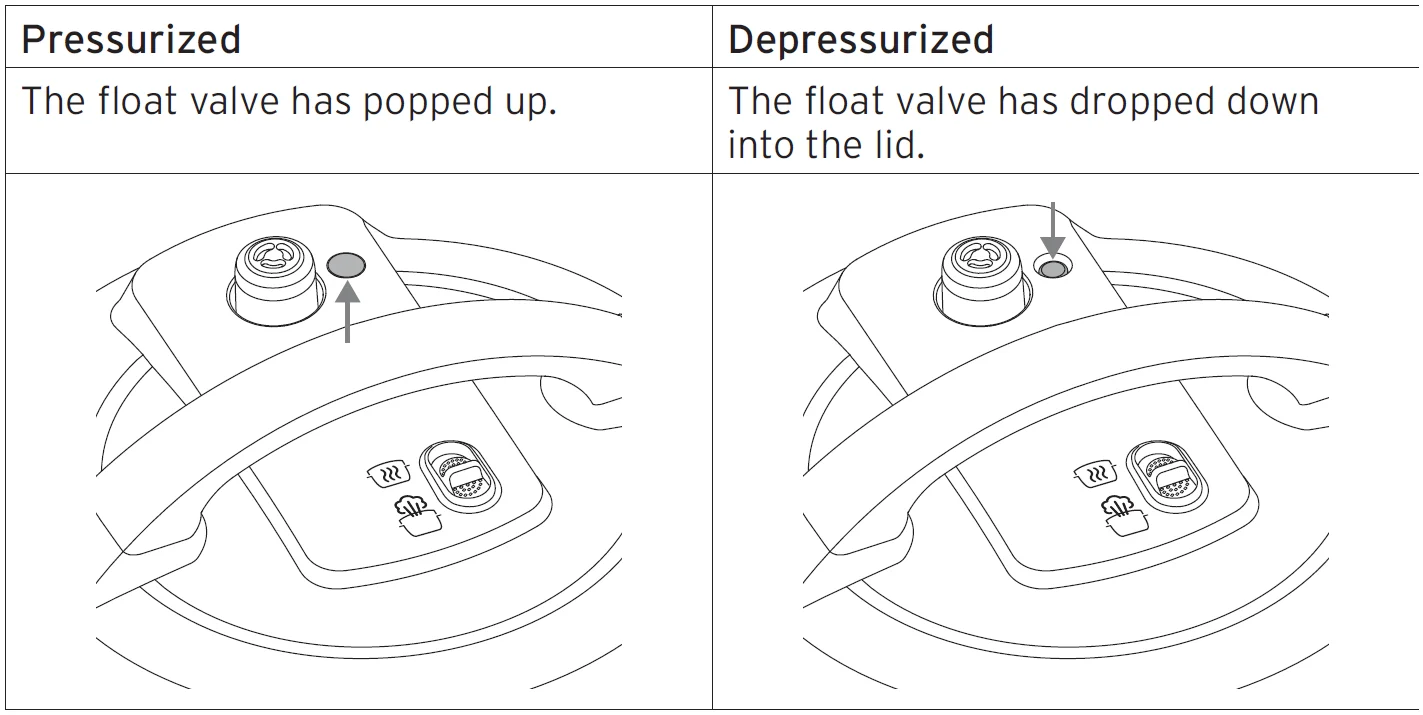
The float valve comes installed in the multi-cooker. Do not touch the float valve during use.
Caution: It may not be easy to see if the float valve has dropped into the lid. Look closely at the float valve and never try to force the lid open. Pressure Cooking Caution. This appliance uses pressure to cook. Allow the appliance to release all excess pressure and steam before opening the lid. Opening the lid before pressure is released may result in burns, personal injury and/or property damage. Read more in the Safety section.
ABOUT PRESSURE COOKING
Pressure cooking uses pressure to raise the temperature in the cooking pot, allowing you to cook food much faster than normal. When pressure cooking, the Instant Pot RIO Mini goes through 3 stages.
Pre-heating
While the multi-cooker pre-heats, it heats the liquid to create steam. Once enough pressure has built up, the lid locks in place and the multi-cooker is ready to start cooking.
Cooking
When the multi-cooker reaches the required pressure level, cooking begins and maintains that pressure throughout the cooking process. See the smart program instructions starting on page 19 for details.
Steam release
When the food has finished cooking, the multi-cooker is still pressurized and hot. Venting releases the pressure, lowers the temperature and allows you to remove the lid safely. See How to release steam on page 16.
Using liquid to create steam
Pressure cooking requires liquid in the cooking pot to produce the steam needed. Here are the minimum amounts you’ll need:

Pressure cooking liquids should be water-based, such as broth, stock, soup or juice. If using canned, condensed, or cream-based soup, add water as directed above.
PRESSURE COOK
Pressure cooking uses pressurized steam to quickly and evenly cook foods. You can adjust the settings as your recipe directs. Choose from these settings in the Pressure Cook smart program. The program uses the default settings or the settings you selected the last time you used the Pressure Cook program.

Other settings
- Keep Warm is set to ON by default.
- Delay Start is available.
How to pressure cook
Prep
Cut, chop, season or marinate your ingredients according to your recipe.
Preheat
- Place the cooking pot into the multi-cooker base and add ingredients and liquid.
- Place the lid on top of the multi-cooker base and lock the lid.
- Press Pressure Cook. The default or last-used cooking settings display.
- To change the cooking time, press thearrows to select a time.
- To turn off Keep Warm, pressKeep Warm. You can activate Keep Warm at any time during cooking.
- To start cooking later, pressDelay Start, then press the Up or Down arrows to select a delay time.
- Press
 Start. The Progress Indicator showsPreheat.
It can take 15 minutes or more to reach the pressure setting for cooking. Frozen foods and large quantities increase the preheating time.
Cook
- When the pressure is ready, the Progress Indicator shows Cook and the cooking timer starts counting down.
You can press Cancel to stop cooking and cancel the smart program at any time. You can press Keep Warm at any time during cooking to turn it off.
Stop cooking
- When the timer reaches 00:00, cooking stops and Natural steam release begins. The Status Display shows End. If you prefer, you can use Quick steam release by pushing the steam release switch on the lid to Vent.
- If Keep Warm is ON, the timer starts counting up. You can press
 Cancel at any time to stop Keep Warm.
 - When all the steam is released, the Float Valve drops into the holder. See ‘How the Float Valve works’ on page 17.
RICE
The Rice Smart program uses pressurized steam to cook rice quickly and evenly. You can adjust the settings as your recipe directs. Choose from these settings in the Rice Smart program. The program uses the default settings or the settings you selected the last time you used the Rice program.

Other settings
- Keep Warm is set to ON by default.
- Delay Start is available.
How to cook rice
Prep
Prepare the ingredients according to your recipe.
Preheat
- Place the cooking pot into the multi-cooker base and add ingredients and liquid.
- Place the lid on top of the multi-cooker base and lock the lid.
- Press Rice. The default or last-used cooking settings display.
- To change the cooking time, press thearrows to select a time.
- To turn off Keep Warm, pressKeep Warm. You can activate Keep Warm at any time during cooking.
- To start cooking at a later time, pressDelay Start, then press thearrows to select a delay time.
- PressStart. The Progress Indicator showsPreheat. It can take 15 minutes or more to reach the pressure setting for cooking. Frozen foods and large quantities increase the preheating time.
Cook
- When the pressure is ready, the Progress Indicator shows
 Cook, and the cooking timer starts counting down. You can press
 Cancel to stop cooking and cancel the smart program at any time. You can press Keep Warm at any time during cooking to turn it off.
Stop cooking
- When the timer reaches 00:00, cooking stops and Natural steam
release begins. The Status Display shows End. If you prefer, you can use Quick steam release by pushing the steam release switch on the lid to Vent. - If Keep Warm is ON, the timer starts counting up. You can pressCancel at any time to stop Keep Warm.
- When all steam is released, the Float Valve drops into the holder. See ‘How the Float Valve works’ on page 17.
SLOW COOK
Slow Cook lets you make your favorite simmering and stewing recipes, just as you would in a slow cooker. Slow Cook does not use pressure to cook food. Choose from these settings in the Slow Cook smart program. The program uses the default settings or the settings you selected the last time you used the Slow Cook program.

Cook settings
For Slow Cooking, you can choose either the Low or High setting.
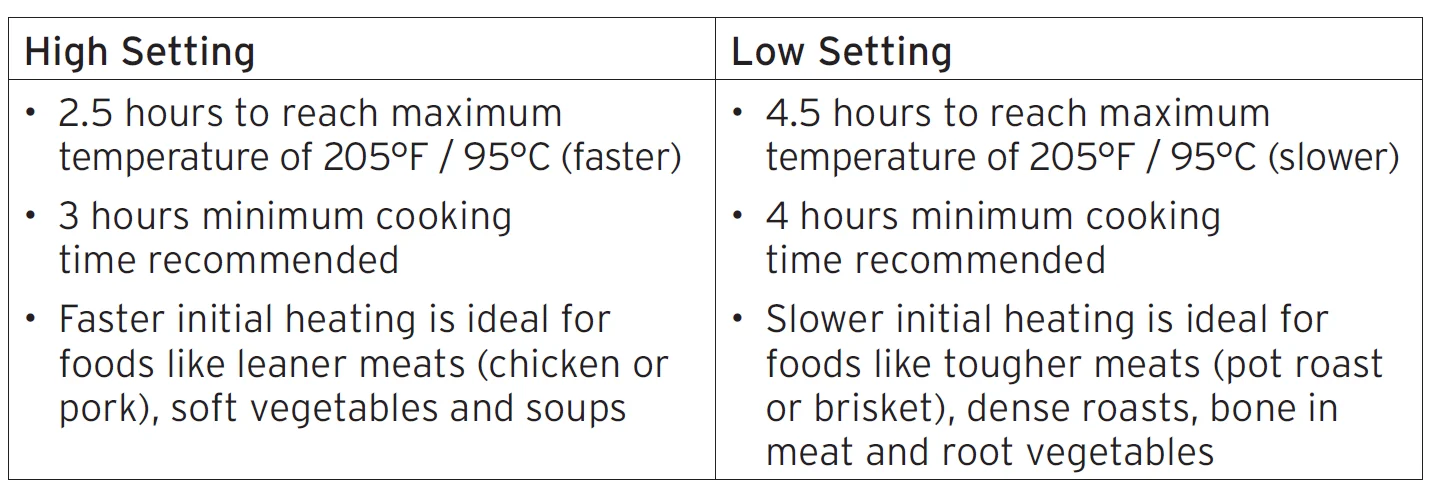
Other settings
- Keep Warm is ON by default.
- Delay Start is available.
How to slow cook
Prep
Cut, chop, season or marinate your ingredients according to your recipe.
Cook
- Place the cooking pot into the multi-cooker base and
add ingredients. - Place the lid on top of the multi-cooker base and lock the lid.
- Press Slow Cook. The default or last-used cooking settings display.
- To change the cooking time, press Time/Temp until the time flashes. Press thearrows to select a time. You can change the cooking time at any time during cooking.
- To change the cook setting, press Time/Temp until the temp flashes. Press thearrows to toggle between Low and High options.
- To turn off Keep Warm, pressKeep Warm. You can activate Keep Warm at any time during cooking.
- To start cooking at a later time, press Delay Start, then press thearrows to select a delay time.
- PressStart. The Progress Indicator showsCook and the cooking timer starts counting down. You can pressCancel to stop cooking at any time.
Stop cooking
- When the timer reaches 00:00, cooking stops. The Status Display shows End.
- If Keep Warm is ON, the timer starts counting up. PressCancel at any time to turn it off.
MAINTENANCE
Your Instant Pot RIO Mini includes parts that enable pressure cooking. These parts must be installed for pressure cooking to work properly and either cleaned or replaced regularly.
WARNING: Failure to adhere to safety instructions may result in personal injury and/or property damage and may void your warranty.
Sealing ring
When the pressure cooking lid is closed, the sealing ring installed on the underside of the lid creates an air-tight seal between the lid and the multi-cooker base.
- The sealing ring must be installed before using the multi-cooker and should be cleaned after each use.
- Install 1 sealing ring at a time; use one for sweet dishes and one for savory.
- Sealing rings stretch over time with normal use. To keep your product safe, replace the sealing ring every 12 to 18 months. Replace sooner if you notice stretching, deformation, or damage.
Install the Sealing Ring
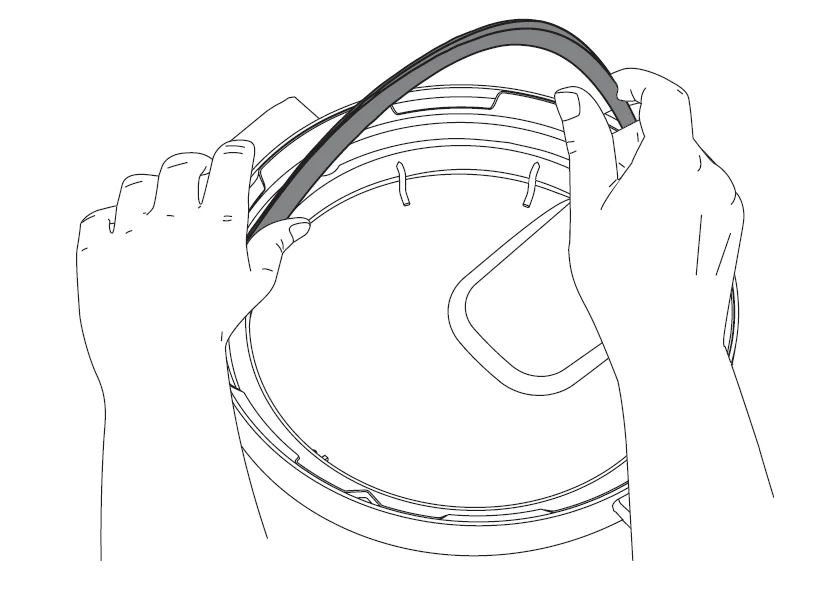
- Place the sealing ring behind the sealing ring rack and press it into place. Press down firmly to ensure there is no puckering.
- The sealing ring should be snug and should not fall out when the lid is turned over.
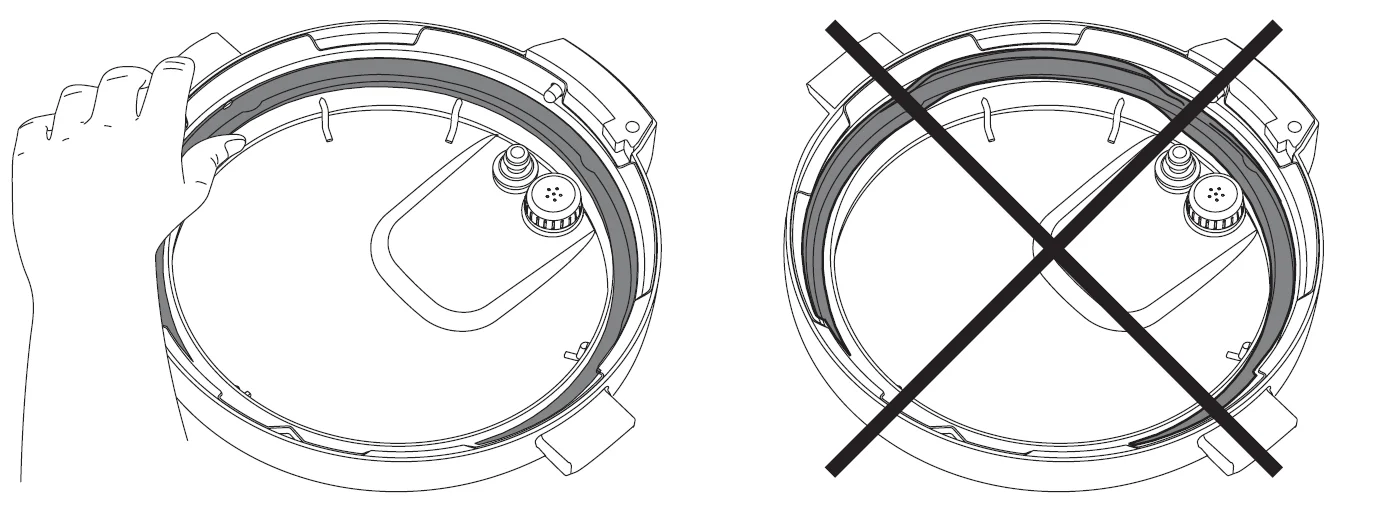
Remove the Sealing Ring
- Grip the edge of the sealing ring and pull it out from behind the sealing ring rack.
- Inspect the rack to ensure it is secured, centered, and an even height all the way around the lid. If the sealing ring rack is deformed, do not try to repair it.
Anti-block shield
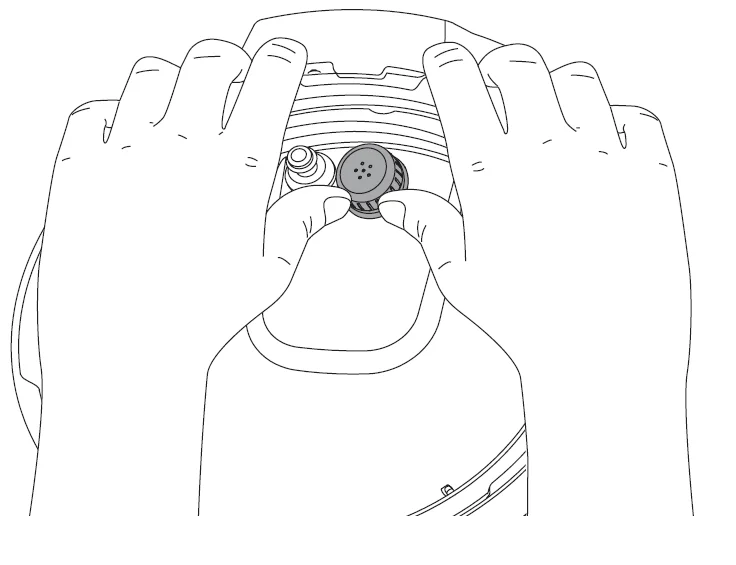
The anti-block shield prevents food particles from coming up through the steam release pipe, helping to regulate pressure. As an integral part of product safety, the anti-block shield must be installed before use and cleaned frequently.
Remove the Anti-Block Shield
Turn the lid over and hold it securely with one hand. Use the other hand to grasp the Anti-Block Shield with your fingers and pull firmly to remove it from the prongs underneath.
Install the Anti-Block Shield
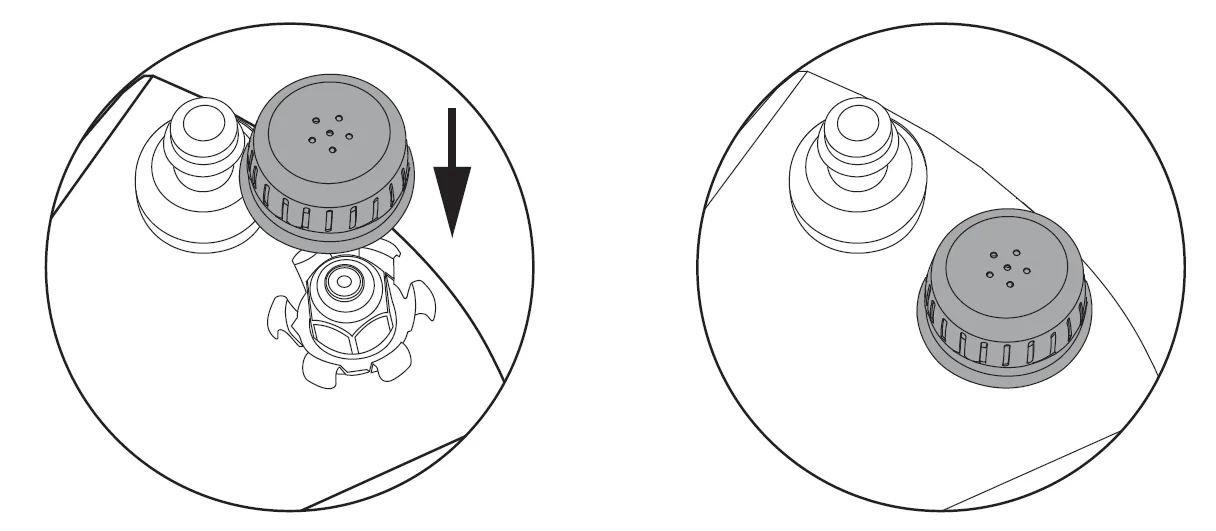
Place the anti-block shield over the prongs and press down until it snaps into position. Do not attempt to operate the pressure multi-cooker without the anti-block shield installed.
Setting up the condensation collector
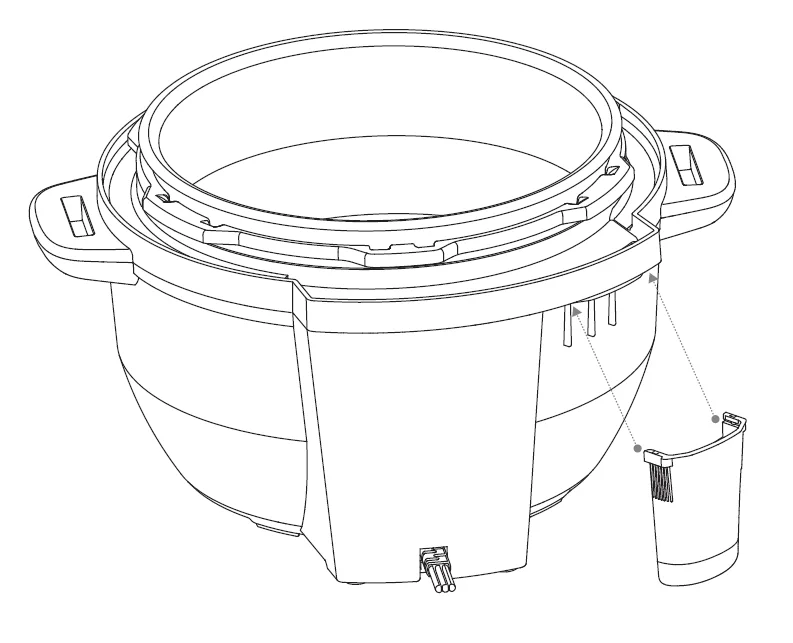
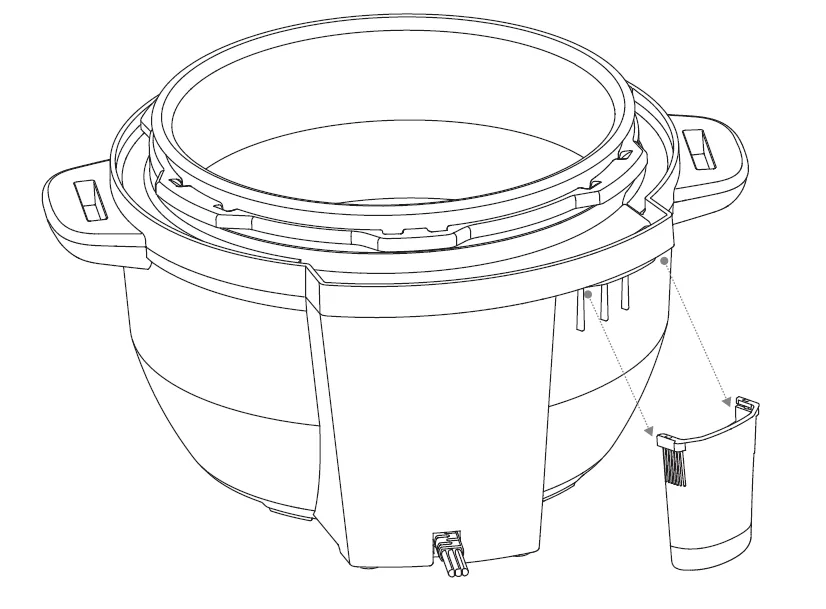
The condensation collector sits at the back of the multi-cooker base and accumulates overflow moisture from the condensation rim. It should be installed before cooking, then emptied and rinsed out after each use.
Install the condensation collector
Align the grooves on the condensation collector with the tabs on the back of the multi-cooker base and slide the condensation collector into place.
Remove the condensation collector
Pull the condensation collector away from the multi-cooker base; do not pull down. Note the tabs on the multi-cooker base and the grooves on the condensation collector.
CLEANING
Clean your Instant Pot RIO MIni after each use. Always unplug the unit and let all parts cool to room temperature before cleaning. Before use or storing, make sure all surfaces are dry.
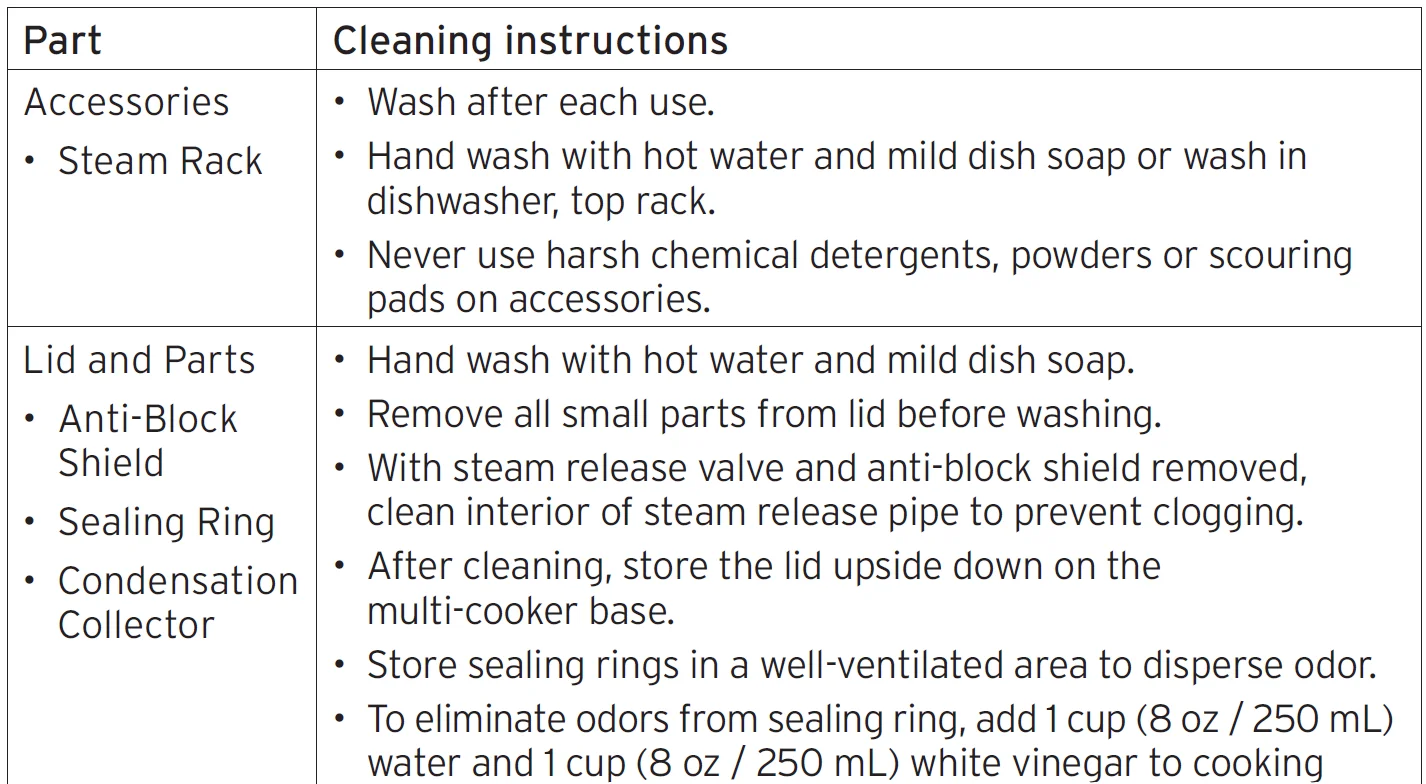
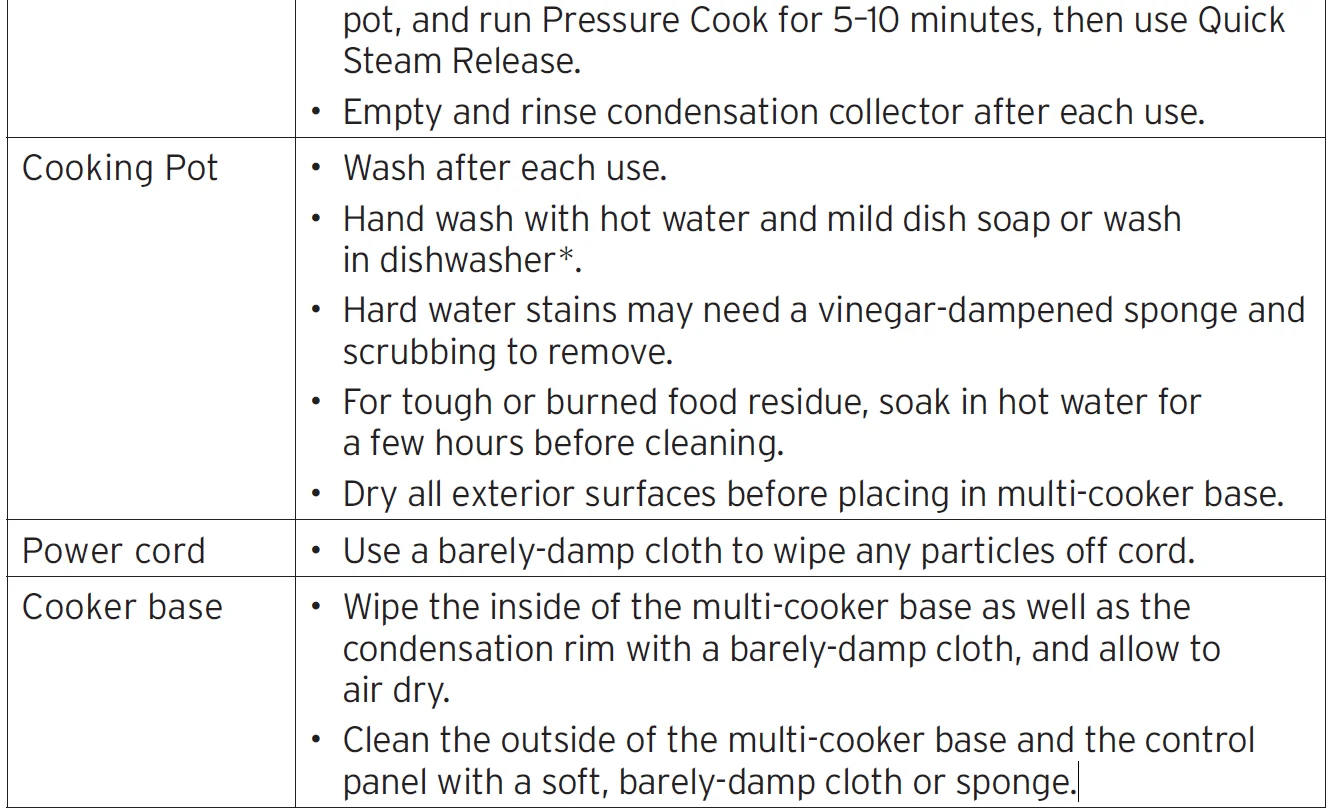
*Some discoloration may occur after machine washing, but this will not affect the multi-cooker’s safety or performance.
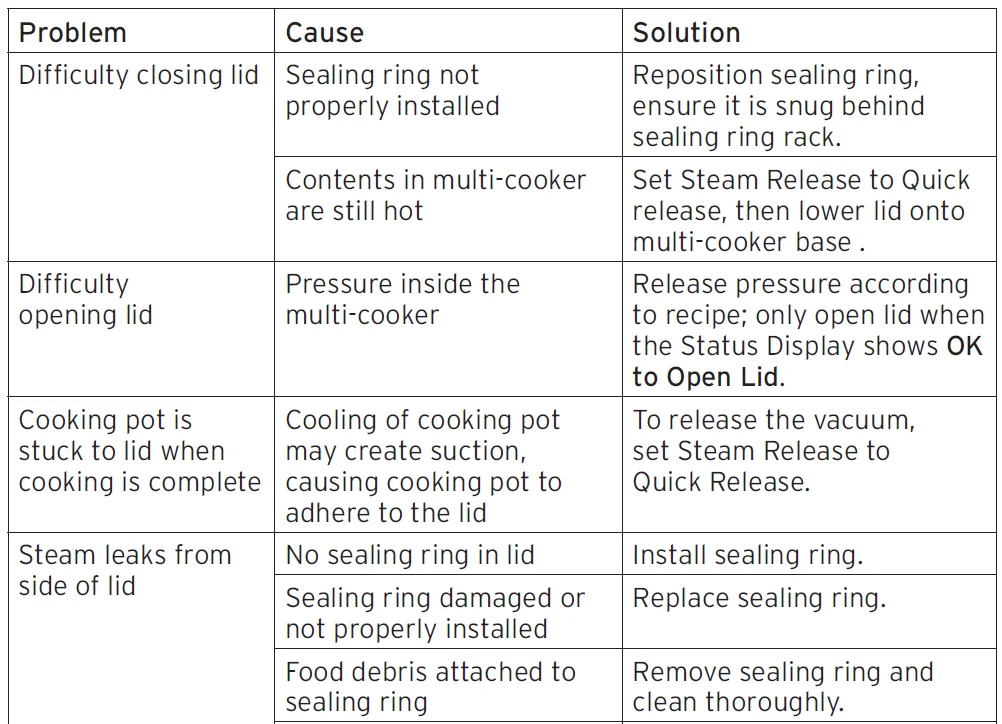
TROUBLESHOOTING
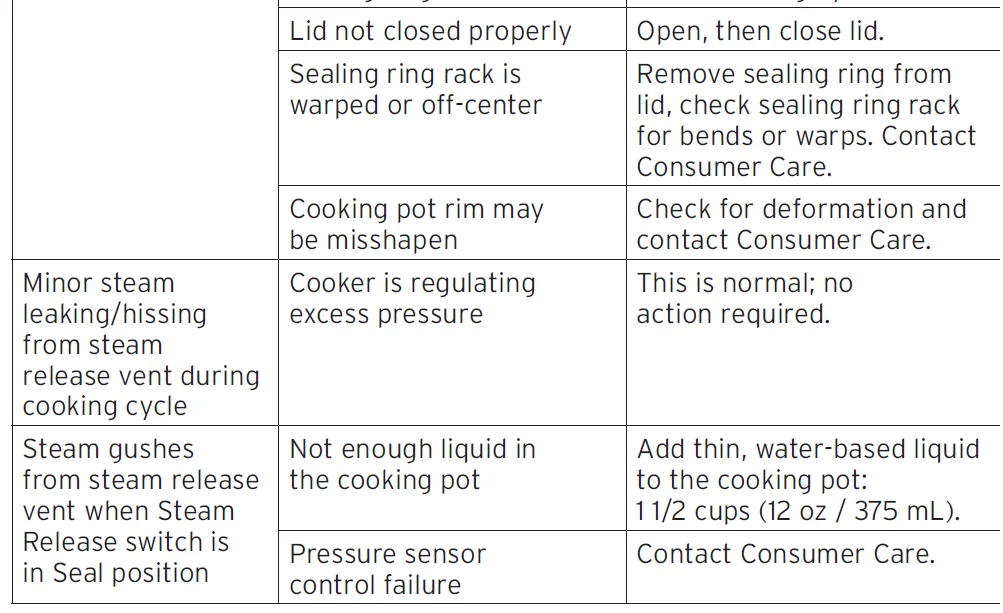
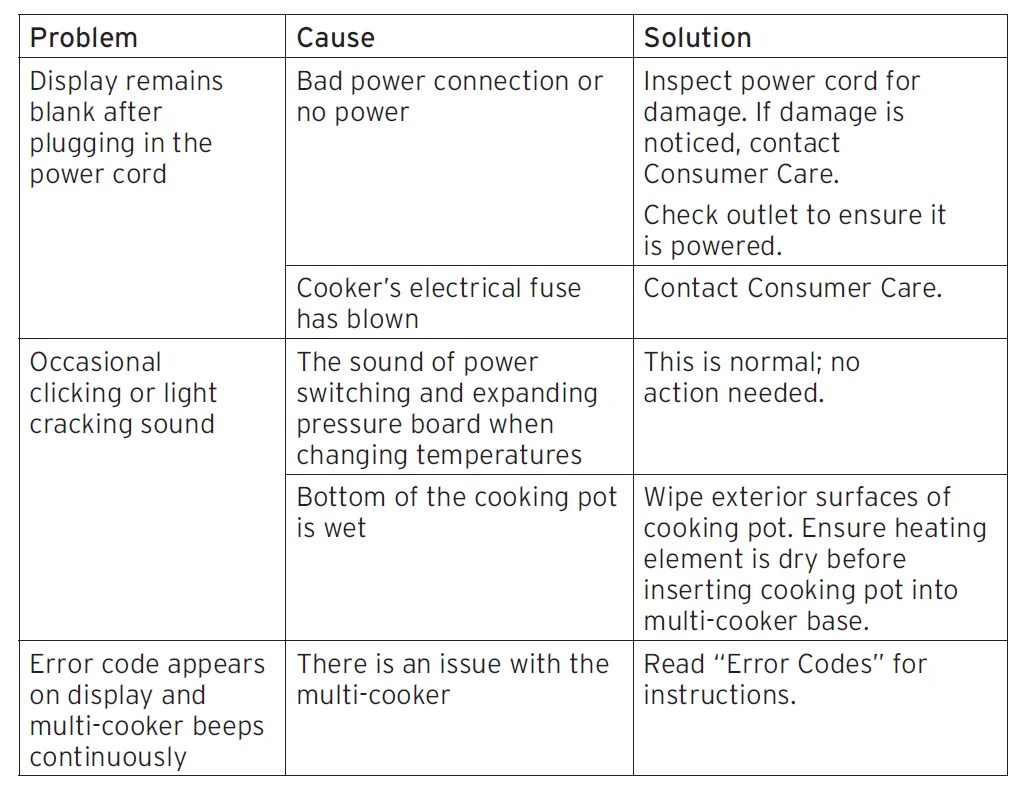
For more manuals by Instant Pot, visit ManualsLibraryy
Instant Pot 4QT RIO Mini 7-in-1 Multi-Cooker-FAQs
Is the Instant Pot 4QT RIO Mini worth buying?
Yes, it’s a great choice for small kitchens and everyday cooking. It combines useful features like a stable inner pot, simple controls, and multiple cooking modes at an affordable price, making it practical for beginners and regular users alike.
What does the 7-in-1 function include?
This multi-cooker works as a pressure cooker, slow cooker, rice cooker, steamer, sauté pan, yogurt maker, and food warmer. These functions allow you to prepare a wide range of meals using just one appliance.
How big is the 4QT RIO Mini?
The cooker has a 4-quart capacity, which is compact yet functional. It’s designed to fit easily on countertops while still offering enough space for everyday meals.
What’s the difference between the RIO Mini and larger models?
The RIO Mini is more compact and designed for smaller portions, while larger versions provide higher capacity for bigger families or batch cooking. The core features remain mostly the same.
How does it compare to a regular pressure cooker?
Unlike traditional stovetop pressure cookers, this electric model offers automatic controls, preset programs, and added safety features, making it easier and safer to use.
What should not be cooked in an Instant Pot?
Avoid cooking dairy-based dishes directly under pressure, as they can curdle. It’s better to add milk, cheese, or cream after cooking is complete.
Is cooking in an Instant Pot healthy?
Cooking with this appliance is generally healthy. It uses less oil and retains nutrients due to shorter cooking times and sealed pressure cooking.
Can I use it as a slow cooker?
Yes, the RIO Mini includes a slow cooking function. For best results, you can sauté ingredients first and then switch to slow cooking for deeper flavor and better texture.
What are common issues with multi-cookers?
Some users may face issues like lid sealing problems, pressure valve malfunctions, or wear in sealing rings over time. Regular cleaning and proper maintenance usually prevent most of these problems.
Is a 4-quart size enough for daily use?
A 4-quart model is ideal for individuals, couples, or small families. It can typically prepare 2–3 servings, making it suitable for soups, rice, stews, and smaller meal portions.