


Jetson Kids Jupiter 2-Wheel Light-Up Kick Scooter

Safety Warnings
- Before use, please read the user manual and safety warnings carefully, and make sure you understand and accept all the safety instructions. The user will be responsible for any loss or damage caused by improper use.
- Before each cycle of operation, the operator shall perform the preoperation checks specified by the manufacturer: that all guards and pads originally supplied by the manufacturer are in proper place and in serviceable condition; that the braking system is functioning properly; that any axle guards, chain guards, or other covers or guards supplied by the manufacturer are in place and in serviceable condition; that tires are in good condition, inflated properly, and have sufficient tread remaining; the area that the product is to be operated should be safe and suitable for safe operation.
- Components shall be maintained and repaired in accordance with the manufacturer’s specifications and using only the manufacturer’s authorized replacement parts, with installation performed by dealers or other skilled persons.
- Do not mix old and new batteries.
- Do not mix alkaline, standard (carbon-zinc), or rechargeable batteries.
- This product should not be used by children or persons with reduced physical, sensory, or mental capabilities, or a lack of experience and knowledge, unless they have been given supervision or instruction (IEC 60335-1/A2:2006).
- Unsupervised children should not play with the product (IEC 60335-1/A2:2006).
- Adult supervision is required.
- The rider should not exceed 132 lb.
- Units shall not be operated to perform racing, stunt riding, or other maneuvers that may cause loss of control or may cause uncontrolled operator/passenger actions or reactions.
- Never use near motor vehicles.
- Avoid sharp bumps, drainage grates, and sudden surface changes. Scooter may suddenly stop.
- Avoid streets and surfaces with water, sand, gravel, dirt, leaves, and other debris. Wet weather impairs traction, braking, and visibility.
- Avoid riding around flammable gases, steam, liquids, or dust that could cause fire.
- Operators shall adhere to all of the manufacturer’s recommendations and instructions, as well as comply with all laws and ordinances: units without headlights shall be operated only with adequate daylight conditions of visibility; and owners shall be encouraged to highlight (for conspicuity) using lighting, reflectors, and, for low-riding units, signal flags on flexible poles.
- Persons with the following conditions shall be cautioned not to operate: those with heart conditions; pregnant women; persons with head, back, or neck ailments, or prior surgeries to those areas of the body; and persons with any mental or physical conditions that may make them susceptible to injury or impair their physical dexterity or mental capabilities to recognize, understand, and perform all of the safety instructions and to be able to assume the hazards inherent in unit use.
- Do not ride at night.
- Do not ride after drinking or taking prescription medication.
- Do not carry items when riding.
- Never operate the product barefoot.
- Always wear shoes and keep the shoelaces tied.
- Make sure your feet are always placed securely on the deck.
- Operators shall always use appropriate protective clothing, including but not limited to a helmet with appropriate certification, and any other equipment recommended by the manufacturer. Always wear protective equipment such as a helmet, knee pads, and elbow pads.
- Always give way to pedestrians.
- Be alert to things in front of and far away from you.
- Do not allow distractions when riding, such as answering the phone or engaging in any other activities.
- The product cannot be ridden by more than one person.
- When you ride the product along with other riders, always keep a safe distance to avoid a collision.
- When turning, be sure to maintain your balance.
- Riding with improperly adjusted brakes is dangerous and can result in serious injury or death.
- The brake may become hot while operating; do not touch the brake with your bare skin.
- Applying the brakes too hard or too suddenly can lock up a wheel, which could cause you to lose control and fall. Sudden or excessive application of the brake may result in injury or death.
- If the brake loosens, please adjust it with the hexagon wrench, or please contact the Jetson Care Team.
- Replace worn or broken parts immediately.
- Check whether all safety labels are in place and understood before riding.
- The owner shall allow the use and operation of the unit after a demonstration that such operators can understand and operate all components of the unit before use.
- Do not ride without proper training. Do not ride at high speeds, on uneven terrain, or on slopes. Do not perform stunts or turn abruptly.
- Recommended for indoor use.
- Prolonged exposure to UV rays, rain, and the elements may damage the enclosure materials. Store indoors when not in use.
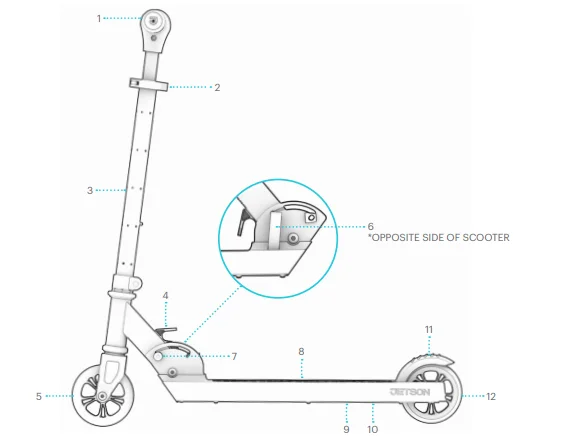
Product Overview
- HANDLEBAR
- STEM CLAMP
- STEM (LED LIGHT-UP)
- FOLDING LEVER
- FRONT WHEEL (MOTION-ACTIVATED LED LIGHT-UP)
- LOCKING LATCH
- KNOB
- DECK (LED LIGHT-UP)
- LIGHTING CONTROL BUTTON (UNDERSIDE OF DECK)
- BATTERY COMPARTMENT (UNDERSIDE OF DECK)
- REAR FOOT BRAKE
- REAR WHEEL (MOTION-ACTIVATED LED LIGHT-UP)
TOOL INCLUDED:

Specs & Features
- WEIGHT LIMIT: 132 LBS
- PRODUCT WEIGHT: 6 LBS
- WHEEL SIZE: 4″
- FOLDED DIMENSIONS: 24″ (L) × 10.5″ (W) × 8.5″ (H)
- UNFOLDED DIMENSIONS: 24″ (L) × 10.5″ (W) × 29″ (H)
- DECK DIMENSIONS: 17.5″ (L) × 3.5″ (W)
- HANDLEBAR HEIGHT: 29″–34″
- 3 AA BATTERIES REQUIRED (NOT INCLUDED)
- RECOMMENDED AGE: 5+
- LED LIGHT-UP WHEELS, DECK, & STEM
- EASY FOLDING TECHNOLOGY
1. Getting Started
1.1 Starting Notes
- REMOVE ALL PROTECTIVE PACKAGING PIECES BEFORE BEGINNING ASSEMBLY, INCLUDING THAT AT THE TOP OF THE STEM.
- THE DIRECTIONS GIVEN IN THIS MANUAL—RIGHT, LEFT, FRONT/FORWARD, AND REAR/BACK—ARE ORIENTED AS THE RIDER WOULD SEE THEM WHEN STANDING ON THE SCOOTER. THE “RIGHT SIDE” OF THE JUPITER, FOR EXAMPLE, IS THE SIDE WHERE THE RIDER’S RIGHT HAND WILL BE.
1.2 Unfolding & Folding the Scooter
- WHEN TO UNFOLD: FOR ASSEMBLY AND RIDING
- WHEN TO FOLD: FOR STORAGE AND TRANSPORT


- HOLDING THE LOCKING LATCH STEADY WITH ONE HAND, USE THE OTHER HAND TO LOOSEN THE KNOB BY TURNING IT COUNTERCLOCKWISE FOR 2–3 ROTATIONS.

- PULL OPEN THE LOCKING LATCH.

- PULL THE FOLDING LEVER UP TOWARDS THE TOP OF THE STEM. HOLD IT THERE WHILE YOU RAISE THE STEM UPRIGHT (TO UNFOLD THE SCOOTER) OR LOWER THE STEM TOWARDS THE DECK (TO FOLD THE SCOOTER).
- ENSURE THAT THE STEM “CLICKS” INTO PLACE IN THE FOLDED OR UNFOLDED POSITION.

- RELEASE THE FOLDING LEVER.
- HOLD THE LOCKING LATCH STEADY WITH ONE HAND WHILE YOU TIGHTEN THE KNOB BY TURNING IT CLOCKWISE.
- PUSH THE LOCKING LATCH CLOSED.
- CHECK THAT THE STEM IS SECURE.


TROUBLESHOOTING: IF YOU CANNOT OPEN OR CLOSE THE LOCKING LATCH, THE KNOB MAY BE TOO TIGHT. LOOSEN THE KNOB BY TURNING IT COUNTERCLOCKWISE FOR 1/2 ROTATION AT A TIME UNTIL YOU CAN UTILIZE THE LATCH.
IMPORTANT: NEVER RIDE WITHOUT THE STEM CLICKED INTO THE UPRIGHT POSITION AND THE LOCKING LATCH CLOSED AND TIGHT.
1.3 Attaching the Handlebars
- UNFOLD THE SCOOTER SO THAT THE STEM IS UPRIGHT.
- UNSCREW THE PRE-ATTACHED BOLT FROM THE NUT IN THE STEM BY TURNING IT COUNTERCLOCKWISE WITH THE SCREWDRIVER TIP OF THE 2-BIT TOOL. (YOU MAY HAVE TO HOLD THE NUT STEADY WITH A FINGER TO LOOSEN AND REMOVE THE BOLT.) SET THE HARDWARE ASIDE.

- POSITION THE HANDLEBAR BASE OVER THE TOP OF THE STEM SUCH THAT THE RAISED LINE ON THE INSIDE OF THE HANDLEBAR BASE IS IN LINE WITH THE INDENTED CHANNEL ON THE TOP OF THE SCOOTER STEM.

- SLIDE THE HANDLEBAR ONTO THE SCOOTER STEM.
- PUSH DOWN AND ADJUST UNTIL THE HOLES IN THE SIDES OF THE HANDLEBAR BASE ARE ALIGNED WITH THE HOLES ON THE SIDES OF THE STEM.

- INSERT THE BOLT THROUGH THE ALIGNED HOLES ON THE RIGHT-HAND SIDE OF THE HANDLEBAR UNTIL THE END OF IT IS VISIBLE THROUGH THE LEFT-SIDE HOLES. IMPORTANT: PLACE THE BOLT ON THE RIGHT SIDE WHEN FACING THE FRONT OF THE SCOOTER FROM THE RIDING POSITION.
- PLACE AND HOLD THE NUT AT THE END OF THE BOLT IN THE ALIGNED HOLES ON THE LEFT SIDE OF THE HANDLEBAR.
- TIGHTEN THE BOLT INTO THE NUT BY TURNING IT CLOCKWISE WITH THE SCREWDRIVER TIP OF THE 2-BIT TOOL.
- CHECK THAT THE HANDLEBAR IS SECURE.


IMPORTANT: BEFORE EVERY RIDE, CHECK THAT THE BOLT AND NUT ARE TIGHTENED AND SECURE.
1.4 Adjusting the Height of the Handlebars
- OPEN THE STEM CLAMP LATCH.
- LOOSEN THE BOLT OPPOSITE THE LATCH TO WIDEN THE CLAMP BY TURNING IT COUNTERCLOCKWISE WITH THE ALLEN KEY TIP OF THE 2-BIT TOOL.

- WHILE PRESSING IN THE STEM PIN, LIFT OR LOWER THE HANDLEBAR UNTIL THE PIN CLICKS INTO ANOTHER STEM PIN HOLE.

- CLOSE THE STEM CLAMP LATCH AND TIGHTEN THE BOLT BY TURNING IT CLOCKWISE WITH THE ALLEN KEY.
- CHECK THAT THE HANDLEBAR IS SECURE.


IMPORTANT: THE STEM PIN ALONE WILL NOT KEEP THE STEM SECURE. MAKE SURE THE STEM CLAMP IS TIGHTENED AND CLOSED BEFORE RIDING.
TROUBLESHOOTING: IF YOU CANNOT OPEN OR CLOSE THE LATCH, THE BOLT ON THE CLAMP MAY BE TOO TIGHT. LOOSEN THE BOLT 1/2 ROTATION AT A TIME UNTIL YOU CAN UTILIZE THE LATCH.
1.5 Inserting the Batteries
YOU WILL NEED 3 AA BATTERIES (NOT INCLUDED) TO USE THE LIGHTS ON YOUR JUPITER.
- LOOSEN AND REMOVE THE SCREW SECURING THE BATTERY COMPARTMENT COVER ON THE UNDERSIDE OF THE DECK BY TURNING IT COUNTERCLOCKWISE WITH THE SCREWDRIVER TIP OF THE 2-BIT TOOL.
- LIFT AND REMOVE THE BATTERY COMPARTMENT COVER.
- PLACE 3 AA BATTERIES IN PLACE ACCORDING TO THE +/- DIRECTIONS INDICATED INSIDE OF THE BATTERY COMPARTMENT.
- REPLACE THE BATTERY COMPARTMENT COVER.
- RE-INSERT THE SCREW AND TIGHTEN IT BY TURNING IT CLOCKWISE WITH THE SCREWDRIVER.
- CHECK THAT THE COMPARTMENT COVER AND SCREW ARE SECURE


Making Moves
2.1 Riding the Scooter
- PLACE ONE FOOT ON THE FRONT OF THE DECK FACING FORWARD.
- USE THE BACK FOOT TO PUSH OFF THE GROUND AND PROPEL THE SCOOTER FORWARD.
- TO COAST: PLACE THE KICKING FOOT ON THE DECK BEHIND THE FRONT FOOT AT A SLIGHT ANGLE.
- TO MAKE TURNS: ROTATE THE HANDLEBAR TO THE LEFT OR RIGHT.


2.2 Using the Brake
PRESS DOWN GENTLY WITH THE REAR RIDING FOOT TO SLOW DOWN. APPLY MORE PRESSURE TO COME TO A COMPLETE STOP.
2.3 Using the LED Lights
THE LIGHTS ON THE WHEELS ARE MOTION-ACTIVATED AND WILL ILLUMINATE WHEN THEY ROTATE, EVEN IF THE OTHER LIGHTS ARE NOT POWERED ON.
- TO TURN ON THE LIGHTS IN THE DECK AND STEM: QUICK-PRESS THE LIGHTING CONTROL BUTTON.
- TO CHANGE THE LIGHTS: CYCLE THROUGH 7 DIFFERENT LIGHTING PATTERNS BY QUICK-PRESSING THE BUTTON AGAIN. STOP PRESSING WHEN YOU’VE LANDED ON THE LIGHTING PATTERN THAT FEELS RIGHT FOR YOUR RIDE.
- TO TURN OFF THE LIGHTS: THE 8TH QUICK-PRESS WILL TURN OFF THE LIGHTS. TO POWER OFF THE LIGHTS WITHOUT GOING THROUGH THE CYCLE OF PATTERNS, PRESS AND HOLD THE LIGHTING CONTROL BUTTON FOR 3 SECONDS.


IMPORTANT: TO PRESERVE BATTERY POWER, TURN THE LIGHTS OFF WHEN YOU’RE FINISHED RIDING THE SCOOTER.
Care & Maintenance
CLEANING THE SCOOTER
- TO CLEAN THE SCOOTER, CAREFULLY WIPE WITH A DAMP CLOTH AND THEN DRY WITH A DRY CLOTH.
- DO NOT APPLY WATER DIRECTLY TO THE SCOOTER. WATER CAN CAUSE DAMAGE TO THE ELECTRICAL SYSTEM OR TO THE FRAME DETERIORATION, WHICH COULD LEAD TO A MALFUNCTION THAT PUTS RIDER SAFETY AT RISK.
PRECAUTIONS
- KEEP AWAY FROM FIRE AND EXCESSIVE HEAT.
- AVOID INTENSE PHYSICAL IMPACT AND/OR SEVERE VIBRATION.
- RIDE THE SCOOTER ON A SMOOTH, FLAT SURFACE.
- PROTECT FROM WATER OR MOISTURE.
- CONTACT THE JETSON CARE TEAM IF THERE ARE ANY ISSUES WITH THE SCOOTER.
STORING THE SCOOTER
- STORE THE SCOOTER INDOORS AND IN A DRY PLACE.
- COVER THE SCOOTER TO PROTECT IT AGAINST DUST.
- REMOVE BATTERIES BEFORE STORING THE SCOOTER FOR EXTENDED PERIODS OF TIME.
Warranty Coverage
GENERAL LIMITED WARRANTY
Your new Jetson product is warranted against defects in materials and workmanship as indicated on ridejetson.com/warranty for a period of time from the date of original retail purchase when used in accordance with Jetson’s user manuals (refer to ridejetson.com/support). Under this warranty, you will be able to direct your claims to Jetson even in situations where you purchased the Jetson Product from one of our authorized retailers. To read the full terms of our warranty, visit ridejetson.com/warranty.
For More Manuals By Jetson, Visit ManualsLibraryy.
Jetson Kids Jupiter 2-Wheel Light-Up Kick Scooter-FAQs
How do I turn on the lights on the Jetson Jupiter scooter?
The Jupiter scooter’s lights turn on automatically when the scooter is in motion. Some models may also have a power button located underneath the deck—press it to activate the lights.
Where is the power button on the Jetson Jupiter scooter?
On most Jetson kick scooters, the power or light control button is located on the underside of the deck or near the handlebar stem, depending on the model.
Does the Jetson Jupiter scooter connect to a mobile app?
No, the Jetson Kids Jupiter 2-Wheel Kick Scooter does not support app or Bluetooth connectivity. It is a manual, kid-friendly scooter designed for simple use.
Does the Jetson Jupiter scooter need charging?
No charging is required. The light-up wheels are motion-activated and powered by movement, not by a rechargeable battery.
Is the Jetson Jupiter scooter safe for kids?
Yes, it is designed specifically for children. Always ensure kids wear proper safety gear such as a helmet, knee pads, and elbow pads.
Why are the scooter lights not turning on?
The lights only activate when the wheels move. If they stay off, try riding faster or check if the wheels are obstructed or worn.
Is the Jetson Jupiter scooter electric?
No, this is a manual kick scooter, not an electric scooter. It does not use a motor, accelerator, or battery.
How do you use the Jetson Jupiter scooter step by step?
Unfold the scooter, ensure the handlebar is locked, place one foot on the deck, and push off with the other foot. The scooter is controlled by balance and steering—no motor or throttle is involved.