
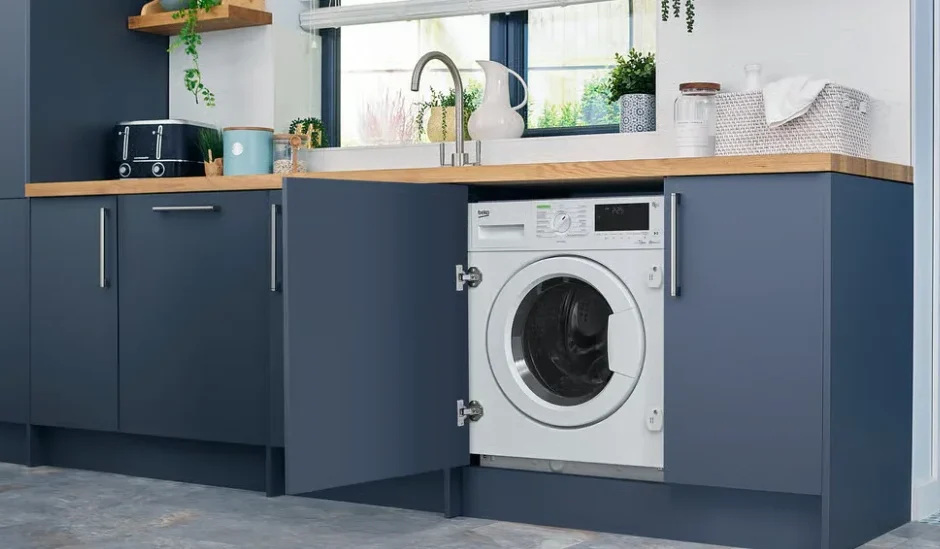

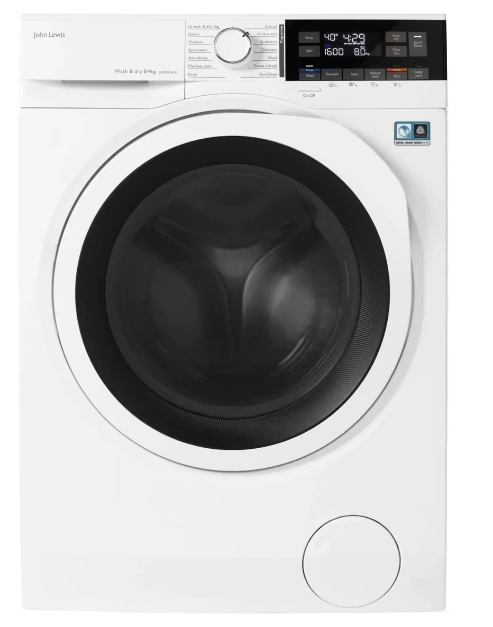
John Lewis JLWD1614 Freestanding Washer Dryer
Safety information
Before the installation and use of the appliance, carefully read the supplied instructions. The manufacturer is not responsible for any injuries or damages that are the result of incorrect installation or usage. Always keep the instructions in a safe and accessible location for future reference.
Children’s and vulnerable people’s safety
 Warning!
Risk of suffocation, injury or permanent disability.
- This appliance can be used by children aged 8 years and above and persons with reduced physical, sensory or mental capabilities or lack of experience and knowledge if they have been given supervision or instruction concerning the use of the appliance in a safe way and understand the hazards involved.
- Children between 3 and 8 years of age and persons with very extensive and complex disabilities shall be kept away unless continuously supervised.
- Children of less than 3 years of age should be kept away unless continuously supervised.
- Do not let children play with the appliance.
- Keep all packaging away from children and dispose of it appropriately.
- Keep detergents away from children.
- Keep children and pets away from the appliance when the door is open.
- If the appliance has a child safety device, it should be activated.
- Children shall not carry out cleaning and user maintenance of the appliance without supervision.
General Safety
- Do not change the specification of this appliance.
- This appliance is intended to be used in household and similar applications such as:
- staff kitchen areas in shops, offices and other working environments;
- by clients in hotels, motels, bed & breakfasts other residential-type environments;
- areas for communal use in blocks of flats or in launderettes.
- The appliance shall be installed as a freestanding product or below the kitchen worktop if space margins permit.
- Do not install the appliance behind a lockable door, a sliding door or a door with a hinge on the opposite side, which would prevent the appliance door from being fully open.
- Connect the mains plug to the mains socket only at the end of the installation process. Make sure that the mains plug is accessible after installation.
- The ventilation opening in the base must not be covered by a carpet, mat, or any floor covering.
- WARNING: The appliance must not be supplied through an external switching device, such as a timer, or connected to a circuit that is regularly switched on and off by a utility.
- Ensure good air ventilation in the room where the appliance is installed to avoid the backflow of unwanted gases into the room from appliances burning gas or other fuels, including open fires.
- Exhaust air must not be discharged into a flue which is used for exhausting fumes from any appliances burning gas or other fuels.
- The operating water pressure at the water entry point from the outlet connection must be between 0.5 bar (0.05 MPa) and 8 bar (0.8 MPa).
- Do not exceed the maximum load of 8 kg (refer to the “Programme chart” chapter).
Installation
Warning!
Refer to the Safety chapters.
Unpacking
- Remove the external film. If necessary, use a cutter.

- Remove the cardboard top and the polystyrene packaging materials.

- Open the door. Remove all the items from the drum.

- Put the front polystyrene packaging element on the floor under the appliance. Carefully put down the appliance onto its rear side.

- Remove the polystyrene protection from the bottom. Put the appliance back into an upright position.

- Remove the power supply cable and the drain hose from the hose holders.
It is possible to see water flowing from the drain hose.
This is because the washing machine has been tested at the factory.
- Remove the three transit bolts and pull out the plastic spacers.

- Put the plastic cap that you find in the user manual bag on the holes.

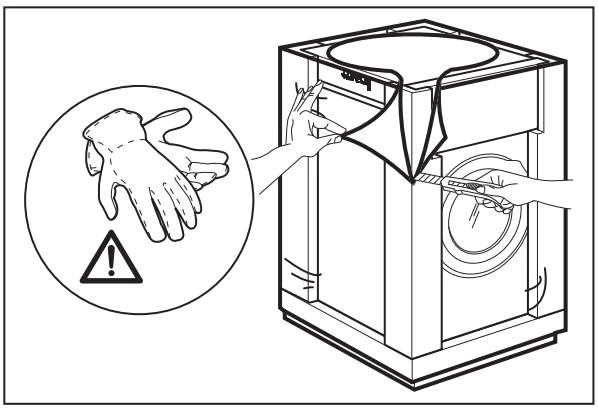
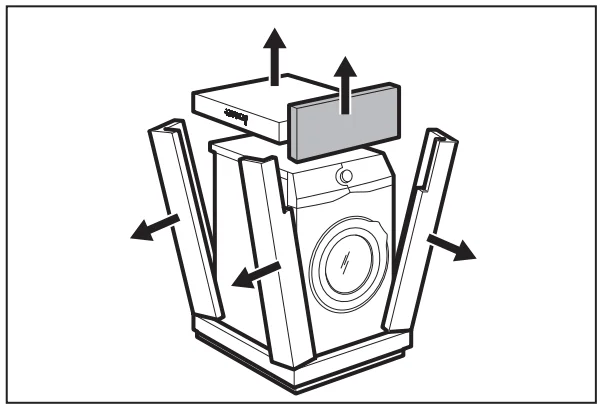
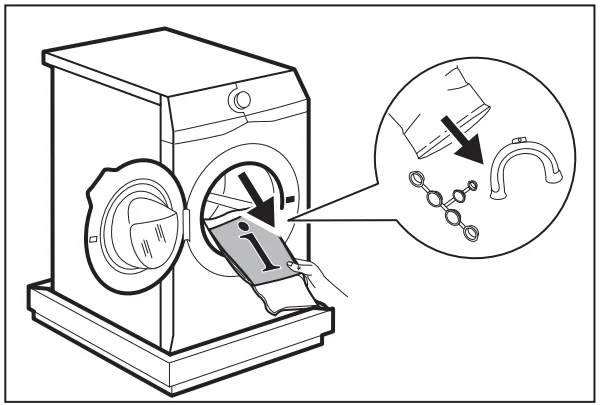
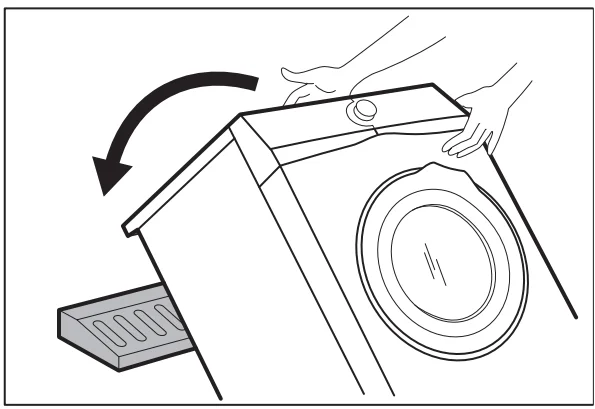
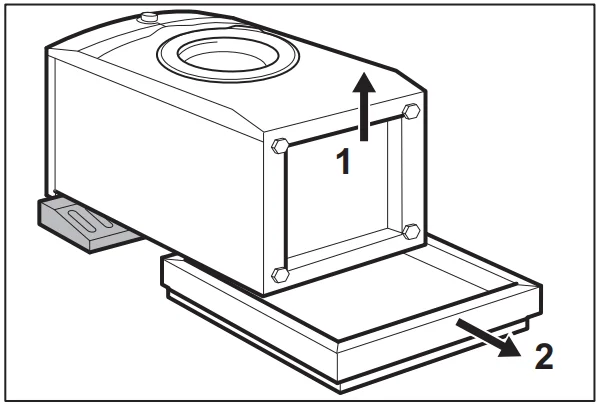
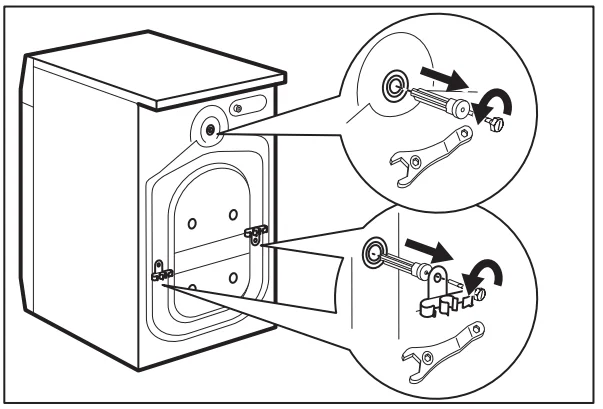
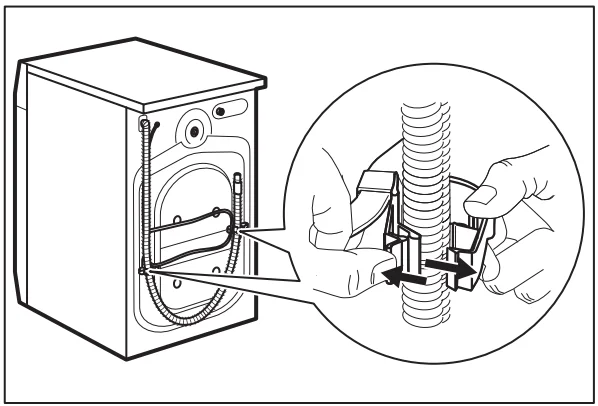
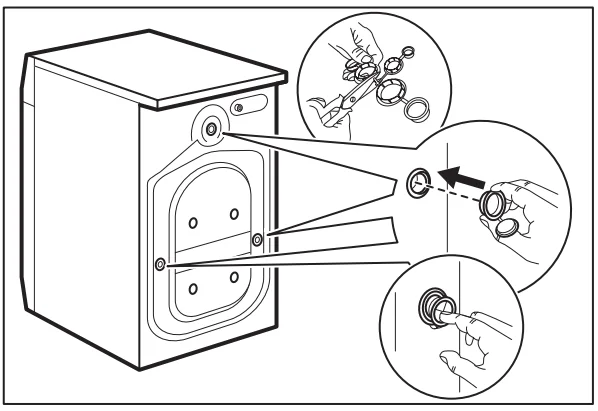
 We recommend that you keep the packaging and the transit bolts for any transport of the appliance.
Information for installation
Positioning and levelling
Adjust the appliance correctly to prevent vibration, noise, and movement of the appliance when it operates.
- Install the appliance on a flat hard floor. The appliance must be levelled and stable. Make sure that the appliance does not touch the wall or other units, and that there is air circulation below the appliance.
- Loosen or tighten the feet to adjust the level. All feet must rest firmly on the floor.
Warning: Do not put cardboard, wood, or equivalent materials below the appliance feet to adjust the level.
The inlet hose
Caution! Make sure there is no damage to hoses and there are no leaks from the couplings. Do not use an extension hose if the inlet hose is too short. Contact the service centre for a replacement inlet hose.
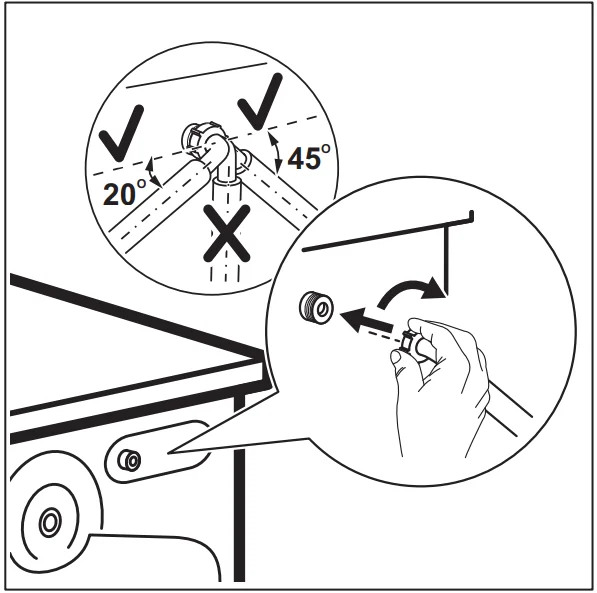
- Connect the water inlet hose to the back of the appliance.

- Position it toward the left or right, depending on the position of the water tap. Make sure that the inlet hose is not in a vertical position.
- If necessary, loosen the ring nut to set it in the correct position.
- Connect the water inlet hose to the cold water tap with a 3/4” thread.
Water drainage
The drain hose should stay at a height of no less than 60 cm and not more than 100 cm.
You can extend the drain hose to a maximum of 400 cm. Contact the authorised service centre for the other drain hose and the extension.
It is possible to connect the drain hose in different ways:
- Make a U shape with the drain hose and put it around the plastic hose guide.

- On the edge of a sink – Fasten the guide to the water tap or to the wall.

 Make sure that the plastic guide cannot move when the appliance drains, and the drain hose end is not immersed in the water. There may be a return of dirty water into the appliance.
 - If the end of the drain hose looks like this (see the picture), you can push it directly into the standpipe.

- To a standpipe with a vent-hole – Insert the drain hose directly into a drain pipe. Refer to the illustration.
 The end of the drain hose must always be ventilated, i.e. the inner diameter of the drain pipe (min. 38 mm – min. 1.5″) must be larger than the external diameter of the drain hose.
 - Without the plastic hose guide, to a sink spigot- Put the drain hose in the spigot and tighten it with a clamp. Refer to the illustration.
 Make sure that the drain hose makes a loop to prevent particles from going into the appliance from the sink.
 - Position the hose directly to a built-in drain pipe in the room wall and tighten it with a clamp.

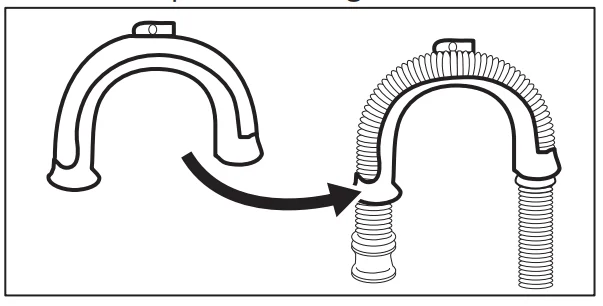
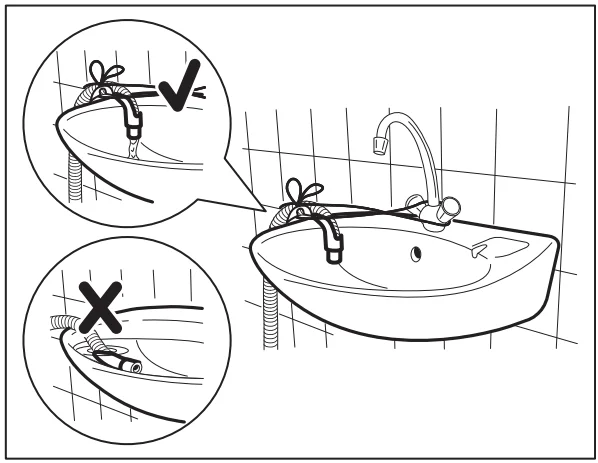
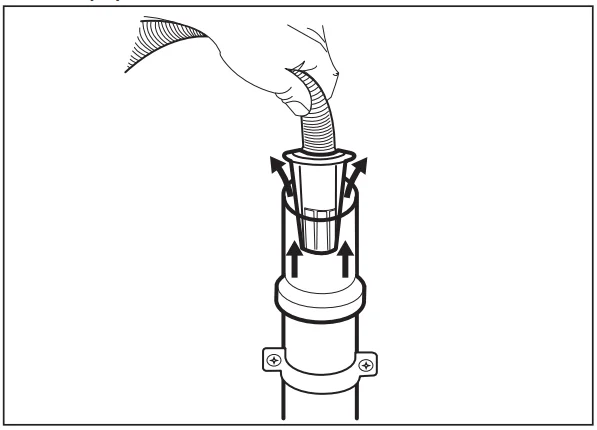
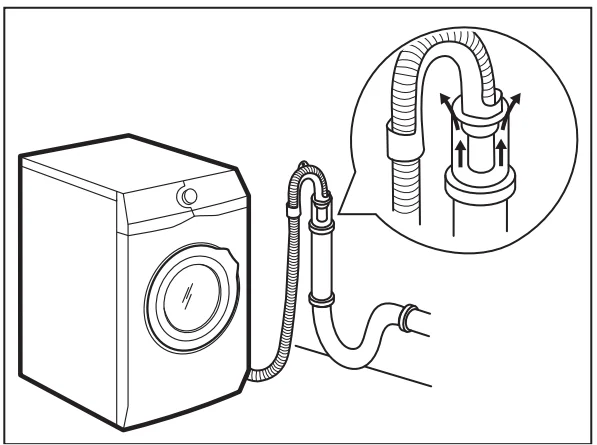
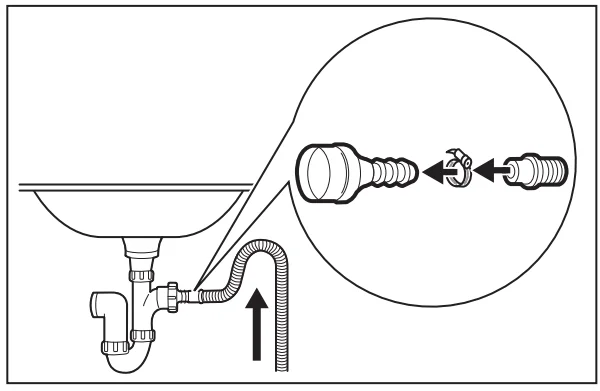 Make sure that the drain hose makes a loop to prevent particles from going into the appliance from the sink.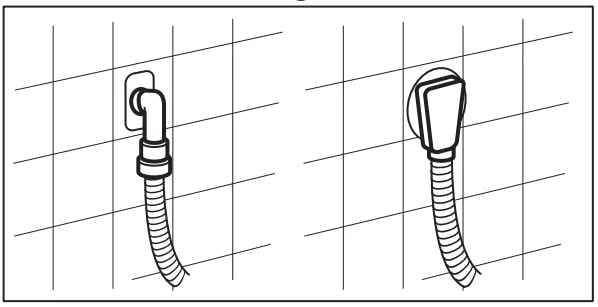
Installation on suspended flooring
Suspended wooden floors are particularly susceptible to vibration.
To limit vibration, we recommend placing a waterproof wooden panel, at least 15 mm thick, under the appliance. It should be screwed to at least 2 floor beams and should extend beyond the front feet.
If possible, install the appliance where the floor is more stable.
Product description
Appliance overview
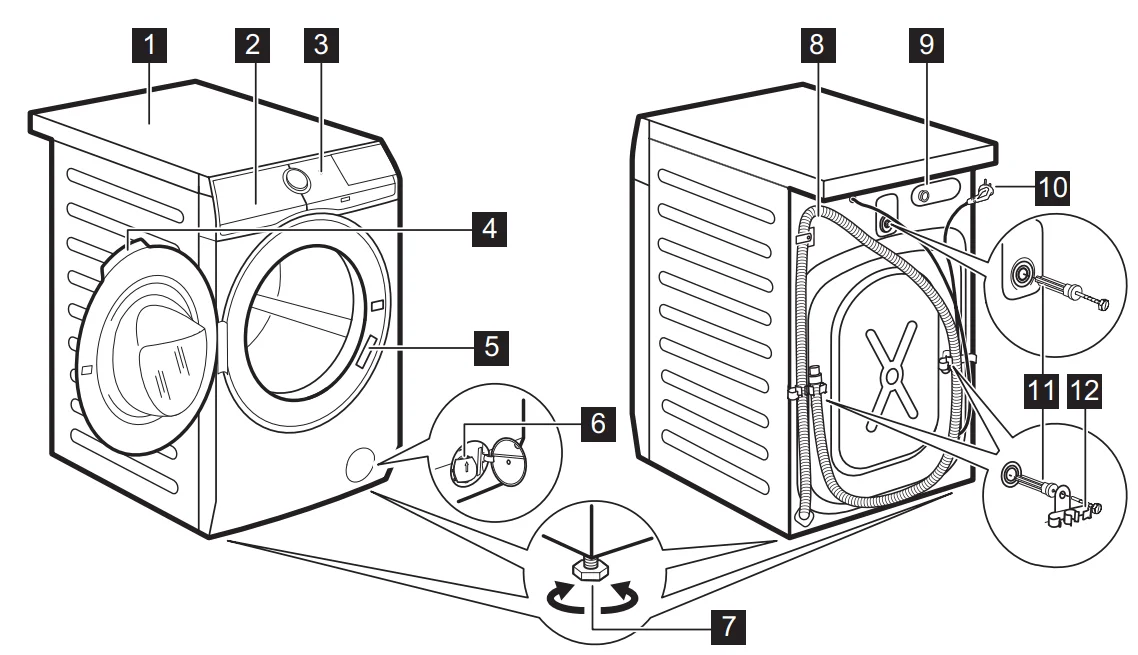
- Worktop
- Detergent dispenser
- Control panel
- Door handle
- Rating plate
- Drain pump filter
- Feet for levelling the appliance
- Drain hose
- Inlet hose connection
- Mains cable
- Transit bolts
- Hose support
Control panel
Control panel description
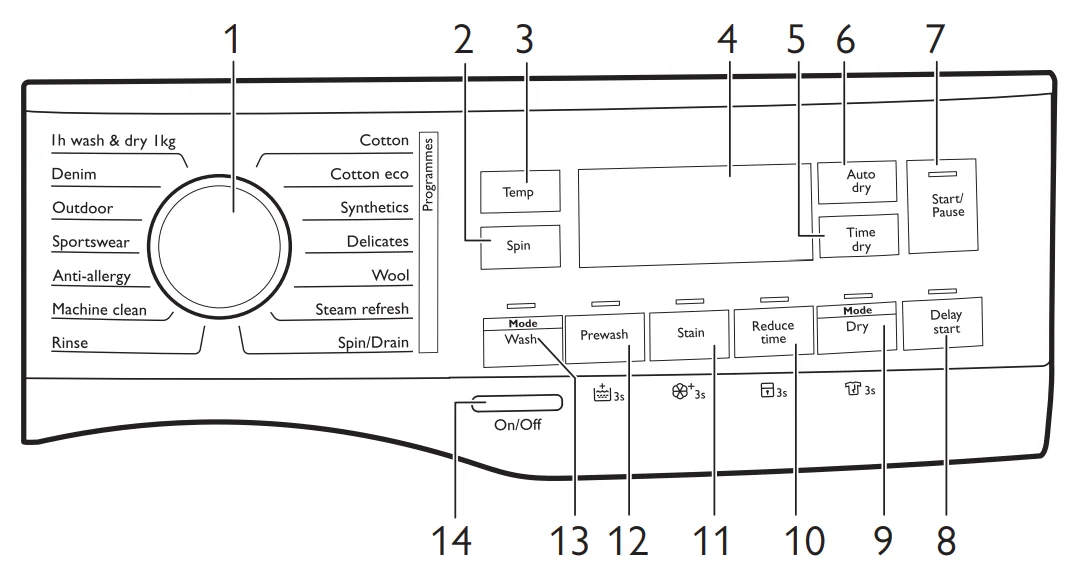
The permanent options are set by pressing the relative button for at least 3 seconds.
- Programme dial
- Spin touch button
- Temp touch button
- Display
- Time dry touch button
- Auto dry touch button
- Start/Pause touch button
- Delay start touch button
- Mode – Dry touch button and permanent Anti-crease option
 3s.
3s. - Reduce the time to touch the button and the permanent Child Lock option
 to 3s.
 - Stain touch button and permanent Soft Plus option
 3s.
3s. - Prewash touch button and permanent Extra Rinse option
 3s.
3s. - Mode – Wash touch button
- On/Off push button
Display
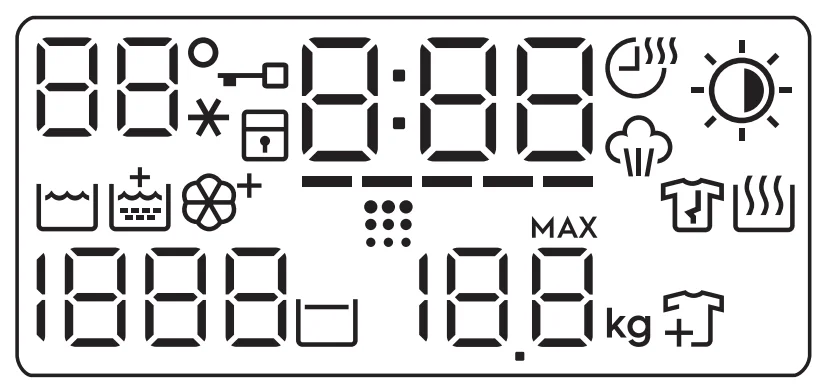
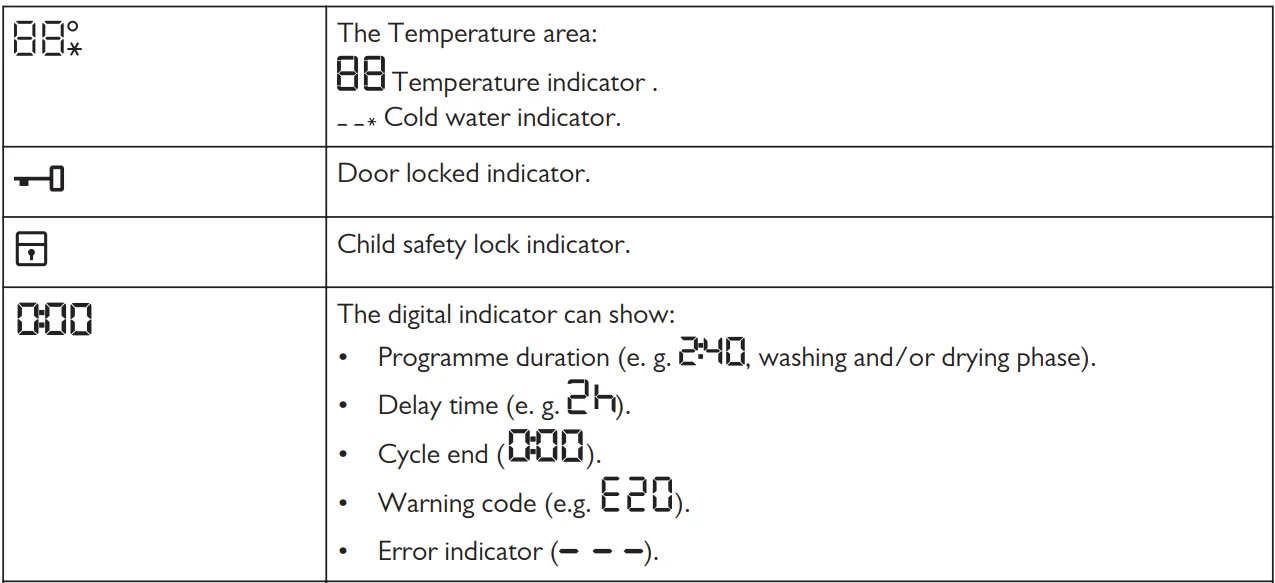
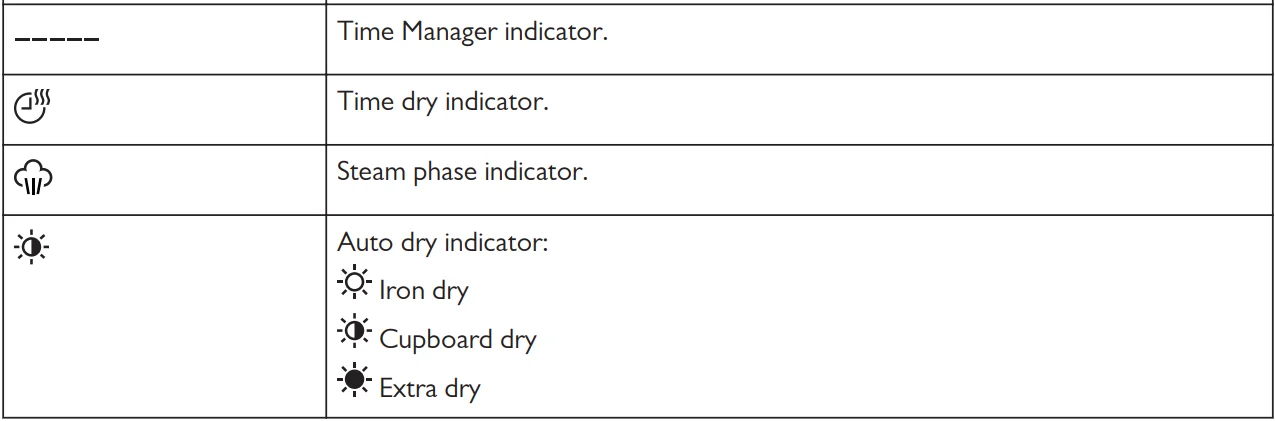
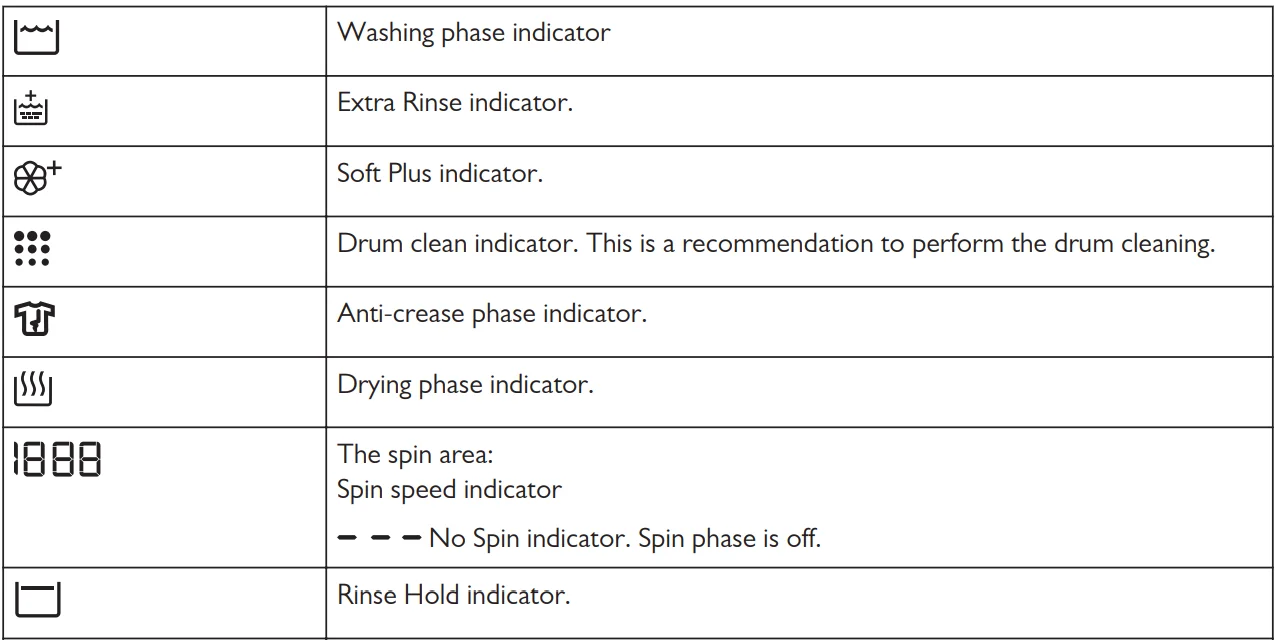
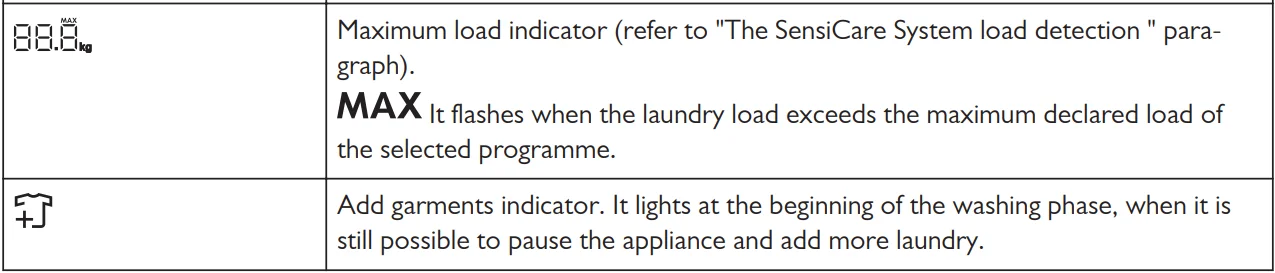
Dial and buttons
Introduction
The options/functions are not available with all washing programmes. Check the compatibility between options/ functions and washing programmes in the “Programme Chart”. An option/function can exclude another one; in this case, the appliance doesn’t allow you to set incompatible options/functions.
On/Off
Press this button for a few seconds to activate or deactivate the appliance. Two different tunes sound while switching the appliance on or off.
As the Stand-by function automatically deactivates the appliance after several minutes to reduce energy consumption, you may need to activate the appliance again.
For more details, refer to the Stand-by paragraph in the Daily Use chapter.
Temp
When you select a washing programme, the appliance automatically proposes a default temperature.
Touch this button repeatedly until the desired temperature value appears on the display.
When the display shows the indicators, the appliance does not heat the water.
Spin
When you set a programme, the appliance automatically sets the maximum spin speed allowed, except for programme Denim. With this option, u can decrease the default spin speed.
Touch this button repeatedly to:
- Decrease the spin speed. The display shows only the spin speeds available for the set programme.
- Additional spin options: No Spin – – –.
Set this option to deactivate all spin phases. The appliance performs the only draining phase of the selected washing programme. Set this option for very delicate fabrics. The rinsing phase uses more water for some washing programmes. - Activate the Rinse Hold
 option.
The final spin is not performed. The water of the last rinse is not drained out to prevent the fabrics from creasing. The washing programme ends with water in the drum.
The indicator remains displayed. The door stays locked and the drum turns regularly to reduce creasing. You must drain the water to unlock the door.
If you touch the Start/Pause button, the appliance performs the spinning phase and drains the water. The appliance empties the water automatically after approximately 18 hours.
 option.
Mode – Wash
This button allows you to activate or deactivate the washing mode. When the washing mode is activated, the button indicator is on.
Prewash
With this option, you can add a prewash phase to a washing programme.
The corresponding indicator above the touch button illuminates.
- Use this option to add a pre-wash phase at 30 °C before the washing phase.
This option is recommended for heavily soiled laundry, especially if containing sand, dust, mud and other solid particles.
The options can increase the programme duration.
Permanent Extra Rinse  3s
3s
With this option, you can permanently have an extra rinse when you set a new programme.
To activate/deactivate this option, hold the Prewash button pressed for 3 seconds until the indicator  comes on/goes off on the display.
When it is activated, the appliance will default to this option after you switch it off or change/ reset the programme.
This option increases the programme duration.
Stain
Touch this button to add the stain phase to a programme.
The corresponding indicator above the touch button illuminates.
Use this option for laundry with hard stains to remove.
When you set this option, put the stain remover into the compartment  .
.
This option increases the programme duration.
This option is not available with a temperature lower than 40 °C.
Permanent Soft Plus  3s
3s
Set this option to optimise the fabric softener distribution and improve fabric softness.
Recommended when you use fabric softener.
To activate/deactivate this option, hold the Stain button pressed for 3 seconds until  the indicator comes on/goes off on the display.
When it is activated, the appliance will default to this option after you switch it off or change/ reset the programme.
This option increases the programme duration.
Reduce time
With this option, you can reduce the programme duration depending on the load size and the degree of soiling.
When you set a washing programme, the display shows the default duration —- and dashes.
Touch the Reduce time button to reduce the programme duration according to your needs.
The display shows the new programme duration, and the number of dashes will decrease accordingly:
– – – – suitable for a full load of normally soiled garments.
– – – a quick cycle for a full load of lightly soiled garments.
– – very quick cycle for a smaller, lightly soiled load (max. half load recommended).
– the shortest cycle to freshen up a small amount of laundry.
The Time Manager is available only with the programmes in the table.
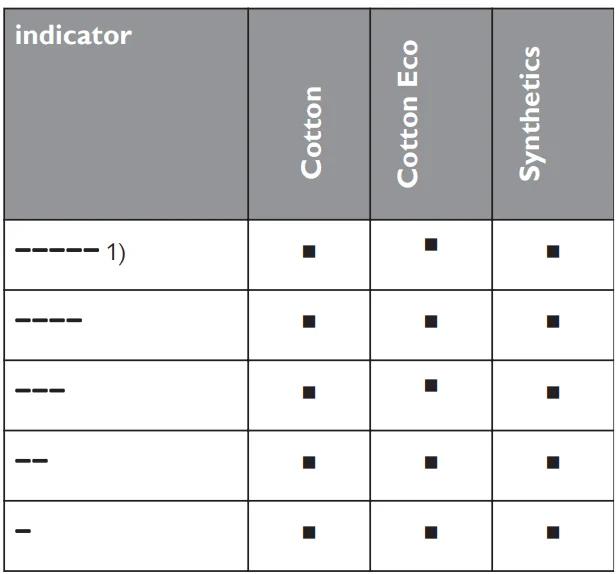
- Default duration for all programmes.
Reduce time with steam programs.. 

When setting a steam programme, this button allows you to choose three steam levels and the programme duration is reduced accordingly:
- – – -: maximum.
- – -: medium.
- -: minimum.
Child Lock  3s
3s
With thioptioio you can prevent children from playing with the control panel.
To activate/deactivate this option, hold the Reduce time button pressed until the indicator  comes on/goes off on the display.
When it is activated, the appliance will default to this option after you switch it off or change/ reset the programme. If you press any button, the indicator blinks to indicate that the buttons are disabled.
Mode – Dry
This buttbutton allows youactivate or deactivate the drying mode. When the drying mode is activated, the button indicator is on.
Permanent Anti-crease  3s
3s
This option adds a short anti-crease phase at the end of the programme.
This phase reduces fabric creasing and facilitates fabric ironing.
To activate/deactivate this option, hold the Mode – Dry button pressed for 3 seconds until the indicator  comes on/goes off on the display.
When it is activated, the appliance will default to this option after you switch it off or change/ reset the programme.
This option can increase the programme duration.
Time dry
Touch this button to set the time that suits the fabrics you have to dry (refer to the “Timed drying” table). The display shows the set value.
Each time you touch this button, the time value increases by 5 minutes.
You cannot set all time values for different types of fabrics.
Auto dry
Touch this button to set one of the automatic dryness levels proposed by the appliance.
On the display, the relevant dryness indicator goes on:
 Iron dry: laundry to be ironed.
 Cupboard dry: laundry to be put ithe n the store.
 Extra dry: laundry to be fully dried.
 Iron dry: laundry to be ironed.
 Cupboard dry: laundry to be put ithe n the store.
 Extra dry: laundry to be fully dried.
 You can not set all automatic levels for each type of fabric
Delay start
With this option y,,o you can delay the start of a programme to a more convenient time.
Touch the button repeatedly to set the required delay. The time increases in steps of 1 hour up to 20 hours.
The corresponding indicator above the touch button illuminates.
The display shows the selected delay time. After touching the Start/Pause button, the appliance begins the countdown and the door is locked.
Start/Pause
Touch the Start/Pause button to start, pause the appliance or interrupt a running programme.
Troubleshooting
Warning: Refer to the Safety chapters.
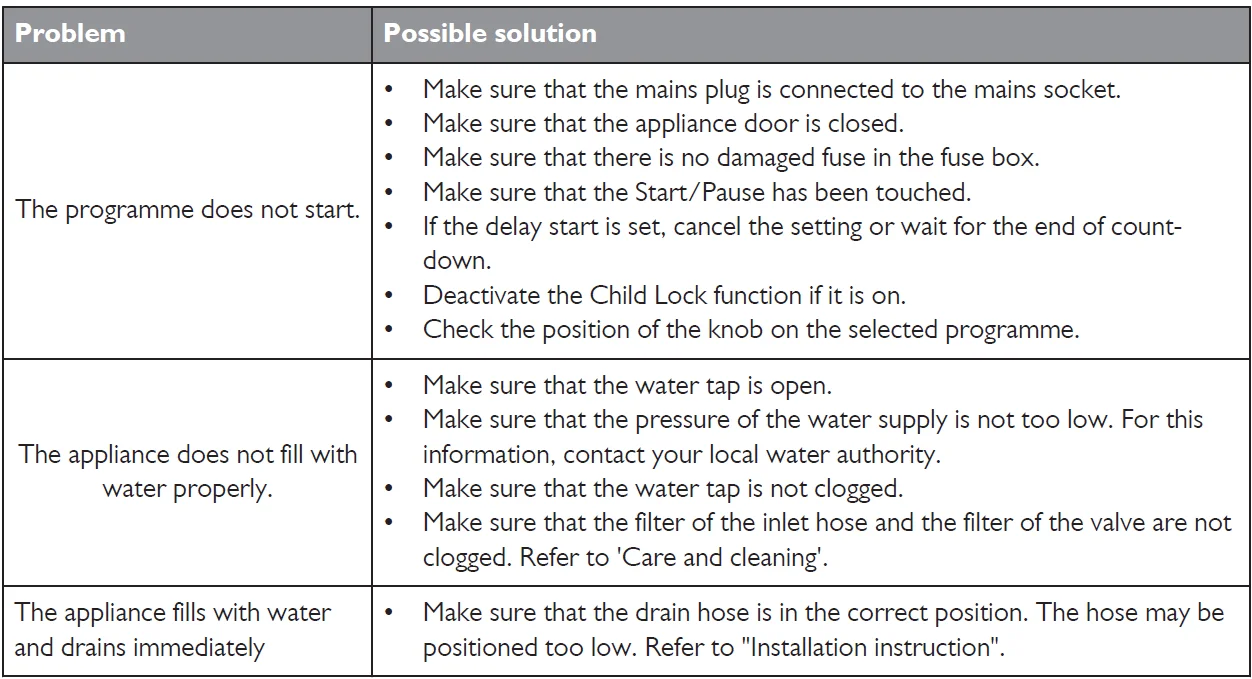
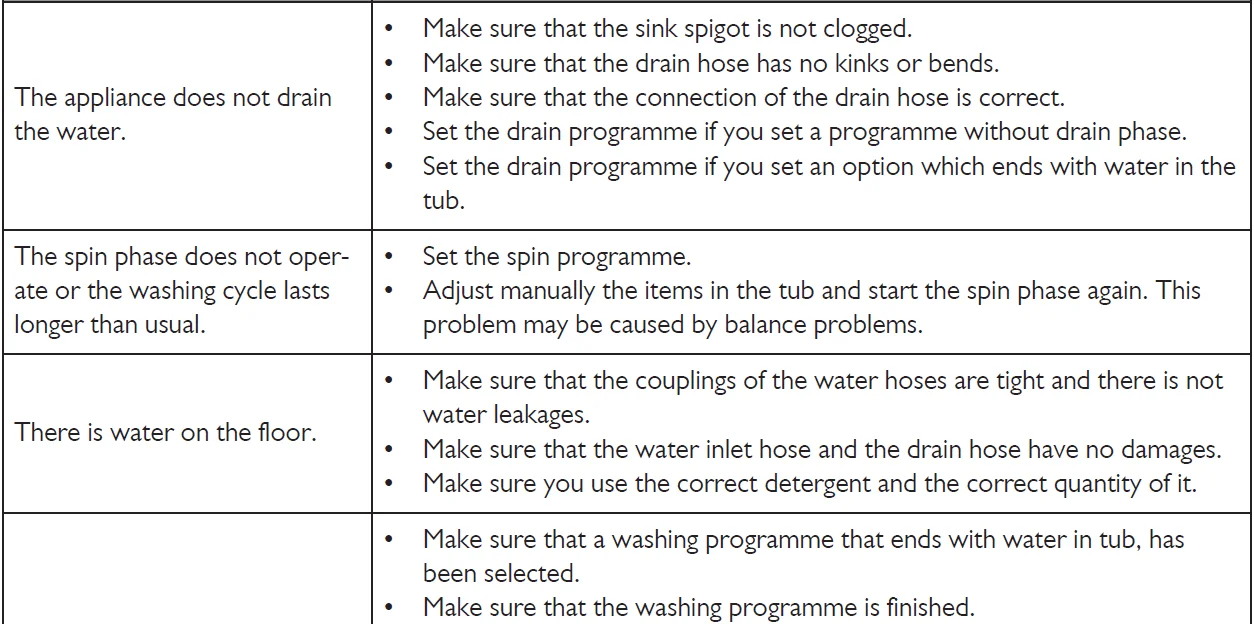
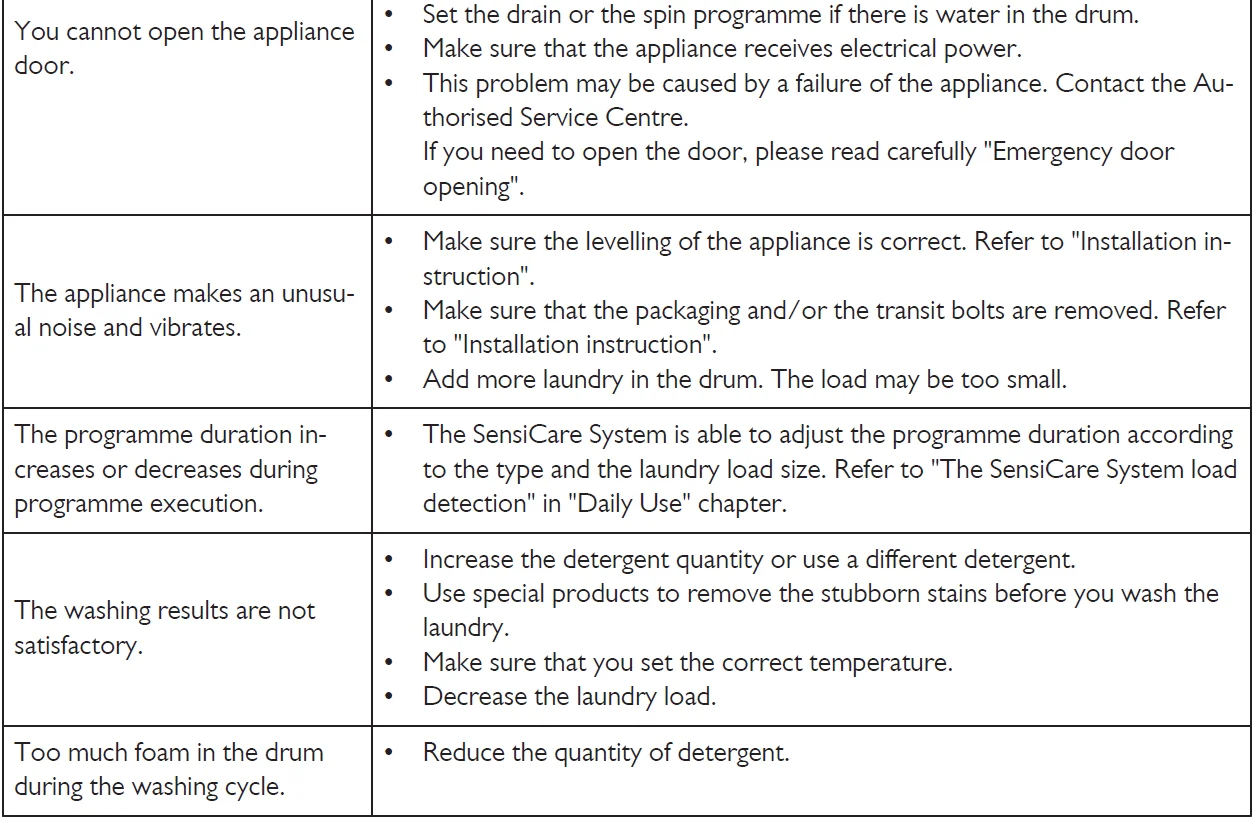
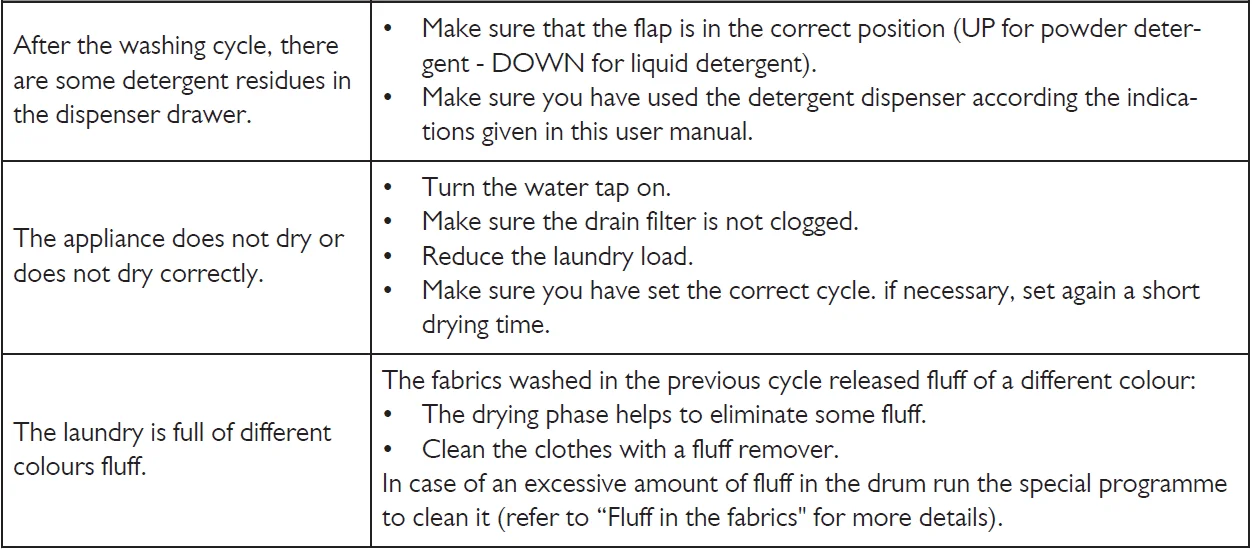
After the check, activate the appliance. The programme continues from the point of interruption.
If the problem occurs again, contact the Authorised Service Centre.
If the display shows other alarm codes, deactivate and activate the appliance. If the problem continues, contact the Authorised Service Centre.
For more manuals by John Lewis, visit ManualsLibraryy
John Lewis JLWD1614 Freestanding Washer Dryer- FAQs
What type of detergent should I use?
Use only High-Efficiency (HE) detergent to prevent excess suds and ensure effective washing performance.
Do I need a special plug or socket for my washer dryer?
No, it works with a standard 220–240V outlet. Avoid using extension cords or adapters.
Can I use dryer sheets in my washer dryer?
Yes. Add dryer sheets after the wash cycle ends and before starting the drying program.
Can I clean my washer dryer with vinegar and baking soda?
Yes, but separately. Run one cycle with white vinegar and another with baking soda to remove odors and residue. Avoid mixing them together.
Why does my washer dryer take 3 hours or more to finish a cycle?
Combined wash-and-dry programs are long because they perform both steps continuously. Use short wash or dry-only programs for faster results.
Do washer dryers use a lot of electricity?
Yes, especially during drying. Use Eco modes and air-dry lighter loads to save energy.
Should I leave the washer dryer door open after use?
Yes. It helps prevent mould, mildew, and bad odors.
Which drying setting is best for towels?
Use Cotton or Extra Dry program with high heat for thick materials.
How do I remove black mould from the rubber seal?
Clean with mild bleach or washer cleaner, and keep the door open after use to prevent moisture buildup.