
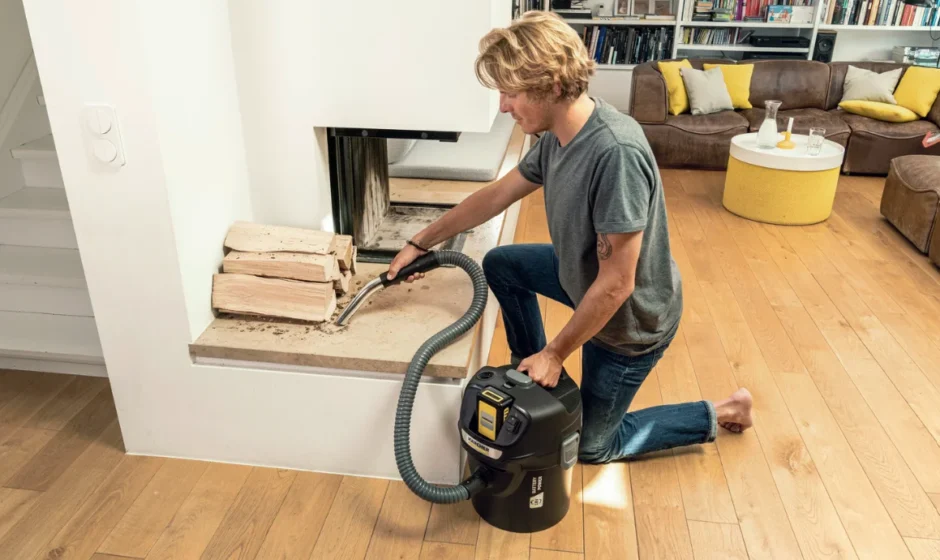

Karcher AD 2 Battery
Safety instructions
Read this safety chapter and these original instructions before using the device for the first time. Act in accordance with them. Keep the original instructions for future reference or for future owners.
- In addition to the notes in the operating instructions, you also need to take into consideration the general safety regulations and accident prevention guidelines applicable by law.
- Warnings and information notices attached to the device provide important information for hazard-free operation.
Hazard levels
DANGER
- Indication of an imminent threat of danger that will lead to severe injuries or even death.
WARNING
- Indication of a potentially dangerous situation that may lead to severe injuries or even death.
CAUTION
- Indication of a potentially dangerous situation that may lead to minor injuries.
ATTENTION
- Indication of a potentially dangerous situation that may lead to damage to property.
General safety instructions
DANGER
- Risk of asphyxiation. Keep packaging film out of the reach of children.
WARNING
- Only use the device for its proper use. Take into account the local conditions and beware of third parties, in particular children, when working with the device.
- Persons with reduced physical, sensory, or mental capabilities and persons lacking experience and knowledge may only use the appliance if they are properly supervised, have been instructed on use of the appliance by a person responsible for their safety, and understand the resultant hazards involved.
- Only people who have been instructed on how to use the device, or have proven their ability to operate it, and have been explicitly instructed to use it, must use the device.
- Children must not operate the device.
- Children from the minimum age of 8 may use the appliance if they are properly supervised or have been instructed in its use by a person responsible for their safety, and if they have understood the resultant hazards involved.
- Children must be supervised to prevent them from playing with the appliance.
- Children may only perform cleaning work and user maintenance under supervision.
CAUTION
- Safety devices are provided for your own protection. Never modify or bypass safety devices.
Operation
DANGER
- Operation in explosive atmospheres is prohibited.
- Risk of explosion
- Never use the device to vacuum up combustible gases, liquids or dusts.
- Never use the device to vacuum up reactive metal dusts (e.g. aluminium, magnesium, zinc).
- Never use the device to vacuum up undiluted brine or acids.
- Never use the device to vacuum up any burning or smouldering objects/matter. These substances can corrode the materials in use on the device.
WARNING
- Risk of injury. Do not use the nozzle and suction pipe at head height.
CAUTION
- Never leave the device unsupervised while it is in operation.
- Accidents or damage due to the device falling over. Before all actions with or on the device, you must make sure that it is stable.
ATTENTION
- Protect the device from extreme weather conditions, moisture and heat.
- Never use the device without a filter; this can lead to device damage.
Risk of fire
WARNING
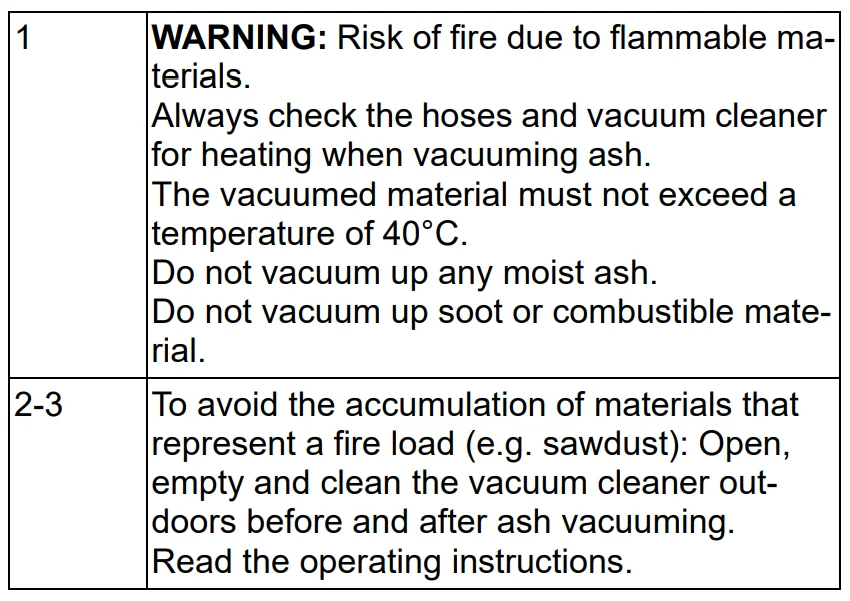
- Do not vacuum glowing or burning ashes. Only vacuum cold ashes.
- Clean and empty the dust container before and after each use.
- Do not use paper dust bags or bags made of similarly inflammable materials.
- Do not use commercially available vacuum cleaners to vacuum ash.
- Do not store the device on combustible or polymeric surfaces such as carpet or vinyl tiles.
- Only vacuum ash from permitted fuels (e.g. natural firewood, wood briquettes/wood pellets, brown and hard coal).
- Do not vacuum soot.
- Vacuumed material that looks cool from the outside can still be hot inside. Hot ash particles can ignite again in the air flow.
- Use a metallic object to churn the ash to test if the ash is still hot.
- Make sure the oven is cold before vacuuming it.
- Wait until the ashes have completely cooled before you start cleaning. We advise against extinguishing the fire quickly with water. The chimney material cannot tolerate the sudden temperature differences and cracks can occur.
- Continuously check the suction hose and device for heating when vacuuming ash. As soon as you notice warming, switch off the device immediately and remove the suction material from the ash vacuum cleaner. Let the device cool down under supervision.
- Do not vacuum up hot, burning or glowing objects above 40°C. There is a risk of fire at temperatures above 40°C.
Care and service
Note
- Switch off the device and remove the battery pack before performing any care and service work.
CAUTION
- Have repair work and work on electrical components carried out by the authorised customer service only.
WARNING
- The appliance contains electrical components – do not clean the appliance under running water.
ATTENTION
- Do not use scouring agents, glass or multi-purpose cleaners for cleaning.
- Remove the battery pack from the device before a long period of inactivity.
- Remove a used battery pack from the device and dispose of it properly.
Transport
CAUTION
- In order to prevent accidents or injuries, you must observe the weight of the device when transporting it.
Intended use
Only use the device in private households. The device is intended for use as an ash/dry vacuum cleaner in accordance with the descriptions and the safety information in these operating instructions.
The device is suitable for picking up:
- cold ashes from fireplaces, chimneys, ovens, ashtrays and similar places where ashes accumulate.
Note: The manufacturer accepts no liability for possible damage caused by improper use or incorrect operation.
Environmental protection
 The packing materials can be recycled. Please dispose of packaging in accordance with the environmental regulations.
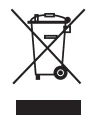 Electrical and electronic appliances contain valuable, recyclable materials and often components such as batteries, rechargeable batteries or oil, which – if handled or disposed of incorrectly – can pose a potential threat to human health and the environment. However, these components are required for the correct operation of the appliance. Appliances marked by this symbol are not allowed to be disposed of together with the household rubbish. Notes on the content materials (REACH) Current information on content materials can be found at: www.kaercher.com/REACH
Customer Service department
Our local KÄRCHER branch will be happy to help you if you have any questions or problems with the device.
Accessories and spare parts
Only use original accessories and original spare parts. They ensure that the appliance will run fault-free and safely. Information on accessories and spare parts can be found at www.kaercher.com.
Warranty
The warranty conditions issued by our relevant sales company apply in all countries. We shall remedy possible malfunctions on your appliance within the warranty period, free of cost, provided that a material or manufacturing defect is the cause. In a warranty case, please contact your dealer (with the purchase receipt) or the next authorised customer service site. (See overleaf for the address)
Scope of delivery
The scope of delivery for the appliance is shown on the packaging. Check the contents for completeness when unpacking. If any accessories are missing or in the event of any shipping damage, please notify your dealer.
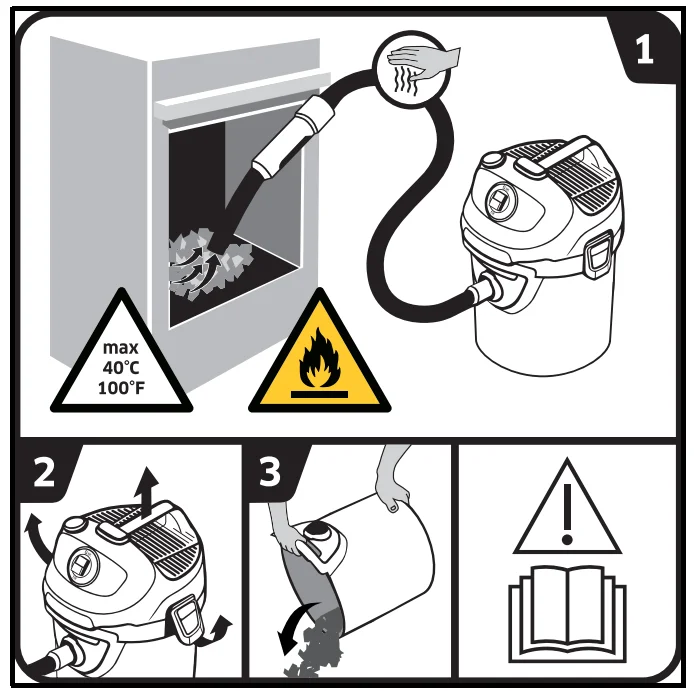
Symbols on the device
Description of the device
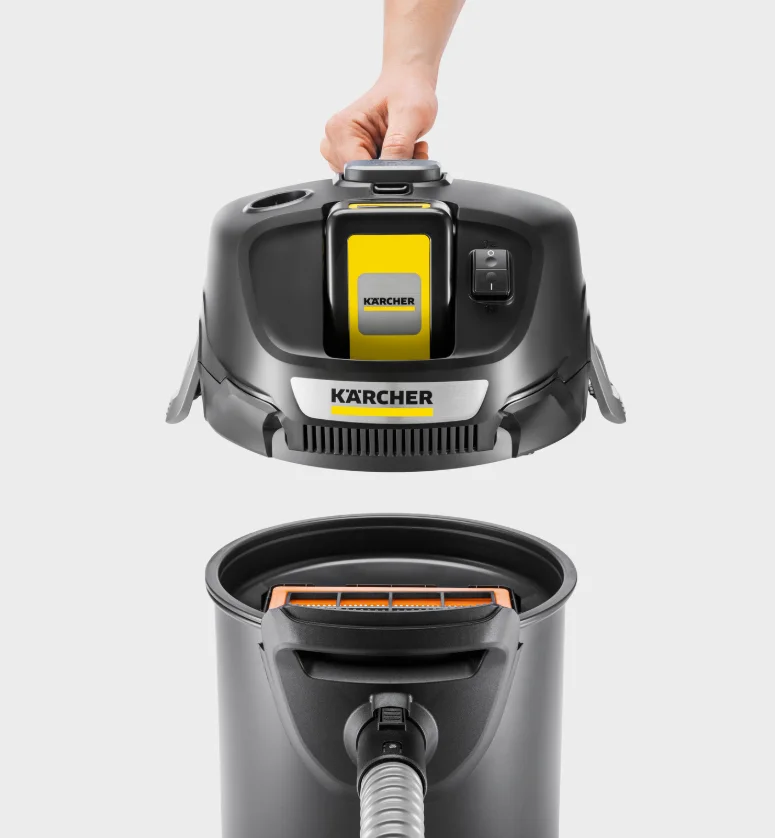
The maximum amount of equipment is described in these operating instructions. Depending on the model used, there are differences in the scope of delivery (see packaging). For the illustrations, refer to the graphics page. Illustration A
- Suction hose connection
- Handle
- Battery pack mounting
- Trigger (On/Off)
- Battery pack unlocking button
- Filter cleaning system connection
- Filter cleaning button
- Carrying handle
- Exhaust air grille
- Container latch
- Container
- Flat fold filter with frame (already fitted in the device)
- Filter basket
- Suction hose with handle
- *Rechargeable battery pack
- *Charger
* optional
Initial startup
Note on the flat fold filter
ATTENTION
Property damage due to the flat fold filter and frame not being used. If the flat fold filter and frame are not used, there is a danger that the ash particles will damage the device. Always fit the flat fold filter and the associated frame in the device during use.
Charging the battery pack
Note: Observe the operating instructions for the battery pack.
Note: The battery pack and charger are in the device packaging of the AD 2 Battery Set variant.
Illustration B
Illustration C
Illustration D
Inserting the battery pack
ATTENTION: Only use battery packs from the KÄRCHER Battery Power (+) platform with 18 V nominal voltage.
- Push the battery pack into the battery pack mounting from above until the battery pack latches into place.
Illustration E
Connecting accessories
WARNING
- Risk of fire due to vacuumed material or dust collection bags
Vacuumed material, such as e.g. sawdust, paper elements and dust bags can catch fire when mixed with hot ash particles. Check that the device has been emptied and cleaned after the last vacuum. Do not use dust collection bags.
- Press the suction hose into the suction hose connection on the device until it latches into place.
Illustration F - To remove, press the latch and pull the suction hose out.
Switching on the device
- Position I: Press to switch the device on.
- Position 0: Press to switch the device off.
Illustration G
Operation
Integrated filter cleaning system
Note: The filter cleaning system is intended for intermediate cleaning when vacuuming large amounts of ash. The filter cleaning system allows the dirty flat fold filter to be cleaned at the push of a button, which increases the suction performance again.
Note: After pressing the filter cleaning button several times, check the container for its filling volume. Otherwise, dirt can escape when the container is opened.
- Insert the handle of the suction hose into the filter cleaning system connection on the device.
- Press and hold the filter cleaning button for 2 seconds, while waiting 4 seconds between the individual operations.
Illustration H
Interrupting operation
Note: If it is necessary to remove the suction head when work is interrupted, the battery pack may become stuck. The battery pack is locked in tightly and cannot fall out.
- Position 0 Press to switch the device off.
Illustration G - Insert the handle of the suction hose into the filter cleaning system connection on the device.
Illustration H
Ending operation
- Position 0 Press to switch the device off.
Illustration G - Push the battery pack unlocking button forward and pull the battery pack upwards out of the battery pack mounting.
Illustration I - Charge the battery pack if necessary, see chapter Charging the battery pack.
Illustration C
Emptying the container
- Remove the device head.
- Remove the filter basket.
Illustration J - Empty the container.
Illustration K
Note: If necessary, clean the flat fold filter, see chapter Cleaning the flat fold filter.
Storing the device
- Insert the handle of the suction hose into the filter cleaning system connection on the device.
Illustration H
or
Wrap the suction hose around the device. - Store the device in a dry room.
Transport
CAUTION
- Failure to observe the weight
- Risk of injury and damage
- Be aware of the weight of the device during transport and storage.
- When transporting in vehicles, secure the device against slipping and tipping over according to the applicable guidelines.
Manual transport
- Lift and carry the device by the carrying handle.
Transport in vehicles
- Secure the device against slipping and tipping over.
Care and service
Cleaning the flat fold filter
Note: The flat fold filter is located in the filter basket.
- Remove the device head.
Illustration L - Remove the frame and filter.
Illustration M - Knock the dirt out of the filter and clean under running water if necessary. Do not rub or brush off.
Illustration N - Allow the filter to dry completely before installation.
Illustration O - Then reinsert the filter and then the frame.
- Fit and lock the device head.
Illustration P
Troubleshooting guide
Malfunctions often have simple causes that you can remedy yourself using the following overview. When in doubt, or in the case of malfunctions not mentioned here, please contact your authorised Customer Service.
Malfunctions
Device not running
The battery pack is not correctly seated in the battery pack mounting.
- Push the battery pack into the battery pack mounting until it latches into place.
Note: If necessary, remove the battery pack again and reinsert it until it latches into place.
The charging state of the battery pack (see display) is too low.
- Charge the battery pack.
Defective battery pack or charger.
- Replace the battery pack or charger.
The suction power decreases
Note: The amount that can be vacuumed can vary depending on the vacuumed material.
Accessories (e.g. suction hose) are blocked.
- Remove the blockage with a suitable aid.
The flat fold filter is dirty.
- Clean the filter.
- Knock the dirt out of the flat fold filter and clean it under running water.
If necessary, replace the flat fold filter.
Technical data
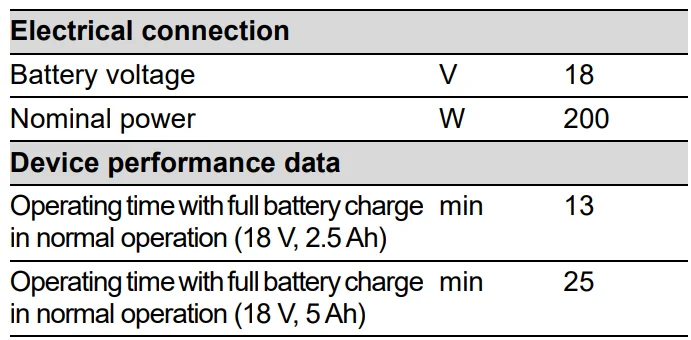
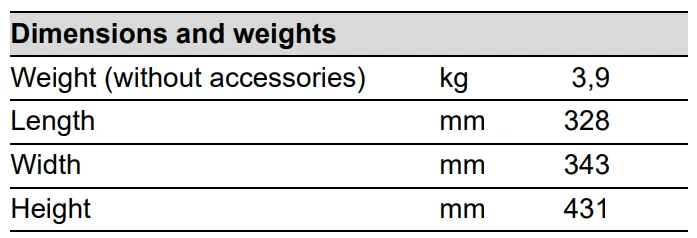
Subject to technical modifications.
For more manuals by Karcher, visit ManualsLibraryy
Karcher AD 2 Battery-FAQs
What batteries are compatible with Karcher AD 2?
The Karcher AD 2 uses 18 V batteries, which are compatible with all Karcher 18 V Home & Garden or Professional devices.
How long does the Karcher AD 2 battery last?
A full charge allows up to 35 minutes of continuous use, which typically covers an area of around 105 m².
How long does it take to charge the battery?
Using the original Karcher charger, the 2.5 Ah battery charges to 80% in about 44 minutes, while a 5.0 Ah battery takes around 90 minutes.
What type of battery does the AD 2 use?
It uses a removable lithium-ion battery, known for long life and efficient power delivery.
Can I replace the battery on the Karcher AD 2?
Yes, the battery is removable and replaceable, making it easy to swap if it loses capacity or becomes damaged.
How can I revive a dead battery?
If the battery is drained or in storage mode, charge it overnight (12–16 hours) using the original charger to restore functionality.
Can the AD 2 battery be overcharged?
No, the battery and charger are designed to prevent overcharging, ensuring safety and longevity.
What should I do if the battery is not starting?
Check that it is fully charged, properly inserted, and that the contacts are clean. If the battery still doesn’t work, it may need replacement.
How do I know if a Karcher battery is bad?
Signs of a failing battery include rapid power loss, the device not starting, or inconsistent suction. Testing with another battery can confirm the issue.
How long do Karcher batteries last?
With normal use, a lithium-ion Karcher battery typically lasts 2–3 years, depending on usage and maintenance.