
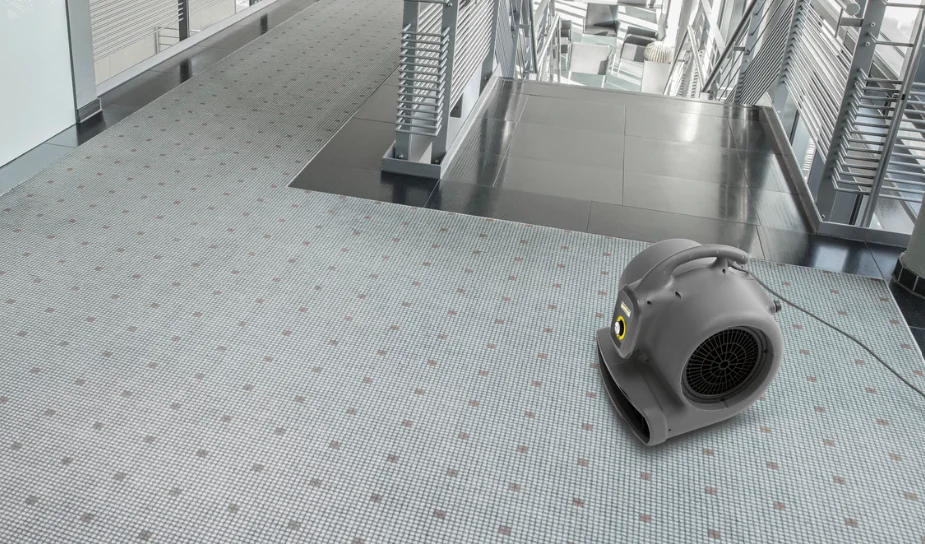

Karcher Air Blower AB20Ec
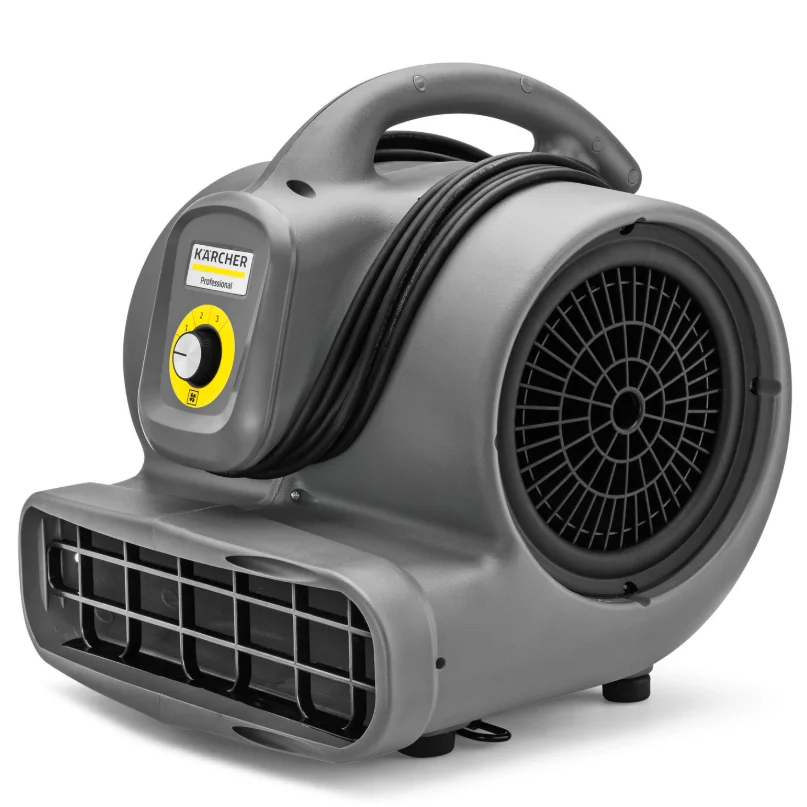
General notes
Read the original operating manual before using the device for the first time and act in accordance with it. Keep the original operating manual for future reference or for future owners.
- If the operating manual and safety instructions are not observed, the device can be damaged, and dangers could arise for users and other persons.
- Notify the dealer immediately in the case of shipping damage.
- Check the package contents when unpacking for missing accessories or for damage.
Intended use
- This blower is intended for drying floors, walls, and ceilings, and wet-cleaned rugs /carpets.
- This device is exclusively suitable for commercial use.
Any other use is considered improper use. The manufacturer is not responsible for any resultant damage. The risk is borne by the user alone.
Environmental protection

The packing materials can be recycled. Please dispose of packaging in accordance with the environmental regulations.
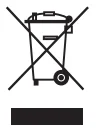
Electrical and electronic appliances contain valuable, recyclable materials and often components such as batteries, rechargeable batteries or oil, which – if handled or disposed of incorrectly – can pose a potential threat to human health and the environment. However, these components are required for the correct operation of the appliance. Appliances marked by this symbol are not allowed to be disposed of together with the household rubbish. Notes on the content materials (REACH) Current information on content materials can be found at: www.kaercher.com/REACH
Accessories and spare parts
Only use original accessories and original spare parts. They ensure that the appliance will run fault-free and safely. Information on accessories and spare parts can be found at www.kaercher.com.
Symbols on the device
Hazard levels
- DANGER: Indication of an imminent threat of danger that will lead to severe injuries or even death.
- WARNING: Indication of a potentially dangerous situation that may lead to severe injuries or even death.
- CAUTION: Indication of a potentially dangerous situation that may lead to minor injuries.
- ATTENTION: Indication of a potentially dangerous situation that may lead to damage to property.
Safety instructions
DANGER
- Never touch the mains. Plug the device into a wall outlet with wet hands.
- Check the mains cable regularly for damage, such as cracks forming or signs of ageing. Replace the mains cable if it is damaged before continued use.
- No changes may be made to the device.
WARNING
- Only use the device for its proper use. Take into account the local conditions and beware of third parties, in particular children, when working with the device.
- Only people who have been instructed on how to use the device, or have proven their ability to operate it, and have been explicitly instructed to use it, must use the device.
- The device is not intended for use by persons with restricted physical, sensory or mental abilities or those lacking in experience and/or lacking in knowledge.
- Children must be supervised to prevent them from playing with the appliance.
- Children must not operate the device.
CAUTION
- Never leave the device unattended when it is not switched off and with the mains plug still connected.
- Check the device with the equipment before each use to make sure it is safe and working correctly. Only use the device when it is in a correct condition.
- Only have repairs and installation of spare parts performed by the approved Customer Service in order to prevent any hazards.
ATTENTION
- The device must not be operated or left outdoors.
Description of the unit
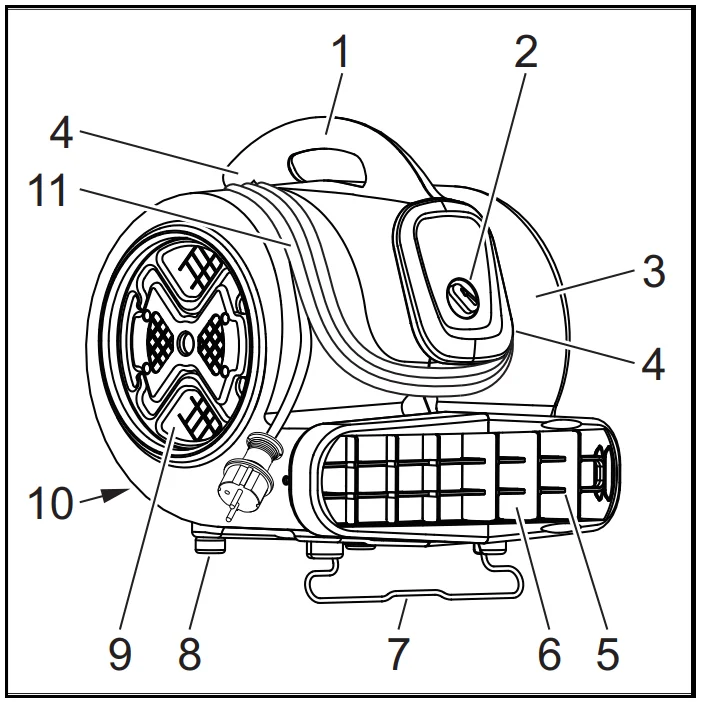
- Carrying handle
- Power switch
- Device housing
- Cable storage
- Fan grille at the air exit grid
- Air exit
- Folding leg
- Rubber foot
- Air inlet
- Type plate
- Mains cable
Operation
DANGER: Turbulence of gases and dusts. Risk of fire and explosion. Do not operate the device near combustible gases and explosive dusts.
DANGER: Poisoning by exhaust gas. Sucked-in exhaust gas contaminates the environment. Do not operate the device near open flames. Prevent exhaust emissions near the air inlet.
WARNING: Injuries due to strong suction. The device creates strong suction at the air inlet, meaning that objects, items of clothing or hair could be sucked in. Keep a safe distance from the air inlet.
WARNING: Injuries due to strong air streaming. The device creates a strong air stream at the air exit, meaning that sucked-in objects could be ejected at high speed. Keep a safe distance from the air exit.
Note: Take suitable measures to avoid the device moving around on smooth floors.
Note: When setting up the device, ensure that the fan grilles are not blocked.
- Open doors and windows as wide as possible to improve ventilation.
Set up and align the device

- Set up and align the device stably on level ground.
- Fold out the folding leg if needed.
Power switch
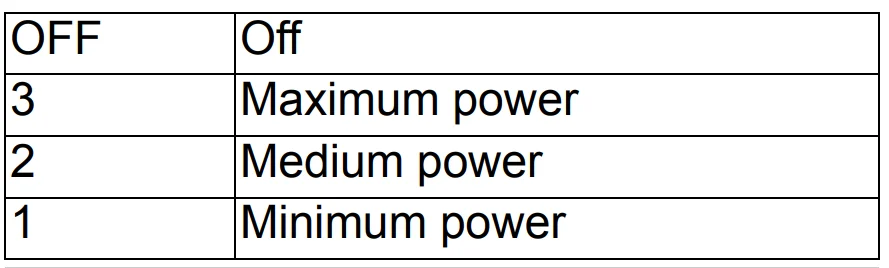
Switching on the device
- Connect the mains plug.
- Switch on the device.
Drying
- Carry out drying.
Switching off the device
- Switch off the device.
- Pull out the mains plug.
Transport
CAUTION
Failure to observe the weight
Risk of injury and damage. Be aware of the weight of the device during transportation.
- Wind the mains cable around the cable storage.
- Carry the device by the carrying handle.
- When transporting the device in vehicles, secure it to prevent it from slipping or overturning in accordance with the respective valid guidelines.
Storage
CAUTION
Failure to observe the weight
Risk of injury and damage. Be aware of the weight of the device during storage. The device may only be operated indoors.
Care and service
DANGER
Danger of electric shock
Injuries due to touching live parts. Switch off the device. Remove the mains plug.
CAUTION
The device continues to run after switch-off. Risk of injury from the blower continuing to run. Wait until the blower has come to a complete standstill before performing maintenance or repair work.
- Check the fan grilles daily for soiling and clean if necessary.
- Regularly clean the device surface with a moist cloth.
Troubleshooting guide
DANGER
Danger of electric shock. Injuries due to touching live parts. Switch off the device. Remove the mains plug.
CAUTION
The device continues to run after switch-off. Risk of injury from the blower continuing to run. Wait until the blower has come to a complete. standstill before performing maintenance or repair work. The blower does not run
- Check the socket and the power supply fuse.
- Check the mains cable and the mains plug of the device.
- Switch on the device.
Customer Service department
If the malfunction cannot be corrected, the device must be checked by the Customer Service department.
Warranty
The warranty conditions issued by our relevant sales company apply in all countries. We shall remedy possible malfunctions on your appliance within the warranty period, free of cost, provided that a material or
manufacturing defect is the cause. In a warranty case, please contact your dealer (with the purchase receipt) or the next authorised customer service site. (See overleaf for the address)
Technical data
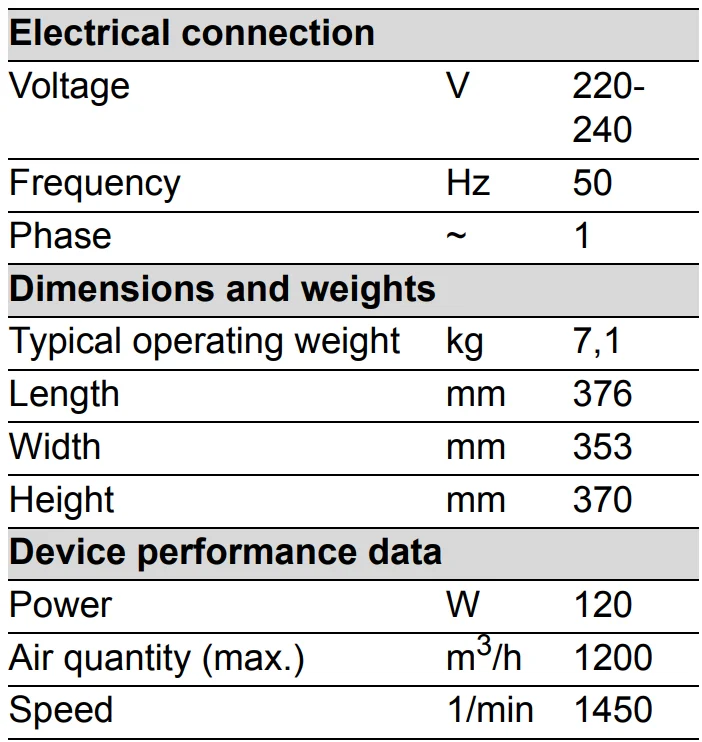
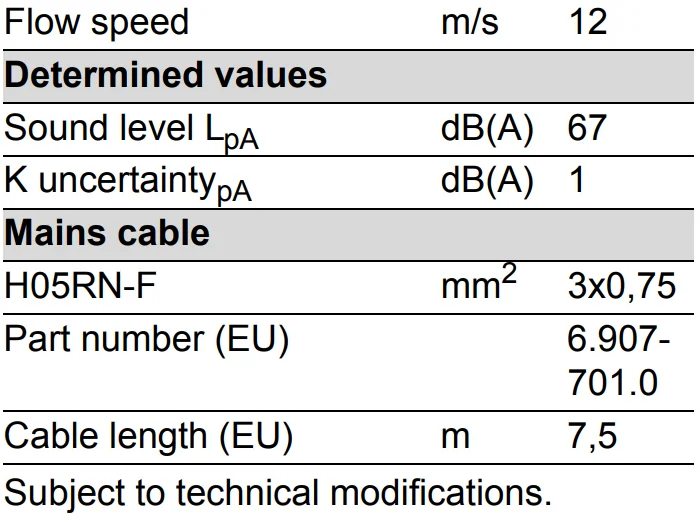
EU Declaration of Conformity
We hereby declare that the machine described below complies with the relevant basic safety and health requirements in the EU Directives, both in its basic design and construction as well as in the version placed in circulation by us. This declaration is invalidated by any changes made to the machine that are not approved by us.
- Product: Air Blower
- Type: AB 20 Ec
- Currently applicable EU Directives
- 2006/42/EC
- 2014/30/EU
- Harmonised standards used
- EN 55014–1: 2006+A1: 2009+A2: 2011
- EN 55014-2: 2015
- EN 60335–1
- EN 60335-2-80
- EN 61000–3–2: 2014
- EN 61000–3-3: 2013
- EN 62233: 2008
- EN ISO 12100: 2010
- National standards used
The signatories act on behalf of and with the authority of the company management.
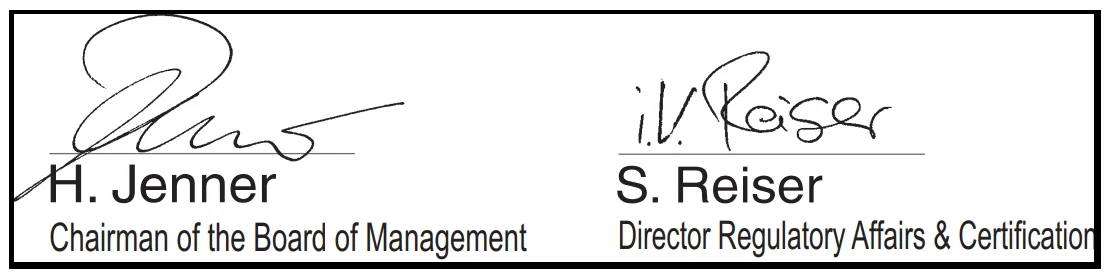
Documentation supervisor: S. Reiser
- Alfred Kärcher SE & Co. KG
- Alfred-Kärcher-Str. 28 – 40
- 71364 Winnenden (Germany)
- Ph.: +49 7195 14-0
- Fax: +49 7195 14-2212
- Winnenden, 2018/08/01
For more manuals by Karcher, visit ManualsLibraryy
Karcher Air Blower AB20Ec-FAQs
How does the Karcher Air Blower AB20Ec work?
The blower uses a rotating impeller to create suction. Air is pulled into the center of the unit and pushed outward by centrifugal force, producing a strong, steady airflow for cleaning and drying tasks.
How do I start the air blower?
Ensure the unit is properly connected to power, switch it on using the main control button, and allow it to reach operating speed before directing airflow toward the surface.
Why is my air blower not working?
Common causes include electrical faults, blown fuses, loose wiring, overheating, or internal mechanical issues. Check the power supply and reset the unit if needed before seeking service support.
How can I check if the blower motor is functioning properly?
Disconnect the power and test the motor terminals with a multimeter. A reading close to zero indicates proper continuity, while no reading may signal a damaged winding.
Can I use the AB20Ec to clean an AC unit?
Yes, an air blower can remove dust from AC cooling fins and filters. Blow air gently without bending the fins to maintain cooling efficiency.
What is the difference between a fan and a blower?
A blower delivers higher pressure airflow in a focused direction, while a fan circulates air at lower pressure over a wider area.
How do I reset the blower motor?
Turn off the unit, locate the reset button (if available), press and hold it for a few seconds, then restore power.
What makes a blower more powerful?
Motor horsepower, impeller design, airflow rate (CFM), and air pressure output determine overall performance.
Can a blower motor be repaired?
Yes, minor electrical or bearing issues can often be repaired. However, severe winding damage may require motor replacement.