
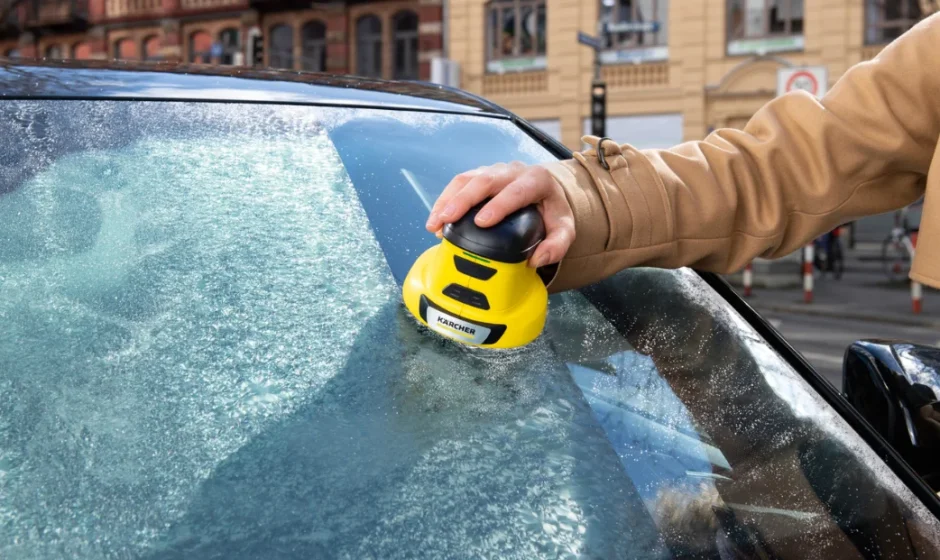

Karcher Electric Ice Scraper EDI 4
General notes
Read these original operating instructions and the safety instructions chapter before using the device for the first time. Act in accordance with them. Keep them safe for future reference or for future owners.
Safety instructions
Hazard levels
DANGER
- Indication of an imminent threat of danger that will lead to severe injuries or even death.
WARNING
- Indication of a potentially dangerous situation that may lead to severe injuries or even death.
CAUTION
- Indication of a potentially dangerous situation that may lead to minor injuries.
ATTENTION
- Indication of a potentially dangerous situation that may lead to damage to property.
Charger
DANGER
- Never touch the mains plug and socket with wet hands.
- Danger of explosion. Do not charge any non-rechargeable battery.
- Do not charge the battery pack in an explosion-hazard environment.
- Never insert conductive objects, e.g., screwdrivers or similar, into the charging socket on the appliance.
WARNING
- Only charge the appliance using the original charger enclosed or with a charger approved by KÄRCHER.
- Protect the power cable from heat, sharp edges, oil, and moving parts.
- Do not open the charger. Repairs are only to be carried out by qualified personnel.
- Only use the charger for charging approved battery packs.
- Immediately replace a damaged charger, together with the charging cable, with an original part.
- The appliance contains electrical components – do not clean the appliance under running water.
- You may not charge the battery pack for longer than 24 hours without interruption.
CAUTION
- Do not use the battery pack when dirty or wet.
- Keep the charger ventilation slits free of obstructions.
- Do not pull the mains plug out of the socket using the power supply cable.
- Do not carry/transport the device using the power supply cable.
ATTENTION
- Short circuit hazard. Protect the contacts of the battery pack from metal parts.
- Only use and store the charger in dry rooms.
Battery
DANGER
- Never insert conductive objects, e.g. screwdrivers or similar, into the charging socket on the appliance.
- Do not expose the battery to strong sunlight, heat or fire.
- Avoid contact with fluid leaking from defective batteries. Immediately rinse off the fluid using water if contact is made, and also consult a doctor in the event of contact with the eyes.
ATTENTION
- This device contains non-replaceable batteries.
Safe handling
WARNING
- The device is not intended for use by children, persons with restricted physical, sensory or mental abilities or persons unfamiliar with these instructions.
- Persons with reduced physical, sensory or mental capabilities and persons lacking experience and knowledge may only use the appliance if they are properly supervised, have been instructed on use of the appliance safely by a person responsible for their safety, and understand the resultant hazards involved.
- Children must not play with the appliance.
- Children must be supervised to prevent them from playing with the appliance.
- Only use the device for its proper use. Take into account the local conditions and beware of third parties, in particular children, when working with the device.
- Adhere to the respective safety regulations in hazard zones (e.g. service stations). Never operate the device in explosive spaces.
- Risk of injury. Avoid contact with the rotating scraper disc. Fit the protective cap when not using the device.
CAUTION
- Do not use the appliance if it has been dropped beforehand, is visibly damaged or if it is leaking.
- Only operate or store the device in accordance with the description or figure.
- Never leave the device unsupervised while it is in operation.
WARNING
- The appliance contains electrical components – do not clean the appliance under running water.
ATTENTION
- Operate the device only at temperatures from -20 °C to +40 °C.
- The device contains Li-ion batteries. Store the device only at temperatures from -20 °C to +40 °C.
- Protect the device from heat and cold. Do not store the device in a vehicle for longer periods of time.
- To avoid damage to the seal or paint, do not use the device at the edge of the windscreen.
Symbols on the device
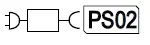
Charge the battery pack only using the original charger enclosed or with a charger approved by KÄRCHER.
Intended use
Use the ice scraper in private households only. The battery-operated device is intended for the removal of fog-frost deposits (hoar frost, hoar ice, clear ice) from automobile windscreens. Never use the device with the scraper disc for cleaning automobile paintwork. Any other use is prohibited. The user carries full liability for damage resulting from improper use.
Environmental protection
The packing materials can be recycled. Please dispose of packaging in accordance with the environmental regulations. Electrical and electronic appliances contain valuable, recyclable materials and often components such as batteries, rechargeable batteries or oil, which – if handled or disposed of incorrectly – can pose a potential threat to human health and the environment. However, these components are required for the correct operation of the appliance. Appliances marked by this symbol are not allowed to be disposed of together with the household rubbish. Notes on the content materials (REACH)
Current information on content materials can be found at: www.kaercher.com/REACH
Accessories and spare parts
Only use original accessories and original spare parts. They ensure that the appliance will run fault-free and safely. Information on accessories and spare parts can be found at www.kaercher.com.
Scope of delivery
The scope of delivery for the appliance is shown on the packaging. Check the contents for completeness when unpacking. If any accessories are missing or in the event of any shipping damage, please notify your dealer.
Device description
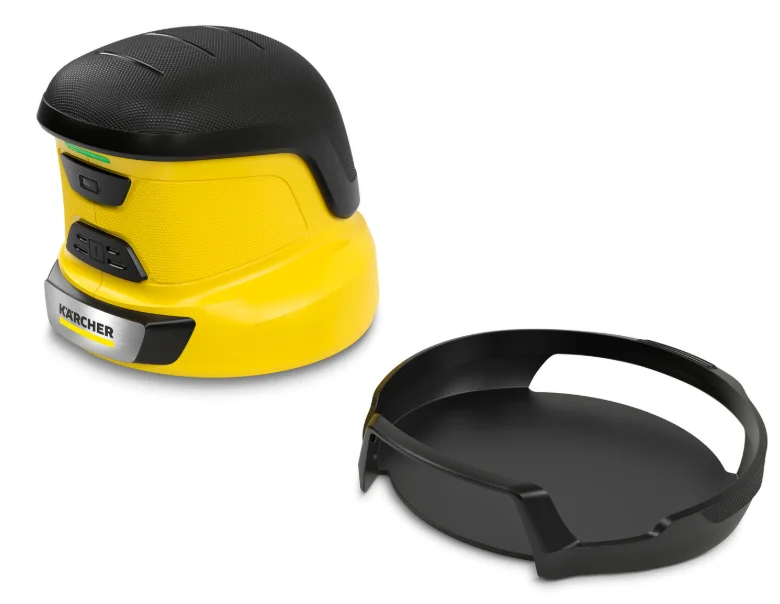
For the illustrations, refer to the graphics page, Illustration A
- Charger
- Power switch
- Charging socket
- Charge indicator
- Trigger switch
- Type plate
- Scraper disc
- Protective cap
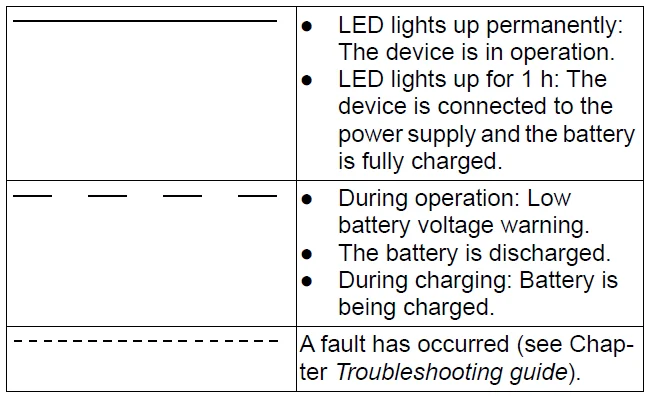
Blink codes
Initial startup
Battery charging
- Charge the battery. Illustration B
Note: The charge indicator flashes during the charging procedure. It lights up continuously for 1 hour when the battery is fully charged. For information on the charging time, see Chapter Technical data.
Operation
General information on handling the device
- Clean the device each time before use (see Chapter Cleaning the device).
- Regularly clear the car windows of dirt to remove dirt particles that could cause scratches. Notice that the greatest contamination is outside the wiping area of the windscreen wipers. That is why it is not enough to clean the car windows with the windscreen washer system alone. Illustration C
- When scraping ice on an uncleaned windshield, limit it to the wiping area of the windscreen washer system in order to avoid possible scratches due to dirt from the edge areas.
- Guide the device slowly over the surface while pressing lightly.
- At regions with thicker ice, leave the device at the same position until the ice breaks.
Note: Extra de-icing agents are not required.
Starting up the device
- Press the power switch. Illustration D
The device is switched on and is in standby mode. - Pull off the protective cap by pressing at the side. Illustration E
- Position the device on the windscreen. Take care to ensure adequate clearance to seals and paintwork. Illustration F
- Actuate the trigger switch. Illustration G
The scraper disc starts rotating.
Storage
ATTENTION
Improper storage
- Damage to the device and battery
- Do not store the device in a vehicle for longer periods of time.
- Switch off the device using the power switch.
- Clean the device (see Chapter Cleaning the device).
- Fit the protective cover.
- Store the device within the permissible temperature range (see Chapter Technical data).
- Charge the battery fully before storing the device for longer periods (e.g., during the summer months) (see Chapter Battery charging).
Care and service
The device is maintenance-free, i.e. you do not need to perform periodic maintenance work.
Cleaning the device
Clean dirt from the scraper disc each time before using the device to avoid scratches in the windscreen.
- Switch off the device using the trigger.
- Clean snow, ice and other dirt from the device.
- Carefully remove the dirt from the scraper disc, wiping the edges in their direction several times. Illustration H
Replacing the scraper disc
- If the device is used regularly, the scraper disc must be replaced at least after every winter period, even if there is no visible wear.
- Switch off the device using the trigger.
- Hold the device firmly in place with one hand.
- Pull the scraper disc off using your other hand. Illustration I
- Press the new scraper disc into the holder. Illustration J
Troubleshooting guide
DANGER
- Touching live parts
- Danger of injury from electric shock
- Switch off the device and unplug the charger from the device before performing any work on the device.
- Have repair work and work on electrical components carried out by the authorised customer service only.
- The charge indicator flashes quickly.
The charging pack/ambient temperature is too low or too high.
- Observe the permissible charging temperature ranges (see Chapter Technical data).
- Wait until the charge indicator no longer flashes or press and hold the trigger for 3 s. The scraper disc is blocked.
- Wait until the charge indicator no longer flashes or press and hold the trigger for 3 s.
- Check the device for blockages and remove if necessary.
- Check that the device is switched off.
- Carefully remove any blockages. The load is too high.
- Wait until the charge indicator no longer flashes or press and hold the trigger for 3 s.
The scraper disc rotates without the trigger switch being pressed.
- Wait until the charge indicator no longer flashes or press and hold the power switch for 3 s.
Scraping result is unsatisfactory.
The scraper disc is damaged.
- Replace the scraper disc (see Chapter Replacing the scraper disc).
Warranty
The warranty conditions issued by our relevant sales company apply in all countries. We shall remedy possible malfunctions on your appliance within the warranty period free of cost, provided that a material or manufacturing defect is the cause. In a warranty case, please contact your dealer (with the purchase receipt) or the next authorised customer service site. (See overleaf for the address)
Technical data
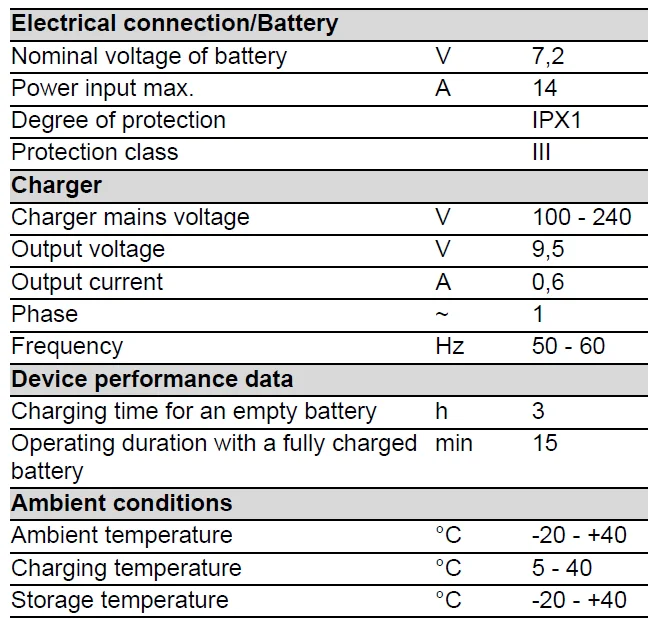
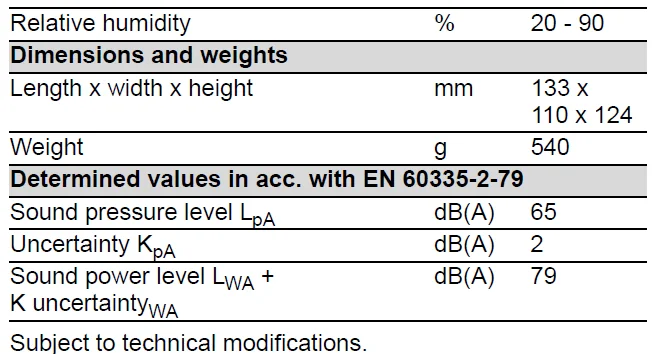
For more manuals by Karcher, visit ManualsLibraryy
Karcher Electric Ice Scraper EDI 4-FAQs
What is the Karcher EDI 4 Electric Ice Scraper used for?
The EDI 4 is designed to quickly remove frost and ice from car windshields, side windows, and mirrors. Its rotating disc helps clear stubborn ice with less effort than a manual scraper.
Can an ice scraper scratch my windshield?
If used aggressively or on dirty glass, even plastic scrapers may cause fine scratches. Using a powered tool like the EDI 4 with gentle pressure reduces the risk of damage.
Is ice hard enough to damage car glass?
Yes. Thick or bonded ice can worsen small chips and cracks if scraped forcefully. Proper de-icing methods help protect your windshield.
How do I safely use the Karcher EDI 4 on my windshield?
Switch on the device, place the rotating disc flat against the glass, and move it steadily across the icy surface. Avoid pressing too hard—let the motor do the work.
What are the ridges on an ice scraper for?
Ridges help break up thicker ice layers before scraping. The EDI 4’s rotating disc performs a similar function automatically.
How can I prevent my windshield from freezing overnight?
Use a windshield cover, park in a garage, or apply a de-icer spray. Covering the glass with a towel or frost guard can also reduce ice buildup.
Can I use hot water to remove ice from my windshield?
No. Pouring hot water on frozen glass can cause sudden cracking due to temperature shock.
How do I remove scratches caused by scraping?
Light surface scratches may be improved with polishing compounds or scratch repair kits. Deep scratches may require professional repair.
Why is the inside of my windshield icy?
Interior frost forms due to moisture inside the vehicle. Reducing cabin humidity and ensuring proper ventilation can help prevent this.
Can I use the EDI 4 on mirrors and side windows?
Yes, the tool is suitable for flat glass surfaces such as side windows and mirrors. Avoid using it on painted surfaces.