
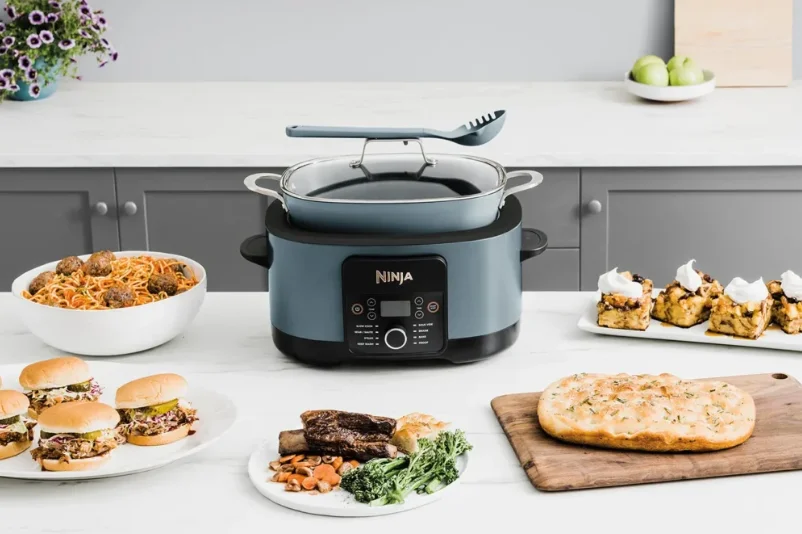

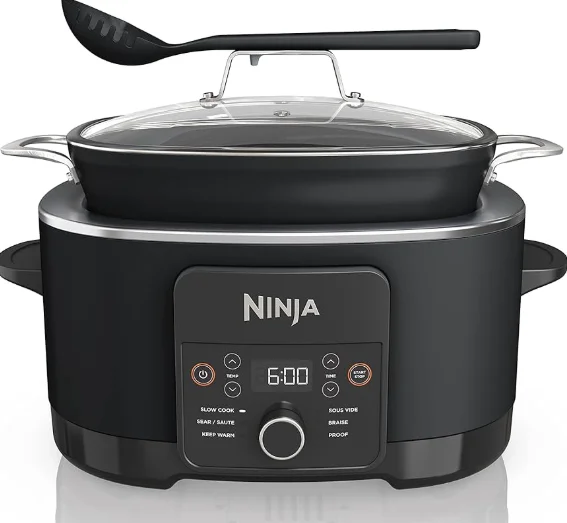
Ninja 12-in-1 Possible Cooker Pro
IMPORTANT SAFEGUARDS
HOUSEHOLD ONLY • READ ALL INSTRUCTIONS BEFORE USE
WARNING: To reduce the risk of injury, fire, electrical shock, or property damage, basic safety precautions must always be followed, including the following numbered warnings and subsequent instructions. Do not use the appliance for anything other than its intended use.
- To eliminate a choking hazard for young children, discard all packaging materials immediately upon unpacking.
- This appliance can be used by persons with reduced physical, sensory, or mental capabilities or a lack of experience or knowledge if they have been given supervision and instruction concerning the use of the appliance in a safe way and understand the hazards involved.
- Keep the appliance and its cord out of reach of children. DO NOT allow children to play with or use the appliance. Close supervision is necessary when used near children.
- A short power supply cord is used to reduce the risk resulting from it being grabbed by children, becoming entangled in, or tripping over, a longer cord.
- Spilled food can cause serious burns. DO NOT let the cord hang over the edges of tables or counters, or place the appliance on or near hot surfaces, on or near a gas or electric burner, or in a heated oven.
- DO NOT operate the multicooker in water or under running water.
- To protect against the risk of electrical shock, do not immerse the multicooker housing in water or any other liquid. If the housing becomes liquid, unplug the cord from the outlet immediately. DO NOT reach into the liquid.
- DO NOT use the appliance without the Cooking Pot installed.
- Before placing the removable Cooking Pot on the cooker base, ensure both the pot and the base are clean by wiping them with a soft cloth.
- When the removable Cooking Pot is empty, DO NOT heat it for more than 10 minutes. Doing so may damage the cooking surface.
- DO NOT use this appliance for deep-frying.
- CAUTION: Sear/Sauté reaches high temperatures. If unmonitored, food may burn on this setting. Use care when touching hot surfaces and when removing food to avoid burns. Do not use the lid and do not leave your cooker unattended while using Sear/Sauté.
- Avoid sudden temperature changes, such as adding refrigerated foods to a heated pot.
- CAUTION: The Cooking Pot and Lid get very hot while using Braise. Use care when touching hot surfaces and when removing food to avoid burns
- Caution should be used when searing meats and sautéing. Keep your hands and face away from the removable Cooking Pot, especially when adding new ingredients, as hot oil may splatter.
- This appliance is for household use only. DO NOT use this appliance for anything other than its intended use. DO NOT use in a moving vehicle or on boats. DO NOT use outdoors. Misuse may cause injury.
- CAUTION: To reduce the risk of electric shock, cook only in the pot provided or in containers placed on the cooking rack in the provided pot.
- Intended for countertop use only. Ensure the surface is level, clean, and dry. DO NOT place the appliance near the edge of a countertop during operation.
- DO NOT use the appliance if there is damage to the power cord or plug. Regularly inspect the appliance and power cord. If the appliance malfunctions or has been damaged in any way, immediately stop use and call Customer Service.
- This appliance has a polarized plug (one blade is wider than the other), To reduce the risk of electric shock, this plug is intended to fit into a polarized outlet only one way. If the plug does not fit fully into the outlet, reverse the plug. If it still does not fit, contact a qualified electrician. DO NOT attempt to modify the plug in any way.
- ALWAYS ensure the appliance is properly assembled before use.
- DO NOT use accessory attachments not recommended or sold by SharkNinja. DO NOT place accessories in a microwave, toaster oven, convection oven, or conventional oven, or on a ceramic cooktop, electrical coil, gas burner range, or outdoor grill. The use of accessory attachments not recommended by SharkNinja may cause fire, electric shock, or injuries.
- CAUTION: A heated pot may damage countertops or tables. When removing the hot pot from the multicooker, DO NOT place it directly on any unprotected surface. ALWAYS set the hot pot on a trivet or a rack.
- When using this appliance, provide at least 6 inches (15.25 cm) of space above and on all sides for adequate air circulation.
- DO NOT operate your appliance in a garage or under a wall cabinet. When storing in an appliance garage, always unplug the unit from the electrical outlet. Not doing so could create a risk of fire, especially if the appliance touches the walls of the garage or the door touches the unit as it closes.
- ALWAYS follow the maximum and minimum quantities of liquid as stated in instructions and recipes.
- To avoid possible steam damage, place the unit away from walls and cabinets during use.
- NEVER use the SLOW COOK setting without food and liquids in the removable Cooking Pot.
- CAUTION: The Cooking Pot and Lid get very hot while using Braise. Use care when touching hot surfaces and when removing food to avoid burns.
- The Cooking Pot and Lid get very hot while using Slow Cook. Use care when touching hot surfaces and when removing food to avoid burns.
- DO NOT move the appliance when in use.
- Prevent food contact with heating elements. DO NOT overfill the Cooking Pot. Overfilling may cause personal injury or property damage or affect the safe use of the appliance.
- DO NOT use this unit to cook instant rice.
- Electrical outlet voltages can vary, affecting the performance and heat output of your product. To prevent possible illness, use a thermometer to check that your food is cooked to the recommended temperatures.
- Should the unit emit black smoke, unplug immediately and wait for the smoking to stop before removing the Cooking Pot.
- DO NOT touch hot surfaces. Appliance surfaces are hot during and after operation. To prevent burns or personal injury, ALWAYS use protective hot pads or insulated oven mitts and use available handles and knobs.
- Extreme caution must be used when moving an appliance containing hot oil or other hot liquids. Improper use, including moving the cooker, may result in personal injury, such as serious burns.
- When the unit is in operation, hot steam may be released into the air via the steam hole in the top of the lid. Place the unit so the steam hole is not directed toward electrical outlets, cabinets or other appliances. Keep your hands and face at a safe distance from the steam hole.
- When using the SLOW COOK setting, ALWAYS keep the lid closed.
- The base unit, inner cooking pot, and glass lid become extremely hot during the cooking process. Avoid hot steam and air while removing the inner cooking pot and glass lid from the base unit. ALWAYS place them on a heat-resistant surface after removing. DO NOT touch accessories during or immediately after cooking.
- ONLY lift the lid from the handle on the front of the unit. DO NOT lift the lid from the side area as scalding steam will release.
- The removable inner cooking pot can be extremely heavy when full of ingredients. Care should be taken when lifting the pot from the cooker base.
- DO NOT touch accessories, including the thermometer (not available on all models), during or immediately after cooking, as they become extremely hot during the cooking process. To prevent burns or personal injury, ALWAYS use care when handling the product. Use long-handed utensils and protective hot pads or insulated oven mitts.
- Cleaning and user maintenance shall not be done by children.
- Allow the unit to cool before cleaning, disassembly, putting in or taking off parts, and storage.
- When not in use and before cleaning, turn the unit off and unplug it from the socket to disconnect.
- DO NOT clean with metal scouring pads. Pieces can break off the pad and touch electrical parts, creating a risk of electric shock.
- Please refer to the Cleaning & Maintenance section for regular maintenance of the appliance.
- DO NOT place the appliance on hot surfaces, near hot gas or electric burners, in a heated oven, or on a stovetop.
SAVE THESE INSTRUCTIONS
PARTS
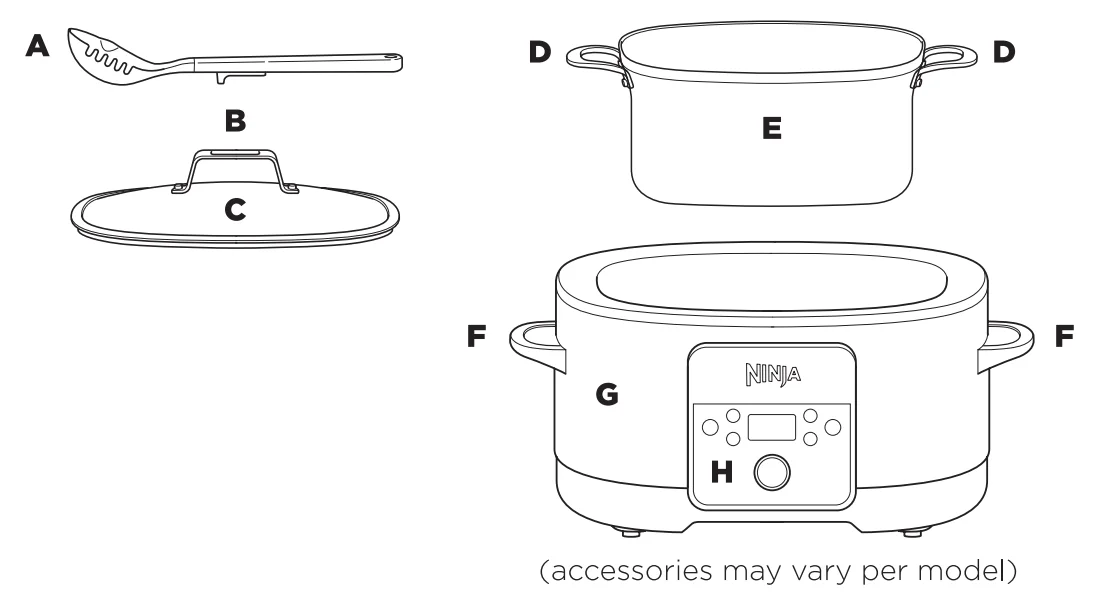
- A Spoon-Ladle
- B Cooking Lid Handle/ Spoon-Ladle Rest
- C Cooking Lid
- D Pot Side Handles
- E 8.5-Quart Cooking Pot
- F Main Unit Handles
- G Main Unit
- H Control Panel
BEFORE FIRST USE
- Remove and discard any packaging material, stickers, and tape from the unit.
- Remove all accessories from the package and read this manual carefully. Please pay particular attention to operational instructions, warnings, and important safeguards to avoid
any injury or property damage. - Wash the Main Base Unit, Inner cooking pot, cooking pot lid, and Spoon-ladle with a damp, soapy cloth, then rinse with a clean, damp cloth and dry thoroughly. NEVER submerge the main unit in water.
- We recommend turning the unit on and running it for 10 minutes without adding food. Make sure the area is well ventilated. This removes any packaging residue and odor traces that may be present. This is completely safe and not detrimental to the performance of the PossibleCooker™ Pro.
GETTING TO KNOW THE NINJA FOODI* POSSIBLECOOKER PRO
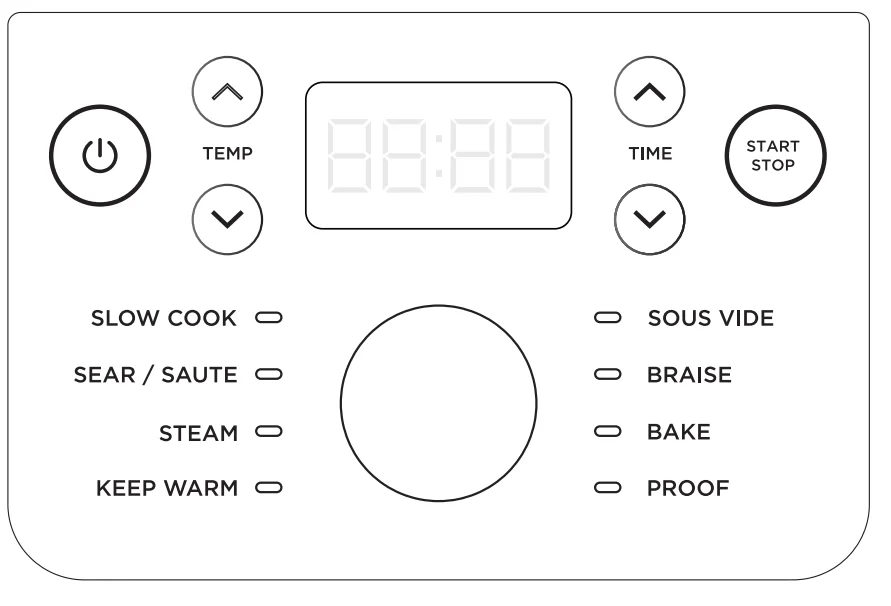
COOKING FUNCTIONS
- SLOW COOK: Cook your food at a lower temperature for a longer period of time.
- SEAR/SAUTE: Use the unit as a cooktop for browning meats, sauteing veggies, simmering sauces, and more.
- BRAISE: Transform tougher cuts of meat by first browning at high heat (with oil) and then simmering in liquid at low heat.
- SOUS VIDE: French for “under vacuum,” this function slow cooks food sealed in a plastic bag in an accurately regulated water bath.
- STEAM: Gently cook delicate foods at a high temperature.
- BAKE: Use the unit like an oven for tender meats, baked treats, and more.
- PROOF: Create an environment for the dough to rest and rise.
- KEEP WARM: Reheat or keep cooked food warm for longer periods of time.
NOTE: If no cooking function is chosen, the unit will shut off after 10 minutes.
OPERATING BUTTONS
- (POWER): The Power button shuts the unit off and stops all cooking modes.
- TEMPERATURE ARROWS: Use the up/down arrows to the left of the display to adjust the cooking temperature.
- TIME ARROWS: Use the up/down arrows to the right of the display to adjust the cooking time.
- START/STOP button: Press START to begin cooking. Pressing START/STOP during a cook cycle will stop the current.
- Function Dial: Use the dial to select a cook function.
USING THE NINJA” FOODI POSSIBLECOOKER PRO
COOKING FUNCTIONS
Slow Cook
- Use the dial to select SLOW COOK.
- Press the +/- TEMP arrows to select Hl or LO.
- Select a time between 3 and 12 hours in 15-minute increments.
NOTE: SLOW COOK LO time may be adjusted between 6 and 12 hours. SLOW COOK HI may be adjusted between 3 and 12 hours. - Press START/STOP to begin cook time.
- When cook time reaches zero, the unit will beep, automatically switch to KEEP WARM, and begin counting up.
NOTE: The unit will automatically shut off after 12 hours on KEEP WARM.
Sear/Saute
- Use the dial to select SEAR/SAUTE.
- Press the +/- TEMP buttons to choose HI or LO temperature.
NOTE: It is recommended to let the unit heat up for 5 minutes before adding ingredients. - Press START/STOP to begin cooking.
- Press START/STOP to turn off the SEAR/SAUTE function.
NOTE: DO NOT use metal utensils; they will scratch the nonstick coating on the pot.
NOTE: You can use this function with or without the lid placed on the pot.
Steam
- Use the dial to select STEAM
- Use the +/- TIME arrows to adjust cook time in 1-minute increments.
- Press START/STOP to begin cooking.
- The display will show PrE, indicating the unit is preheating to the selected temperature.
- When the unit reaches the appropriate steam level, the display will show the set temperature, and the timer will begin to count down.
- When cook time reaches zero, the unit will beep and display END.
NOTE: The unit will automatically switch to KEEP WARM at the end of each cook cycle.
NOTE: Use one cup or more of liquid when steaming.
Keep Warm
- Use the dial to select KEEP WARM. The temperature will default, and the unit will start counting up.
NOTE: Use the +/- TIME arrows to adjust cook time in 1-minute increments up to 1-hour or 5-minute increments up to 6-hours.
Sous Vide
NOTE: For best results, do not use the unit before cooking and do not use warm water.
- Add 12 cups of room-temperature water to the pot.
- Close the lid and turn the dial to SOUS VIDE. The default temperature will display. Use the TEMP arrows to set the temperature in 5-degree increments between 120°F and 190°F.
- The cook time will default to 3 hours. Use the TIME arrows to adjust cook time in 15-minute increments up to 12 hours or 1-hour increments from 12 to 24-hours.
- Press START/STOP to begin cooking.
- The unit display will flash between “Prg” and the current temperature, indicating pre-heat is in progress.
- Once preheating has completed, ADD FOOD will flash on the display. After 30 seconds, the unit will start counting down from the preset cook time.
NOTE: It can take up to 10 minutes for the unit to preheat. Prepare ingredients during this time. Season and place each portion in a single-use resealable plastic bag. Cook times 4+ hours with a temperature above 160°F, double-bag each portion of food or wrap in plastic wrap before placing in the single-use resealable bag. This will help protect the food.
Braise
- Sear ingredients in the pot using the Sear/Saute instructions.
- Once complete, deglaze with wine or stock.
NOTE: To deglaze, pour 1 cup of liquid into the pot. Scrape brown bits from the bottom of the pot and mix them into the cooking liquid. - Add the remaining cooking liquid and ingredients to the pot.
- Turn the dial to select BRAISE. The default temperature setting will display.
- Use the +/- TIME arrows to set cook time in 15-minute increments.
- Press START/STOP to begin cooking.
Bake
- Place ingredients and any recommended accessories into the pot.
- Turn the dial to select BAKE. The default temperature will display.
- Use the +/- TEMP arrows to set the temperature between 250F and 425F.
- Use the +/- TIME arrows to adjust cook time in 1-minute increments up to 1-hour or 5-minute increments up to 6-hours.
- Press START/STOP to begin cooking.
- When cook time reaches zero, the unit will beep and display END for 5 minutes. If food requires more time, use +/- TIME arrows to add time.
Proof
- Place the dough in the pot and place the lid on top.
- Turn the dial to select PROOF. The default temperature setting will display.
- Use the +/- TEMP arrows to set the temperature. in 5-degree increments between 90°F and 105°F.
- Use the +/- TIME arrows to adjust the proof time in 5-minute increments.
- Press START/STOP to begin cooking.
- When cook time reaches zero, the unit will beep, and END will flash 3 times on the display.
CLEANING & MAINTENANCE
Cleaning: Dishwasher & Hand-Washing
The unit should be cleaned thoroughly after every use
- Unplug the unit from the wall outlet before cleaning.
- To clean the cooker base and the control panel, wipe them clean with a damp cloth.
- The cooking pot, glass lid, and spoon-ladle can be washed in the dishwasher.
- If food residue is stuck on the cooking pot, fill pot with water and allow to soak before cleansing. If food residue is stuck on glass lid or silicone spoon-ladle, use a non- abrasive cleanser. DO NOT use scouring pads. If scrubbing is necessary, use a non-abrasive cleanser or liquid dish soap with a nylon pad or brush.
- Air-dry all parts after each use.
NOTE: NEVER put the cooker base in the dishwasher or immerse it in water or any other liquid.
TROUBLESHOOTING GUIDE
The unit won’t turn on.
- Make sure the power cord is securely plugged into the outlet,
- Try plugging the cord into a different outlet,
- Reset the circuit breaker if necessary.
“ADD POT” error message appears on the display screen.
- The cooking pot is not inside the cooker base. The cooking pot is required for all functions.
“ADD WATER” error message appears on the display screen.
- The water level is too low. Add more water to the unit to continue.
Why is the time counting down so slowly?
- You may have set hours rather than minutes. When setting the time, the display will show HH: MM, and the time will increase/decrease in minute increments.
The unit is counting up rather than down.
- The Slow Cook cycle is complete, and the unit is in Keep Warm mode.
“E1, “E2”
- The unit is not functioning properly. Please contact Customer Service at 1-877-646-5288. We ask that you register your product online at registeryourninjacom and have the product on hand when you call, so we may better assist you.
Why did my unit shut off?
- If a cook function is not chosen within 10 minutes after turning on the unit, it will automatically shut off.
HELPFUL HINTS
- Inner cooking pot is oven safe up to 500°F.
- Use the Keep Warm mode to keep food at a warm, food-safe temperature after cooking.
- Refrain from removing the lid during a cook cycle.
- The Cooking Pot is NOT stove top safe.
- The glass lid can be cleaned in the dishwasher.
- The Spoon-ladle can be cleaned in the dishwasher.
- Preheat time will vary depending on the quantity and temperature of the ingredients.
- ALWAYS use oven mitts when removing the cooking pot from the base unit.
- Store extra food in sealed, freezer-friendly containers.
ONE (1) YEAR LIMITED WARRANTY
The One (1) Year Limited Warranty applies to purchases made from authorized retailers of SharkNinja Operating LLC. Warranty coverage applies to the original owner and to the original product only and is not transferable. SharkNinja warrants that the unit shall be free from defects in material and workmanship for a period of one (1) year from the date of purchase when it is used under normal household conditions and maintained according to the requirements outlined in the Owner’s Guide, subject to the following conditions and exclusions:
What is covered by this warranty?
- The original unit and/or non-wearable parts deemed defective, in SharkNinja’s sole discretion, will be repaired or replaced up to one (1) year from the original purchase date:
- In the event a replacement unit is issued, the warranty coverage ends six (6) months following the receipt date of the replacement unit or the remainder of the existing warranty, whichever is later, SharkNinja reserves the right to replace the unit with one of equal or greater value.
What is not covered by this warranty?
- Normal wear and tear of wearable parts (such as blending vessels, lids, cups, blades, blender bases, removable pots, racks, pans, etc.), which require regular maintenance and/or replacement to ensure the proper functioning of your unit, are not covered by this warranty. Replacement parts are available for purchase at ninjaaccessories.com.
- Any unit that has been tampered with or used for commercial purposes.
- Damage caused by misuse, abuse, negligent handling, failure to perform required maintenance (e.g. failure to keep the well of the motor base clear of food spills and other debris), or damage due to mishandling in transit.
- Consequential and incidental damages
- Defects caused by repair persons not authorized by SharkNinja. These defects include damages caused in the process of shipping, altering, or repairing the SharkNinja product (or any of its parts) when the repair is performed by a repair person not authorized by SharkNinja.
- Products purchased, used, or operated outside North America.
For more manuals by Ninja, visit ManualsLibraryy
Ninja 12-in-1 Possible Cooker Pro-FAQs
Can the Ninja 12-in-1 Possible Cooker Pro replace a microwave?
It can handle many reheating and cooking tasks similar to a microwave, such as warming leftovers or cooking quick meals. However, it may not fully replace a microwave for ultra-fast heating, as it focuses more on multi-function cooking like baking, steaming, and air frying.
What is the Ninja 12-in-1 Possible Cooker Pro?
It is a versatile multi-cooker designed to combine multiple kitchen appliances into one. With 12 cooking functions, it can bake, air fry, steam, sauté, slow cook, and more, helping simplify meal preparation and reduce the need for separate devices.
Can the Ninja Possible Cooker Pro cook rice?
Yes, it includes a dedicated rice or grain function. You can cook different types of rice easily by adding the correct water ratio, making it convenient for everyday meals or side dishes.
What cooking functions are included in the 12-in-1 model?
Common functions include air fry, bake, grill, steam, slow cook, sauté, reheat, and rice/pasta cooking. These options allow you to prepare a wide variety of meals using just one appliance.
Can it replace other kitchen appliances?
Yes, it is designed to replace several tools like an air fryer, oven, stovetop pan, steamer, slow cooker, and rice cooker. This helps save both kitchen space and cooking time.
Is the Ninja 12-in-1 suitable for family cooking?
Absolutely. Its large capacity makes it ideal for preparing meals for families. You can cook full dishes like roasts, pasta, or one-pot meals in a single batch.
What types of food can you cook in it?
You can prepare a wide range of dishes, including rice, pasta, meats, vegetables, casseroles, baked goods, and even grilled items. It supports both quick meals and slow-cooked recipes.
Are there foods you should avoid cooking?
Very watery or overly greasy recipes may not perform well in air frying mode. Also, heavily battered foods can create mess or cook unevenly, so they should be handled carefully.
Can it cook frozen food directly?
Yes, many functions allow cooking from frozen, especially air frying and baking. However, for slow cooking, it’s better to thaw ingredients first to ensure even and safe cooking.
How is it different from a regular slow cooker?
Unlike a basic slow cooker, this appliance offers multiple cooking modes. In addition to slow cooking, it can fry, bake, steam, and sauté, making it far more versatile.