
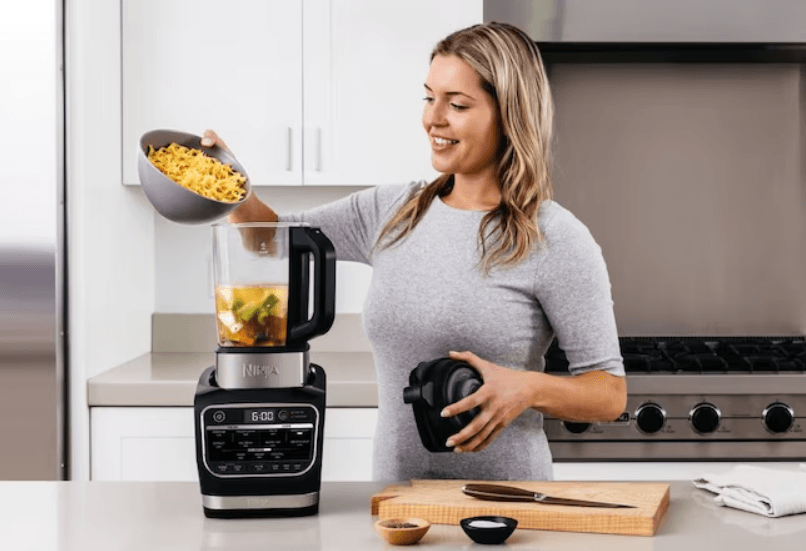

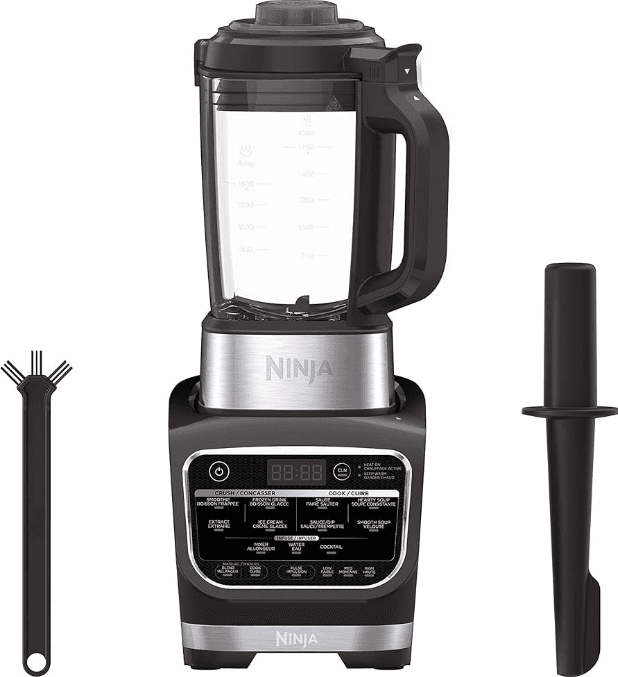
Ninja HB152 Foodi Heat-iQ Blender
IMPORTANT SAFETY INSTRUCTIONS
PLEASE READ CAREFULLY BEFORE USE
FOR HOUSEHOLD USE ONLY
WARNING
To reduce the risk of injury, fire, electrical shock, or property damage, basic safety precautions must always be followed, including the following numbered warnings and subsequent instructions.
Extreme caution must be used when moving an appliance containing hot oil or other hot liquids.
Do not use the appliance for anything other than its intended use.
- Read all instructions prior to using the appliance and its accessories.
- Carefully observe and practice all warnings and instructions. This unit contains electrical connections, moving parts, and heating elements that potentially present a risk to the user.
- Take your time and exercise care during unpacking and appliance setup.
- Take inventory of all contents to ensure you have all parts needed to properly and safely operate your appliance.
- Blades are sharp. Handle carefully.
- Turn the appliance OFF, then unplug the appliance from the outlet when not in use, before assembling or disassembling parts, and before cleaning. To unplug, grasp the plug by the body and pull from the outlet. NEVER unplug by grasping and pulling the flexible cord.
- Wash all parts that may contact with food before use. Follow the washing instructions covered in this instruction manual.
- To protect against the risk of electric shock, DO NOT submerge the appliance or allow the power cord to contact any form of liquid.
- DO NOT use this appliance outdoors. It is designed for indoor household use only.
- This appliance has a polarized plug (one blade is wider than the other). To reduce the risk of electric shock, this plug will fit in a polarized outlet only one way. If the plug does not fit fully in the outlet, reverse the plug. If it still does not fit, contact a qualified electrician. DO NOT modify the plug in any way.
- DO NOT operate any appliance with a damaged cord or plug, or after the appliance malfunctions, or is dropped or damaged in any manner. This appliance has no user-serviceable parts. If damaged, contact SharkNinja for servicing.
- This appliance has important markings on the plug blade. The entire supply cord is not suitable for replacement. If damaged, please contact SharkNinja for service.
- Extension cords should not be used with this appliance.
- DO NOT allow young children to operate this appliance or use it as a toy. Close supervision is necessary when any appliance is used near children.
- This appliance is not intended to be used by people (including children) with reduced physical, sensory, or mental capabilities, or a lack of experience and knowledge, unless they have been given supervision or instruction concerning use of the appliance by a person responsible for their safety.
- Before each use, inspect blade assemblies for damage. If a blade is bent or damage is suspected, contact SharkNinja to arrange for replacement.
- DO NOT attempt to sharpen blades.
- DO NOT let the cord hang over the edge of the table or counter or touch hot surfaces.
- DO NOT allow the unit or the cord to contact hot surfaces, including stoves and other heating appliances.
- DO NOT place on or near a hot gas or electric burner or in a heated oven.
- ALWAYS use the appliance on a dry and level surface.
- Keep hands, hair, and clothing out of the container when loading and operating.
- ONLY use attachments and accessories that are provided with the product or are recommended by SharkNinja. The use of attachments, including canning jars, not recommended or sold by SharkNinja, may cause fire, electric shock, or injury.
- During the operation and handling of the appliance, avoid contact with moving parts.
- DO NOT operate the appliance with an empty container.
- DO NOT fill containers past the max fill or max liquid lines.
- DO NOT microwave any containers or accessories provided with the appliance.
- Before the operation, ensure all utensils are removed from containers. Failure to remove utensils can cause containers to shatter and potentially result in personal injury and property damage.
- Keep hands and utensils out of the container while blending to reduce the risk of severe injury to persons or damage to the blender. A rubber scraper or spatula may be used, but it must be used ONLY when the blender is not running.
- NEVER operate the appliance without lids and caps in place. DO NOT attempt to defeat the interlock mechanism. Ensure the container and lid are properly installed before operation.
PARTS
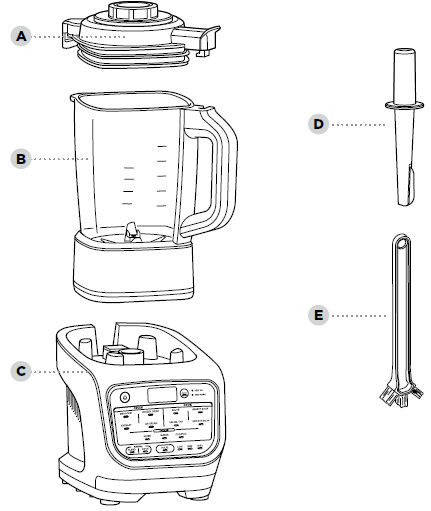
- Pitcher Lid with Removable Center Cap
- 64 oz. Glass Pitcher with Built-in Heating Element
- 56 oz. max cold liquid and 48 oz. Max hot liquid capacity
- Motor Base (attached power cord not shown)
- Tamper
- Cleaning Brush
FEATURES

AUTO-IQ® PROGRAMS:
Intelligent programs that combine unique pulsing, blending, pausing, and heating patterns that do the work for you.
Smoothie (0:45)
Combine your favorite fresh or frozen ingredients, liquids, and powders to create smoothies and protein shakes.
Extract (1:05)
Ideal for tough, leafy, or fibrous whole fruits and vegetables, including their skins, seeds, and stems.
Frozen Drink (0:55)
Crush ice and frozen fruit into restaurant-style frozen drinks.
Ice Cream (1:10)
Use your favorite frozen fruit and dairy to make sorbets and frozen treats.
Sauté (5:21)
Unlock more flavor by quickly cooking onions, garlic, spices, and more before creating homemade soups, sauces, and dips.
Sauce/Dip (20:30)
Create sweet or savory sauces and fondue.
Hearty Soup (20:00)
Create homemade soup with more texture.
Smooth Soup (20:00)
Cook and blend your favorite silky-smooth soups.
Mixer (10:30)
Use sweet or savory ingredients to create bold-flavored concentrates.
Water (10:30)
Create fruit water or wellness tonics and teas.
Cocktail (10:30)
Quickly infuse liquor or create craft cocktails.
MANUAL SETTINGS:
Blend
Select BLEND, then choose either LOW, MED, or HIGH blending speed. The setting will run for 60 seconds or until manually stopped.
Cook
Select COOK, then choose either LOW, MED, or HIGH temperature. The setting will run for 60 minutes or until manually stopped
Pulse
Select either BLEND or COOK, then press PULSE to process ingredients to your desired texture and consistency.
OTHER FEATURES:
Power Button
Use to turn the unit on or off.
Clean (6:36)
Combines heat and rapid pulses to remove stuck-on messes.
Heat On
The light will turn on when you have selected a program or function that uses heat.
Keep Warm
Light will turn on after cooking, and the unit will keep contents warm for up to 60 minutes.
BEFORE FIRST USE
IMPORTANT: Review all warnings on pages 4–5 before proceeding.
- Remove all packaging material and labels from the appliance. Separate all parts from each other.
- Wash the pitcher, lid, and accessories with warm, soapy water. Use a dishwashing utensil with a handle to avoid contact with the blades.
- Thoroughly rinse and air-dry all parts.
NOTE: DO NOT submerge the pitcher when washing.
HANDLING THE BLENDER PITCHER
LIFTING AND POURING FROM THE PITCHER
- Firmly grasp the handle with one hand and carefully pour out ingredients.
NOTE: If the pitcher feels too heavy in one hand, use a protective mitt or glove and support the pitcher’s weight with your other hand.
- DO NOT grasp the pitcher after hot blending or cooking. The surface of the pitcher is hot during and after operation. Surfaces are hot during and after operation. To prevent burns or personal injury, ALWAYS use protective hot pads or insulated oven mitts and use available handles and knobs.
- DO NOT grasp the pitcher after hot blending or cooking. The surface of the pitcher is hot during and after operation. Surfaces are hot during and after operation. To prevent burns or personal injury, ALWAYS use protective hot pads or insulated oven mitts and use available handles and knobs.
GETTING STARTED WITH YOUR BLENDER
ASSEMBLING THE HEATED BLENDER
- Plug in the motor base and place it on a clean, dry, level surface such as a countertop or table.
- Lower the pitcher onto the motor base.
- Add ingredients, making sure not to exceed the max fill lines on the side of the pitcher. In COOK or INFUSE modes, DO NOT exceed the level labeled “SOUP.” In BLEND mode, DO NOT exceed the level labeled “COLD.”
- To install the lid on the pitcher, place the lid tab to the right of the handle. Press the lid down until it is secure. Rotate the tab clockwise so the arrow on the lid tab aligns with the arrow on the pitcher handle.
- Secure the center cap by placing it down into the lid and twisting clockwise until it clicks into place.
- To remove the lid from the pitcher, rotate the lid counterclockwise out of the lock position and lift up.
NOTE: After heated programs, steam may release as the lid is removed. Keep hands on the outer tabs and lift directly up.
AUTO-IQ® PROGRAMS
- To begin, press the Power button.
- Press the program of your choice from the CRUSH, COOK, or INFUSE sections.
- The Heat On light will turn on if the selected program uses heat.
TIP: When making thicker recipes such as ice creams and dips, use the tamper to push ingredients toward the blades. Tamper should be used only when the lid is attached to the pitcher. Remove the center cap and replace it with a tamper.
NOTE: The unit will beep 3 times to alert you that the program is going to stir ingredients. Make sure the center cap is secure during use.
MANUAL SETTINGS
MANUAL BLEND
Manual Blend speeds give you ultimate control over your blend.
- To begin, press the Power button.
- Choose BLEND to unlock speed options.
- Select LOW, MED, HIGH, or PULSE to begin blending.
NOTE: The Pulse setting will run only when the PULSE button is pressed.
MANUAL COOK
Manual Cook settings put the control in your hands.
- To begin, press the Power button.
- Choose COOK to unlock temperature options.
- Select LOW, MED, or HIGH to begin cooking.
- The timer will count up to 60 seconds or until manually stopped.
NOTE: You can press PULSE during Manual Cook mode to gently stir ingredients.
NOTE: For best results, quickly PULSE ingredients periodically during cooking to distribute heat and promote even cooking.
CARE & MAINTENANCE
CLEANING
Allow parts to cool before cleaning. Separate all parts before cleaning.
Hand-Washing
Wash the pitcher, lid, and tamper with warm, soapy water. Use the included cleaning brush to avoid direct contact with the blades.
NOTE: DO NOT submerge the blender pitcher. Submerging will damage the integrated heating element.
Dishwasher
The lid, center cap, and tamper are dishwasher safe.
NOTE: DO NOT wash the blender pitcher in the dishwasher. Dishwashing will damage the integrated heating element.
Motor Base
Press the power button to turn off the unit, then unplug the motor base. Wipe the motor base with a clean, damp cloth.
CLEAN
A combination of heat and rapid pulses easily removes residue from the nonstick coating in minutes.
- Fill the pitcher with 24 oz. of water and small drops of dish soap.
- Place the lid on the pitcher and ensure it is properly closed.
- Press CLEAN.
- When the program is complete, discard water and thoroughly rinse the pitcher.
TIPS FOR BEST CLEANING RESULTS:
- Give the pitcher a quick rinse before running it clean.
- Run CLEAN immediately after use.
STORING
Store the unit upright with the lid secured on the pitcher.
NOTE: DO NOT stack items on top of the unit. Store any remaining attachments alongside the unit or in a cabinet where they will not be damaged or create a hazard.
RESETTING THE MOTOR
This unit features a unique safety system that prevents damage to the motor by temporarily disabling the motor if it begins to overheat. Should this occur, follow the reset procedure below.
- Unplug the unit from the electrical outlet.
- Allow the unit to cool for approximately 15 minutes before using.
IMPORTANT: Ensure that maximum capacities are not exceeded. This is the most typical cause of appliance overload.
ORDERING REPLACEMENT PARTS
To order additional parts and attachments, visit ninjaaccessories.com.
DISPLAY SCREEN & ERROR MESSAGES
DISPLAY SCREEN MESSAGES
“Lid”
The lid is not assembled correctly. Be sure the lid is on the pitcher and locked in place before running a program.
“JAr”
The pitcher is not properly attached to the base. Be sure the pitcher is secured in the base before selecting a program.
“—” Blinking
You are attempting to run a program too many times in a row. For your safety, certain programs may be run only 2 times.
NOTE: DO NOT attempt to remove the pitcher while the blender is running. Wait for the blades to stop spinning before removing the pitcher.
ERROR MESSAGES
“E01” or “E02”
Remove and reinstall the pitcher. If that does not solve the issue, contact Customer Service at 1-877-646-5288. So we may better assist you, please register your product online at registeryourninja.com and have the product on hand when you call.
TROUBLESHOOTING GUIDE
WARNING: To reduce the risk of shock and unintended operation, turn the power off and unplug the unit before troubleshooting.
The unit doesn’t turn on.
- Make sure the unit is plugged in.
- The display will light up with usable programs once connected to power. Pitcher and lid must be engaged to select a program.
The lid is stuck on the pitcher.
- The lid is removed by rotating from the handle and then lifting up.
Cannot change time or temperature settings on Auto-IQ® programs.
- All programs were developed by culinary experts to deliver the perfect balance of heating, stirring, and blending patterns to give perfect results, so you do not have to set the time or temperature.
- To select a specific temperature, use the Manual COOK setting instead of an Auto-iQ program.
Program has paused.
- If the lid is removed while running a program or while in a Manual mode, the cooking or blending function will pause. Replace the lid and push the program button again to continue from where the time left off.
Why does the blender sometimes count up and other times count down?
- Auto-iQ programs are timed to finish on their own when they are complete, so the clock counts down until the program has finished. When using Manual modes, the clock will count up from 0 until the auto shutoff time is reached or the button for the currently running mode is selected again.
How do I know the length of the program before starting?
- Some Auto-IQ programs include an automatic preheat setting before the program begins. Preheat time fluctuates based on the starting temperature of ingredients. See the “Features” section of this User Guide or the included Quick Start Guide for program durations.
Pitcher still has residue after running the Clean program.
- Try running the CLEAN program a second time. You may also hand-wash the pitcher using the included cleaning brush, which is specifically designed to clean those hard-to-reach areas.
The control panel returns to the home display.
- The control panel is designed to return to standby mode when left inactive for 3 minutes. If you have taken longer than 3 minutes to choose a function, or if the program has finished, the unit will return to standby mode.
Why does the unit beep during Auto-iQ Programs?
We’ve incorporated STIR ALERT within all Auto-iQ programs to let you know the unit is about to stir. The alert is 3 beeps followed by a 2-second pause before each beep.
For more Manuals by Ninja, visit ManualsLibraryy
Ninja HB152 Foodi Heat-iQ Blender-FAQs
How do I use Pulse mode?
Toggle the Pulse Switch for short bursts to chop ingredients without over-blending.
Why does my Vitamix stop mid-blend?
Overheating: The motor has Auto Overload Protection. Wait 45+ minutes to cool.
Container misalignment: Ensure it’s fully seated on the base.
Can it blend hot soup?
Yes! Blend hot ingredients (up to boiling) for 5–6 minutes—friction heats soups to serving temperature.
Can it crush ice?
Yes. Use Speed 10 with liquid to protect blades.
Can it grind coffee/nuts?
Yes, but use the Dry Grains Container (sold separately) for best results.
How do I clean the blender?
Fill halfway with warm water + drop of dish soap.
Blend 30–60 seconds on High.
Rinse/dry thoroughly.
Do blades need sharpening?
No! Vitamix blades are hammermill-style and self-maintain. Replace if dull (see warranty).
How often should I replace the blade assembly?
Inspect weekly. Replace if:
Blades spin too freely (“pinwheeling”).
Blending performance declines.