


Pawport Smart Pet Tag

WARNING
Before assembling or installing this product, read all instructions and safety information. Contains small parts and a coin cell battery. Swallowing or mishandling the battery can cause serious injury, burns, or death. Keep away from children. Improper handling may also cause fire or leakage. Dispose of used batteries in accordance with local laws and recycling regulations.
Hate to read?
We feel you! Scan below to view the instructional video and follow along.
Pairing a Tag to the Smart Pet Door
Scan here to open the Pawport app and add a Tag. If you don’t have the app, you’ll be directed to download it and get started.
What’s included
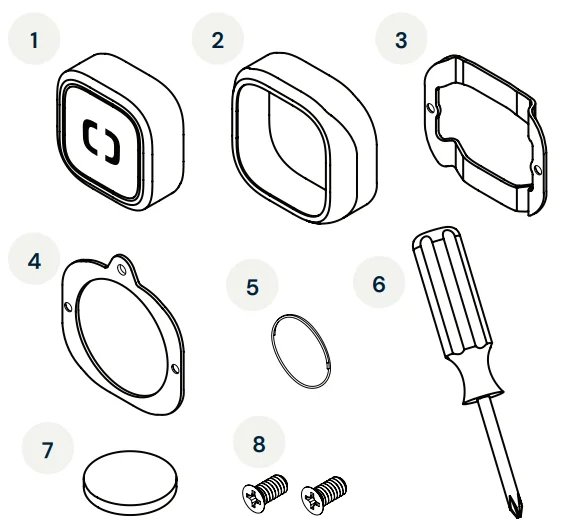
- Smart Pet Tag
- Tag holder
- Snug mount
- Hanging mount
- Split ring
- Philips head screwdriver *Lift tray for tool
- CR2050 lithium battery
- M2 screws ×2
Install the battery
Using a flathead screwdriver, unscrew the battery cover on the back of the Smart Pet Tag (item 1). Place the battery (item 7) into the Tag with the positive side facing up. Reinstall the battery cover and tighten until snug.
WARNING
This product contains a coin cell battery, which can be a choking hazard and is dangerous if swallowed. Keep the battery and Smart Pet Tag out of reach of children and pets during assembly. Dispose of used batteries properly and never incinerate or puncture.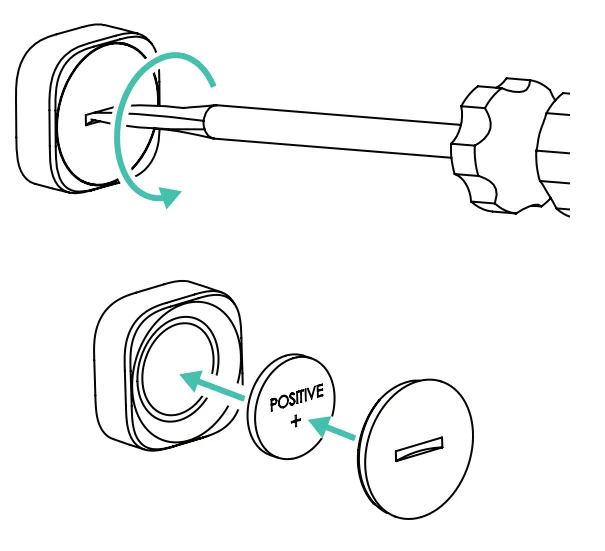
Collar mount options:
1. Hang from your existing collar
The Smart Pet Tag comes with the hanging mount (item 4) preinstalled. Simply attach the split ring (item 5) through the hole on the hanging mount and connect it to your pet’s collar ring as you would a regular pet tag.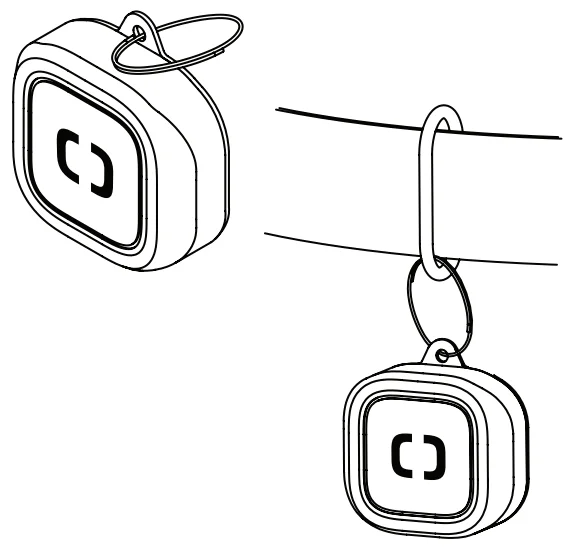
2. Clamp to your existing collar
For a snug fit, fasten the Smart Pet Tag directly onto your pet’s collar using the snug mount (item 3). First, remove the M2 screws (item 8) from the preinstalled hanging mount using the included screwdriver (item 6). Use these same screws and screwdriver to attach the snug mount in place of the hanging mount. Place your collar between the tag assembly and the snug mount, as shown. Ensure the flat side of the snug mount faces the collar and the “bumps” face outward, as shown. Tighten the screws.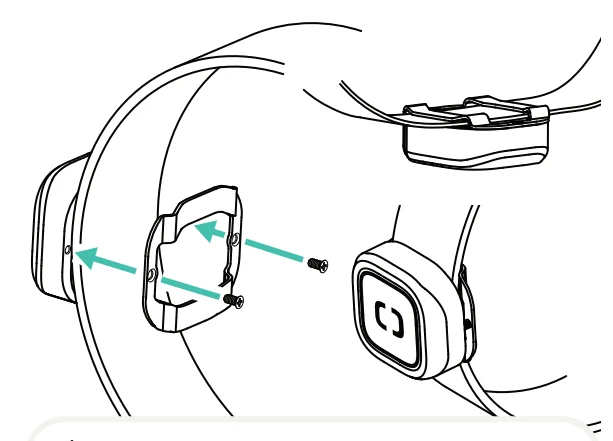
3. Snap into a Pawport Collar
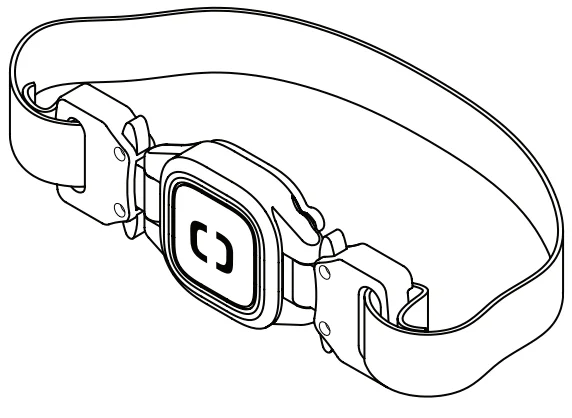
If you purchased a Pawport Collar for a streamlined fit, refer to the instructions included with the Collar.
Need help?
www.pawport.com/support
[email protected]
For More Manuals By Pawport, Visit ManualsLibraryy.
Pawport Smart Pet Tag-FAQs
What is the Pawport Smart Pet Tag, and how does it work?
The Pawport Smart Pet Tag is a lightweight device attached to your pet’s collar that communicates with a compatible smart pet door. When your pet approaches, the tag signals the door to open automatically, enabling controlled entry and exit without manual intervention or supervision.
Does my pet need to wear the Pawport Smart Pet Tag all the time?
To use the automatic door functionality, your pet must wear the Smart Pet Tag on its collar. Without it, the door can still be operated manually through the app or control panel, but your pet won’t have independent access in or out.
Can multiple pets use the Pawport Smart Pet Tag system?
Yes, multiple pets can use the system, but each pet requires its own unique Smart Pet Tag. This allows the system to identify individual pets, manage permissions, and track activity separately through the connected app interface for better control and monitoring.
What kind of data does the Pawport Smart Pet Tag track?
The Smart Pet Tag collects useful activity insights, including how often your pet goes outside, how long they stay out, and general activity or rest patterns. This information is accessible through the app, helping owners better understand their pet’s daily behavior.
How long does the battery last in the Pawport Smart Pet Tag?
The Smart Pet Tag uses a replaceable lithium button battery that typically lasts between 12 and 18 months, depending on usage patterns. This long battery life minimizes maintenance and ensures consistent performance without frequent replacements.
Is the Pawport Smart Pet Tag waterproof and durable?
Yes, the tag is designed with a waterproof and durable composite plastic body, making it suitable for outdoor use in various weather conditions. It is built to withstand everyday wear and tear, including rough play and exposure to moisture.
Can one Smart Pet Tag work with multiple pet doors?
A single Smart Pet Tag can be paired with multiple compatible Pawport smart pet doors. This feature is useful for homes with more than one access point, allowing pets to move freely between different entryways without needing additional tags.
How is the Pawport Smart Pet Tag attached to a collar?
The tag can be easily attached using the included split ring or mounted securely with clip-on or snug-fit attachments. These options ensure compatibility with most standard pet collars while keeping the tag comfortable and stable during everyday movement.
Is the Pawport Smart Pet Tag comfortable for pets to wear?
The tag is compact and lightweight, roughly the size of a coin, so pets typically don’t notice it. Its design focuses on comfort, ensuring it doesn’t interfere with normal movement or cause irritation during extended wear.
How secure is the Pawport Smart Pet Tag system?
The system uses secure communication protocols to ensure only authorized tags can trigger the pet door. This prevents unwanted animals or intruders from accessing your home, making it a safer alternative to traditional pet doors.