


Petwant F13 6-Meal Smart Pet Feeder
Use Safety Guide
Device placement
- The pet feeder should be placed on a level surface. Do not place or store an appliance where it can fall or be pulled.
- For indoor household use only and away from direct sunlight or wet areas.
- Do not place the feeder under a temperature of 0 °C.
- Do not place any foreign object in the pet feeder.
- Make sure there are no objects on and around the food bowl to prevent pets from eating normally.
Important Safety Information
- Please plug in the power supply to ensure stable use of the feeder.
- This product is only applicable to cats and small dogs.
- Do not allow small children to play with, in, or around the pet feeder.
- The filling in the ice pack is not edible. If it is damaged, do not use it.
- Do not immerse the control board in water. The device should not be submerged in water at any time, as this may damage electronic components.
- Do not disassemble the pet feeder other than the components.
- Do not place or store an appliance in a tub or sink.
- Please avoid the charging port from getting wet. If the charging port is wet, it should be fully dried before charging.
- The feeder only supports charging with 5V/1\~2A adapter.
- Always unplug the feeder when not in use. The device should be fully charged if stored for over 6 months.
- Do not allow pets to chew on or swallow any parts.
- Do not use the pet feeder for any purpose other than feeding pets.
Components
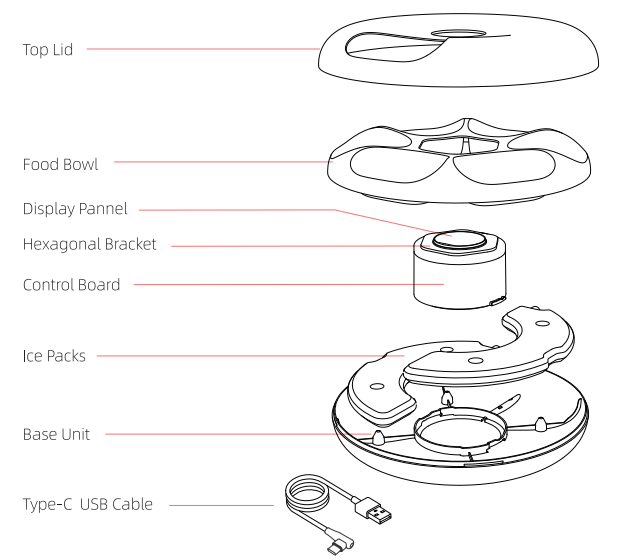
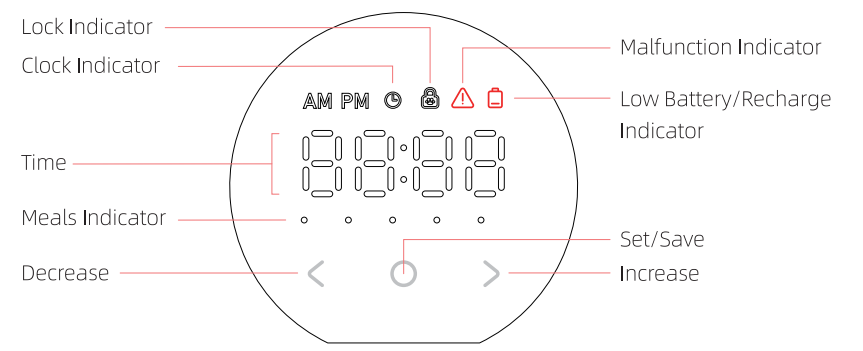
Display Panel
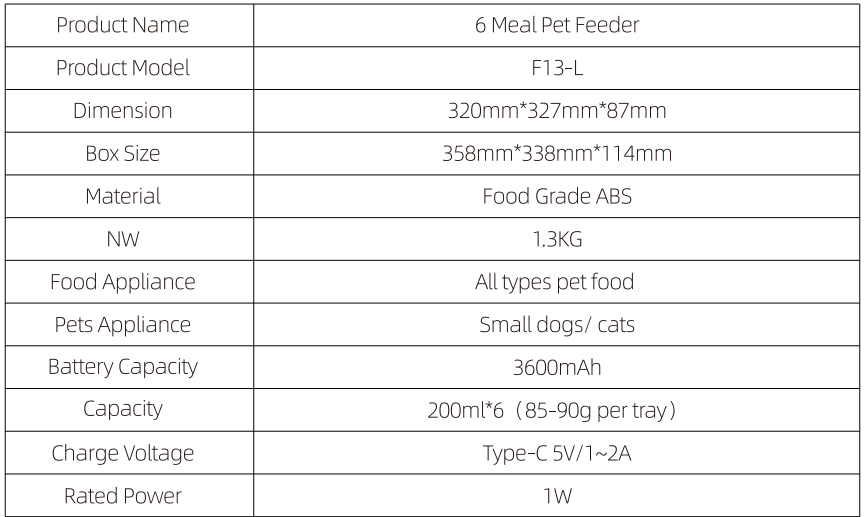
Parameters
Installation and Setup
Open the Lid
Lay the feeder flat, pull up the ring lock at the back of the feeder with one hand, and lift the whole top lid.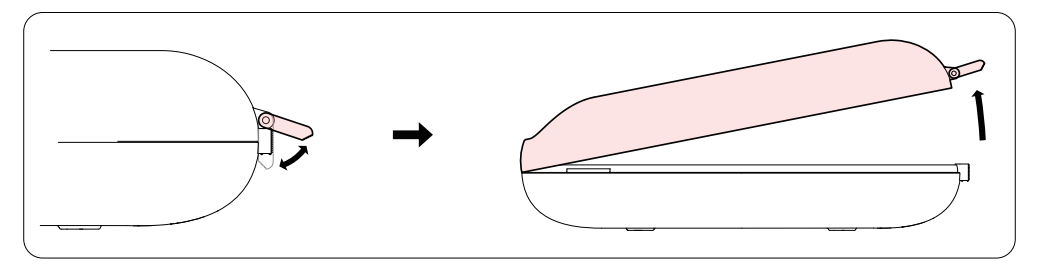
Place the Ice Pack
Remove the ice packs, place them horizontally in the refrigerator freezer (-18 °C), and freeze for at least 6 hours. Then, remove them for use.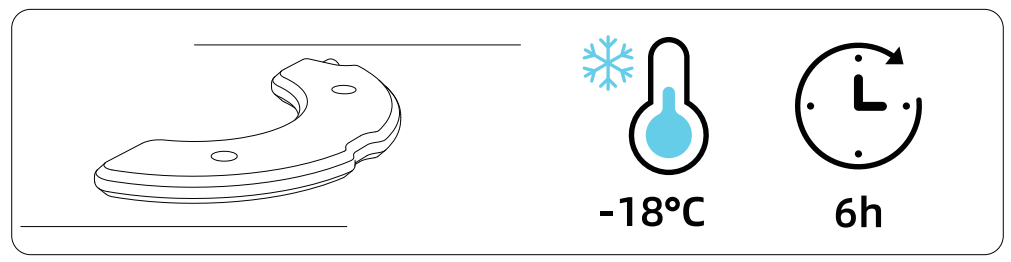
Note:
- Do not freeze the ice packs vertically, which will cause the ice pack to bulge.
- No need for an ice pack for dry pet food.
- The fresh-keeping effect of ice packs is affected by environmental factors.
Fill up Pet Food
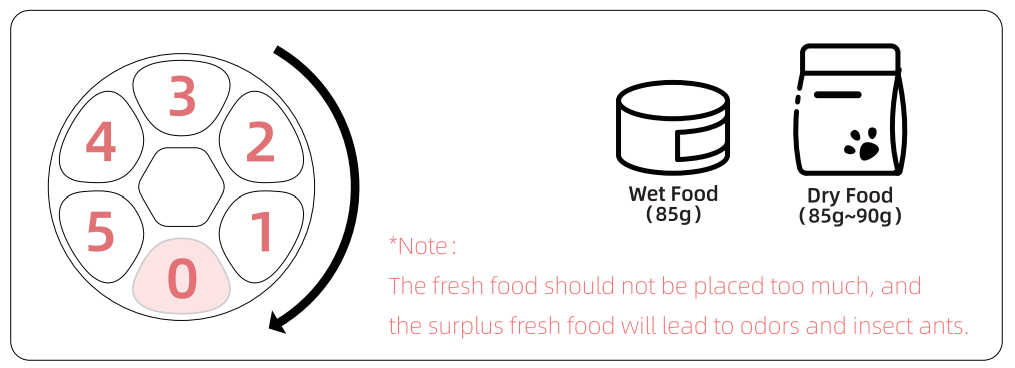
- Place the food bowl into the base unit, and then fill it up with pet food in turn.
- Cover the top lid and lock it.

Unlock the Display
- Press the
 button for 3 seconds at the same time to unlock the display, and then the screen will light up.
 - Press the button for 3 seconds at the same time again to lock the display, and then the screen darkens and the lock indicator will light up.

 button for 3 seconds at the same time to unlock the display, and then the screen will light up.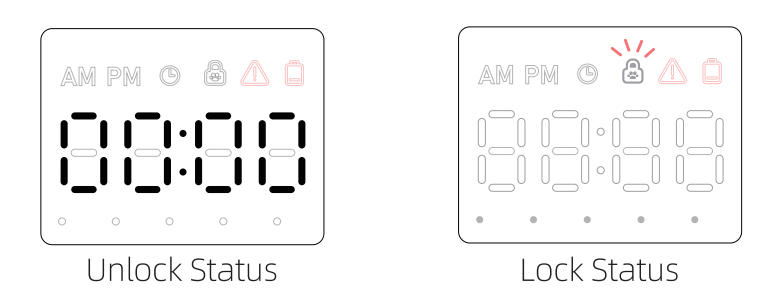
Set the Clock
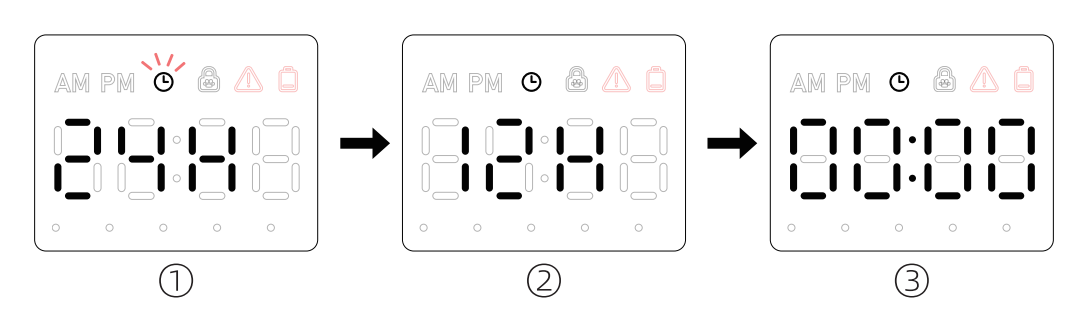
- Unlock the display, press the
 button, enter the setting state, “(9” indicator lights up and flashes.
 - Set Clock: Press
 to select 24 or 12-hour clock, press
  to save.
 - Set Time: Press
 to adjust the clock value, and then press
  to save. Press
  to adjust the minute value, and then press “O” to save.
Program Meal Time
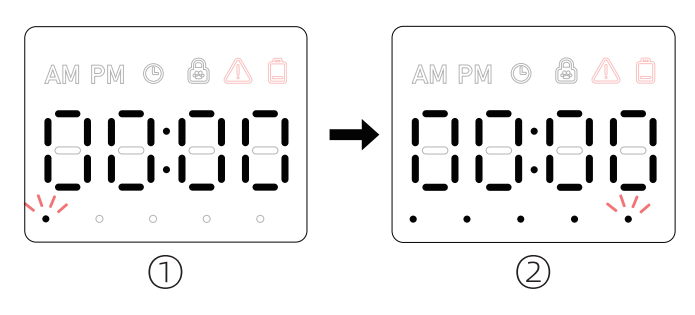
- After setting the clock, the first MEAL indicator will be flashing. Press to set the first meal time and press
 to save.
 - After the first meal setting, it will enter the second meal time automatically. Repeat this process for as many meal times desired (up to 5 meals).

Instant Feed
Unlock the display, long-press button to do instant feed once.
Cancel Feeding Schedule
If the feeding time is set to “00:00” or “AM12:00”, the feeding time will not be fed.
Restore Factory Settings
Unlock the display, press  and at the same time for 3 seconds to clear all settings.
Cleaning & Maintenance
Clean the Product Interior and Food Bowl
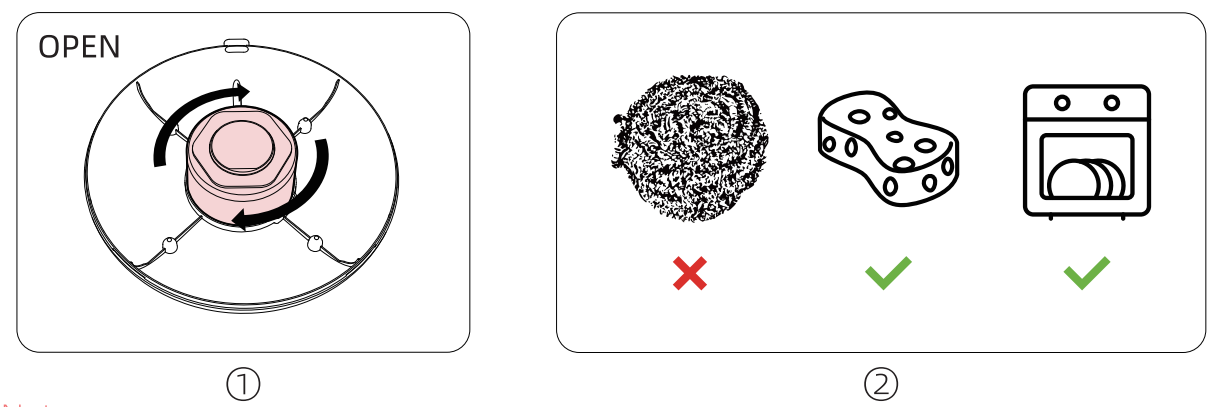
- Rotate the control board clockwise, and take it out.
- All parts are washable except the control board. Do not use metal stuff for cleaning to avoid damaging the product surface.

Note:
- After feeding fresh food or canned food, suggest washing it immediately every day.
Clean the Main Board
Take out the main board, wipe the outside with a soft, wet cloth.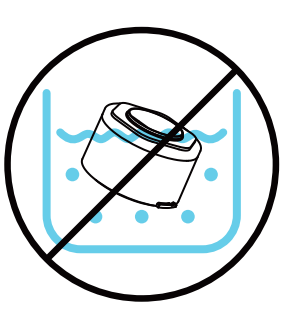
Note:
- The main board is not waterproof and cannot be washed.
Install the Control Board
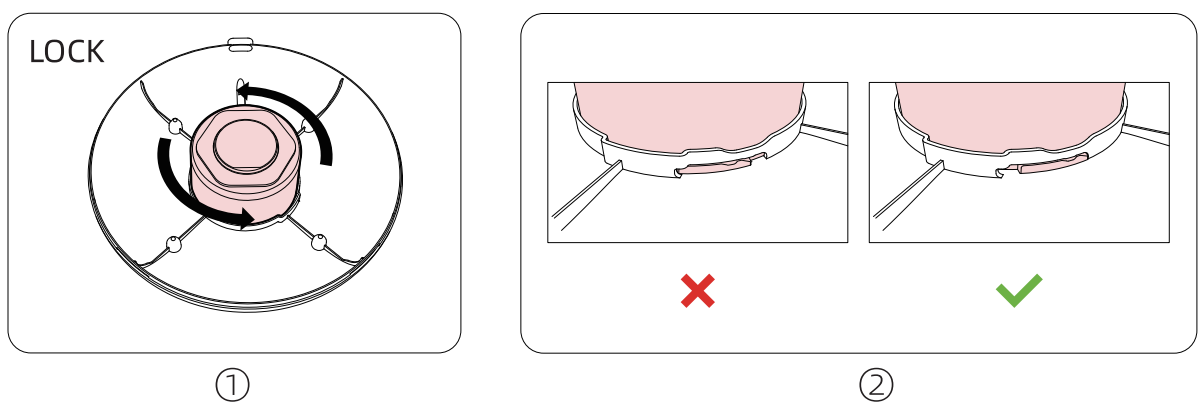
- Align the main board buckle with the bottom housing installation slot, hold and rotate it counterclockwise to hear a “click” sound.
- Check whether the main board is installed in place.

Note:
- If the control board is not installed properly, the food bowl will be misaligned, and the feeder cannot be used normally.
FAQs
For More Manuals By Petwant, Visit ManualsLibraryy.
Petwant F13 6-Meal Smart Pet Feeder-FAQs
How does the Petwant F13 Smart Pet Feeder work?
The feeder uses a timer to dispense food from its 6 meal trays at scheduled times, ensuring your pet eats on time even when you’re away.
How do I set up the feeder for the first time?
Place the feeder on a flat surface, fill the trays with your pet’s food, and use the control panel or app to program feeding times.
How do I connect the feeder to Wi-Fi?
From the app, tap Add Device → Pet Feeder, select your Wi-Fi network, and enter your password. If the indicator light doesn’t blink, press and hold the SET button for 5 seconds to reset.
Do automatic feeders need Wi-Fi to work?
No. The Petwant F13 can run scheduled feedings without Wi-Fi, but Wi-Fi lets you monitor and adjust feedings remotely through the app.
Why is my feeder not working?
Check that the power adapter is securely plugged in or that fresh backup batteries are installed. If still not working, reset the feeder by holding the Feed button for 5 seconds until you hear a beep.
Can I use wet food in the feeder?
The feeder is designed for dry food only. Using wet food may damage the unit and cause hygiene issues.
How do I store my pet’s food properly?
Keep dry food in a cool, dry place below 80°F. Store in an airtight container to maintain freshness and prevent pests.
How do I clean the Petwant F13 feeder?
Remove the food tray and wash it with warm, soapy water. Wipe the main unit with a damp cloth. Do not submerge the electronic base in water.