


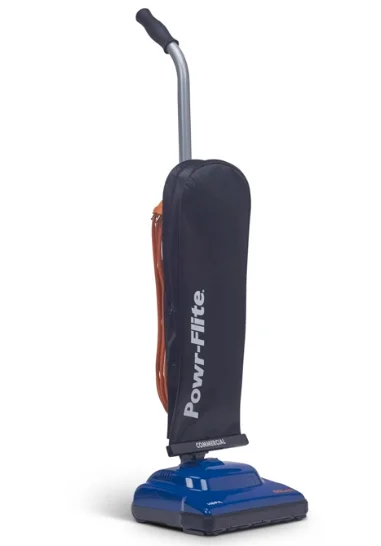
Powr-Flite PV030-W12-U Solar Commercial Upright Vacuum
GROUNDING INSTRUCTIONS
WARNING!
Improper connection of the equipment-grounding conductor can result in a risk of electric shock. Check with a qualified electrician or service person if you are in doubt as to whether the outlet is properly grounded. DO NOT modify the plug provided with the vacuum. If it will not fit the outlet, have a proper outlet installed by a qualified electrician. This vacuum cleaner must be grounded. If it should malfunction or break down, grounding provides a path of least resistance for electric current to reduce the risk of electric shock.
This vacuum cleaner is equipped with a cord having an equipment-grounding conductor and grounding plug. The plug must be plugged into an appropriate outlet that is properly installed and grounded in accordance with all local codes and ordinances. This vacuum cleaner is for use on a nominal 115-volt circuit and has a ground plug (see illustration). Make sure that the vacuum is connected to an outlet having the same configuration as the plug. No adapter should be used with this vacuum.
IMPORTANT SAFETY INSTRUCTIONS
READ AND UNDERSTAND ALL INSTRUCTIONS BEFORE USING THIS UNIT. Read and understand this owner’s manual and all labels on the unit before operating. Safety is a combination of common sense, staying alert, and knowing how your unit works. Use this unit only as described in this manual. Use only the manufacturer’s recommended attachments. To reduce the risk of personal injury or damage to your unit, use only recommended accessories. WARNING: To avoid fire, DO NOT use with a flammable or combustible liquid or floor cleaner. WARNING: To avoid electric shock, DO NOT expose to rain. Store indoors. When using this unit, basic precautions should always be followed, including the following:
- DO NOT leave the unit when plugged in. Unplug from the outlet when not in use and before servicing.
- DO NOT allow the unit to be used as a toy. Close attention is necessary when used around or near children.
- Use only as described in this manual. Use only the manufacturer’s recommended attachments.
- DO NOT use with a damaged cord or plug. If the unit is not working properly because it has been dropped, dropped into water, left outdoors, or damaged in any way, contact a service center.
- DO NOT handle the plug or the appliance with wet hands.
- DO NOT put any objects into openings.
- DO NOT use with any opening blocked: keep free of dust, lint, hair, or anything that may reduce air flow.
- Keep hair, loose clothing, fingers, and all parts of the body away from openings and moving parts.
- DO NOT pick up anything that is smoking or burning, such as cigarettes, matches, or hot ashes.
- DO NOT use it to pick up hazardous chemicals.
- Turn off all controls before unplugging.
- Turn the unit off immediately if foam or liquid comes from the machine exhaust.
• DO NOT use to pick up flammable or combustible liquids such as gasoline or use in areas where they may be present. - DO NOT use where oxygen or anesthetics are used.
- Replace damaged or worn parts immediately with genuine original equipment parts to maintain safety.
- This unit must be connected to a properly grounded outlet only. See grounding instructions.
- DO NOT use equipment outdoors or in the rain.
- DO NOT use equipment near or around flammable or explosive materials, fuels, or solvents.
- DO NOT allow the unit to freeze.
- Anyone designated to operate this equipment must, without fail, read and thoroughly understand all instructions and precautions before use.
- Do not operate in standing water.
- Do not operate equipment under any unsafe condition.
TECHNICAL SPECIFICATIONS

ASSEMBLING THE VACUUM
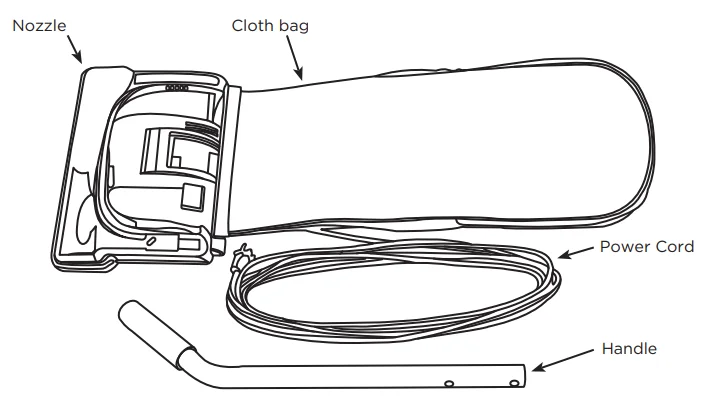
Important Note: Under no circumstances should you plug in the vacuum cleaner before complete assembly. The vacuum cleaner handle is packed as a separate component that requires assembly.
Installing the Handle
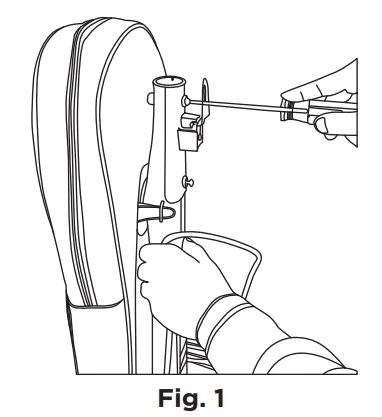
- Release the handle bracket from the handle tube by removing the two screws (Fig. 1).

- Place the handle onto the handle tube, aligning the holes with the pegs (Fig. 2).

- Place the handle bracket back into position (Fig. 3).

- Secure with two screws removed in step 1.


Positioning the Power Cord
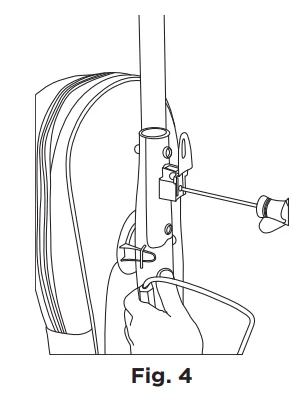
- Loosen, but do not remove, the screw holding the upper cord hook (Fig. 4).

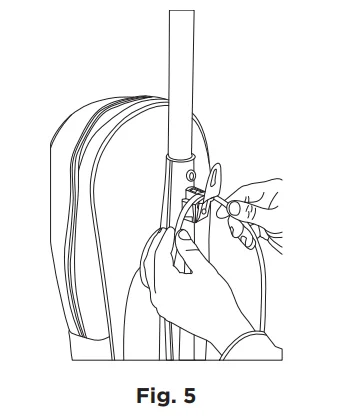
- Position the cord between the cord hook and the vacuum tube (Fig. 5). Re-tighten the screw.

- Once the cord is secured by the cord hook, proceed with wrapping the cord.
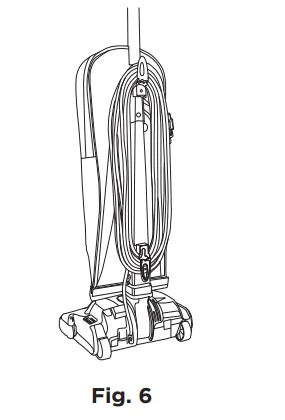
- Wrap the cord clockwise around the top and bottom cord hooks (Fig. 6). Fasten the plug to the wrapped cord using the channel on the plug. When not in use, store the appliance indoors in a clean, dry area where it can’t be damaged or cause injury.

Note: Before wrapping the cord onto the unit, make sure it is unplugged from the wall outlet.
VACUUM FEATURES
On/Off Switch
Locate the switch on the back side of the nozzle to the left of the handle tube (see Fig. 7). Simply press the switch with your foot to turn the vacuum on or off. Do not run the vacuum over the power cord. Always turn the vacuum cleaner off before unplugging it from the electrical outlet.
Edge Cleaning
The edge cleaning feature provides improved cleaning near walls and stationary furniture. For maximum edge cleaning, place the left side of the nozzle against the wall or stationary furniture.
Automatic Carpet Height Adjustment
Your vacuum is designed with an automatic, self-adjusting nozzle. No manual adjustments are required. The height of the nozzle is instantly and automatically adjusted to the flooring surface. This self-adjusting feature allows the nozzle to float evenly over all flooring surfaces.
HOW TO
Change the Vacuum Bag
CAUTION: First, unplug the vacuum cleaner from the electrical outlet.
- Unzip the outer cloth bag (Fig. 8).

- Remove the used bag by pressing the bag holder tab and pulling the bag off the vacuum (Fig. 9). Discard the used bag.

- To install a new bag, position the bottom of the bag collar into the bag collar holder (Fig. 10).

- Push the top of the bag collar inward until the collar “snaps” into place under the bag holder tab.
- Zip the outer cloth bag closed.


Remove/Install the Bottom Plate
CAUTION: First, unplug the vacuum cleaner from the electrical outlet.
To Remove the Bottom Plate
- After unplugging the power cord, turn the vacuum cleaner over, exposing the underside.
- Press the two holding tabs inward (Fig. 11), releasing the bottom plate. Remove the bottom plate.


To Install the Bottom Plate
- Install the bottom plate, making sure the bottom plate hinges are in place before setting the plate (Fig. 12).

- Press the plate into position until the plate “clicks” on both sides.

Change the Belt
CAUTION: First, unplug the vacuum cleaner from the electrical outlet.
- Turn the unit over and remove the bottom plate (see “How to Remove Bottom Plate”).
- Remove the brushroll and the worn or broken belt from the brushroll pulley and the motor drive shaft (Fig. 13).

- Loop the new belt around the motor drive shaft and the brushroll (Fig. 14).

- Reinstall the brushroll back into the housing. Turn the brushroll by hand, making sure the belt is not twisted, and all rotating parts move smoothly (Fig. 15).

- Reinstall the bottom plate (see “How to Install Bottom Plate”).


NOTE: To ensure maximum cleaning efficiency, the belt should be checked regularly to be sure it is in good condition. Replace the belt if it is stretched, cracked, or if excessive slipping is occurring.
Reset the Circuit Breaker
Your vacuum features a circuit breaker to protect the machine against damage due to a surge in the electrical current. Electrical surging can be a result of, though not limited to, a jammed brushroll (i.e., vacuuming up a throw rug) or a jammed motor fan. Should your vacuum cleaner experience a jammed brushroll with the circuit breaker tripping, first press the on/off button to the off position and unplug the unit.
Inspect the brushroll by removing the bottom plate (see “How to Remove Bottom Plate”) and removing any debris that may be causing the jam. Reinstall the bottom plate (see “How to Install Bottom Plate”), reset the circuit breaker by pressing the Circuit Breaker Reset Button (Fig. 16), plug in the power cord, and turn the unit on. If the unit fails to turn on, return to the place where you purchased your unit for assistance.
FOR BEST PERFORMANCE
- Keep your vacuum clean and in good operating condition.
- Change vacuum bags when the bags are 2/3 full to maximize cleaning performance.
- Always use genuine vacuum bags and replacement parts. Use of other products may result in poor cleaning performance, potential vacuum cleaner damage, and may void the vacuum warranty. Genuine products are designed for maximum cleaning performance.
- Have your machine checked periodically by the retailer where you purchased your vacuum.
- Store your machine carefully in a dry area.
- For optimum cleaning performance and safety, follow your owner’s manual instructions.
Consumables
- Belt – B014-0814B
- HEPA Vacuum Bag – X1899 (25 pack)
Visit WWW.POWR-FLITE.COM for more information.
For More Manuals By Powr-Flite, Visit ManualsLibraryy.
Powr-Flite PV030-W12-U Solar Commercial Upright Vacuum-FAQs
Where are Powr-Flite vacuums manufactured?
Powr-Flite products are primarily manufactured and distributed from Fort Worth, Texas, USA. The company also operates facilities in Missouri, but its main production hub reflects its strong American manufacturing roots and focus on commercial-grade quality.
Who owns the Powr-Flite brand?
Powr-Flite is owned by Tacony Corporation, which acquired the brand in 1996. Tacony specializes in commercial floor care equipment, parts, and accessories, making Powr-Flite a trusted name in professional cleaning solutions.
What is a common problem faced by upright vacuum cleaners?
Clogging and loss of suction are the most common issues. These problems usually result from blocked airflow paths or neglected maintenance and can often be resolved by cleaning filters and checking for obstructions.
What is the average lifespan of a commercial vacuum cleaner?
With proper care and maintenance, most commercial vacuums last between 5 to 8 years. Regular filter cleaning, timely part replacement, and correct usage can significantly extend the lifespan.
What safety precautions should be followed when using Powr-Flite vacuums?
Always unplug the vacuum when not in use or before servicing. Do not leave it running unattended, and keep it away from children. Following the manual’s safety instructions helps prevent accidents and equipment damage.
How should I store the Powr-Flite upright vacuum properly?
Store the vacuum indoors in a dry area. Ensure the unit is unplugged, cleaned, and free of debris before storage. Proper storage helps extend motor life and maintains overall performance.
Is vacuuming better than sweeping for carpets?
Yes, vacuuming is far more effective than sweeping on carpets. It removes embedded dirt, dust, and allergens, while sweeping only clears surface debris and may leave fine particles behind.
What are common signs of poor vacuum suction?
Reduced suction, unusual noises, vibrations, or debris being left behind are common indicators. These issues are often caused by clogged filters, blocked hoses, or a full dust bag and can usually be fixed with routine maintenance.
How powerful is the Powr-Flite PV030-W12-U vacuum?
While suction power is not usually listed in Pascals for commercial uprights, the PV030-W12-U provides strong, consistent airflow suitable for deep carpet cleaning and daily debris pickup in professional settings.