
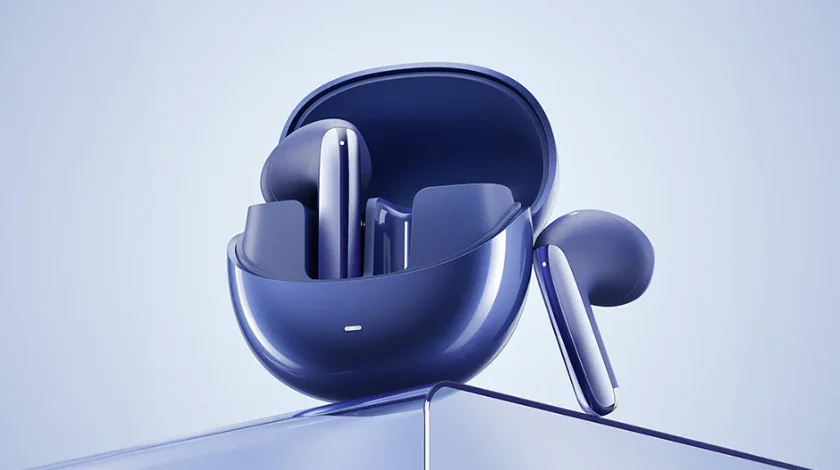

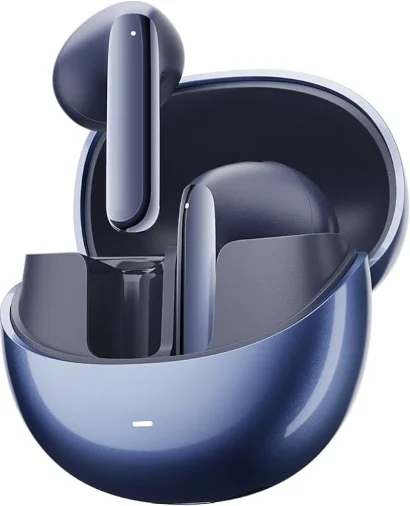
QCY AilyBuds Pro+ Wireless Earbuds
Overview
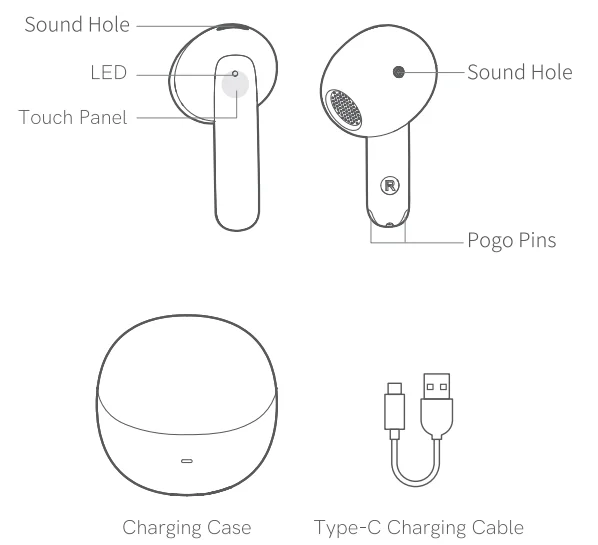
Note: The images in this manual are for reference only and may vary from the actual product. Please refer to the actual product for accuracy.
Bluetooth Pairing
Initial Pairing:
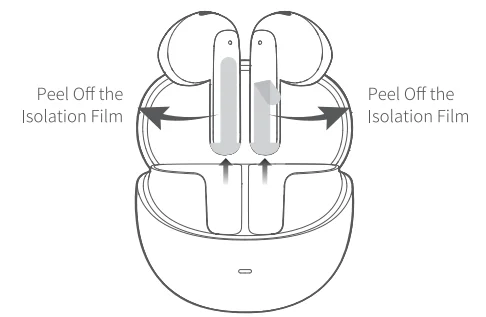
- Take out both earbuds, peel off the isolation film from each, and place them back into the charging case. Close the lid to activate the new device.
- Retrieve both earbuds again.
- Refresh your phone’s Bluetooth devices, pair with QCY AilyBuds Pro+, and complete the setup.
- Opening the charging case turns on the earbuds. If not, try again after charging.

- Opening the charging case turns on the earbuds. If not, try again after charging.
One-Click Device Switching: (This step switches from Device A to Device B.)
- Open the lid, keep both earbuds in the charging case, and press the case button for about 3 seconds. The earbuds will flash red once. Search for them on the device and click to connect.
- The earbuds support connecting to two devices simultaneously. (Enable in the QCY APP settings)
Multi-Device Connection
Steps for Multi-Device Connection: (Enable in the QCY APP settings)
- Power on the earbuds to initiate pairing. After connecting to Device A, turn off Bluetooth on the phone. The earbuds will enter pairing mode again.
- Enable Bluetooth on Device B and select “QCY AilyBuds Pro+” for pairing.
- On Device A, turn on Bluetooth and click the paired earbuds. name. Successful pairing means the earbuds are now connected to both devices simultaneously.
Note: The one-drag-two function and LDAC audio decoding format cannot be enabled simultaneously.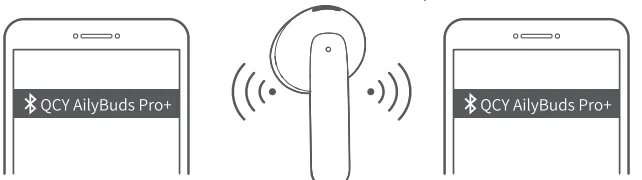
Factory Reset position that is comfortable and secure for you
Clearing Pairing Records (Use in case of connection issues). Place the earbuds in the charging case, open the lid, and press the charging case button for 10 seconds. The earbuds will flash red 5 times, indicating the reset is complete after the blinking stops. After the factory reset, follow the initial pairing method to connect for normal usage.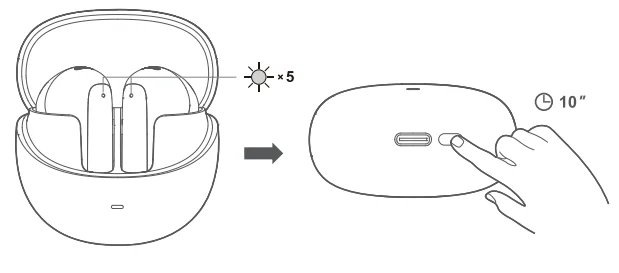
User Guide
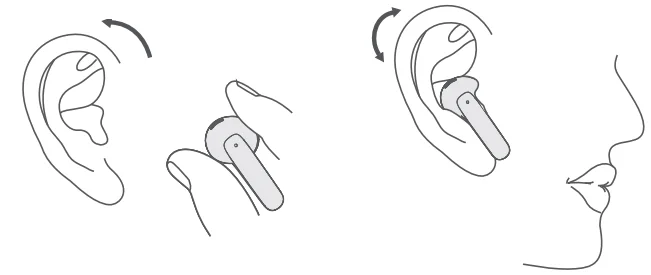
- Properly wear the earbuds on both the left and right sides. After wearing them, you can make slight adjustments by rotating to find a personally comfortable and secure position.
- Ensure the microphone opening is facing downward towards the mouth.
- Incorrect earbud placement may affect both calls and hearing to varying degrees.
- If the fit is not snug enough, the ANC noise cancellation effectiveness may decrease. Try adjusting the wearing angle and direction before reactivating adaptive noise cancellation.

- If the fit is not snug enough, the ANC noise cancellation effectiveness may decrease. Try adjusting the wearing angle and direction before reactivating adaptive noise cancellation.
Earbuds Charging
While charging, the red light stays on and turns off when fully charged.
Charging Case Charging
During charging: The red light stays on. Fully charged: The white light stays on.
Charging Case Battery Status
- Sufficient battery: When the charging case is opened, the white light will stay on for 5 seconds before turning off.
- Low battery: When the charging case is opened, the red light will stay on for 5 seconds before turning off.
- Insufficient battery: When the charging case has insufficient battery, the red light will quickly flash three times before turning off.
Functions
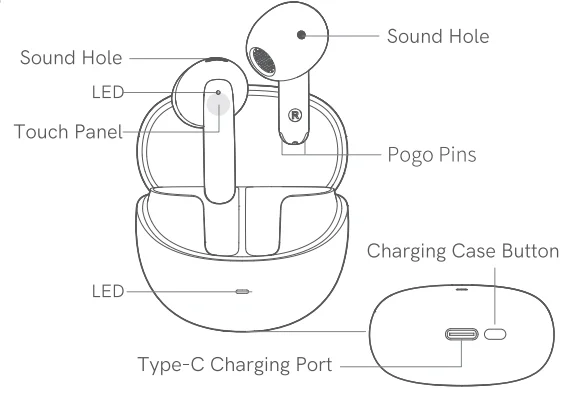
 Power On: Open the charging case (earbuds inside) or, if the earbuds are outside the case, long-press the touch panel for 1.5 seconds.
 Power Off: Place the earbuds into the charging case and close the lid.
 Answer/End Call: Double-tap the touch panel.
 Reject Call: Long-press the touch panel for 1.5 seconds.
- Play/Pause: Double-tap the touch panel.
 Next Track: Triple-tap the right ear touch panel.
 Voice Assistant: Triple-tap the left ear touch panel.
- Low Latency: Long-press the left ear touch panel.
 ANC Mode: Long-press the right ear touch panel to toggle the Adaptive ANC switch.
 Power On: Open the charging case (earbuds inside) or, if the earbuds are outside the case, long-press the touch panel for 1.5 seconds.
 Power Off: Place the earbuds into the charging case and close the lid.
 Answer/End Call: Double-tap the touch panel.
 Reject Call: Long-press the touch panel for 1.5 seconds.
 Play/Pause: Double-tap the touch panel.
 Next Track: Triple-tap the right ear touch panel.
 Voice Assistant: Triple-tap the left ear touch panel.
 Low Latency: Long-press the left ear touch panel.
 ANC Mode: Long-press the right ear touch panel to toggle the Adaptive ANC switch.
Warranty
Your QCY product purchase is covered by a one-year limited manufacturer’s warranty from the date of delivery. Please ensure you retain your purchase receipt. If any defects occur due to quality issues within the warranty period, kindly bring both the warranty card and the purchase receipt to the authorised dealer for complimentary replacement services.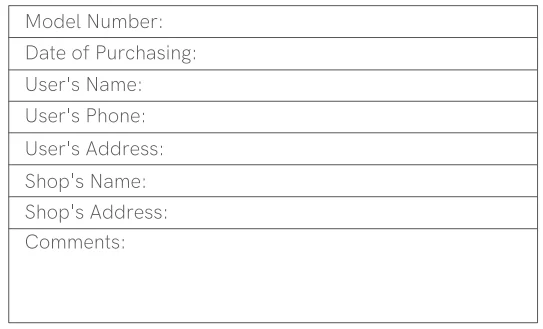
The manufacturer’s warranty is void under the following circumstances, but not limited to:
- Improper or inadequate maintenance or modification.
- Accident, misuse, abuse, contamination, or other external causes.
- The use of unspecified adapters and accessories.
- Malfunctions or damages resulting from natural disasters, earthquakes, lightning, abnormal voltage, or environmental factors.
- Damages that occur as a result of one’s failure to follow the instructions.
FCC Statement
This equipment has been tested and found to comply with the limits for a Class B digital device, pursuant to Part 15 of the FCC Rules. These limits are designed to provide reasonable protection against harmful interference in a residential installation. This equipment generates, uses, and can radiate radio frequency energy and, if not installed and used in accordance with the instructions, may cause harmful interference to radio communications.
However, there is no guarantee that interference will not occur in a particular installation. If this equipment does cause harmful interference to radio or television reception, which can be determined by turning the equipment off and on, the user is encouraged to try to correct the interference by one or more of the following measures:
- Reorient or relocate the receiving antenna.
- Increase the separation between the equipment and receiver.
- Connect the equipment into an outlet on a circuit different from that to which the receiver is connected.
- Consult the dealer or an experienced radio/TV technician for help.
This device complies with part 15 of the FCC Rules. Operation is subject to the following two conditions:
- This device may not cause harmful interference, and
- This device must accept any interference received, including interference that may cause undesired operation.
Changes or modifications not expressly approved by the party responsible for compliance could void the user’s authority to operate the equipment.
Safety Precautions
- Please carefully read and retain this user manual before using the product.
- If the product is not used for an extended period (more than 2 weeks), please recharge it.
- You must choose a charger produced by a legitimate manufacturer and certified by the national safety authority.
- If your phone cannot detect the Bluetooth earbuds, either re-enter pairing mode or perform a factory reset on the Bluetooth earbuds. If there is a phone program error, close and reopen Bluetooth on the phone or restart the phone.
- Do not disassemble or modify the battery, insert foreign objects, expose it to high temperatures, or immerse it in water or other liquids to prevent battery leakage, overheating, ignition, or explosion. Battery replacement should only be done by the manufacturer.
- Do not drop, crush, or puncture the battery. Prevent external pressure that may lead to internal short circuits and overheating.
- Do not dismantle or modify the earbuds for any reason, as it may result in fire, electronic breakdown, or permanent damage to the product damage to the product.
- Do not expose the product to extremely low or high temperatures (below 0°C or above 45°C),
- Do not use the product indicator light near the eyes of children or animals.
- Do not use the product during thunderstorms, as it may cause abnormal operation and increase the risk of electric shock.
- Do not use oil or other volatile liquids to clean the product.
 Please do not use this device for long periods of time and at high volume, as there is a risk of hearing damage.
 Please do not use this device for long periods of time and at high volume, as there is a risk of hearing damage.
Manufacturer: Dongguan Hele Electronics Co., Ltd.
Address: No. 325 Yuehui Rd. Daojiao Town, Dongguan City, Guangdong Province, China
Notice:
 This marking indicates that this product should not be disposed of with other household wastes throughout the EU. To prevent possible harm to the environment or human health from uncontrolled waste disposal, recycle it responsibly to promote the sustainable reuse of material resources. To return your used device, please use the return and collection systems or contact the retailer where the product was purchased. They can take this product for environmentally safe recycling.
For More Manuals By QCY, Visit ManualsLibraryy.
QCY AilyBuds Pro+ Wireless Earbuds -FAQs
What are the QCY AilyBuds Pro+ Wireless Earbuds?
The QCY AilyBuds Pro+ Wireless Earbuds are feature-rich true wireless earbuds designed to deliver high-quality audio, active noise cancellation, and modern connectivity. They use Bluetooth 5.3 for stable pairing and support Hi-Res Audio with the LDAC codec, enabling more detailed sound transmission. With a semi-in-ear design and smart features like multipoint connection, they are built for both everyday use and enhanced listening experiences.
Do the QCY AilyBuds Pro+ support active noise cancellation?
Yes, the QCY AilyBuds Pro+ feature adaptive hybrid active noise cancellation that can reduce environmental noise by up to around 43dB in optimal conditions. The system adjusts based on how the earbuds fit in your ears, improving effectiveness across different environments. This makes them suitable for commuting, office use, or any situation where you want to minimize background distractions.
How is the sound quality of the QCY AilyBuds Pro+?
The QCY AilyBuds Pro+ offer impressive sound quality for their price, thanks to LDAC support and Hi-Res Audio certification. They can transmit high-resolution audio with up to 24-bit/96kHz sampling, producing detailed highs, balanced mids, and strong bass. The built-in DSP tuning enhances clarity and depth, making them suitable for music, videos, and podcasts.
How long does the battery last on the QCY AilyBuds Pro+?
The battery life of the QCY AilyBuds Pro+ is suitable for daily use, offering around 4 hours of playback with ANC enabled and up to 5.5 hours without it. With the charging case, total battery life extends to approximately 23 to 30 hours, depending on usage settings. This allows users to enjoy extended listening sessions without frequent recharging.
Are the QCY AilyBuds Pro+ good for phone calls?
Yes, the QCY AilyBuds Pro+ are equipped with a 6-microphone system combined with AI-based noise reduction technology. This setup helps isolate your voice and reduce background noise, improving clarity during calls. Whether you are indoors or outdoors, the earbuds are designed to provide a clear and stable communication experience.
Do the QCY AilyBuds Pro+ support dual device connection?
The QCY AilyBuds Pro+ support multipoint connectivity, allowing users to connect the earbuds to two devices at the same time. This makes it easy to switch between a smartphone and a laptop without disconnecting manually. It is especially useful for multitasking, such as taking calls on your phone while working on another device.
Are the QCY AilyBuds Pro+ comfortable to wear?
The QCY AilyBuds Pro+ come with an IPX5 water resistance rating, which means they can withstand sweat and light splashes. This makes them suitable for workouts, outdoor activities, and everyday use in mild weather conditions. However, they are not designed for swimming or heavy water exposure, so proper care is recommended.
Do the QCY AilyBuds Pro+ support low latency or gaming mode?
Yes, the QCY AilyBuds Pro+ includes a low-latency mode with delays as low as around 80 milliseconds. This helps keep audio synchronized with visuals when watching videos or playing mobile games. While not specifically gaming earbuds, they offer a smooth and responsive experience for casual gaming and streaming.
Are the QCY AilyBuds Pro+ worth buying?
The QCY AilyBuds Pro+ are a strong value option for users looking for premium features at a budget price. They offer adaptive ANC, Hi-Res audio with LDAC, solid battery life, and clear call quality. While they may not match high-end flagship earbuds, they provide excellent performance for their price, making them a great choice for everyday use.