
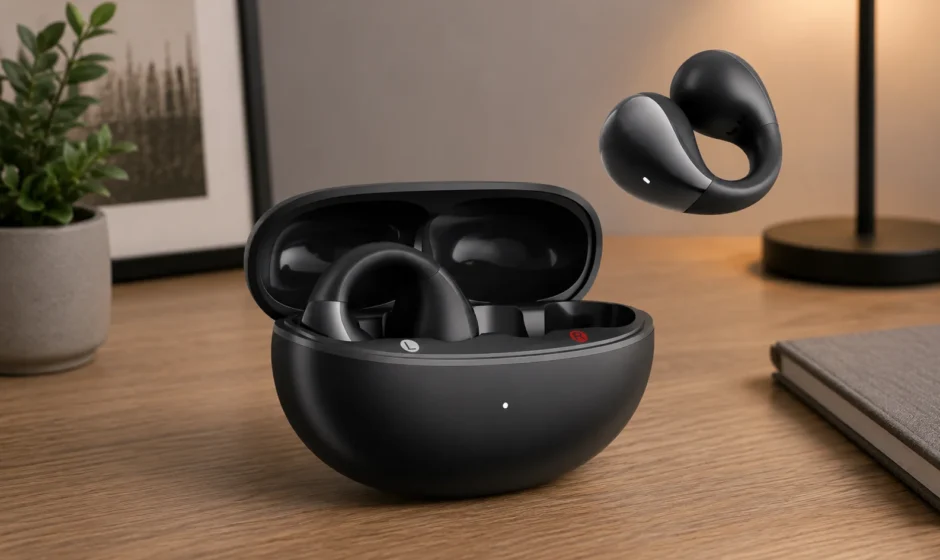

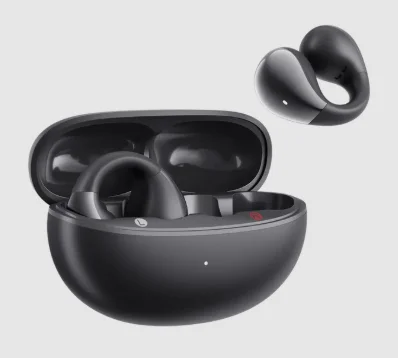
QCY Crossky C30 Open Ear Headphones
 APP DOWNLOAD
 APP DOWNLOAD
 Use your mobile browser to scan the QR code and download the QCY app to experience custom touch control, EQ settings, firmware updates, and more.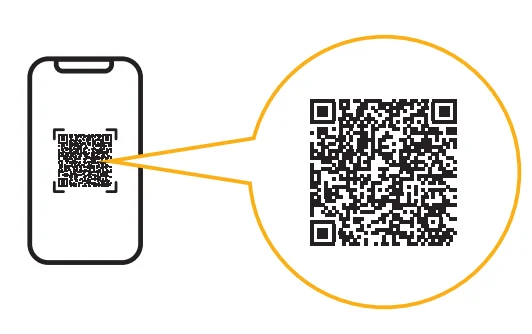
 PAIRING
 PAIRING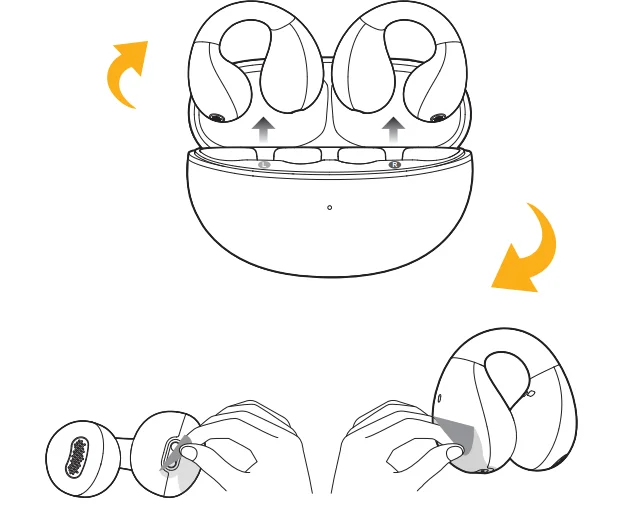
First Time Connection:
- Activate the earphones by removing them from the case, tearing off the protective film, placing them back, and closing the charging case.
- Take the earbuds out again.
- Refresh the Bluetooth device list on your device and select “QCY Crossky C30” to connect.
Note: The earbuds power on automatically when the case opens. If they don’t, recharge and retry.
 MULTIPOINT CONNECTION
 MULTIPOINT CONNECTION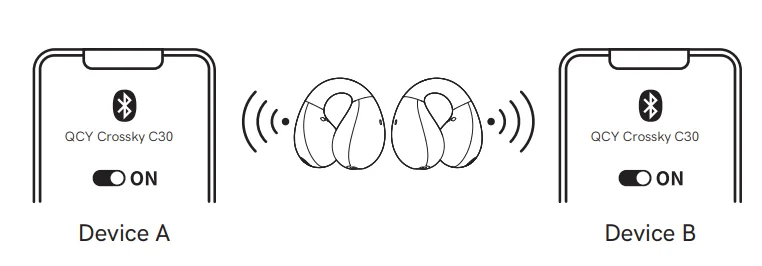
- The earphones will automatically enter pairing mode when turned on. Turn off Bluetooth on your smartphone after device A connects. The earphones will enter pairing mode again.
- Turn on the Bluetooth on device B and select “QCY Crossky C30” to connect.
- Turn on the Bluetooth on device A and select the paired name to connect. Now the earphones are connected to two devices simultaneously.
 FACTORY RESET
 FACTORY RESET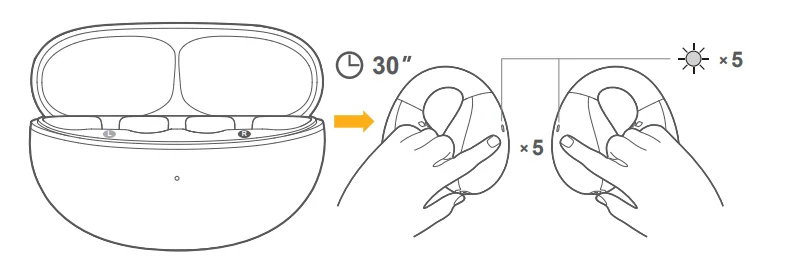
Clear Pairing Records
Disconnect the earbuds from your device. Pick them up, then touch both the panels 5 times within 30 seconds (the LED will blink white 5 times), and the reset is complete after the blinking stops. Apply the pairing method for the first use to connect after resetting.
 HOW TO FIT
 HOW TO FIT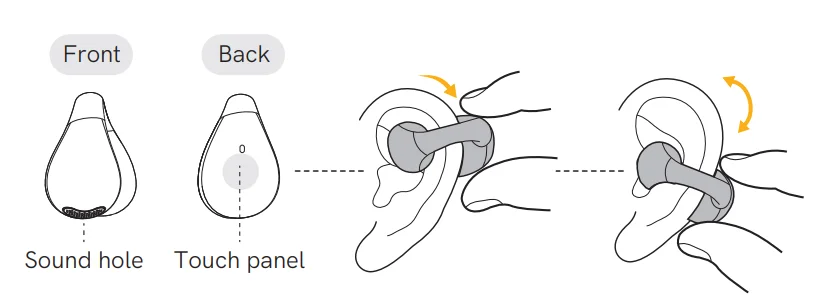
- Put the earbud in your ear, push it down like the above picture, and adjust it to fit yourself.
- Adjust its angle and make the sound hole towards your ear.
Note: If the earbuds are not worn correctly, it may affect sound quality and hearing.
POWER ON/OFF
 POWER ON/OFF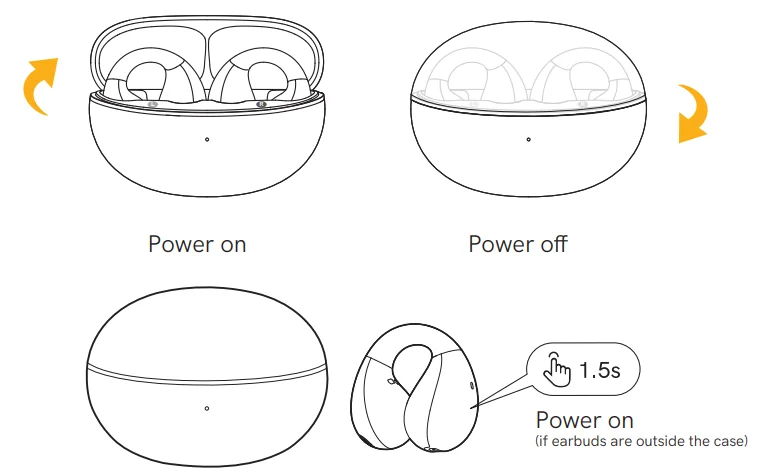
- Open the charging case, and the earbuds will automatically power on. When earphones are outside the charging box, long-press the touch panel for 1.5 seconds.
- Place the earbuds back into the charging case. Close the case, and the earbuds will automatically power off.
 CONTROLS
 CONTROLS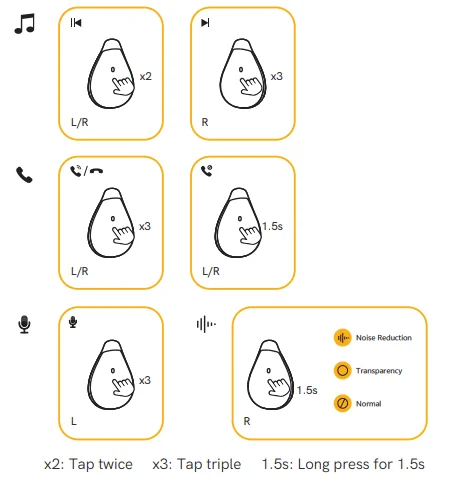
 INDICATOR BEHAVIOR
 INDICATOR BEHAVIOR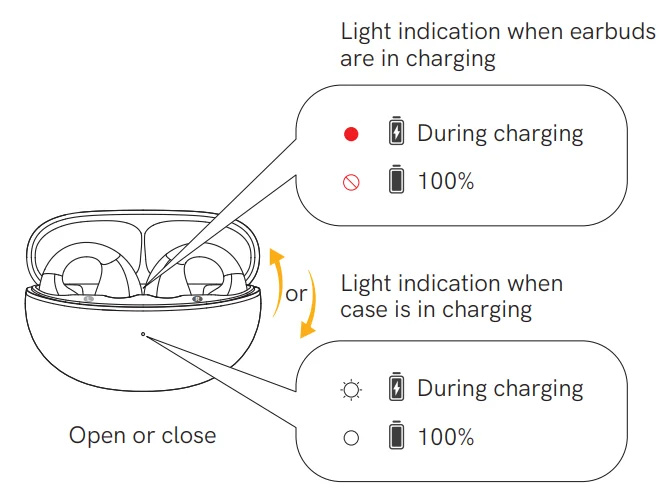
- Light indication when earbuds are in charging:
 Red light on: During charging
 Red light off: Fully charged
- Light indication when the case is charging:
 White light blinks: During charging
 White light stays on: Fully charged
 Red light on: During charging
 Red light off: Fully charged
 White light blinks: During charging
 White light stays on: Fully charged
 TROUBLESHOOTING
 TROUBLESHOOTING
Q: Why can’t earphones pair with my mobile phone?
A: Please check if your earphones are in pairing mode or re-connection mode, and check if the Bluetooth search function of your Bluetooth device is turned on. If all is done, then go to the Bluetooth menu of your Bluetooth device, delete/ignore the earphone Bluetooth pairing name. After that, you can try to reconnect Bluetooth according to the above steps.
Q: Why is the connection not stable and cuts out intermittently?
A: Please check if there are any metal materials or obstacles within a relatively close range or your surroundings that are perhaps interfering with the Bluetooth connection. This may happen because Bluetooth is a radio technology that is sensitive to objects between the earphones and other devices.
Q: What can I do if there is only one earphone producing sound?
A: Please place the two earphones into the charging case, close the case, and take them out to check if both of them produce sounds. If there is still sound from only one earphone, please reset both of them.
Q: Why do I experience a delay in video watching or game playing?
A: Affected by factors such as environment, network, and mobile phone codec, there will be varying degrees of delay when the mobile phone transmits audio data to the earphone.
Q: Why can’t my earphones turn on?
A: Please recharge it and make sure it has enough battery power. If it is fully charged and still nothing happens, or if you are not able to charge the unit, please contact our customer support for warranty coverage.
 WARRANTY INFORMATION
 WARRANTY INFORMATION
Warranty Period
QCY products come with a 12-month warranty period from the date of delivery.
How to Solve My Problem
- Online purchase: When applying for after-sales service, please give priority to contacting the customer service of the purchase channel/platform. The service support of QCY will provide technical support services and solutions to process your after-sales questions.
- Offline purchase: Please contact the store/distributor or agent directly to assist with your after-sales questions.
Valid proof of purchase to claim warranty
- Products purchased online: Please provide an order number or information that clearly shows the sales channel, product details, price, and sales date.
- Products purchased from non-official channels: Please provide sales store information, order number, or product information, evidence confirmed by the QCY service team.
Not Covered under Warranty
The manufacturer’s warranty is avoided under the following circumstances, but not limited to:
- Lost, stolen, or free products.
- Items that have expired their warranty period.
- Products without sufficient proof of purchase.
- Improper or inadequate maintenance or modification.
- Accident, misuse, abuse, contamination, or other external causes.
- The use of unspecified adapters and accessories.
- Malfunctions or damages resulting from natural disasters, earthquakes, lightning, abnormal voltage, or environmental factors.
- Damages that occur as a result of one’s failure to follow the instructions.
Contact Details
For FAQs and more information, please email [email protected] or visit https://www.qcy.com/.
FCC
This equipment has been tested and found to comply with the limits for a Class B digital device, pursuant to Part 15 of the FCC Rules. These limits are designed to provide reasonable protection against harmful interference in a residential installation. This equipment generates, uses, and can radiate radio frequency energy and, if not installed and used in accordance with the instructions, may cause harmful interference to radio communications.
However, there is no guarantee that interference will not occur in a particular installation. If this equipment does cause harmful interference to radio or television reception, which can be determined by turning the equipment off and on, the user is encouraged to try to correct the interference by one or more of the following measures:
- Reorient or relocate the receiving antenna.
- Increase the separation between the equipment and receiver.
- Connect the equipment into an outlet on a circuit different from that to which the receiver is connected.
- Consult the dealer or an experienced radio/TV technician for help.
This device complies with part 15 of the FCC Rules. Operation is subject to the following two conditions:
- This device may not cause harmful interference, and
- This device must accept any interference received, including interference that may cause undesired operation.
- Changes or modifications not expressly approved by the party responsible for compliance could void the user’s authority to operate the equipment.
IC STATEMENT
This device contains licence-exempt transmitter(s)/receiver(s) that comply with Innovation, Science and Economic Development Canada’s licence-exempt RSS(s). Operation is subject to the following two conditions:
- This device may not cause interference.
- This device must accept any interference, including interference that may cause undesired operation of the device.
 SAFETY INSTRUCTIONS
 SAFETY INSTRUCTIONS
- Please carefully read and retain this user manual before using the product.
- If the product is not used for an extended period (more than 2 weeks), please recharge it.
- You must choose a charger produced by a legitimate manufacturer and certified by the national safety authority.
- If your phone cannot detect the Bluetooth earbuds, either re-enter pairing mode or perform a factory reset on the Bluetooth earbuds. If there is a phone program error, close and reopen Bluetooth on the phone or restart the phone.
- Do not disassemble or modify the battery, insert foreign objects, expose it to high temperatures, or immerse it in water or other liquids to prevent battery leakage, overheating, ignition, or explosion. Battery replacement should only be done by the manufacturer.
- Do not drop, crush, or puncture the battery. Prevent external pressure that may lead to internal short circuits and overheating.
- Do not dismantle or modify the earbuds for any reason, as it may result in fire, electronic breakdown, or permanent damage to the product.
- Do not expose the product to extremely low or high temperatures (below 0°C or above 45°).
- Do not put the product indicator light near the eyes of children or animals.
- Do not use the product during thunderstorms, as it may cause abnormal operation and increase the risk of electric shock.
- Do not use oil or other volatile liquids to clean the product.
- Please do not use this device for long periods of time and at high volume, as there is a risk of hearing damage.
For More Manuals By QCY, Visit ManualsLibraryy.
QCY Crossky C30 Open Ear Headphones-FAQs
What are the main features of the QCY Crossky C30 Open Ear Headphones?
The QCY Crossky C30 Open Ear Headphones feature an open-ear clip design, Bluetooth 5.4 connectivity, AI-enhanced call noise reduction, and up to 25 hours of battery life with the charging case. They also include customizable EQ settings through the QCY app and an IPX4 water-resistance rating.
Are the QCY Crossky C30 headphones comfortable for long listening sessions?
Yes, the QCY Crossky C30 headphones are designed for extended comfort with their lightweight open-ear structure and clip-on fit. Many users appreciate that they do not block the ear canal, making them suitable for workouts, office use, walking, and long daily listening without causing ear fatigue.
How is the sound quality of the QCY Crossky C30 Open Ear Headphones?
The QCY Crossky C30 delivers balanced audio with clear vocals and decent detail for an open-ear design. Bass performance is lighter compared to traditional in-ear earbuds, but the headphones still provide enjoyable sound quality for casual listening, podcasts, calls, and everyday music playback.
Do the QCY Crossky C30 headphones leak sound?
The QCY Crossky C30 uses directional audio technology to reduce sound leakage during listening sessions. While leakage is minimized at moderate volume levels, some users may still notice slight audio escape at higher volumes, especially in quiet indoor environments or public spaces. ([QCY Official][1])
Are the QCY Crossky C30 headphones good for workouts and outdoor activities?
Yes, the QCY Crossky C30 headphones work well for exercise, jogging, cycling, and outdoor use because the open-ear design keeps users aware of surrounding sounds. Their lightweight fit and IPX4 splash resistance also help during workouts and light rain conditions.
What is the battery life of the QCY Crossky C30 Open Ear Headphones?
The QCY Crossky C30 offers around 5.5 hours of playback on a single charge and up to 25 hours total with the charging case. Battery performance is generally considered reliable for daily commuting, office work, casual listening, and extended outdoor activities.
Do the QCY Crossky C30 headphones support noise cancellation?
The QCY Crossky C30 includes AI-based ENC technology for clearer phone calls by reducing background noise during conversations. However, because of the open-ear design, they do not provide traditional active noise cancellation for blocking outside environmental sounds while listening to music.
Can you customize the sound settings on the QCY Crossky C30?
Yes, users can personalize sound profiles and touch controls using the QCY mobile app. The app allows EQ adjustments for different listening preferences, helping improve vocals, bass, or overall audio balance depending on the user’s preferred music style and listening experience.
Are the QCY Crossky C30 headphones compatible with Android and iPhone?
The QCY Crossky C30 headphones are compatible with both Android and iPhone devices through Bluetooth 5.4 connectivity. They support stable wireless pairing, quick connections, and smooth performance for music streaming, video playback, voice calls, and mobile gaming across most modern smartphones.
Are the QCY Crossky C30 Open Ear Headphones worth buying?
The QCY Crossky C30 is a good budget-friendly option for users wanting comfortable open-ear headphones with decent sound quality and strong battery life. They are especially suitable for people who prefer environmental awareness during listening, though bass lovers may prefer traditional in-ear earbuds instead.