
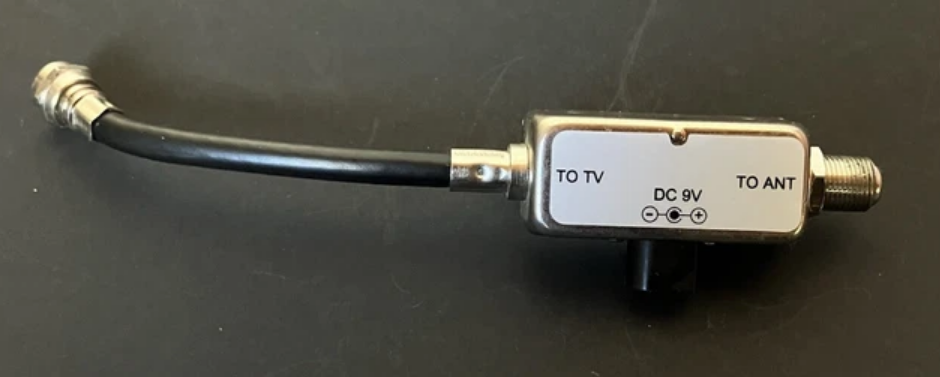

RadioShack In-Line Antenna Single Amplifier
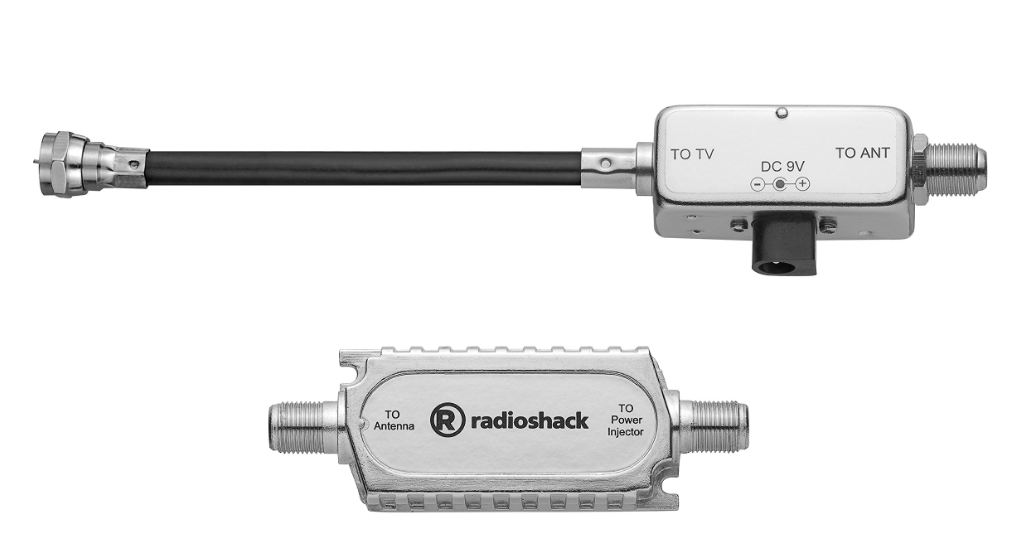
Package Contents
- Signal Amplifier
- Power Injector
- AC Adapter
- Screws (2)
- User’s Guide
Caution:
Because the amplifier uses a coaxial cable to carry the current from the DC power supply, proper connections are crucial. Carefully follow all instructions in this User’s Guide to avoid damage to your equipment.
IMPORTANT SAFETY INSTRUCTIONS
- Read and retain all safety and operating instructions.
- The amplifier should be situated so that its location does not interfere with its proper ventilation.
- This amplifier should be connected to a power supply of the type described in the operating instructions or marked on the amplifier.
- Do not attempt to destroy the grounding or polarization components of this amplifier.
- Wipe the amplifier with a damp cloth occasionally to keep it looking new. Do not use harsh chemicals, cleaning solvents, or strong detergents to clean the amplifier.
- Do not expose to liquid, vapor, or rain.
- An outside antenna system should not be located in the vicinity of overhead power lines or other electric light or power circuits, or where it can fall into such power lines or circuits. When installing an outside antenna system, extreme care should be taken to keep from touching such power lines or circuits, as contact with them might be fatal.
- Place the amplifier away from heat sources such as radiators, heat registers, stoves, or other appliances.
- Temperature extremes can shorten the life of electronic devices and distort or melt plastic parts.
- If an outside antenna is connected to the receiver, be sure the antenna system is grounded to provide some protection against voltage surges, built-up static charges, and lightning strikes. Section 810 of the National Electric Code (NEC), ANSI/NFPA NO. 70-70-1990 provides information with respect to proper grounding of the mast and supporting structure, grounding of the lead-in wire to an antenna discharge unit, size of grounding conductors, location of antenna-discharge unit, connection to grounding electrodes, and requirements for the grounding electrode.
Specifications
Amplifier
- Frequency: 54–700 MHz
- Gain: Min. 15 dB
- Noise Figure: Max. 4 dB
Power Injector
- Input: 9V DC
- Insertion Loss: Max. 3 dB
AC/DC Adapter
- Input: 120V AC, 60Hz
- Output: 9V DC, 100mA, Tip positive
Specifications are subject to change and improvement without notice. Actual product may vary from the images found in this document.
Connect to an Antenna
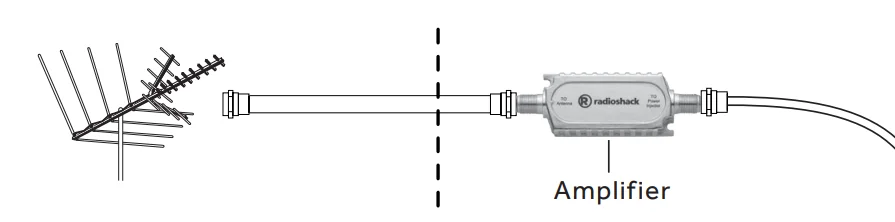
- Install your amplifier close to your antenna. You can mount the amplifier on a wall or another surface using the two supplied screws.
- Do not place the amplifier outdoors. Install it inside your home where the coaxial cable enters from the antenna.
- To keep exposed cable to a minimum, you can place the amplifier in your attic.
- Install waterproof sealant around outdoor connections.
- To prevent interference, do not place the amplifier within six inches of any other electronic device.
- Connect the TO Antenna side of the amplifier to the antenna transformer, or as close to the antenna as possible if it does not have a transformer.
- Route a 75-ohm (RG-6 or RG-6QS) coaxial cable (not supplied) from the amplifier to the power injector.
- Use only as much cable as is necessary to make each connection. An extra cable reduces signal strength.
- Do not route cables where they might be cut, crimped, or crushed.

Connect to the Power Injector
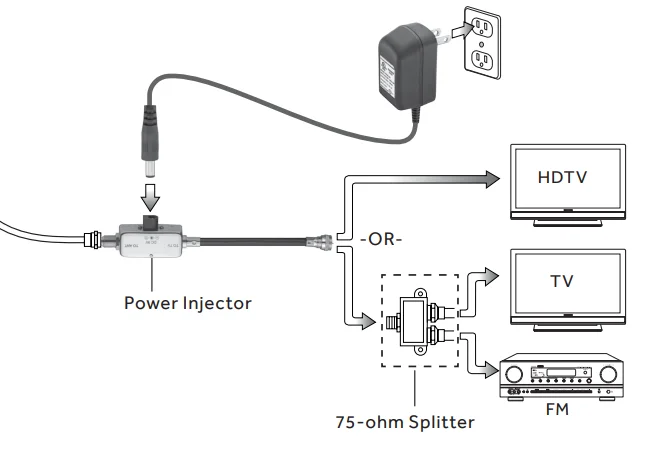
- Place the power injector close to your television and an AC outlet.
- Connect the coaxial cable from the amplifier to the TO ANT side of the power injector.
- Connect the TO TV side of the power injector to one receiver OR to a 75-ohm splitter (not included) and two receivers. Caution: Double-check all connections. Your TV or receiver may be damaged if these connections are reversed.
- Connect the supplied AC adapter to the power injector’s DC 9V jack, then plug it into a standard household outlet. You can use an RF cable (not included) up to 150 feet (46 m) to connect a second amplifier in-line with the first amplifier to enhance the RF signal level.

Note:
- Always connect the AC adapter to the power injector before you connect it to AC power. When you finish, disconnect the adapter from AC power before you disconnect it from the power injector.
- Make sure the power injector is between the amplifier and the splitter (before the signal is split).
- The in-line signal amplifier is designed for use with F-type connectors. For some antenna systems (such as scanners), you must use connection adapters or make special cables.
Troubleshooting
If your receiver does not improve signal strength after you install the in-line signal amplifier:
- Check all connections.
- Unplug the power injector. If the signal worsens, the amplifier is functioning.
- Connect to a different receiver. If possible, also try connecting to a different antenna.
- Minimize the number of splitters between the antenna and your receiver, or use amplified splitters.
- Minimize the length of your cables.
Limited Warranty
RadioShack warrants this product against defects in materials and workmanship under normal use by the original purchaser for ninety (90) days after the date of purchase from a RadioShack-owned store or an authorized RadioShack franchisee or dealer. RADIO SHACK MAKES NO OTHER EXPRESS WARRANTIES.
This warranty does not cover:
- damage or failure caused by or attributable to abuse, misuse, failure to follow instructions, improper installation or maintenance, alteration, accident, Acts of God (such as floods or lightning), or excess voltage or current;
- improper or incorrectly performed repairs by persons who are not a RadioShack Authorized Service Facility;
- consumables such as fuses or batteries;
- ordinary wear and tear or cosmetic damage;
- transportation, shipping, or insurance costs;
- costs of product removal, installation, setup service, adjustment, or reinstallation; and
- claims by persons other than the original purchaser.
Should a problem occur that is covered by this warranty, take the product and the RadioShack sales receipt as proof of purchase date to any RadioShack store in the U.S. RadioShack will, at its option, unless otherwise provided by law:
- repair the product without charge for parts and labor;
- replace the product with the same or a comparable product; or
- refund the purchase price. All replaced parts and products, and products on which a refund is made, become the property of RadioShack.
New or reconditioned parts and products may be used in the performance of warranty service. Repaired or replaced parts and products are warranted for the remainder of the original warranty period. You will be charged for the repair or replacement of the product made after the expiration of the warranty period.
RADIOSHACK EXPRESSLY DISCLAIMS ALL WARRANTIES AND CONDITIONS NOT STATED IN THIS LIMITED WARRANTY. ANY IMPLIED WARRANTIES THAT MAY BE IMPOSED BY LAW, INCLUDING THE IMPLIED WARRANTY OF MERCHANTABILITY AND, IF APPLICABLE, THE IMPLIED WARRANTY OF FITNESS FOR A PARTICULAR PURPOSE, SHALL EXPIRE ON THE EXPIRATION OF THE STATED WARRANTY PERIOD.
EXCEPT AS DESCRIBED ABOVE, RADIOSHACK SHALL HAVE NO LIABILITY OR RESPONSIBILITY TO THE PURCHASER OF THE PRODUCT OR ANY OTHER PERSON OR ENTITY WITH RESPECT TO ANY LIABILITY, LOSS, OR DAMAGE CAUSED DIRECTLY OR INDIRECTLY BY USE OR PERFORMANCE OF THE PRODUCT OR ARISING OUT OF ANY BREACH OF THIS WARRANTY, INCLUDING, BUT NOT LIMITED TO, ANY DAMAGES RESULTING FROM INCONVENIENCE AND ANY LOSS OF TIME, DATA, PROPERTY, REVENUE, OR PROFIT AND ANY INDIRECT, SPECIAL, INCIDENTAL, OR CONSEQUENTIAL DAMAGES, EVEN IF RADIOSHACK HAS BEEN ADVISED OF THE POSSIBILITY OF SUCH DAMAGES.
Some states do not allow limitations on how long an implied warranty lasts or the exclusion or limitation of incidental or consequential damages, so the above limitations or exclusions may not apply to you. This warranty gives you specific legal rights, and you may also have other rights which vary from state to state.
You may contact RadioShack at: www.RadioShack.com
RadioShack Customer Relations
300 RadioShack Circle, Fort Worth, TX 76102
For More Manuals By RadioShack, Visit ManualsLibraryy.
RadioShack In-Line Antenna Single Amplifier-FAQs
What is an antenna amplifier and how does it work?
An antenna amplifier is a device that boosts weak TV signals. It receives the signal from your antenna, amplifies it, and sends it through the coaxial cable to your TV for a clearer picture.
Where should I install the amplifier?
Install it as close to the antenna as possible for the best signal. Avoid placing it between other devices or splitters that may reduce voltage or block signals.
How do I connect a TV signal booster?
Connect the coax cable from your antenna to the amplifier input, then connect the amplifier output to your TV. Use additional outputs if you want to send the signal to multiple TVs.
What is the difference between an antenna booster and an amplifier?
A booster is passive and focuses signals to improve gain slightly. An amplifier is active, increasing signal strength more significantly but requires power to operate.
When should I use an antenna amplifier?
Use it when your TV signal is weak or when you want to distribute the signal to multiple TVs in your home. Avoid using it if your signal is already strong, as it may add unnecessary noise.
Can an antenna amplifier go bad?
Yes. Symptoms of a faulty amplifier include distorted or weak signals, flickering channels, or no reception at all. If this happens, check the power supply and connections or replace the amplifier.
How do I know if my signal booster is working?
You should notice improved signal quality on your TV. If the picture is clearer and fewer channels drop out, the amplifier is functioning correctly.
Can I use one amplifier for multiple TVs?
Yes. Single amplifiers often have multiple outputs, allowing you to distribute the amplified signal to several TVs without significant loss of quality.
How can I improve weak OTA TV reception?
Combine a high-gain antenna, proper positioning, and an in-line amplifier. Keep coaxial cables away from power cords to reduce interference.