
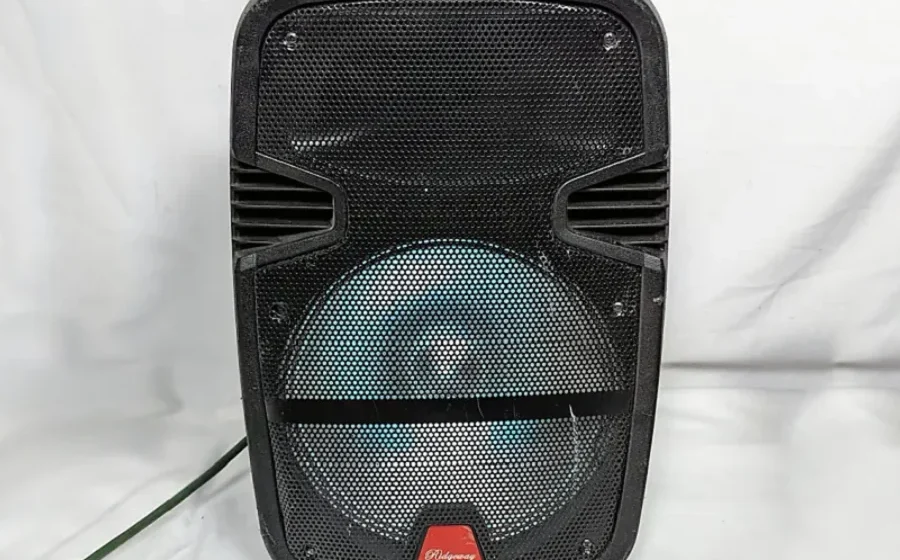

Ridgeway QS-T21015 Speaker

BACK PANEL CONNECTION DIAGRAM
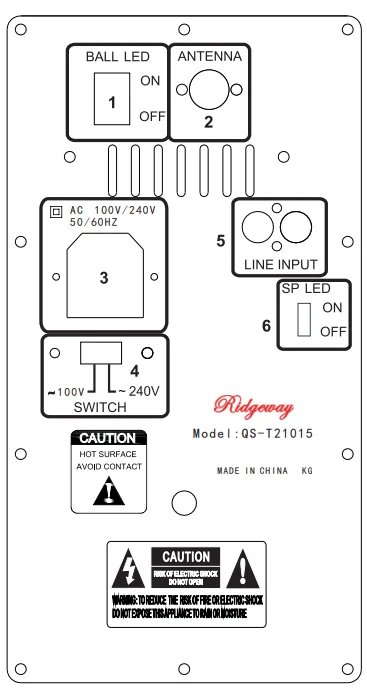
- DISCO BALL LIGHT POWER: DISCO BALL LIGHT ON/OFF
- FM ANTENNA: FM ANTENNA
- AC~100/240/50~60HZ: CONNECT TO AC POWER. PLEASE BE SURE TO CONNECT TO 100V/ 240V 50- 60HZ. OUTER RANGE POWER MAY CAUSE AN ACCIDENT.
- 100V/240V: ADJUST THE VOLTAGE 100V OR 240V
- AUDIO INPUT: AUDIO INPUT JACK
- SPEAKER LIGHT POWER: SPEAKER LIGHT POWER ON/OFF
FRONT PANEL FUNCTION INSTRUCTION
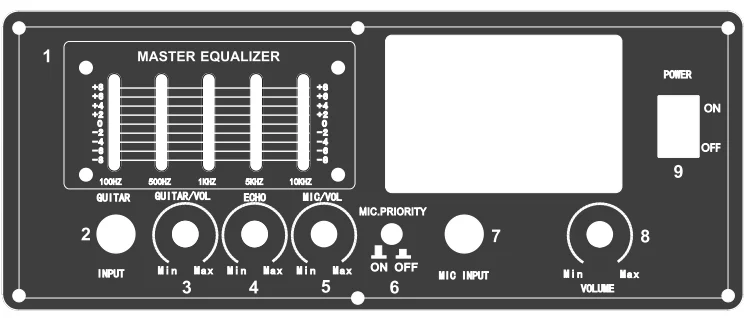
- EQ CONTROL PANEL
- GUITAR INPUT: CONNECT WITH THE GUITAR
- GUITAR VOLUME: ADJUST THE “GUITAR” VOLUME
- ECHO: ADJUST THE “MIC” ECHO.
- MIC. VOLUME: ADJUST THE “MIC” VOLUME
- MIC PRIORITY: MIC PRIORITY ON/OFF
- MIC INPUT: CONNECT WITH WIRE MICROPHONE
- VOLUME: ADJUST THE “MUSIC” VOLUME
- POWER SWITCH: POWER ON/OFF
REMOTE CONTROL
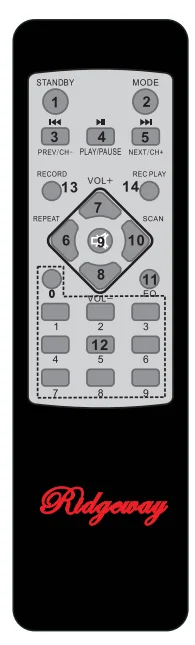
 STANDBY STATE
- MODE CONVERSION(USB/SD/AUX/FM/BT)
 (FAST REWIND) FOR MP3 MODE, PREVIOUS SONG WITH SHORT PRESS FOR FM MODE, ON A SHORT PRESS FOR FINE-TUNING, A DIRECTOR AS A SEARCH
 PLAY/PAUSE
 FAST FORWARD) FOR MP3 MODE, NEXT SONG WITH SHORT PRESS FOR FM MODE, THE NEXT SHORT TO FIND THE PLUS,
THE NEXT STATION IS IN SEARCH OF A- REPEATED A SONG IN MP3 MODE, CANCEL RECORDING FILE WITH LONG PRESS
- VOL + VOLUME INCREASE
- VOL- VOLUME REDUCE
 MUTE
MUTE- FOR MP3 MODE, THE SONG READ-AHEAD 10 SECONDS, DS GOTHE TO NEXT SONG WITH A LONG PRESS
- FOR MP3 MODE, CHANGE EQ ADJUSTMENT WITH A SHORT PRESS
- 0-9 DIRECTLY SELECT THE CHANNEL WHICH HAS BEEN SAVED IN THE SYSTEM ALREADY
- (RECORD)RECORDING
- (REC PALY)RECORD PALY
 STANDBY STATE
 (FAST REWIND) FOR MP3 MODE, PREVIOUS SONG WITH SHORT PRESS FOR FM MODE, ON A SHORT PRESS FOR FINE-TUNING, A DIRECTOR AS A SEARCH
 PLAY/PAUSE
 FAST FORWARD) FOR MP3 MODE, NEXT SONG WITH SHORT PRESS FOR FM MODE, THE NEXT SHORT TO FIND THE PLUS,
 MUTE
MUTEUSB/SD PANEL
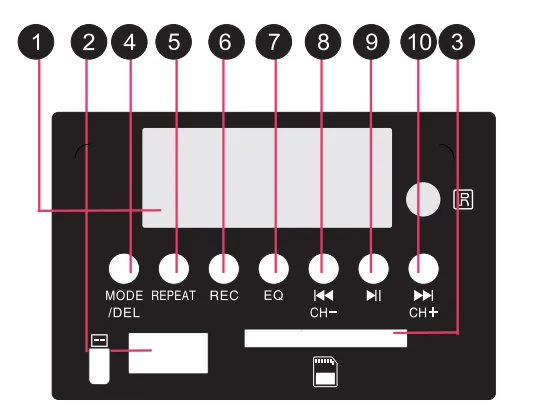
- LED DISPLAY
- USB: PUT THE USB INTO THE SLOT.
- MMC CARD: PUT SD CARD INTO THE SLOT
- MODE/DEL PRESS THIS BUTTON TO SELECT USBISDIMMC/FMILINE/BTLONG-PRESS THIS KEY TO DELETE THE CURRENT RECORDING
FILE WHILE PLAYING THE RECORDING FILE - REPEAT: REPEAT
- REC: RECORD
- EQ: EQUALIZER
- PREV/CH-FOR MP3 MODE, PREVIOUS SONG WITH SHORT PRESS.
FOR FM MODE, ON A SHORT PRESS FOR FINE-TUNING, A DIRECTOR AS A SEARCH - PLAY/PAUSE
- NEXT/CH+: FOR MP3 MODE, NEXT SONG WITH SHORT PRESS.
FOR FM M ODE, THE NEXT SHORT TO FIND THE PLUS, THE NEXT STATION IS IN SEARCH OF A
BT USE INSTRUCTION
STEP1
Please press “MODE’’ to let the audio signal transfer to BT co. Nowon. Now the panel is showing “BT” and the BT icon is flashing.
STEP2
Open your other devices with BT function: Like a cellphone, computer, er o,,r others. Then it automatically begins scanning for nearby BT devices. Our speaker BT is“QS-T21015”.
STEP3
When you find ththeeimplySimply select the BT device to complete the connection.
STEP4
If the mobile phone can’t find the BT settings, please turn off the audio systems and then repeat the above. The following shall be filled in by the user with the assistance of sales.
The followinggshalllowingshalinined ininy the sales.
Technical specification
- Output impedance: 4 ohms
- Intput impedance:22 k ohm
- Frequency response:80HZ-18KHZ
- FM Frequency response:87.5MHZ-108MHZ
- Sensitivity:500mv
- SNR:>90d B
Note:
As the product is constantly updated, the company reserves the right without prior notice to modify the product changes modify.
FCC Caution.
15.19 Labelling requirements.
This device complies with part 15 of the FCC Rules. Operation is subject to the following two conditions: (1) This device may not cause harmful interference, and (2) this device must accept any interference received, including interference that may cause undesired operation.
15.21 Information to the user.
Any Changes or modifications not expressly approved by the party responsible for compliance could void the user’s authority to operate the equipment.
15.105 Information to the user.
Note: This equipment has been tested and found to comply with the limits for a Class B digital device, pursuant to part 15 of the FCC Rules. These limits are designed to provide reasonable protection against harmful interference in a residential installation. This equipment generates uses and can radiate radio frequency energy and, if not installed and used in accordance with the instructions, may cause harmful interference to radio communications. However, there is no guarantee that interference will not occur in a particular installation. If this equipment does cause harmful interference to radio or television reception, which can be determined by turning the equipment off and on, the user is encouraged to try to correct the interference by one or more of the following measures:
- Reorient or relocate the receiving antenna.
- Increase the separation between the equipment and receiver.
- Connect the equipment into an outlet on a circuit different from that to which the receiver is connected.
- Consult the dealer or an experienced radio/TV technician for help.
For more manuals by Blogs, visit ManualsLibraryy
Ridgeway QS-T21015 Speaker- FAQs
How do I connect my Ridgeway QS-T21015 speaker via Bluetooth?
Turn on the speaker, enable Bluetooth on your phone, search for available devices, and select “Ridgeway QS-T21015.” Once paired, you can start playing audio.
How do I know if the speaker is charging?
A red LED lights up while charging. When the battery is full, the red light turns off.
How do I put the QS-T21015 speaker into pairing mode?
Press and hold the Bluetooth/power button for a few seconds. A blinking LED or tone will indicate the speaker is ready to pair.
Why isn’t my Bluetooth speaker pairing?
Make sure Bluetooth is turned on for both devices, the speaker is in pairing mode, and you’re within range. Restarting your phone or speaker often fixes the issue.
How can I manually connect to the speaker?
Open your phone’s Bluetooth settings, enable Bluetooth, wait for the speaker name to appear under Available Devices, and tap to connect.
What is the default Bluetooth pairing code?
Most Ridgeway speakers use 0000 if a passkey is required.
How do I reset the speaker if it isn’t working?
Try holding the Power + Volume Down buttons together for 5–10 seconds. This works for many Bluetooth speaker models that don’t have a dedicated reset button.
Can I charge the Ridgeway QS-T21015 through USB?
Yes. The speaker charges through a standard USB cable (micro-USB or USB-C depending on the model). Plug it into a USB power source for charging.
How do I know if my battery is fully charged?
The LED turns off or changes from red to another color depending on the model. A steady light usually indicates a full charge.
Why is my speaker powered on but producing no sound?
Check the volume on both the speaker and your phone, confirm it is connected to the correct device, and ensure no headphones or other audio outputs are selected.