
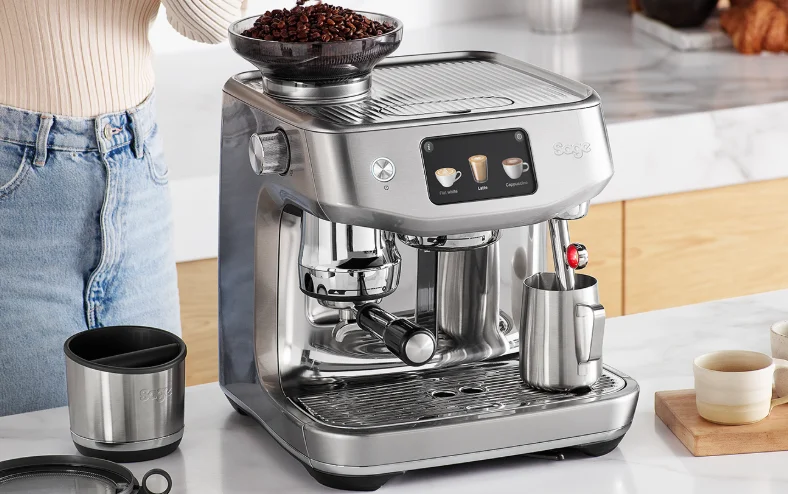

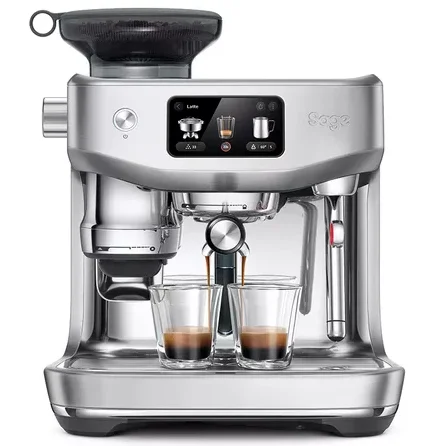
Sage SES985BSS4GUK1 Oracle Jet coffee machine
GUARANTEE 2 YEAR LIMITED
Sage Appliances guarantees this product for domestic use in specified territories for a period of 2 years from the date of purchase against defects caused by faulty workmanship and materials. During this guarantee period, Sage Appliances will repair, replace, or refund any defective product (at the sole discretion of Sage Appliances). All legal warranty rights under applicable national legislation will be respected and will not be impaired by our guarantee. For full terms and conditions on the guarantee, as well as instructions on how to make a claim, please visit www.sageappliances.com.
IMPORTANT SAFEGUARDS
READ ALL INSTRUCTIONS BEFORE USE AND SAVE FOR FUTURE REFERENCE
- Remove and discard any packaging materials safely before first use.
- Ensure the product is properly assembled before first use and fully unwind the power cord before operating.
- Before using for the first time, please ensure that your electricity supply is the same as shown on the rating label on the underside of the appliance. If you have any concerns, please contact your local electricity company.
- The installation of a residual current safety switch is recommended to provide additional safety when using all electrical appliances. Safety switches with a rated operating current not more than 30 mA are recommended. Consult an electrician for professional advice.
- Regularly inspect the power cord, plug, and actual appliance for any damage. If found to be damaged in any way, immediately cease use of the appliance and return the entire appliance to the nearest authorized Sage Service Centre for examination, replacement, or repair.
- Do not let the power cord hang over the edge of a counter or table. Do not let the power cord touch hot surfaces or become knotted.
- To eliminate a choking hazard for young children, discard the protective cover fitted to the power plug safely.
- Position the appliance on a stable, heat-resistant, level, dry surface away from the counter edge, and do not operate on or near a heat source such as a hot plate, oven, or gas hob.
- Do not operate the appliance in an enclosed space or inside a cupboard.
- Do not use attachments other than those provided with the appliance. The use of attachments not sold or recommended by Sage may cause fire, electric shock, or injury.
- This appliance is for household use only. Do not use the appliance for anything other than its intended purpose. Do not use in moving vehicles or boats. Do not use outdoors. Misuse may cause injury.
- Keep the appliance and accessories clean. Follow the cleaning instructions provided in this book. Servicing other than cleaning should be performed at an authorized Sage Service Centre.
- Do not touch hot surfaces. Always ensure the appliance has been allowed to cool. If the appliance is to be left unattended, cleaned, changed accessories, moved, assembled, or stored, always switch off the espresso machine by pressing the POWER button to OFF. Switch off at the power outlet and unplug.
- Improper use of the appliance, incorrectly operated, or unprofessionally repaired. In such a case, any warranty claim is void. No warranty for any damages can be accepted.
- The appliance is not intended to be operated by means of an external timer or separate remote-control system.
- Use caution when operating the machine, as metal surfaces are liable to get hot during use. The heating element surface is subject to residual heat after use.
- Do not fill the water tank or, front top fill with hot water or milk.
- Do not use the appliance without water in the water tank.
- The appliance is not intended for use by persons (including children) with reduced physical, sensory, or mental capabilities, or a lack of experience and knowledge, unless they have been given supervision or instruction concerning use of the appliance by a person responsible for their safety. Cleaning and user maintenance shall not be made by children. Keep the appliance and its cord out of reach of children.
- Do not open the programming port; this is exclusively for authorized service personnel only.
- Do not operate the grinder without the hopper lid in position. Keep fingers, hands, hair, clothing, and utensils away from the hopper during operation.
- Ensure the portafilter is firmly inserted and secured into the group head before starting an extraction. Never remove the portafilter during the extraction process. Failure to follow this instruction may lead to scalding by hot steam or hot coffee.
- The front top fill is not for milk. Do not pour milk into the front top fill.
- Use caution after milk texturing, as the Auto Purge function may purge hot steam when the steam wand is lowered.
- Wipe the outer surface with a soft, dry cloth. Keep the appliance and accessories clean.
- Servicing other than cleaning should only be performed by an authorized service representative or at an authorized Sage Service Centre.
- Any alcohol-based cocktail drinks are intended for use solely by the responsible adults of legal drinking age in their respective country/or state, and or province. Please use the recipes wisely and responsibly.
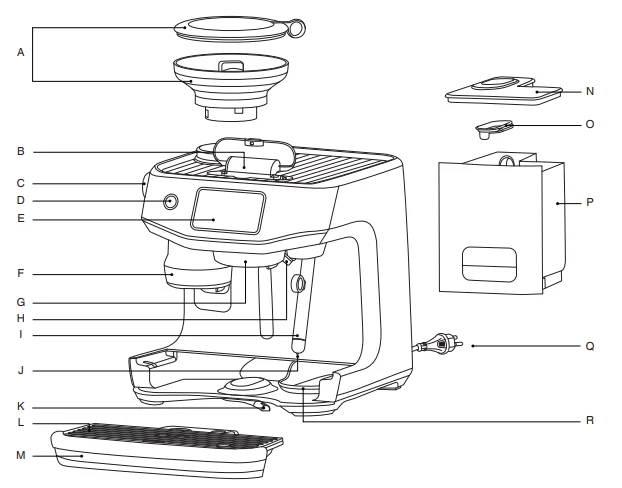
Components
- A. 340 g bean hopper
- B. Front top water fill
- C. Grind size adjustment dial
- D. Power button
- E. 5-inch HD touch screen
- F. Grind and tamp outlet
- G. Heated 58 mm group head
- H. Dedicated hot water outlet
- I. Auto MilQ™ steam wand
- J. Milk temperature sensor
- K. Front lever 3rd wheel
- L. Drip tray grill
- M. Drip tray
- N. Water tank lid
- O. Water tank mesh lid
- P. Water tank
- Q. Power cord with storage
- R. Hidden tool storage tray

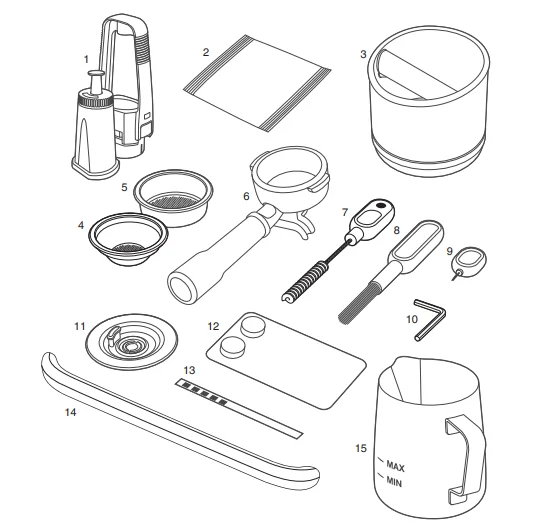
Accessories
- Water filter and filter holder
- Descaling powder
- Knock Box™ 10
- Single-wall 1-cup filter basket
- Single-wall 2-cup filter basket*
- 58 mm stainless steel portafilter
- Grind outlet brush and tamp removal magnet
- Cleaning brush
- Cleaning tool for the steam wand tip
- Hex key
- Cleaning disc
- Cleaning tablets
- Water hardness strip
- Drip tray guard (included with machines in colour only)
- Stainless steel milk jug

Features
THERMOJET HEATING SYSTEM
The state-of-the-art heating system is our fastest and most efficient heating system. Ready to go in seconds.
THERMOJET HEATED GROUP HEAD
Ensuring a stable and optimized extraction that meets professional-level specifications. The heated group head can be customized in +/- 1 degree Celsius increments to suit your taste.
AUTO GRIND DOSE & TAMP
Fully integrated, hardened precision conical burr grinder automatically grinds, doses, and tamps 22 grams of coffee straight into the 58 mm professional style portafilter.
AUTO MILQ
Silky smooth microfoam with settings for dairy, soy, almond, and oat. Adjustable temperatures (45 °C to 75 °C) and 8 texture levels.
BARISTA GUIDANCE
By automatically detecting an over- or under-extracted espresso shot, Barista Guidance helps you adjust the grind size to achieve a more ideal pour.
5 INCH HD TOUCH SCREEN
A dynamic screen that is 4 times richer and 20 times more powerful than before. You can swipe, select, and enjoy in high definition.
COLD COFFEE
Cold Brew
Brewing at lower temperatures reduces acidic flavour notes that heat retains. This creates a smooth and mellow flavour profile that can be enjoyed on its own or form the base for your cold brew experiments.
Cold Espresso
Extracting at a lower temperature produces a full-flavoured, crema-topped espresso without the heavy tones. The cold espresso feature keeps the classic flavour while being softer and lighter in body.
AUTO QUEUE
Auto queue is a feature that allows sequencing the next function during selected milk-based drinks:
- Brew coffee first and queue milk texturing.
- Texture milk first and queue coffee brewing.
PID TEMPERATURE CONTROL
Electronic temperature control delivers precise water temperature for optimum espresso flavour.
DEDICATED HOT WATER SPOUT
Dedicated hot water outlet for making long blacks, teas, and pre-heating cups.
DOUBLE TAP
Double-tap on the grind, brew, or steam icons to automatically purge the system, ready for your brew.
Assembly
BEFORE FIRST USE
Machine Preparation
Remove and discard all labels and packaging materials attached to your espresso machine. Ensure you have removed all parts and accessories from the box before discarding the packaging. Remove the water tank located at the back of the machine by unlocking the latch and pulling the water tank from the latch handle. Clean parts and accessories (water tank, portafilter, filter baskets, milk jug) using warm water and a gentle dishwashing liquid. Rinse well, then dry thoroughly.
NOTE: Machines with colour: drip tray protection guard is included. DO NOT DISCARD.
INSTALLING THE WATER FILTER
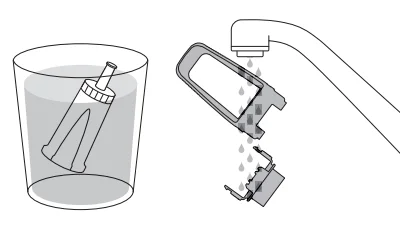
- Remove the water filter and water filter holder from the plastic bag.
- Soak the filter in cold water for 5 minutes.
- Rinse the filter holder with cold water.

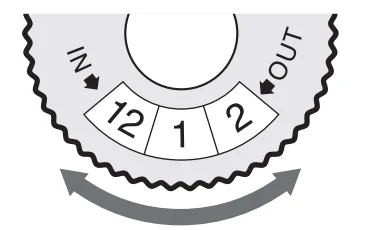
- Set a reminder for replacement. We recommend replacing the filter every 3 months.

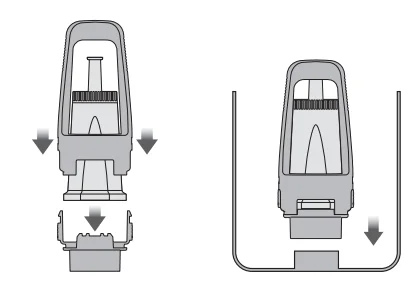
- Insert the filter into the two parts of the filter holder.
- To install the assembled filter holder into the water tank, align the base of the filter holder with the adapter inside the water tank. Push down to lock into place.

NOTE
Replacing the water filter every three months will reduce the need to descale the machine. Filters can be purchased at www.breville.com.
NOTE
Input the water hardness test strip result into the machine. If the result is 4 or 5 bars when tested, we strongly recommend changing to an alternate water source. Filtered water will extend both the life of your built-in filter and descale intervals, as well as provide superior taste. Ensure to test the water hardness of the alternative water source you have chosen and input it into the machine accordingly. Avoid using overly filtered water, like RO water, unless some mineral content is being added back to the final water. Never use distilled water or water with no or low mineral content, as this will affect the taste of coffee.
Guide and Settings
GUIDES
- Startup tutorial – Takes you through the startup tutorial on how to make a coffee with the machine.
- QR code links – Provides QR code links to areas such as support, machine registration, and maintenance products.
- Understanding your Oracle Jet – Describes the key components of your coffee machine.
SETTINGS
Drink Settings
- Barista Guidance – Switch on for grind size recommendations during your extractions.
- Brew control settings – Switch between time or volumetric-based brew output.
- Temperature settings – Adjust the brew temperature.
Maintenance
- Clean steam wand – Guides you through cleaning the steam wand to remove any blockage for better steaming performance.
- Clean group head – Cleans the group head of oils and residue. It will require an espresso cleaning tablet or powder.
- Descale – Descaling prevents excess mineral and scale build-up. Will require descaling powder or solution.
- Change the water filter – To ensure the machine has clean water to use.
- Water hardness test – Configures the water hardness your machine is using. You will need an unused test strip.
Machine Settings
- Theme – Switch between light and dark mode.
- Sound – Adjusts the volume of the interface.
- Screen brightness – Adjusts the brightness of the screen.
- Light brightness – Adjusts the brightness of the LED lights.
- Units – Switch between imperial and metric units.
- Country and language – Select your region and preferred language on screen.
- Time and date – Set the time and date on the machine.
- Wi-Fi – Connect to Wi-Fi to receive the latest software updates.
- Demo mode – Looping video to showcase key features of the machine.
- About the machine – Shows the serial number and firmware version of the machine.
- Reset factory settings – Use this function to reset all programmable values back to the factory settings and delete all custom drinks.
WARNING: Do not unplug the machine while it is performing this function.
Care & Cleaning
HD TOUCH SCREEN DISPLAY
Excess dirt and grime can get in the crevices of your touch screen, impairing its functionality. Keep the touch screen dry and clean to ensure optimal functionality. Use a screen cleaning wipe or a dry, soft cloth.
CLEANING CYCLE
There will be a message prompt when a cleaning cycle is required. This is a backflushing cycle and is separate from descaling. There is also the option to start the cleaning cycle by choosing Clean Cycle in Settings. The cleaning cycle cleans the shower screen and backflushes the group head to remove the build-up of coffee and oils. Follow the instructions on the screen.
DESCALING
There will be a message prompt when a descale cycle is required. Even with the provided water filter, it is recommended to descale if there is scale buildup in the water tank. There is also the option to start the descale cycle by choosing Descale Cycle in Settings. Follow the instructions on the screen.
CLEANING THE STEAM WAND
- The steam wand should always be cleaned after texturing milk. Wipe the steam wand with a damp cloth.
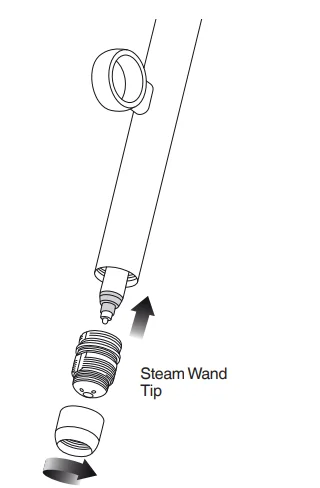
- If any of the holes in the tip of the steam wand become blocked, it may reduce frothing performance.
- Go to Settings > Steam wand cleaning and follow the guide on the screen.

CLEANING THE FILTER BASKET AND PORTAFILTER
- The filter basket and portafilter should be rinsed under hot water after each coffee-making session to remove all residual coffee oils.
- If the holes in the filter basket become blocked, dissolve a cleaning tablet in hot water and soak the filter basket and portafilter in the solution for approximately 20 minutes. Rinse thoroughly.
CLEAR WATER BACKFLUSH
- After each coffee-making session, we recommend doing a clear water backflush before you turn off the machine. Empty the drip tray. Insert the cleaning disc into the filter basket, then insert the portafilter into the group head. Touch the brew icon button and allow pressure to build for 20 seconds, then tap the glass image to stop and release pressure.
CLEANING THE SHOWER SCREEN
- The group head interior and shower screen should be wiped with a damp cloth to remove any ground coffee particles.
- Periodically purge the machine. Place an empty filter basket and portafilter into the group head. Tap the brew icon on the screen and run a short flow of water to rinse out any residual coffee.
CLEANING THE DRIP TRAY & STORAGE TRAY
- The drip tray should be removed, emptied, and cleaned at regular intervals, particularly when the drip tray is full.
- Remove the grill from the drip tray. Lift the coffee grind separator and dispose of any coffee grounds. Wash all parts in warm soapy water with a soft cloth. Rinse and dry thoroughly.
- The storage tray (located behind the drip tray) can be removed and cleaned with a soft, damp cloth. Do not use abrasive cleansers, pads, or cloths, which can scratch the surface.
CLEANING THE OUTER HOUSING
The outer housing can be cleaned with a soft, damp cloth. Polish with a soft, dry cloth. Do not use abrasive cleansers, pads, or cloths, which can scratch the surface.
NOTE: All parts should be cleaned by hand using warm water and a gentle dishwashing liquid. Do not use abrasive cleansers, pads, or cloths, which can scratch the surface. Do not clean any of the parts or accessories in the dishwasher.
Troubleshooting
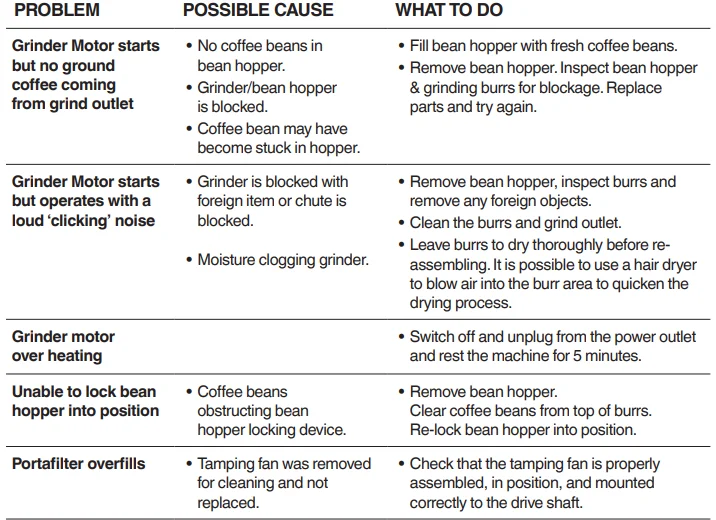
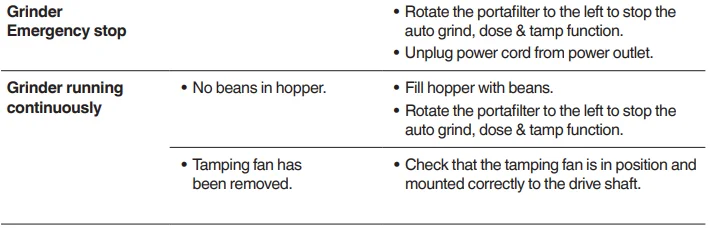
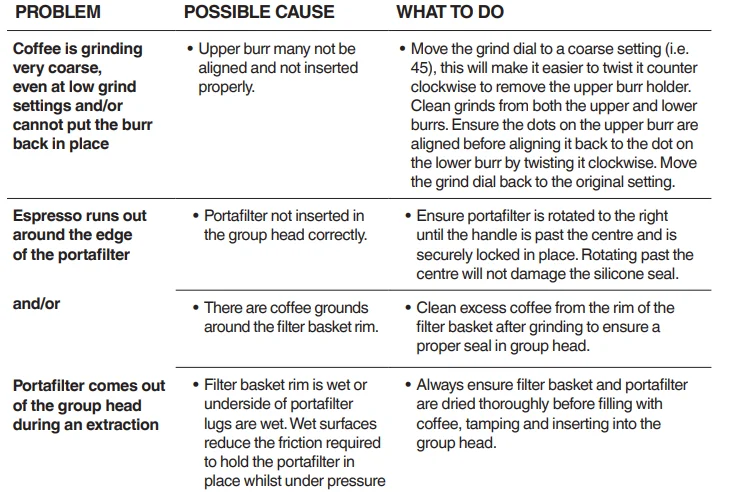
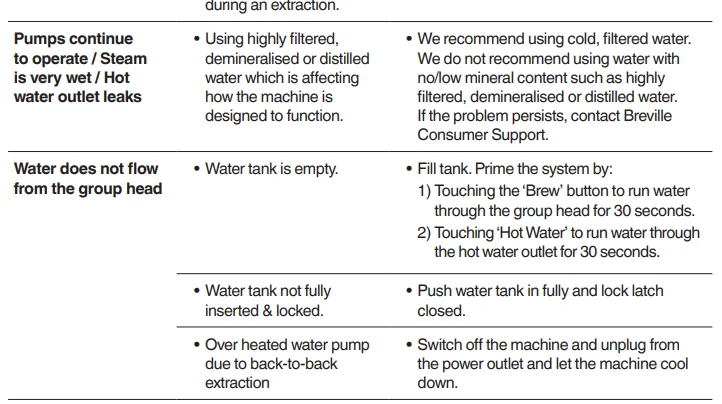
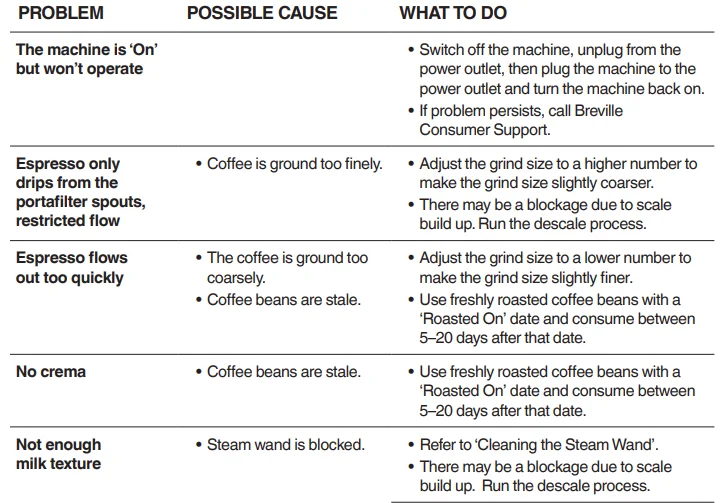
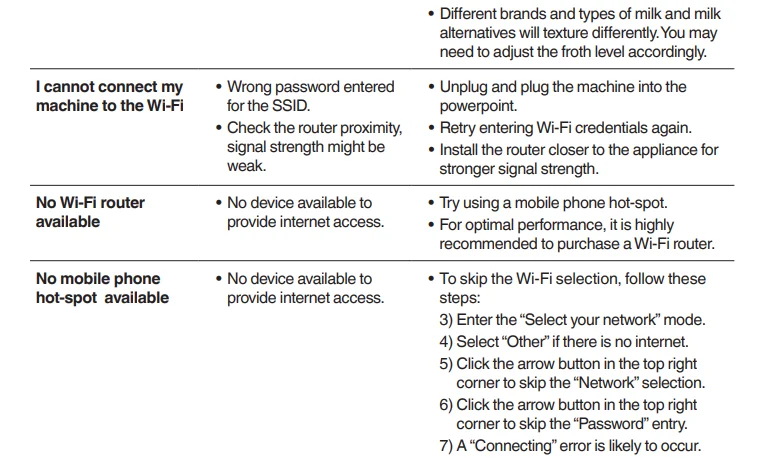

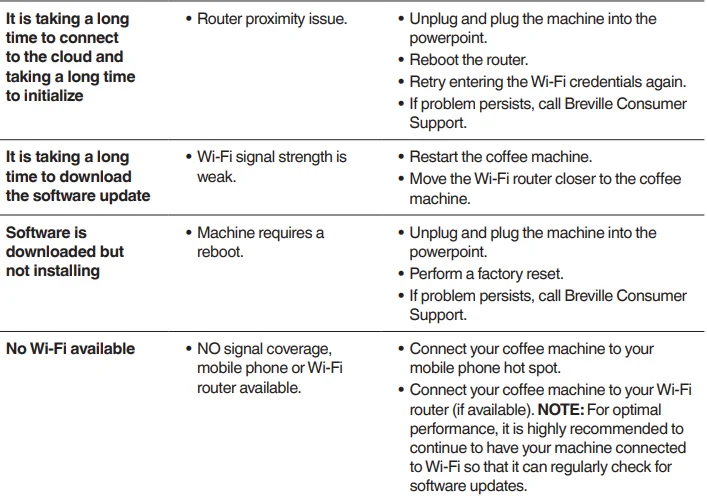
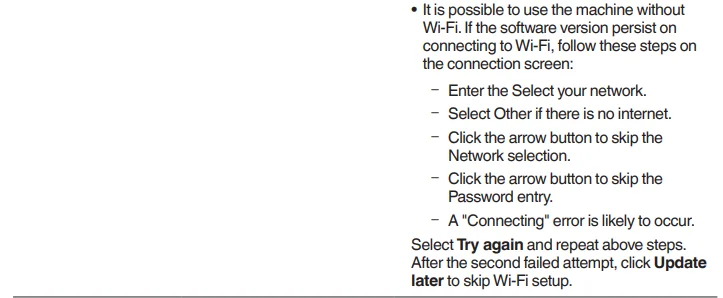
CONNECTING YOUR ORACLE JET
The Oracle Jet is a Wi-Fi-enabled machine that will support downloading the latest software version. If the machine is not connected to Wi-Fi, the machine can still be operated in the same way as an espresso machine with no network connection.
NOTE
We are constantly working to improve the software, which may lead to changes in functionality and setup steps. Please rely on the instructions in the latest version by upgrading the software to guide you through the setup process.
For More Manuals By Sage Appliances, Visit ManualsLibraryy
Sage SES985BSS4GUK1 Oracle Jet coffee machine-FAQS
How do I make coffee using the Sage Oracle Jet?
First, purge the machine by running hot water through the group head. Add fresh coffee beans to the hopper, grind about 18–22 grams, tamp automatically, and start the espresso extraction. Adjust grind size or dose to refine the taste.
What is the ideal extraction time for espresso?
A balanced espresso shot should extract in 25–30 seconds, producing around 30–40 ml from an 18–20 g dose.
How often should I replace the water filter?
The water filter should be replaced every 3 months to reduce limescale and maintain coffee quality.
Why is my Sage Oracle Jet not producing water?
This is often caused by a stuck float in the water tank. Remove the tank, gently shake it, and rinse with warm water before reinserting.
What pressure should the Sage Oracle Jet operate at?
The correct brewing pressure is around 9 bars. Good espresso can still be achieved between 7–11 bars.
How do I steam milk on the Oracle Jet?
Fill the milk jug with cold milk, place it under the steam wand, and select the milk texture and temperature on the touchscreen. The machine will steam automatically.
How often should I clean the Sage Oracle Jet?
If you make 2–5 cups daily, clean the group head and steam wand weekly. Descale the machine when prompted.
Can I use vinegar to descale the machine?
No. Vinegar is not recommended as it may damage internal parts. Always use a Sage-approved descaling solution.
What type of coffee beans work best with the Oracle Jet?
Medium to medium-dark roasted beans work best, providing consistent grinding and balanced flavor.
Why does the machine turn on but not brew?
This can happen due to blocked water lines, scale buildup, or incorrect part placement. Check the water tank, run a cleaning cycle, and ensure all parts are seated correctly.