
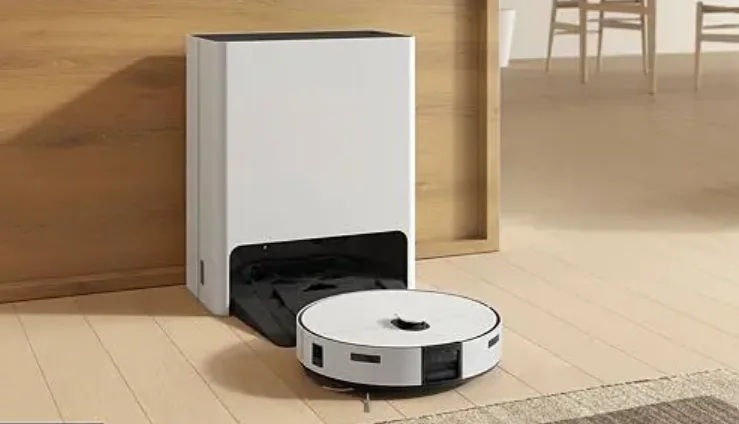
Samsung Robot VR7MD97714G/EU Vacuum Cleaner
Safety information
General
- This appliance can be used by children aged 8 years and above and persons with reduced physical, sensory or mental capabilities or lack of experience and knowledge if they have been given supervision or instruction concerning the use of the appliance in a safe way and understand the hazards involved. Children shall not play with the appliance. Cleaning and user maintenance shall not be made by children without supervision.
- Children should be supervised to ensure that they do not play with the appliance.
- If the supply cord is damaged, it must be replaced by the manufacturer, its service agent, or similarly qualified persons to avoid a hazard.
- Do not use the vacuum cleaner on a wet rug or floor.
- Do not pull or carry by the cord, use the cord as a handle, close the door on the cord, or pull the cord around sharp edges or corners. Keep the cord away from heated surfaces.
- Do not unplug by pulling on the cord. To unplug, grasp the plug, not the cord.
- Do not use a damaged power plug, a power cord, or a loose power outlet.
- For information on Samsung’s environmental commitments and product regulatory obligations, e.g., REACH, visit our sustainability page available via www.samsung.com
Installation
WARNING: When installing the Clean Station, make sure the cord does not get damaged in any way.
- There is a risk of fire or electric shock.
CAUTION
When installing the Clean Station, do not leave the cord carelessly on the floor since the Jet Bot Combo may get caught by it. Do not install the Clean Station in an area with a dark floor.
- If the floor around the Clean Station is dark, recharging is hindered. Do not install the Clean Station on a rug or carpet where contamination may occur.
- If the Jet Bot Combo returns for charging with the Mops still wet, the rug or carpet may be contaminated.
NOTE: Install the Clean Station in a place where the floor and wall are level.
If the cleaning area is wooden floors, it is best to install the Clean Station along the grain of the wooden floors. Always keep the Clean Station’s power cord plugged.
- If power is not supplied to the Clean Station, the Jet Bot Combo cannot find it and cannot automatically recharge.
- If the Jet Bot Combo is left detached from the Clean Station, the battery will drain naturally. Do not place the Clean Station in a place where people pass by frequently, in an entrance way ora
narrow passage. - People may trip over it and be injured, or product damage may occur.
Power
WARNING: Please prevent any risk of electric shock or fire.
- Do not damage the power cord.
- Do not pull the power cord too hard or touch the power plug with wet hands.
- Do not use a power source other than the rated voltage of the charger, and also do not use a multi-outlet to supply power to a number of devices at the same time. (Do not leave the cord carelessly on the floor.)
- Do not use damaged power plugs, power cords, or loose outlets. Clean dust or any foreign matter from the pin and the contact part of the power plug.
- There is a risk of electric shock or malfunction. Use a socket that is properly grounded for safety. Do not ground the appliance to a gas pipe, plastic water pipe, or telephone line.
- This may result in electric shock, fire, an explosion, or problems with the product.
- Never plug the power cord into a socket that is not grounded correctly, and make sure that it is in accordance with local and national regulations.
Before use
WARNING: Do not use the Jet Bot Combo near a heater or combustible materials.
- Do not use the Jet Bot Combo near fire or flame, such as a movable heater, a candlelight, a desk lamp, a fireplace, etc., or in a place where combustible materials such as gasoline, alcohol, thinner, etc. exist.
- Make sure there are no dangerous objects around the Jet Bot Combo’s cleaning area to prevent collision, and unplug any electric heaters or fans. The Jet Bot Combo is intended for household use; therefore, do not use it in an attic, basement, storage, an industrial building, out of an indoor space, places with moisture (such as a bathroom, a laundry room), on the table, or on shelves.
- The Jet Bot Combo can be damaged or malfunction. Be sure the Jet Bot Combo does not suck in or touch any kind of liquids (water, beverage, filth, etc.).
- The Jet Bot Combo can be severely damaged, and it may contaminate other areas if the wheels pass through liquid. Always keep the Cliff Sensor clean for your safety. When the power cord is damaged, contact customer service to get it replaced by a certifiedrepairer.
- There is a risk of fire or electric shock.
Cleaning and maintenance
If you washed the Dustbin and filter with water:
- Completely wipe out the water in the Dustbin.
- Completely dry the filter in the shade before use.
CAUTION
Watch your fingers when attaching or detaching the filter, since they may get stuck. To avoid blockages by foreign matter, do not let the Jet Bot Combo vacuum up toothpicks, cotton swabs, etc. If it is difficult to remove foreign matter from the Brush, contact an authorized customer service. Since the Brush sweeps dirt up from the floor during cleaning, foreign matter such as a thin and long thread, long hair, etc., may get caught in it, so check and clean it regularly. Turn off the Jet Bot Combo before cleaning or maintenance work. If a Brush or a Brush Cover is not assembled correctly after the maintenance work, scratches may occur on the floor, or a product malfunction may occur. Assemble them correctly by checking the maintenance method. Always keep the Obstacle Sensor, Cliff Sensor, and the Carpet Detect Sensor clear.
- If foreign matter accumulates, sensors may malfunction. If you want to purchase an additional Dust Bag, check the Dust Bag’s model name ( VCA-RDB95 ), then contact your nearest Samsung Electronics
retailer or customer service. If you want to clean the Mops additionally, use the product’s Sanitization function to clean or dry the Mops. Do not dry Mops in the dryer. - Usage of a high-temperature dryer may cause shrinkage of the Mops. The Brush may stop or make a sound temporarily due to sucking in a large amount of hair or hair accumulating on the Brush.
- Check and clean it regularly. Foreign matter, such as a thin and long thread, hair, etc., may get caught in the Spin Brush, so check and clean it regularly.
Preparation
Accessories
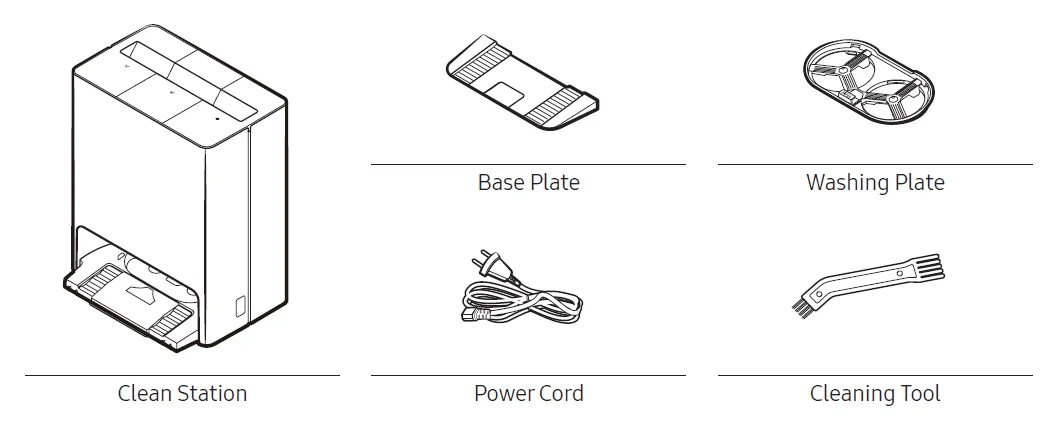
NOTE: Accessories may differ depending on the models.
Parts overview
Jet Bot Combo
Top (Front)
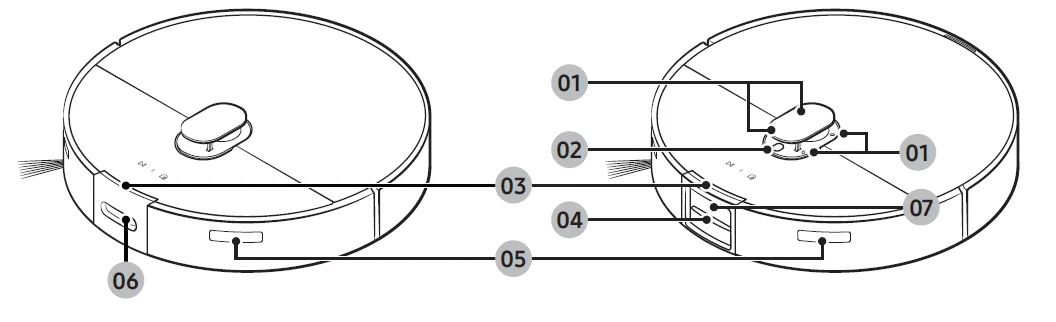
- Microphone
- Microphone Indicator
- Status Indicator
- 3D Sensor
- Signal Transmitter
- Obstacle Detect ToF Sensor
- Camera
Top (Back)
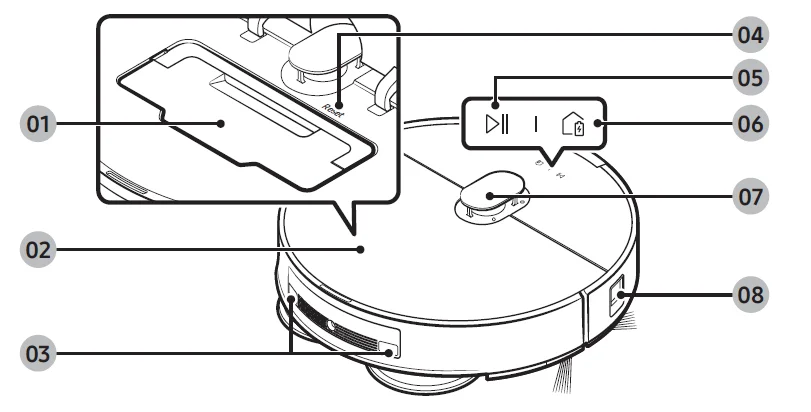
- Dustbin
- Top Cover
- Charging Pin
- Reset button
- Start/Stop button
- Docking (Recharging) button
- LiDAR Sensor
- Obstacle Sensor
Bottom
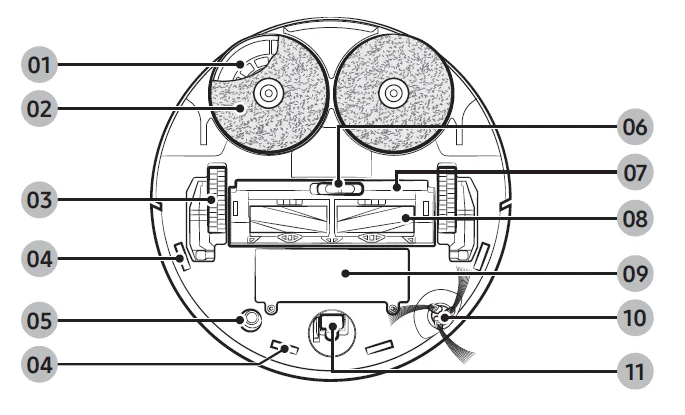
- Mop Spin Board
- Mop
- Driving Wheel
- Cliff Sensor
- Carpet Detect Sensor
- Brush Cover Lock
- Brush Cover
- Brush
- Battery Cover
- Spin Brush
- Roller
Clean Station
Front
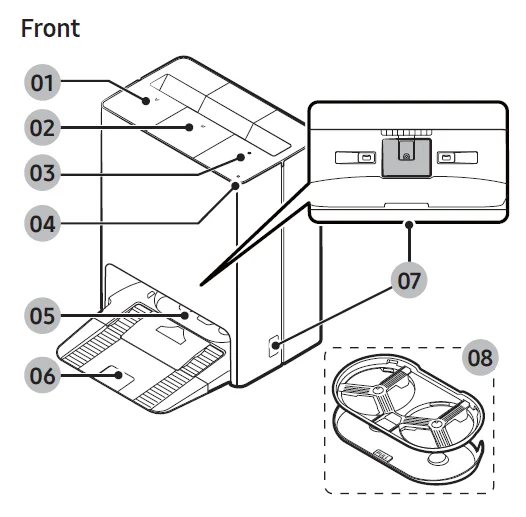
- Waste Water Tank
- Clean Water Tank
- Dustbin
- Status Indicator
- Washing Space
- Base Plate
- Charging Signal Transmitter
- Washing Plate
Back
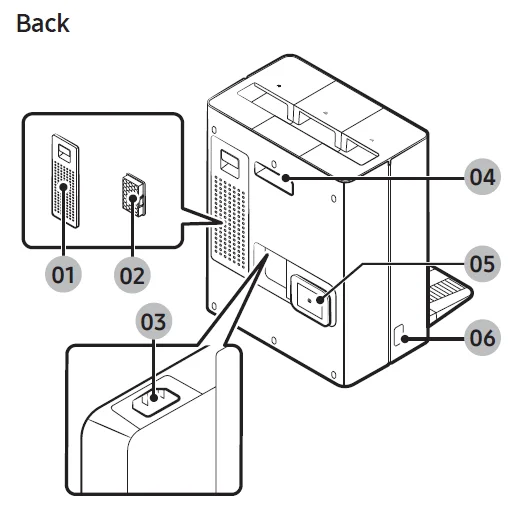
- Filter Cover
- Fine Dust Filter
- Power Cord Port
- Lifting Handle
- Power Cord Organizer
- Charging Signal Transmitter
Installation
Installing the Clean Station
Refer to the figure and clear enough space around the Clean Station.
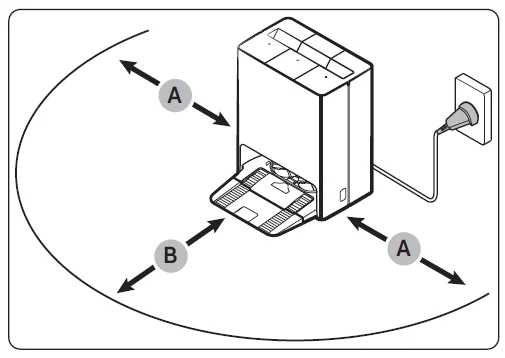
- A: Approximately 0.5 m
- B: Approximately 1.0 m
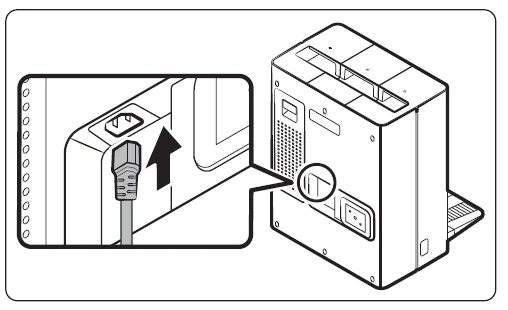
- Connect the provided power cord to the Power Cord Port of the Clean Station.

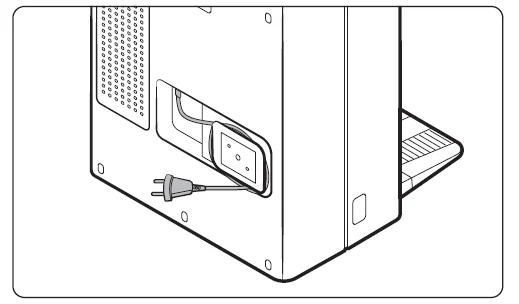
- Wrap the excess power cord around the Power Cord Organizer at the back of the Clean Station.

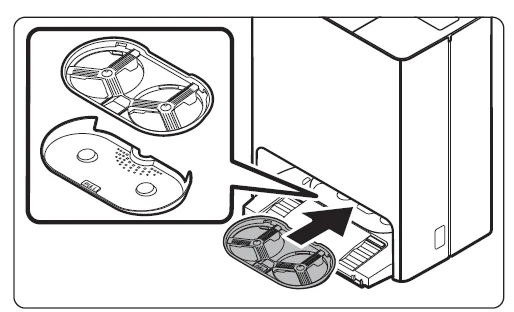
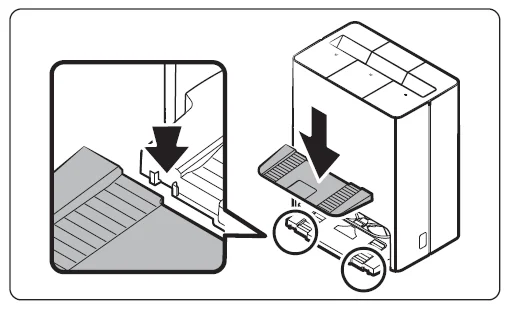
- Assemble the Washing Plate to the Clean Station.

- Assemble the Base Plate to the Clean Station.

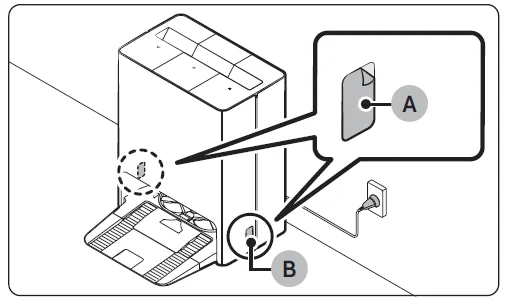
- Place the Clean Station on an even floor and near an electrical outlet, and plug it in.
- Remove the protection films (A) on the Charging Signal Transmitters (B).
NOTE
- Install the Clean Station in a place where the floor and walls are leveled.
- You can wrap the excess power cord around the Power Cord Organizer at the back of the Clean Station.
- After installing the Clean Station, if you rotate it by more than 45 degrees or move it more than 1 meter from the initially installed position, recreate the map from the SmartThings app. (Some areas may not be cleaned if you use the existing map instead of using the newly created map.)
Operation
Removing the protective covers on the Jet Bot Combo
Remove all protective coverings before using the Jet Bot Combo for the first time.
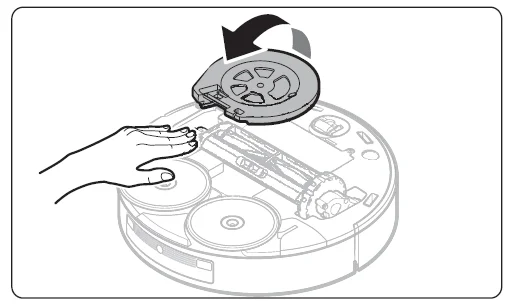
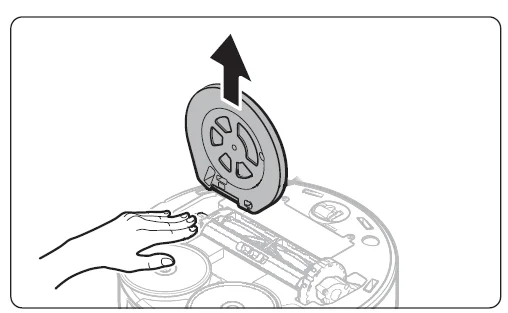
- Lift the Spin Brush’s protective cover in the direction of the arrow as shown in the figure.

- Detach the Spin Brush’s protective cover.
NOTE- Press the Driving Wheels and remove the Spin Brush’s protective cover.
- Discard the Spin Brush’s protective cover after removing it.

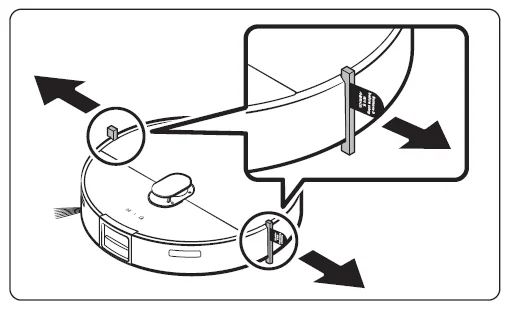
- Remove the bumper protection gaskets attached to the left and right sides.
Auto charging
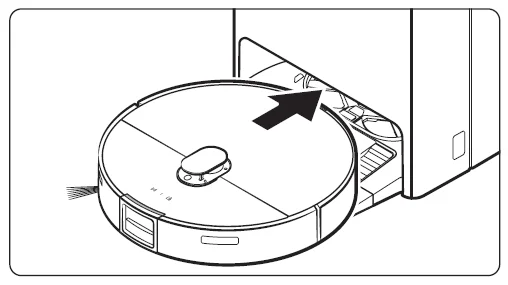
The Jet Bot Combo automatically returns to the Clean Station to recharge when it completes cleaning or when the battery is low.
Docking (Recharging)
You can return the Jet Bot Combo to the Clean Station while cleaning to recharge.
- Press the
 button on the Jet Bot Combo or use the SmartThings app to select the Dock function.
 - If the Jet Bot Combo fails to return to the Clean Station for charging, it turns to Energy-Saving mode. To cancel the Energy-Saving mode, press the
 button.
 button on the Jet Bot Combo or use the SmartThings app to select the Dock function.
Manual Charging (Discharged Jet Bot Combo)
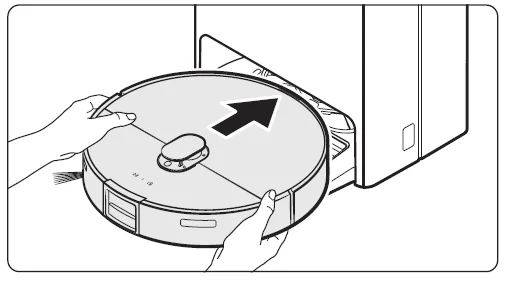
Move the Jet Bot Combo manually onto the Clean Station to recharge. What to do if the Jet Bot Combo does not return for recharging
Cases require checking the Clean Station
- Check whether the Clean Station has been installed in a place where it cannot guide the Jet Bot Combo to return.
- Check whether the distance between the Clean Station and the Jet Bot Combo is over 5 m.
- It may take a longer time for the Jet Bot Combo to return to the Clean Station.
Cases require charging the Jet Bot Combo manually
- When the Clean Station is installed in a corner
- When the battery is completely discharged
- When the Jet Bot Combo is stuck in an obstacle (such as furniture)
- When the Jet Bot Combo cannot climb a threshold near the Clean Station. (The height of the threshold should be less than 1.5 cm.)
- When the Jet Bot Combo’s Status Indicator turns and stays red, the Jet Bot Combo does not work.
NOTE
- Keep the Clean Station’s power on at all times.
- If the power is not supplied to the Clean Station, the Jet Bot Combo will not be able to recharge because it cannot find the Clean Station.
- If the Jet Bot Combo is left detached from the Clean Station, the battery discharges naturally.
Using the Jet Bot Combo
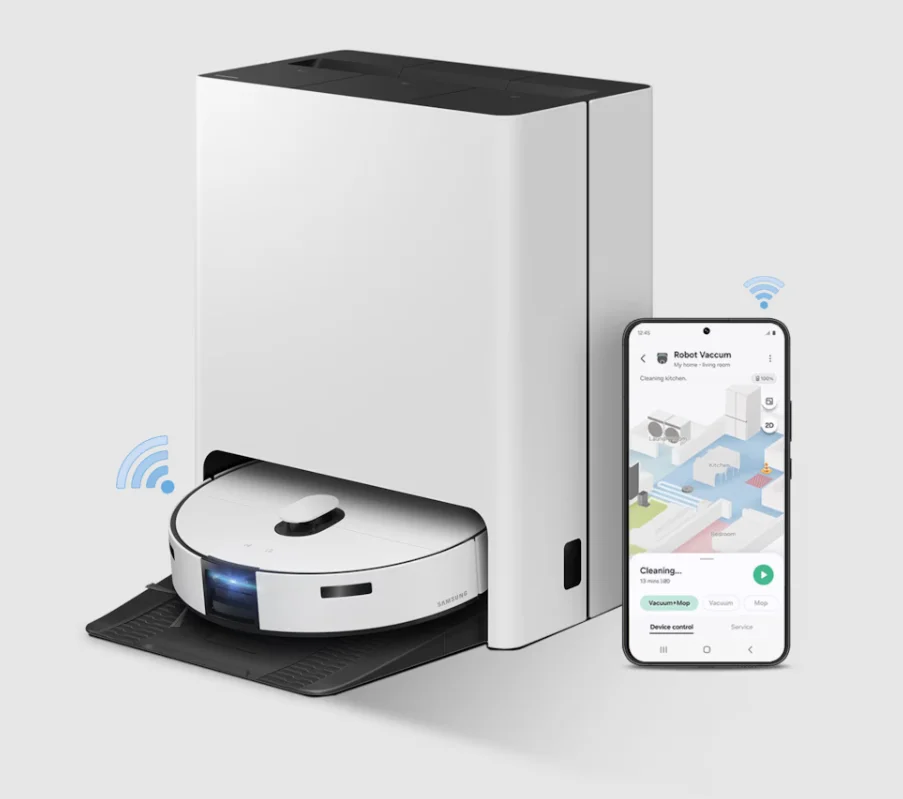
You must connect the Jet Bot Combo with the SmartThings app to use its full features.
- For downloading and installing the SmartThings app, refer to the SmartThings app section.
Using the control panel
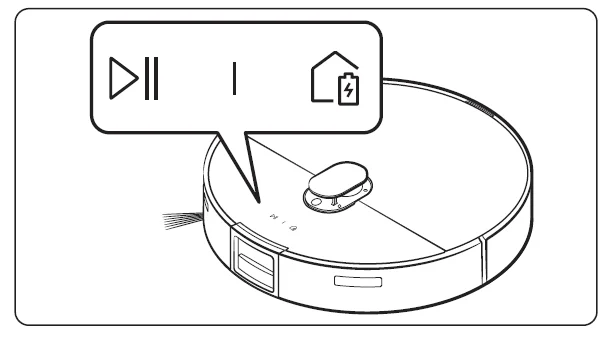
Start cleaning
Press the button on the Jet Bot Combo to start cleaning in Auto Clean.
Stop cleaning
Press the buttonon the Jet Bot Combo to stop operation while cleaning.
- When you press the button, the Jet Bot Combo returns to the Clean Station and starts charging.
- If the Jet Bot Combo does not operate for 20 minutes after it stops operation, it automatically returns to the Clean Station to recharge.
Operation status on the Status Indicator
Jet Bot Combo
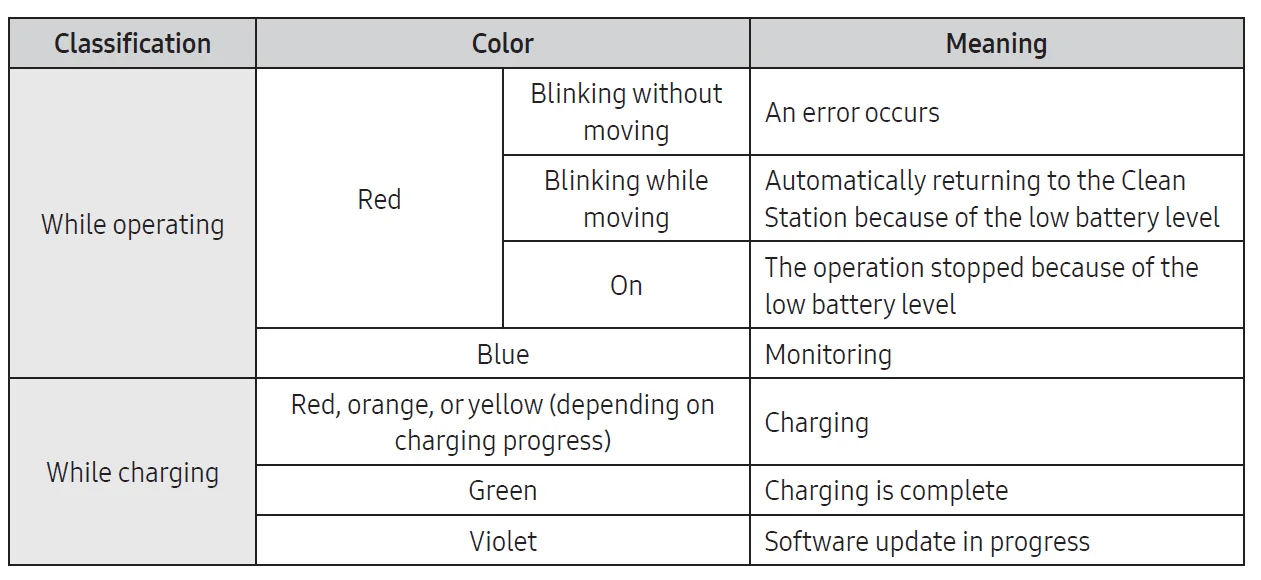
NOTE
- During the first 20 minutes of charging, the Status Indicator turns red.
- If the Jet Bot Combo starts charging after it has been discharged, the Status Indicator turns red and slowly blinks for about 20 minutes.
- The Jet Bot Combo’s Night mode (18:00 ~ 06:00) operates only when the Jet Bot Combo is charging, and in the Night mode, the Jet Bot Combo’s LED brightness is adjusted to 20% within the set time when time synchronization is set through a smartphone.
Clean Station
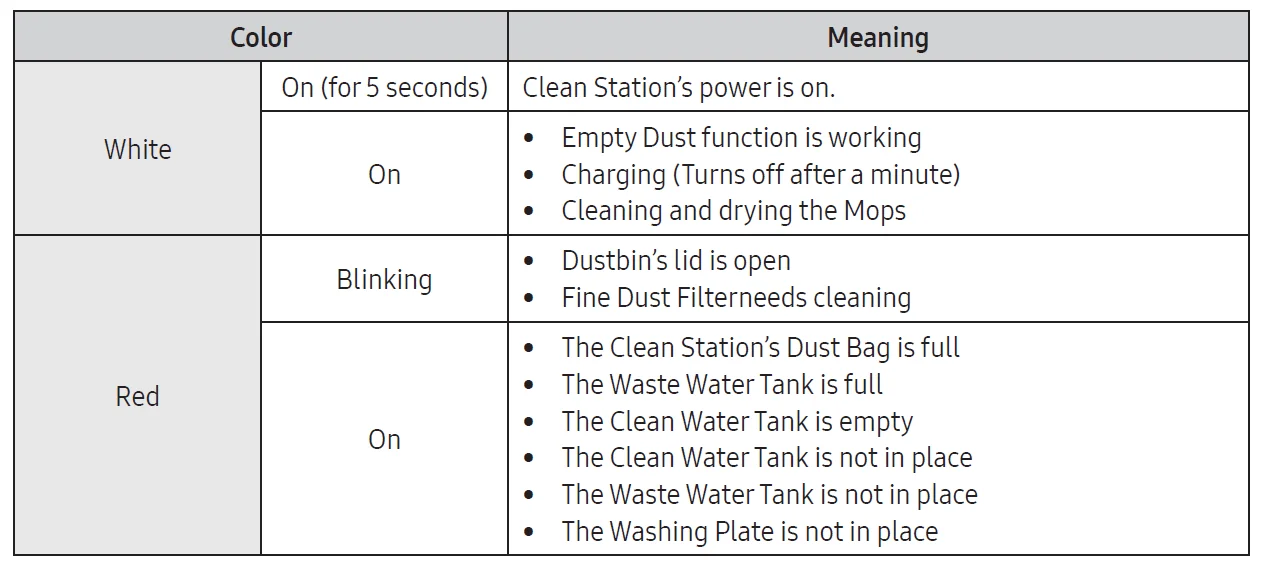
SmartThings app
Before using SmartThings
The SmartThings app is only compatible with models that have a Wi-Fi function.
- If you do not have a Wi-Fi router, you cannot use the SmartThings app. Setting up the wireless router
- Please refer to the user manual of your wireless router for the settings of the wireless router.
- Samsung Jet Bot Combo supports both Wi-Fi 2.4GHz and 5GHz.
- Samsung Jet Bot Combo supports IEEE 802.11b/g/n and Soft-AP.
- IEEE 802.11n is recommended.
- Samsung Jet Bot Combo supports only DHCP (Dynamic Host Configuration Protocol). Check whether the DHCP server option function is activated on the wireless router.
- The Jet Bot Combo supports the WEP-OPEN, WPA-PSK/TKIP, and WPA2-PSK/AES for the authentication and encryption protocols.
- WPA2-PSK/AES is recommended.
- Confirm that your router has a unique SSID and password.
- The quality of your wireless network connection may be influenced by the surrounding wireless environment.
- If your Internet service provider has permanently registered the MAC address (a unique identification number) of your PC or modem, your Jet Bot Combo may not be able to connect to the Internet. Ask your Internet service provider about the procedure to connect an apparatus other than a PC to the Internet.
- If your internet service provider requires your ID or password to connect to the internet, your Jet Bot Combo may not be able to connect. If this is the case, you must enter your ID or password when connecting to the Internet.
- The Jet Bot Combo may not be able to connect to the Internet because of firewall issues. Contact your Internet service provider to resolve these issues.
- Some wireless routers may transmit an abnormal Domain Name Server (DNS) address even if the Internet is not connected. If this occurs, contact the manufacturer of your wireless router and your Internet service provider.
- If you still cannot connect to the Internet even after trying the procedure provided by your Internet service provider, please contact Customer Service.
- If your router is not a Wi-Fi certified product, the Jet Bot Combo may not be able to connect to the Internet.
When the Jet Bot Combo does not have a saved map, it learns cleaning space through the Auto Clean function, which starts from the Clean Station. Once learning is done, a map is saved.
- Room cleaning or Spot Cleaning works regardless of the choice of sequences of the areas.
- If the Jet Bot Combo cannot recognize its current location, it starts Auto Clean.
- The Jet Bot Combo automatically performs a system check and restarts once a week.
- When the Vacuum + Mop or Mop mode is selected from the Auto clean by pile length of the Carpet cleaning options, the Jet Bot Combo may not be able to clean beyond the carpet. Change the Carpet cleaning options or change to mopping after vacuuming.
- If you use the Around furniture, Spots, or Clean missed areas mode, the Mop washing interval will be set By time (20 minutes) even if the option is configured by room. ( Around furniture mode: VR7MD97**** models only)
Open Source Announcement
The software included in this product contains open source software. To obtain the source code covered under licenses that have the obligation of publishing source code (e.g., GPL, LGPL, etc.), please visit
http://opensource.samsung.com/ and search by model name. It is also possible to obtain the complete corresponding source code in a physical medium such as a CD-ROM; a minimal charge will be required. The following URL, http://10.250.141.155/solve/getTotalProjectList.do, leads to open source license information as related to this product. This offer is valid to anyone in receipt of this information.

Maintenance
Cleaning and maintaining the Clean Station
- Be sure the Clean Station’s power cord is unplugged before handling it.
- When cleaning the exterior, wipe with water only.
- Do not use detergent.
Cleaning the Waste Water Tank
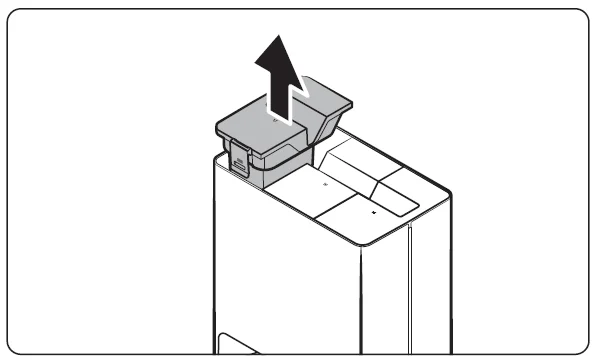
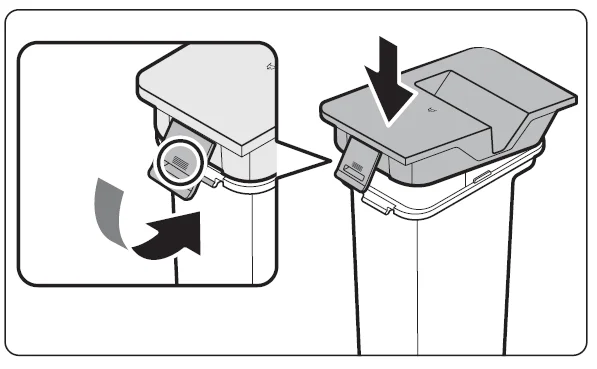
- Detach the Waste Water Tank from the Clean Station by pulling the handle on the top.

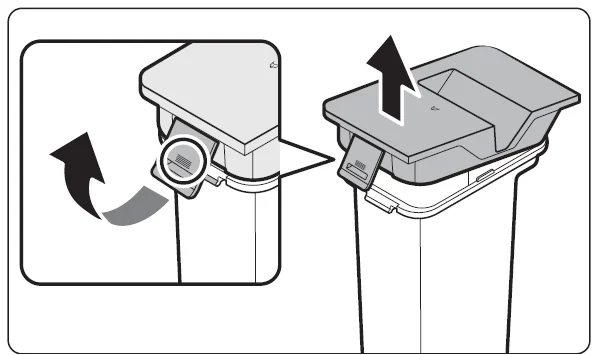
- Pull the lid latch to unlock it, then open the lid.

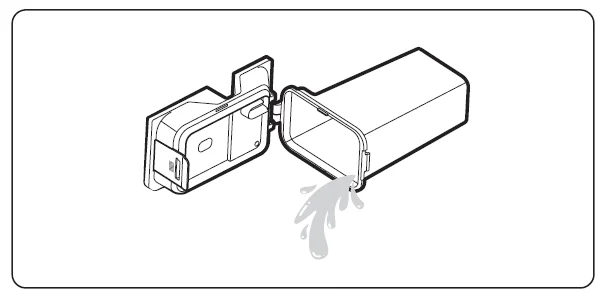
- Empty the Waste Water Tank and clean it thoroughly.

- Close the lid.
- Press the latch on the lid until you hear a click, making sure the lid is completely shut.
- If the lid is not completely shut, the product may malfunction or may result in problems with the product.

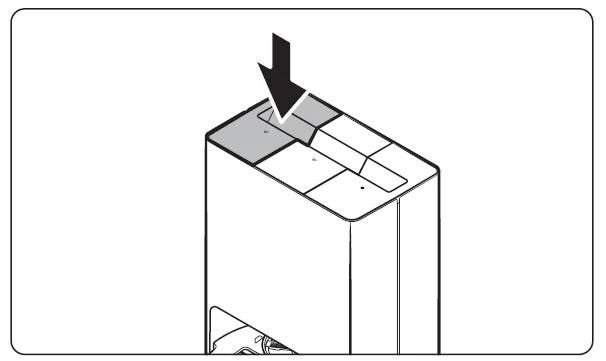
- Insert the Waste Water Tank in the Clean Station.
Descaling the Steamer
- Press theandbuttons on the Jet Bot Combo simultaneously for 7 seconds.
- Dilute 100 g of citric acid into water (1 L) in the Clean Water Tank and insert it into the Clean Station. Then, empty the Waste Water Tank.
- Press theandbuttons on the Jet Bot Combo simultaneously for 7 seconds.
- The descaling process takes about 2 hours, and you will be notified by the Voice guidance once the process is complete.
Rinsing
- Rinse the Clean Water Tank, and then pour water into it.
- Press theandbuttons on the Jet Bot Combo simultaneously for 7 seconds.
- The rinsing process takes about 15 minutes, and you will be notified by the Voice guidance one the process is complete.
NOTE
- To cancel the descaling or rinsing process, press theandon the Jet Bot Combo simultaneously for 7 seconds during the process.
- Canceling during the process will result in incomplete descaling or rinsing.
- Because of the nature of the product, it is recommended to carry out descaling once a year.
- If a descaling alarm goes off, be sure to descale to maintain product quality.
- The steam cleaning function cannot be used after a certain period of time has passed after the descaling alarm goes off.
CAUTION
- Do not put anything other than citric acid and water when descaling.
- Do not use citric acid other than when descaling.
Troubleshooting
Voice Guidance Checklist
- The Status Indicator turns red and blinks with voice guidance.
- Press the Reset button, check the instructions below, and take appropriate actions.
- When pressing the Reset button of the Jet Bot Combo, the Status Indicator turns white.
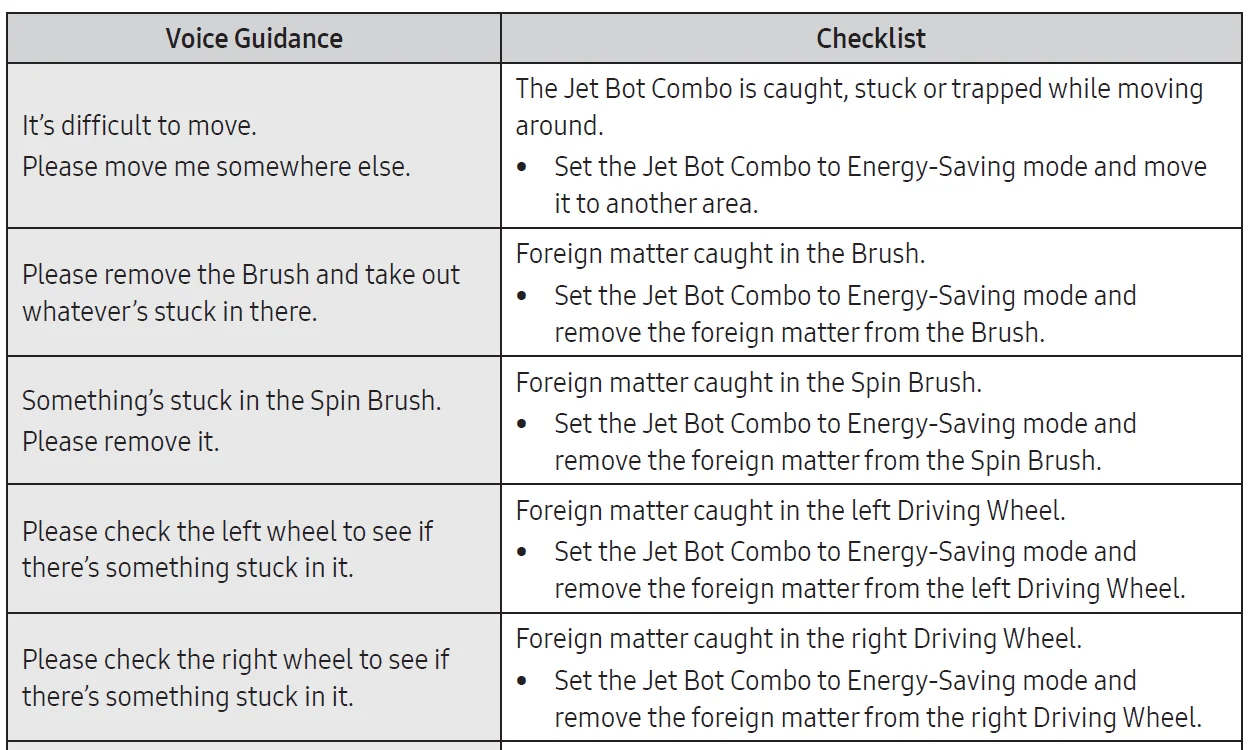
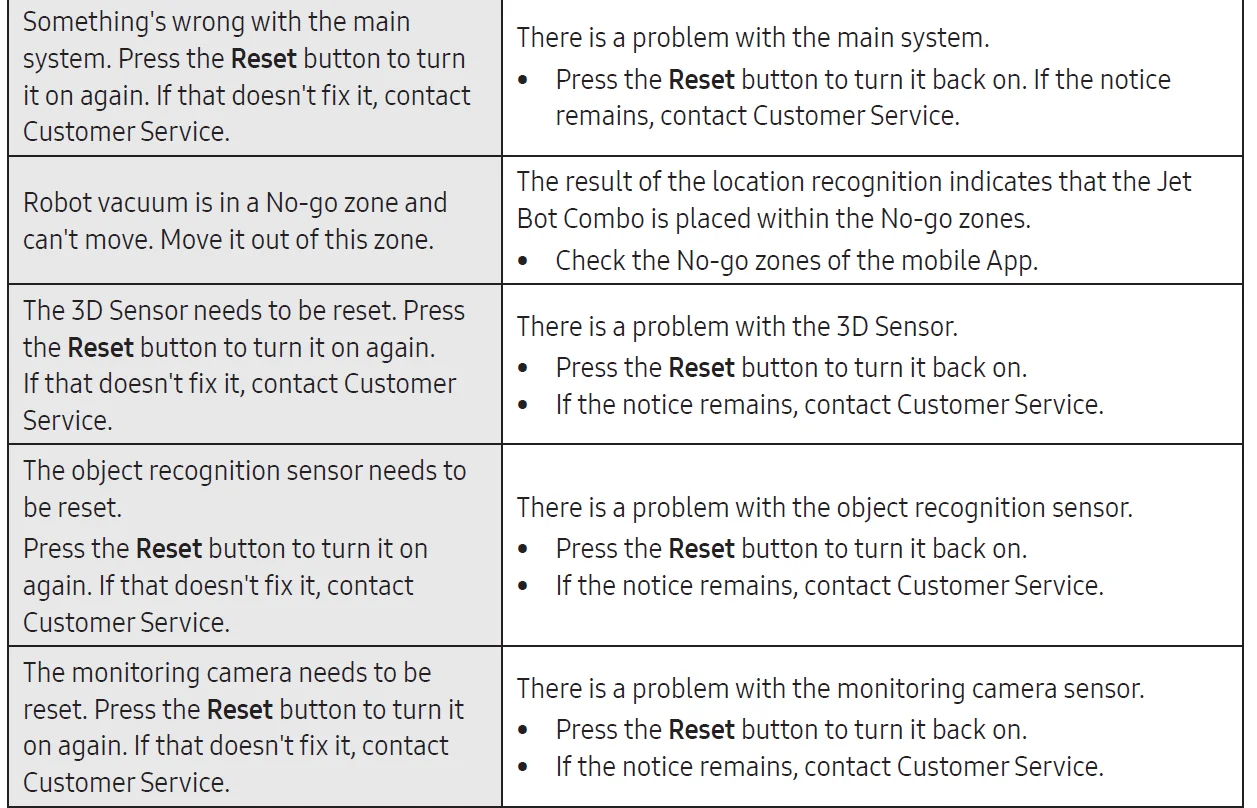
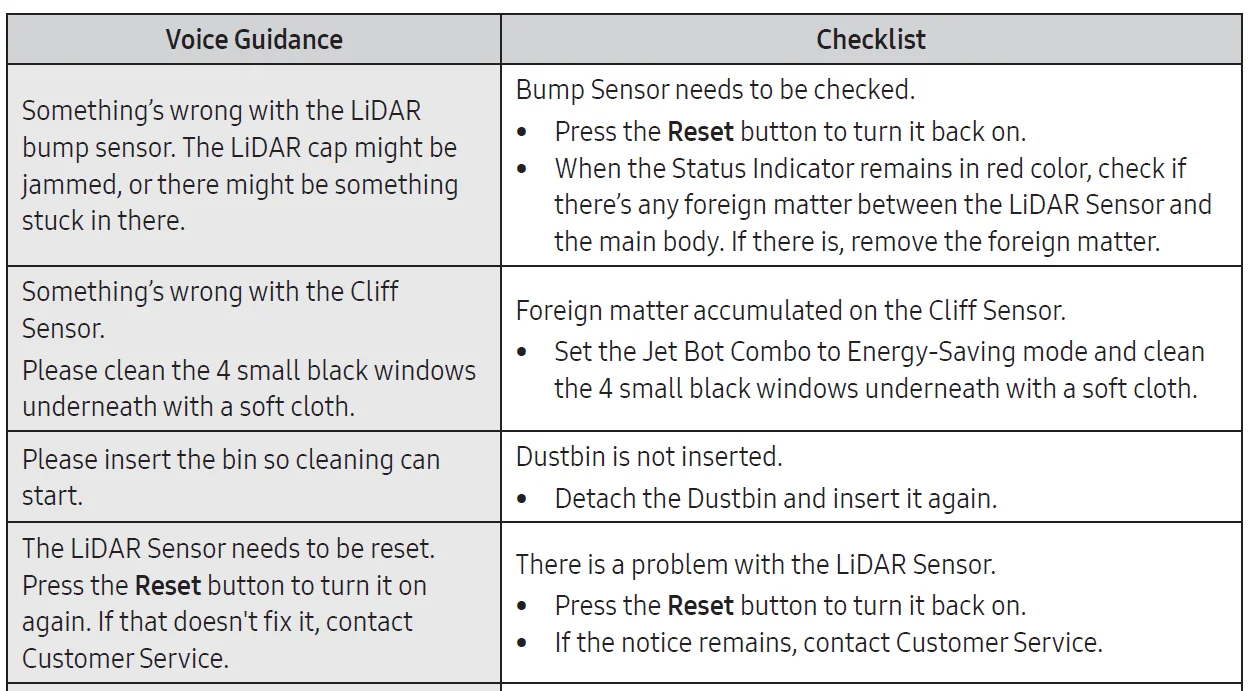
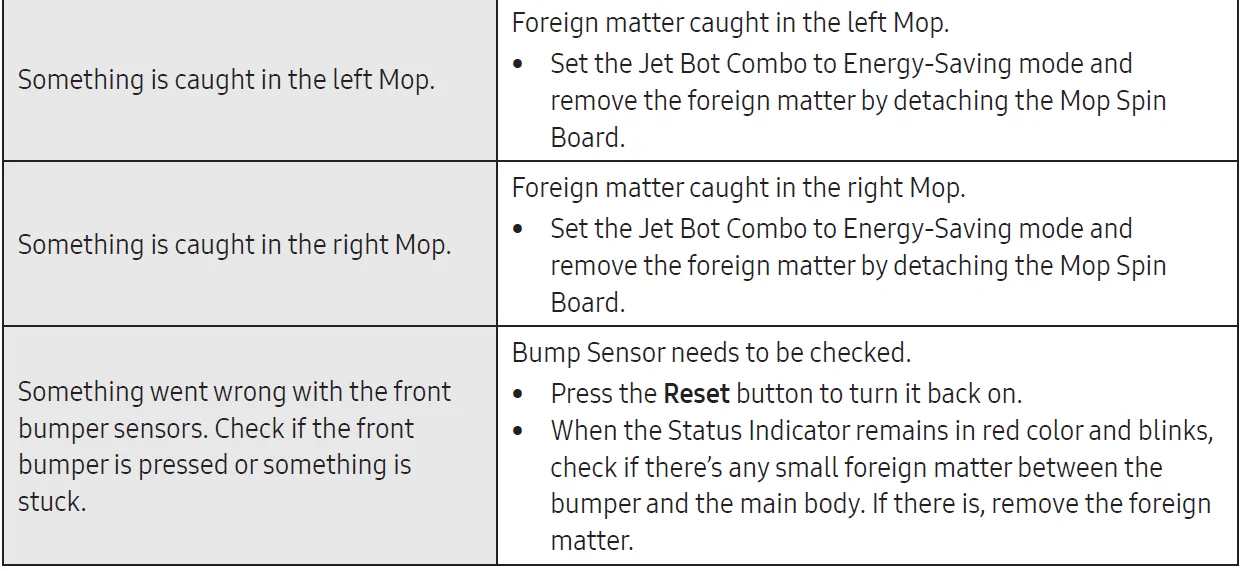
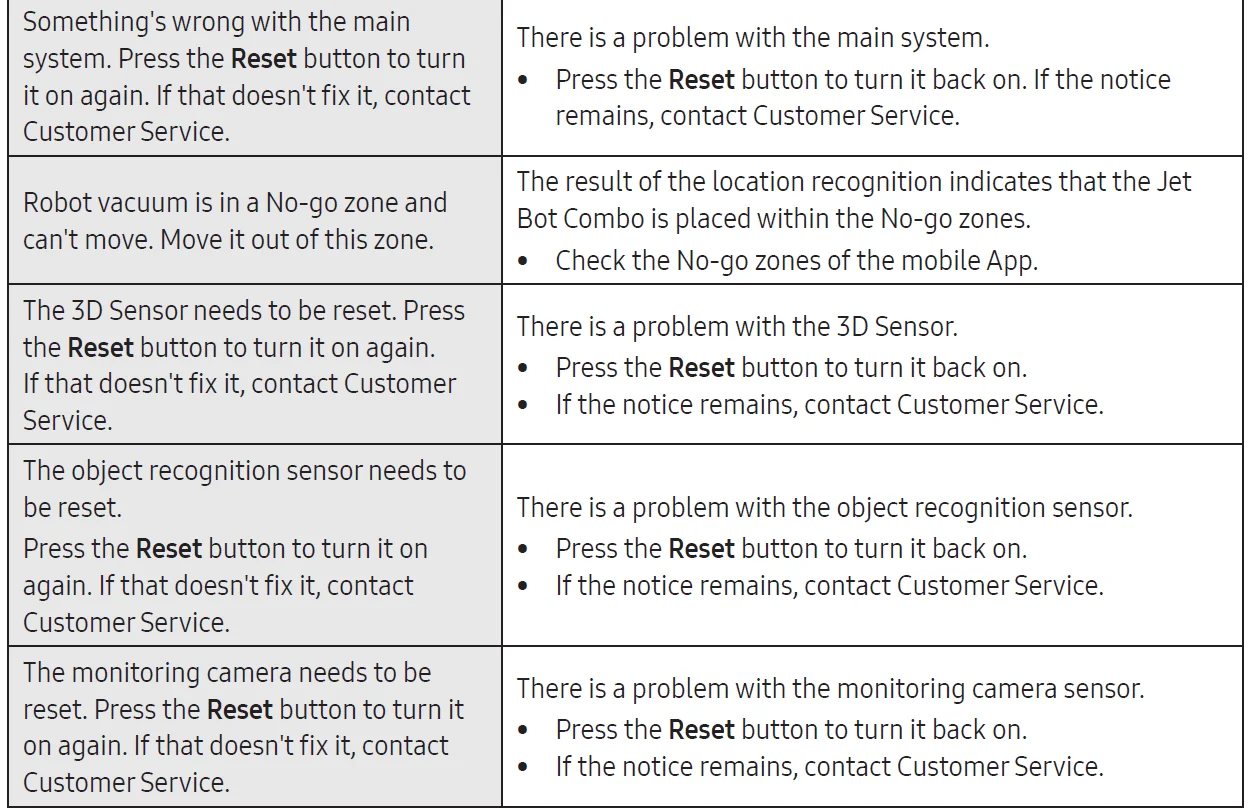
NOTE: You can find details of the checklist on the SmartThings app.
For more manuals by Samsung, visit ManualsLibraryy
Samsung Robot VR7MD97714G/EU Vacuum Cleaner-FAQs
What is the Samsung Robot VR7MD97714G/EU Vacuum Cleaner?
The Samsung Robot VR7MD97714G/EU is a smart robotic vacuum designed for automated floor cleaning. It uses advanced navigation, strong suction power, and intelligent sensors to clean efficiently with minimal manual effort.
What is the price of Samsung robot vacuum cleaners in Pakistan?
Samsung robot vacuum cleaners in Pakistan usually start from around PKR 95,000 and can go higher depending on the model, features, and import availability. Prices may vary by retailer.
Are Samsung robot vacuums good for daily use?
Yes, Samsung robot vacuums are suitable for daily cleaning. They support scheduled runs, automatic navigation, and consistent suction, helping maintain clean floors without manual vacuuming.
What features should I look for when choosing a robot vacuum?
Key features include suction power, navigation technology, battery life, dustbin capacity, smart app control, and compatibility with different floor types.
Can the battery of a Samsung robot vacuum be replaced?
Yes, the battery is replaceable. If you notice reduced runtime after long-term use, replacing the battery can restore performance.
Can I run my Samsung robot vacuum every day?
Yes, daily operation is safe and recommended, especially in homes with pets or high foot traffic. Frequent cleaning reduces dust buildup and improves indoor hygiene.
What are common problems with robot vacuum cleaners?
Common issues include clogged brushes, dirty sensors, full dustbins, or navigation errors. Most problems are solved by routine cleaning and resetting the device.
Is the Samsung Robot VR7MD97714G/EU suitable for pet hair?
Yes, it is effective for pet hair on hard floors and low-pile carpets. Regular emptying of the dustbin and brush cleaning ensures optimal performance in pet-friendly homes.