
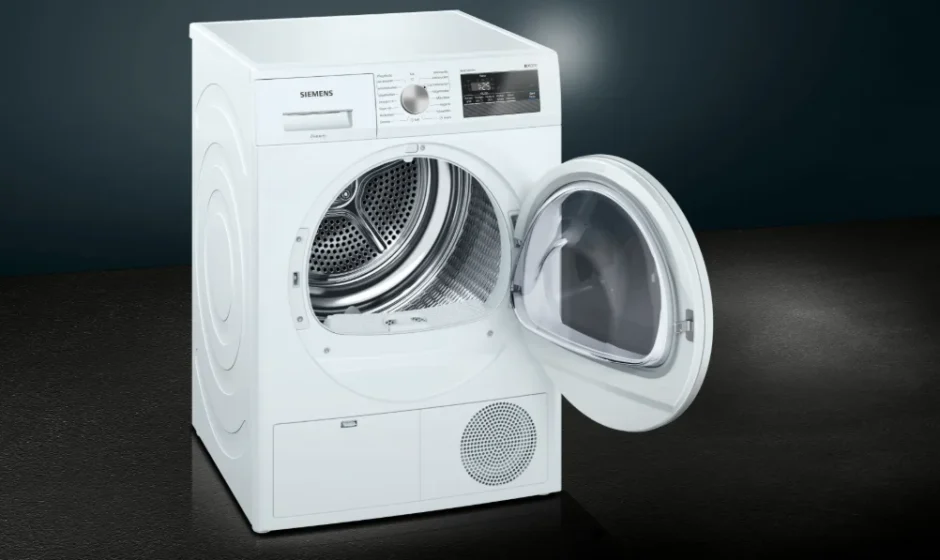

Siemens WT43N2G1 iQ300 Condenser Tumble Dryer
Safety instructions
The following safety information and warnings are provided to protect you from injury and to prevent material damage to your surroundings.
It is nevertheless important to take the necessary precautions and to proceed with care when installing, maintaining, cleaning, and operating the appliance.
Children/people/pets
Warning
Risk of death!
Children and other people who are unable to assess the risks involved when using the appliance may injure themselves or may find themselves in life-threatening situations. Therefore, please note:
- The appliance may be used by children over the age of 8 years and by persons with reduced physical, sensory, or mental capacity or by persons with a lack of experience or knowledge, as long as they are supervised or have received instruction on how to use the appliance safely and they have understood the potential risks of using the appliance.
- Children must not play with this appliance.
- Do not allow children to clean or maintain this appliance unsupervised.
- Keep children under 3 years and pets away from this appliance.
- Do not leave the appliance unattended when children or other people who are unable to assess the risks are in the vicinity.
Risk of death!
Children may lock themselves inside appliances and find themselves in a life-threatening situation.
- Do not position the appliance behind a door, as this may obstruct the appliance door or prevent it from opening completely.
- Once an appliance has reached the end of its life, pull the mains plug from the socket before severing the mains cable, and then destroy the lock on the appliance door.
Risk of suffocation!
If allowed to play with the packaging/plastic film or packing components, children may become caught in these or pull them over their heads and suffocate.
Keep packaging, plastic film, and packing components away from children.
Risk of poisoning!
Detergents and care products may result in poisoning if consumed.
If accidentally swallowed, seek medical advice. Keep detergents and care products out of the reach of children.
Installation and connection
Scope of delivery
- Dryer
- Installation and operating instructions
- Basket for woollens
- Condensation drain
Installing and connecting the dryer
Warning
Risk of death!
There is a risk of electric shock as the dryer is operated with electricity.
- Check the dryer for visible damage. You must not operate the dryer if it is damaged.
- Before connecting the dryer to the power supply, ensure that the electric voltage specified on the rating plate matches the voltage of your socket.
- Ensure that the mains cable is not kinked or trapped, and that it does not come into contact with heat sources or sharp edges.
Caution!
Risk of injury
- Due to the heavy weight of the dryer, you may injure yourself if you lift it. Do not lift the dryer on your own.
- You could cut your hands on the sharp edges of the dryer. Do not hold the dryer by the sharp edges.
- Protruding parts on the dryer may break off when it is lifted or pushed.
- Do not move the dryer by holding onto protruding parts.
Risk of material damage to the dryer or fabrics.
- Check the dryer for damage caused during transportation. Never operate a dryer if it is damaged.
- Any residual water in the dryer may freeze and damage the dryer. Do not install the dryer in rooms that are at risk of frost.
During installation, ensure that:
- The dryer is placed on a clean, level, and firm surface,
- The mains plug can be accessed at all times,
- The air inlet on the dryer is kept clear, and there is sufficient ventilation,
- The area around the dryer is kept clean and
- The dryer is levelled using the threaded feet.
Note: Check the alignment of the appliance with a spirit level and correct if necessary. Change the height by turning the appliance feet. All appliance feet must stand firmly on the ground.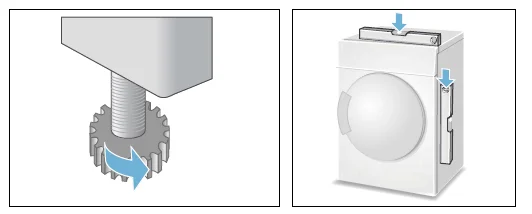 Incorrect alignment may cause high noise levels, vibrations, and improper movement of the drum.
Note: If in doubt, have the appliance connected by a specialist.
Optional accessories
Order optional accessories from the after-sales service:
Washer-dryer stack connection set:
To save space, the dryer can be placed on top of a suitable washing machine of the same width and depth. The dryer must be secured to the washing machine using this connection set.
Order number with pull-out worktop: WZ20400;
Order number without pull-out worktop: WZ11410.
Platform:
For easier loading and unloading, use a platform to raise your dryer.
Transport laundry with the integrated clothes basket in the platform’s pull-out drawer.
Order number: WZ20500.
Basket for woollens:
Dry individual woollen items, sports shoes, and soft toys in the basket for woollens.
Order number: WZ20600.
Transport and frost protection
To empty the condensate container:
- Use the program selector to select any program.
- Press the Start button.
- Wait for 5 minutes. Note: The condensation is drained.
- Empty the condensate container again.
- Switch off the dryer.
Caution!
Any residual water may leak out and cause material damage.
Transport the dryer in an upright position.
Draining the condensation water
Condensation will form in the appliance as it dries the laundry.
You must ensure that the drain hose is connected when you operate the appliance.
If there is no drain hose connected to the appliance, the condensation water from the appliance will run into the condensation container. In this case, you will need to empty the condensation container each time the dryer finishes drying the laundry, and also if it becomes full before drying is complete.
Connect the drain hose as follows:
- Remove the accessories from the dryer drum.

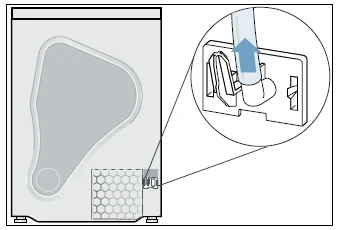
- When the dryer is delivered from the factory, the hose for discharging the condensation into the condensation container is fastened to the connecting piece.
- Detach the condensation hose from the socket.

- Place the condensation hose in the “parked” position.
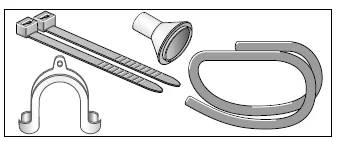
- Take the drain hose from the accessories and secure it to the free connecting piece.
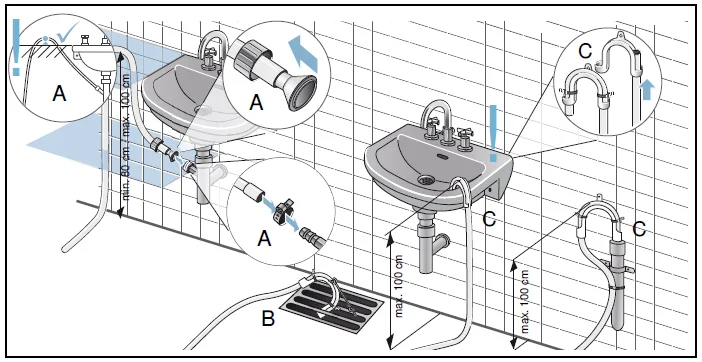
- Fasten the other end of the drain hose with the remaining accessories, depending on the connection situation (A, B, or C).

Caution!
Accumulated water can be drawn back into the dryer and may cause material damage.
Check that the water drains away from the wash basin quickly. The drain must not be sealed or blocked.
Caution!
Material damage due to leaks or draining water.
Secure the drain hose so that it cannot slip out. Do not kink the drain hose.
Ensure that a height difference of max. 100 cm and min. An 80 cm distance between the installation surface and the drain is maintained for drainage into a siphon.
The condensation water is now discharged via the drain hose into the wastewater system or into a washbasin.
Note:
If you want to drain the condensation water back into the condensation container, reverse these steps.
The main points in brief
- Load the laundry and close the door. Switch on the dryer. Select a program and, if necessary, adjust the program default settings.
- Select the start button. Dry. Unload the laundry.
- Switch off the dryer. Empty the condensate container. Clean the fluff filter.
Getting to know your appliance
Dryer
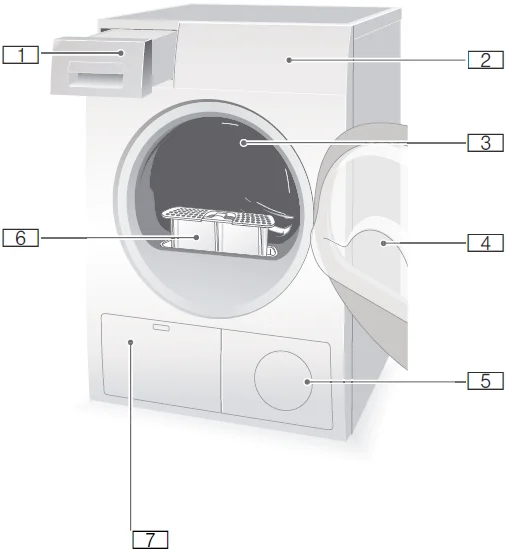
- Condensate container
- Control and display panel
- Drum interior light (depending on the model)
- Dryer door
- Air inlet
- Fluff filter
- Heat exchanger
Control panel
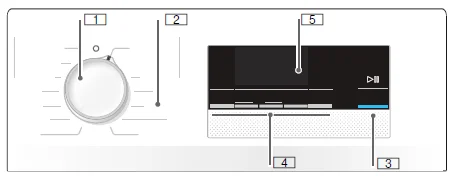
- Use the program selector to switch the dryer on and off and to select the program.
- Programm
- Start button for starting or interrupting the program
- Buttons
- Display panel with buttons
Display panel
Buttons in the display panel
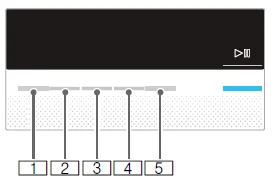
- Select the degree of dryness.
- Select the drying time.
- Select the Ready in time.
- Select Anti-Crease.
- Select Low-Heat Drying.
Laundry
Preparing the laundry
Warning
Risk of explosion or fire!
Remove any cigarette lighters and matches from pockets.
Caution!
The dryer drum and fabrics may be damaged.
Remove all objects from pockets and observe the following information:
- Tie cloth belts, apron strings, etc., together or use a laundry bag.
- Close zips, hooks and eyelets, and buttons. Button up large items of laundry, such as covers.
- Remove any metal objects, such as paper clips, from pockets.
- To ensure a consistent drying result, sort laundry by fabric type and drying programme.
- Always dry very small items of laundry, e.g., babies’ socks, together with large items such as towels.
- Knitted fabrics such as T-shirts and jerseys often shrink the first time they are tumble-dried. Use a gentle programme.
- Do not overdry easy-care laundry. This increases the creasing of the laundry.
- Use timed programmes for single garments.
- Some detergents and care products, e.g., starch or softeners, contain particles that may be deposited on the moisture sensor. This may impair the sensor function and, in consequence, the drying result.
Notes
- When washing laundry to be tumble-dried, use the correct amount of detergent and care products as specified in the manufacturer’s instructions.
- Clean the moisture sensor regularly.
Operating the appliance
Loading laundry and switching on the dryer
Note: The dryer must be correctly positioned and connected, ~ Page 13.
- Place the laundry in the drum.
- To switch the dryer on, turn the program selector to any program.
- Close the dryer door.
Caution!
Risk of material damage to the dryer or laundry.
Take care not to trap any laundry in the door.
Setting a program
Note: If you have activated the childproof lock, you must deactivate it before you can set a program, see ~ Page 24.
- Select the required program; detailed information on the programs can be found from ~ Page 22 onwards.
- Use the program selector to set the required program. The default program settings for the selected program appear in the display panel.
- If required, adjust the default program settings. You can find detailed information on this from ~ Page 22 onwards.
Starting the program
Press the Start button.
Note: If you want to lock the program to prevent it from being inadvertently adjusted, you can select the childproof lock, see ~ Page 24.
Program sequence
The programme status is indicated in the display field.
e.g. 1:27
Expected programme duration in hours and minutes.
Note: When a programme is selected, the expected drying time for the recommended load is displayed. During drying, moisture sensors detect the remaining moisture in the load and adjust the programme length (except timed programmes). This is visible via the time remaining, leaping forward.
Changing the program or adding laundry
You can remove or add laundry and change or alter the program at any time during drying.
- To pause the program, open the dryer door or press the Start button.
- Add or remove laundry.
- Select another program or an additional function, if required.
- Close the dryer door.
- Press the Start button.
Note: The program duration in the display panel is updated depending on the load and residual moisture in the laundry. The values displayed may change after the program is changed or the load is adapted.
Program interruption
The program can be interrupted at any time; to pause, open the dryer door or press the Start button.
Program end
End appears in the display panel.
Cleaning
Cleaning the dryer and the control panel
Warning
Risk of death!
There is a risk of electric shock as the dryer is operated with electricity.
Disconnect the dryer from the mains before cleaning. Clean the dryer using only water and a soft, damp cloth.
Remove all detergent residue, spray residue, or other residues immediately.
Do not use cleaning agents or agents for pre-treating laundry (e.g,. prewash sprays, stain removers). Do not use high-pressure cleaners or steam jet cleaners to clean your appliance.
Cleaning the heat exchanger
Notes
- The heat exchanger requires cleaning once a month; however, this varies depending on how frequently the dryer is used.
- If there is debris in the heat exchanger, this will increase the amount of time required for drying and will compromise the drying results.
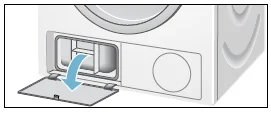
- Allow the dryer to cool down and place an absorbent cloth beneath the maintenance flap. Note: Residual water may leak out.
- Open the maintenance flap fully.

- Turn both locking levers towards each other.
- Remove the top cap from the heat exchanger.
- Remove the heat exchanger.
- Flush water through the heat exchanger from all sides to completely remove all fluff.
- Remove all fluff from the seals on the dryer and on the heat exchanger.
- Allow all the water to drip off.
- First, insert the heat exchanger, and then fit the heat exchanger’s top cap in place.
- Turn both locking levers back and close the maintenance flap until it locks into place.
- Close the maintenance flap and press on it until you feel it click in place.
Cleaning the moisture sensor
Note: The dryer is equipped with a stainless-steel moisture sensor. The moisture sensor measures how damp the laundry is.
After long periods of usage, the moisture sensor may become covered by a fine layer of limescale or residues of detergents and care products. Such residues must be removed regularly as the sensor function and, in consequence, the drying result may be impaired.
Open the door and clean the moisture sensor with a coarse sponge.
Caution!
The moisture sensor may be damaged. Do not clean moisture sensors with abrasives and steel wool.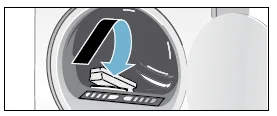
Faults and what to do about them
The dryer does not start.
- Mains plug plugged in or fuse checked?
- Program selected? Select a program.
- Dryer door open? Close the door.
- Childproof lock activated? Deactivate the childproof lock.
- “Finish in” time selected? The program starts after a delay.
Display panel goes off and Start button flashes.
Not a fault. Energy saving mode is active ~ Page 12.
Creasing.
- Creasing occurs when you have exceeded the maximum load or selected the wrong program for the type of fabric. All the required information can be found in the program table.
- Remove clothes immediately after drying; creasing may occur if they are left in the drum.
Water is leaking out.
Not a fault; the dryer may be positioned on an incline. Level the dryer.
Change in the programme duration displayed during drying.
Not a fault. The moisture sensors detect the remaining moisture in the load and adjust the programme length (except timed programmes).
Laundry is not dried correctly or is still too damp.
- After the end of the program, warm laundry feels damper than it actually is. Spread the laundry out and allow the heat to disperse.
- Finely adjust the dryness level – this extends the drying time but does not increase the temperature. Your laundry will become drier ~ Page 24.
- Select a program with a longer drying time or increase the drying level. This does not increase the temperature.
- Select a timed program for subsequent drying of laundry that is still damp ~ Page 22.
- If you have exceeded the maximum load for the program, the laundry may not be dried properly.
- Clean the moisture sensor in the drum. The sensor may become covered by a fine layer of limescale or residues of detergents and care products, which then impair its function. Your laundry is not being dried correctly ~ Page 32.
- Drying has been interrupted as a result of a power cut, because the condensate container is full, or because the maximum drying time has been exceeded.
Note: See also the laundry tips ~ Page 21.
Displayed drying time changes during the drying process.
Not a fault. The dryer recognizes the load and adapts the remaining program duration.
Humidity in the room increases.
Not a fault. Make sure the room is sufficiently ventilated.
Power cut.
The drying program is interrupted. Remove the laundry and spread it out, or restart the program.
For more Manuals by Siemens, visit ManualsLibraryy
Siemens WT43N2G1 iQ300 Condenser Tumble Dryer-FAQs
Why does my dryer take two or more cycles to dry clothes?
This usually indicates poor airflow, a blocked condenser, or an overfilled dryer. Clean the condenser, lint filter, and ensure the dryer isn’t overloaded.
How do I reset my Siemens iQ300 dryer?
Unplug the dryer or switch off the circuit breaker for 1–5 minutes, then plug it back in. Some models have a reset button behind the back panel that can be pressed if the heater or motor trips.
How do I unlock the child lock on my Siemens dryer?
Press and hold the Start button for 3–5 seconds. The key symbol or “CL” code will disappear, indicating the child lock is off.
What does the “CL” code mean on my Siemens dryer?
“CL” indicates that the child lock is active. Deactivate it by pressing and holding the Start button.
Why is my dryer not turning on even though it has power?
Check if the door is fully closed, the door switch and start switch are working, and ensure no blown fuses or tripped thermal protectors.
How often should I clean the condenser?
Clean the condenser regularly to prevent lint buildup, which can reduce airflow and drying efficiency. Every few weeks is recommended, depending on usage.
How do I perform a full reset on my Siemens dryer?
Turn off power at the plug or circuit breaker for a few minutes, then turn it back on. For some models, press the reset button on the back panel if available.
Is it worth fixing a 7-year-old Siemens dryer?
If repair costs exceed 50% of a new dryer’s price, replacement is usually better. Otherwise, repairs like cleaning the condenser or replacing the heating element are cost-effective.
Is there a factory reset or pinhole reset?
Some models have a pinhole reset button behind panels. Use it only if the dryer won’t respond to standard resets.
Why are my clothes still damp after drying?
This can result from overloading the dryer, blocked vents, or a dirty condenser. Ensure proper load size and clean all filters and condenser units.