


SmartWay Solutions VT1007 Talking Thermostat
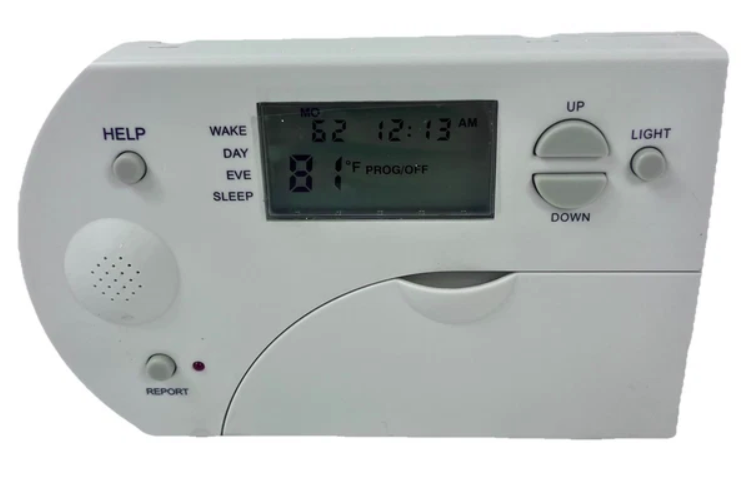
The Talking Thermostat™
5/2 DAY PROGRAMMABLE
- VT1007-SINGLE STAGE GAS & ELECTRIC
- VT2007-TWO STAGE HEAT/SINGLE COOL
- VT2207-TWO STAGE HEAT/TWO STAGE COOL
User’s Guide
- The Talking Thermostat is a battery-powered heating & cooling digital thermostat control that plays audio information for easy & precise temperature management
VT1007 Features
(VT2007 see pg. 6, VT2207 see pg. 7)
- Operates on single gas, oil or electric heating & cooling systems and heat pump systems without secondary heat
- 5/2 (weekdays/weekend) programming functionality.
- 4 separate time & temperature settings for weekday/weekend.
- Stores both heat & cool temperature program settings.
- Audio instructions for setting up day/time and temperature programs.
- An audio “Help” message is available if a heating or cooling problem occurs.
- Battery powered (4 “AA” alkaline).
- Audio & display screen alert messages for Filter, System Service & Low Batteries.
- °F/°C temperature operation (range 50° F/10° C to 90° F/32° C).
- 7 terminals for single or two-transformer systems.
- O/B terminals for heat pump systems (without back-up heat only).
- Freeze protection, automatic heat when the temperature is less than 40° F/4 °C
Optional Capabilities
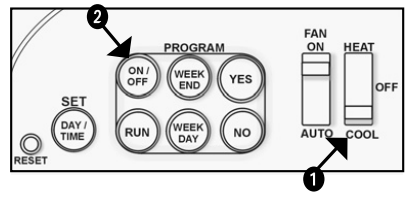
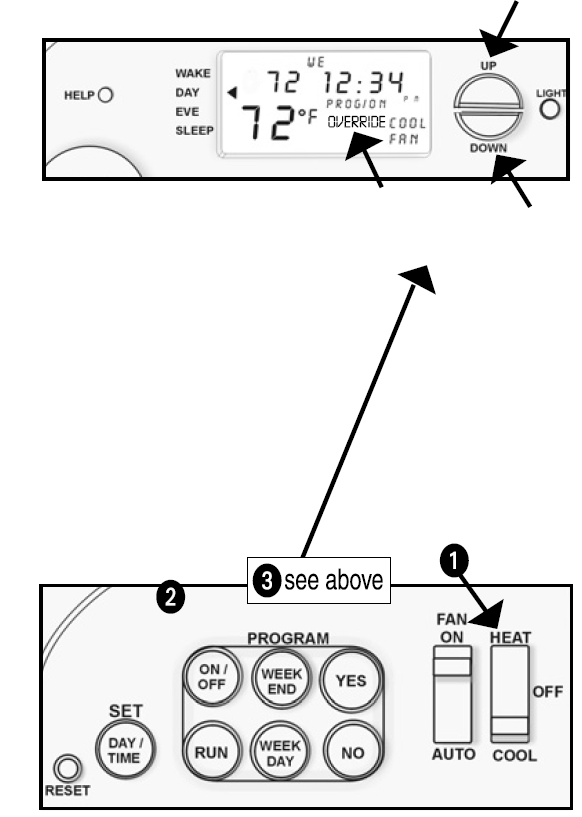
- Manual or Programmable Operation: Change operation from manual to programmable by pressing the ON/OFF button. “Program is Off” indicates conventional operation, and the temperature setting adjusts by pressing the UP and DOWN keys. “Program is ON” indicates programmable operation & temperature settings automatically adjust four times a day.
- Silent or Audio Instructions: Voice instructions for setting Day & Time and Programmable Operation can be turned on or off.
- Off-Wall Programming: The Front plate of the thermostat can be detached for program setup away from the wall-mounted base.
- Query successful
Cautions!
- To prevent electrical shock and/or equipment damage, turn off power at the main service panel by removing the fuse or switching the circuit breaker to the OFF position until removal of the existing and installation of new one is installed.
- This thermostat must be installed in conformance with all local and national building and electrical codes.
- If two-transformer wiring is used, it must be in phase. Failure to do so may result in personal injury and/or property damage.
Installation Instructions
Removing the Existing Thermostat
- Shut off power to the heating & cooling system.
- Remove the front cover of the existing thermostat. Note & label the wiring connections.
- Remove the wires from the terminal.

Installing The Talking Thermostat Base
- Remove the thermostat front body by pressing down on the lower edge: the plastic clip, and carefully tilt the front body upward until detached.
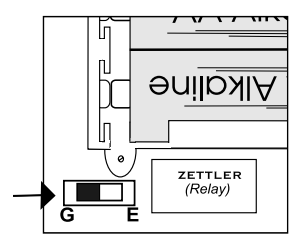
- Move the slide switch located on the back of the circuit board to the “E” (Electric) position if the thermostat is required to energize the fan when calling for heat.
- Level the base against the wall where it will be mounted. Make sure the wires will feed through the opening. Mark the mounting hole locations.
- Remove the base and, using a bit drill, the mounting holes. Fasten the base to the wall using the included anchors and screws, making sure base is level.
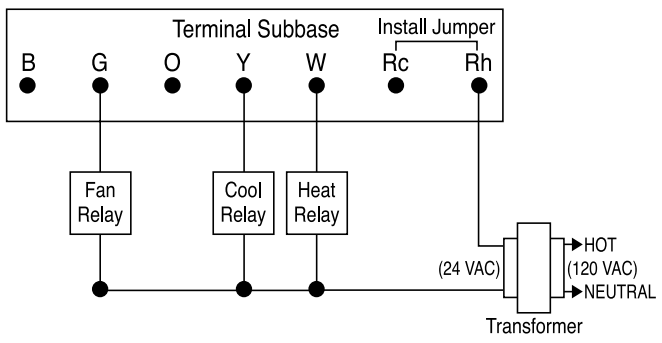
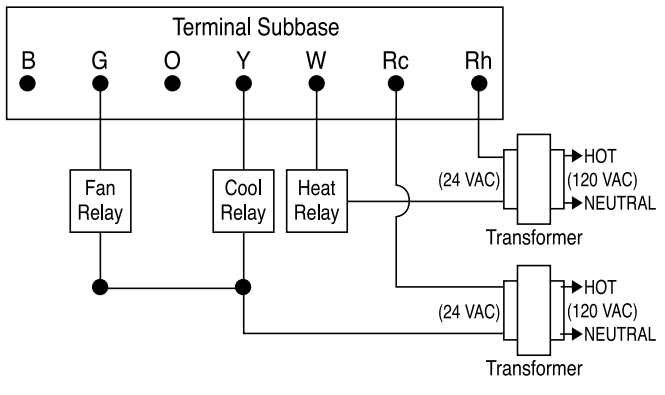
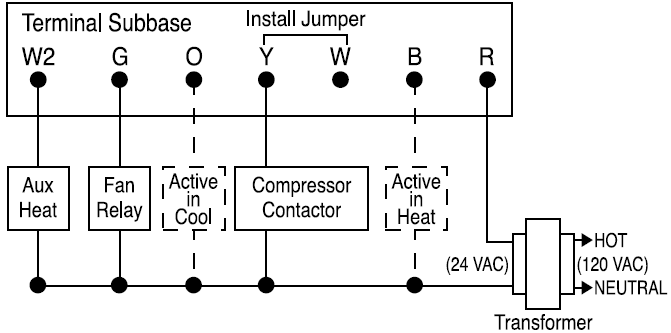
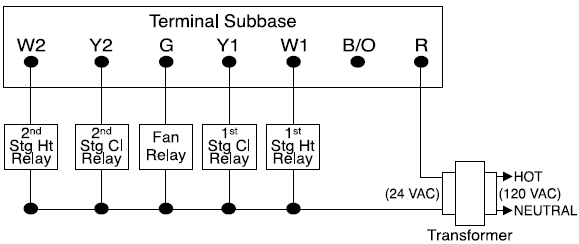
- Attach the wires to the terminals according to the appropriate wiring diagrams (VT 2007 see pg. 6, VT 2207, see pg. 7).
- Note: Electric Heat and/or Hot Water Furnaces should be wired for Single Transformer Systems Only. Always refer to the equipment manufacturer’s wiring instructions
- VT1007 HEAT/COOL & WIRE SINGLE TRANSFORMER

- Note:
- B terminal is active in heat
- 0 terminal is active in cool
- VT1007 GAS HEAT COOL WIRE TWO TRANSFORMER

- Note:
- B terminal is active in heat
- 0 terminal is active in cool
- Install four “AA” alkaline batteries into the battery compartment in the direction as shown on the circuit board diagram (i.e., “flat negative battery end faces towards the spring”)
- Line up the base pins with the front cover slots and push the top into place.
Setting Day and Time
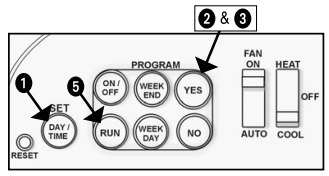
- Pull down the curved panel door and press the DAY/TIME button.
- Press the YES button when asked if you wish to change the day or time settings.

- Press the YES button when asked if you wish to have voice instructions.
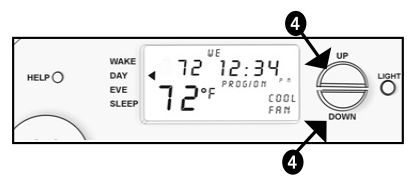
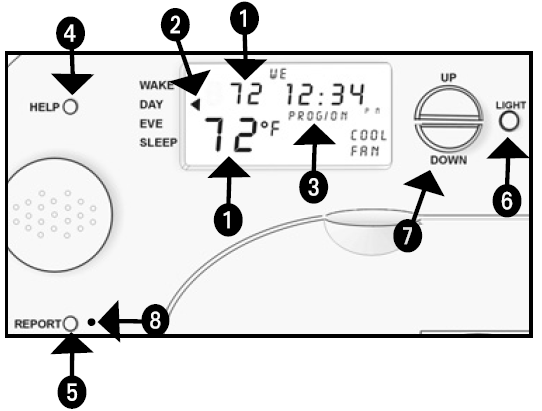
- Press the UP or DOWN Keys (next to the display screen) to make changes to minutes, hours, and day settings.

- Press the RUN button to accept changes until “Program Completed” is heard
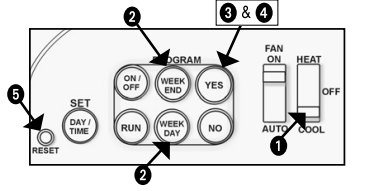
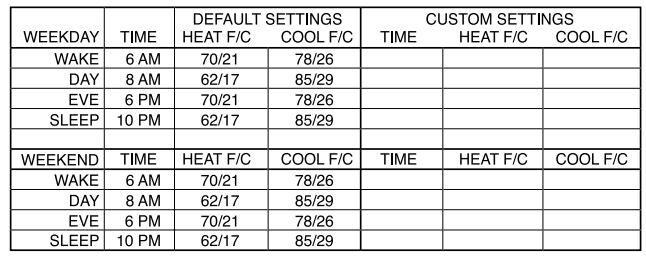
Setting Program Operation Times & Temperatures
How do the thermostat sensors work?
The temperature sensors detect changes by sending electrical signals. They use special metals that react to temperature shifts by altering voltage or resistance.
Will the thermostat still work during a power outage?
Yes, the thermostat saves your set temperatures and schedule. However, it may lose the current time and won’t operate until power is restored.
What is the main purpose of a thermostat?
A thermostat regulates temperature by turning heating or cooling systems on or off to maintain a desired setting.
What are NTC and PTC thermistors?
NTC (Negative Temperature Coefficient) thermistors decrease resistance as temperature rises, while PTC (Positive Temperature Coefficient) thermistors increase resistance with heat.
How can I adjust the thermostat settings?
Use the mode button to switch between heating, cooling, or fan-only. Adjust the temperature using the arrow buttons. You can also set schedules to save energy.
What’s the difference between digital and analog thermostats?
Digital thermostats use sensors and often come with more features, including remote control via apps. Analog models use manual knobs or switches and offer basic control.
How does the thermostat actually control temperature?
It maintains the set temperature by turning heating or cooling systems on or off, or by adjusting the flow of air or fluids.
Does the digital thermostat need Wi-Fi to function?
Basic heating and cooling work without Wi-Fi. However, to use smart features like remote control or scheduling from your phone, a Wi-Fi connection is needed.