
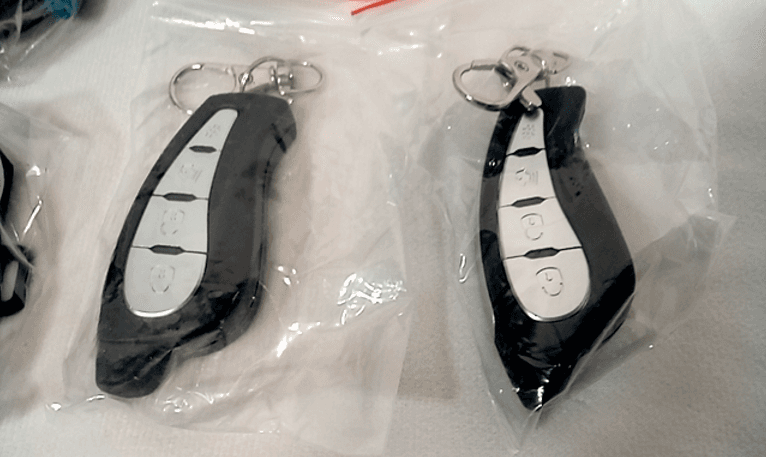

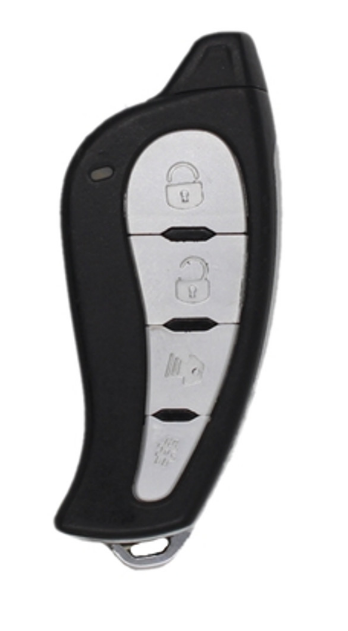
Solace SY9PANDALARM870 Key Remote Transmitter
CN1 (MAIN)
These Wires are limited to 1 amp. Do not connect to high-current vehicle wires. If you are installing in a vehicle where high current is needed, please use the Plug-in Relay Pack.
- RED – (+) 12V INPUT – This wire is the 12V(+) input for the remote starter. Connect this wire to a 12V(+) Constant wire on the vehicle.
- BLACK – This wire is the system ground input. Connect this wire to the bare metal on the vehicle chassis. Solace recommends a kick panel and scraping away any paint. All your ground connections from the remote starter and any add-ons, such as alarm sensor or bypass module, should be grounded at the same point.
- PURPLE – (+) START OUTPUT – This wire will send out a 12V(+) pulse during crank. Connect this wire to the (+) Starter wire on the vehicle.
- ORANGE – (+) ACCESSORY OUTPUT – This wire sends outa a 12V(+) signal but shuts off during the crank cycle. Connect
This wire is connected to the (+) Accessory wire on the vehicle. - PINK – (+) IGNITION INPUT/OUTPUT – This wire sends out a 12V(+) signal during remote start and during the crank cycle. This wire is also the ignition feed for the remote starter and is required for programming. Connect this wire to the (+) Ignition wire on the vehicle.
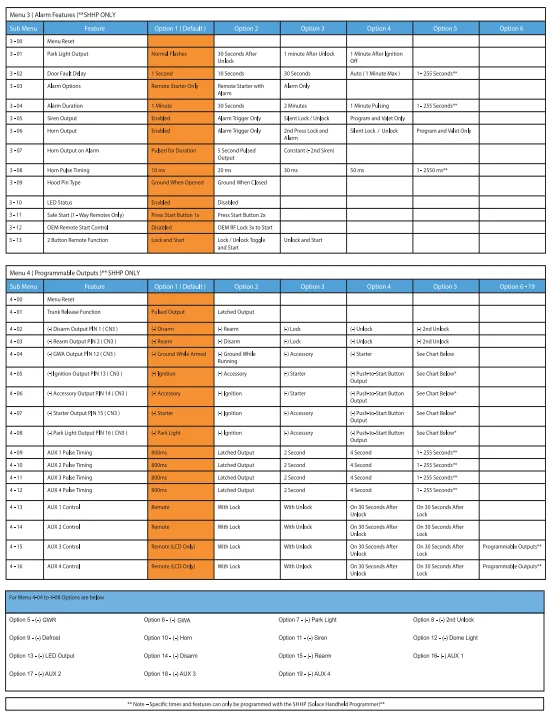
- PINK/WHITE – (+) SELECTABLE OUTPUT – This wire is programmable in Menu 2-01. Whatever it is programmed for, it will duplicate the output for a 2nd wire. It is the default set to (+) Ignition. Connect this wire to either 2nd Ignition, 2nd Starter, or 2nd Accessory. Please be sure to program for the correct wire on the vehicle. This wire can also be programmed to control a (+) Positive trunk release, (+) PUSH TO START BRAKE output, or SIREN. Connect to a positive trunk release circuit if needed and program Menu 2-19 to the desired setting.
CN2 (LOCKS)
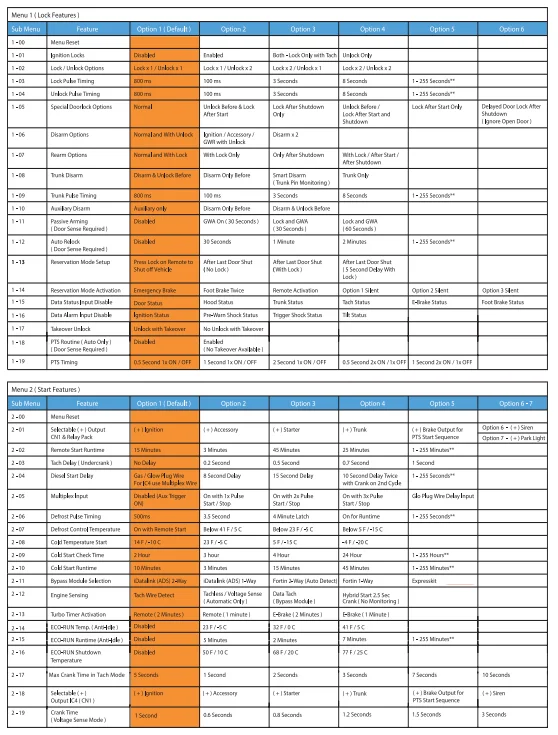
- GREEN- (-) 325mA LOCK OUTPUT – This wire will send a (-) pulse whenever the lock is pressed. Connect this wire to the
vehicle’s NEGATIVE lock wire. DO NOT connect to any wire other than the negative. This is a programmable output that can be programmed for timing, number of pulses, and when it turns on. Please see Menu 1-02, 1-03, 1-05, 1-12, and 1-13 - EMPTY- (+) 1 AMP POSITIVE OUTPUT – This empty spot will send a constant 12V(+) output that can be used to trip a
relay or a Power Door Lock Module. DO NOT use this wire to drive reverse polarity door locks. DO NOT connect to a high-amperage circuit, as damage may occur. - BLUE- (-) 325mA UNLOCK OUTPUT – This wire will send a (-) pulse whenever unlock is pressed. Connect this wire to the vehicle’s NEGATIVE unlock wire. DO NOT connect to any wire other than he negative. This is a programmable output that can be programmed for timing, number of pulses, and when it turns on. Please see Menu 1-02, 1-04, and 1-05.
CN3 (AUXILIARY)
NOT USED FOR REMOTE START
CN4 (INPUT / OUTPUT)
- BLUE/WHITE – (-) 325mA DISARM – This wire sends a pulse to disarm the factory content alarm system before the
remote start sequence begins, with every unlock command, and trunk release. This wire can be programmed in Menu 1-06, 1-08, and 1-10 for different functions; it can also be programmed in Menu 4-02 for different outputs. Connect this wire to either the factory disarm wire or door pin wire to control the factory alarm systems on most vehicles. This wire can also be connected to the factory door pin wire to wake up a BCM on some vehicles that require this. - GREEN/WHITE – (-) 325mA REARM – This wire sends a pulse to rearm the factory content alarm system after the remote start sequence ends, and with every lock command. This wire can be programmed in Menu 1-08 for different functions, and it can also be programmed in Menu 4-03 for different outputs. Connect this wire to the factory rear wire to control the factory alarm on most vehicles. This wire can also be used to pulse door pins to shut off auto lights or rearm security on some vehicles.
- RED/WHITE – (-) 325mA TRUNK RELEASE – This wire will send out a negative pulse when the trunk command is
received. By default, the doors will unlock before the trunk pulse is sent. This wire can be programmed in Menu 1-08and 1-09 for different timing and features. It can also be changed to a latched output in Menu 4-01. Connect this wire to a negative trunk wire on the vehicle. If the vehicle has a positive trunk release circuit, please either use a relay or the PINK/WHITE wire on CN1 and program Menu 2-01 to (+)Trunk. - PINK – (+) FOOT BRAKE STATUS INPUT – This wire is the brake shutdown wire and MUST be connected to the vehicle’s (+) brake light wire when the foot brake is depressed. This wire will disengage the remote starter when 12V is applied; it is also used for the tach learning process. NOTE – Some newer vehicles must have the ignition on for the brake lights to be activated.
CN5 (ANTENNA)
This connector is used for the antenna, Solace PC Cable (SPCC) for firmware updates, and also the Solace Handheld Programmer (SHHP), which can be used to program all features of this remote starter.
CN6 (RS232 BYPASS)
This connector is used to plug in Fortin, iDatalink, and/or Expresskit bypass modules. Solace remote starters are 2-Way datalink compatible with all manufacturers. Please see either manufacturer’s installation guides for more info. The required data protocol must be selected in Menu 2-11. It is set to the 2-Way iDatalink protocol by default. An optional cable is required when using Expresskit Bypass modules.
CN7 (SHOCK SENSOR)
- PIN 1 – (-) INSTANT TRIGGER INPUT – If this wire receives a ground signal from any sensor, the alarm will go into full
trigger mode. Connect this wire to the instant trigger wire of an external alarm sensor. - PIN 2 – (-) WARN AWAY TRIGGER INPUT – If this wire receives a ground signal from any sensor, the alarm gives a warning consisting of 3 siren chirps/horn honks, notifying the individual that the car is equipped with an alarm system. This also monitors the exterior zone of a proximity sensor. Connect this wire to the pre-warn or pre-shock to an eternal alarm sensor.
- PIN 3 – 12V (+) POSITIVE OUTPUT – This wire supplies a 12V (+) output is can be used for auxiliary alarm sensors such as shock, tilt, audio, and proximity.
- PIN 4 – (-) GROUND OUTPUT – This wire supplies a ground (-) output is can be used for auxiliary alarm sensors such as shock, tilt, audio, and proximity.
CN8 (BYPASS SUPPLY)
- WHITE/PURPLE – (-) 325mA GROUND WHEN RUNNING – This wire will send a (-) output whenever the remote starts engaged. This wire can be used in multiple scenarios; the most common is connecting to a bypass module so that it turns on when remote starting.
- RED – (+) 1 AMP POSITIVE OUTPUT – This wire supplies a 12V (+) output that can be used for a bypass module input,
the coil side of a relay, or optional low amperage accessories such as GPS modules or alarm sensors. DO NOT connect to a hihigh-amperageircuit,, as damage may occur. - BLACK- (-) 325mA GROUND OUTPUT – This wire supplies a (-) ground output that can be used for a bypass module
ground input, the coil side of a relay, or optional low amperage accessories such as GPS modules, or alarm sensors.
OPTIONAL RELAY PACK
The optional relay pack is used when a Current Output is required on older vehicles. The Relay Pack snaps in and can only be removed by removing 2 screws on the bottom of the Relay Pack and separating the case. See Relay Pack Installation sheet included for wire descriptions.
PROGRAMMING
TRANSMITTER LEARNING
Important! The remote starter will hold 3 transmitter codes. It is recommended that when programming transmitters, you fill up all three transmitter codes, even if only using one or two transmitters. This will clear all other transmitter coding from the unit and prevent stray coding or possible interference from other remote transmitters.
- Turn Ignition ON-OFF-ON.
- Press the valet switch TWICE (button) in the antenna, the siren/horn (optional) will chirp once each time the button is pressed.
- Press and hold the valet switch, the siren/horn will chirp 3 times & parking lights will turn on to indicate you have entered Transmitter Learning Mode.
- Press Button 1 (Lock) of every transmitter to be coded. For 2-Button Remotes, press both buttons together; for 1 Button Remotes, press the Start button. The siren/horn will chirp once, and the parking lights will flash once to indicate successful learning. The system will exit Learn Mode, and the lights will turn off after 15 seconds of no activity.
- Turn ignition OFF, and the unit will exit code-learning mode.
TACH LEARNING
- Start the vehicle with the key.
- Press the foot brake and hold it down.
- Within 10 seconds, press and release the valet switch. The unit will enter Tach Learning Mode automatically.
- If a Tach signal is detected, the parking light will flash and the siren/horn will chirp according to the Chart below.
- 2 FLASHES – Tach Learn – Hard-wired Tach Source from vehicle or hard-wired output from bypass module
- 3 FLASHES – Data Tach Learn – Tach signal from bypass module through 2-Way Datalink
- 4 FLASHES – Tachless Mode – No tach wire is connected, and the remote starter monitors the vehicle system to ensure it is running
- 10 FLASHES – Tachless Mode Not allowed in Manual Transmission
ENTERING PROGRAM MODE
- Turn ignition ON-OFF-ON. (Leaving Key is ON position)
- Press the valet switch 1 time and release. The parking lights will flash, and the siren/horn will chirp once to confirm.
- Press and hold the valet button for 3 seconds. The system confirms with 1 siren/horn pulse and park light flash to confirm that it is now in Program Mode.
Selecting Program Menu
- Once Program mode has been entered, pressing the remote will select the different program menus as below. Button 1 ( Lock) will select MENU 1 – 1 light flash siren/horn chirp.. Button 2 (Unlock) will select MENU 2 – 2 light flashes, siren/horn chirps.
Selecting Program Feature Menu
- Enter Program Mode and select Menu.
- Press and release the Valet (Program) Button the correct number of times to select the desired Feature. The park lights will flash once, and the siren/horn will chirp each time the programming button is pressed. The LEDs in the antenna will flash in sets to indicate which Feature Menu has been selected. (e.g. 3 flashes = Feature 3)
MASTER RESET (To reset ALL menus)
- Turn ignition ON-OFF-ON. (Leaving Key in the ON position)
- Press and release the valet switch 3 times. The parking lights will flash, and the siren/horn will chirp 3 times.
- Press the valet button for 3 seconds. The system confirms with 5 siren/horn pulses & park light flashes to confirm the system reset was performed.
- To exit, turn the ignition off.
DOOR LOCK RELAY DIAGRAMS
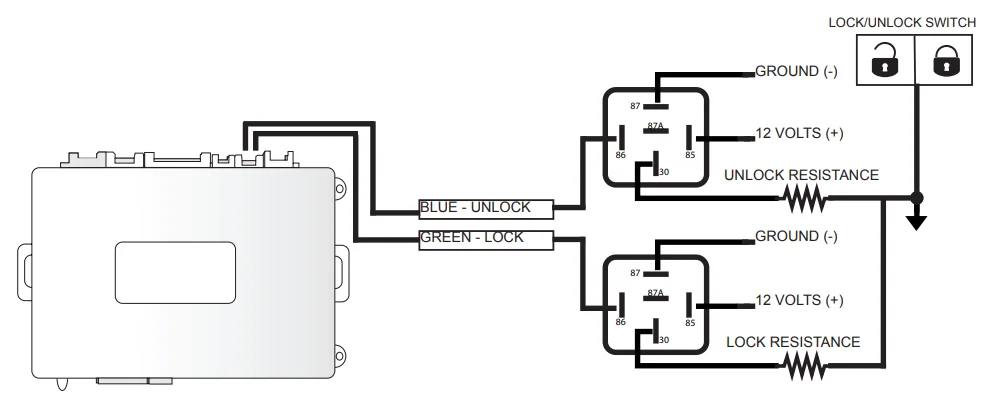
NEGATIVE ONE WIRE RESISTANCE TYPE DOOR LOCKS
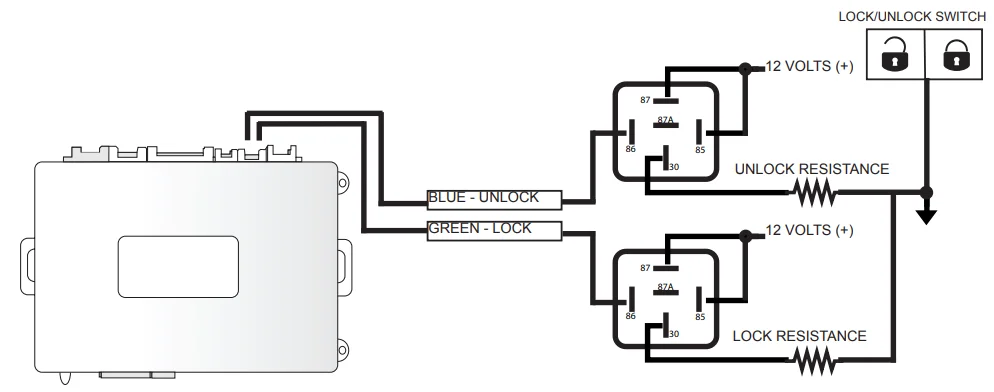
POSITIVE ONE-WIRE RESISTANCE TYPE DOOR LOCKS
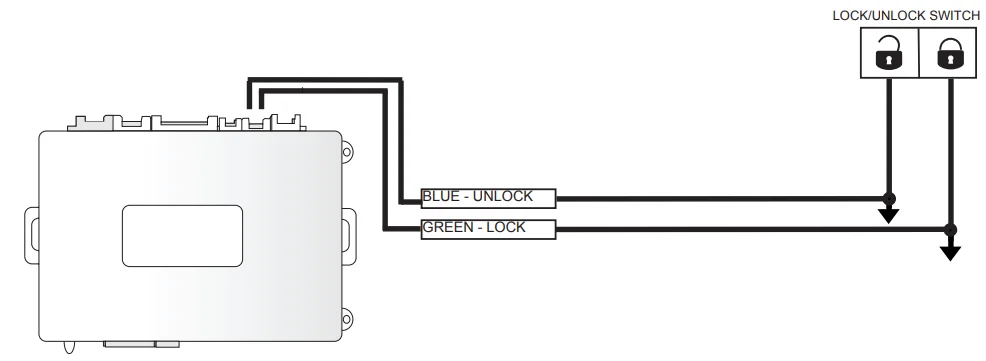
NEGATIVE TYPE DOOR LOCKS
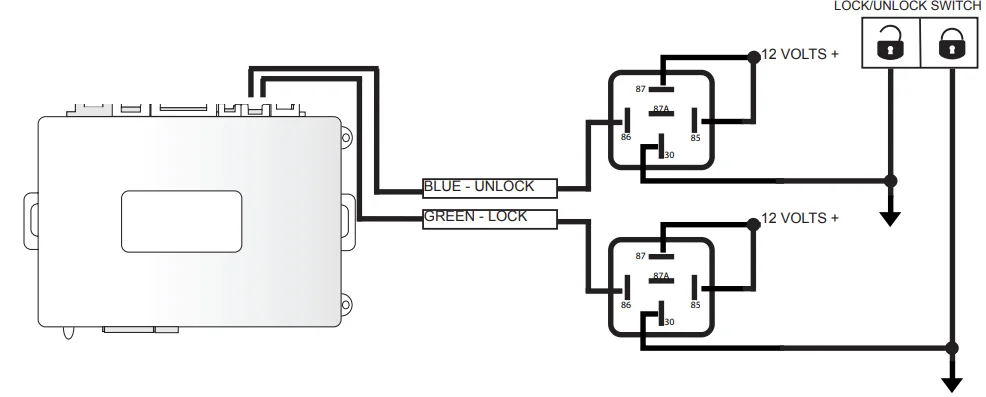
POSITIVE TYPE DOOR LOCKS
REVERSE POLARITY TYPE DOOR LOCKS
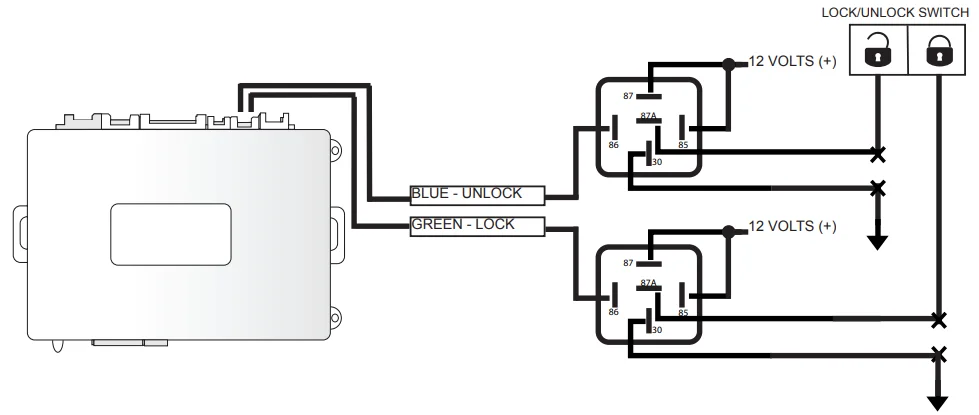
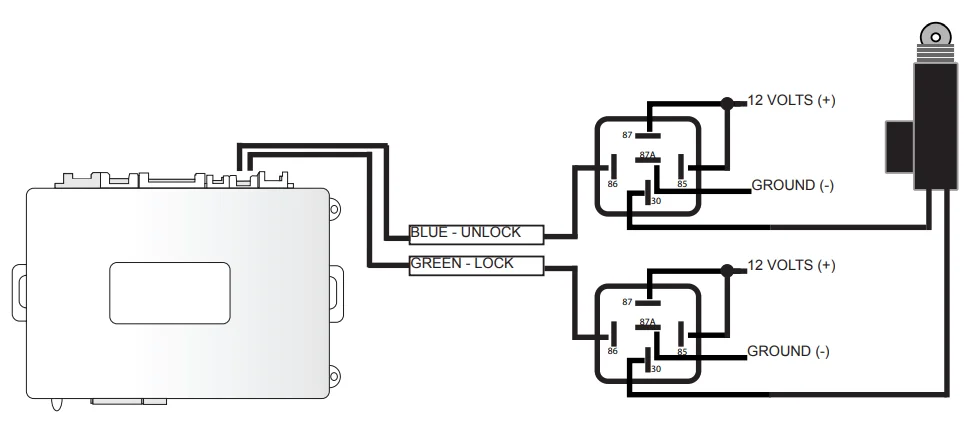
ADDING AFTER-MARKET DOOR LOCK ACTUATORS
RELAY DIAGRAMS
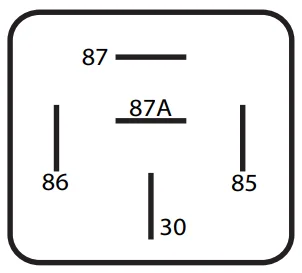
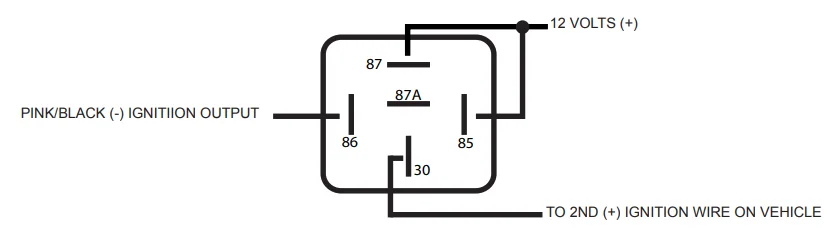
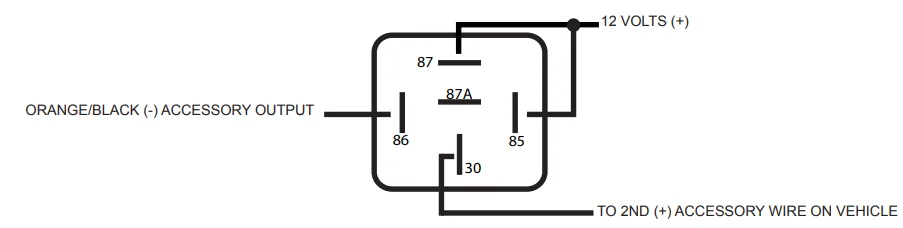
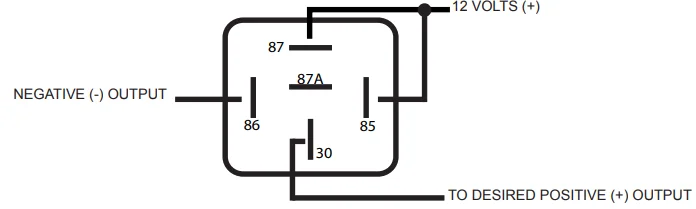
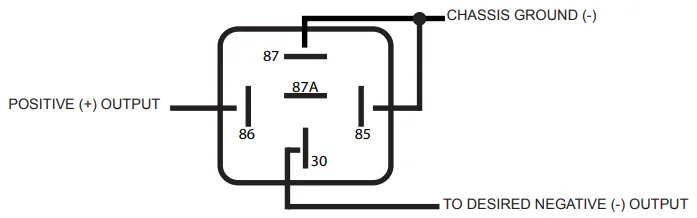
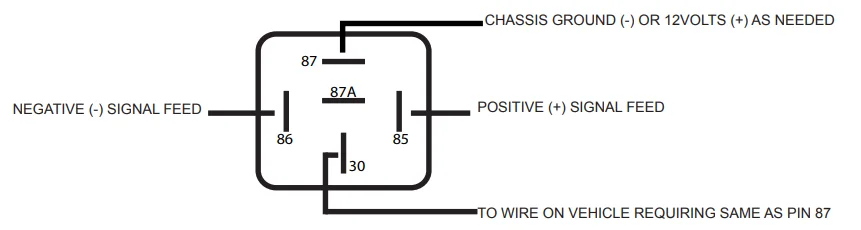
- RELAY PIN IDENTIFICATION AND DESCRIPTION
- PIN 86 – RELAY COIL GROUND
- PIN 85 – RELAY COIL FEED (TRIGGER)
- PIN 87 – NORMALLY OPEN CONTACT (CONNECTED TO
- PIN 30 WHEN RELAY COIL IS ENGAGED)
- PIN 87A – NORMALLY CLOSED CONTACT (CONNECTED
- TO PIN 30 WHEN COIL IS NOT ENGAGED)
- PIN 30 – COMMON FEED
SWITCHING A NEGATIVE (-) START TO A POSITIVE (+) START
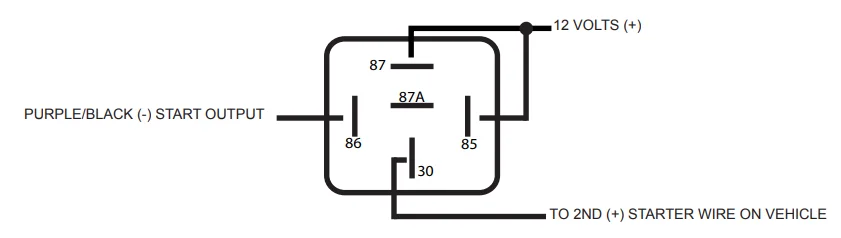
SWITCHING A NEGATIVE (-) IGNITIION TO A POSITIVE (+) IGNITION
SWITCHING A NEGATIVE (-) ACCESSORY TO A POSITIVE (+) ACCESSORY
SWITCHING A NEGATIVE (-) OUTPUT TO A POSITIVE (+) OUTPUT
SWITCHING A POSITIVE (+) OUTPUT TO A NEGATIVE (-) OUTPUT
ADDING RESISTANCE THROUGH GROUND
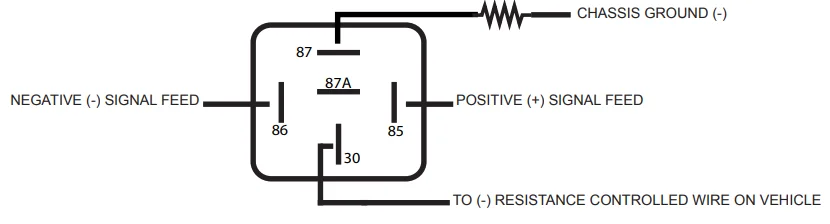
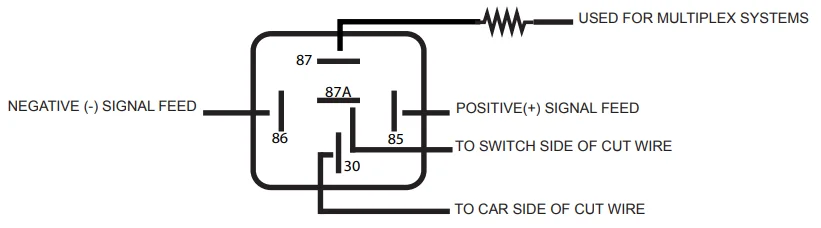
ISOLATING A WIRE (5 WIRE) ALSO FOR MULTIPLEX SYSTEMS
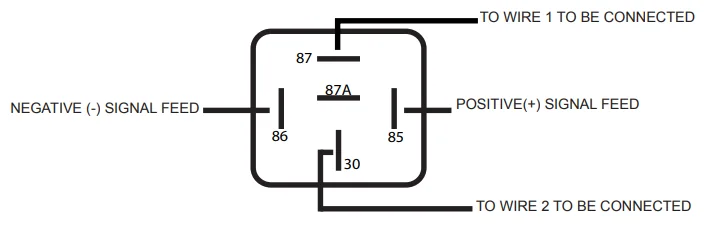
CLOSING A WIRE (CONNECTING 2 WIRES)
OPENING A WIRE (CUTTING) ALSO FORD OPEN DOOR R.A.P. (RADIO SHUTDOWN)
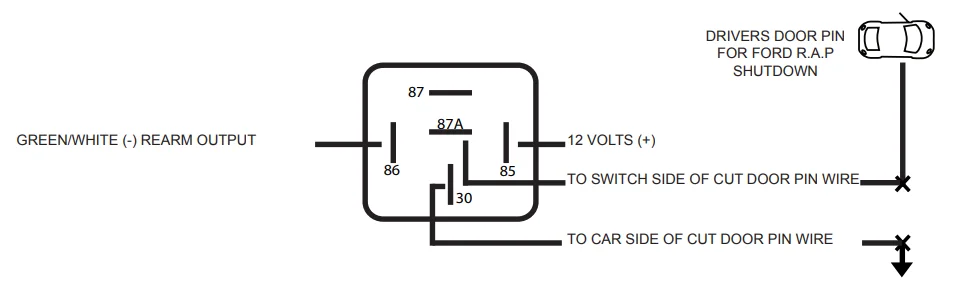
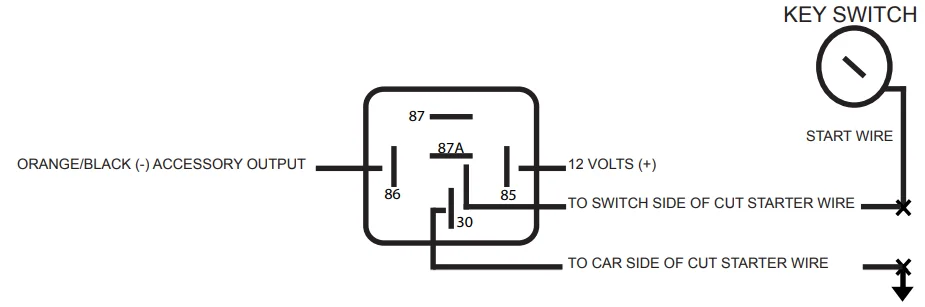
STARTER KILL/ANTI-GRIND
HIGH CURRENT GROUND OR POSITIVE
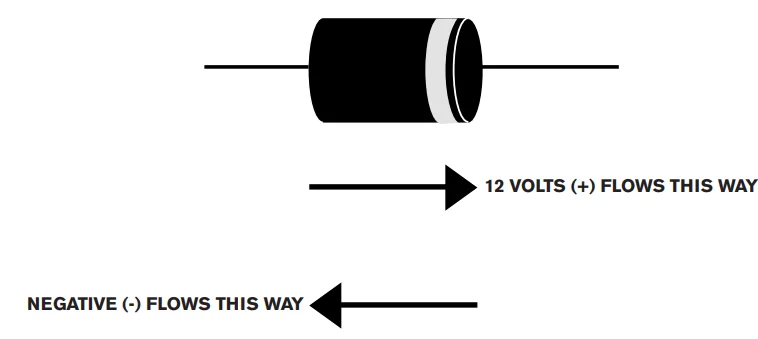
DIODE DIAGRAMS
SWITCHING 1 NEGATIVE (-) WIRE TO 2 NEGATIVE (-) ISOLATED WIRES

SWITCHING 1 POSITIVE (-) WIRE TO 2 POSITIVE (+) ISOLATED WIRES

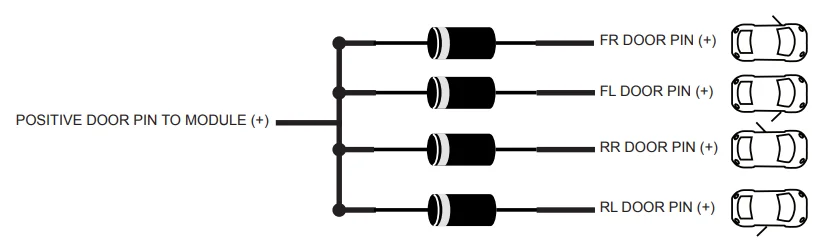
MONITORING MULTIPLE WIRE POSITIVE (+) DOOR PINS
MONITORING MULTIPLE WIRE NEGATIVE (-) DOOR PINS
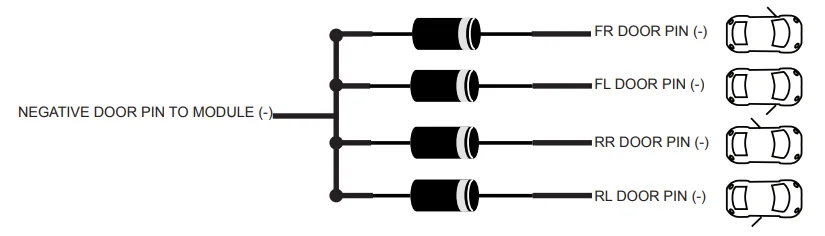
ISOLATING A NEGATIVE FALSING DOOR PIN WIRE FOR AN ALARM

ISOLATING A POSITIVE FALSING DOOR PIN WIRE FOR ALARM

MONITORING OPEN DOOR CIRCUIT FOR ALARM OR MANUAL TRANSMISSION (FORD, MAZDA)
(DIAGRAM COURTESY OF FORTIN ELECTRONICS)
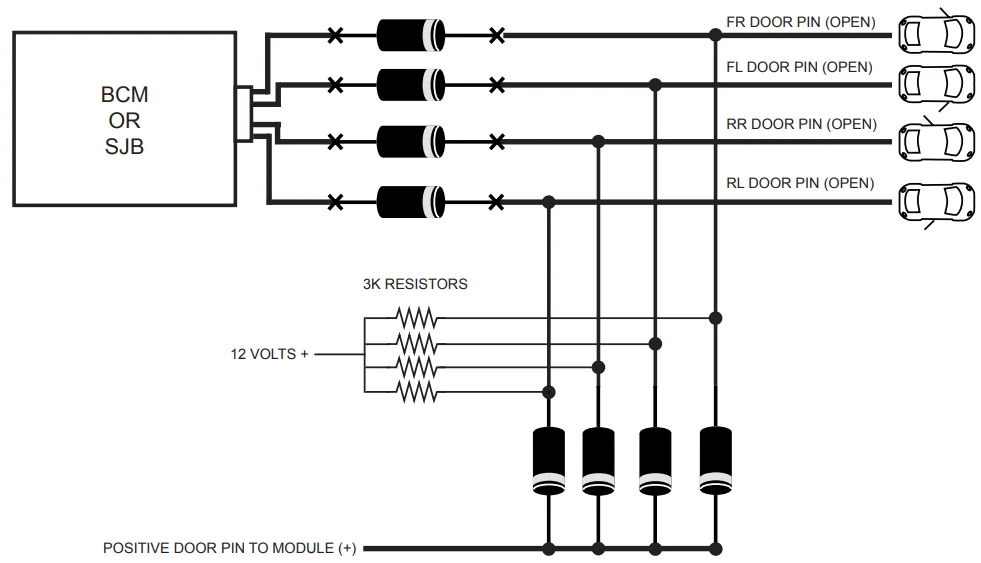
BEFORE INSTALLATION
We recommend using a digital multimeter to test all wires in the vehicle, as on-board computer systems can be damaged by using a ow low-resistance testing device, including test lights, and even computer-safe test lights (logic test probe). Notice Air Bag systems and do not disconnect these systems, as it may turn on a “check air bag system” light or code that may need a dealer scan tool to clear the fault. We also recommend testing all functions of the vehicle, such as power windows, locks, and HVAC systems. Check for any instrument cluster lights that are on, such as “Check Engine”, “Air Bag”, and “TPMS” lights. Also, check that all lights work on the vehicle, such as brake lights, headlights, interior lights, etc. Also, check the interior and exterior for any damage, including scuffs, dents, fingerprints, etc. Be sure to note all deficiencies or other problems and make the customer aware of these before starting the installation.
TESTING VEHICLE WIRES
WHEN LOOKING FOR A POSITIVE (+) WIRE, CONNECT ONE LEAD OF YOUR METER TO A CHASSIS GROUND. WHEN LOOKING FOR A NEGATIVE (-) WIRE, CONNECT ONE LEAD OF YOUR METER TO A 12V (+) CONSTANT SOURCE.
- 12 VOLTS (+) CONSTANT – You can find different locations for 12V(+) constant. You can use either the (+)
Battery Terminal or the (+) Constant feed to the ignition switch. To test for this wire, use a multimeter set to DC Voltage with one lead to chassis ground and the other lead to probe for a wire that reads between 10-16Volts (+), no matter the position of the key switch. This wire will also be powering the locks, bypass modules, and other circuits, so we recommend you DO NOT remove or change the supplied 30Amp Fuses on the 12V(+) Remote Starter wires. Connect the Red and Red/White wires on CN1 to this wire. If there are 2 12V(+) constant wires at the ignition switch, we recommend connecting the Red wire from CN1 to one and the Red/White wire from CN1 to the other. - STARTER (+) – This wire provides a 12V(+) Source to the starter directly or to the starter circuit on the vehicle. To test for this wire, use a multimeter set to DC Voltage with one lead to chassis ground and the other lead to probe for a wire that reads between 10-16Volts (+) when the key is in the Start (Crank) position in the key switch. Connect the Purple wire on CN1 to this wire. If there are more than 1 starter wires on the vehicle, then you can use the Pink/White from CN1 and program for 2nd Starter in Menu 2-01, or use the Purple/Black on CN4 through a Relay to power this wire. See the relay guide.
- STARTER (-) – This wire provides a Negative(-) Source to the starter circuit on the vehicle. To test for this wire, use a multimeter set to DC Voltage with one lead to 12V(+) Constant and the other lead to probe for a wire that reads between 10-16Volts (-) when the key is in the Start (Crank) position in the key switch. Connect the Purple/Black wire on CN4 to this wire.
- ACCESSORY (+) – This wire provides a 12V(+) Source to the HVAC circuits on the vehicle. To test for this wire, use a multimeter set to DC Voltage with one lead to chassis ground and the other lead to probe for a wire that reads between 10-16Volts (+) when the key is in the ACC and Run position in the key switch. This wire will NOT show a positive feed in the Start (Crank) position. Connect the Orange wire on CN1 to this wire. If there are more than 1 starter wires on the vehicle, then you can use the Pink/White from CN1 and program for 2nd Accessory in Menu 2-01, or use the Orange/Black on CN4 through a Relay to power this wire. See the relay guide.
- ACCESSORY (-) – This wire provides a Negative(-) Source to the HVAC circuits on the vehicle. To test for this wire, use a multimeter set to DC Voltage with one lead to 12V(+) Constant and the other lead to probe for a wire that reads between 10-16Volts (-) when the key is in the ACC and Run position in the key switch. This wire will NOT show a negative feed in the Start (Crank) position. Connect the Orange/Black wire on CN4 to this wire
- UNLOCK (-) – This wire can usually always be found at the door panel lock/unlock switch, and on most cars at the BCM. It is becoming more popular that locks can be controlled using a bypass module. To test for this wire, use a multimeter set to DC Voltage with one lead to 12V(+) Constant and the other lead to probe for a wire that reads between 10-16Volts (-) when the unlock button is pressed. Connect the Blue wire on CN2 to this wire. Multiple changes can be made to the way this wire functions in Menu 1-01 to 1-05.
FOR MORE MANUALS BY SOLACE, VISIT MANUALSLIBRARYY
Solace SY9PANDALARM870 Key Remote Transmitter-FAQs
1. How do I program the Solace remote starter?
Turn the ignition ON-OFF-ON. Press the valet switch twice (the siren/horn will chirp each time). Then press and hold the valet switch until the siren/horn chirps three times and the parking lights flash. Finally, press the Lock button (Button 1) on each transmitter you want to program.
2. Can I program the remote starter myself?
Yes, some vehicles allow self-programming. Older models typically let you program the key fob without special tools, but newer models may require a professional or specialized equipment.
3. How do I activate the remote start?
Press the Lock button on your key fob three times quickly. The system will recognize this as the remote start command and start the engine automatically.
4. Why is my remote not responding?
Check the battery and replace if needed. Ensure the remote antenna inside the vehicle is properly connected. If still not working, try reprogramming the remote.
5. How do I reset my remote starter?
With all fobs, sit in the driver’s seat, close the door, turn the ignition to Accessory (or press Start without the brake), and press the Lock button on the remote to reset.
6. Can I install the remote starter myself?
Installation is possible but not recommended unless you have experience with automotive electronics. For most users, professional installation is safer and more reliable.
7. What happens if I press the Lock button twice or five times?
Twice: Double locks the vehicle (doors locked inside and out).
Five times or other sequences: Refer to your manual, as this may activate valet mode, auxiliary functions, or other custom settings.
8. How many remotes can be programmed?
Most systems allow multiple remotes to be programmed, usually up to 4–5 transmitters. Check your manual for exact limits.
9. Does using remote start drain the car battery?
Normal use has minimal impact on the battery. Ensure the battery is healthy to avoid starting issues.