
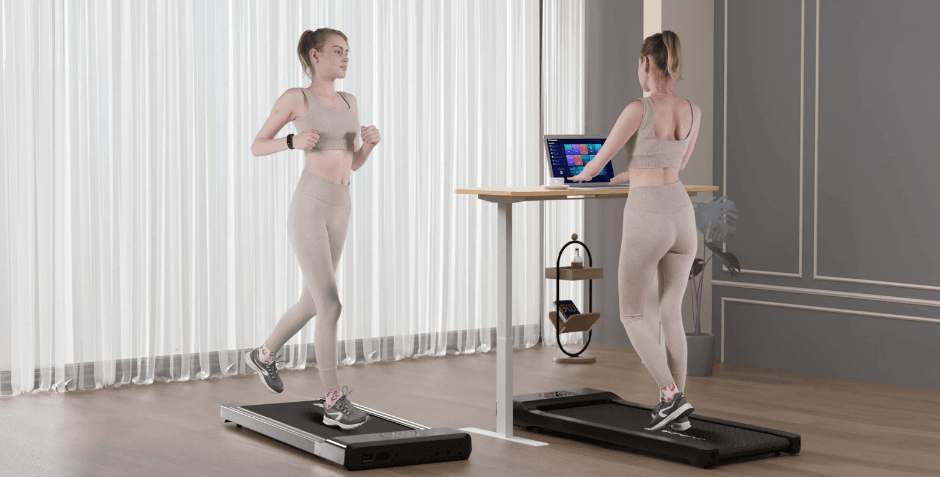

SupeRun BA03 Smart Walking Pad Under Desk Treadmill
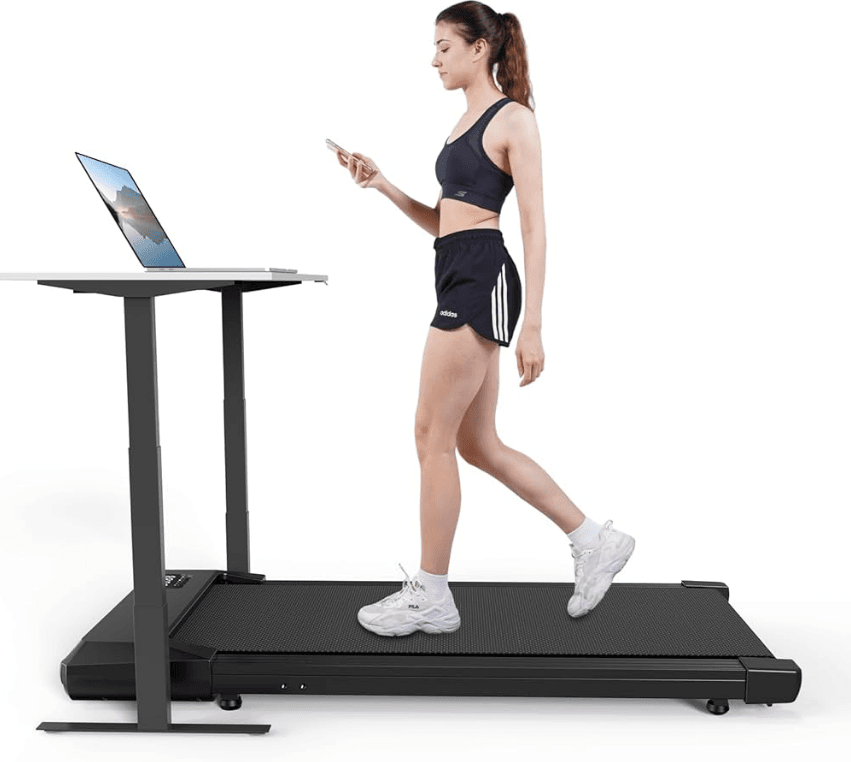
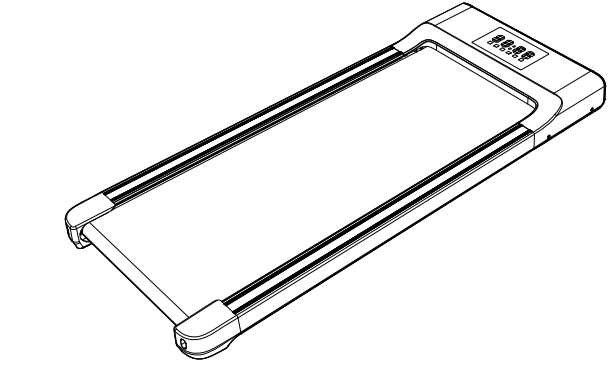
SPECIFICATION
Welcome to use. Help you enjoy exercising at home.
- Product Size: 49.1 \20.6 \ 4.8 inch
- Product weight: 45.85 LBS
- Peak horsepower: 2.5 HP
- Running belt size: 39.4 \ 15.7 inch
- Rated voltage: 120V
- Maximum load: 300 LBS
- Maximum speed: 3.8 MPH

SAFETY PRECAUTIONS
Please read all instructions carefully before operating this product. Basic precautions should always be followed when using the device, including the following safety instructions:
- Please do not use the machine when you are sick, tired, or drunk.
- Please wear comfortable clothes and avoid flip-flops or skirts when using this machine.
- Please start from a suitable sport, as excessive exercise may affect health.
- Load capacity 300 LBS, overload may cause damage.
- Please ensure that all parts are not damaged and fixed before use. The device should be placed on a flat surface when used.
- Do not attempt any maintenance or adjustments other than those described in this manual.
- The device is for home use only. Do not use the device in a commercial, rental, or institutional environment.
- Only one person is allowed to use the device.
- Keep children and pets away from the device when using it.
- If you experience any chest pain, nausea, dizziness, or shortness of breath, stop exercising immediately and consult your doctor before continuing.
WARM-UP
Sports suggestions and guidelines: WARNING! Before beginning this or any exercise program, you should consult your physician. Warming up prepares the body for exercise by increasing circulation, supplying more oxygen to the muscles, and raising body temperature. Begin each workout with 5 to 10 minutes of stretching and light exercise to warm up. The photos on this page show several forms of basic stretching you may perform before your workouts. In order to achieve an adequate warm-up, perform each stretch three times.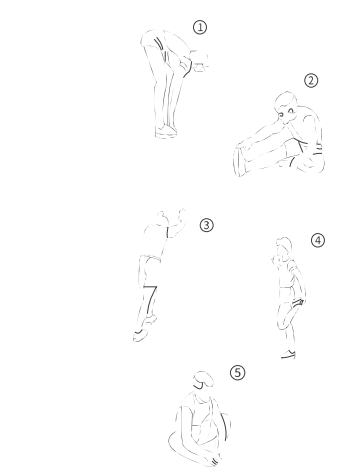
- Stretch down: Bend your knees slightly with your body stretched down slowly, let your back and shoulders relax, and try to extend your hands to touch your toes. Hold for 10-15 seconds and take a break for a few seconds. Repeat 3 times.
- Hamstring stretch: Sit down on a clean cushion, straighten one leg, and place the other leg inward towards the thigh and snug on the inside of the straightened leg. In the meantime, try to touch the toes of your straightened leg with the hand on the same side. Hold for 10-15 seconds and take a break for a few seconds. Repeat 3 times for each leg.
- Calf and Achilles Tendon Stretches: Place both hands against the wall while standing with one foot behind the other, keeping your back leg straight and both heels planted on the ground while leaning against the wall. Hold for 10-15 seconds and take a break for a few seconds. Repeat 3 times for each leg.
- Sartorius (muscle of inner thigh) Stretch: Sit on the floor with your two feet holding against each other and your knees pointing in opposite directions, grab your feet with your hands and pull them toward your groin. Hold for 10-15 seconds and take a break for a few seconds. Repeat 3 times.
PRODUCTS AND ACCESSORIES
Product introduction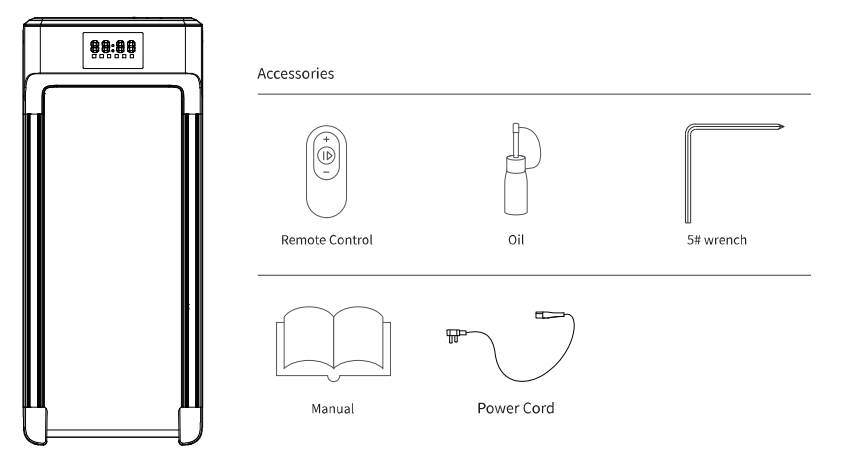
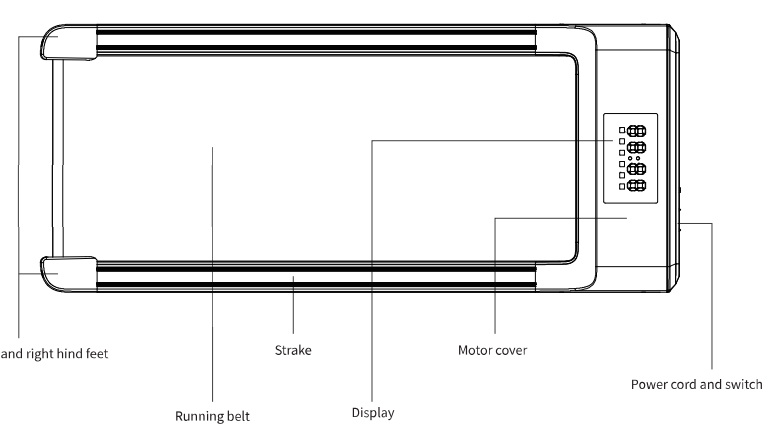
FUNCTION DIAGRAM
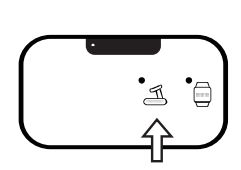
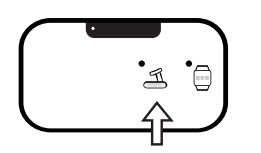
The function of the display panel is described. When the machine is running, the display window automatically switches every 5 seconds. The indicator light at the bottom of the display window changes with the display of the window. The information displayed in different windows is as follows: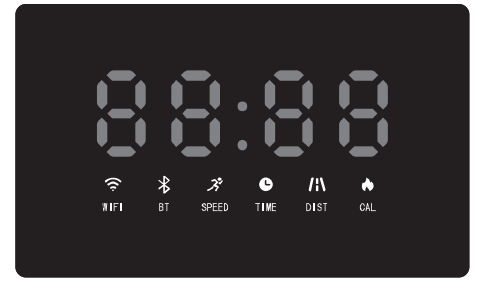
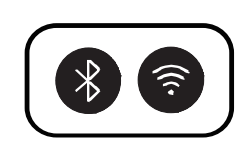
- WIFI” window: Display the WIFI indication. The icon will light up when the WIFI connection is successful.
- Bluetooth” window: Display the Bluetooth indication. The icon will light up when the Bluetooth connection is successful.
- Speed” window: The current speed value is displayed in the running state, and the speed is on. The display range is 0.6–3.8 mph. ATTENTION: 0.6–3.8 MPH is the best walking speed, so our default value is 3.8 MPH.
- Time” window: Display exercise time. The time range is 0:00–99:59 minutes.
- Distance” window: Display the moving distance. The display range is 0.00–99.99 miles.
- Calories” window: Display the calorie consumption value. The display range is 0.0–9999 kcal.

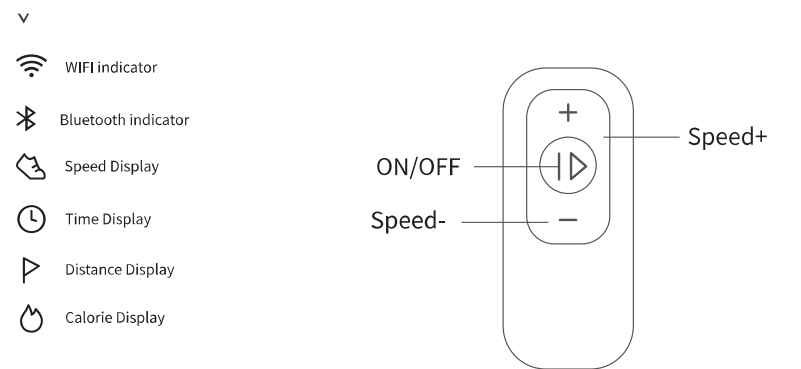
Remote control
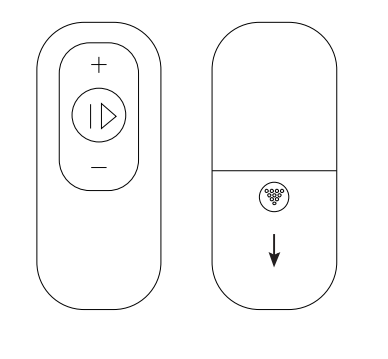
- Press the “Speed -” key to reduce the machine speed.
- Press “Speed+” to increase the speed of the machine.
- Press the “ON/OFF” button, and the machine will start or stop slowly.
- In the standby state, directly press the “ON/OFF” button, the treadmill would start to move at the speed of 0.6 miles/hr, other windows start counting up from 0, press the “+” and “-” buttons to change the speed.
USING THE TREADMILL
- Download the PitPat app on your phone and install it. Search for “PitPat” in the app store or scan the following QR code to download and install the app. Note: System requirements: iOS 13 or above; Android 6.0 or above. Treadmill supports connection to a mobile phone via Bluetooth.

- Configure the PitPat app account. Open the PitPat app and follow the app instructions to log in or register account.
- Connect the treadmill:
- Turn on the Bluetooth function of the mobile phone (Android phones also need to turn on the positioning function).

- Open the PitPat app (if the app prompts for authorization, please grant the app related permissions).
- Waiting for the treadmill to connect

- Enter the app home page, click the treadmill icon in the upper left corner of the home page to enter the search interface. Your phone will automatically search for nearby devices. Tap your treadmill. (Devices starting with PitPat-T are your treadmills) to connect. After the treadmill makes a beep, the connection is successful, and the Bluetooth icon on the treadmill panel lights up.
- Display “Green” to complete the connection. Note: Please make sure your phone is connected to the Internet when connecting the treadmill via Bluetooth. Please refer to the APP description for detailed networking configuration.

- Treadmill WIFI network configuration. After the treadmill is successfully connected to the mobile app, it will enter the treadmill’s Wi-Fi configuration interface. Note: The treadmill only supports 2.4GHz WIFI (the app also only displays the 2.4GHz WIFI signal that the treadmill can search for). Please make sure that your network device can provide a 2.4GHz WIFI signal.
- Find the network you need to connect to.

- Enter your WIFI password according to the prompt. After the treadmill successfully connects to the network, the WIFI icon on the treadmill panel lights up, and the app will return to the home page. Note: If the WIFI connection fails, after the WIFI returns to normal, please restart the treadmill so that it can reconnect to the Internet.


FIRST USE GUIDANCE
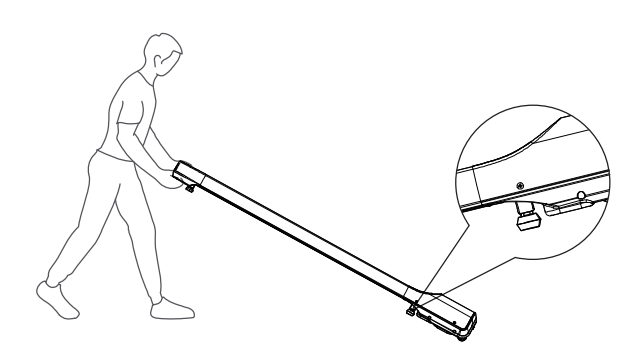
- Place the machine on a flat surface, keeping 50 cm of space in front and back.

- Adjust the mats to make the machine level and make each mat fall firmly on the ground.

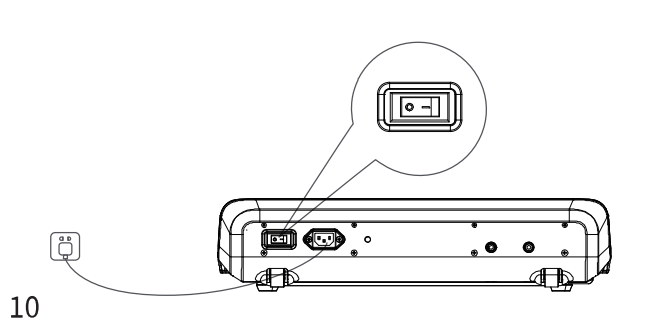
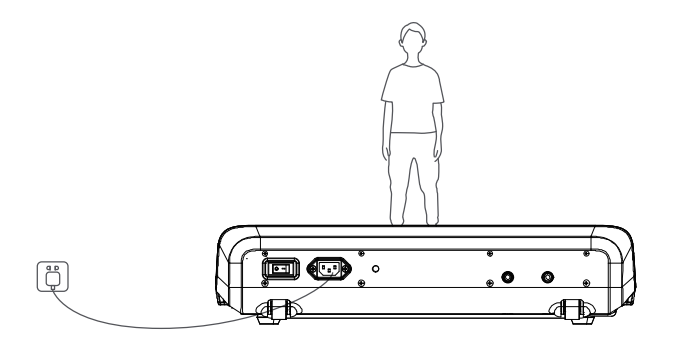
- Connect the power supply, turn on the switch.

- First, check the battery installation on the back of the remote control. Press the “ON/OFF” button. There would be 3 3-second delay displayed on the panel before operating.

- Start using a walking treadmill.

MAINTENANCE INSTRUCTION
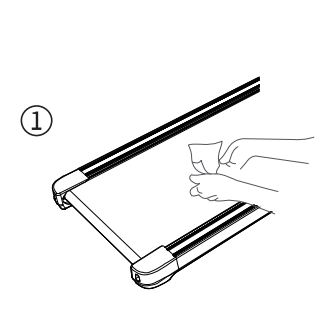
- The treadmill must be lubricated after half a year or a cumulative run of 100 hours.
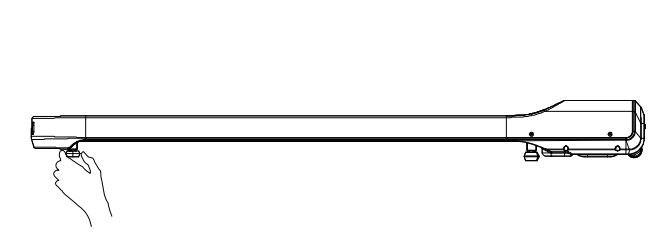
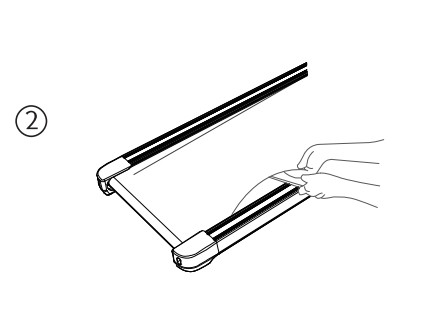
- Confirm the lubrication status. With the treadmill off, lift the running belt from one side and reach for the surface under the running belt, and if the lubricant can be touched, there is no need to add more lubricant. But if the lubricant dries up, refill it. (Use only non-petroleum-based lubricants.)
- Follow the figure below to properly add the lubricant:
- Clean the treadmill.

- Turn off the power, lift the running belt, and apply silicone oil to the inner surface.

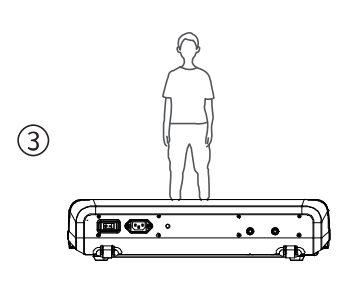
- Start the treadmill and lubricate at 3 mph for 10–20 seconds.

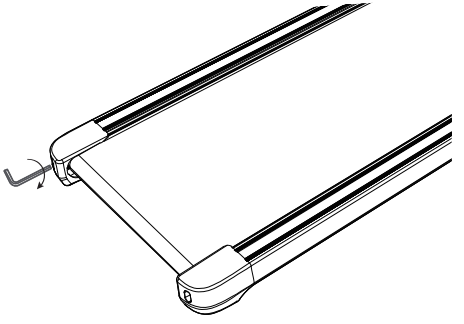
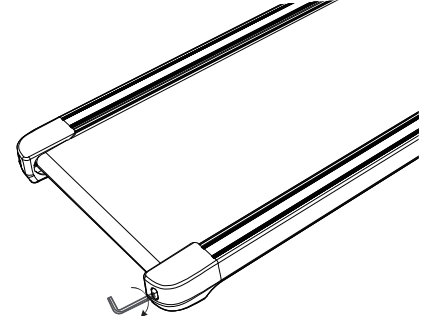
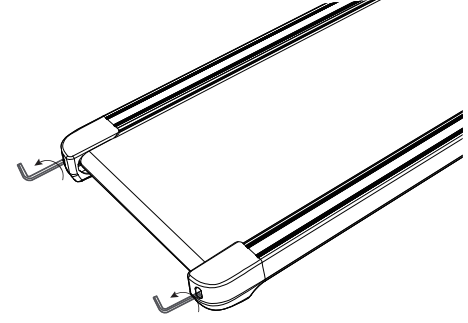
- When the running belt leans to the left, adjust the screw on the left 1–2 turns clockwise. Then, test running. If the running belt still leans to the left, repeat the above steps until the running belt is aligned.

- When the running belt leans to the right, adjust the screw on the right 1–2 turns clockwise. The test is running. If the running belt still leans to the right, repeat the above steps until the running belt is aligned.

- When the running belt gets too tight, it will cause stronger resistance. Please adjust both sides’ screws 1–2 turns counterclockwise, loosen the belt until it stops skidding or pausing. When the running belt is too loose, please adjust both sides’ screws 1–2 turns clockwise.

FAQS AND SOLUTIONS
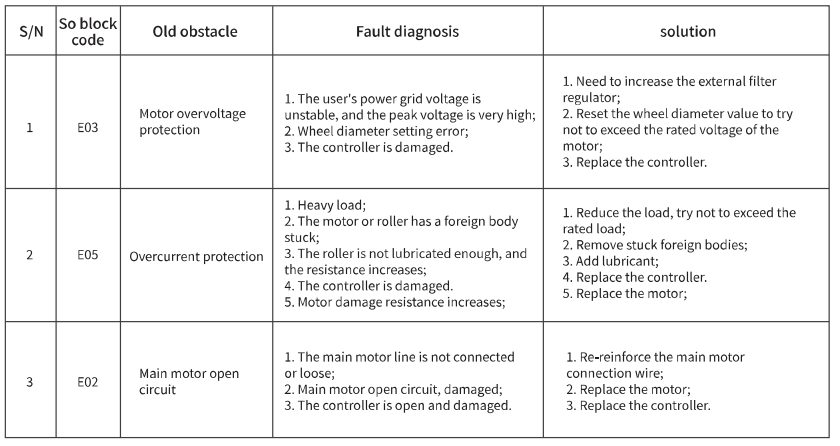
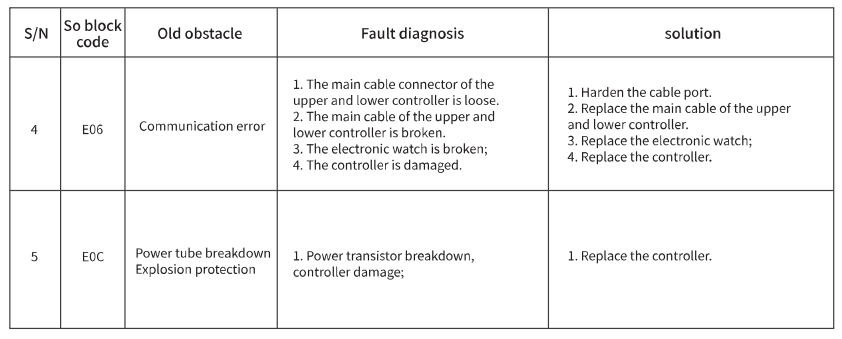
FCC Warning
This device complies with part 15 of the FCC Rules. Operation is subject to the following two conditions:
- This device may not cause harmful interference.
- This device must accept any interference received, including interference that may cause undesired operation. Any changes or modifications not expressly approved by the party responsible for compliance could void the user’s authority to operate the equipment.
NOTE: This equipment has been tested and found to comply with the limits for a Class B digital device, pursuant to Part 15 of the FCC Rules. These limits are designed to provide reasonable protection against harmful interference in a residential installation. This equipment generates, uses, and can radiate radio frequency energy and, if not installed and used in accordance with the instructions, may cause harmful interference to radio communications. However, there is no guarantee that interference will not occur in a particular installation. If this equipment does cause harmful interference to radio or television reception, which can be determined by turning the equipment off and on, the user is encouraged to try to correct the interference by one or more of the following measures:
- Reorient or relocate the receiving antenna.
- Increase the separation between the equipment and receiver.
- Connect the equipment to an outlet on a circuit different from that to which the receiver is connected.
- Consult the dealer or an experienced radio/TV technician for help.
- This equipment complies with FCC radiation exposure limits set forth for an uncontrolled environment.
- This equipment should be installed and operated with a minimum distance of 20cm between the radiator and your body.
For More Manuals By SupeRun, Visit ManualsLibraryy.
SupeRun BA03 Smart Walking Pad Under Desk Treadmill-FAQs
What is a walking pad?
A walking pad is a compact treadmill with a flat belt that allows you to walk indoors. It’s designed to fit under a desk or in small spaces, offering a simple way to stay active while working or relaxing.
How does an under-desk walking pad work?
It works like a treadmill but without large handles or screens. You walk on the moving belt, and you can control the speed using a remote or an app.
How do I start the SupeRun BA03 walking pad?
Plug in the machine, switch on the power, then use the remote control to press the start button and adjust the speed.
Do walking pads need electricity?
Yes, but they use very little power compared to full-sized treadmills, making them energy-efficient.
What is the maximum speed of the SupeRun BA03 walking pad?
The SupeRun BA03 typically reaches speeds of up to 3.7 mph (6 km/h)—ideal for walking or light jogging.
What speed should I use while working?
For desk use, walk at a slow pace of 1–2 mph (1.5–3 km/h) to stay active without affecting productivity.
How many minutes a day should I walk on my walking pad?
Aim for 30–60 minutes daily. You can split this into shorter sessions throughout the day.
How long does it take to reach 10,000 steps on a walking pad?
At an average pace of 3–4 mph, it takes 90–120 minutes to complete 10,000 steps.
Can I use a walking pad to lose weight?
Yes. Consistent walking helps burn calories and fat. Pairing daily use with a healthy diet can support weight loss, including reducing belly fat.
Do I need to wear shoes on a walking pad?
Yes, wear proper walking or running shoes for cushioning and safety. Avoid slippers, flip-flops, or walking barefoot.