
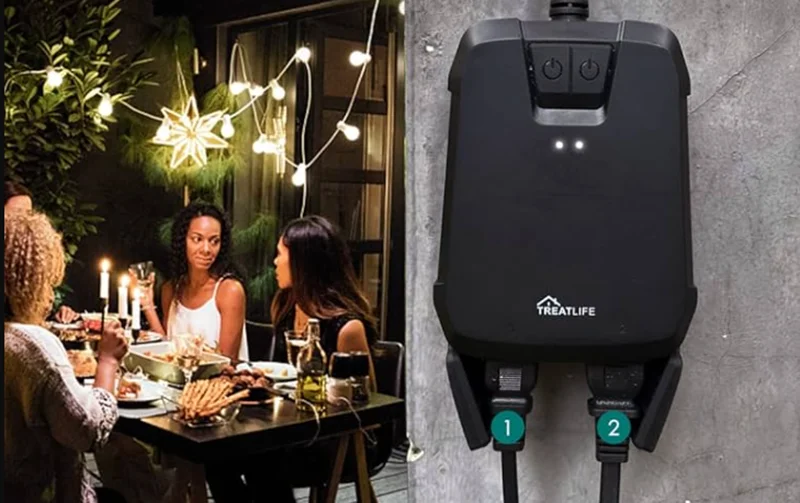

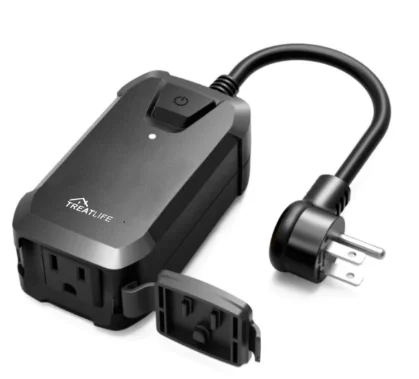
Treatlife SK30H Smart Outdoor Plug
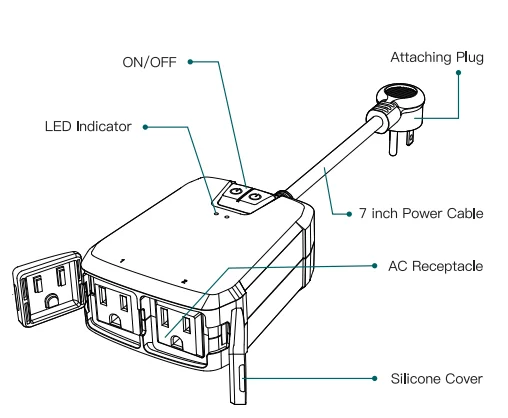
PRODUCT OUTLINE
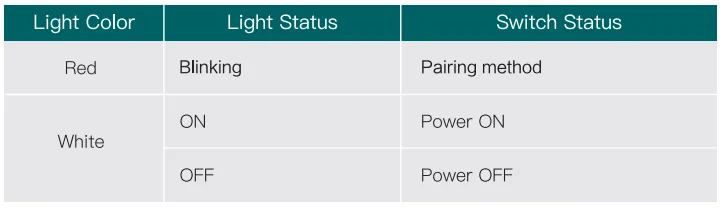
INDICATOR LIGHT STATUS
ADD DEVICES
- Download the Treatlife APP

- Registration or Log In
- Tap “Register” to create an account. Enter your Email Address to get a verification code and create a password. Or, choose “Log in” if you already have a TreatLife account.
- Configure the APP to the Switch
- Preparation: Ensure the switch is connected to power; Ensure your phone is connected to your WiFi router and can connect to the internet.
Note: This switch only supports 2.4GHz networks. If you connected to a 5GHz network before, please switch to the 2.4GHz Network.
3.1 Apple IOS system pairing method
Press and hold the mechanical on/off button for 5 seconds until the red indicator light blinks.
- Click on “Profile.”
- Tap “HomeKit Information.”
- Tap “Add HomeKit Device” (Make sure the red LED indicator is flashing)
- Scan the QR code
Note: Controlling this HomeKit-enabled accessory automatically and away from home requires an Apple TV, an iPad, or a HomePod set up as a home hub. The latest iOS version is recommended.
3.2 Android system pairing method
Press and hold the mechanical on/off button for 5 seconds until the red indicator light blinks.
- Tap “AP Mode” on the top right corner.
- Tap “Confirm indicator slowly blink”.
- Enter your Wi-Fi password.
- Open WLAN settings, the Wi-Fi settings on your phone, and connect to the “TreatLife-XXX” network.
- Go back to the APP and continue to add the device, then wait for the connection to complete.
Link “Treatlife” to Alexa / Google Assistant / SmartThings
- Go to Treatlife >
 > More for instructions to link Alexa / Google Assistant, SmartThings.
 > More for instructions to link Alexa / Google Assistant, SmartThings.
Note: Please log in with your TreatLife account.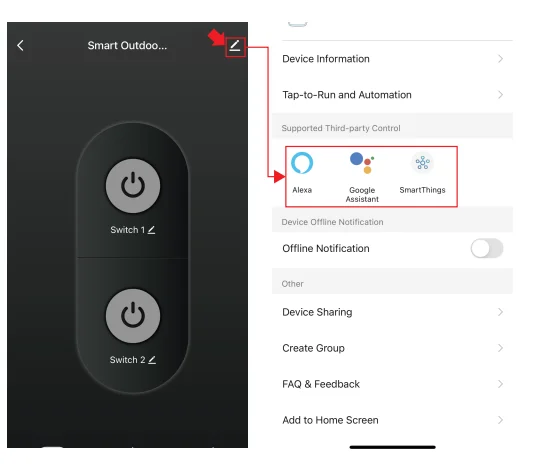
Key Steps to Link the Alexa Skill
- Sign in with Amazon, tap on “Skills & Games” in the Alexa menu;
- Search for “Treatlife” and tap “Enable” to enable the skill.
- Enter the “Treatlife” APP with your account and password, then tap “Link Now” to enable the skill.
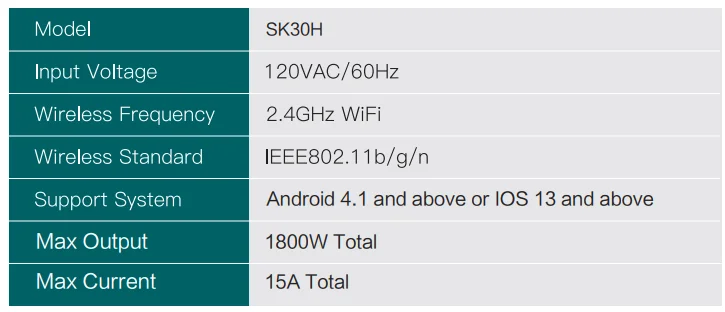
SPECIFICATION
FCC CAUTION
This device complies with part 15 of the FCC Rules. Operation is subject to the following two conditions:
- This device may not cause harmful interference;
- The device must accept any interference received, including interference that may cause undesired operation. Any changes or modifications not expressly approved by the party responsible for compliance could void the user’s authority to operate the equipment.
Note: This equipment has been tested and found to comply with the limits for a Class B digital device, pursuant to part 15 of the FCC Rules. These limits are designed to provide reasonable protection against harmful interference in a residential installation. This equipment generates uses and can radiate radio frequency energy and, if not installed and used in accordance with the instructions, may cause harmful interference to radio communications.
However, there is no guarantee that interference will not occur in a particular installation. If this equipment does cause harmful interference to radio or television reception, which can be determined by turning the equipment off and on, the user is encouraged to try to correct the interference by one or more of the following measures:
- Reorient or relocate the receiving antenna.
- Increase the separation between the equipment and receiver.
- Connect the equipment into an outlet on a circuit different from that to which the receiver is connected.
- Consult the dealer or an experienced radio/TV technician for help.
This equipment complies with FCC radiation exposure limits set forth for an uncontrolled environment. This equipment should be installed and operated with a minimum distance of 20cm between the radiator & your body.
ISEDC WARNING
This device complies with Innovation, Science, and Economic Development Canada’s licence-exempt RSS standard(s). Operation is subject to the following two conditions:
- The device may not cause interference;
- The device must accept any interference, including interference that may cause undesired operation of the device.
The device is in compliance with RF exposure guidelines, and users can obtain Canadian information on RF exposure and compliance. The minimum distance from the body to use the device is 20cm.
For More Manuals By Treatlife, Visit ManualsLibraryy.
Treatlife SK30H Smart Outdoor Plug-FAQs
What is the Treatlife SK30H Smart Outdoor Plug, and how does it work?
The Treatlife SK30H Smart Outdoor Plug is a WiFi-enabled outdoor outlet that lets you remotely control connected devices via the Treatlife app. It plugs into a standard socket and connects to your 2.4GHz WiFi network, allowing you to turn outdoor appliances on or off from anywhere. It’s commonly used for garden lights, patio equipment, and holiday decorations.
Does the Treatlife SK30H require a hub to operate?
No, the SK30H does not require a hub. It connects directly to your home’s 2.4 GHz Wi-Fi network, making setup simple and beginner-friendly. Unlike Zigbee devices, everything is controlled directly through the app without needing additional hardware, although it relies on stable WiFi for best performance.
Is the Treatlife SK30H weatherproof?
Yes, the SK30H is designed for outdoor use and features IP64 weather resistance. This means it can withstand splashes, rain, and moisture, making it suitable for gardens, patios, and outdoor lighting setups. However, it should not be fully submerged in water or exposed to extreme conditions beyond its rating.
Can you control multiple devices with the SK30H?
Yes, the plug typically includes two outlets that can be controlled individually. This allows you to manage multiple devices, such as string lights and garden equipment, separately or together. Each outlet can appear as a separate device in the app, giving you more flexibility in automation and control.
What is the power capacity of the Treatlife SK30H?
The SK30H supports a maximum output of around 1800W with a total current of 15A. Each outlet can handle a portion of that load, making it suitable for most outdoor appliances like lights, pumps, or small tools. However, it’s important not to exceed the rated capacity to avoid damage or safety risks.
Does the SK30H support voice control?
Yes, the smart plug works with voice assistants like Amazon Alexa and Google Assistant. Once connected, you can control outdoor devices using voice commands, such as turning lights on or off without needing to open the app. This adds convenience, especially for hands-free operation.
Can you schedule devices with the Treatlife SK30H?
Yes, the plug supports scheduling and timers through the app. You can automate devices to turn on or off at specific times, including sunrise and sunset-based scheduling. This is especially useful for outdoor lighting, ensuring lights operate automatically based on your routine or daylight conditions.
How easy is it to install and set up?
Setup is straightforward and typically takes only a few minutes. You plug in the device, connect it to a 2.4GHz WiFi network, and follow the instructions in the Treatlife app. Pairing usually involves holding the power button until the indicator light starts blinking, after which the app guides the rest of the process.
What are common uses for the Treatlife SK30H?
The SK30H is commonly used for outdoor lighting, including patio lights, garden lights, and holiday decorations. It can also control devices like fountains, pool pumps, or outdoor fans. Its weather-resistant design and remote control features make it ideal for managing outdoor electrical setups efficiently.
Is the Treatlife SK30H Smart Outdoor Plug worth buying?
The SK30H is a reliable option for outdoor smart control, offering weather resistance, dual outlets, voice control, and scheduling features. It’s especially useful for users who want simple automation without needing a hub. While it depends on WiFi stability, it provides strong value for managing outdoor devices conveniently and efficiently.