
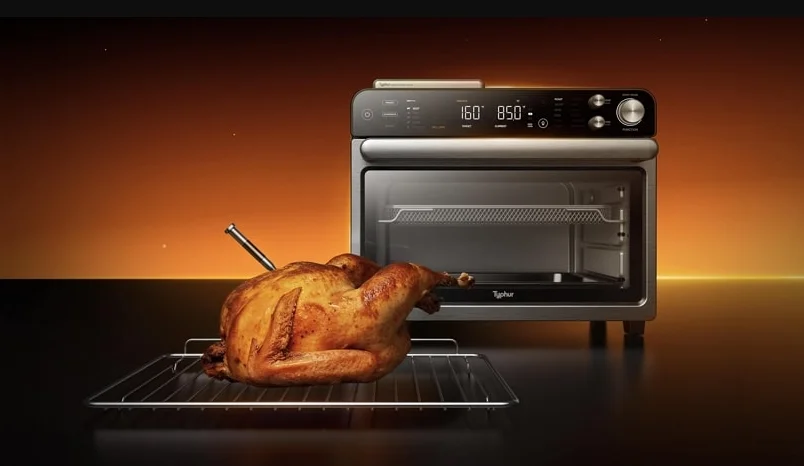

Typhur CV03 Sync Oven
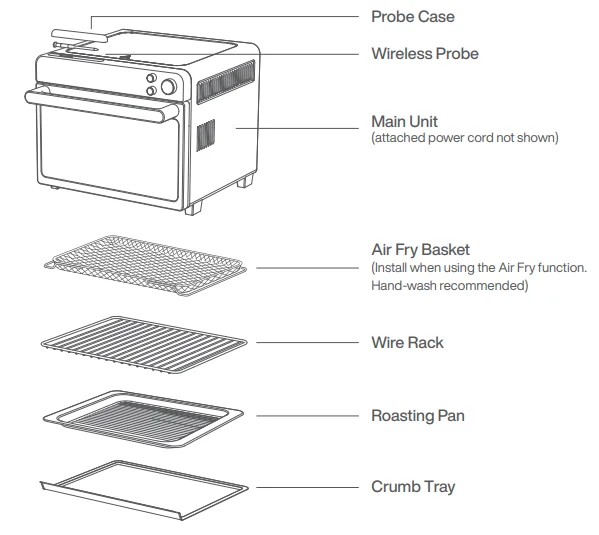
Parts
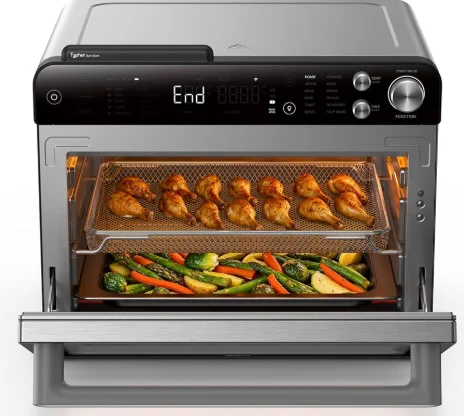
Common-Sense Practices/Good Habits
- DO NOT leave your toaster oven unattended while making food. If possible, unplug the oven while not in use to eliminate the possibility of accidents occurring.
- Have a fire extinguisher or fire containment blanket handy in a safe, known location. If you don’t have a fire extinguisher, douse the flames with baking soda until they are put out.
- If a fire occurs and the food in the oven is not greasy, immediately unplug the unit and douse the flames with water until the fire is extinguished. DO NOT use water if grease is present, since it could make the fire worse. Use baking soda instead.
Before First Use
- Remove and discard any packaging material, tape, and stickers from the unit.
- Remove all accessories from their packaging and wash them in warm, soapy water or in the dishwasher, except for the Probe case. NEVER submerge the main unit in water.
- Ensure that the voltage applied to the appliance matches your local or home voltage.
- Scan the QR code to download the free Typhur app for iOS or Android to control your device remotely.


Using The Control Panel
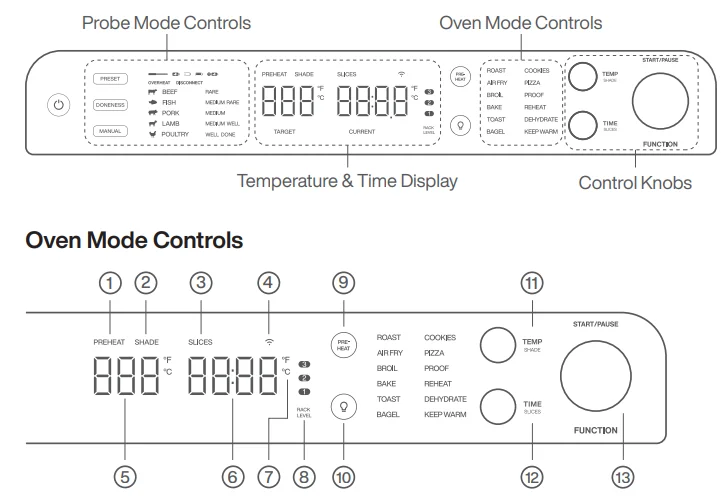
Control Panel Display
- PREHEAT: Blinking during preheating, the indicator self-extinguishes automatically upon completion of preheating.
- SHADE: Illuminates when using the TOAST or BAGEL function to designate desired shade.
- SLICES: Illuminates when using the TOAST or BAGEL function to designate the number of slices.
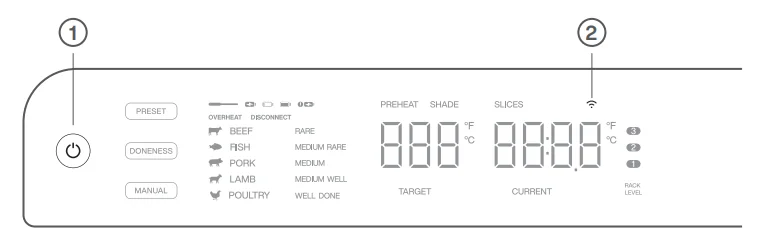
- WI-FI ICON: Blinking indicates pairing; a solid light means connected.
- Temperature display: Shows the cook temperature.
- Time display: Shows the cook time. The time will count down when cooking is in progress.
- °F/°C: Press and hold the
 button for 3 seconds to switch the temperature unit.
 - RACK LEVEL: Depending on the function you choose, the illuminated rack level(s) will indicate where your accessory should be placed in the unit.
 button for 3 seconds to switch the temperature unit.
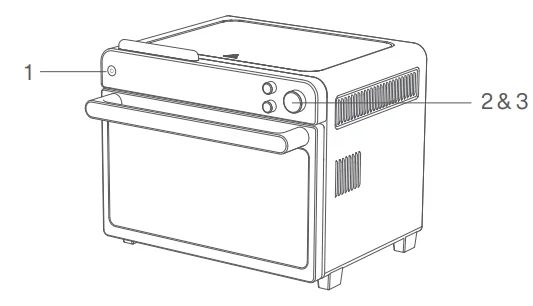
Operating Knobs & Buttons
- PREHEAT button: To skip preheating in modes with default preheating, press the ‘PREHEAT’ button.
- (Light) button: Press to turn the oven’s interior light on and off while cooking.
- TEMP/SHADE knob: To adjust temperature, rotate the TEMP/SHADE knob. When using the TOAST or BAGEL function, the knob will adjust the shade level (1–7 from lightest to darkest) instead of the temperature. Temperature will increase in 5-degree increments.
- TIME/SLICES knob: To select a cook time, rotate the TIME/SLICES knob. Time adjusts in 1-minute increments (0–1 hour), 5-minute increments (1–4 hour), and 30-minute increments (4–6 hour). When using the TOAST or BAGEL function, the knob will adjust the number of slices/bagel halves instead of the time.
- FUNCTION/START/PAUSE: Rotate the knob to select a cooking function, press to start or stop cooking.
Probe Mode Controls
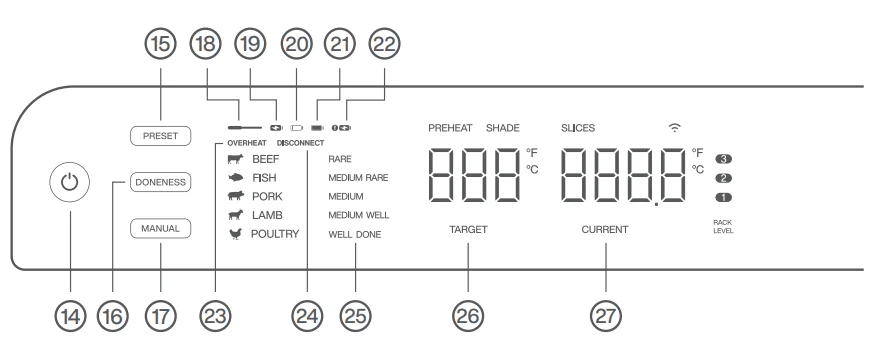
 (Power) button: Press to turn the unit on and off.
- PRESET button: Press the PRESET button repeatedly to cycle through the probe mode presets and exit options.
- DONENESS button: Press the DONENESS button to set the desired internal cook level (Rare to Well Done). Default doneness levels vary by food type.
- MANUAL button: Press MANUAL to enter probe manual mode. Subsequent presses will alternate between exiting probe mode and re-entering manual mode.
 (Power) button: Press to turn the unit on and off.
Control Panel Display
 Probe icon: Illuminates when the probe is connected to the device.
 Charging: Illuminates when the probe is charging.
 Low battery: Illuminates when the probe battery is low. Please charge soon.
 Fully charged: Illuminates when the probe is fully charged.
 Charging anomaly: Illuminates when the probe is in contact with the charging points but not charging.
- OVERHEAT: Illuminates when the probe internal temperature exceeds 221°F (105°C).
- DISCONNECT: Illuminates when the probe signal is disconnected from the oven.
- RARE/MEDIUM RARE/MEDIUM/MEDIUM WELL/WELL: Probe mode presets include recommended doneness levels, which are not displayed in manual mode.
- TARGET: Illuminates when using the probe to show the target temperature.
- CURRENT: Illuminates when using the probe to show the current temperature of the probe.
 Probe icon: Illuminates when the probe is connected to the device.
 Charging: Illuminates when the probe is charging.
 Low battery: Illuminates when the probe battery is low. Please charge soon.
 Fully charged: Illuminates when the probe is fully charged.
 Charging anomaly: Illuminates when the probe is in contact with the charging points but not charging.
Using Oven Functions
The oven has 3 available rack positions where your accessories can slide into the unit (see image above). When you select a function, the corresponding rack number(s) will illuminate on the control panel. The numbers on the control panel (see Fig. 1) will coincide with those on the interior of the unit.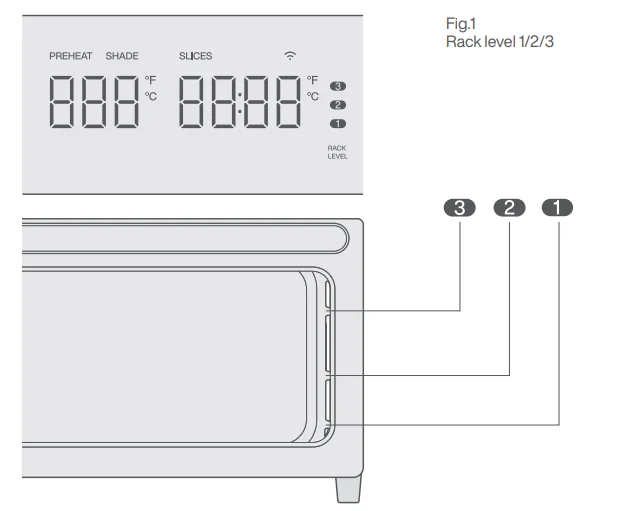
Cooking
- Press the button to turn the unit on.
- Rotate the FUNCTION/START/PAUSE knob to select a cooking function.
- Adjust the settings if desired, then press FUNCTION/START/PAUSE to begin.

Cooking Functions
ROAST
The ROAST function is ideal for cooking a variety of meats and poultry. Even heat plus fan circulation renders fat and crisps the exterior while keeping the center juicy.
- Fan Speed: High
- Heating Elements: Top and bottom.
- Rack and Accessories: Level 1 or 2 with roasting pan, depending on food size.
- PROBE: The Probe Mode can be used.
- For Best Results: For extended cooking periods, cover with foil to prevent surface sauces from excessive browning. Keep foil secure and clear of heating elements.
AIR FRY
The AIR FRY function is designed for crisping foods such as French fries, chicken wings, and frozen snacks, delivering a fried-like texture with minimal oil.
- Fan Speed: High
- Heating Elements: Top and bottom.
- Rack and Accessories: Level 2 with air fry basket, optional roasting pan underneath for wings or skin-on thighs to catch drips.
- PROBE: The Probe Mode can be used.
- For Best Results: When preparing a larger amount of food, shake or stir the contents in the basket in order to achieve a consistent result.
BROIL
The BROIL function is ideal for searing open-faced sandwiches, meats, poultry, fish, and vegetables, or for browning the tops of casseroles and baked dishes.
- Fan Speed: Low
- Heating Elements: Primarily top heating.
- Rack and Accessories: Level 2 or 3 with roasting pan, depending on food size.
- Temperature: LOW: 400°F/205°C; HIGH: 450°F/230°C
- PROBE: The Probe Mode can be used.
- For Best Results: High-fat foods near the upper heating element may produce smoke. Pat surface dry before cooking or use rack level 2 to reduce smoke.
BAKE
The BAKE function provides gentle, even heat, making it ideal for cakes, muffins, pastries, and other baked goods, as well as for cooking meats, fish, and casseroles that require consistent, thorough heating.
- Fan Speed: Medium
- Heating Elements: Top and bottom.
- Rack and Accessories: Level 2 with a wire rack or roasting pan.
- PROBE: The Probe Mode can be used.
- For Best Results: Use foil with care. Always secure it firmly and ensure it does not touch the heating elements to prevent overheating or fire hazards.
TOAST
The TOAST function is ideal for creating a crisp, golden exterior while keeping the inside of your bread soft and tender.
- Fan Speed: Low
- Heating Elements: Top and bottom.
- Rack and Accessories: Level 2 with wire rack.
- Time/Temp: Toasting times auto-adjust by slice count, shade level, and oven temperature. Temperature is set to 450°F/230°C.
For Best Results:
- Use shade 1–2 for light, 3–5 for medium, 6–7 for dark toast.
- Place slices at the center of the rack for the best results. Add up to 6 slices of bread.
- You may need to adjust the shade level based on the bread’s type, thickness, and freshness.
- Use lighter settings for raisin bread, white bread, and thin or dry slices. Use darker settings for whole wheat, rye, dense, or freshly baked bread.
BAGEL
The BAGEL function toasts bagels by giving the cut side a golden, crispy finish while leaving the outer crust pleasantly crunchy.
- Fan Speed: Low
- Heating Elements: Top and bottom.
- Rack and Accessories: Level 2 with wire rack.
- Time/Temp: Toasting times auto-adjust by slice count, shade level, and oven temperature. Temperature is set to 450°F/230°C.
For Best Results:
- Always place bagels cut side up.
- Use shade 1–2 for light, 3–5 for medium, 6–7 for dark.
- Place slices at the center of the rack for the best results. Add up to 6 slices of bagel.
- You may need to adjust the shade level based on the bagel’s type, thickness, and freshness.
PIZZA
The PIZZA function is designed to create a crisp crust while thoroughly melting and browning the cheese and toppings.
- Fan Speed: Low
- Heating Elements: Primarily the bottom.
- Rack and Accessories: Level 2 with wire rack.
- For Best Results: Preheat recommended for best results.
COOKIES
The COOKIES function is designed for baking scratch-made or ready-to-bake cookies and related pastries.
- Fan Speed: Low
- Heating Elements: Top and bottom.
- Rack and Accessories: Level 2 with roasting pan.
- For Best Results: Line pan with parchment paper for easy cleanup and best results.
PROOF
The PROOF function gently maintains low, stable temperatures, ideal for proofing dough for bread, rolls, and pizza. Also suitable for yogurt.
- Fan Speed: Off
- Heating Elements: Top heating.
- Rack and Accessories: Level 1 with wire rack.
- For Best Results: Place dough or yogurt in an oven-proof vessel, cover, and place in the center of a wire rack.
REHEAT
The REHEAT function is designed to reheat leftovers.
- Fan Speed: Medium
- Heating Elements: Top and bottom.
- Rack and Accessories: Level 1 or 2 with roasting pan, depending on food size.
- For Best Results: Ensure you reheat your leftovers to an internal temperature of 165°F (74°C).
DEHYDRATE
The DEHYDRATE function uses low, consistent heat and gentle airflow to dehydrate foods evenly without cooking them. Ideal for making dried fruits, vegetable chips, and similar snacks.
- Fan Speed: Low
- Heating Elements: Top and bottom.
- Rack and Accessories: Level 2 with air fry basket.
For Best Results:
- Use parchment paper to prevent staining from strongly colored foods.
- Place a roasting pan underneath to catch drips from items like marinated jerky.
KEEP WARM
The KEEP WARM function keeps cooked food at a safe serving temperature of 160°F (71°C) or higher to inhibit bacterial growth.
- Fan Speed: Low
- Heating Elements: Top and bottom.
- Rack and Accessories: Level 1 or 2 with roasting pan, depending on food size.
For Best Results:
- Use Keep Warm only for foods that are already fully cooked.
- Cover food to retain moisture and prevent drying during extended holding.
App Controls
- To connect to Wi-Fi, press and hold the Power button for 3 seconds (when not cooking).
- The Wi-Fi icon will blink to indicate pairing mode.
- Open the Typhur app, tap Devices, then Add Device. Select Typhur Sync Oven and follow the on-screen steps.
- To reset the Wi-Fi, press and hold the Power button for 10 seconds. This will erase all user data and settings.

Cleaning & Maintenance
- Before cleaning, ensure the oven is turned off by removing the power plug from the power outlet.
- Allow the oven and all accessories to cool completely before disassembling and cleaning.
Cleaning the outer body and door
- Wipe the outer body with a soft, damp sponge. A non-abrasive liquid cleanser or mild spray solution may be used to avoid the build-up of stains. Apply the cleanser to the sponge, not the oven surface, before cleaning.
- To clean the glass door, use a glass cleaner or mild detergent and a soft, damp sponge or soft plastic scouring pad. Do not use an abrasive cleanser or metal scouring pad, as these will scratch the oven surface.
- Wipe the screen with a soft, damp cloth. Apply cleanser to the cloth and not the surface. Cleaning with a dry cloth or abrasive cleaners may scratch the surface.
- Let all surfaces dry thoroughly before inserting the power plug into a power outlet and turning the oven on.
Cleaning the interior
- Unplug the unit from the outlet and allow it to cool down before cleaning.
- Remove all accessories from the unit, including the crumb tray, and wash separately.
- Use a non-abrasive cleaning brush to more thoroughly wash the air fry basket. Accessories are hand-wash recommended.
- Use warm, soapy water and a soft cloth to wash the oven’s interior and glass door. DO NOT use abrasive cleaners, scrubbing brushes, or chemical cleaners, as they will damage the oven. CAUTION: NEVER put the main unit in the dishwasher or immerse it in water or any other liquid.
- To remove tough grease, let the roasting pan and roast tray soak overnight in warm, soapy water, then wash with a non-abrasive sponge or brush.
- Thoroughly dry all parts before placing them back in the oven.
Cleaning the probe and the probe case
- DO NOT place the Probe case in the dishwasher; the probe is dishwasher safe.
- Allow the probe to cool down before cleaning.
- The probe is dishwasher safe and can be hand-washed. Clean the areas contacting the charging points thoroughly, and ensure it is dry before returning it to the case.
- The Probe case is hand-wash only. DO NOT immerse it in water or any other liquid. We recommend cleaning with a damp cloth only.
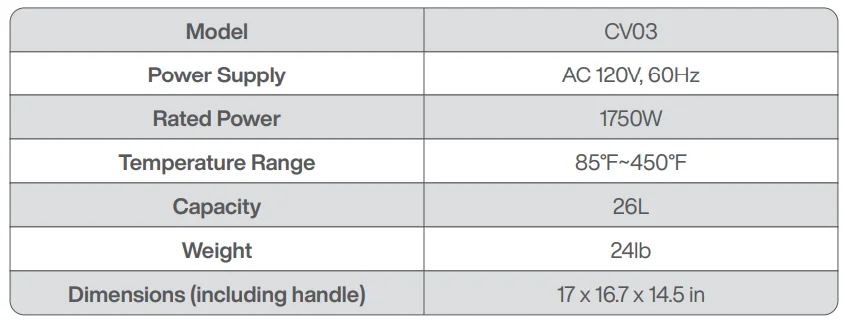
Technical Specifications
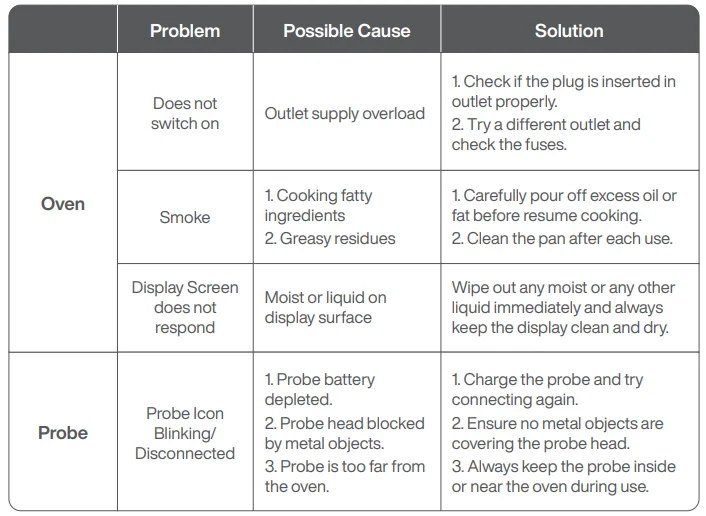
Troubleshooting
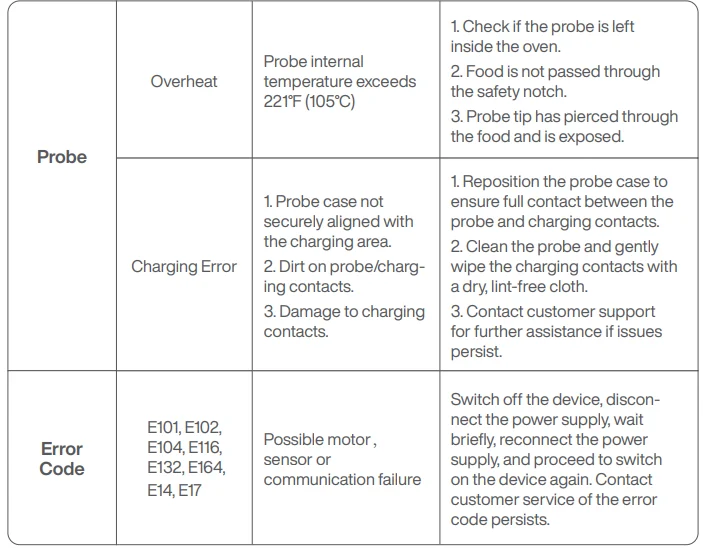
FAQ
Why won’t the oven turn on?
- Make sure the power cord is securely plugged into the outlet.
- Insert the power cord into a different outlet.
- Reset the circuit breaker if necessary.
- Press the power button.
Can I use the roasting pan instead of the air fry basket with the Air Fry function?
- Yes, but crispiness results may vary.
Do I need to adjust the cook times and temperatures of traditional oven recipes?
- For best results, keep an eye on your food while cooking. Refer to the cooking charts for more guidance on cook times and temperatures.
Can I restore the unit to its default settings?
- The oven will remember the last setting used for each function, even if you unplug it.
- To restore the oven’s default settings for each function, press and hold the power button for 10 seconds to restore factory settings.
Why do the heating elements appear to be turning on and off?
- This is normal. The oven is designed to control temperature precisely for every function by adjusting the heating elements’ power levels.
Why does the oven have a different temperature reading with an external probe?
- Convection ovens circulate air differently than traditional ovens, so when the door is opened, more heat will escape. This may affect any external temperature reading of the unit’s interior temperature.
- Since this is a convection oven, it can cook more quickly than a traditional oven. Convection cooking includes a fan that helps speed up cook time by circulating hot air and can affect temperatures within the cavity. The time it takes the unit to heat to the set temperature will vary based on the amount of food being cooked, the function being used, and the cook temperature and time. The oven features an algorithm that ensures temperature and time settings work with most traditional oven recipes. As a result, the temperature inside the oven may differ from the set temperature. This does not impact cooking quality. Refer to the Cooking Chart to learn more about recommended cook times and temperatures.
Why is steam coming out of the oven door?
- This is normal. Foods with a high moisture content may release steam around the door.
Why is water dripping onto the counter from under the door?
- This is normal. The condensation created by foods with a high moisture content (such as frozen breads) may run down the inside of the door and drip onto the counter.
Why is the unit generating smoke?
- Ensure you are using the roast pan when cooking all greasy foods or when cooking in Air Fry, Roast, or other modes.
If the problem persists, run a Toast cycle on shade 7 with accessories removed; this will burn off any additional grease on the heating elements that are causing smoke.
Why is my food overcooked or undercooked even though I used the probe?
- It is important to insert the probe lengthwise into the thickest part of the ingredient to get the most accurate reading. Make sure to allow food to rest for 3–5 minutes to complete cooking. For more information on recommended doneness while using the Manual function and doneness temperatures while using the Preset function, refer to the Using the probe section.
Will the probe melt if it touches the heating elements inside the oven?
- The probe will not melt, but prolonged contact with the heating element may cause internal damage.
How can I clean the roasting pan?
- For stuck-on food, let the roasting pan soak before cleaning.
Line the roasting pan with aluminum foil or parchment paper when cooking to make clean-up easier.
Why did a circuit breaker trip while using the unit?
- The unit uses 1750 watts of power, so it must be plugged into an outlet on a 15-amp circuit breaker. It is also important that the unit be the only appliance plugged into an outlet when in use. To avoid tripping a breaker, make sure the unit is the only appliance plugged into an outlet on a 15-amp breaker.
Support
Please contact our Customer Support Team if you have any questions.
Phone: 1 (888) 838-6563 (USA)
Email: [email protected]
Website: www.typhur.com/contact-us
Typhur Privacy Statement
We value your privacy and personal data rights, and we, Typhur Inc., are the entity responsible for the collection, use, and disclosure of information under our Privacy Statement. For more details, please visit https://www.typhur.com/privacy-statement.
Terms of Service
For details about Typhur Terms of Service, please visit https://www.typhur.com/terms-of-service.
Refund & Return Policy
Typhur has a 30 calendar day hassle-free return policy. For more details, please visit https://www.typhur.com/refund-and-return.
Warranty
Full details are stated in Typhur’s warranty policy at https://www.typhur.com/warranty.
For More Manuals By Typhur, Visit ManualsLibraryy.
Typhur CV03 Sync Oven-FAQs
How do I charge the Typhur Sync probe?
To charge the probe, insert it into the charging base and connect the base using the supplied USB Type-C cable. Make sure the probe has cooled completely before charging.
Why is my Typhur probe not charging?
Charging issues usually occur if the base is not receiving power, the USB cable or adapter is faulty, or the probe is not positioned correctly in the charging dock. Trying a different power source often resolves the problem.
How do I turn on the Typhur CV03 Sync Oven?
Press the power button once to turn the oven on or off. For Wi-Fi setup, press and hold the up and down control buttons together for two seconds when the oven is idle.
What is the maximum temperature supported by Typhur Sync?
The Typhur Sync probe can safely handle ambient temperatures up to 752°F or 400°C, making it suitable for high-heat cooking methods such as grilling and roasting.
Where is Typhur located?
Typhur is a US-based company headquartered in San Jose, California. It was founded in 2019 and focuses on smart kitchen and cooking appliances.
What is the wireless range of the Typhur Sync thermometer?
The Typhur Sync allows wireless monitoring from a distance of up to 165 feet, enabling you to track cooking progress through the companion mobile app.
Why is my Typhur thermometer not turning on?
This issue is commonly caused by a low battery or improper charging. Fully recharge the probe and ensure it is seated properly in the charging base.
How do I check if the Typhur thermometer is working correctly?
To test accuracy, place the probe in ice water for about 30 seconds. A correct reading should be close to 32°F or 0°C. If the reading is off, recalibration may be required.
What cooking modes are available in the Typhur CV03 Sync Oven?
The oven offers multiple cooking modes including air fry, bake, roast, broil, reheat, and dehydrate. It also includes preset programs for commonly prepared foods.